1
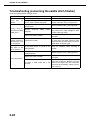
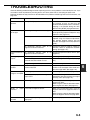
TROUBLESHOOTING
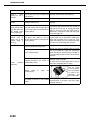
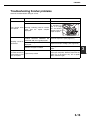
Problem
Check
Solution or cause
Is
paper
other
than
SHARPUse SHARP-recommended paper. (Page 2-16)
recommended paper being used?
Is paper size or weight out of the
allowable range?
Use paper in the allowable range.
Paper damp?
Be sure to store paper in the wrapper in a dry
location and do not store paper in a location that is
●humid
●at a high temperature or an extremely low
temperature
●exposed to direct sunlight
●dusty.
The contrast on the
touch panel is too Is LCD contrast properly adjusted?
high or too low.
Adjust the screen contrast using "DISPLAY
CONTRAST" in "Default settings" of the custom
settings. (Page 2-14)
Printed paper is
wrinkled or the
image
rubs
off
easily.
Load paper in the tray with the print side face up.
However, if the paper type is "PRE-PRINTED",
The paper is loaded in the tray with the
"PRE-PUNCHED" or "LETTER HEAD", load the
Printing takes place print side face down*.
paper with the print side face down*.
on the wrong side of * Face up if the paper type is "PRE* If the two-sided function has been prohibited
PRINTED", "PRE-PUNCHED" or
the paper.
using "DISABLING OF DUPLEX" in the key
"LETTER HEAD".
operator programs (page 11 of the Key
operator's guide), load the paper face up.
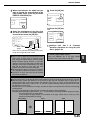
Marks appear at
regular intervals on Paper with punch holes is being used.
printed pages.
If the original image overlaps the punch holes,
marks will appear at the position of the holes on
the back of the paper after one-sided printing, or
on the front and back of the paper after twosided printing. Make sure that the original image
does not overlap the punch holes.
2-25
2