1
It’s Under Control®
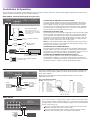
Relay/Trigger Outputs
Configurable within Integration Designer® to be either a dry contact
closure or a voltage trigger output (12VDC @100mA). All relays are
Normally Open when not energized, but they can be programmed to
behave Normally Closed (as long as power is applied to the XP-8s).
Drapes
+ -
For contact closure control, connect the A and B contact terminals of
a relay to the desired device.
To use a relay as a voltage trigger, connect Contact A to the positive
side and connect Contact B to the ground side of the desired device.
+ -
Screen Lift
signal in/high out/power terminals
Connecting Block
To Audio/Video
Equipment, Lighting
Systems, etc.
RF or IR Receivers
TERMINAL: +12VDC
Positive power supply connection. It is internally tied to the Power jack. This
can be used to power external IR or RF receivers.
TERMINAL: GROUND
Common ground connection. Use this ground reference for any device that is
connected to the +12VDC, SIGNAL IN, OR HIGH OUT terminals.
TERMINAL: SIGNAL IN
Input connection for system trigger codes. This should be connected to an
RTI RM-433 RF receiver or industry standard IR repeater system. The signal
voltage can be from 3VDC - 12VDC.
TERMINAL: HIGH OUT
High current (200mA) IR output connection. This can be used to power up to
10 infrared mini-emitters, an IR blaster, or extending IR control over a long
distance (1000 ft. max).
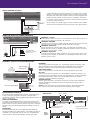
Ethernet, USB, RTI COM, Expansion Port
LAN
ZM-24 Zigbee
Transceiver
(Future Use) USB
CB-8 Connecting Block
cat5
Power
Supply
ETHERNET
This RJ-45 port allows connection to a 10/100 Base-T Ethernet network (LAN).
Network settings such as the IP address are configurable within Integration
Designer®. Ethernet can be used to download system files to the XP-8s.
USB PORTS (REAR)
These are host ports for external devices and are intended for future use.
RTI COM
This RJ-45 port allows connection to a ZM-24 Zigbee® transceiver module. The
connection supports full duplex two-way communication for use with compatible
RTI handheld controllers. Refer to the ZM-24 Zigbee transceiver module
operation guide for installation instructions.
EXPANSION PORT
This RJ-45 port provides a convenient connection for receiving IR signals and
two-way RS-485 communication from RTI in-wall controls through a CB-8
connecting block.
NOTE: In-wall controllers may be connected directly to the XP-8s Expansion
Port, however, they should be powered with a separate power supply.
PROGRAMMING THE XP-8s
The XP-8s must be programmed to operate. All programming
is done using RTI’s Integration Designer® software and is
downloaded using the USB Programming Port located on front of
XP-8s or via Ethernet.
Updating firmware
It is highly recommended that this and all RTI products have
the latest firmware installed. The firmware can be found in the
Dealer section of the RTI website (www.rticorp.com). Install the
firmware using the USB Programming Port located on front of
XP-8s.
Mounting
The XP-8s ships with four removable feet that allow the
XP-8s to be placed on a flat surface. The XP-8s can also be
mounted in a component rack as part of a comprehensive
control system. Remove feet before mounting in a rack.
XP-8s Front
Menu
Display
Exit
Backlight On/Off
Reset
SD Flash Memory Slot
USB Programming Port
Rack
Mount
Option
Select
Cursor
IR Adjustment Dials
and IR Feedback LED’s