1
•
•
•
•
•
•
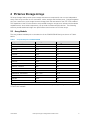
clustered storage traffic patterns used by the EqualLogic SAN architecture, switches that
support “cut-through” mode are not suitable for use in an EqualLogic SAN and may actually
result in lower overall SAN performance.
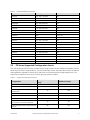
Support for IEEE 802.3x flow control (passive and/or active) on ALL ports: Switches and
network interface controllers used in an EqualLogic SAN must be able to passively respond to
any “pause” frames received. If possible, you should use switches that have the ability to
transmit “pause” frames to external devices in the event that the device cannot adequately
forward traffic in a timely fashion.
Support for Jumbo Frames: This is not a requirement. But, the use of jumbo frames may yield
desirable results. Most iSCSI SAN implementations should benefit from using jumbo frames.
The actual impact on SAN throughput when using jumbo frames will depend on your
workload’s I/O characteristics.
Support for Rapid Spanning Tree protocol (IEEE 802.1w), or Cisco “portfast” functionality if
the SAN infrastructure will consist of more than two switches: For SAN infrastructures
consisting of more than 2 non-stacking switches, R-STP must be enabled on all ports used for
inter-switch trunks. All non-inter-switch trunk ports should be marked as “edge” ports or set to
“portfast”.
Support for unicast storm control: iSCSI in general, and Dell EqualLogic SANs in particular can
send packets in a very “bursty” profile that many switches could misdiagnose as a virally
induced packet storm. Since the SAN should be isolated from general Ethernet traffic, the
possibility of actual viral packet storms occurring is non-existent. In an EqualLogic SAN, the
switches must always pass Ethernet packets regardless of traffic patterns.
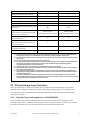
Support for Inter-Switch Trunking (IST) or Stacking: IST support is required to link all
switches in SAN infrastructure together. For stacking capable switches, the use of stacking
ports for IST is assumed. A good rule of thumb for stacking link bandwidth would be a
minimum 20 Gbps full-duplex.
Support for vLAN functionality if SAN traffic is to share the same physical switch resources
with other (non-iSCSI SAN) network traffic.
Note: We recommend this strategy for small SAN environments only, where networking device
resources are limited. For larger SANs and datacenter environments we recommend using vLAN
functions only if Data Center Bridging (DCB) is implemented.
•
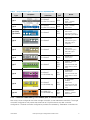
Support for creating Link Aggregation Groups (LAG): For non-stacking switches, the ability to
bind multiple physical ports into a single logical link for use as an inter-switch trunk (IST) is
required. The switch should support designating one or more ports for IST (via Link
Aggregation Groups). The switch should support creation of LAGs consisting of at least eight
1Gbps ports or at least two 10Gbps ports.
Note: For 1GbE SANs, using non-stacking switches to connect three or more EqualLogic
arrays into a single group may negatively impact SAN I/O throughput performance.
4.3.1
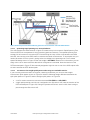
Connecting SAN Switches in a Layer 2 Network
When more than one SAN switch is required, each switch connected to the array group members will
be in the same subnet. These switches must be interconnected to provide a single switched Ethernet
June 2012
Dell EqualLogic Configuration Guide v13.2
39