1
Chapter 1
Getting Started
A Tour of the PA982
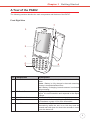
The following sections describe the main components and features of the RH767.
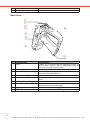
Front Right View
7
1
2
Esc
3
a
1a
% i
4e
2b
3c
.
7
5f
6g
+
-
n
s
o
8k
9 l
t
0p
( q
@
“
j
<x
,
u
=y
No. Component
1.
Status Indicator
2.
LCD Touch Screen
3.
4.
Alpha Mode Indicator
Keypad
5.
Power Button
Enter
Func
d
[
4
5
alph
[ v
Del z
.
h
m
r
6
/ w
BkSp
Description
Indicates the battery charging and barcode scanning
status.
Green - Battery is fully charged or barcode scanning
process is completed without error.
Red - Battery is charging, barcode scanner is activated
and processing.
Displays the applications and data stored on your
device. It is touch-sensitive and responds to the stylus
or finger.
Indicates the Alpha Mode status.
Keypad interface for controlling the RH767. See Using
the Hardware on page 13 for more information.
If the device is off, press this button to turn it on.
Alternatively, when the unit is on, this key must be
pressed and held down for about two seconds in order
to turn the device off.