1
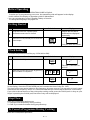
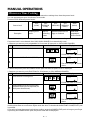
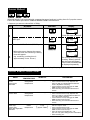
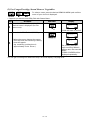
Sequence Cooking
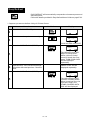
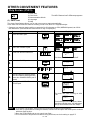
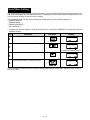
Your oven can be programmed for up to 3 cooking sequences, switching from one variable power setting
to another automatically.
* Suppose you want to cook for 10 minutes on 50% (MEDIUM POWER) followed by 5 minutes on
100% (HIGH POWER):
Step
Procedure
Pad Order
Display
1000
Enter desired cooking time.
1
COOK will flash on and off.
2
50 %
Select power level by pressing the
POWER LEVEL pad as required. (for
50% press three times)
x3
3
500
For second sequence, enter desired
cooking time.
(If power is not selected the oven will
operate at 100%).
1000
Press the INSTANT COOK/START pad.
The timer begins to count
down.
When it reaches zero,
4
500
the second sequence will
appear and the timer will
begin to count down again.
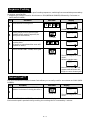
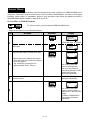
Instant Cook™
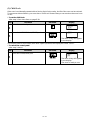
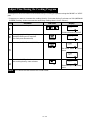
For your convenience Sharp’s Instant Cook allows you to easily cook for one minute on 100% (HIGH
POWER).
Step
Procedure
Pad Order
Press the INSTANT COOK/START pad.
(Within 3 minutes of closing the door.)
Display
100
1
The timer begins to count
down.
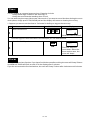
Press the INSTANT COOK/START pad until desired time is displayed.
Each time the pad is pressed during cooking, the cooking time is increased by 1 minute.
E–8