1
OPERATION OF TOUCH CONTROL PANEL
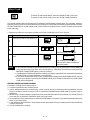
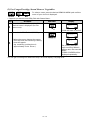
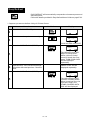
The operation of the oven is controlled by pressing the appropriate pads arranged on the surface of the control
panel.
An entry signal tone should be heard each time you press the control panel to make a correct entry.
In addition an audible signal will sound for approximately 2 seconds at the end of the cooking cycle, or 4 times
when cooking procedure is required.
Control Panel Display
Indicator
Touch Control Panel Layout
1
2
7
4
3
5
6
9
0
A
B
8
1 SENSOR MENU PADS
Press to select Sensor Menu.
2 INFO PAD
Press to select auto start,
child lock, language or
demonstration modes.
Press to get cooking information.
3 SENSOR REHEAT PADS
Press to reheat popular
menus.
4 EXPRESS DEFROST PAD
Press to select the Express
Defrost menu.
5 EASY DEFROST PAD
Press to defrost meat by
entering the weight.
6 SLOW COOK PAD
Press to cook slowly and for a
longer time.
7 MORE ( ), LESS ( ) PADS
Press to adjust the doneness
of food in one minute
increments during cooking or
to increase/decrease the time
whilst programming the
automatic operations.
8 NUMBER PADS
Press to enter cooking times,
clock time or weight of food.
9 POWER LEVEL PAD
Press to select microwave
power setting.
If not pressed, 100% (HIGH
POWER) is automatically
selected.
E–4
0 CLOCK PAD
Press to set clock or timer.
A STOP/CLEAR PAD
Press to clear during programming.
Press once to stop operation
of oven during cooking; press
twice to cancel cooking
programme.
B INSTANT COOK/START PAD
Press to start oven after
setting programmes.
Press once to cook for 1
minute on 100% (HIGH
POWER) or increase by 1
minute multiples each time
this pad is pressed during
cooking.