1
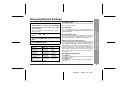
Troubleshooting
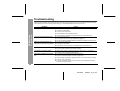
Many potential "problems" can be resolved by the owner without calling a service technician. If something seems to be wrong
with this product, check the following before calling your authorized SHARP dealer or service center.
PROBLEM
The unit does not turn on.
CAUSE
z Is the AC adaptor disconnected?
z Is the battery exhausted?
z Is the unit in the hold mode?
References
-Troubleshooting-
z Has condensation formed inside the unit?
z Is the unit being influenced by mechanical shock or by static electricity?
No sound is heard from the headphones.
z Is the volume set too low?
z Is the remote control unit or the headphones plugged in?
z Are you trying to play a MiniDisc with data on it instead of a MiniDisc containing music?
When the operation buttons are
pressed, the unit does not respond.
z Is the unit in the hold mode?
z Is the battery exhausted?
z Is the remote control unit plug or the headphones plug inserted firmly?
Some sounds are skipped.
z Is the battery exhausted?
z Is the unit being subjected to excessive vibration?
The MiniDisc cannot be ejected.
z Has the track number or character information been written on the disc yet?
Recording and editing are impossible.
z Is the MiniDisc protected against accidental erasure?
z Is the unit in the recording or editing mode?
z Is the unit connected properly to the other equipment?
z Is the AC adaptor unplugged or did a power failure occur while recording or editing?
z Is the unit in the hold mode?
z Is an optical signal being output from the stereo system? Read the operation
manual for the stereo system.
44
00/12/26
90SEC_40_47.fm