1
The information contained in this user guide is correct at
the time of going to press, but Orange reserves the right
to make subsequent changes to it and services may be
modified, supplemented or withdrawn. April 2003.
© Orange Personal Communications Services Limited
2003. Orange and wirefree™ and any other Orange
product or service names referred to in this user guide
are trade marks of Orange Personal Communications
Services Limited.
Orange Personal Communications
Services Limited.
PO Box 10
Patchway
Bristol
BS32 4BQ
*A5B00075069860*
For further information about Orange products and
services please visit our website at the address below.
Ref.No.: A31008-H5600-A40-1-7619
C55_Cover 16.04.2003 13:02 Uhr Seite 1
guide
www.orange.co.uk/business
PCN –D0285 ISSUE 1 Z : h 15
Produced by Clear® the explanation agency
to using your Siemens C55
C55_Cover 16.04.2003 13:02 Uhr Seite 2
C55_UG_001_083 14.04.2003 19:32 Uhr Seite 1
welcome
This guide provides you with all the information you need to
use your phone, from making a call to texting a colleague.
You can also find out more about the wide range of services
offered by Orange to keep you in touch and informed whether
you’re at work, at home or abroad.
So that you can make your first call please take a few
moments to register with Orange.
C55_UG_001_083 14.04.2003 19:32 Uhr Seite 2
insert your SIM Card
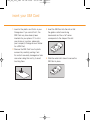
1 Look for the plastic card that is in your
Orange box. If you cannot find it, the
SIM Card may have already been
inserted into your phone. If it is not in
your phone or your box, please ask
your company’s Orange account holder
for a SIM Card.
2 Remove the SIM Card from its plastic
surround by carefully pushing it out.
Its contacts are easily damaged so take
care when doing this and try to avoid
touching them.
SIM Card
3 Insert the SIM Card into the slot so that
the golden contacts are facing
downwards and the cut off corner
corresponds to the shape of the slot.
4 Slide the metal catch down to secure the
SIM Card in place.
C55_UG_001_083 14.04.2003 19:32 Uhr Seite 3
insert and charge your battery
insert the battery
charge the battery
1 With the phone face down and the top
pointing away from you, position the
battery so that the gold contacts touch
the gold contacts inside the phone.
The first charge must be for a minimum of
2 hours in order to achieve optimum
performance. Subsequent charges should
be 2 hours if the battery is completely flat.
You can make calls whilst charging as long
as you have registered with Orange.
2 Insert the left side of the battery first.
You should be able to see the word
SIEMENS at the top of the battery.
3 Slide the battery cover into place.
remove the battery and cover
1 Push the cover up and away from the
phone.
2 Press the release catch on the battery
and lift it out of the phone.
1 Plug your charger into a mains socket.
2 Insert the lead into the socket on the
base of your phone. The battery
indicator on the display will pulse whilst
charging. Do not remove the battery
covers whilst charging.
3 To remove the charger lead lift the base
and pull gently away.
Rechargeable batteries have a limited
lifespan and Orange recommend that you
purchase a new one every year.
For more information about compatible
accessories, contact your company’s
Orange account holder or call 158 for
more details.
C55_UG_001_083 14.04.2003 19:33 Uhr Seite 4
registration
if your phone wasn’t
registered with Orange
when you bought it, follow
the simple steps below
before you call
When you apply to register on the Orange
Network, you and Orange agree to be
bound by the Orange terms and conditions
set out in the back of this guide. Please
take time to read and consider them before
you register.
switching your phone on
Switch on your phone by pressing and
holding the key, and then pressing
under OK to confirm.
registration
Please call Business Customer Services
on 158 from your Orange phone,
07973 100 158 from any other phone or
via your usual route, before you make any
other calls.
While speaking with Business Customer
Services, you will be asked whether you
wish to receive any marketing material from
Orange. By answering Yes, Orange will
keep you informed of any special offers or
promotions which could save you money,
and make you aware of new services and
products that could be useful to you.
If you answer No, Orange will not
communicate with you unless it is in
connection with your own account.
If you change your mind at any time, simply
call 158.
During your first call to Business Customer
Services you will be asked for the following
information:
1 The 15-digit serial number or IMEI number
This is inside your phone underneath
the battery.
C55_UG_001_083 14.04.2003 19:33 Uhr Seite 5
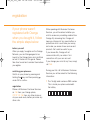
2 The SIM Card number
This is on the SIM Card itself.
8 9 4 4 1 2
3 A password for security purposes
For example your mother’s maiden
name.
4 Your address
Including the postcode.
your Orange phone number
This is given to you either when you buy
your phone or when you call to register.
SIM update
When your phone is registered you will
receive one or more SIM updates. They will
arrive as text messages and the message
SIM Update will appear on the display.
upgrade registration
If you are already an Orange customer and
wish to register an upgraded phone, please
call 07973 100 158 from any other phone
before you make any other calls. This only
applies if your phone was not registered at
the time you bought it.
acknowledging and deleting your
SIM update:
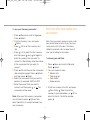
1 If your phone is switched on when the
message arrives you will hear a tone and
the symbol
will appear in your
display with the message New Text
Message Received. If your phone is
switched off when your SIM update
arrives, you’ll hear the tone and see
when you turn the phone on.
Press
under
to open and read
the message.
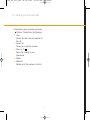
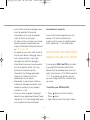
2 When you have read the message press
under Options and select Delete.
3 Press
under Yes. You should turn your
phone off and back on again. This will
enable you to make your first call.
C55_UG_001_083 14.04.2003 19:33 Uhr Seite 6
with the C55 you can...
■
keep on top of things and
set yourself reminders
using your phone’s
organiser
■
send a text message to
several contacts at the
same time or join them in
a conference call
■
enjoy continuous access
to the Internet but only
pay for the data you send
and receive with GPRS
■
set up to eight profiles to
operate your phone in the
most convenient way to
suit your surroundings
■
use your built-in fax and
data modem to send
important documents
from your laptop while on
the move
■
keep your hands free
while you are on a call
using the speakerphone
the C55 – the perfect corporate companion
C55_UG_001_083 14.04.2003 19:33 Uhr Seite 7
inside
1
introduction to your phone
1.2
Make your way around the menus
4
decide how to manage
your calls
1.2
1.2
Make a selection
4.1
Orange Answer Phone
Auto keylock
4.1
Answer Phone Call Return
1.3
Menu map
4.4
Line 2
1.5
Symbols on your display
4.4
Call Divert
2
calls
5
messaging
2.1
Make a call
5.1
Send a text message
2.3
Answer a call
5.1
Standard and predictive text input
2.3
Redial a number
5.3
Attach a picture to a message
2.3
Missed calls
5.3
Text message templates
2.4
Mute a call
5.4
Group Text Messaging
5.5
Reading a text message
6
Orange Multi Media
services
2.4
Call Waiting
2.5
Caller id
3
manage your phonebook
3.1
Store names and numbers
3.2
Orange Directory Enquiries
6.1
Orange WAP Services
3.4
Manage your contacts
6.2
Setting your connection
3.5
Call your contacts quickly
6.6
Orange Information menu
6.7
Orange Voice Media
6.7
Orange Text Media
C55_UG_001_083 14.04.2003 19:33 Uhr Seite 8
7
keep working on the move
7.1
Data and Fax modem
10
ensure your phone is
secure
7.2
Orange Answer Fax
10.1
Orange Care
7.3
Conference Calling
10.2
SIM Card PIN
7.4
Orange Assistant
10.4
Babysitter
7.4
Accessories
10.5
Call Barring
8
set your phone to suit
your needs
11
games and applications
11.1
Java™
8.1
Voice commands
8.1
Hotkeys
12
International services
8.2
Profiles
12.1
International services
8.3
Change your alert settings
12.3
Select a network
8.5
Voice memo
8.5
Download ring tones
13
reference
8.6
Change your phone’s appearance
13.1
Safety
13.9
Radio waves and your phone
9
manage your time and calls
13.9
Paperwork
9.1
Set your phone’s time and date
13.11
Orange Care terms and conditions
9.1
Organiser
13.23
Pay monthly terms and conditions
9.4
Review your calls
13.39
Declaration of conformity
14
index
C55_UG_001_083 14.04.2003 19:38 Uhr Seite 9
introduction to
your phone
■
Make your way around the menus
■
Make a selection
■
Auto keylock
■
Menu map
■
Symbols on your display
1
C55_UG_001_083 14.04.2003 19:38 Uhr Seite 10
1 - introduction to your phone
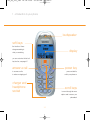
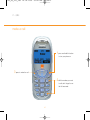
loudspeaker
soft keys
the function of these
change according to
display
what you are doing
you can customise the left soft
key function, see page 8.1
power key
answer a call
press and hold to
to answer a call or
to make an outgoing call
switch your phone on
charger and
headphone
socket
to move through the menu
scroll keys
options and to access your
phonebook
1.1
C55_UG_001_083 14.04.2003 19:48 Uhr Seite 11
switch your phone on
make your selection
To switch your phone on press and
hold the
key, and then press
under
OK to confirm. If you do not press
under OK within ten seconds, your phone
will automatically switch off again. If you
have activated PIN code request, you will
not be asked to confirm switch on.
The soft keys control how you choose a
function. On your display you will see what
feature the soft key controls, depending on
what you are doing at the time. So, for
example, from the main display press the
left soft key
under New SMS to write a
text message, or press the right soft key
under Menu to enter the main menu.
After a few seconds your phone will be ready
to use.
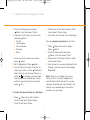
Note: You can alter the menu option that
appears over the left soft key in the main
display. See page 8.1 for more details.
make your way around
the menus
auto keylock
To enter the menus, press
Menu. Use
the
and
keys to find your way
around the menus. Each menu has its
own set of submenus. Have a look at the
menu map overleaf for a breakdown of the
submenus.
To prevent accidental calls made when, for
example, your phone is in your pocket, the
keypad of your C55 is configured to lock
one minute after you last used it.
To unlock the keypad press and hold #.
To return to the previous screen from any
menu simply press
.
Note: You can disable the auto keylock
feature. See page 10.6 for more details.
1.2
C55_UG_001_083 14.04.2003 19:48 Uhr Seite 12
1 - introduction to your phone
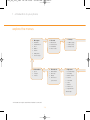
explore the menus
1 Messages
2 Records
3 Groups
1
New SMS
1
Missed calls
1
SMS to group
2
Predefined text
2
Calls received
2
Call to group
3
Inbox
3
Calls dialled
3
Group setup
4
Outbox
4
Erase records
5
Archive
6
SMS profiles
7
Voice message
10 Information
9 Phonebook
8 My menu
1
Sport
1
Own numbers
1
2
Lifestyle
2
New entry
2
Recording
3
Finance
3
Groups
3
Games & more
An A-Z list of
4
Internet
your contacts
5
New SMS
6
Inbox
7
Outbox
8
Alarm clock
9
Appointments
4
Sound manager
10 Greetings
~ this feature can only be used when a headset is connected
1.3
C55_UG_001_083 14.04.2003 19:48 Uhr Seite 13
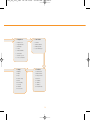
4 Organiser
5 Surf & fun
1
Alarm clock
1
Internet
2
Appointments
2
Games & More
3
Greetings
3
Bitmap viewer
4
Notes
4
Sound manager
5
Missed alarms
6
Calculator
7
Currency conv.
8
Voice command
7 Setup
6 Profiles
1 Display
1
Normal envi.
2 Audio
2
Quiet environ.
3 Keys
3
Noisy environ.
4 Phone setup
4
Car Kit ~
5 Clock
5
Headset ~
6 Connectivity
6
<Name>
7 Security
7
<Name>
8 Network
8
Aircraft mode
9 Accessories
1.4
C55_UG_001_083 14.04.2003 19:48 Uhr Seite 14
1 - introduction to your phone
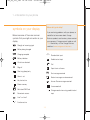
symbols on your display
Where do I go for help?
If you are having problems with your phone, or
Below are some of the more common
symbols that you might encounter on your
display.
would like to know more about Orange
Business products and services, please contact
your company’s Orange account holder, or call
158. Alternatively, visit the Orange Business
Strength of incoming signal
website at www.orange.co.uk/business
Battery being charged
Charging complete
abc/
Abc/123
Battery indicator
T9
All calls are diverted
Standard text input
Predictive text input
Call
Ring off
Open the in-call menu
Short ring (beep) only
Text message received
Alarm is set
No text messages can be received
Key lock active
Answer Phone message received
Phone memory
Unanswered call
Restricted SIM Card
Change words when using predictive text
No network access
input
Line 1 or Line 2
Function active
1.5
C55_UG_001_083 14.04.2003 19:48 Uhr Seite 15
calls
■
Make a call
■
Answer a call
■
Redial a number
■
Missed calls
■
Mute a call
■
Call Waiting
■
Caller id
2
C55_UG_001_083 14.04.2003 19:44 Uhr Seite 16
2 - calls
make a call
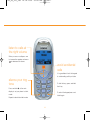
1 press and hold this button
to turn your phone on
3 press to make the call
2 dial the number you want
to call, don’t forget to use
the full area code
2.1
C55_UG_001_083 14.04.2003 19:45 Uhr Seite 17
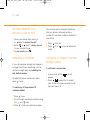
listen to calls at
the right volume
When you are on a call press
to increase the earpiece volume or
to decrease the volume.
avoid accidental
calls
It’s a good idea to lock the keypad
to avoid making calls by mistake.
silence your ring
tone
Press and hold
To lock the keys, press and hold
the # key.
at the main
display to set your phone to silent
To unlock the keypad press and
mode.
hold # again.
Repeat to deactivate silent mode.
2.2
C55_UG_001_083 14.04.2003 19:51 Uhr Seite 18
2 - calls
choose whether you
answer a call or not
You can also set up Automatic Redial so
that your phone continually redials a
number if it has been unable to establish a
connection.
1 When your phone rings, press
or
Reply to answer the call.
2 Press
or
Reject to busy the call
to your Answer Phone.
3 To end a call press
.
1 Press
2 Press
redial.
redialling a number
Auto dial.
Off or
to turn off automatic
call back a missed number
straight away
If you call someone and get disconnected
or forget to tell them something, you can
call them straight back by redialling the
last dialled number.
To call back a missed call:
1 If you miss a call the
icon will
appear.
2 Press
to see a list of missed
calls. Scroll to the one you want to call
back and press .
To redial the phone number last called
press
twice.
To redial any of the previous 10
numbers dialled:
1 Press
once.
2 Scroll through the phone numbers using
the
and
keys.
3 Press
to dial your selected number.
2.3
C55_UG_001_083 14.04.2003 19:51 Uhr Seite 19
mute your call
take two different calls
at the same time
Sometimes you may need to say
something to another person that you
don’t want your caller to hear. In these
cases, you can mute your call and
preserve your privacy.
When you are on a call, answer a
second call without ending the first
using Call Waiting.
To mute your call:
To activate Call Waiting:
1 On the call, press
Menu.
Microphone on is highlighted.
Press
Select.
2 The call is now muted. To unmute, press
Menu then
Select.
1 Press
Menu to enter the main menu.
Scroll to and select Setup.
2 Select Phone setup and then press
Select to select Call Waiting.
3 Select Set to activate Call Waiting.
The sound of two beeps when you are on
a call indicates you have a second
incoming call. To accept the new call
press .
To swap between calls press
Swap.
This puts the original call on hold.
2.4
C55_UG_001_083 14.04.2003 19:51 Uhr Seite 20
2 - calls
know who is calling you, or
hide your number when
you make a call
To return to the call on hold, press
Swap, or
to end the active call.
Alternatively, press
Reject, which will
send the new caller to your Answer Phone.
Your Caller id identifies you to a person
you are calling and identifies a caller to you.
To put an active call on hold, make a
second call and then return to the original
call:
To hide your number when calling
another person, simply dial 141 before
the number.
1 While you are in the active call, press
Menu. Select Hold.
2 Dial the new number and press .
3 Press
Swap to switch between the
held call and the active call. To end the
active call, press
. This will also
automatically reactivate the held call.
To hide your number permanently, call
Business Customer Services on 158 from
your Orange phone or 07973 100 158 from
any other phone. Whilst your number is
hidden you will not be able to see the
Caller id of any incoming calls.
Note: If you are abroad the availability of
the services described in this section
depends on the network that you are
using.
2.5
C55_UG_001_083 14.04.2003 19:51 Uhr Seite 21
manage your
phonebook
■
Store names and numbers
■
Orange Directory Enquiries
■
Manage your contacts
■
Call your contacts quickly
3
C55_UG_001_083 14.04.2003 19:51 Uhr Seite 22
3 - manage your phonebook
store the names and
numbers of your colleagues
in your phonebook
When I save a contact in my phonebook
where are the details stored?
You can store up to 90 names and numbers
on your SIM Card’s memory and 50 names
and numbers on your phone’s internal
To open your phonebook press .
Own numbers will be highlighted. You can
scroll through the list of contacts using
and
. To go to a number quickly,
press the key which corresponds to the
first letter of the contact’s name. For
example, press 6 to go to contacts
beginning with M. If you press a number
key twice quickly, you will go to contacts
beginning with the second letter on that
key, for example press 2 twice for B.
memory.
The advantage of storing contacts on your
SIM Card is that if you change phones, all of
the contacts on your SIM Card will move to
the new phone.
To add a new entry to your phonebook:
1 Press
to open your phonebook.
2 Scroll down to New Entry and press
Select.
3 Enter the number that you want to save.
Press
when you have finished.
4 Enter the name of the contact, using the
appropriate keys on the keypad. See
page 5.1 for information on text input.
5 When you have finished, press .
6 You can choose to assign the contact to
a group. Press Change to choose
To call an entry in your phonebook scroll
to the person you would like to talk to and
press .
3.1
C55_UG_001_083 14.04.2003 19:51 Uhr Seite 23
Orange Directory Enquiries
from No group, Family, Friends, Office,
VIP, Leisure, or a group that you have
created yourself. See page 3.4 for more
information on Groups. When you have
finished, press .
7 Press
Change to choose whether to
save the contact to your SIM Card
memory, your Protected SIM Card
memory or Mobile, which is your phone
memory. When you have finished,
press . Press Select.
8 You can allocate each contact a record
number by pressing
Change. See
page 3.5 for more details on Record
numbers. When you have finished, press
Save.
The new number for Directory Enquiries is
118 000.. Oftel will be withdrawing 192 from all
landline and mobile networks in August 2003.
So save 118 000 to your phone now, and it’ll
be there the next time you’re out and about and
need a number in a hurry.
The only thing that's changed is the number.
The service is still the straightforward and
efficient way to find the number you are after.
We'll find any listed UK business, residential or
Orange telephone number for you. We'll text the
numbers to you, so you can save them to your
phonebook, and we can even connect you
straight through.
Each time you call we'll search for up to three
numbers for a fixed fee of only 50.2p. There's no
charge for being connected straight through,
and the on going call is 25.5p per minute. All
prices are excluding VAT.
Note: The new number for Orange International
Directory Enquiries is 118 880.
3.2
C55_UG_001_083 14.04.2003 19:51 Uhr Seite 24
3 - manage your phonebook
You also have a number of phonebook
options.
1 Press
to open your phonebook.
2 Scroll to the entry that you want to apply
an option to and press Options.
3 Choose from one of the following:
■ View
Displays all of the details for the
contact.
■ Edit
Allows you to change the contact’s
details.
■ New entry
Lets you add a new contact to your
phonebook.
■ Delete
Erases the contact permanently.
■ Delete all
Erases your entire phonebook
permanently.
■ Voice dialling
Assign a recording of your voice to
the contact, so you can call them
using voice dialling.
■ Send SMS
You have two further options. You can
■
■
either select As entry, to send the
contact to another person, or As text
to send a text message to the
contact.
Animation
Choose to assign a picture or
animation to the contact, which will
show when you are on a call to that
number.
Capacity
Shows you how many spaces are
available in your SIM Card and Mobile
phonebooks, and voice dialling,
picture and group features.
To make changes to a phonebook entry:
3.3
1 Press
to open your phonebook.
2 Scroll to the entry that you want to edit
and press
Options.
3 Scroll to Edit and press
Select.
4 Use
and
to scroll through the
fields. When you come to one that you
want to change, either press
Clear
to erase the information, or press
Change to edit it.
5 When you have finished press
Save.
C55_UG_001_083 14.04.2003 19:51 Uhr Seite 25
manage your contacts by
sorting them into groups
■
You can sort your work contacts into
different departments using the group
feature.
■
To set up groups on your phone:
1 Press
three times from the main
display. Press
Select.
2 The five preset groups are Family,
Friends, Office, VIP and Leisure, with
three extra groups for you to
personalise.
3 Scroll to the group that you want to
change and press
Options. Choose
one of the following options to adapt the
Groups to your requirements:
■ View members
When you have set up your groups,
use this option to see a list of the
contacts that you have assigned to
the group.
■
Rename group
Use this option to rename your group,
to make the contacts more easily
recognisable.
Call to group
If you are a pay monthly customer,
you can use this feature to call all the
members of the group at once, to a
maximum of five people, then link the
calls into a Conference Call. See page
7.1 for more details on Conference
calling.
SMS to group
Use this feature to send one text
message to every contact in a group.
See page 5.1 for more details on Text
Messaging.
Note: You can assign a contact to a group
when you first save their details or by
editing their details at a later date. See
page 3.1 for more details.
3.4
C55_UG_001_083 14.04.2003 19:51 Uhr Seite 26
3 - manage your phonebook
call your contacts quickly
without having to enter
your phonebook
Your phone also has a voice recognition
feature, allowing you to make a call by
saying the name of a contact.
You can call contacts saved in your
phonebook quickly using your phone’s
Record number and voice dialling
features.
To assign a voice tag to a contact:
You can assign up to 20 voice tags to
numbers saved in your phonebook.
1 Press
to enter your phonebook and
then scroll to the contact that you want
to assign a voice tag to.
2 Press
Options and then scroll down
to Voicedialling. Press
Select.
3 Press
Yes and then press
Start.
Say the name of the contact clearly into
the phone after the beep.
4 Repeat the name at the prompt. The
voice tag will be saved.
A Record number is a one or two digit
shortcut to a contact saved in your
phonebook.
When you first save a contact you have the
option to enter a Record number. Pick an
available number on your SIM Card and
then save the contact as normal.
To make a call using a Record number:
1 At the main display, enter the Record
number of the contact that you want to
call.
2 Press # and then press .
3.5
C55_UG_001_083 14.04.2003 19:51 Uhr Seite 27
Once the voice tag is saved, you can
re-record it at any time.
To re-record a voice tag:
1 Press
to enter your phonebook and
then scroll to the contact that you want
to re-record the voice tag for.
2 Press
Options, then scroll to
Voicedialling.
3 Pressing
Delete will delete the voice
tag. To listen to or re-record the voice
tag press
Select.
4 Press
Record then
Yes to re-record
the voice tag.
To make a call using voice dialling:
1 Press and hold
down at the main
display, and then say the voice tag.
2 Your phone will call the contact.
3.6
C55_UG_001_083 14.04.2003 19:51 Uhr Seite 28
3 - manage your phonebook
3.7
C55_UG_001_083 14.04.2003 19:51 Uhr Seite 29
decide how to
manage your calls
■
Orange Answer Phone
■
Orange Answer Phone Call Return
■
Line 2
■
Call Divert
4
C55_UG_001_083 14.04.2003 19:51 Uhr Seite 30
4 - decide how to manage your calls
Answer Phone Call Return
what happens when you
get an Answer Phone
message?
You can use Answer Phone Call Return to
return a call after someone has left a message
on your Answer Phone, without having to
remember or make a note of their number.
When someone leaves a message on your
Answer Phone, the
symbol will appear
on your phone’s display along with the
message New Voice Message received.
This symbol will remain until the message
has been saved or deleted. Answer Phone
messages that have not been listened to
will be saved for up to 21 days.
To use Answer Phone Call Return:
1 Listen to your Answer Phone message as
normal.
2 When you have finished, if you want to
return the call, simply press # while you
are still connected.
3 Orange Answer Phone will automatically
listening to your Answer
Phone messages
dial the caller’s number and connect you.
Note: Answer Phone Call Return is only
available if the network you are calling
To listen to your Answer Phone
messages select Listen when the message
first arrives, or press and hold the 1 key.
Listen to the simple steps to save, listen to
or delete messages. You can save
messages that you have listened to for up
to seven days.
supports this service and you are charged
your standard call rate.
4.1
C55_UG_001_083 14.04.2003 19:51 Uhr Seite 31
use Answer Phone
shortcuts to manage your
messages efficiently
personalising your Answer
Phone greeting
Your Answer Phone comes with a standard
greeting but you can record your own
personal greeting so your callers know
they’ve got through to you.
Your Answer Phone is quick to use as there
are several single key presses to help you
move through your messages.
1 Call your Answer Phone by pressing and
holding the 1 key. Listen to the simple
steps and select option 3, then option 1,
then option 1 again.
2 Record your greeting followed by the
# key.
3 Press 2 to save it.
When listening to your messages press:
1
2
3
7
8
9
#
0
to listen to your message again
to save your message
to delete your message
to rewind 10 seconds
to skip to the next message
to fast forward 10 seconds
to return the call
for help
4.2
C55_UG_001_083 14.04.2003 19:51 Uhr Seite 32
4 - decide how to manage your calls
set up an Answer Phone
PIN
Phone messages from any other phone
even while abroad. To use this service you
must set up an Answer Phone PIN.
For added Answer Phone security, you can
set up your Answer Phone to request a PIN
(Personal Identification Number) each time
you want to listen to your messages.
To access your Answer Phone
messages from any another phone
or while abroad:
1 Call 07973 100 123 from any phone.
2 Enter your Orange number followed by
the # key.
3 Enter your Answer Phone PIN followed
by the # key.
4 Follow the simple steps to listen to your
messages.
To set up an Answer Phone PIN:
1 Call your Answer Phone by pressing and
holding the 1 key.
2 Select option 3, then option 2.
3 Enter your chosen Answer Phone PIN
which should be between 4 and 10
digits long, followed by the # key.
4 Press 1 to save your Answer Phone PIN.
Note: With recent improvements to our
international network, if you select the
Orange network in certain EU countries,
you can dial into Answer Phone in the
same way as in the UK and no longer need
a PIN number to access your messages
from abroad.
Please call Business Customer Services for
up-to-date information, or visit:
www.orange.co.uk/business
listen to your Answer Phone
messages from any other
phone and while abroad
If you do not have access to your Orange
phone, you can listen to your Answer
4.3
C55_UG_001_083 14.04.2003 19:51 Uhr Seite 33
keep your business and
personal lives separate by
using two different lines
To switch between Line 1 and Line 2:
1 Press 0 at the main display.
2 Select
Line 1/2.
Note: Line 2 does not support Fax and
Data. You can receive but not send text
messages from Line 2.
With Line 2 you can keep business and
personal calls separate.
To activate Line 2 contact your company’s
Orange account holder.
when you can’t take your
calls, why not divert them
to another number?
There is a one-off connection charge and you
receive a reduced monthly charge on your
Line 2 Service Plan. You will receive a SIM
Update when the service has been activated.
When you receive a call on Line 2, your
phone will ring without you having to have
Line 2 selected. You receive a separate
Answer Phone for your Line 2 which you
can also personalise. Call your Answer
Phone in the usual way but remember to
switch to Line 2 first.
Call Divert allows you to divert different
types of calls to different numbers. So, you
might choose to divert fax calls to your
office fax machine, but voice calls to your
Answer Phone. The availability of this
facility depends upon the network that you
are using.
To activate a divert:
If you call Answer Phone from Line 2 but
have no messages, you will automatically
be connected to your Line 1 Answer Phone
if you have messages.
1 Press
Press
4.4
Menu and scroll to Setup.
Select.
C55_UG_001_083 14.04.2003 19:51 Uhr Seite 34
4 - decide how to manage your calls
2 Choose one of the divert options. Scroll
to and select Check status.
3 The status of the divert will be displayed.
2 Scroll to Phone setup and press
Select, and then select Divert.
3 Choose a divert type from one of the
following options:
■ All calls
■ Unanswered
■ Not reachable
■ No reply
■ Busy
You can cancel your diverts at any time.
1 Press Menu and scroll to Setup.
Press Select.
2 Scroll to Phone setup and press
Select, and then select Divert.
3 Choose one of the divert options. Scroll
to and select Clear.
4 Your phone will communicate briefly with
Orange, and then return the message
Divert off!.
4 Once you have chosen your option,
press
Select.
5 Set is highlighted. Press
Select.
6 You will need to choose a number to
divert your calls to. Press
Mailbox to
divert them to your Answer Phone, or
press
to choose a number from
your phonebook. Alternatively, simply
enter the number that you want and
press
OK.
Note: There is no charge to set up or
cancel a divert. You are charged your
normal Service Plan rate and, if you are
calling or diverting your calls abroad, the
rate will vary depending on the service
provider you are using.
To check the divert status of a call type:
1 Press
Menu and scroll to Setup.
Scroll to and select Phone setup.
Scroll to and select Divert.
4.5
C55_UG_001_083 14.04.2003 19:51 Uhr Seite 35
messaging
■
Send a text message
■
Standard and predictive text input
■
Attach a picture to a message
■
Text message templates
■
Group Text Messaging
■
Reading a text message
5
C55_UG_001_083 14.04.2003 19:51 Uhr Seite 36
5 - messaging
text messages are easy,
quick and convenient
How do I know which symbols are
available on which keys?
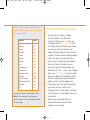
key
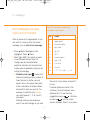
When a phone call is inappropriate, or you
only want to convey a short and simple
message, you can write a text message:
1 Press
Menu. Messages will be
highlighted. Press
Select.
2 Select New SMS. Your phone is preset
to use T9 predictive text input. To
change case and swap between
predictive, standard and numerical text
modes press # repeatedly while you are
writing the message.
■ Predictive text input T9 means that
instead of pressing a key a number of
times to arrive at a letter, you only
press it once. Your phone then looks
at the combination of letters entered,
and predicts what your word is. For
example, to write the word orange,
you would press 6, 7, 2, 6, 4 and 3
once each.
Although while you are entering a
word it may look strange, as you near
symbol
1
space, return,1
2
abc2äàæåç
3
def3éè
4
ghi4ì
5
jkl5
6
mno6öøòñ
7
pqrs7β
8
tuv8üù
9
wxyz9
0
.,?!‘“0-()@/:_+~&
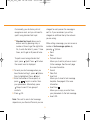
the end of it your phone will predict it
for you.
If several options are found in the
dictionary, the most frequent one is
displayed first. To see the other
suggestions press
. Continue
to press
until the correct
word is displayed. Press 1 for a space.
5.1
C55_UG_001_083 14.04.2003 19:51 Uhr Seite 37
charged for each person the message is
sent to. If you are abroad, you will be
charged an additional fee by the network
you are using.
Occasionally, your dictionary will not
recognise a word, and you will need to
spell it using standard text input.
■
Standard text input allows you to
enter a word by pressing a key a
number of times to get the right letter.
So, to write the letter O, press 7 three
times, and to get an N press 6 twice.
While writing a message, you can access a
number of text message options by
pressing
Options.
■ Send
■ Save
■ Picture & Sound
Allows you to add a picture or sound
to the message. See the next page
for more information.
■ Format
■ Clear Text
■ Insert text
Allows you to insert a text message
template. See page 5.3 for more
information.
■ Insert from
Allows you to copy a contact from
your phonebook to the text message.
■ Insert URL
To spell a word using standard text
input, press
Spell. Press
OK when
the correct word is displayed.
3 To send your text message when you
have finished writing it, press
Options.
Send is highlighted. Press
Select.
4 Enter the number of the recipient, or
press
to pick a contact from
your phonebook. Alternatively, press
Group to send it to a group of
contacts.
5 Press
OK.
Note: The cost to send a text message
depends on your Service Plan and you are
5.2
C55_UG_001_083 14.04.2003 19:51 Uhr Seite 38
5 - messaging
attach a picture or ring
tone to help make your
meaning clear
5 Write and send the message as normal.
Note: The cost of sending a picture or ring
tone in a text message is equivalent to
sending three standard text messages.
Pictures and sounds will only work with
other compatible phones.
Attach a ring tone or picture to your text
message to get your point across more
effectively.
save time when sending a
text message using
templates
1 Write your message as normal, then
press
Options.
2 Scroll to Picture & Sound and press
Select.
3 Select the type of attachment that you
would like to use. Choose from:
■ Fix animations
■ Fix sounds
■ Own animations
■ Own pictures
■ Own sounds
Your phone comes with nine preset text
message templates that you can use in
your own text messages to save time.
To use a text message template:
1 Press
Menu. Messages will be
highlighted. Press
Select.
2 Select New SMS and then press
Options. Select Insert text, select
a template and then write your
message as normal.
4 Scroll through the attachments until you
come to the one that you want to use,
then press
Select if it is a fixed
attachment or
Load then
Select if it
is one of your own.
5.3
C55_UG_001_083 14.04.2003 19:51 Uhr Seite 39
send the same text
message to a group
of people
How do I know whether a text message
has been delivered?
When you send a message, put the letters
RCT at the front of the first word without
leaving a space. When the message is
If you have saved certain contacts in a
group, you can send them all a text
message at the same time.
delivered, a confirmation message will be
returned to you.
See page 3.4 for details on how to assign
contacts to a group.
To create your own text message
template:
To send a message to a group:
1 Press
Menu. Messages will be
highlighted. Press
Select.
2 Scroll to Predefined text and press
Select.
3 New entry is highlighted.
Press
Select.
4 Enter your text then press
Save.
The text is saved to the template list.
You can Edit or Delete it at any time by
pressing
Options.
1 Write your message as usual, then press
Options and select Send.
2 Press
Group and then select the
group of people that you want to send
the message to.
Note: The cost to send a text message
depends on your Service Plan and you are
charged for each person the message is
sent to.
5.4
C55_UG_001_083 14.04.2003 19:51 Uhr Seite 40
5 - messaging
reading a text message
When you have finished writing your
message, send it by pressing
Select.
When you receive a text message, the
symbol
will appear in your display with
the message New text message received.
Press
to read the message.
To reply to a text message, press
Reply. You can then choose from the
following options:
■ Write message
Write a reply to the sender.
■ Edit
Edit the message you have received.
■ Answer is YES
Automatically adds YES to your reply.
■ Answer is NO
Automatically adds NO to your reply.
■ Call back
Automatically adds Please call back
to your reply.
■ Delay
Automatically adds I’ll be late to your
reply.
■ Thanks
Automatically adds Thank you to the
reply.
To manage your text messages:
5.5
1 Once you have read the message, press
Options.
2 Scroll through and choose from the
following:
■ Reply
■ Delete
■ Send
Forward the message to another
person.
■ Edit
■ Picture & sound
Lists pictures and sounds included in
the message.
■ Capacity
See how many more text messages
you will be able to receive before your
phone’s memory is full.
■ Save no. to
Save the sender’s number to your
phonebook.
■ Move to archive
Move the message to your archive.
C55_UG_001_083 14.04.2003 19:51 Uhr Seite 41
Orange Multi Media
services
■
Orange WAP Services
■
Setting your connection
■
Orange Information menu
■
Orange Voice Media
■
Orange Text Media
6
C55_UG_001_083 14.04.2003 19:54 Uhr Seite 42
6 - Orange Multi Media services
Orange WAP services
brings you information on
the move
WAP (Wireless Application Protocol) is ideal
for finding up to the minute information
such as train times and share prices. You
can check the news and weather or simply
relax and play games.
For more information on Multi Media
services contact your company’s Orange
account holder or call 07973 100 158.
Note: If abroad the availability of this
service depends on the network that you
are using. Availability of this service in the
UK may depend upon network coverage.
6.1
C55_UG_001_083 14.04.2003 19:55 Uhr Seite 43
setting your connection
If you want to change your connection
type, here’s what to do:
Your phone is able to access Orange WAP
services via CSD and GPRS connections.
1 Press
Menu and scroll to Surf & fun.
Press
Select.
2 Internet is highlighted. Press
Select.
3 The Start menu will open up.
4 Scroll to Profiles and press
Select.
5 Select either Orange Wap for a CSD
connection, or Orange GPRS Wap for a
GPRS connection.
Orange is the standard Circuit Switched
Data (CSD) connection, whereby you pay
for the amount of time that you are
connected.
Orange GPRS (General Packet Radio
Service) is a new service that allows you to
remain connected all day long, while only
paying for the information you transfer.
Note: If you experience problems
accessing GPRS when you are abroad you
will need to select the Orange WAP profile
and use a standard GSM connection.
Your phone is preset to access Orange
WAP services via a GPRS connection.
If you need to re-enter your WAP settings,
scroll to the settings that you want and
press Edit, and then copy the information
from the relevant table on page 6.5.
6.2
C55_UG_001_083 14.04.2003 19:55 Uhr Seite 44
6 - Orange Multi Media services
4 Scroll down the page, and press
Select when you come to a link you
want to visit.
5 If you clicked on the Travel and Journey
link the following screen will appear.
To start using WAP:
1 Press
Menu and scroll to Surf & fun.
Press
Select.
2 Internet will be highlighted. Press
Select. Homepage is highlighted.
Press Select.
6 To end your WAP session press and
hold
.
3 The Orange homepage will open up
automatically.
6.3
C55_UG_001_083 14.04.2003 19:55 Uhr Seite 45
choose from a list
of options while you
are browsing
■
You can access the Options menu at any
time by pressing
to highlight
, then
pressing
Select. The Options menu is
dynamic in that its content may vary
according to which WAP site you are visiting.
However, the menu will open to show:
■
■
■
■
■
■
■
■
■
The full list of Options is as follows.
Home
This takes you to the Orange homepage.
■ Bookmarks
Allows you to create a shortcut to your
favourite sites.
■
6.4
Open link
Enables you to enter a WAP address
directly. Please note that Orange cannot
guarantee the quality of service. Any
queries regarding the operation of these
services should be directed to the WAP
sites in question.
Add bookmark
Go to address
Appearance settings
Download settings
To download additional settings.
Use number
Reload
Clear the cache
Security info
Quit
To end your WAP session.
C55_UG_001_083 14.04.2003 19:55 Uhr Seite 46
6 - Orange Multi Media services
bookmark your favourite
sites
What are my Orange GPRS WAP settings?
If you lose your settings simply copy them from
this table.
When you find a site that you like you can
bookmark it. This means that when you
want to visit the site in the future you can
shortcut to it from the Orange homepage.
option
setting
Profile name
Orange GPRS
WAP Parameters
1 Scroll to
and press
Select to
access the Options menu. Scroll to
Bookmarks and press
Select.
2 Scroll to Add bookmark? and press
Select.
3 The site address that you wish to
bookmark will appear. Press
Select to
save it.
IP address
192.168.71.35
Port
9201
Homepage
http://orange.multimedia/
Linger time
0
GPRS settings
Deactivate GPRS
No
APN
orangewap
Login name
To go to a bookmark:
Password
1 Scroll to
and press
Select to
access the Options menu. Scroll to
Bookmarks and press
Select.
2 Scroll to the bookmark you want to visit
and press
Go.
Note: You do not need to enter a Login name
or Password for a GPRS connection. Entries in
the APN field are case sensitive.
6.5
C55_UG_001_083 14.04.2003 19:55 Uhr Seite 47
access information direct
from your phone’s
Information menu
What are my Orange WAP settings?
If you lose your settings simply copy them from
this table.
option
setting
Profile name
Orange
1 Press
Menu, scroll to Information and
press
Select. Choose from the
following topics:
■ Sport
■ Lifestyle
■ Finance
WAP Parameters
IP address
192.168.71.35
Port
9201
Homepage
http://orange.multimedia/
Linger time
120
2 You will be offered a further list of
options. Scroll to the one you want and
press
Select.
3 Enter the code for your specific
information and press
OK.
4 Choose from the following three options:
■ Latest
Sends you a single text message with
the latest information.
■ All future
Requests that you are sent regular
updates on your chosen subject.
■ No more
Cancels the All future option.
CSD settings
Dial-up no
+447973100500
Call type
ISDN
Login name
Orange
Password
Multimedia
Note: Entries in the Login name and Password
fields are case sensitive.
6.6
C55_UG_001_083 14.04.2003 19:55 Uhr Seite 48
6 - Orange Multi Media services
set up text alerts for
financial and world news
and other areas of interest
Note: You will be charged your normal
service plan rate for each text message
received.
if you prefer to listen to the
news rather than read it
simply call 177
To set up an Orange text alert simply call
277 free from your Orange phone:
1 Call 277.
2 Follow the voice prompts.
When you call 177 you can listen to
up-to-date information on a variety of
subjects.
After setting up an alert, you’ll receive a
text message every time there’s an update
about the subject you’ve chosen.
1 Call 177.
2 Simply follow the voice prompts to hear
the information you want.
To cancel an alert dial 277 and follow
the prompts.
Note: You will be charged a set price of
34p per minute (excluding VAT) to call 177.
Note: You can receive text alerts when
roaming but you cannot set them up.
6.7
C55_UG_001_083 14.04.2003 19:55 Uhr Seite 49
keep working on
the move
■
Data and Fax modem
■
Orange Answer Fax
■
Conference Calling
■
Orange Assistant
■
Accessories
7
C55_UG_001_083 14.04.2003 19:55 Uhr Seite 50
7 - keep working on the move
send faxes, emails and
documents straight from
your laptop while you are
on the move
Before you can install your C55 as a modem
you must first choose how you wish to
transfer data. Choose from the following:
■
Your Orange phone allows you to work while
on the move as effectively as if you were in
the office.
Your Orange phone automatically has the
ability to send fax and data calls, but you will
have to set up receiving numbers by calling
Business Customer Services on 158. Fill in
your incoming Fax number and incoming
Data number in the boxes below.
■
7.1
Orange Fax and Data
Your phone is automatically configured to
use a GSM connection. You do not need
to make a subscription to use this
connection.
Orange GPRS
Orange GPRS allows you to be
permanently online whilst only being
charged for any data transfer activity,
such as emails, web pages or files. You
can also make and receive voice calls
whilst using GPRS.
C55_UG_001_083 14.04.2003 19:55 Uhr Seite 51
Orange Answer Fax
To install your C55 as a modem:
If you spend a lot of time away from the office,
1 Download the GPRS modem assistant
software from www.my-siemens.com.
2 Connect your C55 to your laptop via a
data cable.
3 Select the modem software, and then
select data cable as your method of
connection.
4 Select an automatic or manual
connection, and then install the modem
assistant software.
5 Once the software is installed, the
Siemens icon will appear on your
display.
6 A phone connection wizard will appear
on your display. Work through the
wizard, which will require you to enter a
name for your phone.
you can still keep on top of your faxes with
Orange Answer Fax,, which enables your
Orange phone to store faxes until it is
convenient for you to print them. Whenever
a colleague or friend sends you a fax on your
personal Answer Fax number, you will receive
a text message that tells you how many pages
there are and the number it was sent from.
You can then use your Orange phone to
retrieve and print your faxes using any fax
machine that is convenient to you.
Simply call your Answer Phone by pressing
and holding the 1 key, and follow the simple
prompts to retrieve your faxes.
To connect to Orange Answer Fax, call 158
from your Orange phone.
To activate your data and fax modem,
double-click the Siemens icon, enter your
location and ‘Orange UK’ as your service
provider, and then select Connect.
To end your connection, double-click the
Siemens icon and select Yes.
Note:: The availability of Orange Answer Fax is
Note
dependent upon the network you are using.
You are charged a standard data call charge.
7.2
C55_UG_001_083 14.04.2003 19:55 Uhr Seite 52
7 - keep working on the move
speak with up to five
colleagues at the same
time while out of the office
2 Dial the number of the person you want
to add to the conference call, and
press .
3 Your first call will go on hold as your
second call connects.
4 Once your second call has connected,
open the in-call menu by pressing
Menu and scrolling to Conference.
Press
Select.
5 The two calls will be joined into a
conference.
6 To add further calls, up to a maximum of
five, simply repeat steps 2 to 5.
Conference Calling is a great way to hold
a meeting with up to five other people while
you’re out of the office.
To activate Conference Calling contact
your company’s Orange account holder or
call Business Customer Services on 158
from your Orange phone or 07973 100 158
from any other phone.
To end your conference call, press
All calls will end at the same time.
There is no charge but you may be asked
for a refundable deposit. You will receive a
SIM update when the service has been
activated. Turn your phone off and back
on again.
Note: If you are abroad the availability of
this service depends on the network you
are using. You are charged your standard
Service Plan rate for each call you make.
To start a conference call:
1 Make or answer your first call as normal.
When the call connects, press
Menu and then select Hold to put the
call on hold.
.
7.3
C55_UG_001_083 14.04.2003 19:55 Uhr Seite 53
Orange Assistant
When you can’t take calls, you can divert them
to Orange Assistant.. An Orange operator will
answer all your calls in person and send the
messages to your phone as text messages.
This way your callers are diverted to a real
person instead of an answer message and can
relay their messages to you quickly and easily.
There is no charge for the Call Divert to
Orange Assistant or for direct calls to Orange
accessories
Your Siemens C55 is compatible with
several accessories, such as personal
handsfree car kits and data cables, to help
keep you productive on the move.
Please contact your company’s Orange
account holder or call 158 for information
on the full range of accessories available for
your phone.
Assistant. You only pay for the messages that
you receive.
You can either pay per message or pay a
monthly subscription for an unlimited number
of messages. The number of messages
Orange Assistant can receive and relay to you
is unlimited.
Contact your company’s Orange account
holder or call 07973 100 158 to set up Orange
Assistant. You will be charged your standard
rate.
Note: Orange Assistant cannot be used while
you are abroad.
7.4
C55_UG_001_083 14.04.2003 19:55 Uhr Seite 54
7 - keep working on the move
7.5
C55_UG_001_083 14.04.2003 19:55 Uhr Seite 55
set your phone to
suit your needs
■
Voice commands
■
Hotkeys
■
Profiles
■
Change your alert settings
■
Voice memo
■
Download ring tones
■
Change your phone’s appearance
8
C55_UG_001_083 14.04.2003 19:55 Uhr Seite 56
8 - set your phone to suit your needs
control your phone using
voice commands
have instant access to your
favourite phone features at
the touch of a button
You can set up to 20 voice commands
which will allow you to control your phone
functions simply by saying a name.
You can set your left soft key
your most used feature.
to access
To save a voice command:
1 Briefly press the left soft key
. Press
Change. This opens up the list of
functions to assign.
2 Choose from the list of functions.
1 Press
Menu and scroll to Organiser.
Press
Select.
2 Scroll to Voice command and press
Select.
3 Scroll to the function that you would like
to set a voice command for, for example
New SMS.
4 Press
Record and then press
Yes.
5 Press
Start and speak clearly into the
phone after the beep. Repeat the name
after the second beep.
You can set keys 2-9 to act as hotkeys
which take you straight to a phone number
or function. To set your hotkeys:
1 Press the number you want to set, then
press the right soft key .
2 Press
Change, then scroll through
the list and press
Select to set the
function.
3 To access your chosen function in future,
press and hold down the corresponding
key.
To use a voice command, press and hold
down at the main display, and then say
the command.
8.1
C55_UG_001_083 14.04.2003 19:55 Uhr Seite 57
change the way your
phone behaves instantly
Note: The Car kit and headset options will
only appear when they are connected.
You can change the details of all profiles
except for Aircraft mode. To do this:
A profile is a collection of settings that
allows you to change the way your phone
behaves by simply changing one setting.
1 Scroll to the profile and press
Options.
2 Scroll to Change settings and
press
Select.
3 Choose from the following options:
■ Ringer setting
Choose to switch the ring tone On,
Off or Beep only.
■ Dynamic Vibra
Choose a vibrate mode to silently alert
you to calls and messages.
■ Volume
Adjust the volume of your ring tone.
■ Call screening
Turn call screening on or off.
■ Key tones
Set your phone to make a Click,
Tone or be Silent each time a key
is pressed.
Your phone comes with six preset profiles
which you can change, as well as space
for you to create two of your own.
To change your profile:
1 Press
Menu and scroll to Profiles.
2 Press
Select. Scroll through the
available profiles. They are:
■ Normal envi.
■ Quiet environ.
■ Noisy environ.
■ Car kit
■ Headset
■ <Name>
■ <Name>
■ Aircraft mode
You cannot change this profile.
3 To activate a profile, press
Activate.
8.2
C55_UG_001_083 14.04.2003 19:55 Uhr Seite 58
8 - set your phone to suit your needs
■
■
■
■
To change the ring tone type:
Info tones
Turn the info tone on, off or extended.
Bitmap style
Change the graphic which appears
while your phone carries out a feature.
You can either choose the Duck
animation or the Cat and fish
animation.
Big letters
Use a smaller or larger font size on
your display.
Illumination
Turn the phone’s screen light on or off.
1 Press
Menu, select Setup and then
select Audio.
2 Ringer setting is highlighted. Press
Select.
3 Choose On , Off or Beep
and
press
Select.
If you set the ring tone to On, you can also
change your ring tone:
1 Press
Menu, select Setup and then
select Audio.
2 Press
Select. Scroll to Ring tones and
press
Select.
3 You can change the ring tone for various
types of calls or events. Choose from:
■
Calls
Sets the ring tone for calls that you
receive from your phonebook
contacts.
■ Group calls
Sets a different ring for each of the
groups that you have stored.
always be alerted to a call in
the most appropriate way
You can change your ring tone to suit your
circumstances.
There are three states that your phone can
be in, depending on your preference or
environment. You can turn the ring tone On
or Off, or be alerted by a beep.
8.3
C55_UG_001_083 14.04.2003 19:55 Uhr Seite 59
■
■
■
■
2 Ringer setting is highlighted. Press
Select. Scroll to Off and press
Select.
3 Scroll to Dynamic Vibra and press
Select and then select the type of
vibrating alert that you want.
Other calls
Sets the ring tone for all calls that you
receive.
Alarms
Changes the sound of your alarms.
Messages
Sets the sound your phone makes
when you receive an Answer Phone
or text message.
Cell broadcast
This feature is not available.
Alternatively, simply press and hold
in the
main display to switch silent alert on and off.
If you activate call screening, your phone
will only ring if the caller is one of the
people in your phonebook. If not, the
number of the caller will merely appear on
the display.
4 Once you have selected which field you
want to alter, press
Select.
5 A list of ring tones will appear.
Scroll through them until you come to the
one that you want. When you have
chosen one, press Select.
1 Press
Menu, select Setup and then
select Audio.
2 Scroll to Call screening and press
Select.
3 Choose the groups or phonebook that
you want to be alerted for and press
Select.
Activate silent alert so that you know
when a call is coming through without
disturbing anybody else. When you receive
a call, your phone will vibrate.
1 Press
Menu, select Setup and then
select Audio.
8.4
C55_UG_001_083 14.04.2003 19:55 Uhr Seite 60
8 - set your phone to suit your needs
record a voice memo to be
reminded of events by your
own voice
use your phone to find and
save new ring tones to
make it truly your own
You can make a voice or sound recording
using your Sound manager, which you can
then use as your ringing tone, or to sound
when an alarm goes off.
You can download ring tones to your
phone from WAP sites, or receive them as
text messages from friends who own
compatible phones. When you receive
them, you use your Sound manager to
load the tone into your phone. There is
room for five new ring tones on
your phone.
1 Press
Menu and scroll to Surf & fun.
Press
Select.
2 Scroll to Sound manager and press
Select.
3 <New Sound> will be highlighted. Press
Select, and then press
Record to
start recording.
4 Press
Stop when you have finished
recording, and then press
Save.
5 Enter a name for the recording and
press
Save.
6 Set the sound as a ring tone as
described on page 8.3.
7 Alternatively, select the recording in your
Sound manager and press
Play to
remind yourself of the note.
When you receive a ring tone in a text
message:
1 When you receive a text message, the
symbol
will appear in your display
with the message New text message
received. Press
to open the
message.
2 You will hear the ring tone and see any
text sent in the same message.
Press
Options.
8.5
C55_UG_001_083 14.04.2003 19:55 Uhr Seite 61
3 Scroll to Picture and sound and
press
Select twice.
4 Press
Save and scroll to a location
for the ring tone to be saved in.
Press
Save again.
■
■
Any tones that you save will be stored in
your Sound manager:
1 Press
Menu and scroll to Surf & fun.
Press
Select.
2 Select Sound manager.
3 Scroll through the ring tones and
press
Play to listen to a ring tone or
press
Options for the following list:
■ Play
Plays the ring tone.
■ Ring tone for...
Set the tone to sound when you
receive a certain type of alert.
■ Volume
Adjust the volume of the tone.
■ Delete
Delete the ring tone from the
phone memory.
■ Rename
Rename the tone.
Attributes
Opens a list of details about the tone.
Capacity
Shows you how much memory you
are using and have left in your phone.
change your phone’s
appearance to suit
your mood
You can change the appearance of your
phone’s display in a number of ways:
8.6
1 Press
Menu and select Setup. Display
is highlighted. Press
Select.
2 A list of display settings will appear.
Choose from:
■ Language
Choose the language that you would
like your menu items to appear in.
■ Text input
Switch between T9 predictive and
standard text input modes.
■ Screensaver
This allows you to choose a
C55_UG_001_083 14.04.2003 19:55 Uhr Seite 62
8 - set your phone to suit your needs
■
■
■
■
screensaver to activate after the last
key press. Press
Change to enable
the screensaver. Scroll to and select
Style to choose a screensaver type
and then select Animation to choose
the screensaver.
Logo
This allows you to choose a picture to
be displayed. Press
Select to
choose a logo.
Bitmap style
Change the graphic which appears
while your phone carries out a feature.
You can either choose the Fishes
animation or the Panda animation.
Own greeting
This allows you to write the greeting
that appears when you turn your
phone on. Press
Change, write
your greeting and press
OK.
Big letters
You can change the typeface on your
phone to large lettering. Press
Change to swap between large and
small letters.
■
■
Illumination
Press
Change to choose between
backlight on and off.
Contrast
Use the
and
keys to adjust the
contrast and press
OK.
create a new phone any
time you want
Change the colour of your phone, or add a
personal pattern by simply changing its
cover.
1 Ensure that your phone is switched off
and unplugged from the charger.
Never attempt to change your phone’s
cover while charging.
2 Remove the back cover.
3 On each side of the phone, you will see
an L-shaped clip. Pull these clips away
from the phone.
4 The cover should come away easily.
Simply replace it with your new one,
then close the back cover again.
8.7
C55_UG_001_083 14.04.2003 19:55 Uhr Seite 63
manage your time
and calls
■
Set your phone’s time and date
■
Organiser
■
Review your calls
9
C55_UG_001_083 14.04.2003 19:55 Uhr Seite 64
9 - manage your time and calls
set the time and date
use your phone’s Organiser
to remind yourself of
important events
Your Orange phone has a number of
convenient features designed to make it
easy for you to keep track of time and plan
your day.
Your C55 has a built-in Organiser which
allows you to set notes and alarms
reminding you of your work commitments.
1 Press
Menu and scroll to Setup.
Press
Select.
2 Scroll to Clock and press
Select.
3 Scroll to Time/Date and press
Select.
4 If the time and date are correct, press
OK. Otherwise, press
Change.
5 Use the
or
keys to move from
one part of the time or date to another.
Change the numbers by entering the
correct ones on the keypad.
6 When you have finished, press
OK.
You can set an alarm to alert you only on
work days, which will sound even if your
phone is switched off.
To set your alarm clock:
1 Press
Menu and scroll to Organiser.
Press
Select.
2 Alarm clock will be highlighted. Press
Select.
3 Press
Change and set the time at
which you would like the alarm to sound.
4 Press
and scroll through the days of
the week. Press
Change to set the
days on which you would like the alarm
to sound.
5 Press
OK then
On to set the alarm.
To change the date format, scroll to
Format date and press
Select. Choose
either DD.MM.YYYY or MM.DD.YYYY.
9.1
C55_UG_001_083 14.04.2003 19:55 Uhr Seite 65
6 Press
and select how often you want
the reminder to recur, then enter the
date and time for the appointment, and
press
Save.
Press
Off to stop your alarm when it
sounds. Alternatively, press
Pause to
turn the alarm tone off for five minutes.
Note: If you miss an alarm because you
are on a call when it sounds, it will be
saved in the Missed alarms menu.
You can save personal events using the
Greetings menu in the same way. Greetings
are automatically preset to recur annually,
and you will be reminded twice; 24 hours
before the event and at the time of the
event itself.
You can remind yourself of your meetings
by saving them as Appointments.
To save an Appointment:
Once an Appointment or Greeting has
been saved, you can send it to a
compatible phone via text message, so
your colleagues are reminded at the same
time as you.
1 Press
Menu and scroll to Organiser.
Press
Select.
2 Scroll to Appointments and press
Select.
3 <New entry> will be highlighted. Press
Select.
4 Choose the type of appointment from:
■ Memo
■ Call
■ Meeting
5 Press
and add a description for the
appointment. If the appointment is a call,
enter the number in the Description tab.
1 Press
Menu and scroll to Organiser.
Press
Select.
2 Scroll to Appointments/Greetings and
press
Select.
3 Scroll to the entry that you want to send
and press
Options.
4 Select Send SMS. See page 5.1 for
more information on Text Messaging.
9.2
C55_UG_001_083 14.04.2003 19:55 Uhr Seite 66
9 - manage your time and calls
If you remember something important or
have an idea whilst you are on the move,
you can save up to 10 notes in your phone
for you to use at a more convenient time.
■
To save a note:
Send
Send the note to a compatible phone
via text message. See page 5.1 for
more details on Text Messaging.
keep track of figures and
finances using your
Organiser
1 Press
Menu and scroll to Organiser.
Press
Select.
2 Scroll to Notes and press
Select.
3 <New entry> will be highlighted. Press
Select.
4 Write the note, which can be up to 50
characters long. See page 5.1 for more
information on text input.
5 Press
Options and choose from the
following:
■ Save
Save the note.
■ Text input
Select the way that you want to enter
text.
■ Line feed
Add a line break.
■ Clear text
Delete the note.
Your phone’s Organiser also has built-in
Calculator and Currency converter features.
To use your Calculator:
1 Press
Menu and scroll to Organiser.
Press
Select.
2 Scroll to Calculator and press
Select.
3 Enter the first number for your sum, and
then press
.=+x/ repeatedly until you
reach the function that you want.
4 Add the second number and press
.=+x/ repeatedly until you reach =. The
equation will be solved.
9.3
C55_UG_001_083 14.04.2003 19:55 Uhr Seite 67
find out who has called you
and when
To use your Currency converter:
1 Press
Menu and scroll to Organiser.
Press
Select.
2 Scroll to Currency conv. and press
Select.
3 Press
OK to set the currency and
rate.
4 Press
List to select the first currency
and then press
and
List again to
enter the currency that you want to
convert to. Alternatively, enter the names
of the currencies that you want to
convert.
5 Press
OK and then set the conversion
rate using the keypad. Press
Options
and then press
Select.
6 Select the conversion that you want to
perform, for example, EUR into FRF.
7 Enter the amount that you want to
convert, and then press
+. . The
conversion will be made.
Note: After your first currency conversion
you will need to press
Options then
select New Entry to convert between two
new currencies.
Each time you make, receive or miss a call,
your phone takes a note. At any time you
can access a list of the last 10 missed,
dialled or received calls, to keep track of
who you’re talking to and when.
To access your call lists:
1 Press
Menu and scroll to Records.
Press
Select.
2 You can choose to view:
■ Missed calls
■ Calls received
■ Calls dialled
■ Erase records
3 Scroll to a number in the list, and press
View. Press
Save to save the
number to your phonebook, or
OK to
return to the list. To dial the number,
press .
9.4
C55_UG_001_083 14.04.2003 19:55 Uhr Seite 68
9 - manage your time and calls
4 Alternatively, go to a number and press
Options. Choose from the following:
■ View
Shows the date, time and duration of
the call.
■ Correct no.
Allows you to edit the number.
■ Save no. to
Saves the number to your
phonebook.
■ Delete
■ Delete all
Deletes all of the numbers in the list.
9.5
C55_UG_001_083 14.04.2003 19:55 Uhr Seite 69
ensure your phone
is secure
■
Orange Care
■
SIM Card PIN
■
Babysitter
■
Call Barring
10
C55_UG_001_083 14.04.2003 19:55 Uhr Seite 70
10 - ensure your phone is secure
Orange Care
Note: Orange Care includes insurance and
warranty which is subject to terms and
conditions and exclusions as stated in
chapter 13.
To find out if you are covered by Orange
Care or for more information call 158 free
from your Orange phone.
Life’s difficult enough, without having to
worry about the expense and hassle of
replacing your phone.
With Orange Care you get:
■ Worldwide cover against loss, theft,
accidental or malicious damage and
handset breakdown.
■ A replacement phone of the same
model despatched within 24 hours of
our acceptance of your claim, to any
UK address.
■ The same number and the same service
on your replacement Orange phone that
you enjoyed on your old one, so you’re
never out of touch for long.
■ Great value cover at up to £5 per month.
Protecting your phone
Accidents happen – which is why we offer
Orange Care. However, we do ask that
you take good care of your phone and
follow just a few basic steps to help protect
your phone:
■ Don’t leave your phone unattended in a
public place.
■ Don’t leave your phone in a vehicle.
If this can’t be avoided, please make
sure it’s locked in the boot or locked in
the glove compartment.
■ Never loan your phone to someone else.
To get Orange Care call 158 free from your
Orange phone.
Your Plan customers must purchase Care
separately, from as little as £5 per month.
How to claim:
■
10.1
Report the loss, theft or damage to
Orange as soon as possible.
C55_UG_001_083 14.04.2003 19:55 Uhr Seite 71
■
■
■
■
■
Loss, theft or malicious damage claims
must be reported to the police
immediately (or as soon as possible
within 24 hours of discovery).
To make a claim or to have your phone
barred to prevent unauthorised use
simply call Business Customer Services
on 07973 100 158.
To speed up your claim make a note of
the key facts before calling, eg, time of
theft, where you lost it, how it got
damaged and what the damage is,
steps taken to recover your phone and
any other relevant details. You must
provide any assistance and/or
information that Orange reasonably
requests in connection with the
replacement of your phone.
Remember, if your phone is stolen or
maliciously damaged we need a crime
reference number or a lost property
number if it is lost.
Once your claim is agreed, Orange will
despatch your replacement phone. Please
see section 13.1 in the Orange Care terms
and conditions for more information.
10.2
manufacturer’s warranty
If you do not have Orange Care you still
receive a 12-month manufacturer’s
warranty which covers you against phone
faults. Please call 158 for more details.
ensure that only authorised
people can use your phone
If your phone’s SIM Card PIN is activated
a four-digit PIN (Personal Identification
Number) will be requested each time you
switch your phone on. This PIN is preset to
1111. To increase your phone’s security
you can change the PIN to a number only
you know.
To activate your SIM Card PIN:
1 Press
Menu and scroll to Setup.
Press
Select.
2 Select Security and then select Codes.
C55_UG_001_083 14.04.2003 19:55 Uhr Seite 72
10 - ensure your phone is secure
What if I enter the wrong PIN?
3 Scroll to PIN Control and press
Select.
4 You will be asked to enter your PIN, then
press
OK.
5 PIN Control is set to Off. To change it,
press
Change, then press
OK.
If you enter an incorrect SIM Card PIN or PIN2
three times in a row, your SIM Card will block.
You will need a PUK (personal unblocking key)
to unblock your SIM Card.
Call Business Customer Services on
To turn your phone on once SIM Card
PIN is activated:
07973 100 158 for details on how to
unblock your phone.
1 Switch your phone on as usual.
2 You will be asked for a PIN. Enter your
PIN then press
OK.
Do not attempt to guess the PUK code.
If you enter your PUK code incorrectly 10 times
in a row, you will permanently block your
SIM Card and you may have to return your
To change your SIM Card PIN:
phone to Orange.
1 Press
Menu and scroll to Setup.
Press
Select.
2 Scroll to Security and press
Select.
3 Select Codes and then select Change
PIN.
4 Enter your original PIN number and
press
OK.
5 Enter your new PIN number and press
OK. This number can be anything
between four and eight digits long.
6 Repeat the new code and press
7 You will see New PIN accepted.
10.3
OK.
C55_UG_001_083 14.04.2003 19:55 Uhr Seite 73
control the numbers
that can be called from
your phone
What are the security codes for?
Your Orange phone comes with a number of
preset security codes. Each code controls
one of your phone’s security features. Use the
table below to identify which code you will
Babysitter allows you to set your phone so
that only one number can be dialled, while
Call barring blocks certain types of call.
need to activate each feature.
security feature
preset code
To use Babysitter:
1 Press
Menu and scroll to Setup.
Press
Select.
2 Scroll to Security and press
Select.
3 Scroll to Babysitter and press
Select.
4 You will be asked to enter your phone
code. The first time you use Babysitter,
you enter any number with four to eight
digits, which becomes your phone code.
5 Enter the number and press
OK.
Press
Change to set Babysitter on or
off.
6 Enter the number to which calls are
allowed or search for it by pressing
. Press
Save. Babysitter will be
activated. If you are using a new contact
it will be saved to your phonebook.
SIM Card PIN1
1111
Call barring
1111
All other security
You have to set
features, including
this code when
Babysitter
you first use it please make a
note of it as
Orange will not
know your code
if it is lost.
10.4
C55_UG_001_083 14.04.2003 19:55 Uhr Seite 74
10 - ensure your phone is secure
Call barring can be used
selectively to bar outgoing
and incoming calls
■
■
The call barring password is preset to
1111. Emergency calls to 999 or 112 can
be made while Call barring is on.
1 Press
Menu and scroll to Setup.
Press
Select.
2 Scroll to Security and press
Select.
3 Scroll to Barrings and press
Select.
Choose one of the following options:
■ All outgoing
Stops your phone from making any
outgoing calls.
■ Outgoing international
Stops your phone from making any
outgoing international calls.
■ Outgoing international except home
Stops your phone from making any
outgoing international calls except to
your home country.
■ All incoming
Stops your phone from receiving
any incoming calls.
■
When roaming
Bars all calls while you are abroad.
Status check
Checks with Orange to see what bars
you have activated.
Clear all
Cancels all of your Call barring
settings.
4 Select an option and enter your call
barring password, which is preset to
1111. Press
OK.
5 You can then choose to Set, Clear or
Check Status of the bar.
10.5
C55_UG_001_083 14.04.2003 19:55 Uhr Seite 75
set your phone to only
accept your SIM Card
avoid accidental calls by
setting your keypad to lock
automatically
You can also stop your phone from being
used if a new SIM Card is inserted.
Your phone’s keypad is preconfigured to
lock automatically one minute after you last
pressed a key.
1 Press
Menu and scroll to Setup.
Press
Select.
2 Scroll to Security and press
Select.
3 Scroll to This SIM only and press
Select.
4 You will be asked to enter your phone
code. The first time you use this feature,
you enter any number with four to eight
digits, which becomes your phone code.
5 Press
OK. Repeat the entry and press
OK again.
6 Press
Change to switch between On
and Off.
To deactivate the automatic keypad
lock:
1 Press
Menu and scroll to Setup.
Press
Select.
2 Scroll to Keys and press
Select.
3 Scroll to Auto key lock and press
Change.
If the automatic key lock is deactivated,
you can manually lock the keys by pressing
and holding # at the main display. Repeat
to unlock the keys.
Note: You can also activate or deactivate
key tones using the Keys menu.
10.6
C55_UG_001_083 14.04.2003 19:55 Uhr Seite 76
10 - ensure your phone is secure
10.7
C55_UG_001_083 14.04.2003 19:55 Uhr Seite 77
games and
applications
■
Java™
11
C55_UG_001_083 14.04.2003 19:55 Uhr Seite 78
11 - games and applications
download useful business
tools and games
4 To use a game or application, scroll to it
and press
Select. To download a new
game or application from a link, scroll to
the link and press
Internet.
Your phone supports Java™ technology,
allowing you to download useful Java™
applications such as organisers, converters
and scientific tools, as well as the latest
games.
Your phone already has two Java™
applications installed on your phone;
Remind me and Unit Converter.
To choose a game or application:
1 Press Menu and scroll to Surf & fun.
Press Select.
2 Scroll to Games & more and press
Select.
3 A list of games and applications will be
displayed. Scroll through the list, which
will include applications preset into your
phone, and links to new games and
applications that can be downloaded
via WAP.
11.1
C55_UG_001_083 14.04.2003 19:55 Uhr Seite 79
International
services
■
International services
■
Select a network
12
C55_UG_001_083 14.04.2003 19:55 Uhr Seite 80
12 - International services
Orange International
services
When travelling abroad, always try to keep
safety at the front of your mind.
1 For safety and security, always pack
your Orange phone in your hand luggage
and switch it off before boarding a plane.
2 Let others know you are abroad so they
can expect a different ring tone when
they call you or they might hear a
recorded message in a foreign language
if you are out of coverage.
Whether it’s a quick business trip or two
weeks in the sun, take Orange with you
when you go abroad and have the
reassurance that it’s the affordable way
to keep talking.
You can call or send text messages or
photo messages from abroad by simply
adding the international dial code before
the number you call or text.
If you call or send a text or photo
message abroad from the UK it makes
sense to use your Orange phone. Orange's
low fixed price rates make it simple to work
out exactly what you will be charged, so
you can stay in touch around the world.
Note: To dial the international prefix (+),
press and hold 0 at the main display. Press
+List for a list of international codes.
12.1
C55_UG_001_083 14.04.2003 19:55 Uhr Seite 81
check list before you travel
What are the international dialling codes I
need to add to numbers when I am calling
to or from the UK?
country
code
Austria
+43
Belgium
+32
Cyprus
+357
Denmark
+45
France
+33
Germany
+49
Greece
+30
Italy
+39
Luxembourg
+352
Netherlands
+31
Northern Cyprus
+905
Portugal
+351
Rep. of Ireland
+353
Spain and islands*
+34
Sweden
+46
UK
+44
*includes the Canary and Balaeric islands.
Note: Press and hold 0 and then press
+List to open a list of international codes
on your phone.
12.2
1 Contact your company’s Orange
account holder or call Business
Customer Services on 158 from your
Orange phone or 07973 100 158 from
any other phone to activate your phone
so you can make and receive calls
abroad. Roaming needs to be activated
at least 24 hours before travelling abroad
and it only has to be activated once.
2 If you want to use Answer Fax abroad
you must have it activated on your
account at least 24 hours before you
leave the UK. Call 158 from your Orange
phone or 07973 100 158 from any other
phone for details. The availability of this
service is dependent upon the partner
network which you are logged into.
3 If you have Line 2 we recommend that
you divert all Line 2 calls to your
Orange Answer Phone before you leave
as this service is not available whilst you
are abroad.
4 Remove any temporary bars on
international calls using the menu
options on your phone.
C55_UG_001_083 14.04.2003 19:55 Uhr Seite 82
12 - International services
when you go abroad, you
need to select the partner
network to use
5 Set up any diverts on your Orange
phone before you leave the UK as you
will not be able to do it when you are
abroad. Refer to chapter 4 for more
information on call diverts.
6 Make sure you pack your charger and a
three-pin adaptor so you can charge
your phone whilst abroad.
7 Make sure that the frequently used
numbers in your phonebook are saved
with the international dialling codes
you need, ie, +44 minus the leading
zero from the area code for calls back
to the UK.
Orange has partnerships with a range of
networks in a variety of countries.
When you go abroad, you need to tell your
phone to select a network.
1 From the main display press
Menu
scroll to Setup and press
Select.
Scroll to Network and press
Select.
2 Select Auto network for your phone to
automatically select a local network.
3 Select Choose network to choose from
a selection of local networks.
Note: The availability of Orange products
and services when roaming is dependent
upon the partner network. You cannot use
Orange Assistant while abroad.
12.3
C55_UG_001_083 14.04.2003 19:55 Uhr Seite 83
using GPRS abroad
How do I know which countries I can call
from and to using my Orange phone?
If you use GPRS abroad you may need to
manually select the network you use to
ensure that you are roaming on a network
that supports GPRS Roaming.
Call the Information line on 158 from your
Orange phone or 07973 100 158 from any
other phone. You can also go to
www.orange.co.uk to obtain an up-to-date list
of roaming destinations.
Call Business Customer Services on
158 from your Orange phone, or
07973 100 158 from any other phone, to
get an up-to-date list of foreign operators
that support GPRS Roaming and the tariffs
applicable to the Service Plan. You can
connect to GPRS services as if you are in
the UK when you use it abroad.
using your Answer Phone
abroad
You can still use your Answer Phone in
several countries outside of the UK.
1 Simply press and hold the 1 key.
2 You will be connected to your Answer
Phone. Now just press:
1
2
3
7
8
9
#
to
to
to
to
to
to
to
more information
For more information on International
services contact your company’s Orange
account holder or call 158.
listen to your message again
save your message
delete your message
rewind 10 seconds
skip to the next message
fast forward 10 seconds
return the call
12.4
C55_UG_084_133 14.04.2003 19:04 Uhr Seite 84
12 - International services
12.5
C55_UG_084_133 14.04.2003 19:04 Uhr Seite 85
reference
■
Safety
■
Radio waves and your phone
■
Paperwork
■
Orange Care terms and conditions
■
Pay monthly terms and conditions
■
Declaration of conformity
13
C55_UG_084_133 14.04.2003 19:04 Uhr Seite 86
13 - reference
safety
1
3
network services
Safety comes first, and is the ultimate
responsibility of the driver. Therefore:
The mobile phone described in this guide is
approved for use on the Orange network.
A number of features included in this guide
are called Network Services. These are
special services that you can arrange
through Orange. Before you can take
advantage of the Network Services, you
must subscribe to them through Orange.
Instructions for these services are included in
this guide.
2
using your Orange phone in a
vehicle
■
■
■
everyday use of your phone
As with any other radio transmitting
equipment, you are advised that for the
satisfactory operation of your phone and for
your own safety, you should use your phone
only in the normal operating position.
■
■
13.1
Orange recommend that you do not use
your phone when driving, unless you are
using a personal handsfree car kit.
If you need to make or receive a call and
you have a personal handsfree car kit,
make sure it is done sensibly using speed
dialling or voice activation where possible,
and keeping calls brief and to a minimum.
If you don’t have a personal handsfree car
kit, stop and park your vehicle safely
before using your phone, although never
on a motorway slip road or hard shoulder
even if it is urgent.
Do not store or carry inflammable liquids,
gases or explosive materials in the same
compartment as your phone, its parts or
accessories and always store your phone
safely and securely.
You should always use a phone holder in
your car to secure your phone safely.
C55_UG_084_133 14.04.2003 19:04 Uhr Seite 87
Never place the phone on the passenger
seat or where it can break loose in a
collision or sudden stop.
■
Remember: Always give your full attention
to driving. There is a personal handsfree car
kit and personal handsfree car kit available
for most Orange phones which you can
purchase separately by calling Business
Customer Services on 07973 100 158 or by
visiting your local stockist.
4
■
■
Your mobile phone is a low power radio
transmitter and receiver. When it is switched
on, it receives and sends out radio frequency
(RF) signals. Most modern electronic
equipment is shielded from RF signals.
However, RF signals may affect improperly
installed or inadequately shielded electronic
systems in motor vehicles (eg electronic fuel
injection, electronic anti-lock braking,
electronic speed control or air bag systems,
etc). Check with the manufacturer or its
representative regarding your vehicle.
You should also consult the manufacturer of
any equipment that has been added to your
vehicle.
car kit installation
Only qualified personnel should install or
service the personal handsfree car kit or
the phone in a vehicle. Faulty installation
or service may be dangerous and may
invalidate any warranty which may apply
to the unit or your vehicle.
For vehicles equipped with an air bag,
remember that an air bag inflates with
great force. Do not place objects,
including both installed or portable
wireless equipment, in the area over the
air bag or in the air bag deployment area.
If a personal handsfree car kit is
improperly installed and the air bag
inflates, serious injury could result.
Check regularly that all mobile phone
equipment in your vehicle is mounted and
operating properly.
5
■
13.2
fuse replacement
Always replace a blown fuse with a fuse of
the same type and size. Never use a fuse
of a higher rating.
C55_UG_084_133 14.04.2003 19:04 Uhr Seite 88
13 - reference
6
accurately as possible. Remember that your
phone may be the only means of
communication at the scene of an accident do not cut off the call until given permission
to do so by the operator.
emergency calls
If your phone offers the features listed below,
and if you have restricted or barred outgoing
calls from your phone, calls to emergency
numbers (999 or 112 in the UK) may still be
possible. The features are:
■
■
■
■
■
7
one touch emergency dialling
If your phone supports pre-programmed one
touch emergency dialling, using the
9 key to call the emergency number may not
be possible when you have restricted or
barred outgoing calls from your phone. This
depends on the type of restriction you have
chosen, and the type of barring option you
have selected.
One touch emergency dialling does not
operate when certain other features are in
use (such as keypad locking and others).
Restricted dialling lists
Call barring
Fixed dialling lists
Calls to closed user groups
Keypad locking
Ensure the phone is switched on and in
service. Give your location to the operator.
To make an emergency call:
1 If the phone is not on, switch it on.
Check for adequate signal strength.
2 From the main display key in the
emergency number for your location
(eg 999, 112 or other official emergency
number).
Note: Official emergency numbers (e.g 999,
112 or other official emergency number) may
vary by location. However, only one official
emergency number is programmed into your
phone, which may be incorrect if you are
using your phone overseas.
When making an emergency call, remember
to give all the necessary information as
13.3
C55_UG_084_133 14.04.2003 19:04 Uhr Seite 89
8
Please check with our Partner Network
abroad for the emergency number that is
used in that location.
operating environment
Remember to follow any special regulations
in force in any area, and always turn off your
phone wherever it is forbidden to use it, or
when it may cause interference or danger.
When connecting the phone or any
accessory to another device, read its user
guide for detailed safety instructions.
Do not connect incompatible products.
Your Orange phone, like any mobile phone,
operates using radio signals, mobile and
fixed line networks which cannot always
guarantee connection in all conditions.
Therefore never rely solely upon your mobile
phone for essential communication such as
medical emergencies. Do not hang up
during an emergency call until you are told to
do so by the operator.
9
■
Note: When using voice dialling you must
say the name exactly as you said it when
you recorded it, which may be difficult in, for
example, a noisy environment or during an
emergency. Do not rely solely upon voice
dialling in all circumstances.
Note: A valid SIM Card must be inserted in
your phone in order to make emergency
calls.
pacemakers
Pacemaker manufacturers recommend
that a minimum separation of 16 cm
(6 inches) be maintained between a
handheld phone and a pacemaker to
avoid potential interference with the
pacemaker. These recommendations are
consistent with the independent research
of and recommendations of Wireless
Technology Research.
Users with pacemakers should therefore:
■ Always keep your phone at least 20
cm
13.4
C55_UG_084_133 14.04.2003 19:04 Uhr Seite 90
13 - reference
■
■
■
10
facilities when any regulations posted in
these areas instruct you to do so.
(8 inches) away from your pacemaker
when the phone is switched on.
Never carry your phone in your breast
pocket.
Use the ear opposite to the pacemaker
to minimise the potential for
interference.
Switch off your phone immediately if
you suspect that interference is being
caused.
12
aircraft safety
Using your phone while in the air is
prohibited. Switch off your phone before
boarding any aircraft. The use of mobile
telephones in an aircraft may be dangerous
to the operation of the aircraft, disrupt the
mobile telephone network, and is illegal.
hearing aids
Certain hearing aids can be interfered with by
your mobile phone. If this occurs, please
consult the hearing aid manufacturer.
Note: Failure to observe this instruction may
lead to suspension or denial of Orange
phone services to the offender, or legal
action or both.
11
13
other medical equipment
Operation of any radio transmitting
equipment, including mobile phones, may
interfere with the working of other
inadequately protected medical devices.
Consult a physician or the manufacturer of
the medical device if you have any questions.
Always switch off your phone in health care
■
13.5
explosive materials
You are advised to switch off your phone
when at a petrol station or other refuelling
point. You must observe restrictions on
the use of radio equipment in fuel depots
(fuel storage and distribution areas);
chemical plants or where blasting
operations are in progress.
C55_UG_084_133 14.04.2003 19:04 Uhr Seite 91
■
Areas with a potentially explosive
atmosphere are often but not always
clearly marked. They include: below deck
on boats; chemical transfer or storage
facilities; vehicles using liquefied petroleum
gas (such as propane or butane); areas
where the air contains chemicals or
particles, such as grain, dust or metal
powders; and any other area where you
would normally be advised to turn off your
vehicle engine.
■
■
■
Note: The functioning of your phone can be
affected by localised conditions, and we
cannot guarantee coverage inside buildings.
If you have difficulty in making or receiving
calls, you should contact Orange Customer
Services.
14
■
■
general safety information
When changing your phone’s cover,
always switch off the power and
disconnect the phone from the charger or
any other device. Always store the phone
with the covers attached.
Never use a phone without a cover.
13.6
Remember to always make backup
copies of all important data.
Your phone must be switched on to
access games, ring tone composer,
calendar, calculator, WAP, infrared, timer
and other similar features. Do not switch
your phone on when mobile phone use is
prohibited or when it may cause
interference or danger.
The information or services you have
accessed using WAP are stored in the
cache of your phone, which is a memory
used to store data temporarily.
You should empty the cache of your
phone after each use to ensure that any
confidential information cannot be
accessed by anyone using your phone.
Parts of the phone are magnetic. Metallic
materials may be attracted to the phone.
Always secure the phone in its holder
because metallic materials may be
attracted by the earpiece. Do not place
credit cards or other magnetic storage
media near the phone, because
information stored on them may be
erased.
C55_UG_084_133 14.04.2003 19:04 Uhr Seite 92
13 - reference
■
Always switch your phone off in any facility
where posted notices so require.
■
15
phone and battery care
Warning: Use only batteries, charger and
accessories approved for use with this
particular phone model. The use of any other
types may invalidate any approval or
warranty applying to the phone, and may be
dangerous.
■
■
■
■
■
■
■
Do not charge the battery when either of
your phone’s covers are removed.
Keep the phone and all its parts and
accessories out of children’s reach.
Your phone is not water resistant.
Keep it dry. Precipitation, humidity and all
types of liquids or moisture can contain
minerals that will corrode electronic
circuits.
Do not use your phone in dusty, dirty
areas. Its moving parts can be damaged.
Your phone is powered by a rechargeable
battery. Note that a new battery’s full
performance may only be achieved after
■
■
■
13.7
two or three complete charge and
discharge cycles.
The battery can be charged and
discharged hundreds of times but it will
eventually wear out. When the operating
time (talk time and standby time) is
noticeably shorter than normal, it is time to
buy a new battery.
Temperature extremes may affect the
ability of your battery to charge: allow it to
cool down or warm up first.
Never use any charger or battery which is
damaged or worn out.
Always unplug the charger when not in
use. Do not leave the batteries connected
to the charger for longer than a week,
since overcharging may shorten its
lifetime. If left unused, a fully charged
battery will discharge itself over time.
Do not paint your phone as this can clog
its moving parts and prevent operation.
Only use the antenna supplied or an
approved replacement antenna.
Unauthorised antennae, modifications or
attachments could damage the phone
and may violate regulations governing use
C55_UG_084_133 14.04.2003 19:04 Uhr Seite 93
■
■
■
■
■
■
of mobile phones.
Keep all SIM Cards out of children’s reach.
Use your phone battery only for its
intended purpose, and never use any
charger or battery which is damaged or
worn out.
Never allow the battery terminals to short
circuit, as this can cause damage to the
battery or to the connecting object (a
short circuit can occur if a metallic object
such as a coin, clip or pen causes direct
connection between the + and - terminals
of the battery). Therefore, always take
adequate precautions when carrying a
spare battery in a purse or pocket.
Batteries must be recycled or disposed of
properly and according to your local
regulations, and must never be disposed
of in household waste. Never dispose of
batteries in a fire.
When you disconnect the power cord of
any accessory, including the charger,
grasp and pull the plug, not the cord.
For good operation times, discharge
an NiMH battery from time to time by
leaving your phone switched on until it
turns itself off.
Do not attempt to open the casing on
your phone or its battery. Non-expert
handling may damage it.
■ Do not drop, knock or shake the phone.
Rough handling can break the internal
circuit boards.
■ Do not use harsh chemicals, cleaning
solvents, or strong detergents to clean
your phone. Wipe it with a soft cloth
slightly dampened in a mild soap and
water solution.
■ Do not store it in hot areas. High
temperatures can shorten the life of
electronic devices, damage batteries and
warp or melt certain plastics.
■ Do not store your phone in cold areas.
When it warms up (to its normal
temperature) moisture can form inside the
phone which may damage electronic
circuit boards.
All of the above suggestions apply equally to
your phone, battery, charger or any
accessory. If any of them is not working
properly, contact Orange Business Customer
Services on 07973 100 158 for assistance.
■
13.8
C55_UG_084_133 14.04.2003 19:04 Uhr Seite 94
13 - reference
radio waves and your
phone
paperwork
14-day phone return
Specific absorption rate, or SAR, is an
internationally accepted way of measuring
how much radio frequency (RF) energy is
absorbed by the body when a mobile
phone is used.
The 14-day phone return only applies to new
phones and excludes upgrades and
reconditioned phones. If you are unsatisfied
with our service in any way, you can return
your phone within 14 days of purchase, and
we will reimburse you the cost of purchase
and your connection charge.
All we request is that you pay for the calls
you’ve already made and a percentage of
the monthly subscription. Simply fill in the
form supplied with your phone and take it
along with your phone to your stockist.
You should retain the form for your records.
All phones on the Orange network are
designed by the phone manufacturers to
comply with the relevant recommendations
and standards. Orange believes that new
and existing customers should be fully
informed about SAR.
The SAR value for your Siemens C55 is
0.49w/kg.
Note: The SAR value for your phone has
been provided to Orange by the
manufacturer. By acting as facilitator for
conveying this information to our
customers, Orange is fulfilling its duty as a
responsible retailer.
13.9
C55_UG_084_133 14.04.2003 19:04 Uhr Seite 95
data protection
direct debit
We will use the personal information you
supply us to help manage your Orange
account efficiently, for example, to assist in
handling queries, sending bills (excluding pay
as you go) or to send you information on
products and services which may be of
particular interest to you. From time to time,
we may pass information about you to third
parties or government agencies. Full details
are given in the terms and conditions
booklet.
Direct Debit is the easiest way to pay your
Orange bills, combining control with peace of
mind. You’ll still be sent a detailed monthly
statement but you won’t have to remember
to send a cheque every month. Plus, you’ll
have 10 days after the bill date if you’ve any
queries regarding your bill before your
account is debited.
To set up a Direct Debit simply call Business
Customer Services on 158 from your Orange
phone or 07973 100 158 from any other
phone. Please have your bank account
details ready. Quote reference number 03
and we’ll do the rest.
Please call Business Customer Services on
07973 100 158 if you do not wish to receive
any marketing materials related to Orange
and its services, or if you do not wish us to
pass on your details to any other reputable
organisations for sales and marketing
purposes.
13.10
C55_UG_084_133 14.04.2003 19:04 Uhr Seite 96
13 - reference
allowing access to your Orange account
It can sometimes be useful for someone else
to have access to your account, for example
if you have more than one Orange phone in
your name. As an account holder you can
choose to allow information only access and
access which will allow changes to be made.
For further information on how to set this up
please call Business Customer Services on
158.
Orange explain Services and Charges
For details of the range of Orange Services
and Charges please contact your Orange
account holder or call Business Customer
Services on 07973 100 158 and request
Orange Explain Services and Charges.
Alternatively, visit the Orange website at
www.orange.co.uk/business
Orange Care terms
and conditions
1
Interpretation
1.1 In these terms and conditions
Insurance refers to the provisions of
clause 3 and Warranty to the
provisions of clause 7, together
Insurance and Warranty are referred
to as Orange Care.
1.2 Orange Care is subject at all times to
the provisions of these terms and
conditions and does not apply and
cannot be purchased in relation to any
second line activated on your Orange
phone. (Orange Care only applies to
approved and Orange branded
phones).
1.3 To check whether your chosen service
plan includes Orange Care or requires
Orange Care to be purchased as an
optional extra please call 158 from
your Orange phone or 07973 100 158
from any other phone.
13.11
C55_UG_084_133 14.04.2003 19:04 Uhr Seite 97
2
behalf of Orange. This insurance is
subject to the terms and conditions of
the master policy, a copy of which can
be obtained from HSBC Insurance
Brokers Limited. Requests should be
made in writing, stating your Orange
phone number.
Insurance terms
2.1 Orange Personal Communications
Services Limited (Orange) is monitored
by HSBC Insurance Brokers Limited
which is a member of the General
Insurance Standards Council.
2.2 Orange is authorised by the insurer to
collect premiums, to accept or decline
claims, to arrange repairs and issue
replacement phones on behalf of the
insurer. For the purposes of this
insurance, ‘phone’ means handset,
standard battery, SIM Card and
charger, originally supplied as part of
the standard package.
2.3 The insurance is arranged with an
authorised insurer whose details are
available upon request to HSBC
Insurance Brokers Limited, Quay West,
Trafford Wharf Road, Manchester,
M17 1PL.
2.4 The following paragraphs describe the
conditions and cover provided under
the terms of this insurance which forms
part of a master policy arranged by
HSBC Insurance Brokers Limited on
3
Cover for lost, stolen and damaged
phones
Your phone is insured worldwide subject to
the terms of the insurance policy (see clause
6.14). If your phone (or parts thereof) is lost,
stolen or damaged you will be entitled to a
replacement or repair free of charge provided
you have complied in all respects with the
terms and conditions of the policy and in
particular:
3.1 Loss, theft or malicious damage claims
must be reported to the Police
immediately but in any event within 24
hours of discovery of the occurrence.
In respect of claims arising outside the
United Kingdom please refer to Clause
6.14.
13.12
C55_UG_084_133 14.04.2003 19:04 Uhr Seite 98
13 - reference
3.2 Your claim must be reported to Orange
as soon as possible but in any event
not more than 24 hours after you
discover the loss, theft or damage.
In respect of claims arising outside the
United Kingdom please refer to Clause
6.14. To make a claim you must
provide the following:
3.2.1 the crime reference number in
respect of theft or malicious damage
claims or the lost property reference
number if the phone has been lost;
3.2.2 full details of how the loss, theft or
damage occurred; and
3.2.3 any other information and evidence
as may reasonably be requested by
Orange regarding the cause of loss
or damage.
3.3 Orange will arrange repair or
replacement on behalf of the insurers.
3.4 Lost, stolen or damaged antennas will
be repaired/replaced, where
appropriate, free of charge once only.
3.5 You or any authorised user of the
phone must at all times act with due
care in looking after the phone and take
all reasonable precautions to safeguard
it against loss, theft or damage. An
authorised user is the Orange
registered customer, other users
officially notified to Orange by the
customer and authorised by Orange,
the registered Customer’s
spouse/partner, members of his/her
immediate family all of whom would
normally reside at the registered
customer’s address and employees of
the registered customer who use the
phone with permission of the customer.
For the purposes of this insurance
‘registered’ means you must provide an
IMEI and SIM number for each phone
you own.
4
Exclusions
4.1 A replacement or repair will not be
provided under the terms of the
insurance where the loss or damage is
caused by or consists of:
4.1.1 normal wear and tear or
deterioration, depreciation, rusting
or oxidisation, atmospheric or
13.13
C55_UG_084_133 14.04.2003 19:04 Uhr Seite 99
climatic conditions or other
gradually operating cause;
4.1.2 confiscation or detention;
4.1.3 improper maintenance, repair or
modification;
4.1.4 defective materials or workmanship
covered by the manufacturer’s
warranty;
4.1.5 breakdown of or interruption to the
network service;
4.1.6 loss of use or consequential loss of
any kind;
4.1.7 cosmetic damage which does not
impair the normal functions of the
phone;
4.1.8 loss of or theft of items left
unattended in a public place;
4.1.9 theft of items from an unattended
vehicle unless the item was in a
locked boot or locked glove
compartment and the vehicle itself
was securely locked;
4.1.10 any wilful act, neglect or failure to
take reasonable care by you or
any authorised user or any wilful
act or neglect carried out at the
direction or instigation of you or
any authorised user;
4.1.11 disregard of manufacturer’s and/or
operating instructions;
4.1.12 damage resulting from pressure
waves caused by aircraft or other
aerial devices travelling at sonic or
supersonic speeds;
4.1.13 war and hostilities;
4.1.14 loss, destruction or damage in
Northern Ireland due to civil
commotion unlawful or wanton
act committed maliciously in
connection with any unlawful
association;
4.1.15 radioactive contamination;
4.1.16 loss or theft of a phone from
temporary premises is covered
only where there is evidence of
forcible and violent entry or exit.
4.2 A replacement or repair will not be
provided if:
4.2.1 Orange has reason to believe you
have made a fraudulent claim;
4.2.2 you do not make reasonable
efforts to recover any lost or
stolen items;
13.14
C55_UG_084_133 14.04.2003 19:04 Uhr Seite 100
13 - reference
4.2.3
4.2.4
5
the phone is not registered and
connected to the Orange network
in your name;
at the time of loss, theft or
damage the phone was not being
used or in the possession of you
or an authorised user.
Premium Payment
Insurance cover will cease if any premium is
not paid on the due date. Your phone will not
be replaced or repaired if any sum is due by
you to Orange.
6
General
6.1 It is a condition of this policy that the
replacement of any phone will only be
made with an Orange product.
Wherever possible, reasonable efforts
will be made to ensure that the
replacement phone is of the same or
similar specification.
6.2 Replacement phones may be
supplied from refurbished stock that
have been tested and are fully
functional.
6.3 In the event of a claim you are only
entitled to repair or replacement (at the
option of Orange) of your phone. There
is no entitlement to any monetary
settlement under the terms of the
Orange Care insurance policy.
6.4 The insurance period will be unaffected
by the replacement of your phone and
will continue to apply from the date the
insurance first came into force.
6.5 Should you find a phone that you have
reported lost or stolen before you have
received a replacement, you must
report this to Orange immediately so
13.15
C55_UG_084_133 14.04.2003 19:04 Uhr Seite 101
6.6
6.7
6.8
6.9
that the delivery of the replacement can
be cancelled. If you fail to do so we
reserve the right to impose a charge for
any attempt to deliver the replacement.
When a replacement phone has been
supplied due to accidental or malicious
damage the original phone must be
returned to Orange.
When a replacement phone has been
supplied because of loss or theft, if the
original phone is subsequently
recovered it must be returned to
Orange as it is the property of the
insurer.
If there is reason to believe that you
have not taken reasonable care of your
phone any claim may be referred to
chartered loss adjusters in order to
carry out a special investigation into the
circumstances of the claim. No free
replacement or repair will be provided
unless and until the adjusters confirm
your claim.
If Orange believes that you have
persistently failed to take reasonable
care of your phone your cover may be
cancelled.
6.10 Orange may at its option require you to
return your phone for examination
before a replacement is supplied.
6.11 If Orange has reasonable cause to
believe you have made a fraudulent
claim your cover will be cancelled.
6.12 You must provide any assistance
and/or information that Orange
reasonably requests in connection with
the replacement of your phone.
6.13 A replacement item will be refused or
you will be charged for any
replacement if you have not complied
with the terms of the insurance policy
and of Orange Care.
6.14 If your phone is lost or stolen or
maliciously damaged whilst you are
abroad you must report the loss or theft
to the relevant local authority and to
Orange as soon as possible but in any
event as soon as reasonably
practicable after you discover loss, theft
or malicious damage. A replacement
phone will not be sent to you until you
return to the United Kingdom.
13.16
C55_UG_084_133 14.04.2003 19:04 Uhr Seite 102
13 - reference
6.15 Where a replacement phone is issued
under the warranty the original phone
must be returned to Orange.
6.16 You may be charged the
recommended retail price of any battery
charger or antenna returned to Orange
which is shown not to be that originally
supplied with the phone or of any
phone returned to Orange which is
shown to have been deliberately
damaged.
6.17 If your phone is lost or stolen, or
maliciously or accidentally damaged so
that it is no longer operable and such
lost theft or damage falls outside these
terms and conditions then Orange may
entirely at its discretion agree to sell you
a replacement phone at prevailing
replacement phone prices. The charge
for any replacement phone so supplied
will be applied to your Orange account.
6.18 Orange will use its reasonable
endeavours to dispatch any
replacement phone to you within 24
hours of agreeing to issue such
replacement, however, for reasons
beyond our control this may not always
be possible.
6.19 Orange will arrange with you a place
and time period for any replacement
phone to be delivered free of charge
but we reserve the right to impose a
charge if you are unavailable as agreed.
6.20 Any replacement phone received under
either clause 3 or clause 7 will not
attract a further period of insurance or
warranty. For the avoidance of doubt
(subject to the provisions of clause 6)
the periods stated in clauses 8.1, 9.1
and 10.2 as appropriate will continue to
apply from the date such cover
originally came into effect.
7
Warranty - defective materials or
workmanship
7.1 If your phone (or parts thereof)
becomes defective due to faulty
materials or workmanship Orange will
(at its option) repair or replace it at no
charge provided that:
13.17
C55_UG_084_133 14.04.2003 19:04 Uhr Seite 103
7.1.1 it has been used in accordance with
the operating instructions;
7.1.2 any repairs which may have been,
or are to be undertaken have been
arranged by Orange;
7.1.3 you have complied with the
foregoing terms and conditions;
7.1.4 the Orange phone is registered and
connected to the Orange Network;
7.2 This Warranty is an extra benefit and
is additional to your legal rights.
7.3 Batteries only have a 12-month
warranty.
8
Term & Payments - Service Plan
inclusive of Orange Care
8.1 Where you are connected to a service
plan which includes Orange Care, the
Insurance and Warranty will come into
force when you register the phone on
the Orange Network. The Insurance will
remain in effect for a period of 12
months and the Warranty for a period
of 3 years (subject to clause 7.3),
unless you switch to a different service
plan as indicated in clauses 11.2 and
11.6.
8.2 Insurance cover may be purchased
separately once the initial period of 12
months has expired.
8.3 Where phones share an Orange Group
Service Plan then each phone will be
covered separately.
9
Term & Payments – Pay monthly
service plan with optional Orange
Care
9.1 Where you are connected to a service
plan which requires Orange Care to be
purchased as an optional extra, the
Insurance and Warranty will come into
force 24 hours after you call to request
cover or 24 hours after we receive your
written request for cover and will each
have a minimum term of 12 months.
Your confirmation of insurance cover
will be sent to you within 30 working
days after the end of the month in
which cover becomes effective.
9.2 Premiums will be invoiced monthly by
Orange on behalf of the Insurer on your
13.18
C55_UG_084_133 14.04.2003 19:04 Uhr Seite 104
13 - reference
9.3
9.4
9.5
9.6
Orange account and must be paid
along with your Orange charges.
Premiums may be varied at any time
but if your premium is increased you
may terminate this policy on not less
than 10 days’ notice (before your bill
date). If you do not give notice within
one month of notification of any
increase you will be taken to have
accepted the increase.
In the event that any tax payable on
premiums should be increased or any
new tax imposed then such increase or
new tax may be passed onto you.
Where phones share an Orange Group
Service Plan then Orange Care must be
purchased separately for each phone.
You may terminate Orange Care on or
after the minimum term by giving not
less than 10 days’ notice before a bill
date. As a concession, if you are also
terminating your Orange account then
you may terminate Orange Care within
the minimum term and it will not be
necessary for the notice to expire on
your bill date but in such event you will
not be entitled to a refund of any
premiums paid.
9.7 Orange may negotiate renewals of the
Insurance policy on your behalf and
may change Insurer and vary the terms
of the policy from time to time but if
your rights under the policy are
restricted or removed you may
terminate Orange Care on not less than
10 days’ notice (ending on an invoice
date). If you do not give notice within
one month of notification of any
changes you will be taken to have
accepted the changes.
10
Term and Payments - pay as you go
service plan
10.1 When you are connected to a pay as
you go Service Plan which requires
Orange Care to be purchased as an
optional extra the premium must be
paid in advance.
10.2 The policy only applies to approved and
branded Orange pay as you go phones
13.19
C55_UG_084_133 14.04.2003 19:04 Uhr Seite 105
and may be purchased for any phone
within the current pay as you go range.
If you pay by credit card or debit card
the policy will come into force 24 hours
after your call to request cover. If you
pay by cheque then the policy will
come into force within 24 hours of
clearance of your cheque. The
insurance and warranty within the
policy will each have a term of 12
months. Your confirmation of insurance
cover will be sent to you within 30
working days after the end of the
month in which cover becomes
effective.
10.3 You may request that the policy is
terminated at any time during the 12
month period in which event Orange
will refund to you a pro rata proportion
of the premium for the balance of each
complete month remaining of that
period unless you have already made a
claim on the policy, in which event no
refund will be due.
11
switching between service plans
11.1 In the event that you wish to switch
from one pay monthly service plan to
another, both of which include Orange
Care, or from one pay monthly service
plan to another, both of which require
Orange Care to be purchased as an
optional extra then Orange Care will
continue unaffected.
11.2 In the event that you wish to switch
from a pay monthly service plan which
includes Orange Care to a pay monthly
plan which requires Orange Care to be
purchased as an optional extra, the
inclusive Orange Care will automatically
cease.
11.3 In the event that you wish to switch
from a pay monthly service plan which
requires Orange Care to be purchased
as an optional extra to a pay monthly
service plan which includes Orange
Care then from the date such switching
takes effect you will be covered by
Orange Care for the unexpired balance
(if any) of any period under clause 8.1
calculated from the day your phone
13.20
C55_UG_084_133 14.04.2003 19:04 Uhr Seite 106
13 - reference
was first registered on the Orange
network.
11.4 In the event that you wish to switch
from a pay as you go service plan for
which Orange Care has been
purchased to a pay monthly service
plan which requires Orange Care to be
purchased as an optional extra, Orange
Care will automatically cease. Orange
will refund to you a pro rata proportion
of the premium for the balance of each
complete month remaining of that
period, unless you have already made a
claim on the policy in which event no
refund will be due.
11.5 In the event you switch from a pay as
you go service plan to a pay monthly
service plan which includes Orange
Care then from the date such switching
takes effect you will be covered by
Orange Care for the unexpired balance
(if any) of any period under clause 8.1
calculated from the day your phone
was first registered on the Orange
network.
11.6 In the event you switch from a pay
monthly Service Plan inclusive of
Orange Care to a pay as you go
service plan Orange Care will
automatically cease.
11.7 In the event that you wish to switch
from a pay monthly service plan for
which Orange Care has been
purchased as an optional extra, Orange
Care will automatically cease but in
such event you will not be entitled to
any refund of premiums paid.
12
Claims
12.1 To make a claim under this insurance
you should call 158 from your Orange
phone or 07973 100 158 from any
other phone. Alternatively, write to
Orange Insurance, Senhouse Road,
Darlington, DL1 4YG. Your claim will be
handled fairly and promptly.
12.2 In certain circumstances, particularly
where there is a dispute over your claim
Orange may refer the matter to
independent Chartered Loss Adjusters
for investigation and review.
13.21
C55_UG_084_133 14.04.2003 19:04 Uhr Seite 107
13
Complaints
13.1 If you have any queries or complaints
regarding this insurance you should in
the first instance address this to
Orange. Business customers can call
158 from their Orange phone or
07973 100 158 from any other phone.
Alternatively, write to Orange Insurance,
Senhouse Road, Darlington, DL1 4YG.
13.2 If you are not satisfied with the way a
complaint has been dealt with you
should write to HSBC Insurance
Brokers Limited, Quay West, Trafford
Wharf Road, Manchester, M17 1PL.
13.3 If you remain dissatisfied, HSBC
Insurance Brokers, as a member of the
General Insurance Standards Council,
is also a member of a registered
independent dispute resolution
scheme. They will advise you how you
can contact this scheme.
13.4 In so far as general insurance products
are concerned, Orange is monitored by
HSBC Insurance Brokers Limited who
are members of the General Insurance
Standards Council.
13.22
C55_UG_084_133 14.04.2003 19:04 Uhr Seite 108
13 - reference
pay monthly
terms and conditions
1
definitions
The following words and expressions shall
have the following meanings:
Accessories
products approved by Orange which you
use in conjunction with your phone.
They include (without limitation) batteries,
chargers, car kits, headsets and carry cases.
Account
our records of your payments and
outstanding Charges, plus your personal
details.
Bar
a block placed by us on some or all of the
Services you normally use (except for calls to
emergency services).
Charges
all charges for Services, as published in our
periodically updated Price Guide.
These include any reasonable administration
charges.
Connection
the process of giving you access to a
Service. ‘Disconnection’ and
‘Re-connection’ have a corresponding
meanings.
Contract
the terms and conditions described in this
leaflet which are binding on both you and
Orange for each phone you connect to the
Orange network.
Customer Literature
printed matter published by Orange which
provides information on Orange Services.
It may be distributed with new Phones or in
mailings to some or all Orange Customers.
Deposit
refundable amount that Orange may ask you
to pay before we Connect or Re-connect
you to the Network or before providing any
Service.
Line 1 and Line 2
Line 1 is the primary means by which you
have access to the Services. Line 2 is a
second line on the same phone with its own
phone number.
13.23
C55_UG_084_133 14.04.2003 19:04 Uhr Seite 109
Minimum Term
the period of 12 months commencing on the
date of Registration.
Monthly Billing Date
the day in each month on which your billing
statement will be issued after you have been
connected.
Network
the public telecommunications system by
which Orange makes Services available in
the United Kingdom.
Orange Additional Services
optional Services (including Roaming and
International Calling) which cost extra
whether they are supplied in conjunction with
Price Plans or outside Price Plans.
Orange
Orange Personal Communications Services
Limited, or any organisation that may
succeed it as the assignee of this Contract.
Phone
a mobile telephone (excluding Accessories,
but including the charging unit and SIM
which remains the property of Orange) which
is approved by Orange for connection to its
Network.
Price Guide
a publication which lists our current Charges
and which is updated from time to time.
Price Plan
a bundle of airtime and supplementary
Services offered by Orange for an agreed
monthly payment.
Registration
our acceptance of your application for
Services and our record of your Customer
and User data prior to Connection. Register
has a corresponding meaning.
Roaming
An optional Service which allows you to use
your Phone on other operators’ networks,
usually in foreign countries.
Services
Network and other Services, including
Orange Additional Services, provided or
procured by us for you to use.
SIM
a card or other device which contains your
personal telephone number and which is
programmed to allow you to access the
Network.
13.24
C55_UG_084_133 14.04.2003 19:04 Uhr Seite 110
13 - reference
3
Suspension
the temporary disconnection of Services.
Suspend has a corresponding meaning.
User
you, or another person named by you, who
is authorised to incur Charges to your
Account.
2
2.1
2.2
3.1
your Contract and the Minimum Term
your Contract runs for at least 12
months
For each Phone you own, your
Contract starts on the date of
Registration and has a Minimum Term
of 12 months.
what happens when the minimum
term ends
After the Minimum Term ends, we
will continue to supply you with
Services as normal until your Contract
is terminated in any of the ways
described in Section 4.
3.2
13.25
provision of Services
what we aim to provide in the UK
We will take all reasonable steps to
make all Services available to you at all
times. The Services are only available
within the range of the base stations
that make up our Network. However,
please note that:
3.1.2 the quality and availability of
Services may sometimes be
affected by factors outside our
control - such as local physical
obstructions, atmospheric
conditions, other causes of radio
interference, and faults in other
telecommunication networks to
which the Network is connected.
3.2.2 the quality of our Services may not
be at its best inside buildings or
below ground.
Services may sometimes be affected
by maintenance and upgrading
The Network and the Services may
from time to time require upgrading,
modification, maintenance or other
C55_UG_084_133 14.04.2003 19:04 Uhr Seite 111
works. These may result in some or all
of the Services becoming temporarily
unavailable. In such cases, we'll do
everything we can to provide alternative
Services and to keep the period of nonavailability to a minimum. However,
some interruption may be inevitable.
3.3
suspension of Services if you break
your Contract
We may suspend some or all of the
Services you use, without giving you
notice, if we have good reason to
believe that you haven't complied with
one or more of the terms of your
Contract.
3.3.1 If you don't pay your bill within the
time stipulated in Condition 6.2,
we reserve the right to place a Bar
on all outgoing calls from your
Phone (with the exception of calls
to the emergency services). This
Bar will remain in force until you've
paid everything you owe us. At
our discretion, we may charge
you for Re-connection and
removal of the Bar.
3.3.2 We also reserve the right to
Suspend Services if a complaint
has been made against you.
The complaint will be thoroughly
investigated, and Services will
remain suspended until we know
the results of that investigation.
Any complaint you make will
similarly be thoroughly
investigated.
3.4
3.5
13.26
suspension of Orange Additional
Services
We reserve the right to suspend, either
temporarily or permanently, part or all of
any Orange Additional Service on giving
reasonable notice.
monitoring the Services you use
For the purposes of good management
and security, we may need to monitor
the contents of any text message you
send from time to time. We may also
tape conversations between you and
our customer services for training
purposes.
C55_UG_084_133 14.04.2003 19:04 Uhr Seite 112
13 - reference
3.6
4
4.1
4.2
Term agreement (except in the
circumstances set out in
Conditions 4.3 and 15.1). You'll
be entitled to a rebate of 5% of
that total if you terminate your
Contract up to and including the
first day of the eleventh month of
the Minimum Term.
roaming Services outside the UK
Roaming relies on the
telecommunications systems of foreign
networks, over which we have no
control. We cannot therefore offer any
guarantees about roaming services.
your rights to terminate this Contract
terminating your Contract after the
Minimum Term
You may terminate your Contract to
expire at anytime after the Minimum
Term by giving us at least one month's
written notice. You are free to restore
your Contract throughout this notice
period, should you change your mind.
4.3
terminating your Contract during the
Minimum Term
You may terminate your Contract
before the Minimum Term has expired if
you pay us:
4.2.1 all Charges that are due, plus
4.2.2 a lump sum equivalent to the total
of all the monthly Charges still
remaining on your initial Minimum
13.27
terminating your Contract because
Orange has changed its terms
You may also terminate your Contract if
we vary its terms, resulting in an
excessive increase in the Charges or
changes that alter your rights under this
Contract to your detriment.
In such cases you would need to give
us at least 14 days’ written notice prior
to your Monthly Billing Date (and within
one month of us telling you about the
changes). However, this option does
not apply if:
4.3.1 we have increased the Charges
by an amount equal to or less
than the percentage increase in
the All Items Index of Retail Prices
published by the Central Statistical
C55_UG_084_133 14.04.2003 19:04 Uhr Seite 113
Office in the Monthly Digest of
Statistics in any 12-month period;
or
4.3.2 the variations we have made have
been imposed on us as a direct
result of new legislation, statutory
instrument, government regulation
or licence; or
4.3.3 the variation relates solely to an
Orange Additional Service, in
which case you may cancel that
Orange Additional Service in
accordance with Condition 15.1.
4.4
termination of your Contract by
Orange
We may terminate your Contract
immediately at any time in respect of
any or all the Phones owned by you, in
whole or in part, by giving you written
notice if:
4.4.1 you fail to pass any credit
assessments which we may
reasonably consider to be
necessary from time to time;
4.4.2 you fail to pay any of your bills
from Orange on time;
4.4.3 we have good reason for believing
4.5
13.28
that any information you have
given us is false or misleading;
4.4.4 you become insolvent within the
meaning of Section 123 of the
Insolvency Act 1986, or bankrupt,
or if we have good reason for
believing that you are unable to
pay the Charges
4.4.5 in addition, we may terminate your
Contract at any time after the
Minimum Term has expired by
giving you at least one month's
written notice.
disconnection of your Service by us
without written notice
If we have good reason for believing
that you have breached Conditions
6.4.2, 6.4.3, 6.4.4 or 6.4.5, we reserve
the right to disconnect you from
Network Services without notice.
In such circumstances, we may also
give you written notice that if you fail to
correct this breach of Conditions within
7 days, we may terminate your
Contract with immediate effect.
C55_UG_084_133 14.04.2003 19:04 Uhr Seite 114
13 - reference
termination of your Contract by Orange
Orange reserves the right to terminate
your Contract immediately if:
4.6.1 you have failed to correct a
breach of Conditions 6.4.2, 6.4.3,
6.4.4 or 6.4.5 within 7 days of
being given written notice to do so
4.6.2 you have breached conditions
6.4.1, 6.4.6 or 6.4.7 and have
failed to correct that breach within
7 days of being given written
notice to do so.
refund any pre-paid Charges that
have not been used up.
4.6
4.8
5
5.1
4.7
termination because Orange is no
longer able to provide access to our
Network
If, for reasons beyond our control, we
are no longer able to provide Network
Services, we will either:
4.7.1 make arrangements for you to be
supplied with equivalent Services
by another network at no extra
cost to you; or
4.7.2 accept written notice from you
that you wish to terminate your
Contract. In such cases we will
13.29
termination and Line 2
Termination of your Contract for any
reason connected with Line 1 will result
in automatic termination of Line 2.
after Termination
what to do after Termination of your
Contract
Termination of your Contract is subject
to you paying us any money you owe
us and us paying you any money we
owe you. After termination, it is your
responsibility to cancel any direct
debits, standing orders, credit card
mandates or other authorisations you
may have given for periodic payments
to be made to us by third parties.
C55_UG_084_133 14.04.2003 19:04 Uhr Seite 115
6
6.1
If your Service has been
Disconnected, either at your
request or ours, you will remain
responsible for paying any
outstanding Charges.
your responsibilities
when your payments are due
Ordinarily we will invoice you monthly in
advance for monthly charges which are
non-refundable, and monthly in arrears
for call and message charges but we
reserve the right to amend the invoicing
period and submit interim invoices to
you. The Connection charge will be
included on your first invoice. Charges
in respect of Services not supplied
directly by us eg Roaming may be
invoiced several months in arrears. VAT
will be added to all invoices at the
relevant rate where applicable. Payment
is due when you receive your billing
statement.
6.1.1 You will be responsible for paying
all Charges on your Account,
whether or not they have been
accrued by you personally. You
will also be responsible for any
extraordinary costs incurred in
administering your Account,
including collecting any payments.
6.2
6.3
13.30
penalties for overdue payments
If payment is not made within 14 days
of its due date, we may charge interest
on all sums outstanding at the rate of
2% above the base rate of National
Westminster Bank Limited. This interest
will be charged on a per annum basis
calculated daily.
payment methods
Ordinarily we will accept payment of
Charges by credit card, debit card,
cheque, direct debit and electronic
transfer, but we reserve the right to
refuse any payment method if we have
reasonable cause to believe such
payment will be dishonoured.
things that you agree to do
C55_UG_084_133 14.04.2003 19:04 Uhr Seite 116
13 - reference
6.4
Recognising that good management
and security of the Services is
important to all Orange customers, you
agree that you will:
6.4.1 provide whatever proofs of your
identity and address that we
consider reasonably necessary
from time to time.
Whilst photocopy or fax copies
are usually acceptable we do
reserve the right to request the
original document;
6.4.2 keep confidential, and not
disclose to any third party, your
account password or any
personal identification code,
number or name issued by us
permitting access to the Services;
6.4.3 not use the Services for any
improper, immoral, fraudulent or
unlawful purposes or for the
sending of any communication
which is of an offensive, abusive,
indecent, obscene or menacing
nature;
13.31
6.4.4 not cause, nor knowingly allow
others to cause, any nuisance,
annoyance or inconvenience,
whether to us or to any of our
customers, by any means
including the use of the Network
for persistently sending unsolicited
communications without
reasonable cause;
6.4.5 not act in a way, whether
knowingly or otherwise, which will
impair the operation of the
Network or any part of it, or put it
in jeopardy;
6.4.6 use only Phones and Accessories
approved for use with the
Network, and comply with all
relevant legislation or regulation
relating to their use;
6.4.7 comply with any reasonable
instructions issued by us which
concern your use of the Services,
and co-operate with us in our
reasonable security and other
checks (which may include us
making phone calls to you).
C55_UG_084_133 14.04.2003 19:04 Uhr Seite 117
7
multiple users
Where there are one or more Users
other than you under your Contract,
you remain liable for all Charges
incurred to your Account by those
Users.
8
8.1
9
9.1
Line 2 - limitations on usage
Suspension of Services
If we Suspend Services on Line 1,
Services on Line 2 will automatically be
Suspended also.
8.2
text messages
It is not possible to send or receive text
messages on Line 2.
8.3
Talk Plan
You may not have a higher Price Plan
on Line 2 than you have on Line 1.
9.2
13.32
information supplied by you
the details you give us must be
correct
By applying for Registration or for
Orange Additional Services, you
undertake to provide your correct
name, address and other factual
information. You also confirm that:
9.1.1 the person stated to be
authorised to sign for a company
or firm is duly authorised.
9.1.2 any individual applying as a
member of a company is of full
contractual capacity and is able
both to pay for the Services he or
she has requested and to meet
his or her other obligations under
your Contract.
what happens if we suspect the
details you give us aren’t correct
If we suspect, on reasonable grounds,
that information has been supplied to
us without the knowledge of the person
named, or that an application is
C55_UG_084_133 14.04.2003 19:04 Uhr Seite 118
13 - reference
unauthorised or contains false
particulars, we may delay Connection
or Suspend Services to your Phone
while we investigate further. Following
our investigation, we will Connect or
reinstate the Services unless we have
grounds to terminate.
You acknowledge that you will have no
claim against us in respect of any delay
or Disconnection caused as a result of
the operation of this Condition.
you is incorrect, we will review your
eligibility. However, we cannot accept
responsibility for the accuracy of
information provided from the
databases of credit reference agencies.
Nor can we accept any liability for the
consequences of our declining to
Connect you.
11
deposits
deposits are held for 12 months
10
credit assessments
your application is subject to credit
status
10.1 All applications for Registration and
Orange Additional Services are subject
to credit assessment before we can
connect you to the Network. If our
assessment of you does not meet our
normal requirements we reserve the
right to decline to Connect you or to
supply Orange Additional Services.
Alternatively, we may ask you to lodge
a Deposit with us before we Connect
you. If you believe our assessment of
11.1 We may request a Deposit from you:
a) before Connection
b) before making Orange Additional
Services available to you, or
c) before reinstating the Services after
Suspension.
Deposits will be held for 12 months from the
date of receipt and then refunded. We do not
pay interest on Deposits. If you owe us
money, we may set off Deposits against the
amount due to us. If there is a balance left
over in such cases, we will remit this to you
either by cheque or by crediting your
Account.
13.33
C55_UG_084_133 14.04.2003 19:04 Uhr Seite 119
12
practicable, but we reserve the right to
charge you for doing so.
SIM Card
it's your responsibility to keep your
SIM Card safe
12.1 Any SIM Card we supply to you
remains our property, but it is your
responsibility to keep it safe.
SIM Cards are easily damaged and
should be handled with care. We will
replace free of charge any SIM Card
found to be defective through faulty
design or workmanship. In any other
circumstances, however, we may
charge for replacing it. We reserve the
right to recall any SIM Card from you at
any time to enhance or maintain the
quality of the Services.
what to do if your SIM Card is lost,
stolen or damaged
12.2 You must inform us immediately if the
SIM Card supplied to you is lost, stolen
or damaged. You will remain liable for
all Charges incurred until you do so.
We will send you a replacement SIM
Card as soon as reasonably
your SIM Card and other networks
12.3 The SIM Card supplied with your
Phone enables the Phone to work on
our Network only - with the exception
of Phones which can access Roaming
Services. However, after the Minimum
Term we will lift this restriction at your
request, provided all your payments of
Charges are up to date and you pay
the current administration charge.
The software in the SIM Card and the Phone
is either owned by or licensed to Orange
which grants you a non-exclusive licence to
use it for accessing the Services for the
duration of your Contract and not otherwise.
13.34
C55_UG_084_133 14.04.2003 19:04 Uhr Seite 120
13 - reference
13
Plans and add to or cancel Additionals
by giving us not less than 10 days’
notice before your Monthly Billing Date
(subject to the terms of any promotional
offers you have accepted).
directory and Caller id
what to do if you want your number
to remain private
13.1 We will enter your Orange number in
directories, and our Network will allow
the display of your Orange number on
receiving handsets. If you prefer not to
allow either of these options, please let
us know in writing.
14
We do, however, reserve the right to
vary the terms of this Contract from
time to time and to make changes to
your Price Plan. We acknowledge that if
we do increase the Charges, withdraw
Orange Additional Services or introduce
new mandatory Charges - or if your
contractual rights are affected to your
detriment - you may terminate your
Contract in accordance with Condition
4.3. If you do not give notice within one
month of our notifying you of any
change(s), you will be taken to have
accepted the change(s).
phones
your phone is not a part of your
Contract
14.1 Your Phone and Accessories are
acquired by you outside the terms of
your Contract.
15
changes to your Contract
we reserve the right to make
changes to your Contract
15.1 When you Register you are asked to
choose a Price Plan and to indicate
which Orange Additional Services you
require. You may switch between Price
new services
15.2 We are continuously enhancing our
13.35
existing Services as well as adding new
services, particularly Orange Additional
Services. Charges for, and any special
terms and conditions attached to,
C55_UG_084_133 14.04.2003 19:04 Uhr Seite 121
Orange Additional Services will be
notified in Customer Literature.
The terms of your Contract, including
Charges current on the date when you
take up the offer of any Orange
Additional Service, will apply to it,
subject to any special promotional offer
made by us and accepted by you.
b) in a text message sent by us to your
Phone.
c) communicated directly by any
means.
17
assignment of Contract and change
of ownership of phone
your Contract is personal to you
17.1 Your Contract is personal to you and
16
customer literature
you may not assign it. However, we
may at our discretion allow you to:
a) nominate a User other than yourself
while you remain primarily liable to us
under your Contract.
b) terminate your Contract on short
notice if you have transferred title to
your Phone to a new customer who
has Connected the Phone to our
Network.
please read all the information we
send you
16.1 We update our Customer Literature
from time to time. Information on
various topics is mailed to Customers
with their monthly billing statements
and is available on request from us.
You are asked to read your Customer
Literature and to keep it until it is
superseded. We regard you as having
been given any information if it is either:
a) included in a mailing addressed
to you;
We may assign our rights to your
Contract only if such assignment is on
terms which are at least as
advantageous to you as those set out
in your Contract.
13.36
C55_UG_084_133 14.04.2003 19:04 Uhr Seite 122
13 - reference
18
damage which is:
a) direct financial loss.
b) direct physical damage to or loss of
property resulting from our breach of
contract or negligence while
providing Services.
liability
circumstances in which neither of us
accepts liability
18.1 Except as provided in this Condition
18, neither party shall be liable to the
other, whether in contract or tort or
otherwise, for any loss or damage
which is:
a) not the fault of the other party;
b) indirect and/or not reasonably
foreseeable.
c) loss of business, profits, savings,
revenue, use or goodwill whether
caused to the other party through
any breach of your Contract or any
matters arising under it. Neither party
excludes liability for negligent acts or
omissions causing death or personal
injury to any person.
factors beyond our control
18.3 We will not be liable to you if we are
unable to perform an obligation or
provide the Services to you because of
any factor outside our control, including
but not limited to Acts of God, industrial
action, default or failure of a third party,
war, governmental action, or by any act
or decision made by a court of
competent jurisdiction.
your maximum liability
18.4 Subject to Condition 18.1, your liability
is limited to payment of all outstanding
Charges due in accordance with the
provisions of your Contract.
maximum liability of Orange
18.2 Subject to Condition 18.1, we limit our
legal liability up to a maximum of three
thousand pounds per claim or a series
of related claims for any loss or
13.37
C55_UG_084_133 14.04.2003 19:04 Uhr Seite 123
19
c) any disclosure required as a result of
an order of any court of competent
jurisdiction or by statutory authority.
general
changes to your Contract
19.1 Subject to Condition 15.2, your
delivering communications to you
Contract may be varied or amended
only by the express mutual agreement
of both parties. A party seeking to rely
on such variation or amendment must
produce evidence of the other party's
agreement to it.
19.3 All notices to be served in accordance
disclosure of information to third
parties
19.2 You agree to the disclosure to any
telecommunications company, debt
collection agency, credit reference
agency, credit or fraud monitoring
scheme, security agency or credit
provider of:
a) any information relating to your
Contract, including your personal
financial information and details of
how you have performed in meeting
your obligations under your Contract;
b) any disclosure as may be within our
Data Protection Act registration.
with your Contract must be served by
post or facsimile. We can in addition
serve notice to you by text message.
They will be deemed served 48 hours
after they are sent, or on earlier proof of
delivery. All invoices and notices served
by post will be sent to the address
given by you on Registration unless you
notify us of a change to this address.
Any waiver, concession or extra time
we may allow you is limited to the
specific circumstances in which it is
given and does not affect our rights in
any other way.
disputes between you and us
19.4 You may request that disputes between
13.38
you and us are referred to arbitration
under our Code of Practice for
Consumer Affairs. We will supply a
C55_UG_084_133 14.04.2003 19:04 Uhr Seite 124
13 - reference
copy of our Code of Practice for
Consumer Affairs to you on request.
Orange company details
19.5 Our Company Registration Number is
2178917 and our Registered Office is
at St James Court, Great Park Road,
Almondsbury Park, Bradley Stoke,
Bristol, BS32 4QJ.
governing law
19.6 Your Contract is to be interpreted in
accordance with the Laws of England
and Wales.
declaration of conformity
Siemens Information and Communication
mobile hereby declares that the phone
described in this user guide is in
compliance with the essential requirements
and other relevant provisions of European
Directive 1999/5/EC (R&TTE).
The declaration of conformity (DoC)
concerned has been signed. Please call the
company hotline if you require a copy of
the original.
13.39
C55_UG_084_133 14.04.2003 19:04 Uhr Seite 125
index
■
index
14
C55_UG_084_133 14.04.2003 19:04 Uhr Seite 126
14 - index
index
Caller id
a
Conference calling
7.3
Currency converter
9.4
Accessories
7.4
Alarm clock
9.1
d
Data and Fax modem
Answer Phone
2.5
7.1
Dialling
see Orange Answer Phone
Answer a call
2.3
Voice
3.3
Appearance
8.6
Divert a call
4.4
Directory Enquiries
Appointments
9.2
Automatic keylock
1.2
Automatic redial
2.4
b
Babysitter
c
e
Emergency calls
10.4
Calculator
9.3
Calls
2.1
Answering
see Orange Directory Enquiries
Download ring tones
8.5
13.3
f
Fax and data
see Orange Fax and Data
2.3
g
Barring
10.5
Length
9.5
List
9.4
GPRS
6.2
Make a
2.1
Greetings
9.2
Mute
2.4
Groups
3.4
Waiting
2.4
Games
14.1
11.1
C55_UG_084_133 14.04.2003 19:04 Uhr Seite 127
h
Help
1.5
Hold a call
2.5
Hotkeys
8.1
m
Memory
Phonebook
i
Information menu
12.1
pay monthly customers
12.1
network selection
12.3
j
Java™
k
Keypad lock
l
1.3
Missed calls
2.3
Mute
2.4
o
see Orange Information menu
International services
1.2
3.1
Menu map
Orange Answer Fax
7.2
Orange Answer Phone
4.1
Answer Phone Call Return
4.1
Answer Phone PIN
4.3
checking from any other phone
4.3
messages
4.1
personal greeting
4.2
shortcuts
4.2
Orange Assistant
Orange Care
7.4
10.1
Orange Directory Enquiries
3.2
Left soft key
8.1
Orange Fax and Data
7.1
Line 2
4.4
Orange Text Media services
6.7
Orange Information menu
6.6
Orange 177
6.7
Orange 277
Organiser
14.2
6.7
9.2
C55_UG_084_133 14.04.2003 19:04 Uhr Seite 128
14 - index
t
p
Taking a second call
Phonebook
Call using your phonebook
3.2
Groups
3.4
Phonebook options
3.3
Store a name and number
2.4
Text Media
see Orange Text Media
Text messages
3.1
Attach a picture
5.3
Phone display
1.1
Attach a ring tone
5.3
Predictive text
5.1
Group Text Messaging
5.4
Profiles
8.2
Send
5.1
Templates
5.3
r
Write
Record number
3.5
Redialling
2.3
Review your calls
9.4
Ring tone
8.3
s
Safety
Tones
v
5.1
8.3
Voice commands
8.1
Voice dialling
3.5
Voice Media
13.1
see Orange 177
Screensaver
8.6
Voice memo
8.5
Scroll keys
1.2
Volume
2.2
Security codes
10.4
SIM Card PIN
10.2
w
WAP
6.1
Soft keys
1.1
Sound settings
8.3
Bookmarks
6.6
Standard text mode
5.2
Connection
6.2
Switch your phone on
1.2
14.3
C55_UG_084_133 14.04.2003 19:04 Uhr Seite 129
notes
C55_UG_084_133 14.04.2003 19:04 Uhr Seite 130
notes
C55_UG_084_133 14.04.2003 19:04 Uhr Seite 131
notes
C55_UG_084_133 14.04.2003 19:04 Uhr Seite 132
contact Orange
Orange Business Customer Services are available 24 hours a day, seven days a week, 365 days a year.
Alternatively, visit the Orange website at www.orange.co.uk/business for more details.
The numbers in Orange can be called from any phone by adding the prefix 07973 100.
www.orange.co.uk/business
Orange services
Business Customer Services
158†
Directory Enquiries
118 000*
International Directory
Enquiries
118 880*
Operator Services
100†
Orange Multi Media
177* or 277*
Visit the Orange business website to find
out more about Orange Business products
and services.
If you have a query about your phone or
an Orange service, contact your Orange
account holder or call 07973 100 158.
If your phone is lost or stolen, contact your
Orange account holder or call 07973 100 158†
Emergency services can be contacted on 999
or 112.
* Chargeable services available with your Orange phone.
† Charged at BT ‘F’ rate if you call from a BT fixed line phone.
■ Some calls are free from your Orange phone unless you have
an Orange Value Promise Service Plan.
C55_UG_084_133 14.04.2003 19:04 Uhr Seite 133
notes
C55_Cover 16.04.2003 13:02 Uhr Seite 2
The information contained in this user guide is correct at
the time of going to press, but Orange reserves the right
to make subsequent changes to it and services may be
modified, supplemented or withdrawn. April 2003.
© Orange Personal Communications Services Limited
2003. Orange and wirefree™ and any other Orange
product or service names referred to in this user guide
are trade marks of Orange Personal Communications
Services Limited.
Orange Personal Communications
Services Limited.
PO Box 10
Patchway
Bristol
BS32 4BQ
*A5B00075069860*
For further information about Orange products and
services please visit our website at the address below.
Ref.No.: A31008-H5600-A40-1-7619
C55_Cover 16.04.2003 13:02 Uhr Seite 1
guide
www.orange.co.uk/business
PCN –D0285 ISSUE 1 Z : h 15
Produced by Clear® the explanation agency
to using your Siemens C55