1
Configuring a Second Equalizer As a Backup (Failover)
When you run the Setup program to install, make sure that SSH (under “Net”), the Xorg
Server and xterm (under “X11”) are selected for installation. To run, open a Cygwin window
and enter ‘startx’; once the Xterm window opens, enter ‘ssh eqsupport@equalizer-ip’.
Configuring a Second Equalizer As a Backup (Failover)
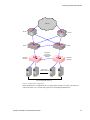
You can configure a second Equalizer as a hot backup (or hot spare) so that if the Equalizer that
currently handles requests (the primary unit) fails, the backup unit automatically takes over. This is
called a failover configuration.
Both Equalizers are configured to default to either the primary or backup role. When a failed unit
comes back online, it assumes the backup role, even if it is designated the default primary.
If you are going to use two Equalizers in a failover configuration, perform the basic configuration
for both units now as described in the previous section.
Additional configuration for failover is performed through the Equalizer Administration Interface,
as described in the section “Setting Up a Failover Configuration” on page 47.
Configuring Routing on Servers
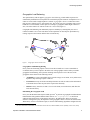
To use Equalizer, you must configure your servers so that Equalizer gateways the packets the
servers send to their clients. If you do not adjust the routing on your servers, a client may not
receive a response when it attempts to contact a virtual cluster. Then, the connection will time out.
When you configure the servers, the default route gateway depends on your Equalizer
configuration:
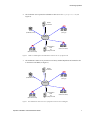
•
If you use a two-network configuration, the gateway for the default route should be
Equalizer’s internal address regardless of the Equalizer model.
•
If you use a single-network configuration on switch-based Equalizers, the gateway for the
default route should be Equalizer’s internal address.
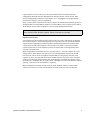
•
If you use a single-network configuration on dual-port Equalizers, the gateway for the
default route should be Equalizer’s external address.
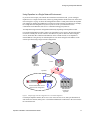
•
If you use a failover configuration, set the gateway for the default route to the failover alias.
For more information, see “Setting Up a Failover Configuration” on page 47.
The way that you configure routing on a server depends on the server’s operating system. To verify
that you have configured a server’s routing correctly, trace the route from the server to a destination
address outside the internal network to ensure that Equalizer gets used as a gateway. On UNIX
systems, use the traceroute utility; on Windows, use tracert.
Configure each server from the system console, not through a telnet session. This will avoid any
disconnects that might otherwise occur as you change the network settings on a server.
Configuring DNS and Firewalls for Geographic Load Balancing
If you are configuring Equalizer to use Envoy for geographic load balancing, you need to configure
your authoritative domain name server to delegate authority to the Envoy sites. If you will use
Equalizer Installation and Administration Guide
29