1
Chapter 1: Overview
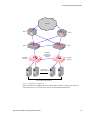
the same outbound NAT setting on both Equalizers. For more information, see “Setting Up a Failover
Configuration” on page 47.
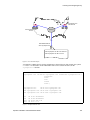
Note – If outbound NAT is enabled, Equalizer processes each server response. If your servers
do not need to initiate outbound connections, disable outbound NAT for improved performance.
Equalizer Configuration Worksheets
This section includes two configuration worksheets:
•
use the “Standard Configuration Worksheet”, below, to prepare to install and configure
Equalizer
•
use the “Special Configuration Worksheet for Using Reserved IP Addresses” on page 18 only
if you plan to use reserved IP addresses (rather than real IP addresses) when you set up
Equalizer
Standard Configuration Worksheet
Before you install and configure Equalizer, write down the answers to all the following questions:
1.
What is your physical network layout?
Will all your servers, Equalizer, and your Internet router reside on a single network? Or will
you use a two-network configuration and split your network into multiple subnets? If you use
two-network configuration, Equalizer will function as the gateway between them and must be
connected to both.
If you don’t have a subnet or separate network available to devote to Equalizer’s internal
network, you can use a single-network topology. For information about using Equalizer with a
single network, refer to “Using Equalizer in a Single Network Environment” on page 11.
2.
Which network will be used as the external network?
Equalizer’s external port is connected to this network, which is connected to the Internet.
Example 1: Single Network
For the class C network 199.146.85.0 with a default netmask of 255.255.255.0, the
external network would be 199.146.85.0. (See Figure 8 on page 11.)
Example 2: Two Class C Networks
If you use two class C networks, 199.146.85.0 and 199.145.90.0, and choose the first
as the external network, the external network would be 199.146.85.0, with a netmask of
(for example) 255.255.0.0. (See Figure 7 on page 10.)
3.
What is Equalizer’s address on the external network?
You can assign any suitable IP address on your external network as Equalizer’s external and
administration address. To administer Equalizer, enter this address in your browser’s URL field.
Example 1: Single Network
Equalizer Administration Address: 199.146.85.2. (See Figure 8 on page 11.)
Example 2: Two Class C Networks
16
Equalizer Installation and Administration Guide