1
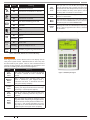
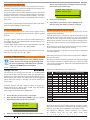
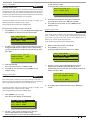
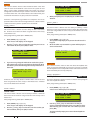
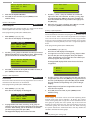
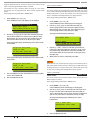
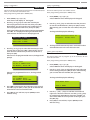
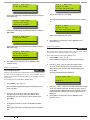
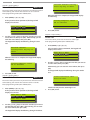
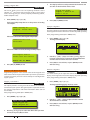
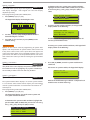
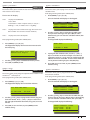
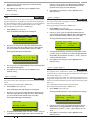
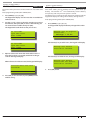
Solution16 Plus User Guide Communication / Reporting Programming options in this section relate to how you alarm syetm will communicate alarm information. Your installer will advise you on the exact makeup and configuration of your system. Comms > Commands > Call/Answer RAS MENU 5-0-1 This menu allows you to initiate a modem call to the installer’s off-site computer for programming changes or updates. Your installer may request that you enter this command so that they can remotely service and configure you system. You should not enter this command unless requested to do so. Comms > Commands > Call Forward On/Off MENU 5-0-2 Comms > Commands > Set Domestic Phone Number Domestic reporting allows the Solution 16Plus control panel to send reports to personal telephone numbers (eg. mobile telephone numbers). Up to three different telephone numbers can be programmed, each having a maximum of 32 digits. A telephone call needs to be acknowledged by the user that answers the incoming call. If the user fails to acknowledge the call, the Solution 16Plus control panel will make another attempt to report until the maximum number of call attempts are reached. To acknowledge the call, the user needs to press the [#] key on their telephone. Enter programming mode (PIN + MENU) then, 1. Domestic Reports Not Enabled. Please contact Your Security Service Provider Enter [MENU] + [5] + [0] + [2]. If the control panel has been configured to report via domestic format, the keypad will display information for telephone number 1. If the call forward status is off, the keypad will display: Call Forward On/Off Call Forward is OFF, To turn ON, Press ON. To Go Back Press OK Domestic Phone Number 1 631728_ Press 0-9 OK to SAVE If the call forward status is on, the keypad will display: 2. Call Forward On/Off Call Forward is ON, To turn OFF, Press OFF. To Go Back Press OK To toggle call forward on, press the [ON] key or press the [OFF] key to turn call forward off. 3. Press [OK] to save and exit, or press [MENU] to cancel. 3. 4331_ Press 0-9 OK to SAVE MENU 5-0-3 4. Reserved for future use Using the numeric keys, enter all the digits of the second telephone number (if required). You can change a single digit by scrolling the cursor left [←] and right [→]. For special characters (eg. , = pause * or # etc), use the [↑] and [↓] keys. To clear all text from the cursor position to the right, press the [OFF] key. Comms > Commands > MENU 5-0-4 Reserved for future use 5. Bosch Security Systems 09/06 BLCC100U Press [OK] to program telephone number 2. Domestic Phone Number 2 Comms > Commands > Email System Log Using the numeric keys, enter all the digits of the first telephone number. You can change a single digit by scrolling the cursor left [←] and right [→]. For special characters (eg. , = pause * or # etc), use the [↑] and [↓] keys. To clear all text from the cursor position to the right, press the [OFF] key. 2. Check Web Email Enter [MENU] + [5] + [1] + [5]. If the control panel is configured to report via domestic format, the keypad will display the following: This menu allows you to turn on and off the call forward feature. When you turn on call forwarding, the Solution 16Plus control panel will automatically activate and de-activate the call forward on and call forward off sequence accordingly when you turn Area 1 All On and off (arm and disarm). Enter programming mode (PIN + MENU) then, 1. MENU 5-1-5 Press [OK] to program telephone number 3. 21