1
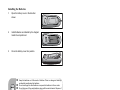
Installation Connecting the Projector 1 VGA Cable (D-Sub to D-Sub) 5 VGA (D-Sub) to HDTV (RCA) Cable 2 Audio Cable 6 S-Video Cable 3 RS-232 Cable 7 Composite Video Cable 4 USB Cable 8 Internet Cable Laptop type 8 2 1 2 ViewSonic Desktop type 1 5 1 3 5 4 6 7 When connecting cable, power cords of both a projector and external equipment should be disconnected from AC outlet. The figure above is a sample connection. This does not mean that all of these devices can or must be connected simultaneously. The cables that come with the projector may differ from the above illustration. The included cables are based on actual shipment delivery. 10 PJD6220/PJD6230/PJD6240