1
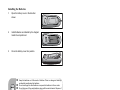
Adjusting the Projector Adjusting the Projector Height Tilt-adjustment foot Elevator foot Elevator button The projector is equipped with an elevator foot to adjust the image height. To raise or lower the image: 1. 2. To raise or lower the image, press the elevator button and raise or lower the front of the projector. Release the button to lock the adjustment. To level the image on the screen, turn the tilt-adjustment foot to fine-tune the height. To avoid damaging the projector, make sure that the elevator foot and tiltadjustment foot are fully retracted before placing the projector in its carrying case. Adjusting the Projector Zoom and Focus Zoom ring Focus ring 1. 2. Focus the image by rotating the focus ring. A still image is recommended for focusing. Adjust the image by sliding the zoom ring. ViewSonic 12 PJD6220/PJD6230/PJD6240