1
6 Monitoring and Controlling Your System
Rack Display Window
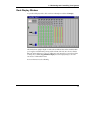
To open the rack display window, click a rack icon in the Explorer and then click Display.
This window shows a graphic display of a rack. It shows which modem cards are installed, which
power supplies are installed and operating, and the node ID of the rack. (Note, however, that the
LED states in this display are for purposes of illustration only.) From here you can select modems
to manage. If you click the Toggle Full Rack Display button, the display changes to show the
current status of all installed modems.
For more information see the online Help.
53