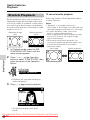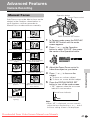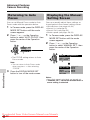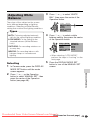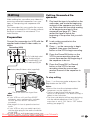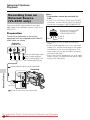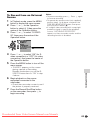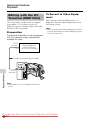
1
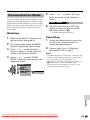
LIQUID CRYSTAL DISPLAY CAMCORDER
VL-Z300S-S
VL-Z100S-S
OPERATION MANUAL
Downloaded From VideoCamera-Manual.com Manuals
Downloaded From VideoCamera-Manual.com Manuals
Before using the camcorder, please read this operation manual
carefully, especially page vi.
OPERATION MANUAL
WARNING
To prevent fire or shock hazard,
do not expose this apparatus to
dripping or splashing. No
objects filled with liquids, such
as vases, should be placed on
the apparatus.
This equipment should be used
with the recommended AC
adapter or battery pack.
ENGLISH
CAUTION
To prevent shock, do not open the
cabinet. No user serviceable parts
inside. Refer servicing to qualified
dealer or service centre.
CAUTION
To prevent electric shocks and
fire hazards, do NOT use any
other power source.
Important:
Audio-visual material may consist
of copyrighted works which must
not be recorded without the
authority of the owner of the
copyright. Please refer to relevant
laws in your country.
Power supply:
This unit can be operated by
connecting it to either the AC
adapter or battery pack. The AC
adapter incorporates the AUTO
VOLTAGE (AC 110–240 V,
50/60 Hz) function.
NOTE
The LCD panel of this camcorder is a very high technology product with
more than 215,000 thin-film transistors*, giving you fine picture detail.
Occasionally, a pixel may appear on the screen as a fixed point of blue,
green, red, or black. Please note that this does not affect the
performance of your camcorder.
*Specifications are subject to change without notice.
Downloaded From VideoCamera-Manual.com Manuals
i
Contents
Supplied Accessories ......................................................................................... v
Optional Accessories .......................................................................................... v
Precautions ........................................................................................................ vi
Operation References
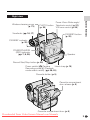
Part Names ............................................................. 1
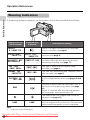
Warning Indicators .................................................. 4
Preparation
Attaching and Removing the Battery Pack ............. 5
Charging the Battery Pack ...................................... 7
Powering the Camcorder from an AC Outlet .......... 8
Inserting and Removing a Cassette ....................... 9
Installing the Lithium Batteries .............................. 10
Selecting the Language
for the On-screen Display .................................. 12
Setting the Date and Time .................................... 13
Using the Lens Cap .............................................. 14
Adjusting the Hand Strap ..................................... 15
Using the Grip ....................................................... 15
Detaching the Lens Hood ..................................... 16
Using the Viewfinder ............................................. 16
Using the LCD Monitor ......................................... 18
Tips on Recording Positions ................................. 19
Basic Operations
Camera Recording
Easy Camera Recording in Full Auto Mode .......... 20
Zooming ................................................................ 21
Power Standby Mode ........................................... 22
Turning on/off the Backlight .................................. 22
Auto Focus ............................................................ 23
Macro Shots .......................................................... 23
Remaining Recording Time Display ..................... 23
Remaining Battery Power Display ........................ 24
Information Display for Battery Usage .................. 24
Playback
Playback ............................................................... 25
Volume Control ...................................................... 26
Still ........................................................................ 26
Video Search ......................................................... 26
Watching Playback on a TV .................................. 27
Downloaded From VideoCamera-Manual.com Manuals
ii
Useful Features
Control Buttons ..................................................... 28
Using the Mode Screens ...................................... 28
Using the Menu Screens ....................................... 29
Camera Recording
Setting the Digital Zoom ....................................... 30
Backlight Compensation (BLC) ............................ 31
Gain-up ................................................................. 32
Fade In and Fade Out ........................................... 33
Quick Return ......................................................... 34
Edit Search ............................................................ 35
Still Recording ....................................................... 35
Digital Image Stabilization (DIS) ........................... 36
Wide Mode ............................................................ 36
Power Save Mode ................................................. 37
Windbreak ............................................................. 37
Self Recording ...................................................... 38
Recording in LP (Long Play Recording) Mode ..... 40
Selecting the 16-bit Audio Recording Mode ......... 41
Playback
Using the Remote Control (Not supplied) ............. 42
Selecting the Date and Time of Recording
Display ................................................................ 43
Picture Effect Playback ......................................... 44
Rotate Playback .................................................... 45
Stretch Playback ................................................... 46
Advanced Features
Camera Recording
Manual Focus ....................................................... 47
Returning to Auto Focus ....................................... 48
Displaying the Manual Setting Screen .................. 48
Adjusting White Balance ....................................... 49
Manual Iris ............................................................ 51
Manual Gain .......................................................... 52
Setting the Shutter Speed ..................................... 53
Tips on Manual Settings ....................................... 54
Setting the Camcorder to Full Auto Mode ............. 54
Scene Menu (Program AE) ................................... 55
Digital Picture Effects ............................................ 56
Downloaded From VideoCamera-Manual.com Manuals
iii
Contents
Advanced Features
Playback
Using the Time Code ............................................ 57
Audio Dubbing Feature ......................................... 58
Selecting the Audio Playback Mode ..................... 60
Editing ................................................................... 61
Recording from an External Source
(VL-Z300 only) .................................................... 62
Editing with the DV Terminal (IEEE1394) .............. 64
Using the Camcorder as a Converter
(VL-Z300 only) .................................................... 66
Appendix
Picture/Backlight Adjustments .............................. 67
Turning off the Confirmation Sound ...................... 68
Setting the Camcorder to Factory Presettings ...... 68
Demonstration Mode ............................................ 69
Useful Information ................................................. 70
Troubleshooting .................................................... 75
Specifications ....................................................... 79
On-screen Display Index ...................................... 80
Index ..................................................................... 82
Note:
• Before requesting service, please read “Troubleshooting” carefully. (See pages 75–
78.)
Downloaded From VideoCamera-Manual.com Manuals
iv
Supplied Accessories
Battery pack
BT-L227
AC adapter
CR1216 type
lithium battery
for camcorder
Lens cap
Power cord
Audio/video/S-video
cable
Optional Accessories
Standard-life
battery pack
BT-L227
External battery with
hand strap
BT-LCA1
Downloaded From VideoCamera-Manual.com Manuals
v
Precautions
• Before recording an important scene,
please perform the recording test, then
playback to check if the scene was recorded properly. If noise occurs, use a
commercially available cleaning tape to
clean the video heads (see page viii).
• When the camcorder is not in use, remember to remove the cassette tape,
turn off the power, and disconnect the
camcorder from the power source.
• Do not aim the lens at the sun.
Do not allow direct sunlight to strike the
camcorder lens, whether or not recording
is in progress, as it may damage the CCD
sensor. Be particularly careful when recording outside.
• Avoid magnetic sources.
Using the camcorder near
strong fluorescent lights,
motors, televisions, or
other magnetic sources
may adversely affect recorded images.
• Using the camcorder near a broadcasting station or other powerful transmission source may cause buzzing or
picture deterioration.
• Always respect prohibitions or restrictions on the use of electronic equipment
on commercial flights or in other sensitive areas.
• Be aware of the temperature and humidity.
You can use your camcorder at 0°C to
L40°C, and at 30% to 80% relative humidity. Do not store the unit in an
unventilated car in the summer, in direct
sunlight, or near
strong heat
sources; this can
result in severe
damage to the unit
casing and circuitry.
• Avoid situations where water, sand, dust
or other foreign matter could get on or
inside the camcorder, and do not use or
leave your camcorder in areas with excessive smoke, steam or moisture.
Such environments can cause malfunctions or cause mildew to form on the
lenses. Be sure to
keep the unit in a
well-ventilated location.
• Avoid shocks and dropping.
Do not drop or otherwise subject the camcorder to hard
shocks or strong vibrations.
Bumping or striking the unit
during recording will generate noise in the recorded image.
• Some small, portable tripods may be difficult to
attach and may not be
sturdy enough to support your camcorder. Be
sure to use only a
strong, stable tripod.
• Avoid placing the
camcorder in close
proximity to lighting
equipment.
The heat from incandescent lights
may deform the
camcorder, or
cause it to malfunction.
• When using your camcorder in a cold
environment, the LCD monitor screen often appears less bright immediately after the power is turned on. This is not a
malfunction. To prevent the camcorder
from becoming too cold, wrap it in a
thick cloth (a blanket, etc.).
Downloaded From VideoCamera-Manual.com Manuals
vi
Dew Formation
• What is “dew formation”?
For example, when bringing the
camcorder indoors after skiing, place it in
a plastic bag.
When cold water is poured into a glass,
dew drops form on the glass. This clinging
of water drops is called dew formation.
• When dew forms in your camcorder.
Dew will gradually form on the head drum
of your camcorder and make the video
tape stick to the head. This causes
damage both to the head and the tape.
When dew forms, recording and playback
may not function properly.
Dew is likely to form in the following
circumstances:
— When moving the camcorder from a
cold place to a warm place.
— When placing the camcorder in a cold
room which is then heated rapidly.
— When moving the camcorder outdoors
from an air conditioned room or car.
— When placing the camcorder in the
direct path of air
blowing from an air
conditioner.
— When placing the
camcorder in a
humid room.
Plastic bag
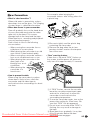
1 Be sure to tightly seal the plastic bag
containing the camcorder.
2 Remove the bag when the air temperature inside it reaches the temperature of the room.
• “Dew” warning feature
If dew forms, the word “DEW” flashes on
the screen, and the power will automatically turn off in approximately 10 seconds.
• How to prevent trouble.
When using the camcorder in a place
where dew is likely to form, allow the
camcorder and the video tape to
acclimatise to the surroundings for about
one hour.
Downloaded From
1 If “DEW” flashes, remove the cassette,
leave the cassette compartment open,
and wait for a few hours to allow the
camcorder to acclimatise to the
surrounding temperature.
2 To use the camcorder again, turn on the
power after waiting for a few hours. Be
sure that “DEW” has disappeared.
3 Do not insert a cassette while “DEW” is
flashing; this may result in damage to
the tape.
4 Since dew forms gradually, it may take
10 to 15 minutes before the dew
VideoCamera-Manual.com Manuals
warning feature engages.
vii
Precautions
Dirty Video Heads
When the video heads have become
clogged with dirt (dust and tape coating
particles),
Striped noise
Mosaic noise
• mosaic-like noise appears on the
playback picture. (See illustrations above.)
• playback pictures do not move.
• during playback, the whole screen
becomes blue.
Using a Cleaning Tape (Commercially Available)
You can clean the video head with a
commercially available cleaning tape.
Notes:
• Excessive use of the cleaning tape may
cause damage to the video heads. Please
read the instructions accompanying the
cleaning tape carefully before using it.
• The fast forward and rewind functions cannot
be used when the cleaning tape is in the
camcorder.
• If the video heads again become clogged
with dirt soon after cleaning, this might be
caused by a damaged tape. In this case,
stop using that cassette immediately.
1
Insert a cleaning tape into the
camcorder.
2
Hold down the Lock button and set
the Power switch to w.
Causes of video head clogging
• High-temperature and high-humidity
environment
• A lot of dust in the air
• Damaged tape
• Worn tape
• Long-time use
• Dew formation
• The video head cleaning screen
appears.
3
Press m on the Operation button to
begin video head cleaning.
• “NOW CLEANING” flashes during
cleaning.
CL EA N I NG
NOW C LE AN I NG
START
If the video heads become clogged, the
v indicator appears on the screen. Contact
the nearest SHARP service centre or your
dealer for further advice.
4
Remove the cleaning tape.
To cancel cleaning, press l.
Downloaded From VideoCamera-Manual.com Manuals
viii
STOP
• After about 20 seconds, video head
cleaning automatically finishes, and
“EJECT THE CASSETTE.” displays.
Operation References
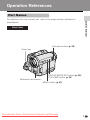
Part Names
Operation References
For details on the use of each part, refer to the page number indicated in
parentheses.
Front view
Operation button (p. 28)
Zoom lens
Monaural microphone
DISPLAY/MODE SET button (p. 28)/
LCD LAMP button (p. 22)
MENU button (p. 29)
Downloaded From VideoCamera-Manual.com Manuals
1
Operation References
Operation References
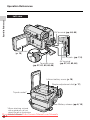
Left view
DV terminal (pp. 64, 66)
LCD monitor
(p. 18)
DC IN jack (pp. 7, 8)
Terminal cover
(pp. 27, 61, 62, 64, 66)
AV terminal
(pp. 27, 61, 62, 66)
Lithium battery cover (p. 10)
Dioptre adjustment dial (p. 17)
Tripod socket*
Battery release (pp. 6, 10)
* When attaching a tripod
with a guide pin, do not
attach the pin to the bottom
of the camcorder.
Downloaded
From VideoCamera-Manual.com
2
Manuals
Right view
PHOTO button
(p. 35)
Operation References
Window cleaning cover
(p. 73)
Power Zoom Wide angle/
Telephoto control (p. 21)/
VOLume control (p. 26)
Viewfinder (pp. 16, 17)
STANDBY button
(p. 22)
STANDBY indicator
(p. 22)
POWER/CHARGE
(RED) indicator
(pp. 7, 8, 20)
Speaker
Record Start/Stop button (p. 20)
Power switch (v Camera
Hand strap (p. 15)
Recording mode/w Playback
mode select switch) (pp. 20, 25)
Cassette holder (p. 9)
Cassette compartment
door release (p. 9)
Cassette compartment door (p. 9)
Downloaded From VideoCamera-Manual.com Manuals
3
Operation References
Operation References
Warning Indicators
If a warning indicator appears on the screen, follow the specified instructions.
Displayed for the
first 3 seconds
Displayed after
3 seconds
Description of warning
There is no video cassette in the camcorder.
Insert a cassette (see page 9).
I NSER T
A CASS E T TE.
E J E C T THE
CAS SE T T E .
E J E C T THE
CAS SE T T E .
The video cassette is defective and should be
removed (see page 9).
CASSE T T E NOT
RE CORDA BL E.
P RO T E C T . T A B
The erasure protect tab on the video cassette
has been slid to the record-protect position,
preventing recording (see page 71).
THE TAPE
ENDS SOON.
T APE END
The tape is about to end. Prepare a new
cassette (see page 9).
CHANGE THE
CAS SE T T E .
T A PE E ND
The tape has reached the end. Replace it with a
new cassette (see page 9).
The battery is almost depleted. Replace it with
a fully charged battery pack (see pages 5 and
6).
BAT T ERY I S
TOO LOW.
DEW
DEW
Dew has formed inside the camcorder. Wait a
few hours for the dew to dry away (see page
vii).
About 10 seconds after this warning appears,
the camcorder automatically turns off.
The video heads are clogged and should be
cleaned (see page viii).
L AMP
L AMP
The fluorescent lamp behind the LCD monitor is
close to the end of its service life. Call your local
authorized Sharp dealer to have it replaced.
Note:
• N indicates a flashing display.
Downloaded From VideoCamera-Manual.com Manuals
4
Preparation
Attaching and
Removing the Battery
Pack
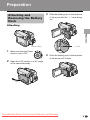
3
Slide the battery pack in the direction
of the arrow with the “m” mark facing
out.
Attaching
Preparation
Power switch
1
2
Make sure that the Power
switch is set to OFF.
“m” mark
4
Push the battery pack in the direction
of the arrow until it clicks.
Open the LCD monitor to a 90° angle
to the camcorder body.
90°
Downloaded From VideoCamera-Manual.com Manuals
5
Preparation
Removing
Preparation
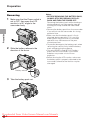
1
Make sure that the Power switch is
set to OFF, then open the LCD
monitor to a 90° angle to the
camcorder body.
90°
2
Slide the battery release in the
direction of the arrow.
Notes:
• BEFORE REMOVING THE BATTERY PACK,
ALWAYS STOP RECORDING OR PLAYBACK AND TURN THE POWER OFF.
Removing the battery pack while shooting or
during playback may damage the tape by
causing it to wrap around the video head
drum.
• Remove the battery pack from the camcorder
if you will not use the camcorder for a long
period of time.
• Make sure that the battery pack is firmly
attached during operation. If it is not, the
battery pack may come off or camcorder
operation may fail because of the poor
contact pressure.
• To prevent damage to the battery pack when
removing, be sure to firmly hold the battery
pack while pressing the release.
• Use only SHARP model BT-L227 battery
packs with this camcorder. Use of other
batteries may create a risk of fire or
explosion.
• Before closing the LCD monitor, make sure
the battery pack is properly attached to the
camcorder, otherwise the monitor may be
damaged.
Battery release
3
Take the battery pack out.
Downloaded From VideoCamera-Manual.com Manuals
6
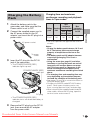
Charging the Battery
Pack
Attach the battery pack to the
camcorder, and make sure that the
Power switch is set to OFF.
2
Connect the supplied power cord to
the AC power socket on the AC
adapter, and insert the AC plug into a
power outlet.
BT-L227
120
145
125
125
• The chart specifies the approximate times in
minutes.
AC power socket
To power
outlet
3
Max.
Max.
continuous
Battery Charging recording time continuous
playback time
time
pack
LCD
LCD
on LCD
closed open
Preparation
1
Charging time and maximum
continuous recording and playback
times in Tape modes
Insert the DC plug into the DC IN
jack of the camcorder.
• The POWER/CHARGE (RED)
indicator lights up red.
POWER/CHARGE (RED)
indicator
DC IN jack
Notes:
• Charge the battery pack between 10°C and
30°C. The battery pack may not charge
properly at temperatures too low or too
high.
• The battery pack and AC adapter become
warm during charging. This is not a
malfunction.
• Using the zoom (see page 21) and other
functions or turning the power on and off
frequently will increase power consumption. This may result in a decrease in the
actual recording time compared to the
maximum continuous recording time listed
above.
• The charging time and recording time may
vary depending on the ambient temperature and the condition of the battery pack.
• See pages 72 and 73 for more information on
using the battery pack.
• Charge only SHARP model BT-L227 battery
packs. Other types of battery packs may
burst, causing personal injury and damage.
• When attaching the supplied audio/video/Svideo cable, remove the DC plug, open the
terminal cover and connect it.
DC plug
• The POWER/CHARGE (RED)
indicator turns off when the battery is
charged.
4
Remove the DC plug from the DC IN
jack, then remove the AC adapter
from the power outlet.
Downloaded From VideoCamera-Manual.com Manuals
7
Preparation
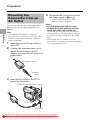
Powering the
Camcorder from an
AC Outlet
Preparation
You can also power the camcorder from a
power outlet by using the supplied AC
adapter.
Note:
• The supplied AC adapter is specially
designed for use with this camcorder, and
should not be used as a power supply for
other camcorders.
1
Make sure that the Power switch is
set to OFF.
2
Connect the supplied power cord to
the AC power socket on the AC
adapter, and insert the AC plug into a
power outlet.
4
Hold down the Lock button and set
the Power switch to v or w.
• The POWER/CHARGE (RED)
indicator lights up green.
Notes:
• BEFORE REMOVING THE DC PLUG,
ALWAYS STOP RECORDING OR PLAYBACK AND TURN THE POWER OFF.
Removing the DC plug while shooting or
during playback may damage the tape by
causing it to wrap around the video head
drum.
• Disconnect the AC adapter from the
camcorder if you will not use the camcorder
for a long period of time.
AC power socket
To power
outlet
3
Insert the DC plug into the DC IN
jack of the camcorder.
POWER/CHARGE (RED) indicator
DC IN jack
DC plug
Downloaded From VideoCamera-Manual.com Manuals
8
Inserting and
Removing a Cassette
Inserting
1
4
Wait for the cassette holder to fully
retract. Close the compartment door
by pressing its centre until it clicks
into place.
• After confirmation sound, the
cassette holder extends and opens
automatically.
Cassette compartment door release
Preparation
Attach the power source to the
camcorder, then slide and hold the
cassette compartment door release
as you open the cassette compartment door.
Removing
Perform step 1 above, then take out the
cassette.
2
Insert a commercially available Mini
DV cassette fully with the window
facing outwards, and with the erasure
protect tab facing upwards.
Erasure protect tab
SAVE
REC
3
Press the “PUSH” mark gently until
the cassette holder clicks into place.
• The cassette holder retracts
automatically.
Notes:
• Do not try to close the cassette compartment
door while the cassette holder is extending or
retracting.
• Be careful not to get your fingers caught in
the cassette holder.
• Do not apply force to the cassette holder
except when pressing the “PUSH” mark to
close it.
• Do not tilt the camcorder or hold it upside
down when you are inserting or removing a
cassette. It may damage the tape.
• Remove the cassette if you will not use the
camcorder for a long period of time.
• If you do not correctly close the cassette
holder in step 3, the cassette protection
mechanism of the camcorder might eject the
cassette. If this happens, repeat the insertion
procedure.
• Do not attempt to pick up the camcorder by
the cassette compartment door.
• If the battery power is too low, you may not
be able to eject the cassette. Replace the
battery pack with a fully charged one.
• You can only use Mini DV cassettes. Large
DV cassettes cannot be used. Be sure to use
Mini DV cassettes with the i mark.
• See page 71 for more information on the
video cassette tapes intended for use with
this camcorder.
Downloaded From VideoCamera-Manual.com Manuals
“PUSH” mark
9
Preparation
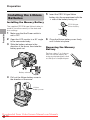
Installing the Lithium
Batteries
5
Insert the CR1216 type lithium
battery into the compartment with the
H side of the battery facing out.
Installing the Memory Battery
CR1216 type
lithium battery
Preparation
The supplied CR1216 type lithium battery is
used to store the memory of the date and
time settings.
1
Make sure that the Power switch is
set to OFF.
2
Open the LCD monitor to a 90° angle
to the camcorder body.
3
Slide the battery release in the
direction of the arrow, then take the
battery pack out.
6
Close the lithium battery cover firmly
until it clicks into place.
Removing the Memory
Battery
Perform steps 1 to 4 above,
then lift out the battery by
using a pointed object such
as the tip of a ballpoint pen.
Battery release
4
Pull out the lithium battery cover in
the direction of the arrow.
Lithium
battery cover
Downloaded From VideoCamera-Manual.com Manuals
10
Installing the Battery to
Remote Control
(Not supplied)
1
2
Insert a pointed object such as the
tip of a ballpoint pen to open the
battery holder.
Place the CR2032 type lithium
battery on the battery holder with the
H side facing down.
CAUTION: Danger of explosion if
battery is incorrectly replaced. For
camcorder, replace only with same or
equivalent type CR1216, for remote
control unit, replace only with same or
equivalent type CR2032, both recommended by the equipment manufacturer.
X KEEP THIS BATTERY
AWAY FROM CHILDREN. IF SWALLOWED, CONSULT A PHYSICIAN
IMMEDIATELY FOR EMERGENCY
TREATMENT.
Z BATTERY MAY EXPLODE
IF MISUSED OR INSTALLED WITH
POLARITY REVERSED. DO NOT
RECHARGE, DISASSEMBLE OR
DISPOSE OF IN FIRE.
Preparation
The remote control (RRMCGA237WJSA)
is not supplied with this camcorder.
Contact the nearest SHARP service
centre or your dealer for purchasing as
specified part.
The CR2032 type lithium battery is used
to power the remote control unit.
Notes on the Use of the Lithium
Battery
• Do not short-circuit, recharge, disassemble,
or heat the lithium battery.
• Should the lithium battery leak, wipe the
battery compartment clean, and then insert a
new battery.
• The lithium batteries will last about one year
under normal usage.
CR2032 type lithium battery
3
Close the battery holder until it
clicks.
Downloaded From VideoCamera-Manual.com Manuals
11
Preparation
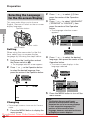
Selecting the Language
for the On-screen Display
This camcorder allows you to choose
English, German or French as the on-screen
display language.
2
3
Operation button
Press l or m to select Z, then
press the centre of the Operation
button.
Press l or m to select “LANGUAGE”
(“SPRACHE” or “LANGUE”), then
press the centre of the Operation
button.
Preparation
• The language selection screen
appears.
OTHE RS 1
DE F AUL T
R EMO T E
BEEP
E X E C UT E
ON
ON
LANGUAGE
D EMO MO D E
R E T U RN
EXECUT E
OFF
Power switch
MENU button
Setting
When using the camcorder for the first
time, select your on-screen display
language by following the steps below.
1
L AN GU A G E
E NG L I SH
DEU T S CH
F RAN Ç A I S
4
Hold down the Lock button and set
the Power switch to v.
• The menu screen displays in the
language selected.
• The language selection screen appears.
2
Press l or m to select the desired
language, then press the centre of the
Operation button.
Press l or m on the Operation button
to select the desired language, then
press the centre of the Operation button.
S PR A C H E
E N G L I SH
DE U T S C H
F RAN Ç A I S
L AN GU A G E
E NG L I SH
DEU T S CH
F RAN Ç A I S
S ON S T I G E S 1
V OR G A B E N
F E R N B DG .
P I E P T ON
PAUSE
5
A US F Ü HR E N
E IN
E IN
SPRACHE
AUSF Ü HREN
D EMO - B E T R .
Z UR Ü C K
A US
Press the MENU button to turn off the
menu screen.
AU TO
Changing
• The example screens shown are for Camera
mode.
1
Press the MENU button to display the
menu screen.
Note:
• The English, German and French
portions of this operation manual are
based on the use of on-screen displays
in their respective languages. The
portions of this manual in other
language, however, are based on the use
of English on-screen displays.
Downloaded From VideoCamera-Manual.com Manuals
12
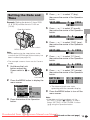
Setting the Date and
Time
Example: Setting the date to 2 June 2005
(2. 6. 2005) and the time to 10:30 am
(10:30).
Operation button
4
Press m or l to select “2” (day),
then press the centre of the Operation
button.
SE T T I NG
5
Power switch
MENU button
Note:
• Before performing the steps below, make
sure that the CR1216 type lithium battery has
been installed (see page 10).
• The example screens shown are for Camera
mode.
1
Hold down the Lock
button and set the
Power switch to v or
w.
8
O T H E RS 2
P OWE R S A V E
T I ME C OD E
T C OUT
12H / 24H
DA T E D I S P .
SE T T I NG
R E T UR N
3
OF F
OF F
OF F
24H
D A T E + T I ME
1. 1 . 2 0 0 4
0 : 00
Press the centre of the Operation
button.
2. 6 . 2 0 0 5
10 : 0 0
Press m or l to select “30” (minute),
then press the centre of the Operation
button.
SE T T I NG
Press the MENU button to display the
menu screen.
2. 6 . 2 0 0 5
0 : 00
Press m or l to select “10” (hour),
then press the centre of the Operation
button.
SE T T I NG
Lock button
2
Press m or l to select “2005” (year),
then press the centre of the Operation
button.
SE T T I NG
7
2. 6 . 2 0 0 4
0 : 00
RETURN
2.
6. 2 0 0 5
1 0 : 30 : 0 0
• The internal clock now starts
operating with the seconds display.
9
Press the MENU button to turn off the
menu screen.
Note:
• If the date and time have been set, the
SETTING 1 screen (T) appears in step 2.
Select “SETTING” in the OTHERS 2 screen
(~) using the Operation button.
Downloaded From VideoCamera-Manual.com Manuals
(Continued on the next page)
13
Preparation
Press m or l to select “6” (month),
then press the centre of the Operation
button.
SE T T I NG
6
2. 1 . 2 0 0 4
0 : 00
Preparation
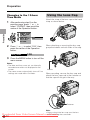
Changing to the 12-hour
Time Mode
1
After performing step 8 on the
previous page, press l or m to
select “12H/24H”, then press the
centre of the Operation button.
Using the Lens Cap
Attach the strap of the lens cap to the hand
strap as shown below.
Preparation
O T H E RS 2
POW E R S A V E
T I ME C OD E
T C OUT
2 4H
12H / 24H
DA T E D I S P . 1 2 H
S E T T I NG
R E T UR N
2
Press l or m to select “12H”, then
press the centre of the Operation
button.
1 2 H 2 4H
3
When attaching or removing the lens cap,
grasp the indents on both sides of the cap.
1 2H
Press the MENU button to turn off the
menu screen.
Notes:
• The date and time, once set, are internally
recorded even when not displayed on the
screen.
• The menu screen automatically turns off if no
settings are made within 5 minutes.
Indents
When recording, remove the lens cap and
attach the lens cap cord to the fastener so
that the cap will not get in the way.
Fastener
Downloaded From
14
Note:
• Always attach the lens cap over the lens
when
not using the camcorder.
VideoCamera-Manual.com
Manuals
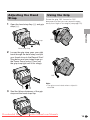
Adjusting the Hand
Strap
1
Open the hand strap flap (1) and grip
strap (2).
Rotate the grip 135° forward or 105°
downward so that you can record images
easily from high or low angle (see page 19).
Preparation
Grip strap
Using the Grip
135°
Hand strap flap
2
Loosen the grip strap, pass your right
hand through the hand strap, and put
your thumb close to the Record Start/
Stop button and your index finger on
the Power Zoom control. Then, pull
the grip strap tight until it fits snugly.
105°
Note:
• The grip cannot rotate when a tripod is
attached.
3
Seal the Velcro® fasteners of the grip
strap and the hand strap flap.
Downloaded From VideoCamera-Manual.com Manuals
15
Preparation
Detaching the Lens
Hood
You can record the subject using the
electronic viewfinder. You can also watch
playback through the viewfinder.
Viewfinder
Preparation
Before using a commercially available
conversion lens, detach the lens hood as
shown below.
Using the Viewfinder
Power switch
1
Pull out the viewfinder completely.
2
Hold down the Lock
button and set the
Power switch to v or
w.
Note:
• You cannot attach the supplied lens hood or
lens cap to a conversion lens.
Lock button
Downloaded From VideoCamera-Manual.com Manuals
16
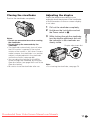
Closing the viewfinder
Adjusting the dioptre
Push in the viewfinder completely.
Adjust the dioptre according to your
eyesight when the picture in the viewfinder
or the characters on the on-screen display
is not clear.
Pull out the viewfinder completely.
3
While looking through the viewfinder,
turn the dioptre adjustment dial until
the indicators in the viewfinder are
clearly visible.
Hold down the Lock button and set
the Power switch to v.
Dioptre adjustment dial
Note:
• For cleaning the viewfinder, see page 73.
Downloaded From VideoCamera-Manual.com Manuals
17
Preparation
Notes:
• Do not use excessive force when moving
the viewfinder.
• Do not pick up the camcorder by the
viewfinder.
• The viewfinder automatically turns off when
the LCD monitor is opened. If the vertical
rotation of the monitor is 180° when Camera
mode, however, the viewfinder is on and the
subject is displayed both in the viewfinder
and on the monitor (see page 38).
• You can adjust the settings on the MENU
screen through the viewfinder by using the
Operation button (see page 28 for use of the
Operation button).
• Be sure to close the viewfinder after use.
1
2
Preparation
Using the LCD
Monitor
• You can also fold the LCD monitor
into the camcorder with the screen
facing out for watching playback on
the monitor.
Preparation
You can use the LCD monitor to play back
recordings that you have made or to watch
the subject during recording.
3
Power switch
LCD monitor
1
Open the LCD monitor to a 90° angle
to the camcorder body.
Hold down the Lock
button and set the
Power switch to v or
w.
• A picture displays on
the LCD monitor.
Lock button
Note:
• Battery consumption is larger when the LCD
monitor is opened. Use the viewfinder instead
of the LCD monitor when you want to save
the battery power.
Closing the LCD monitor
Return the LCD monitor to the vertical 90°
position with the screen facing in, and fold it
into the camcorder into place.
90°
2
Adjust the LCD monitor to an angle
that allow easy viewing of the onscreen picture.
• The LCD monitor rotates 270°
vertically.
180°
90°
Note: Do not try to rotate the LCD
monitor vertically until the monitor is
completely opened.
Notes:
• Do not use excessive force when moving
the LCD monitor.
• When closing the LCD monitor, do not tilt
it; otherwise the monitor may not close
properly and may become damaged.
• Do not pick up the camcorder by the LCD
monitor.
• Do not place the camcorder with the LCD
monitor screen facing down.
• Close the LCD monitor completely with the
screen facing in when not in use.
• Before closing the LCD monitor, make sure
the battery pack is properly attached to the
camcorder, otherwise the monitor may be
damaged.
• When carrying the camcorder in a bag, for
example, close the LCD monitor with the
screen facing in.
Downloaded From VideoCamera-Manual.com Manuals
18
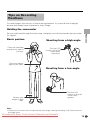
Tips on Recording
Positions
To create images that are easy to watch during playback, try to record with an upright
posture and steady hands to prevent a shaky image.
Holding the camcorder
Basic posture
Shooting from a high angle
Place the viewfinder
eyecup firmly against
your eye.
Turn the LCD
monitor so that the
screen faces
downward.
Place your elbows
against your sides.
Shooting from a low angle
Balance your
weight on both
legs.
Turn the LCD
monitor so that the
screen faces
upward.
Note:
• Take care not to touch the microphone with your fingers during recording. It will cause noise on
the audio track.
Downloaded From VideoCamera-Manual.com Manuals
19
Preparation
Put your right hand through the hand strap, and place your left hand under the camcorder
for support.
Basic
Operations
Basic Operations
Camera Recording
Camera
Recording
3
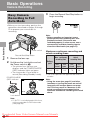
Easy Camera
Recording in Full
Auto Mode
Press the Record Start/Stop button to
begin recording.
Basic Operations
• Before you start recording, perform the
operations described on pages 5 through
19 to prepare your camcorder for
recording.
REC
Note:
• Before recording an important scene,
please perform the recording test, then
playback to check if the scene was
recorded properly. If noise occurs, use a
commercially available cleaning tape to
clean the video heads (see page viii).
Power switch
Maximum continuous recording and
actual recording times
Record Start/Stop button
1
2
Max. continuous
recording time
Remove the lens cap.
Hold down the Lock button and set
the Power switch to v.
• The picture from the lens now
displays and the POWER/CHARGE
(RED) indicator lights up green.
• The camcorder is now ready to
record (Recording Standby mode).
POWER/CHARGE
(RED) indicator
PAUSE
AU TO
Battery
pack
BT-L227
LCD
closed
LCD
open
LCD
closed
LCD
open
145
125
70
60
• The chart specifies the approximate times in
minutes.
Note:
• Using the zoom (see page 21) and other
functions or turning the power on and off
frequently will increase power consumption. This may result in a decrease in the
actual recording time compared to the
maximum continuous recording time listed
above.
Lock button
Note:
• If “AUTO” is not displayed at this time,
set the camcorder to Full Auto mode
(see page 54).
Downloaded From VideoCamera-Manual.com Manuals
20
Actual
recording time
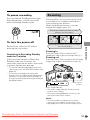
Zooming
To pause recording
Press the Record Start/Stop button again.
Recording pauses, and the camcorder
enters Recording Standby mode.
Zooming allows you to move visually closer
to or further from a subject without physically changing your position.
When using the optical zoom, you can
enlarge the subject up to 10K.
Zooming in (when you want to centre
attention on the subject)
PAUSE
To turn the power off
Zooming out (when you want to include
the surroundings)
Zooming in
Remaining in Recording Standby
mode for 5 minutes
Push the Power Zoom control to the T
(telephoto) side to get a close-up view (1).
If the camcorder remains in Recording
Standby mode over 5 minutes, the
camcorder automatically enters stop mode
to protect the tape from damage.
Push the Power Zoom control to the W (wide
angle) side to get a wide field of view (2).
Zooming out
— To resume Recording Standby mode from
stop mode, press the STANDBY button (see
page 22).
— To resume recording from stop mode
directly, press the Record Start/Stop button.
However, it may need several seconds to
resume recording after pressing the Record
Start/Stop button.
W
T Z OOM
3
Power Zoom
control
Zoom range indicator
• The zoom range indicator shows you the
current zoom setting.
• The zoom speed depends on how far you
push the Power Zoom control.
Notes:
• The camcorder is unable to focus when
zooming in on subjects closer than 1.5 m.
• See page 30 for how to use the digital zoom.
Downloaded From VideoCamera-Manual.com Manuals
21
Basic Operations
Set the Power switch to OFF without
pressing the Lock button.
Basic Operations
Camera Recording
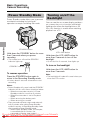
Power Standby Mode
Basic Operations
Power Standby mode allows you to prevent
accidental recording by locking all
operations except cancelling the mode.
Turning on/off the
Backlight
You can see the on-screen display outdoors
on a sunny day or in a location with bright
lighting even when the backlight turns off.
Also, this function is useful when watching
playback on a TV.
STANDBY button
Hold down the STANDBY button for more
than 2 seconds when you pause
recording.
• The screen turns off and the STANDBY
indicator lights up.
STANDBY indicator
LCD LAMP button
Hold down the LCD LAMP button for
more than 2 seconds to turn off the
backlight.
• H will flash for 2 seconds, then lights up.
To turn on the backlight
Hold down the LCD LAMP button for
more than 2 seconds.
To resume operation
Press the STANDBY button again to
return to the Recording Standby mode.
Note:
• The backlight off mode will cancel when you
close the LCD monitor.
• It takes about 2 seconds to be able to start
recording.
Notes:
• Power Standby will cancel and the STANDBY
indicator will turn off in these situations below:
— When the camcorder remains in Power
Standby mode for more than 5 minutes
— When the camcorder is set to Playback
mode
— When removing the battery pack
— When removing a cassette
• The camcorder will enter stop mode automatically 5 minutes after setting Power Standby
mode if it remains in Recording Standby mode
after cancelling Power Standby mode.
— When Power Standby mode, for example,
is cancelled after 3 minutes, the
camcorder
willVideoCamera-Manual.com
enter stop mode if
Downloaded
From
22 recording is not started within 2 minutes.
Manuals
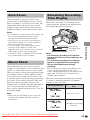
Auto Focus
The camcorder is preset to Auto Focus
mode, which is designed to focus on most
types of subjects. In Auto Focus mode, the
camcorder automatically focuses on the
subject in the centre of the scene. Always
keep the subject in the centre of the scene.
Macro Shots
This camcorder lets you shoot close-up
images of small objects such as flowers and
insects, or make title frames for your videos.
When you want to record a magnified image
of a subject which is within approximately
1.5 m of the camcorder, do not zoom in on
it. Instead, zoom out all the way by pushing
the Power Zoom control to the W side, and
then move the camcorder closer to the
subject until you obtain the desired angle of
view. The camcorder will automatically
focus on the subject when the lens is set for
the widest angle.
Note:
• When you are recording a macro shot, be
sure that the subject receives sufficient
illumination.
When the camcorder is recording, an onscreen indicator displays the approximate
remaining tape time in minutes.
3 0 min
Remaining
recording time
indicator
Notes:
• The remaining recording time indicator
appears when the on-screen indicators are
turned on.
• The remaining recording time indicator
appears 10 seconds after pressing the
Record Start/Stop button to begin
recording.
• The remaining recording time indicator only
shows the approximate time left. Also, it
varies slightly depending on the length of the
tape used. (This function is based on the
DVM60 tape standard.)
When the remaining recording time reaches
1 minute, a warning indicator will appear.
Prepare a new cassette.
Warning indicator
Approx. remaining
time
T HE T A P E
E NDS SOON.
Less than 1 min.
T A PE E ND
CHANGE THE
CAS SE T T E .
The tape has reached
the end.
T APE END
Downloaded From VideoCamera-Manual.com Manuals
23
Basic Operations
Notes:
• If no subject is in the centre of the scene, the
focus area will expand and the subject
nearest the centre will be focused on.
• Auto Focus may not work in the situations
described on page 47. In these situations,
use the manual focus function.
• The camcorder may not be able to focus
correctly if the subject is closer than
approximately 1.5 m. Set the zoom control to
wide angle, and try refocusing again.
• If the lens is dirty or fogged, the camcorder
may not be able to focus correctly.
Remaining Recording
Time Display
Basic Operations
Camera Recording
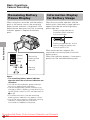
Remaining Battery
Power Display
When using the camcorder with the battery
pack as the power source, the remaining
battery power indicator is displayed. If the
battery power becomes very low, a warning
indicator appears. Replace the battery
pack.
Information Display
for Battery Usage
When the camcorder operates with the
battery pack, the battery usage indicator
appears beside the remaining battery
power indicator.
Battery usage indicator for
the battery pack attached
to the camcorder
Basic Operations
Battery usage indicator for the
optional external battery with
hand strap BT-LCA1
(Green)
(Green)
(Red)
BAT T ERY I S
TOO LOW.
Remaining
battery power
indicator
When both indicators appear, the
camcorder consumes power from both
battery packs.
When one indicator appears, it consumes
power from the indicated battery pack.
Warning
indicator
Notes:
• The remaining battery power indicator
appears when the on-screen indicators are
turned on.
• Use the remaining battery power indicator
only as an approximate indication.
• The remaining battery power indicator may
change to either a higher or lower level if you
set the Power switch to OFF and then back to
v or w.
• In cold environments, the red remaining
battery power indicator may appear sooner.
• Use of the zoom functions when the warning
indicator is displayed may cause the
camcorder to suddenly lose power.
Downloaded From VideoCamera-Manual.com Manuals
24
Basic Operations
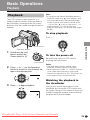
Playback
Playback
The LCD monitor screen functions as a
handy playback monitor. Nothing needs to
be connected, allowing instant on-screen
playback with the sound through the built-in
speaker.
Note:
• If you press the Record Start/Stop button in
Playback mode, the “g” mark appears and
the camcorder enters Recording Standby
mode. If you do not intend to record, press
l to turn the “g” mark off, then press m to
begin playback. This will ensure your
previous recording is not erased (see pages
62–65).
To stop playback
Press l.
Basic Operations
Power switch
Operation button
1
Hold down the Lock
button and set the
Power switch to w.
To turn the power off
Set the Power switch to OFF without
pressing the Lock button.
Lock button
2
3
Press j (or k) on the Operation
button to rewind (or fast forward) the
tape to the desired point.
Notes:
• The tape automatically rewinds when
playback reaches the end of the tape.
• When selecting “5 MIN” or “10 MIN” in power
save mode and remaining in stop mode
without any operation for 5 or 10 minutes, the
camcorder will turn off automatically.
Watching the playback in
the viewfinder
Press m to begin playback.
You can also watch the playback in the
viewfinder by closing the LCD monitor with
the screen facing in. You cannot monitor the
sound through the speaker when watching
the playback in the viewfinder.
Downloaded From VideoCamera-Manual.com Manuals
25
Basic Operations
Playback
Volume Control
Video Search
Basic Operations
When the camcorder is in Playback mode,
push the Volume control to the L or + side
to increase (1) or decrease (2) the
volume.
The volume level indicator will appear on
the LCD screen during adjustment only.
Once the Volume control is released, the
volume level indicator will disappear shortly
afterwards.
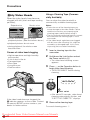
The video search function makes it easy to
search for a desired scene on the tape.
Searching for a Scene Near
the Current Tape Position
1
• The playback picture fast forwards
(or reverses).
2
VOLUME
Decrease
Volume
control
Increase
Still
During playback, press m on the Operation
button.
To return to normal playback, press m
again.
Notes:
• The sound is off in Still mode.
• To protect the tape, the camcorder automatically returns to normal playback if it is left in
Still mode for more than 5 minutes.
When you find the scene, press m to
return to normal playback.
Searching for a Scene Far
from the Current Tape Position
1
The still function allows you to pause
playback.
During playback, press k (or j) on
the Operation button.
During fast forward (or rewind), press
and hold k (or j) on the Operation
button.
• The fast forward (or rewind) picture
displays.
2
If the scene is still rather far from the
current tape position, release the
Operation button to normal fast
forward (or rewind).
3
Repeat steps 1 and 2 above until you
find the scene.
4
Press m to begin normal playback.
Notes:
• The sound is off during search.
• You may experience picture noise during
search. This is not a malfunction.
Downloaded From VideoCamera-Manual.com Manuals
26
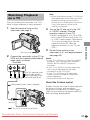
Watching Playback
on a TV
Note:
• Check that the camcorder, TV, VCR and
other equipment to be used are turned
off before making any connections.
Picture noise or malfunction may occur
if any of the above is left on while
making a connection.
You can connect the camcorder to a TV to
allow a larger audience to enjoy playback.
1
Open the terminal cover on the
camcorder (see page 2).
3
Turn on the TV and set it to the “AV”
or “VIDEO” channel. (See the
operation manual of your TV.)
Terminal cover
2
Connect the camcorder to your TV (or
VCR) with the supplied audio/video/Svideo cable, as shown.
TV or VCR
S-VIDEO
VIDEO (MONO) L-AUDIO-R
AV-IN
Black: To S-video input socket
Yellow: To video input jack
White: To audio input (L) jack
Red: To audio input (R) jack
4
Set the Power switch on the
camcorder to w, and begin playback
(see page 25).
Notes:
• If your TV or VCR has a 21-pin Euro-SCART
connector, use a commercially available
RCA/21-pin Euro-SCART conversion
connector.
• If your TV or VCR has only one audio input
jack, use the white plug for the audio
connection on the TV or VCR.
• If your TV or VCR has an S-video input
socket, you do not need to connect the
yellow video plug.
• Close the terminal cover after use.
About the S-video socket
Audio/video/S-video cable (supplied)
S-video sockets are used to separately pass
the chroma (colour) and luminance
(brightness) components of video signals.
They serve to improve the picture quality in
both recording and playback.
To AV
terminal
: The arrow shows the signal flow.
Downloaded From VideoCamera-Manual.com Manuals
27
Basic Operations
• When connecting to a TV via a VCR,
turn on the VCR and set it to the “AV”
or “LINE” input channel. Operate the
TV as you normally do to view the
signal from the VCR. (See the
operation manuals of your TV and
VCR.)
Useful
Features
Useful Features
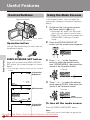
Control Buttons
Operation button
Using the Mode Screens
In the mode screens, you can adjust the
camcorder settings by using the Operation
button.
1
• See pages 80 and 81 for the mode
items you can select in each mode.
• Steps 2 to 4 show how to change the
SCENE MENU setting in Camera
mode.
Power switch
DISPLAY/MODE SET button
2
Operation button
Hold down the Lock button and set
the Power switch to v or w.
Press the DISPLAY/MODE SET
button until the mode screen appears.
Use the Operation button to select and set
the desired setting.
Useful Features
M A NU A L S E T E X E C U T E
F OCUS
AUTO F OCUS
BLC / GA I N
DISPLAY/MODE SET button
3
Each time you press the DISPLAY/MODE
SET button, the screen changes as shown
below.
Press l or m on the Operation
button to select the desired mode
item (SCENE MENU), then press the
centre of the Operation button.
• The example screens shown are for Camera
mode.
Information
PAUSE
display on
2.
AU TO
3 0min
Example
AUTO F OCUS
BLC / GA I N
FADE
SC E N E M E NU OF F
4
6. 2 00 5
10 : 30
Mode screen
Press l or m to select the desired
mode setting (DUSK), then press the
centre of the Operation button.
PAUSE
Example
MANU A L S E T E X E C U T E
F OCUS
AUTO F OCUS
BLC / GA I N
AU TO
3 0min
SEL ECT
AUTO F OCUS
BLC / GA I N
FADE
S C E N E M E N U DU S K
SET
PAUSE
Information
display off
To turn off the mode screen
Press the DISPLAY/MODE SET button.
Note:
• Items that are not selectable are greyed out.
Downloaded From VideoCamera-Manual.com Manuals
28
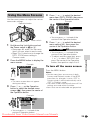
Using the Menu Screens
4
Use the menu screens to adjust the various
camcorder settings.
Press l or m to select the desired
menu item (DGTL ZOOM), then press
the centre of the Operation button.
Example
Operation button
S E T T I NG 1
Q K . R E T U RN
W I D E MOD E
DG T L Z O OM OF F
TAPE SPEE D 4 0
R E T URN
500
• You can press k, instead of the
centre of the Operation button.
Power switch
MENU button
1
Hold down the Lock button and set
the Power switch to v or w.
• See pages 80 and 81 for the menu
items you can select in each mode.
• Steps 2 to 5 show how to change the
DGTL ZOOM menu setting in
Camera mode.
Press the MENU button to display the
menu screen.
Press l or m to select the desired
menu setting (40), then press the
centre of the Operation button.
DG T L ZOOM
40
• You can press j, instead of the
centre of the Operation button.
• To adjust another menu item, press
l or m to select “RETURN” and
press the centre of the Operation
button, then perform steps 3 to 5.
Example
S E T T I NG 1
Q K . R E T U RN
W I D E MOD E
DG T L Z O OM
TAPE SPEE D
R E T URN
S T AR T
OF F
OF F
SP
Note:
• The menu screen does not appear
during recording.
3
Press l or m on the Operation
button to select the desired menu
screen (T), then press the centre of
the Operation button.
To turn off the menu screen
Press the MENU button.
Notes:
• Certain menu items are common in both
Camera and Playback modes. If the BEEP
menu item, for example, is set to “OFF” in
Camera mode, it will be automatically set to
“OFF” in Playback mode.
• The menu screen automatically turns off if no
settings are made within 5 minutes.
• Items that are not selectable are greyed out.
Example
S E T T I NG 1
QK. RETURN START
OF F
W I D E MOD E
DG T L Z O OM O F F
TAPE SPEE D SP
R E T URN
• You can press k, instead of the
centre of Operation button.
Downloaded From VideoCamera-Manual.com Manuals
29
Useful Features
2
5
Useful Features
Useful Features
Camera Recording
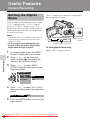
Setting the Digital
Zoom
The “D” digital zoom indicator is displayed
during digital zooming.
You can select three different zoom ranges:
1–10K (optical zoom), 10–40K (digital
zoom) or 10–500K (digital zoom). The
digital zoom allows you to record powerful
close-up pictures with the same operation
as normal zooming.
Useful Features
Notes:
• The digital zoom is in addition to the optical
zoom giving a combined maximum zoom
range of 1–500K.
• As the image is enlarged digitally, the
picture quality decreases when higher
digital zoom settings are used.
W
T D- Z OOM 2 5
Digital zoom indicator
To use optical zoom only
Select “OFF” in step 4 above.
1
In Camera mode, press the MENU
button to display the menu screen.
2
Press l or m on the Operation
button to select T, then press the
centre of the Operation button.
3
Press l or m to select “DGTL
ZOOM”, then press the centre of the
Operation button.
S E T T I NG 1
Q K . R E T U RN
W I D E MOD E
DG T L Z O OM OF F
TAPE SPEE D 4 0
R E T URN
500
4
Press l or m to select “40” or “500”,
then press the centre of the Operation
button.
DG T L ZOOM
5
40
Press the MENU button to turn off the
menu screen.
Downloaded From VideoCamera-Manual.com Manuals
30
Power Zoom
control
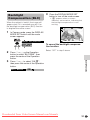
Backlight
Compensation (BLC)
When the subject is backlit, the image will
appear dark if it is recorded normally. Use
the backlight compensation (BLC) function
to brighten the entire screen.
1
4
Press the DISPLAY/MODE SET
button to turn off the mode screen.
• “x” appears when on-screen
indicators are turned on, indicating that
the backlight compensation is now
working.
PAUSE
In Camera mode, press the DISPLAY/
MODE SET button until the mode
screen appears.
M A NU A L S E T E X E C U T E
F OCUS
AUTO F OCUS
BLC / GA I N
AU TO
3 0min
To cancel the backlight compensation function
Select “OFF” in step 3 above.
Press l or m on the Operation
button to select “BLC/GAIN”, then
press the centre of the Operation
button.
3
Press l or m to select “ON x”,
then press the centre of the Operation
button.
BLC / GA I N
Useful Features
2
ON
Downloaded From VideoCamera-Manual.com Manuals
31
Useful Features
Camera Recording
To cancel the gain-up function
Gain-up
When you are recording in a dark or poorly
illuminated location, “LIGHT” is displayed
on the screen. Use the gain-up function to
record a brighter picture.
Note:
• At locations where lighting is adequate,
“LIGHT” will not appear. The gain-up function
cannot be used in this case.
1
In Camera mode, press the DISPLAY/
MODE SET button until the mode
screen appears.
Select “OFF” in step 3 above.
Notes:
• You may experience some picture noise in
Gain-up mode, which increases when the
e appears.
• When the e indicator appears, you may
get a shadow image behind a subject that is
moving around a lot.
• Fine brightness adjustments are possible
when using manual iris (see page 51).
• The e indicator will disappear and
Gain-up mode will cancel if you aim the
camcorder in a bright location.
Useful Features
MANU A L S E T E X E C U T E
F OCUS
AUTO F OCUS
BLC / GA I N
2
Press l or m on the Operation
button to select “BLC/GAIN”, then
press the centre of the Operation
button.
3
Press l or m to select “ON e”,
then press the centre of the Operation
button.
BLC / GA I N
4
ON
Press the DISPLAY/MODE SET
button to turn off the mode screen.
• “e” appears when on-screen
indicators are turned on, indicating that
the gain-up function is now working.
PAUSE
AU T O
3 0min
min
Downloaded From VideoCamera-Manual.com Manuals
32
Fade In and Fade Out
The fade function allows you to gradually
bring the image and sound in or out at the
beginning or end of a scene for creating
scene transitions. This is especially effective
in creating a dramatic change in scenery.
4
Press the DISPLAY/MODE SET
button until on-screen indicators
appear.
5
Press the Record Start/Stop button to
begin recording.
• The picture turns white, and the
image and sound fade in.
Operation button
REC
FADE I N
AU TO
3 0min
min
DISPLAY/MODE
SET button
Record Start/Stop
button
6
Press the Record Start/Stop button at
the point where you wish to stop
recording.
REC
F A D E OUT
Fade out
Using
1
2
In Camera mode, press the DISPLAY/
MODE SET button until the mode
screen appears.
Press l or m on the Operation
button to select “FADE”, then press
the centre of the Operation button.
F OCUS
AUTO F OCUS
BLC / GA I N
FADE
OF F
3
Press l or m to select “ON”, then
press the centre of the Operation
button.
Downloaded From
AU TO
2 7min
7 min
To cancel Fade mode
Select “OFF” in step 3 above.
To use Fade Out only
1
During camera recording, press the
DISPLAY/MODE SET button until the
mode screen appears.
2
3
Perform steps 2 and 3 in “Using”.
Press the Record Start/Stop button at
the point where you wish to stop
recording.
Note:
• Fade mode automatically cancels after Fade
Out.
VideoCamera-Manual.com
Manuals
33
Useful Features
• The image and sound fade out as the
picture gradually turns white. The
camcorder then returns to Recording
Standby mode.
Fade in
Useful Features
Camera Recording
Quick Return
If while playing back your tape you want to
quickly return to the last recorded scene
and start recording again, use the quick
return function.
1
In Recording Standby mode, press
the MENU button to display the menu
screen.
2
Press l or m on the Operation
button to select T, then press the
centre of the Operation button.
3
Press l or m to select “QK.
RETURN”, then press the centre of
the Operation button.
5
Press the MENU button to turn off the
menu screen.
Notes:
• To cancel the quick return function while
“SEARCH” is flashing, press the centre of
Operation button twice.
• Quick return will not work if you remove the
cassette and reload it after recording or if
nothing has been recorded since loading.
• When the camcorder remains in Recording
Standby mode for more than 5 minutes and
enters stop mode, quick return will not work.
Useful Features
S E T T I NG 1
S T AR T
Q K . R E T U RN
S T OP
W I D E MOD E
DG T L Z O OM
TAPE SPEE D
R E T URN
4
Press l or m to select “START”,
then press the centre of the Operation
button.
• “SEARCH” flashes, and the tape
begins fast forwarding or rewinding
to the end of the last recorded scene.
SE ARCH
• When the tape reaches the end of
the last recorded scene, “FINISHED”
is displayed, and the camcorder
enters Recording Standby mode.
Downloaded From VideoCamera-Manual.com Manuals
34
Edit Search
The edit search function lets you search,
without switching from Camera mode to
Playback mode, for the point on the tape
where you wish to start recording next.
Still Recording
You can record continuous still images of
subjects.
1
In Recording Standby
mode, press the PHOTO
button fully.
• A still image of the
subject is displayed.
2
Operation button
1
When you find the point where you
want to begin recording, release the
button.
• The still image of the
subject will be recorded.
• During still recording,
“RECORDED ON TAPE”
appears on the screen.
To pause recording
Press the Record Start/Stop button.
To cancel the still image
Press the PHOTO button fully.
Notes:
• Still Recording can also be used during
recording by pressing the PHOTO button
fully.
• The picture quality in Still Recording function
will be slightly lower than normal pictures.
Notes:
• The sound is off during search.
• Forward edit search is performed at the same
speed as normal playback, and reverse edit
search at 6.5 times the normal playback.
• You may experience picture noise during
reverse edit search.
• When the camcorder remains in Recording
Standby mode for more than 5 minutes and
enters stop mode, edit search will not work.
Downloaded From VideoCamera-Manual.com Manuals
35
Useful Features
2
In Recording
Standby mode,
press and hold
down j (reverse
edit search) or k
(forward edit
search) on the
Operation button.
Press the Record Start/
Stop button.
Useful Features
Camera Recording
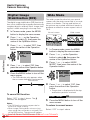
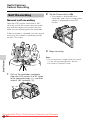
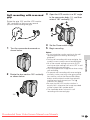
Digital Image
Stabilization (DIS)
Wide Mode
The digital image stabilization (DIS) function allows you to stabilize the image by electronically
compensating for relatively minor image shaking that is often annoying in close-up shots.
1
In Camera mode, press the MENU
button to display the menu screen.
2
Press l or m on the Operation
button to select Y, then press the
centre of the Operation button.
3
Press l or m to select “DIS”, then
press the centre of the Operation
button.
Useful Features
S E T T I NG 2
ON
DIS
A U D I O MO D E O F F
W I ND
R E T URN
4
Normal screen
Wide screen
1
In Camera mode, press the MENU
button to display the menu screen.
2
Press l or m on the Operation
button to select T, then press the
centre of the Operation button.
3
Press l or m to select “WIDE
MODE”, then press the centre of the
Operation button.
Press l or m to select “ON”, then
press the centre of the Operation button.
DIS
5
The wide screen function lets you record
scenes with the wide-screen feel of a movie
shown in a theater. The top and bottom of
the picture are masked with black bands to
produce an effective screen aspect ratio of
16:9.
ON
S E T T I NG 1
Q K . R E T U RN
W I D E MOD E
OF F
DG T L Z O OM ON
TAPE SPEE D
R E T URN
Press the MENU button to turn off the
menu screen.
• The DIS indicator only appears when
the on-screen indicators are turned on.
DIS indicator
PAUSE
4
• The picture is displayed with the top
and bottom portions masked.
To cancel DIS function
Select “OFF” in step 4 above. The z
indicator will disappear.
Press l or m to select “ON”, then
press the centre of the Operation
button.
WIDE MODE
5
ON
Press the MENU button to turn off the
menu screen.
Notes:
• The DIS function cannot compensate for
To return to normal screen
excessive image shaking.
• When image shaking does not occur (e.g.
Select “OFF” in step 4 above.
when using the camcorder on a tripod), turn
off the DIS function. The picture will appear
Downloaded
From
VideoCamera-Manual.com
Manuals
more natural
when
the DIS function is off.
36
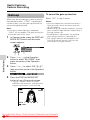
Power Save Mode
Power save mode will turn off the
camcorder automatically to save battery
power when the camcorder is not in use for
5 or 10 minutes.
Note:
• To resume recording or playback, set the
Power switch to OFF, then back to v or w.
• The example screens shown are for Camera
mode.
Turn on the camcorder, then press
the MENU button to display the menu
screen.
2
Press l or m on the Operation
button to select ~, then press the
centre of the Operation button.
3
Press l or m to select “POWER
SAVE”, then press the centre of the
Operation button.
OTHE RS 2
POW E R S A V E O F F
T I ME CO D E
5 MIN
T C OU T
1 0 MI N
12H / 24H
DA T E D I S P .
S E T T I NG
R E T UR N
4
Press l or m to select “5 MIN” or “10
MIN”, then press the centre of the
Operation button.
P OWE R S A V E
5
5 MI N
Press the MENU button to turn off the
menu screen.
To cancel the power save mode
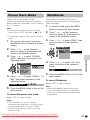
The windbreak function allows you to
reduce annoying noise from strong winds
when recording.
1
In Camera mode, press the MENU
button to display the menu screen.
2
Press l or m on the Operation
button to select Y, then press the
centre of the Operation button.
3
Press l or m to select “WIND”, then
press the centre of the Operation
button.
S E T T I NG 2
DIS
A UD I O MOD E
OF F
W I ND
R E T U RN
ON
4
Press l or m to select “ON”, then
press the centre of the Operation
button.
W I ND
5
Useful Features
1
Windbreak
ON
Press the MENU button to turn off the
menu screen.
To cancel Windbreak
Select “OFF” in step 4 above.
Note:
• Keep the windbreak function off during
normal recording. If left on, the recorded
audio may sound somewhat muffled when
played back.
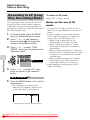
Select “OFF” in step 4 above.
Notes:
• The camcorder will not turn off when
recording or playing back. It will also not turn
off when inputting AV or DV for VL-Z300.
• The camcorder will turn off prior to Power
Standby mode.
Downloaded From VideoCamera-Manual.com Manuals
37
Useful Features
Camera Recording
Self Recording
2
Set the Power switch to v.
• The subject is displayed in the
viewfinder, and a mirror image of the
subject is displayed on the LCD
monitor.
Normal self recording
Open the LCD monitor and rotate it 180°
vertically so that the screen faces the other
way and the subject can monitor the shot
while you are recording with the viewfinder.
If the camcorder is steadied, you can record
yourself in the scene by watching yourself
on the LCD monitor.
3
Begin recording.
Useful Features
Note:
• You can play back images while the monitor
is in the self recording position. Set the
camcorder to Playback mode.
1
Pull out the viewfinder completely.
Open the LCD monitor to a 90° angle
to the camcorder body (1), and then
rotate it 180° vertically (2).
180°
90°
Downloaded From VideoCamera-Manual.com Manuals
38
Self recording with reversed
grip
3
Open the LCD monitor to a 90° angle
to the camcorder body (1), and then
rotate it 180° vertically (2).
Rotate the grip 105° and the LCD monitor
180° vertically so that you can record
yourself while holding the grip.
90°
180°
1
Rotate the lens section 105° vertically
as shown below.
4
5
Set the Power switch to v.
Begin recording.
Notes:
• Do not rotate the monitor section to the self
recording position during recording or
playback.
• During self recording with reversed grip, the
mode or menu screen cannot be displayed.
• All of the manual settings are set to AUTO
and some other settings will set to OFF in self
recording with reversed grip.
• You may experience image noise when using
self recording.
• To operate self recording with reversed grip
correctly, make sure to turn the grip and the
lens section so that the Record Start/Stop
button and the tripod socket face upward,
and the lens faces toward you. The I
indicator will appear.
• Be sure that the LCD monitor rotation is
exactly 180°, otherwise the image recorded
will be rotated 180° upside-down.
• The viewfinder does not work in self
recording with reversed grip.
105°
Downloaded From VideoCamera-Manual.com Manuals
39
Useful Features
2
Turn the camcorder downward as
shown below.
Useful Features
Camera Recording
Recording in LP (Long
Play Recording) Mode
Useful Features
This camcorder allows you to record in LP
(Long Play Recording) mode for approximately 50% more recording time with the
same picture quality as that in SP (Standard
Play Recording) mode.
1
In Camera mode, press the MENU
button to display the menu screen.
2
Press l or m on the Operation
button to select T, then press the
centre of the Operation button.
3
Press l or m to select “TAPE
SPEED”, then press the centre of the
Operation button.
S E T T I NG 1
QK . R E T URN
W I D E MOD E
D G T L Z O OM
TAPE SPEE D SP
LP
RE T URN
4
To return to SP mode
Select “SP” in step 4 above.
Notes on the use of LP
mode
• To record in LP mode, be sure to use a
Mini DV cassette labelled for use with LP
mode.
• Frozen images, mosaic-pattern picture
noise, audio interruptions or audio loss
may occur in the following cases:
—When using a tape which is not
designated for use with LP mode.
—When a tape recorded in LP mode
under high temperature conditions is
played back.
—When a tape recorded in LP mode with
the camcorder is played back on a Mini
DV player or camcorder from another
manufacturer.
—When a tape recorded in LP mode is
played back on a Mini DV player or
camcorder without an LP function.
• Audio dubbing is not possible with LP
mode recording.
Press l or m to select “LP”, then
press the centre of the Operation
button.
T AP E SP E ED LP
5
Press the MENU button to turn off the
menu screen.
• The long play recording mode
indicator only appears when the onscreen indicators are turned on.
LP
P AT UA SP E
Long play recording mode indicator
Downloaded From VideoCamera-Manual.com Manuals
40
Selecting the 16-bit
Audio Recording
Mode
The camcorder normally records audio in
the 12-bit audio recording mode. For higherquality audio recording, select the 16-bit
audio recording mode.
1
In Camera mode, press the MENU
button to display the menu screen.
2
Press l or m on the Operation
button to select Y, then press the
centre of the Operation button.
3
Press l or m to select “AUDIO
MODE”, then press the centre of the
Operation button.
Press l or m to select “16bit”, then
press the centre of the Operation
button.
AUD I O MODE 1 6 bit
5
Press the MENU button to turn off the
menu screen.
• The 16-bit audio recording mode
indicator only appears when the onscreen indicators are turned on.
P AT UA SP E
1 6 bit
16-bit audio recording mode indicator
To return to 12-bit audio recording
mode
Select “12bit” in step 4 above.
Note:
• When using Audio Dubbing with 16-bit audio
recordings, both the dubbed and original
sounds will be recorded in mono (see page
58).
Downloaded From VideoCamera-Manual.com Manuals
41
Useful Features
S E T T I NG 2
DIS
A U D I O MO D E 1 2 bit
1 6 bit
W I ND
R E T URN
4
Useful
Features
Useful Features
Playback
Playback
Using the Remote
Control
(Not Supplied)
Operating
Aim the remote control at the remote sensor
of the camcorder, and press the control
buttons to operate.
The remote control (RRMCGA237WJSA) is
not supplied with this camcorder. Contact
the nearest SHARP service centre or your
dealer for purchasing as specified part.
Press the MENU button to display the
menu screen.
2
Press l or m on the Operation
button to select Z, then press the
centre of the Operation button.
3
Press l or m to select “REMOTE”,
then press the centre of the Operation
button.
Useful Features
1
5
• The example screens shown are for
Playback mode.
m
Activating
Remote sensor
ZOOM (W/T) buttons
OTHE RS 1
DE F AUL T
ON
R EMO T E
BEEP
OF F
L A NGU A G E
*S - V I D E O I N
R E T U RN
TAPE REC START/STOP button
* CARD REC button
* CARD PLAY/MULTI
button
SLOW button
FF button
PLAY/STILL button
* “S-VIDEO IN” does not appear with
VL-Z100.
4
Press l or m to select “ON”, then
press the centre of the Operation
button.
REMOT E
5
VOLUME +/L
buttons
T/C (Time Code)
button
DATE button
STOP button
REW button
Notes:
• Be careful not to expose the remote sensor to
direct sunlight or strong interior lighting, as
this may prevent the remote control from
operating properly.
• Be sure that there are no obstacles between
the remote control and the remote sensor.
• The
buttons with an asterisk mark (*) do not
VideoCamera-Manual.com
Manuals
work with this camcorder.
Press the MENU button to turn off the
menu screen.
Downloaded From
42
ON
Advance/reverse
buttons
* Shift buttons
Selecting the Date
and Time of
Recording Display
5
Press the MENU button until the date
(or date and time) appears.
2.
Follow the procedure below to select the
date, or both the date and time, of recording
display on the screen. You can display the
date and time during both recording and
playback.
• The example screens shown are for Playback
mode.
Press the MENU button to display the
menu screen.
2
Press l or m on the Operation
button to select ~, then press the
centre of the Operation button.
3
Press l or m to select “DATE DISP.”,
then press the centre of the Operation
button.
STOP
R EW
6. 200 5
FF
Notes:
• The date (or date and time) appears when
the on-screen indicators are turned on.
• Before recording, make sure that the date
and time have been correctly set. If they have
not been set, the display will be left blank
when playing back the recording. (The
display will also be left blank for unrecorded
or damaged portions of the tape.)
• In Playback mode, the current date and time
are displayed when the tape is not being
played back.
• You can also press the DATE button on the
remote control (not supplied) to display the
date (or date and time).
Useful Features
1
PLAY
O T H E RS 2
POW E R S A V E
T I ME C O D E
T C OUT
12H / 24H
D A T E D I S P . D A T E + T I ME
S E T T I NG
DA T E
R E T URN
OF F
4
Press l or m to select the desired
setting, then press the centre of the
Operation button.
DATE D I S P. DA T E
Downloaded From VideoCamera-Manual.com Manuals
43
Useful Features
Playback
Picture Effect
Playback
These picture effects let you play back
images with a more dramatic effect.
Types
Useful Features
B/W: The picture is displayed in
black-and-white.
SEPIA: The picture is displayed in
sepia colour similar to that of an old
photograph.
SOLARI: The contrast of the subject
is enhanced, creating an unique
artistic image.
NEGA: The blacks and whites of the
image are reversed and colours of
the image are inverted.
1
During playback, press the DISPLAY/
MODE SET button until the mode
screen appears.
2
Press l or m on the Operation
button to select “PIC. EFFECT”, then
press the centre of the Operation
button.
4
Press the DISPLAY/MODE SET
button to turn off the mode screen.
To cancel picture effect playback
Select “OFF” in step 3 above.
Note:
• Video images in picture effect playback
mode cannot be transferred via DV cable to a
personal computer.
P I C . E F F E C T OF F
AU D I O DU B
STRETCH PB
3
Press l or m to select the desired
picture effect, then press the centre of
the Operation button.
P I C. E F F E C T B W
Downloaded From VideoCamera-Manual.com Manuals
44
Rotate Playback
This function allows you to play back
images rotated 180°.
1
In Playback mode, press the MENU
button to display the menu screen.
2
Press l or m on the Operation
button to select V, then press the
centre of the Operation button.
3
Press l or m to select “ROTATE
PB”, then press the centre of the
Operation button.
Notes:
• When executing rotate playback during
playback, playback will stop. Press m to
begin rotate playback.
• Even if the camcorder is in rotate playback
mode, the image output via a DV connection
will display as normal playback.
• When you want to display the menu screen
during rotate playback, press the centre of
the Operation button.
• In rotate playback mode, you cannot perform
picture effect playback.
• Rotate playback indicator appears.
of the Operation button.
P L AY BACK SE T
ROTA T E PB E X+ ECUT E
AUD I O
*A N L G
DGT L
R E T U RN
1 2
OFF
Useful Features
AUDIO1 + 2
RO T A T E P B
Rotate playback indicator
* “ANLGyDGTL” does not appear with
VL-Z100.
4
Press m to begin rotate playback.
• The image is rotated 180° upside
down.
To cancel rotate playback
Press the centre of the Operation button
in step 4 above.
Downloaded From VideoCamera-Manual.com Manuals
45
Useful Features
Playback
Stretch Playback
To cancel stretch playback
Stretch playback allows you to playback a
squeezed image with the wide screen feel
of a movie shown in a theatre. Useful when
you want to play back images recorded by
a camera other than this camcorder in wide
mode on a 4:3 TV.
Squeezed image
(4:3)
Stretch playback
(16:9)
In Playback mode, press the DISPLAY/MODE SET button until the
mode screen appears.
2
Press l or m on the Operation
button to select “STRETCH PB”, then
press the centre of the Operation
button.
Useful Features
1
Press the centre of the Operation button
in step 3 above.
Notes:
• “Squeeze” is an image compression
technology. A 16:9 image is compressed and
recorded (squeeze recorded) as a 4:3 image.
• In stretch playback mode, you cannot
perform picture effect playback.
• When outputting the stretch playback image
from the DV terminal, the original image
signal will be output.
• When performing stretch playback, the
normal recorded image (picture aspect ratio
4:3) will be stretched as shown below.
4:3 picture aspect
ratio image
P I C. EF F ECT
A U D I O DU B
STRETCH PB EXE CUT E
• Playback will stop after turning on
stretch playback.
3
Press m to begin stretch playback.
AUDIO1 + 2
STRE T CH PB
CANC E L
PAUSE
STOP
R EW
FF
• The picture displays with black
bands.
Downloaded From VideoCamera-Manual.com Manuals
46
Stretch playback
Advanced Features
Camera Recording
Manual Focus
Operation button
Power Zoom control
Auto Focus may not be able to focus on the
subject in the situations shown below. In
such situations, set the camcorder to
Manual Focus mode and focus manually.
Subject is too dark.
Lack of contrast, e.g.
snow scene.
Fast-moving subject.
Background is too bright.
Subject has horizontal
stripes.
Subject is being shot through a
dirty or wet window.
Two subjects at different distances
overlap in the same scene.
1
In Camera mode, press the DISPLAY/
MODE SET button until the mode
screen appears.
2
Press l or m on the Operation
button to select “FOCUS”, then press
the centre of the Operation button.
M A NU A L S E T
F OCUS
AUTO F OCUS
BLC / GA I N
/
3
Adjust the Power Zoom control to
frame the subject as you desire.
4
Press l or m to focus on the
subject.
Advanced Features
Light reflects off the
subject.
DISPLAY/MODE SET button
p: To focus on a closer subject
o: To focus on a more distant subject
Subject has fine, repeated Subjects at different distances
appear in the centre of the scene
patterns.
at the same time.
5
Press the DISPLAY/MODE SET
button to turn off the mode screen.
• “MF” appears when the on-screen
indicators are turned on.
Manual focus indicator
Fast-speed shutter being
used under fluorescent
lighting.
MF
3 0min
Note:
• When “MF” is displayed, you can manually
adjust the focus by pressing l or m, even if
the focus setting screen is not displayed.
Downloaded From VideoCamera-Manual.com Manuals
47
Advanced Features
Camera Recording
Returning to Auto
Focus
Displaying the Manual
Setting Screen
You can set Manual Focus mode to Auto
Focus mode with the operation below.
You can manually adjust these settings as
shown below in the manual setting screen.
1
In Camera mode, press the DISPLAY/
MODE SET button until the mode
screen appears.
• White Balance (see pages 49, 50)
• Manual Iris (see page 51)
• Manual Gain (see page 52)
• Shutter speed (see pages 53, 54)
2
Press l or m on the Operation
button to select “AUTO FOCUS”, then
press the centre of the Operation
button.
M A NU A L S E T
F OCUS
AUTO F OCUS E X E CU T E
BLC / GA I N
1
In Camera mode, press the DISPLAY/
MODE SET button until the mode
screen appears.
2
Press l or m on the Operation
button to select “MANUAL SET”, then
press the centre of the Operation
button.
MANU A L S E T E X E C U T E
F OCUS
AUTO F OCUS
BLC / GA I N
• The FOCUS setting returns to Auto
Focus mode.
Note:
• You can return to Auto Focus mode
when you press j after selecting
“FOCUS”.
Advanced Features
3
FULL AUTO
WH I T E B A L .
IRIS
GA I N
SHU T . S P E E D
R E T U RN
Press the DISPLAY/MODE SET
button to turn off the mode screen.
E X E CUT E
AUTO
AUTO
AUTO
AUTO
Notes:
• Items that are not selectable are greyed out.
• “MANUAL SET” cannot be selected when a
scene setting is selected.
Downloaded From VideoCamera-Manual.com Manuals
48
Adjusting White
Balance
3
Press l or m to select “WHITE
BAL.”, then press the centre of the
Operation button.
The colour of the subject on the screen
looks different depending on lighting
conditions. Selecting a White Balance
setting that matches the lighting conditions.
FULL AUTO
WH I T E B A L . A U T O
IRIS
GA I N
S HU T . S P E E D
R E T U RN
Types
AUTO: Colouring adjusted automatically for the current lighting condition.
4
LOCK MODE: Fix the setting to the
standard balance (White Balance
Lock).
Press l or m to select a white
balance setting, then press the centre
of the Operation button.
FULL AUTO
WH I T E B A L .
IRIS
GA I N
S HU T . S P E E D
R E T U RN
OUTDOOR: For recording outdoors on
a sunny day.
INDOOR: For recording indoors with
halogen lamps or incandescent
lighting.
Selecting
In Camera mode, press the DISPLAY/
MODE SET button until the mode
screen appears.
2
Press l or m on the Operation
button to select “MANUAL SET”, then
press the centre of the Operation
button (see page 48).
• When selecting “LOCK MODE”,
perform the steps in “Locking” on the
next page.
5
Press the DISPLAY/MODE SET
button to turn off the MANUAL SET
screen.
Advanced Features
1
E X E CUT E
OU T DOO R
AUTO
AUTO
AUTO
Downloaded From VideoCamera-Manual.com Manuals
(Continued on the next page) 49
Advanced Features
Camera Recording
Locking
1
2
Select “LOCK MODE” in step 4 in
“Selecting” on the previous page.
To return to Auto White Balance
mode
Aim the lens at a white object.
Press j in step 4 in “Selecting” on the
previous page or step 3 in “Locking” to
display “AUTO”.
• Adjust the distance of the object so
that the entire screen is white.
To return to Full Auto mode
White paper or white cloth
Set the camcorder to Full Auto mode (see
page 54).
Note:
• White Balance setting cannot be used
when a scene setting is selected.
3
Press the centre of the Operation
button to set the white balance lock.
Advanced Features
• “LOCK MODE” will change to
“LOCK” after pressing the centre of
the Operation button.
• “LOCK” flashes during the locking
procedure, and stops flashing after
locking the white balance.
Note:
• If you move the camcorder while
“LOCK” is flashing, “LOCK” may not
stop flashing. If this occurs, repeat
step 3.
4
Press the DISPLAY/MODE SET
button to turn off the MANUAL SET
screen.
Downloaded From VideoCamera-Manual.com Manuals
50
Manual Iris
3
The camcorder is preset to Auto Iris mode,
which automatically selects the optimal
aperture. However, when there is too much
contrast in brightness between the subject
and background, you may not be able to
record a clear image. In this case, use the
manual iris function to correct the iris value.
Background is too bright and subject too
dark (backlit subject).
Press l or m to select “IRIS”, then
press the centre of the Operation
button.
FULL AUTO
WH I T E B A L .
AUTO
IRIS
GA I N
S HU T . S P E E D
R E T U RN
4
• Decrease the iris value to allow more light
through the lens.
Press l or m to select the desired
iris value, then press the centre of the
Operation button.
FULL AUTO
WH I T E B A L .
IRIS
GA I N
SHU T . S P E E D
R E T U RN
E X E CUT E
AUTO
F2.0
AUTO
AUTO
Subject is too bright against background.
• Increase the iris value to allow less light
through the lens.
• The number shown is the selected
iris value. The adjustment range is 15
steps from F1.8 (most light) to F19
(least light).
5
1
Press l or m on the Operation
button to select “MANUAL SET”, then
press the centre of the Operation
button (see page 48).
To return to Auto Iris mode
Press j in step 4 above to display “AUTO”.
To return to Full Auto mode
Set the camcorder to Full Auto mode (see
page 54).
Note:
• Manual Iris mode cannot be used when a
scene setting is selected.
Downloaded From VideoCamera-Manual.com Manuals
51
Advanced Features
2
In Camera mode, press the DISPLAY/
MODE SET button until the mode
screen appears.
Press the DISPLAY/MODE SET
button to turn off the MANUAL SET
screen.
Advanced Features
Camera Recording
Manual Gain
When recording in a dark or poorly
illuminated location with Auto Gain mode,
the light sensitivity of the camcorder (gain)
will be automatically adjusted and the
recorded image may be brighter than the
subject actually is. If you want to faithfully
record a dark scene in this case, use the
manual gain function. You can also adjust
the gain to record a backlit subject brighter.
3
Press l or m to select “GAIN”, then
press the centre of the Operation
button.
FULL AUTO
WH I T E B A L .
IRIS
GA I N
AUTO
S HU T . S P E E D
R E T U RN
4
Example of use
Press l or m to select the desired
gain value, then press the centre of
the Operation button.
Faithfully recording a dark scene
FULL AUTO
WH I T E B A L .
IRIS
GA I N
S HU T . S P E E D
R E T U RN
• Select a smaller gain value (to decrease the
light sensitivity).
Background is too bright and subject is
too dark (backlit subject)
• Select a larger gain value (to increase the
light sensitivity).
1
Advanced Features
2
• The number shown is the selected
gain value. The adjustment range is 7
steps from 0dB (lowest sensitivity) to
L18dB (highest sensitivity).
In Camera mode, press the DISPLAY/
MODE SET button until the mode
screen appears.
Press l or m on the Operation
button to select “MANUAL SET”, then
press the centre of the Operation
button (see page 48).
E X E CUT E
AUTO
AUTO
+3dB
AUTO
Note: If you select a large gain value,
the image may appear grainy.
5
Press the DISPLAY/MODE SET
button to turn off the MANUAL SET
screen.
To return to Auto Gain mode
Press j in step 4 above to display “AUTO”.
To return to Full Auto mode
Set the camcorder to Full Auto mode (see
page 54).
Note:
• Manual Gain mode cannot be used when a
scene setting is selected.
Downloaded From VideoCamera-Manual.com Manuals
52
Setting the Shutter
Speed
To return to Auto Shutter Speed
mode
Press j in step 4 above to display “AUTO”.
The shutter speed is preset to auto mode,
which automatically selects the optimal
shutter speed for the ambient light.
However, depending on the subject or
situation, you may want to set the shutter
speed manually to create a high-quality
picture.
1
2
3
In Camera mode, press the DISPLAY/
MODE SET button until the mode
screen appears.
Press l or m on the Operation
button to select “MANUAL SET”, then
press the centre of the Operation
button (see page 48).
Press l or m to select
“SHUT.SPEED”, then press the
centre of the Operation button.
FULL AUTO
WH I T E B A L .
IRIS
GA I N
SHU T . S P E E D A U T O
R E T U RN
Press l or m to select the desired
shutter speed, then press the centre
of the Operation button.
FULL AUTO
WH I T E B A L .
IRIS
GA I N
S HU T . S P E E D
R E T U RN
E X E CUT E
AUTO
AUTO
AUTO
1 / 250
• In Camera mode, you can select 18
speeds from 1/12 sec. (“1/12”) to 1/
10,000 sec. (“1/10000”).
5
Set the camcorder to Full Auto mode (see
page 54).
Recommended Shutter
Speeds
The faster the shutter speed, the darker the
picture becomes. Select the most appropriate shutter speed for the ambient light.
Situation
Recommended
shutter speed
• Recording sports action
in bright daylight.
• Recording in bright
daylight at a ski resort.
1/10,000 sec.
l
1/1,000 sec.
• Recording outdoor
sports on a partially
cloudy day.
• Recording an outside
scene through a car
window (when you want
to minimize blur caused
by the camera shaking).
1/1,000 sec.
l
1/250 sec.
• When you want to
reduce the light by half.
Use as a substitute for
an ND2 filter.
1/120 sec.
• Recording in a poorlyilluminated location.
• When you want to
create artistic trailing
images of fast-moving
subjects.
1/25 sec.
1/12 sec.
Press the DISPLAY/MODE SET
button to turn off the MANUAL SET
screen.
Downloaded From VideoCamera-Manual.com Manuals
(Continued on the next page) 53
Advanced Features
4
To return to Full Auto mode
Advanced Features
Camera Recording
Tips on Using the Manual
Shutter Speed
• Fast shutter speeds can be used with
the still recording functions (see page
35) to record higher quality still images
of fast-moving subjects.
• If the on-screen picture flickers when
recording under fluorescent lighting,
you may be able to compensate by
setting the shutter speed to 1/120 sec.
Advanced Features
Notes:
• Recording with a shutter speed faster than
1/50 sec. tends to darken the picture. Record
in bright locations when you use a fast shutter
speed.
• Using a fast shutter speed under fluorescent
lighting will cause flickering in the picture and
possibly periodic colour shifts.
• When selecting 1/25 sec. or 1/12 sec. shutter
speed, you may get a shadow image behind
a subject that is moving around a lot.
• The Manual Shutter Speed setting cannot
be used when a scene setting is selected
or the e indicator appears.
• The shutter speed will be set to AUTO
when selecting “ON e” in gain-up
function.
Tips on Manual
Settings
Setting the
Camcorder to Full
Auto Mode
You can set all the settings shown in the
screen to Full Auto mode in one operation.
1
In Camera mode, press the DISPLAY/
MODE SET button until the mode
screen appears.
2
Press l or m on the Operation
button to select “MANUAL SET”, then
press the centre of the Operation
button (see page 48).
FULL AUTO
WH I T E B A L .
IRIS
GA I N
S HU T . S P E E D
R E T U RN
3
Press l or m to select “FULL
AUTO”, then press the centre of the
Operation button.
FULL AUTO
E X E CUT E
WH I T E B A L .
IRIS
GA I N
S HU T . S P E E D
R E T U RN
4
Press l or m to select “EXECUTE”,
then press the centre of the Operation
button.
When the mode or menu screen is off, press
and hold down the centre of the Operation
button until the screen shown as below
appears. You can set focus, white balance,
iris, gain and shutter speed manually.
FULL AUTO
FO CUS
WH I T E B A L .
IRIS
GA I N
SHU T . S P E E D
R E T U RN
E X E CUT E
AUTO
AUTO
AUTO
AUTO
AUTO
FULL AUTO
WH I T E B A L .
IRIS
GA I N
SHU T . S P E E D
R E T U RN
5
E X E CUT E
AUTO
AUTO
AUTO
AUTO
Press the DISPLAY/MODE SET
button to turn off the MANUAL SET
screen.
Note:
• You cannot select “FULL AUTO” when no
manual settings are currently in use.
Downloaded From VideoCamera-Manual.com Manuals
54
E X E CUT E
L OC K
F4. 0
+3dB
1 / 500
Scene Menu
(Program AE)
You can set the camcorder to a shooting
mode that will create the best results for a
specific situation. Just select one of the six
scene settings shown below. The
camcorder will automatically set the
exposure, white balance, and shutter speed
to produce the optimum picture quality for
the selected situation.
1
In Camera mode, press the DISPLAY/
MODE SET button until the mode
screen appears.
2
Press l or m on the Operation
button to select “SCENE MENU”,
then press the centre of the Operation
button.
AUTO F OCUS
BLC / GA I N
FADE
S C E N E ME N U O F F
Types
SPORT (A): When you want to record
a fast-moving subject.
3
DUSK (B): When you want to
faithfully record the red of the setting
sun, and the surrounding twilight.
• The selected scene setting displays
on the mode screen.
SUNLIGHT (F): When background is
very bright.
PARTY (C): When the illumination is
from a spotlight or candle.
NIGHT LUMI (D): When you want to
record fireworks or an illuminated
object in the dark.
SCE NE MENU DUS K
4
Press the DISPLAY/MODE SET
button to turn off the mode screen.
• The selected scene setting indicator
displays when the on-screen
indicators are turned on.
Advanced Features
SLOW SHUT. (E): When you want to
record an object in a dim place and
make it emerge brightly.
Press l or m to select the scene
setting that best fits the recording
situation, then press the centre of the
Operation button.
T A P EP A U S E
Scene setting indicator
To cancel the scene setting
Select “OFF” in step 3 above.
Note:
• Scene settings cannot be used when using
any manual setting except focus. Also not
selectable when e displays.
Downloaded From VideoCamera-Manual.com Manuals
55
Advanced Features
Camera Recording
Digital Picture
Effects
These digital picture effects let you record
the subject with a more dramatic effect.
1
In Camera mode, press the DISPLAY/
MODE SET button until the mode
screen appears.
2
Press l or m on the Operation
button to select “PIC.EFFECT”, then
press the centre of the Operation
button.
Types
B/W: To record in black-and-white.
BLC / GA I N
FADE
SC E N E M E N U
P I C . E F F E C T OF F
SEPIA: To record in sepia colour similar
to that of an old photograph.
SOLARI: To record with enhanced
contrast, creating an unique artistic
image.
NEGA: To record a picture whose
blacks and whites of the image are
reversed and colours of the image are
inverted.
3
Press l or m to select the desired
digital picture effect, then press the
centre of the Operation button.
P I C. E F F E C T B W
4
Press the DISPLAY/MODE SET
button to turn off the mode screen.
To cancel the digital picture effect
Select “OFF” in step 3 above.
Advanced Features
Note:
• Digital picture effects will not work when a
still image is displayed.
Downloaded From VideoCamera-Manual.com Manuals
56
Advanced Features
Playback
Using the Time Code
5
Press the MENU button to turn off the
menu screen.
• The time code appears when the onscreen indicators are turned on.
The time code shows the hour, minute and
second of recording, and the frame number
(1 frame = approx. 1/25 sec.). This is
automatically recorded along with the
subject when you are recording on the tape.
You can display the time code on the screen
as an accurate counter in both Playback
and Camera modes.
AUDIO1 + 2
TC 0 : 10 : 20
Time code
To turn off the time code
Display format
TC 0 10 20 20
Frame number*
Second
Minute * Displayed during still
playback.
Hour
• The example screens shown are for Playback
mode.
Select “OFF” in step 4 above.
Notes:
• When the tape reaches an unrecorded
section, the time code returns to zero (TC
0:00:00). Once recorded, the time code
cannot be changed.
• You can also press the T/C button on the
remote control (not supplied) to display the
time code.
Displaying the time code on
a TV during playback
During playback or camera recording,
press the MENU button to display the
menu screen.
1
2
Press l or m on the Operation
button to select ~, then press the
centre of the Operation button.
In Playback mode, press the MENU
button to display the menu screen.
2
Press l or m to select “TIME
CODE”, then press the centre of the
Operation button.
Press l or m on the Operation
button to select ~, then press the
centre of the Operation button.
3
Press l or m to select “TC OUT”,
then press the centre of the Operation button.
3
OTHE RS 2
POW E R S A V E
T I ME C O D E
OF F
T C OU T
ON
12H / 24H
DA T E D I S P .
S E T T I NG
R E T URN
4
Press l or m to select “ON”, then
press the centre of the Operation
button.
T I ME CODE
Advanced Features
1
OTHE RS 2
POW E R S A V E
T I ME C O D E
T C OU T
OF F
ON
12H / 24H
DA T E D I S P .
S E T T I NG
R E T URN
4
ON
Press l or m to select “ON”, then
press the centre of the Operation
button.
T C OU T
5
ON
Press the MENU button to turn off the
menu screen.
Downloaded From VideoCamera-Manual.com Manuals
57
Advanced Features
Playback
Audio Dubbing
Feature
You can add narration to recordings made
with this camcorder, while preserving the
original audio and video recordings.
Microphone for Audio Dubbing
You can use the built-in monaural microphone to record narration.
Audio Recording
In normal recording mode
12-bit audio recording
The audio is recorded in monaural on
Audio 1.
Audio 1: Monaural sound
Audio 2: No audio
16-bit audio recording
The audio is recorded in monaural on two
separate channels.
Audio 1: Monaural sound
Audio 2: Monaural sound
In Audio Dubbing mode
12-bit audio recording
The dubbed audio is recorded on Audio 2.
Audio 1: Original monaural sound
Audio 2: Dubbed monaural sound
Built-in monaural
microphone
Note:
• You cannot use audio dubbing with
recordings made in LP mode.
16-bit audio recording
The dubbed audio is recorded on Audio 2
over the original monaural sound.
Audio 1: Original monaural sound
Audio 2: Dubbed monaural sound
Advanced Features
Notes:
• You can select the 12-bit or 16-bit audio
recording mode by performing the procedure
on page 41.
• You can perform audio dubbing, such as
music, on Audio 2 if you connect another
source via the AV cable. If the audio to be
dubbed was recorded in 12-bit audio
recording mode, it can be recorded on Audio
2 in stereo sound.
Downloaded From VideoCamera-Manual.com Manuals
58
Audio Dubbing
1
Play back the Mini DV cassette
recorded in SP mode and locate the
tape position where you wish to start
audio dubbing.
2
Press m on the Operation button to
pause playback.
3
Press the DISPLAY/MODE SET
button until the mode screen appears.
4
Press l or m to select “AUDIO
DUB”, then press the centre of the
Operation button.
• The audio dubbing screen appears.
P I C. EF F ECT
AUD I O DUB
EXE CUT E
STRETCH PB
TC 0 : 00 : 00
AUDIO1 + 2
A UD I O DUB
5
STOP
1
Press the DISPLAY/MODE SET
button to turn off the audio dubbing
screen.
2
Repeat steps 1 to 5 above.
Notes:
• It is recommended that you use Audio
Dubbing only with recordings made with this
camcorder. Use of recordings made with
other digital video equipment may result in
poor audio quality.
• Audio dubbing will automatically pause if the
original audio changes from 12-bit mode to
16-bit mode or vice versa. Press m to
resume operation.
• Audio dubbing will automatically stop if a
portion recorded in LP mode or an unrecorded portion of the tape is encountered.
• You can play back the dubbed audio and the
original audio together or separately (see
page 60).
• “AUDIO DUB” cannot be selected when the
Mini DV cassette is recorded in LP mode.
Advanced Features
START
If you wish to change the
dubbed audio or dub additional scenes
CANC E L
Press m to begin audio dubbing.
Record your narration.
To pause audio dubbing
Press l. To resume audio dubbing, press
m again.
To cancel audio dubbing
Press the centre of the Operation button in
step 4. The audio dubbing screen disappears.
Downloaded From VideoCamera-Manual.com Manuals
59
Advanced Features
Playback
Selecting the Audio
Playback Mode
3
Press l or m on the Operation
button to select V, then press the
centre of the Operation button.
You can select any of the following audio
playback modes.
4
Press l or m to select “AUDIO”,
then press the centre of the Operation
button.
Audio 1H2
P L AY BACK SE T
ROTA T E PB
AUD I O
1+2
*ANL G DGT L 1
R E T U RN
2
• 12-bit recording in mono (Audio 1
and Audio 2 channels)
• 16-bit recording in mono
Audio 1
• 12-bit recording in mono (Audio 1
channel only)
• 16-bit recording in mono
* “ANLGyDGTL” does not appear with
VL-Z100.
Audio 2
• 12-bit recording in mono (Audio 2
channel only)
• 16-bit recording in mono
5
Note:
• This camcorder can output stereo sound
when a tape is recorded in stereo.
1
Advanced Features
2
Playback a Mini DV cassette with
dubbed audio.
Press the MENU button to display the
menu screen.
Press l or m to select the desired
audio playback mode, then press the
centre of the Operation button.
1+2
AUD I O
6
Press the MENU button to turn off the
menu screen.
• The selected audio playback mode
indicator only appears when the onscreen indicators are turned on.
AUDIO1 + 2
Audio playback mode indicator
Note:
• The audio playback mode indicator,
“AUDIO”, displays in different colours
depending on the recording mode (12- or 16bit) used for the recording being played
back. A white display indicates 12-bit
recording mode, while a green indicates 16bit.
Downloaded From VideoCamera-Manual.com Manuals
60
Editing
Cutting Unwanted Sequences
Video editing lets you refine your videos by
removing unwanted sequences from your
tape, or transposing one sequence with
another.
This camcorder lets you monitor the source
program on the built-in LCD monitor without
having to connect it to an external TV or
video monitor.
1
Play back the tape to be edited on the
camcorder, and locate the beginning
and end of the sequence you wish to
cut. Write down the time code reading
at the beginning and end of that
sequence (see page 57). Then,
rewind the tape to before the
beginning of the portion that you wish
to keep.
2
Load a video cassette into the
recording VCR.
3
Press m on the camcorder to begin
playback, then press the Record
button on the VCR to begin recording.
4
Press the Pause/Still button on the
VCR to pause recording when the
source tape reaches the beginning of
the sequence to be cut.
5
Press the Pause/Still (or Record)
button on the VCR to resume
recording when the source tape
reaches the end of the sequence to
be cut.
Preparation
Connect the camcorder to a VCR with the
supplied audio/video/S-video cable, as
shown.
Recording (VCR)
S-VIDEO
VIDEO (MONO) L-AUDIO-R
AV-IN
Black: To S-video input socket
Yellow: To video input jack
White: To audio input (L) jack
Red: To audio input (R) jack
Audio/video/S-video cable (supplied)
Playback
Press l on the camcorder and press the
Stop button on the VCR.
To AV
terminal
Notes:
• Some of the transitions between edited
sequences may be slightly off.
• There may be picture noise during video
search or still playback. This does not imply a
defect in the camcorder.
• The time code display will be recorded along
with the edited sequences if the TC OUT
menu item is set to “ON”. Set to “OFF” before
editing (see page 57).
: The arrow shows the signal flow.
Notes:
• If your VCR has a 21-pin Euro-SCART
connector, use a commercially available
RCA/21-pin Euro-SCART conversion
connector.
• See page 2 for how to open the terminal
cover.
• If your VCR has only one audio input jack,
use the white plug for the audio connection
on the VCR.
• If your VCR
has an
S-video input socket, you
Downloaded
From
VideoCamera-Manual.com
do not need to connect the yellow video plug.
Manuals
61
Advanced Features
To stop editing
Advanced Features
Playback
Recording from an
External Source
(VL-Z300 only)
You can use this camcorder to record or
edit videos from another source, such as a
VCR or TV.
Preparation
21-pin Euro-SCART on TV or VCR
0
VIDEO
Connect the camcorder to the source
equipment with the supplied audio/video/Svideo cable, as shown.
Playback
(VCR or TV)
S-VIDEO
Notes:
• This function cannot be used with VLZ100.
• If your TV or VCR has a 21-pin Euro-SCART
connector, use the RCA/21-pin Euro-SCART
conversion connector (QSOCZ0361CEZZ).
VIDEO (MONO) L-AUDIO-R
AV-OUT
Black: To S-video output socket
Yellow: To video output jack
White: To audio output (L) jack
Red: To audio output (R) jack
AUDIO
AUDIO
(L/MONO)
(R)
Video
Recording
Advanced Features
Audio R
Audio L
• See page 2 for how to open the terminal
cover.
• If the source equipment has only one audio
output jack, use the white plug for the audio
connection on the source equipment. (The
input audio will only be recorded on the left
channel of the tape.)
• Even if the source equipment has an S-video
output socket, connect both the yellow video
plug and S-video plug.
Audio/video/S-video cable (supplied)
To AV
terminal
: The arrow shows the signal flow.
Downloaded From VideoCamera-Manual.com Manuals
62
RCA/21-pin Euro-SCART
conversion connector
(QSOCZ0361CEZZ)
To Record from an External
Source
1
2
3
In Playback mode, press the MENU
button to display the menu screen.
Press l or m on the Operation
button to select Z, then press the
centre of the Operation button.
Press l or m to select “S-VIDEO
IN”, then press the centre of the
Operation button.
Notes:
• To pause recording, press m. Press m again
to resume recording.
• To operate by remote control (not supplied),
perform steps 1 to 6 above, and press the
TAPE REC START/STOP button, then press
the PLAY/STILL button (g).
• If a digital video recording with a copyright
protection signal is used as the playback
source, “COPYRIGHT PROTECTED.”
appears on the camcorder monitor and the
recording function is disabled.
OTHE RS 1
DE F AUL T
R EMO T E
BEEP
L A NGU A G E
S - V I DEO I N OF F
ON
R E T U RN
4
5
Press l or m to select “ON” (for Svideo connection) or “OFF” (for video
connection), then press the centre of
the Operation button.
Press the MENU button to turn off the
menu screen.
6
Advanced Features
• “S-VIDEO” appears on the screen
during a pause or Recording
Standby mode when you set the SVIDEO IN menu item to “ON” in step
4 above.
Begin playback on the source
equipment connected to the
camcorder.
• Check the camcorder screen to see if
the picture is properly received.
7
Press the Record Start/Stop button
on the camcorder, then press m to
begin recording.
Downloaded From VideoCamera-Manual.com Manuals
63
Advanced Features
Playback
Editing with the DV
Terminal (IEEE1394)
This camcorder can be used as a digital
video editor. A DV cable transfers all
dubbing signals including video and audio
directly to the camcorder.
Preparation
To Record to Video Equipment
See “Cutting Unwanted Sequences” on
page 61 using the video equipment as the
recording source.
Note:
• Make sure that the video equipment to which
you are recording can input dubbing signals
via the DV terminal.
Connect the camcorder to video equipment
with a DV terminal using a commercially
available DV cable.
To DV
terminal
Video equipment
with DV terminal
(e.g. DV camcorder)
Advanced Features
DV cable (commercially available)
To DV
terminal
Note:
• See page 2 for how to open the terminal
cover.
Downloaded From VideoCamera-Manual.com Manuals
64
To Record from Video Equipment (VL-Z300 only)
1
Set the camcorder to Playback mode,
and insert a Mini DV cassette.
2
Begin playback on the video equipment connected to the camcorder.
• Check the camcorder screen to see if
the picture is properly received.
3
Press the Record Start/Stop button
on the camcorder.
• The camcorder enters Recording
Standby mode.
4
Press m on the Operation button to
begin recording.
To stop recording
Press l on the Operation button.
Cutting Unwanted Sequences
Press m to pause recording when the
source tape reaches the beginning of
the sequence to be cut.
2
Press m to resume recording when
the source tape reaches the end of
the sequence to be cut.
Downloaded From VideoCamera-Manual.com Manuals
Advanced Features
1
Notes:
• Make sure that the video equipment from
which you are recording can output dubbing
signals via the DV terminal.
• If the video equipment is not set to playback
mode or the DV cable is not properly
connected, “NO SIGNAL” is displayed on the
camcorder screen.
• If no picture or sound is input to the
camcorder even if the DV cable is properly
connected and you are playing back the
source media from the video equipment, set
the Power switch on the camcorder to OFF
and then back to w, or disconnect the DV
cable and connect it again.
• If a digital video recording with a copyright
protection signal is used as the playback
source, “COPYRIGHT PROTECTED.”
appears on the camcorder monitor and the
recording function is disabled.
• When displaying the playback picture on the
PC, you may find black bands around the
image. This is caused by the differences of
the image display sizes.
• “i.LINK” refers to the IEEE1394-1995 industry
specification and extensions thereof. The z
logo is used for products compliant with the
i.LINK standard. This “i.LINK” mark is a
trademark of Sony Corporation.
65
Advanced Features
Playback
Using the Camcorder
as a Converter
(VL-Z300 only)
You can use this camcorder to convert from
analog signal (e.g. video recorded on 8 mm
or Hi8 tapes) to digital signal.
Preparation
Connect the audio/video/S-video cable and
DV cable as shown below.
1
Set the camcorder to Playback mode,
and make sure that playback is
stopped.
2
Press the MENU button to display the
menu screen.
3
Press l or m on the Operation
button to select V, then press the
centre of the Operation button.
4
Press l or m to select
“ANLGyDGTL”, then press the centre
of the Operation button.
P L AY BACK SE T
ROTA T E PB
AUD I O
OF F
ANL G DGT L
ON
R E T U RN
Recording
(digital equipment)
e.g. computer
To DV terminal
5
DV cable (commercially available)
Digital
signal
ANL G DGT L ON
To DV terminal
Advanced Features
Press l or m to select “ON”, then
press the centre of the Operation
button.
To AV terminal
Analog
signal
Audio/video/S-video cable (supplied)
Black: To S-video output socket
Yellow: To video output jack
White: To audio output (L) jack
Red: To audio output (R) jack
Playback
(analog equipment)
VIDEO
L-AUDIO-R
e.g. 8 mm or Hi8
S-VIDEO
AV-OUT
camcorder
: The arrow shows the signal flow.
Note:
• See page 2 for how to open the terminal
cover.
(MONO)
6
Press the MENU button to turn off the
menu screen.
7
Press the Play button on the analog
equipment.
• Check the monitor on the digital
equipment to see if the picture is
being properly received.
8
Press the Record button on the digital
equipment.
Notes:
• This function cannot be used with VLZ100.
• The camcorder is not guaranteed to work
with all digital/analog equipment. Contact the
manufacturer of your equipment for advice.
• If the camcorder outputs a video recording
with a copyright signal, the digital equipment
cannot record or save it.
• The camcorder may not convert some input
video recordings properly (e.g.
discolouration, picture noise, muted sound),
depending on the input condition.
Downloaded From VideoCamera-Manual.com Manuals
66
Appendix
5
Picture/Backlight
Adjustments
If the picture is difficult to see due to
ambient light or other factors, adjust the
monitor picture settings.
• The example screens shown are for Camera
mode.
Press the MENU button to turn off the
menu screen.
Note:
• When adjusting the colour, the picture on the
LCD monitor may differ from the picture
actually recorded. Do not change the colour
setting unless necessary. (This adjustment
only affects the monitor picture, not the
recorded image.)
Adjusting the Picture
Adjusting the Backlight
1
Press the MENU button to display the
menu screen.
1
Press the MENU button to display the
menu screen.
2
Press l or m on the Operation
button to select O, then press the
centre of the Operation button.
2
Press l or m on the Operation
button to select O, then press the
centre of the Operation button.
3
Press l or m to select “BACKLIGHT”, then press the centre of the
Operation button.
LCD SE T
BACKL I GHT NORMAL
L C D B R I GH T –
L C D C O L OU R –
–
B R I GH T
R E T U RN
*VF
+
+
+
LCD SE T
BA CK L I GHT
NO RMA L
L C D B R I GH T B R I GH T
L C D C O L OUR
* V F B R I GH T
R E T U RN
* “VF BRIGHT” does not appear with
VL-Z100.
3
Press l or m to select “LCD
BRIGHT”, “LCD COLOUR” or “VF
BRIGHT”, then press the centre of
the Operation button.
• The viewfinder turns on if you select
“VF BRIGHT” (VL-Z300 only).
4
* “VF BRIGHT” does not appear with
VL-Z100.
4
Press j or k to adjust the item to
the desired setting, then press the
centre of the Operation button.
+
Brighter
LCD COL OUR –
Decrease
+
Increase
–
Darker
+
Brighter
* VF B R I GH T
BACKL I GHT
BR I GHT
NORMAL: For use indoors or under
moderate lighting conditions.
BRIGHT: For use outdoors under
strong lighting conditions, such
as bright daylight.
5
Press the MENU button to turn off the
menu screen.
* “VF BRIGHT” does not appear with
Downloaded
From VideoCamera-Manual.com Manuals
VL-Z100.
67
Appendix
LCD BR I GHT –
Darker
Press l or m to select “NORMAL” or
“BRIGHT”, then press the centre of
the Operation button.
Appendix
Turning off the
Confirmation Sound
Setting the
Camcorder to
Factory Presettings
A confirmation sound is made when you
turn on or off the Power switch, press the
Record Start/Stop button, or perform other
designated operations. Use the procedure
below to turn off the confirmation sounds.
You can set the camcorder to the factory
presettings in one operation.
• The example screens shown are for Camera
mode.
1
Press the MENU button to display the
menu screen.
• The example screens shown are for Camera
mode.
1
Press the MENU button to display the
menu screen.
2
2
Press l or m on the Operation
button to select Z, then press the
centre of the Operation button.
Press l or m on the Operation
button to select Z, then press the
centre of the Operation button.
3
Press l or m to select “DEFAULT”,
then press the centre of the Operation
button.
3
Press l or m to select “BEEP”, then
press the centre of the Operation
button.
OTHE RS 1
DE F AUL T
R EMO T E
BEEP
L A NGUA G E
D EMO MO D E
R E T U RN
4
DE FAUL T
R EMO T E
BEEP
L A NG UA G E
D EMO MO D E
R E T U RN
ON
OF F
Press l or m to select “OFF”, then
press the centre of the Operation
button.
BE E P
5
OTHE RS 1
DE F A U L T
R E T UR N T O P RE S E T T I N G S
E X C E P T C E R T A I N I T EMS .
OFF
NO
YES
Press the MENU button to turn off the
menu screen.
To turn on the confirmation sound
SEL ECT
SET
4
Press l or m to select “YES”, then
press the centre of the Operation
button.
• To cancel the setting, select “NO”.
5
Press the MENU button to turn off the
menu screen.
Select “ON” in step 4 above.
Appendix
E XECUT E
ON
ON
E NG L I SH
OF F
Note:
• Even when you perform the steps above, the
clock and language settings will remain in the
camcorder’s memory.
Downloaded From VideoCamera-Manual.com Manuals
68
Demonstration Mode
You can watch a brief demonstration of the
special camcorder features in Demo mode.
If the demonstration appears on the screen
when you turn on the camcorder for the first
time, cancel the Demo mode to use your
camcorder.
5
DEMO MODE
6
Remove the Mini DV cassette from
the camcorder (see page 9).
2
In Camera mode, press the MENU
button to display the menu screen.
3
Press l or m on the Operation
button to select Z, then press the
centre of the Operation button.
4
Press l or m to select “DEMO
MODE”, then press the centre of the
Operation button.
OTHE RS 1
DE F AUL T
R EMO T E
BEEP
L A NGUA G E
D EMO MO D E
R E T U RN
ON
Set the Power switch to OFF, then
hold down the Lock button and set
the Power switch to v.
• The demonstration begins.
Watching
1
Press l or m to select “ON”, then
press the centre of the Operation
button.
Cancelling
1
During the demonstration, press the
centre of the Operation button to
pause the demonstration.
2
Perform step 2 to 4 in “Watching”,
then select “OFF” in step 5.
Notes:
• The demonstration will pause if you press the
centre of the Operation button. If you leave it
for 60 seconds, or turn the power off
temporarily and then set the Power switch to
v, the demonstration will begin again.
• Demonstration mode does not work in self
recording with reversed grip.
OF F
ON
Appendix
Downloaded From VideoCamera-Manual.com Manuals
69
Appendix
Useful Information
Hints for Better Shooting
• Position the subject in the centre of the
scene. When using auto focus, whatever
is in the centre of the scene is kept in
focus.
• Horizontal panning (lateral movement) and
tilting (vertical movement) should be done
slowly to emphasize the wide expanse of
a scene or the height of a building, and to
make scenes easy to watch during
playback.
• Use a wide-angle setting for fast-moving
subjects.
Note:
• It may take longer to focus when zooming
and panning are used frequently.
Position the
subject in the
centre.
Focus manually when
you need to position
the subject off centre
(see page 47).
• Avoid backlit subjects. For the best
picture, shoot with the light source behind
you.
Light from behind
;;;;;;;;;;;;;;;;;;;
;;;;;;;;;;;;;;
;;;;; ;;;;;;;
;;;;;;;;;;;;;;;;;
When the background is brighter than the
subject, the subject often becomes too
dark. If you have to record in this lighting,
use Backlight Compensation or correct
the iris value to improve the picture (see
pages 31 and 51).
Backlighting
Appendix
• Before zooming, think about how to best
frame the shot. Frequent zooming
produces unattractive pictures. It also runs
down the battery more quickly.
• When image shaking is noticeable during
zoomed-in telephoto shooting, use a
tripod or push the Power Zoom control to
the W side to zoom out.
Downloaded From VideoCamera-Manual.com Manuals
70
Mini DV Cassette
To protect recordings against
accidental erasure
Slide the protect tab on the rear of the Mini
DV cassette to the “SAVE” position.
Erasure protect tab
Precautions when using a Mini DV
cassette
• Be sure to use only Mini DV cassettes with
the i mark.
To record over a previously recorded tape,
slide the protect tab to the “REC” position.
• This camcorder can record and play back
using Mini DV cassettes with cassette
memory, but it cannot record or play back
this memory.
• To record in LP mode, use a Mini DV
cassette labelled for use with LP mode.
• Do not insert anything into the holes on the
bottom of the Mini DV cassette or block
them in any way.
• Avoid placing the Mini DV cassette in
areas conducive to dust or mold.
• Do not place the Mini DV cassette near
magnetic sources such as electric clocks
or magnetic devices as this may adversely
affect recorded material.
About a tape recorded with highdefinition camcorder
This camcorder cannot play back a tape
recorded with high-definition camcorder. If
such a tape is played back, the screen
becomes blue and the warning indicator,
“NOT RECORDED ON DV FORMAT”, will
appear.
• When a previously recorded Mini DV
cassette is used again for recording, the
previously recorded material will be
automatically erased.
• The Mini DV cassette will not operate if
inserted in the wrong direction.
• Do not repeatedly insert and eject the Mini
DV cassette without running the tape as
this may cause uneven tape winding and
damage the tape.
Appendix
• Do not place the Mini DV cassette in direct
sunlight, near strong heat sources, or in
areas with excessive steam.
• Store the Mini DV cassette in its case and
stand it in an upright position.
• If the tape is not properly wound, rewind
the tape.
• Do not drop
the VideoCamera-Manual.com
Mini DV cassette or
Downloaded
From
Manuals
subject it to excessive shocks.
71
Appendix
Battery Pack
This camcorder uses a lithium-ion type
battery pack.
Charging
• Charge the battery pack immediately (or a
day) before use. The battery pack
gradually self-discharges even if stored in
a fully charged state.
• Charge the battery pack between 10°C
and 30°C.
• Fully charge the battery pack. Use of an
insufficiently charged battery pack will
shorten actual time of use.
• Refresh (discharging before charging) is
unnecessary.
Use
• To conserve battery power, be sure to turn
off the camcorder power when not in use.
• Battery consumption may vary depending
on the condition of use. Recording with
many starts and stops, frequent zooming,
and recording in low temperatures will
shorten actual recording times.
• Use of a weak battery pack may cause
loss of power while operating the
camcorder. Use a fully charged battery
pack to protect both the battery pack and
the unit.
Appendix
• It is recommended that you have enough
battery packs on hand to handle two or
three times your estimated recording time.
See page 20 for the approximate times of
actual recording for the battery packs.
Battery power is consumed even when
the camcorder power is turned off. If you
are not going to use your camcorder
immediately, remove the battery pack
(see page 6).
Storage
• Store the battery pack in a fully discharged state.
• Store the battery pack in a dry, cool place.
• When storing the battery pack, put it in the
original protective plastic bag.
Notes:
• Improper handling of the battery pack may
present a risk of fire or explosion. Pay close
attention to the following:
— Do not allow metallic objects to come in
contact with the terminals. This can
cause a short circuit.
— Do not attempt to disassemble or repair
the battery pack.
— Do not use any battery charging
equipment other than that designed for
use with these battery packs.
— Do not place the battery pack under
direct sunlight or in excessively hot
places (over 60°C) such as the
dashboard of cars.
— Do not expose the battery pack to
moisture or water.
— Do not drop the battery pack or subject
it to strong force.
— Keep the battery pack out of reach of
children.
— Dispose of used battery packs
promptly. Do not dispose of them in fire.
• To protect the terminals, put the cover on the
battery pack when it is not in use.
• The battery pack will become warm during
charging and use. This is not a malfunction.
• The battery pack has a limited service life. If
the period of use becomes noticeably shorter
with a normal charge, the battery pack is at
the end of its service life. Replace it with a new
battery pack.
• If the terminals of the battery pack are dirty,
wipe the terminals with a soft, dry cloth.
Note:
• Use only SHARP BT-L227 battery packs.
These are designed specifically for use with
this camcorder.
Downloaded From VideoCamera-Manual.com Manuals
72
Extending battery pack life
Even when the battery pack is not used, the
capacity of the battery pack will naturally
deteriorate over time. To limit the deterioration of the capacity, it is recommended to
perform the following procedure at least
once every six months:
1 Charge the battery pack until the
POWER/CHARGE (RED) indicator turns
off.
2 Attach the battery pack to the
camcorder, and set the Power switch to
v without inserting a cassette and turn
off the power save mode. Allow the
battery power to fully discharge by
leaving it on the camcorder until the
camcorder power automatically turns
off.
3 Remove the battery pack and store it
between 10°C and 20°C.
Cleaning
• Many plastic parts are used in the
camcorder casing. Do not use thinner,
benzene or other strong chemical
cleaners. These may cause discolouration
and damage to the casing.
• Clean the casing with a soft, dry cloth. If
the casing is particularly dirty, wipe the
casing with a tightly wrung cloth dampened with a diluted, neutral detergent.
Then wipe it again with a soft, dry cloth.
• Use a soft cloth to wipe finger marks and
other smudges off the LCD screen.
• Use a soft cloth, or compressed air and
lens paper designed for photographic
lenses to clean the lens.
• Pull out the viewfinder and open the
window cleaning cover as shown below so
that you can clean up the inside of the
viewfinder with a camera blower.
AC Adapter
• The AC adapter may interfere with
reception if used near a radio.
• Prevent flammables, liquids, and metal
objects from entering the adapter.
• The adapter is a sealed unit. Do not
attempt to open or modify it.
• Do not damage, drop, or subject the
adapter to vibration.
• Do not leave the adapter in direct sunlight.
Window
cleaning cover
• Avoid using the adapter in humid or
extremely hot places.
Replacing the Fluorescent
Lamp
Note:
• After cleaning, close the window cleaning
cover securely. Closing the viewfinder with
the window cleaning cover opened may
cause malfunction.
Downloaded From VideoCamera-Manual.com Manuals
Appendix
This camcorder uses a fluorescent lamp to
backlight the LCD monitor. If the monitor
becomes dark or difficult to view, the
fluorescent lamp may need to be replaced.
Contact the nearest SHARP service centre
or your dealer for further advice.
73
Appendix
Using Your Camcorder
Abroad
Television signal standards and electrical
voltages and frequencies vary substantially
from country to country. When you are
abroad, check the sections below before
using the AC adapter or connecting the
camcorder to a TV.
AC Adapter (Supplied Accessory)
The supplied AC adapter is compatible with
50 Hz and 60 Hz electrical systems in the
range of 110 V to 240 V AC.
Television Signal Standards
This product incorporates copyright
protection technology that is protected
by method claims of certain U.S. patents
and other intellectual property rights
owned by Macrovision Corporation and
other rights owners. Use of this copyright
protection technology must be authorized by Macrovision Corporation, and is
intended for home and other limited
viewing uses only unless otherwise
authorized by Macrovision Corporation.
Reverse engineering or disassembly is
prohibited.
Appendix
In any country, you can always watch the
video picture by using the LCD monitor
screen. However, if you want to watch the
picture on a TV screen, the TV must be PAL
system compatible. PAL is used in the
following areas:
Germany, United Kingdom, Ireland,
Sweden, Denmark, Austria, Belgium,
Switzerland, Italy, Spain, Holland, Finland,
Portugal, Norway, Hong Kong, Thailand,
Australia, New Zealand, Singapore, Kuwait,
China, etc.
Copyright Protection
The digital VCR has far superior recording
and playback ability than the traditional
analog VCR, and in order to protect digital
video software copyrights, a system for
managing copyrights has been established.
Some digital video recording with prerecorded copyright protection signals can still
be played back on this camcorder. If you
play a digital video recording that has a
copyright protection signal on video
equipment with a DV terminal and attempt
to record a copy of that software on this
camcorder, “COPYRIGHT PROTECTED.”
appears on the screen and the recording is
disabled.
Downloaded From VideoCamera-Manual.com Manuals
74
Troubleshooting
Before calling for service, please check the following troubleshooting table.
Symptom
Power
No power.
Camera mode
The Record Start/
Stop button does not
work.
Possible cause
Suggested solution
Power source is not properly connected.
Connect power source properly
(pp. 5, 8).
Battery pack is not charged.
Charge battery pack sufficiently
(p. 7).
Dew in camcorder.
Wait until dew dries (p. vii).
Safety function is in effect.
Set the Power switch to OFF and remove battery pack. Wait for 2 seconds, then reinstall battery pack
and turn on power (pp. 5, 6).
Erasure-protect tab on video cassette is open.
Close tab or use a new cassette
(p. 71).
Power suddenly turns POWER SAVE menu item is set to
off.
“5 MIN” or “10 MIN”.
Set the POWER SAVE menu item to
“OFF” (p. 37).
Auto focus does not
work.
Manual Focus mode is engaged.
Set to Auto Focus mode (p. 48).
Zoom used on close subject.
Zoom out from subject (p. 21).
Subject has little contrast in brightness, or is full of horizontal or vertical stripes.
Focus manually (p. 47).
Bright subject produces wide vertical
lines.
Occurs when shooting subject with
strong contrast to the background.
Does not indicate a malfunction.
Display automatically
changes in Camera
mode.
Camcorder is in Demo mode.
——
Set the DEMO MODE menu item to
“OFF” (p. 69).
Appendix
Downloaded From VideoCamera-Manual.com Manuals
75
Appendix
Symptom
No image appears
on connected TV
screen.
Possible cause
Select video input channel or TV
channel properly (p. 27).
Audio/video/S-video cable is not
properly connected.
Connect audio/video/S-video cable
properly (p. 27).
No image from an ex- DV cable or audio/video/S-video
ternal source apcable is not properly connected.
pears on the
camcorder screen.
(VL-Z300 only)
The cable connection does not
match the S-VIDEO IN menu setting.
Playback mode
Suggested solution
Video input channel on TV or TV
channel is not selected properly.
Connect DV cable or audio/video/Svideo cable properly (pp. 62, 64,
66).
Set the S-VIDEO IN menu item to
“ON” for S-video connection, or
“OFF” for video connection (p. 63).
Cannot rewind or fast Position at beginning or end of tape. Rewind or fast forward tape to deforward tape.
sired point (p. 25).
Using a cleaning tape
Video noise in image. Dirty video heads.
Old or worn tape.
The cleaning tape will automatically
rewind after cleaning finishes (p.
viii).
Call for service or use a commercially available cleaning tape (p.
viii).
Use a new cassette.
Using a 12-bit recording tape with
Set the AUDIO menu item to “AUAUDIO menu item set to “AUDIO 2”. DIO 1” or “AUDIO 1L2” (p. 60).
Tape does not work.
Battery pack is depleted.
Charge battery pack or replace it
with a fully charged one (pp. 5–7).
Motion images are
rotated 180° upside
down.
Improper self recording.
Turn on Rotate Playback (p. 45).
Appendix
No sound.
Downloaded From VideoCamera-Manual.com Manuals
76
Symptom
Clock has been reset.
General
Cassette will not
eject.
Warm up battery pack, for example
in your pocket, just before using it.
Battery pack is not fully charged.
Charge battery pack sufficiently (p.
7).
Lithium battery is not properly installed.
Install lithium battery properly (p.
10).
Lithium battery is depleted.
Replace new lithium battery (p. 10).
Power source is not properly connected.
Connect power source properly
(pp. 5, 8).
Battery pack is not charged.
Charge battery pack sufficiently
(p. 7).
Camcorder is recording.
Stop recording and try again (p. 21).
No image on monitor. Backlight has been turned off.
Viewfinder picture is
hard to see.
Suggested solution
Possible cause
Battery pack is easily Using camcorder in extremely cold
depleted.
environment.
Turn on backlight (p. 22).
Fluorescent lamp has burned out.
Call for service.
Viewfinder dioptre is not properly
adjusted.
Adjust dioptre (p. 17).
Inappropriate picture adjustments.
Adjust picture (p. 67).
Monitor picture is
hard to see.
Inappropriate picture adjustments.
Adjust picture (p. 67).
POWER/CHARGE
(RED) indicator
flashes in red when
charging battery
pack.
AC adapter or battery pack may
have malfunctioned.
Call for service.
Cannot edit to connected VCR.
Audio/video/S-video cable is not
properly connected.
Connect audio/video/S-video cable
properly (p. 61).
Appendix
Downloaded From VideoCamera-Manual.com Manuals
77
Appendix
General
Symptom
“E007” is displayed
on the screen, and
unable to operate
normally.
Possible cause
The camcorder may be damaged.
Suggested solution
Do not take out a cassette, and call
for service.
Appendix
Notes:
• This unit is equipped with a microprocessor. Its performance could be adversely affected by
external electrical noise or interference. If this should happen, turn off the power and disconnect
the unit from any power sources, including the lithium battery, etc. Then reconnect the power
sources to resume operation.
• If the characters displayed in the viewfinder or on the LCD monitor screen appear to malfunction, disconnect the power source and remove the lithium battery, then reconnect the power
source, insert the lithium battery, and turn the power on again. The characters on the monitor
should be normal. Set the date and time, then resume operation.
Downloaded From VideoCamera-Manual.com Manuals
78
Specifications
Camcorder
Signal System:
Recording System:
Cassette:
Recording/Playback Time:
Tape Speed:
Pickup Device:
Lens:
Lens Filter Diameter:
Monitor:
Viewfinder:
Built-in microphone:
Colour Temperature Compensation:
Minimum Illumination:
DV terminal:
Power Requirement:
Power Consumption:
Operating Temperature:
Operating Humidity:
Storage Temperature:
Dimensions (WKHKD) (approx.):
Weight (approx.):
PAL standard
2 rotary heads, helical scanning system
Digital VCR Mini DV video cassette
90 minutes (DVM60, LP mode)
SP mode: 18.831 mm/second
LP mode: 12.568 mm/second
1
⁄6" (4.2 mm, effective size: 4.5 mm) CCD image sensor
(with approx. 800,000 pixels including optical black,
effective pixels: 414,000 pixels)
10K optical zoom lens (F1.8, f=3.8–38.0 mm)
30 mm
2.5" (6.4 cm) CGSilicon
0.16" LCD panel, slide type
Electret monaural microphone
Auto white balance with white balance lock, outdoor or
indoor
2 lux* (with gain-up, F1.8)
4 pin connector (i.LINK)
DC 7.4 V
3.4 W (during camera recording in Camera mode
using the viewfinder in Full Auto mode with the DIS
function on)
4.0 W (during camera recording in Camera mode
using the LCD monitor in Full Auto mode with the DIS
function on and backlight in normal mode)
0°C to L40°C
30% to 80%
+20°C to L60°C
82.9 mm K 82.2 mm K 100.8 mm
470 g (without battery pack, lithium battery, video
cassette and lens cap)
AC Adapter (UADP-A053WJZZ)
Power Requirement: AC 110–240 V, 50/60 Hz
DC Output: 10 V
Dimensions (WKHKD) (approx.): 49.0 mm K 27.5 mm K 79.0 mm
Specifications are subject to change without notice.
*Minimum illumination: Since there is no widely accepted testing procedure for determining
minimum illumination capability, lux ratings are comparable only between
models from the same manufacturer.
Appendix
Downloaded From VideoCamera-Manual.com Manuals
79
Appendix
On-screen Display Index
MENU button
Camera mode
PA US E
p. 24
p. 36
DISPLAY/MODE SET button
p. 54
p. 23
AU TO
3 0min
2. 6. 200 5
10:30
MENU button
DISPLAY/MODE SET button
Menu screens
PA US E
M A NU A L S E T E X E C U T E
F OCUS
AUTO F OCUS
BLC / GA I N
AU TO
3 0min
SE L E CT
SET
Mode screens
p. 48
p. 47
p. 48
pp. 31, 32
p. 33
p. 55
p. 56
M A NU AL S E T
F O C US
A U T O F O C US
BLC / GA I N
FADE
SC E N E M E N U
P I C. E F FEC T
Appendix
PA US E
S E T T I NG 1
Q K . R E T U RN
W I D E MOD E
DG T L Z O OM
TAPE SPEE D
R E T URN
p. 34
p. 36
p. 30
p. 40
S E T T I NG 2
DIS
A UD I O MOD E
W I ND
R E T U RN
p. 36
p. 41
p. 37
OTHE RS 1
DE F AUL T
R EMO T E
BEEP
L A NG UA G E
DEMO MO D E
R E T UR N
p. 68
p. 42
p. 68
p. 12
p. 69
O T H E RS 2
POW E R S A V E
T I ME C OD E
T C OUT
12H / 24H
DA T E D I S P .
S E T T I NG
R E T UR N
p. 37
p. 57
p. 57
p. 14
p. 43
p. 13
LCD SE T
BA CK L I GHT
L C D B R I GH T
L C D C O L O UR
* V F B R I GH T
R E T U RN
p. 67
p. 67
p. 67
p. 67
* VL-Z300 only
“VF BRIGHT” does not appear with
VL-Z100.
Downloaded From VideoCamera-Manual.com Manuals
80
Playback mode
p. 24
AUDIO1 + 2
p. 60
PLAY
MENU button
STOP
2. 6. 200 5
10:30
FF
Menu screens
R EW
DISPLAY/MODE SET button
AUDIO1 + 2
P I C . E FFECT OF F
AUD I O DUB
S TRE TCH P B
SE L E CT
SET
Mode screens
p. 44
p. 59
p. 46
P I C. EF F ECT
AU D I O DU B
STRETCH PB
P L AY BACK SE T
ROTA T E PB
AUD I O
* ANL G DGT L
R E T U RN
p. 45
p. 60
p. 66
OTHE RS 1
DE F AUL T
R EMO T E
BEEP
L A NG U A G E
*S - V I DEO I N
R E T U RN
p. 68
p. 42
p. 68
p. 12
p. 63
OTHE RS 2
POW E R S A V E
T I ME CO D E
T C OU T
12H / 24H
DA T E D I S P .
S E T T I NG
R E T U RN
p. 37
p. 57
p. 57
p. 14
p. 43
p. 13
LCD SE T
BA CK L I GHT
L C D B R I GH T
L C D C O L OU R
* V F B R I GH T
R E T U RN
p. 67
p. 67
p. 67
p. 67
* VL-Z300 only.
“ANLGyDGTL”, “S-VIDEO IN” and “VF
BRIGHT” do not appear with VL-Z100.
Appendix
Downloaded From VideoCamera-Manual.com Manuals
81
Appendix
Index
A
E
AC adapter ....................................... 7, 8
Audio dubbing .............................. 58, 59
Audio playback mode ......................... 60
Audio recording mode ........................ 41
Auto focus ........................................... 23
AV terminal ........................ 27, 61, 62, 66
Edit search .......................................... 35
Erasure protect tab ............................. 71
B
G
Backlight ....................................... 22, 67
Backlight compensation (BLC) ........... 31
Battery release ................................ 6, 10
Battery pack .......................... 5, 6, 72, 73
Beep ................................................... 68
Gain .................................................... 52
Gain-up ............................................... 32
C
Charging ............................................... 7
Conversion lens .................................. 16
D
Fade .................................................... 33
Full Auto .............................................. 54
H
Hand grip ............................................ 15
Hand strap .......................................... 15
I
Information display ............................. 28
Iris ....................................................... 51
L
LCD bright .......................................... 67
LCD colour .......................................... 67
LCD LAMP button ............................... 22
LCD monitor ........................................ 18
Lens cap ............................................. 14
Lithium battery .............................. 10, 11
LP mode .............................................. 40
Appendix
Date and time ..................................... 43
Default ................................................. 68
Demo mode ........................................ 69
Digital zoom ........................................ 30
Dioptre adjustment dial ....................... 17
DIS ...................................................... 36
DISPLAY/MODE SET button ................ 28
DV terminal ................................... 64, 66
F
Downloaded From VideoCamera-Manual.com Manuals
82
M
S
Manual focus ...................................... 47
Manual setting .................................... 48
MENU button ...................................... 29
Menu screen ....................................... 29
Mini DV cassette ............................... 9, 71
Mode screen ....................................... 28
Scene menu ........................................ 55
Self recording ................................ 38, 39
Shutter speed ............................... 53, 54
SP mode ............................................. 40
STANDBY button ................................. 22
Still recording ...................................... 35
Stretch playback ................................. 46
O
Operation button ................................. 28
T
P
Tape speed ......................................... 40
Terminal cover ....................................... 2
Time Code .......................................... 57
Part names ......................................... 1-3
PHOTO button .................................... 35
Picture effect ....................................... 56
Picture effect playback ....................... 44
Playback ............................................. 25
POWER CHARGE (RED) indicator .... 7, 8, 20
Power save mode ............................... 37
Power standby mode .......................... 22
Power switch ................................. 20, 25
Power Zoom control ............................ 21
Q
Quick Return ....................................... 34
R
Record Start/Stop button .................... 20
Recording Standby mode ............. 20, 21
Recording time .................................... 20
Remote control .................................... 42
Rotate playback .................................. 45
V
VF bright ............................................. 67
Video search ....................................... 26
Viewfinder ..................................... 16, 17
Volume control .................................... 26
W
Warning indicator .................................. 4
White balance ............................... 49, 50
Wide mode .......................................... 36
Windbreak ........................................... 37
Window cleaning cover ...................... 73
Z
Zoom ................................................... 21
Appendix
Downloaded From VideoCamera-Manual.com Manuals
83
Note
Downloaded From VideoCamera-Manual.com Manuals
Downloaded From VideoCamera-Manual.com Manuals
LIQUID CRYSTAL DISPLAY CAMCORDER
VL-Z300S-S
VL-Z100S-S
OPERATION MANUAL
Downloaded From VideoCamera-Manual.com Manuals