1
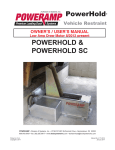
PowerHold
Truck Restraint
OWNER’S / USER’S MANUAL
POWERHOLD &
POWERHOLD SC
POWERAMP • Division of Systems, Inc. • W194 N11481 McCormick Drive • Germantown, WI 53022
800.643.5424 • fax: 262.255.5917 • www.docksystemsinc.com • [email protected]
Printed in U.S.A.
Copyright © 2008
Manual No. 4111-0016
September 2010
®
Table of Contents
Page
Safety
Recognize Safety Information . . . . . . . . . . . . . . . . . . . . . . . . . . . . . . .
General Operational Safety Precautions . . . . . . . . . . . . . . . . . . . . . .
Operational Safety Precautions . . . . . . . . . . . . . . . . . . . . . . . . . . . . .
Maintenance Safety Precautions . . . . . . . . . . . . . . . . . . . . . . . . . . . .
Safety Decal's . . . . . . . . . . . . . . . . . . . . . . . . . . . . . . . . . . . . . . . . . . . .
Owner’s/User’s Responsibilities . . . . . . . . . . . . . . . . . . . . . . . . . . . . .
1
1
2
4
5
7
Introduction
General Information . . . . . . . . . . . . . . . . . . . . . . . . . . . . . . . . . . . . . . . 8
Theory . . . . . . . . . . . . . . . . . . . . . . . . . . . . . . . . . . . . . . . . . . . . . . . . . . 9
Installation
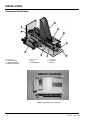
PowerHold Installation Overview . . . . . . . . . . . . . . . . . . . . . . . . . . . .10
Component Identification . . . . . . . . . . . . . . . . . . . . . . . . . . . . . . . . . . 12
Operation
Operating Instructions . . . . . . . . . . . . . . . . . . . . . . . . . . . . . . . . . . . . 14
Sequence of Operation . . . . . . . . . . . . . . . . . . . . . . . . . . . . . . . . . 15
PowerHook Light Sequence . . . . . . . . . . . . . . . . . . . . . . . . . . . . . 16
Maintenance
Service Dock Leveler/Restraint Safely . . . . . . . . . . . . . . . . . . . . . . . 18
Periodic Maintenance . . . . . . . . . . . . . . . . . . . . . . . . . . . . . . . . . . . . . 20
Adjustment And Testing
Testing PowerHook Operating Range . . . . . . . . . . . . . . . . . . . . . . . . 22
Adjust Dock Leveler and Truck Restraint Interlock . . . . . . . . . . . . . 24
Adjust Auto Return To Dock (ARTD) . . . . . . . . . . . . . . . . . . . . . . . . . 26
Troubleshooting
Troubleshooting . . . . . . . . . . . . . . . . . . . . . . . . . . . . . . . . . . . . . . . . .
Electrical Drawings . . . . . . . . . . . . . . . . . . . . . . . . . . . . . . . . . . . . . . .
Programming . . . . . . . . . . . . . . . . . . . . . . . . . . . . . . . . . . . . . . . . . . . .
Manual Release . . . . . . . . . . . . . . . . . . . . . . . . . . . . . . . . . . . . . . . . . .
29
36
38
39
Parts
Valve Blocks . . . . . . . . . . . . . . . . . . . . . . . . . . . . . . . . . . . . . . . . . . . .
PowerHold Break Down . . . . . . . . . . . . . . . . . . . . . . . . . . . . . . . . . . .
Power Pack Assembly Self Contained . . . . . . . . . . . . . . . . . . . . . . .
Latch Assembly . . . . . . . . . . . . . . . . . . . . . . . . . . . . . . . . . . . . . . . . . .
Power Pack Assembly Remote Mount . . . . . . . . . . . . . . . . . . . . . . .
Outside Signs . . . . . . . . . . . . . . . . . . . . . . . . . . . . . . . . . . . . . . . . . . .
Outside lights . . . . . . . . . . . . . . . . . . . . . . . . . . . . . . . . . . . . . . . . . . .
41
44
46
47
48
50
51
Miscellaneous
Customer Information . . . . . . . . . . . . . . . . . . . . . . . . . . . . . . . . . . . . 53
Warranty . . . . . . . . . . . . . . . . . . . . . . . . . . . . . . . . . . . . . . . . Back Cover
4111-0016 — Sept 2010
SAFETY
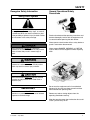
Recognize Safety Information
Safety-Alert Symbol
The Safety-Alert Symbol identifies important safety
messages on equipment, safety signs, in manuals,
or elsewhere. When you see this symbol, be alert
to the possibility of personal injury or death. Follow
the instructions in the safety message.
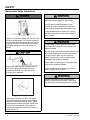
General Operational Safety
Precautions
Read and understand the operating instructions and
become thoroughly familiar with the equipment and
its controls before operating the dock leveler.
Never operate a dock leveler while a safety device or
guard is removed or disconnected.
The use of the word DANGER signifies the
presence of an extreme hazard or unsafe practice
which will most likely result in severe injury or
death.
The use of the word WARNING signifies the
presence of a serious hazard or unsafe practice
which may result in serious injury or death.
The use of the word CAUTION signifies possible
hazard or unsafe practice which could result in
personal injury.
IMPORTANT
The use of the word IMPORTANT is to draw
attention to a procedure that needs to be followed
to prevent machine damage.
Never remove DANGER, WARNING, or CAUTION
signs or Decal's on the equipment unless replacing
them.
e
Op
in g
rat
ne
Zo
g
tin
era
p
O
Zo
ne
Do not start the equipment until all unauthorized
personnel in the area have been warned and have
moved outside the operating zone.
Remove any tools or foreign objects from the
operating zone before starting.
Keep the operating zone free of obstacles that could
cause a person to trip or fall.
4111-0016 — Sept 2010
1
SAFETY
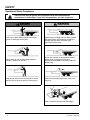
Operational Safety Precautions
Learn the safe way to operate this equipment. Read and understand the
manufacturer's instructions. If you have any questions, ask your supervisor.
Stay clear of dock leveling device when freight
carrier is entering or leaving area.
Chock/restrain all freight carriers. Never remove
the wheel chocks until loading or unloading is
finished and truck driver has been given
permission to drive away.
Do not move or use the dock leveling device if
anyone is under or in front of it.
Do not use a broken or damage dock leveling
device. Make sure proper service and
maintenance procedures have been performed
before using.
Keep hands and feet clear of pinch points. Avoid
putting any part of your body near moving parts.
Make sure lip overlaps onto trailer at least 4 in.
(102 mm).
Keep a safe distance from both side edges.
2
4111-0016 — Sept 2010
SAFETY
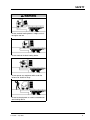
Do not use dock leveling device if freight carrier is
too high or too low.
Do not overload the dock leveling device.
Do not operate any equipment while under the
influence of alcohol or drugs.
Do not leave equipment or material unattended on
dock leveling device.
4111-0016 — Sept 2010
3
SAFETY
Maintenance Safety Precautions
ALWAYS disconnect electrical power source and
ground wire before welding on dock leveler.
DO NOT ground welding equipment to any
hydraulic or electrical components of the dock
leveler. Always ground to the dock leveler frame.
Failure to follow these instructions may result in
damage to dock leveler and/or serious personal
injury or death.
Hydraulic and electrical power must be OFF when
servicing the equipment. For maximum protection,
use an OSHA approved locking device to lock out
all power sources. Only the person servicing the
equipment should have the key to unlock the
device.
DO NOT grind or weld if hydraulic fluid or other
flammable liquid is present on the surface to be
ground or welded
DO NOT grind or weld if uncontained hydraulic fluid
or other flammable liquid is present. Stray sparks
can ignite spills or leaks near the work area.
Always clean up the oil leaks and spills before
proceeding with grinding or welding.
Always keep a fire extinguisher of the proper type
nearby when grinding or welding.
Always post safety warnings and barricade the
work area at dock level and ground level to
prevent unauthorized use of the unit before
maintenance is complete.
Failure to follow these instructions may result in
serious personal injury or death.
ALWAYS stand clear of dock leveler lip when
working in front of the dock leveler. Failure to do
this may result in serious personal injury or death.
The maintenance prop must be in the upright
"service" position when working under the dock
leveler. For maximum protection, use an OSHA
approved locking device to lock the maintenance
prop in the service position. Only the person
servicing the equipment should have the key to
unlock the device.
4
4111-0016 — Sept 2010
SAFETY
Dock Leveler Safety Decal's
Every 90 days (quarterly) inspect all safety labels and tags
to ensure they are on the dock leveler and are easily legible. If any are missing or require replacement, please call
1-800-643-5424 for replacements.
DANGER
CRUSH HAZARD
Maintenance prop must
support leveler behind bar.
Do not force maintenance
prop forward of bar to
support lip. Refer to
owner’s/user’s manual for
proper use. Failure to
comply will result in
death or serious injury.
1751-0727
1751-0727
1751-0730 (x2)
SAFETY INFORMATION
DANGER
Unsupported dock leveler
ramps can lower unexpectedly.
Before allowing vehicle to leave
the dock always:
Ensure that no equipment,
material or people are on the
dock leveler.
Return the dock leveler to its
stored position at dock level.
Failure to follow posted instructions will result in death or serious injury.
Operation
1. Read and follow all instructions and
warnings in the owner’s/user’s
manual.
2. Use of dock leveler restricted to
trained operators
3. Always chock trailer wheels or
engage truck restraint before
operating dock leveler or beginning to
load or unload.
4. Never use hands or equipment to
move the ramp or lip
5. Before activating dock leveler:
Ensure trailer is backed in against
bumpers.
Remove any end loads if required.
Check trailer alignment to avoid lip
interference. If lip does not lower to
trailer bed, reposition vehicle.
6. Ensure that truck bed supports
extended lip or the leveler frame
supports the ramp before driving on
ramp.
7. Stay clear of hinges and front and
sides of moving dock leveler.
8. Never use damaged or
malfunctioning dock leveler. Report
problems immediately to supervisor.
Maintenance/Service
1. Read and follow all instructions,
warnings and maintenance schedules
in the owner’s/user’s manual.
2. Maintenance/Service of dock leveler
restricted to trained personnel.
3. Place barriers on the driveway and on
dock floor to indicate service work is
being performed.
4. DO NOT ENTER PIT unless dock
leveler is securely supported by
maintenance prop.
5. If electrically powered turn off and use
OSHA lockout/tagout procedures.
Call 262.255.1510 for replacement placards, warning labels, or owner’s/user’s manuals.
(decal placed in same position on both sides)
1751-0329 (x2)
DO NOT
FORK THIS SIDE
(decal placed in same position on both sides)
FORK
HERE
1751-0330 (x2)
(decal placed in same position on both sides)
1751-0728
DANGER
CRUSH HAZARD
Do not remove main springs until leveler is safely supported by
maintenance prop. Main springs contain stored energy. Be sure
springs are fully unloaded and ends are loose before removal. Refer
to owner’s/user’s manual for proper maintenance procedure. Failure
to comply will result in death or serious injury.
1751-0728
1751-0788
DANGER
CRUSH HAZARD
Do not work under dock leveler unless this maintenance prop has been secured in the
upright position. See owner’s/user’s manual for proper procedures. Failure to comply
1751-0788
will result in death or serious injury.
DANGER
1751-0789
CRUSH HAZARD
Open the pin latch and insert
through the maintenance
prop housing and prop
completely. Close the pin latch
to secure prop. Use every
time dock leveler is serviced.
Failure to comply will result
in death or serious injury.
1751-0789
DANGER
1751-0726
CRUSH HAZARD
DO NOT ENTER PIT unless dock leveler is
safely supported by maintenance prop. Place
barriers on driveway and dock floor to indicate
service work being performed. Refer to
owner’s/user’s manual for proper maintenance
procedures. Failure to comply will result in death
or serious injury.
1751-0726
4111-0016 — Sept 2010
5
SAFETY Decal's
Every 90 days (quarterly) inspect all safety labels and tags
to ensure they are on the dock leveler and are easily legible. If any are missing or require replacement, please call
1-800-643-5424 for replacements.
DANGER
CRUSH HAZARD
Maintenance prop must
support leveler behind bar.
Do not force maintenance
prop forward of bar to
support lip. Refer to
owner’s/user’s manual for
proper use. Failure to
comply will result in
death or serious injury.
1751-0727
1751-0730 (x2)
1751-0727
SAFETY INFORMATION
DANGER
Unsupported dock leveler
ramps can lower unexpectedly.
Before allowing vehicle to leave
the dock always:
Ensure that no equipment,
material or people are on the
dock leveler.
Return the dock leveler to its
stored position at dock level.
Failure to follow posted instructions will result in death or serious injury.
Operation
1. Read and follow all instructions and
warnings in the owner’s/user’s
manual.
2. Use of dock leveler restricted to
trained operators
3. Always chock trailer wheels or
engage truck restraint before
operating dock leveler or beginning to
load or unload.
4. Never use hands or equipment to
move the ramp or lip
5. Before activating dock leveler:
Ensure trailer is backed in against
bumpers.
Remove any end loads if required.
Check trailer alignment to avoid lip
interference. If lip does not lower to
trailer bed, reposition vehicle.
6. Ensure that truck bed supports
extended lip or the leveler frame
supports the ramp before driving on
ramp.
7. Stay clear of hinges and front and
sides of moving dock leveler.
8. Never use damaged or
malfunctioning dock leveler. Report
problems immediately to supervisor.
Maintenance/Service
1. Read and follow all instructions,
warnings and maintenance schedules
in the owner’s/user’s manual.
2. Maintenance/Service of dock leveler
restricted to trained personnel.
3. Place barriers on the driveway and on
dock floor to indicate service work is
being performed.
4. DO NOT ENTER PIT unless dock
leveler is securely supported by
maintenance prop.
5. If electrically powered turn off and use
OSHA lockout/tagout procedures.
Call 262.255.1510 for replacement placards, warning labels, or owner’s/user’s manuals.
(decal placed in same position on both sides)
1751-0329 (x2)
D
FORK THIS SIDE
(decal placed in same position on both sides)
1751-0330 (x2)
FORK
HERE
(decal placed in same position on both sides)
! DANGER
CRUSH HAZARD
DO NOT REMOVE hydraulic cylinder until leveler is
safely supported by maintenance prop. Refer to
owner’s/user’s manual for proper maintenance
procedure. Failure to comply will result in death or
serious injury.
1751-0138
6<67(06,1&
1751-0729
DANGER
CRUSH HAZARD
Do not work under dock leveler unless this maintenance prop has been secured in the
upright position. See owner’s/user’s manual for proper procedures. Failure to comply
1751-0729
will result in death or serious injury.
C
C
DANGER
C
CRUSH HAZARD
C a
1751-0731
Rotate prop to maintenance
position. Open the pin latch
and insert through the
maintenance prop housing.
Close the pin latch to secure
prop. Use every time dock
leveler is serviced. Failure to
comply will result in death
or serious injury.
1751-0731
DANGER
1751-0726
CRUSH HAZARD
DO NOT ENTER PIT unless dock leveler is
safely supported by maintenance prop. Place
barriers on driveway and dock floor to indicate
service work being performed. Refer to
owner’s/user’s manual for proper maintenance
procedures. Failure to comply will result in death
or serious injury.
1751-0726
6
4111-0016 — Sept 2010
OWNER’S/USER’S RESPONSIBILITIES
1. The owner/ user should recognize the inherent dangers of the interface between the
loading dock and the transportation vehicle. The owner/ user should, therefore, train and
instruct all operators in the safe operation and use of the loading dock equipment in
accordance with manufacturer’s recommendations and industry standards. Before
operation of the equipment, all operators shall read, understand and be familiar with all
functions of equipment as described in the owner’s/user’s manual.
2. The manufacturer shall provide to the initial purchaser all necessary information with
regards to: Safety Information, Operation, Installation and Safety Precautions,
Recommended Initial and Periodic Inspections Procedures, Planned Maintenance
Schedule, Product Specifications, Troubleshooting Guide, Parts Break Down, Warranty
Information and Manufacturers Contact Information. The owner/ user shall be responsible
to verify that this information is available and received as well as proper instructions,
training and familiarity of the equipment for all operators has been completed. Owner’s/
User’s shall actively maintain, update and re train all operators on safe working habits and
operations of the equipment.
3. It is recommended when the transportation vehicle is positioned correctly in the dock
opening and in contact with both bumpers, there shall be a minimum of 4.00 inches
(100mm) overlap of the leveling device and the transportation vehicle at all times during
the loading and unloading process.
4. Name plates, placards, Decal's, instructions and posted warnings shall not be obscured
from the view of the operator or maintenance personnel for whom such warnings are
intended for. Contact manufacturer for any replacements.
5. Manufacturer’s recommended periodic maintenance and inspection procedures in effect at
the date of shipment shall be followed at all times. Written documentation of maintenance,
replacement parts or damage should be retained. In the event of damage notification to
the manufacturer is requested.
6. Any modifications or alterations of loading dock equipment shall only be done with prior
written approval from the original equipment manufacturer.
7. When industrial moving devices are being used in the loading or unloading of product
from the transportation vehicle, this vehicle shall have the brakes and wheel chocks
applied appropriately or all other positive restraining device shall be fully utilized.
8. Loading dock safety equipment should never be used outside of its intended use, range,
or capacity. Please consult the manufacturer if you have any questions as to the use,
range or capacity of the equipment.
9. When selecting loading dock safety equipment, it is important to consider not only present
requirements but also future plans and any possible adverse conditions, environments or
use.
4111-0016 — Sept 2010
7
INTRODUCTION
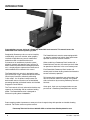
Congratulations on your choice of a Poweramp PowerHold truck restraint. This manual covers the
PowerHold Truck restraint operating system.
Designed by Poweramp to be a marvel of simplicity
and efficiency, your truck restraint, when properly
installed, will provide many years of trouble-free
performance with an absolute minimum of
maintenance. Its revolutionary hydraulic system
efficiently controls and operates every function. To
obtain maximum performance and longest possible
use, a simple program of preventive maintenance is
recommended and is outlined in this manual.
The PowerHold truck restraint is designed to seek,
find and maintain a tight, continuous hold on the RIG
(Rear Impact Guard) bar, effectively eliminating
“trailer creep”. As an optional safety feature, the
dock leveler and truck restraint can be interlocked,
preventing operation of the dock leveler until the hold
engages the truck RIG bar.
The Truck restraint is firmly anchored to the drive way
approach or the building wall for maximum holding
power. The PowerHold restraint is designed to
withstand a pulling force of 30,000 lbs.
The PowerHold truck restraint comes equipped with
an electrical control panel, which allows push button
operation of the truck restraint functions.
When combining a Poweramp Dock Leveler with a
PowerHold truck restraint, the control panel will allow
for operation of both units in the same control panel.
Each PowerHold, Poweramp Dock Leveler and
control panel has been factory prewired and tested to
ensure satisfactory operation.
To illustrate which connections are to be made in the
field at installation, electrical drawings are included
with each order or by contacting Poweramp Technical
Services.
Once again, thank you and congratulations on your
purchase of a Poweramp PowerHold truck restraint.
Due to ongoing product improvement, some parts have changed, along with operation and trouble shooting
methods. For further assistance, please contact:
Poweramp Technical Service at 800-643-5424 or [email protected]
8
4111-0016 — Sept 2010
OPERATION
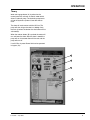
Theory
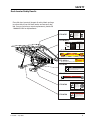
When the engage button (A) is pushed on the
control panel this activates an electric motor which,
drives a hydraulic pump. The hydraulic pump forces
oil into the hydraulic cylinder causes the shoe to
raise.
The shoe will make contact with the ICC bar. The
pump will shut off one the shoe is at 90deg. Once
the truck is locked The leveler the raise button will be
activated(D).
When the release button (B) is pushed the motor will
run and lower the shoe. After the shoe is stored the
pump will run 10 seconds then will time out and the
pump will turn off.
If no ICC Bar is preset Power Hold can be operated
in bypass (C)z.
A
B
C
D
4111-0016 — Sept 2010
9
INSTALLATION
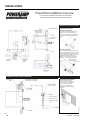
PowerHold Installation Overview
For comprehensive installation instructions of the PowerHold
read and understand the Installation and Operation Manual.
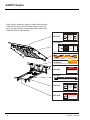
POWERPACK LOCATION OPTIONS
Coordinate powerpack location and hose
length for proper placement.
Allow
Enough
Clearance
for Possible
Seal or
Shelter
Dock Face (Self Contained)
Appropriate location when the likelihood of
flooding, snow removal and damage from
trailer/trucks is minimal. Also recommended
for use with non-hydraulically powered dock
levelers.
Under The Dock Leveler
When combined with hydraulic leveler pump or
remotely mounting under leveler, make certain
to locate the powerpack where leveler will not
interfere in below dock conditions. The routing
of hydraulic and electrical lines from the
powerpack to the restraint are best placed
through min. 3” PVC (hydraulic) and 3/4”
conduit (electrical)
chase during pit
construction.
POWERHOLD REMOTE MOUNT POWERPACK
IO PH PR 06/04
Inside Building (Remote Mount)
Locate powerpack to minimize
obstruction potential. Hydraulic and
electrical lines from the powerpack
to the restraint are best placed
through min. 3” PVC (hydraulic)
and 3/4” (electrical) chase during pit
construction.
10
4111-0016 — Sept 2010
INSTALLATION
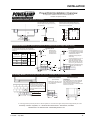
PowerHold Installation Overview
For comprehensive installation instructions read and understand the
Installation and Operation Manual.
Concrete Dock Face
(Standard installation)
Wedge Anchors Method
Weld Plate Embed Method
Using back plate as a guide, drill eight (8)
holes for wedge anchors (3/4”x 5 1/4” min.)
(Kit #2103-0004)
Weld three sides of PowerHold back plate to the
optional embed mounting plate (Part #7953-0119)
with continuous 1/4” fillet weld.
20”
5 1/4” minimum
20”
Embed
Plate
located 2”
above grade
3/8”
Cantilevered Dock
(For bumper projection >4” or cantilevered dock or Edge-of-Dock leveler)
To determine size offset required, take total effective
bumper projection (bumper size plus any cantilever) and
subtract 4”.
Driveway Mount
Dim. A
Offset Formula
Dim. A
Dim. B
Bumper Projection
Cantelever
4"
6"
10"
15"
Offset
Wall Mount
Determine offset
then proceed with
“Driveway Mount”
instructions below.
For filler requirements from 1 ½”to
Dim. A 7 ½” use cantilever bracket #94140054 and anchor cantilever bracket
to the dock face or weld to
embedded mounting plate (Part
#7953-0119)
Dim. B
+ Dim B
+ Dim B
-4" = Offset
+ Dim B
+ Dim B
For filler requirements for 8 3/4” to
Dim. B 13 3/4” use cantilever bracket
33”
#9414-0055 and anchor cantilever
bracket to the dock face (3/4” Dia.
X 5 1/4” min.) (Kit #2103-0004) or
weld to embedded mounting
Plate (Part #7953-0119).
10”
8” Min.
48”
Dim. B
Dim. B
Driveway Mount
(Recommended when dock face is unsuitable for PowerHold Mounting)
Wedge Anchors Method
(Kit #2103-0005)
Driveway mount requires attachment to
a concrete drive greater than 8” thick.
For asphalt drive, pour 48”x48”x8”
(min.) concrete pad and include six (6)
3/4” dowels into foundation wall. Then
proceed with adhesive anchors or weld
plate embed.
Install nine (9) 3/4” Dia. x 5 1/4”
min. wedge anchors at the base
of the PowerHold.
Drive Embed Method
Weld method
Properly locate and level the drive embed weld
plate (Part#7953-0132) in the drive approach.
Observe Cantilever conditions for proper
positioning. Weld restraint to embed plate with a
continuous ¼” filet weld.
14”
8” Min.
48”
36”
48”
A continuing product improvement process is in effect at Systems, Inc. We reserve the right to make product changes without prior notice.
Poweramp • Division of Systems, Inc. • W194 N11481 McCormick Dr. • Germantown, WI 53022
800.643.5424 • fax: 262.255.4199 • www.DockSystemsInc.com
4111-0016 — Sept 2010
11
INSTALLATION
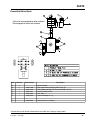
Component Identification.
F
E
J
H
B
G
D
I
A —Weldment
B —Latch Assembly
C —Hydraulic Cylinder
D — Power Pack SC Only
E — Valve Block
F — Shoe
G — Rack Weldment
A
C
H — Slide Block
I — Push Rod
J — Spring
“TWIDO” Programmable Logic Controller
12
4111-0016 — Sept 2010
INSTALLATION
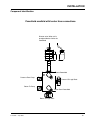
Component Identification
PowerHold manifold with leveler Hose connections.
Diverter valve, When coil is
energized directs fluid to the
PowerHold
Pressure to Powerhold
Pressure From Pump
Pressure To Logic Block
Return To Pump
Return From PowerHold
Return To Logic Block
4111-0016 — Sept 2010
13
OPERATION
Operating Instructions
Stay clear of dock leveler when freight carrier is
entering or leaving dock area.
DO NOT move or use the dock leveler if anyone is
under or in front of leveler.
Keep hands and feet clear of pinch points. Avoid
putting any part of your body near moving parts.
Failure to follow these instructions may result in
severe personal injury or death.
DO NOT overload the dock leveler.
DO NOT operate any equipment while under the
influence of alcohol or drugs.
DO NOT leave equipment or material unattended
on the dock leveler.
Failure to follow these instructions may result in
personal injury and/or damage to equipment.
Only trained personnel should operate the dock
leveler and truck restraint.
DO NOT use a broken or damaged dock leveler or
truck restraint. Make sure proper service and
maintenance procedures have been performed on
equipment before using.
Truck/trailer wheels must be chocked unless the
truck restraint is used. Never remove the wheel
chocks until loading/unloading is finished and truck
driver has been given permission to leave.
Make sure platform lip rests on the truck/trailer bed
with at least 4 in. (102 mm) of overlap.
Maintain a safe distance from side edges of leveler
during the loading/unloading process.
Failure to follow these instructions may result in
serious personal injury or death.
14
4111-0016 — Sept 2010
OPERATION
SEQUENCE OF OPERATION NORMAL
SEQUENCE OF OPERATION BYPASS
1. Check that the truck/trailer is positioned squarely
against the dock bumpers.
- Inside Red Light
- Outside Green Light
1. Check that the truck/trailer is positioned squarely
against the dock bumpers.
2. Push ENGAGE button to activate restraint.
- Inside Green and Yellow Light
- Outside Red Light
3. ENGAGED on Truck Restraint.
- Inside Green Light
- Outside Red Light
4. Visually inspect restraint for proper engagement.
If RIG (Rear Impact Guard) is damaged or
missing, dock leveler can be used in BYPASS
IF BYPASS MODE IS REQUIRED
SEE: SEQUENCE OF OPERATION - BYPASS
FOR NORMAL OPERATION AFTER TRAILER RIG
IS ENGAGED CONTINUE WITH: STEP 4
2. Push ENGAGE button to activate restraint.
- Inside Green Light, Red Outside Light
3. Visually inspect restraint for proper engagement.
If RIG (Rear Impact Guard) is damaged or missing
dock leveler can be used in BYPASS.
4. If RIG (Rear Impact Guard) is damaged or
missing, Shoe will automatically return to the
stored position.
- Inside Amber Light and LED will flash for 30
seconds, then Flash Red (Do Not Enter).
- Outside Red Light will flash for 30 seconds, then
flash Green
5. Secure truck/trailer wheels with wheel chocks.
6. Use key to activate BYPASS mode.
- Inside Green Light with Amber Caution Light
- Outside Red Light
5. Position dock leveler onto truck/trailer.
7. Position dock leveler onto truck/trailer
6. When loading or unloading is complete, return
dock leveler to the stored position.
7. Release truck restraint and/or remove chocks from
truck/trailer wheels.
8. When loading or unloading is complete, return
dock leveler to the stored position.
-Inside Green Light with Amber Caution Light
-Outside Red Light
9. Reset BYPASS mode to NORMAL mode by
pressing the ENGAGE button once.
- Inside Red Light, Amber turns Off
- Outside Green Light
- Pressing the ENGAGE button during any part of
the cycle will end the ENGAGE mode
- Pressing the LOCK button a second time will
cycle the PowerHold.
10.Un-chock the truck/trailer wheels when truck is
ready to depart.
4111-0016 — Sept 2010
15
OPERATION
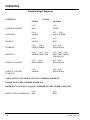
PowerHold Light Sequence
CONDITION
INSIDE
LIGHTS
OUTSIDE
STORED BEGIN/END
(O/9)
RED
(O/8)
GREEN
IN MOTION
(O/6)
AMBER
(O/7) (O/6)
RED & STROBE
HOOKED
(O/5)
GREEN
(O/7)
RED
OVERRIDE
(O/5)
(O/6)
GREEN/AMBER
(O/7) (O/6)
RED/STROBE
MISSED ICC
(O/6)
30sec (O/4)
AMBER (TIME) RED
(O/7) 30sec (O/8)
RED (TIME) GREEN
STROBE (O/8)
TIMEOUT (FAILURE)
(O/9) (O/6)
RED/AMBER
(O/7) (O/6)
RED/STROBE
(O/8)
AMBER
(O/5) (O/8)
RED/STROBE
TIMEOUT (FAILURE)
IN MOTION
A NEW LOCK CYCLE OR BYPASS WILL OVERRIDE MISSED ICC
TIMEOUT FAILURE OVERRIDE MISSED ICC
EMERGENCY STOP (Where Equipped) OVERRIDES EVERY OTHER CONDITION
WHEN E-STOP IS DEPRESSED
16
(O/4)
RED
(O/5)
RED
4111-0016 — Sept 2010
OPERATION
This page intentionally left blank
4111-0016 — Sept 2010
17
MAINTENANCE
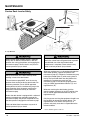
Service Dock Leveler Safely
A
B
Side View
A
E
C
A— Lip Maintenance Prop
B —Tag Out Device
C — Lock Out Device
When service under the dock leveler is required,
always lock all electrical disconnects in the OFF
position after raising the platform and engaging the
maintenance prop. Failure to do this may result in
serious personal injury or death.
Always stand clear of the dock leveler lip when
working in front of the dock leveler.
The maintenance prop MUST be in the service
position when working under the dock leveler. For
maximum protection, use an OSHA approved
locking device to lock the maintenance prop in the
service position. Only the person servicing the
equipment should have the key to unlock the
maintenance prop.
Unless the dock leveler is equipped with a tethered
remote, two people are required to engage the
maintenance prop: one person to operate the unit,
the other person to engage the maintenance prop.
Failure to follow these instructions may result in
serious personal injury or death.
E.—3 Styles of Lock
Always post safety warnings and barricade the
work area at dock level and ground level to prevent
unauthorized use of the dock leveler before
maintenance is complete. Failure to do this may
result in serious personal injury or death.
Whenever maintenance is to be performed under the
dock leveler platform, support the platform with
maintenance prop (E). Position the maintenance prop
behind front header plate (F) while staying clear of
the lip. The lip will fold down after the platform has
rested on the maintenance prop. Lock the
maintenance prop in the service (upright) position
using an OSHA approved lockout device* (C) and
tagout device* (D).
Whenever servicing the dock leveler, lock the
electrical power disconnect in the OFF position. Use
only an OSHA approved lockout device* (B) and
tagout device (A).
Only the person servicing the equipment should have
the capability to remove the lockout devices. The
tagout devices* must inform that repairs are in
process and clearly state who is responsible for the
lockout condition.
* Refer to OSHA regulation 1910.147.
18
4111-0016 — Sept 2010
MAINTENANCE
Periodic Maintenance
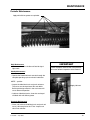
Apply white lithium grease or equivalent
Daily Maintenance
• Make sure that all the Inside and Outside signal
lights work.
IMPORTANT
Failure to properly lubricate the Truck Restraint
will cause abnormal operation of the Restraint
Weekly Maintenance
• Operate the PowerHold truck restraint through the
complete operating cycle to maintain lubrication.
NOTE: - position.
• Inspect the slide block track and push rod areas.
The areas must be kept free of dirt and debris.
Build-up of foreign material in the track areas will
cause abnormal operation.
Apply lubricant
• Lubricate slide block tracks, shoe slots and top of
slid block with whit lithium grease
Quarterly Maintenance
• Clean and Lubricate slide block track and push rod
areas. Lubricate pins for the “Z” bar. Inspect and
clean Prox switches.
4111-0016 — Sept 2010
19
MAINTENANCE
Periodic Maintenance With Leveler
C
B
A
D
K
On select models an inspection
plate is provided in the platform
floor for ease of maintenance and
pit inspection. Others must be
serviced from under the leveler.
J
E
H
F
L
G
L
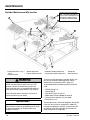
A— Lip Hinge Area
B— Valve Lever Pivot on Logic
Block
C— Inspection Plate
D— Dual-Lanyard Lever Pivot
E— Platform Hinge Area
F— Platform Cylinder Trunnion
Before performing any maintenance under the dock
leveler, lock the electrical power source in OFF
position and lock the maintenance prop in the
service position using an approved locking device.
(See Service Dock Leveler Safely in this section.)
Failure to follow these instructions may result in
serious personal injury or death.
IMPORTANT
Use of fluids that do not have equivalent
specifications to those in the following list will result
in abnormal operation of the dock leveler and
voiding of warranty.
20
G — Toe Guard Hinges
K— Lip Lifter and Lift
H— Platform Cylinder-to-Platform Pin
Cylinder Pin
J— Lip Cylinder-to-Platform Frame Pin L — Toe Guard Pivots
To ensure normal operation of the dock leveler, use
only aircraft hydraulic fluid designed to meet or
exceed military specification MIL-L-5606. It is
recommended that the following hydraulic fluids be
used:
•
•
•
•
•
•
ULTRA-VIS-HVI-15
Flomite 530 ZF
Aero Shell Fluid 4 or Fluid 41
Mobile Aero HFA Mil-H5606A or Aero HF
Texaco Aircraft Hydraulic Oil 15 or 5606
Exxon Univis J13
These fluid brands can be mixed together. Mixing with
fluids that do not meet or exceed MIL-L-5606 may
damage the equipment and WILL void warranty. Use
of hydraulic fluids with equivalent specifications to
those listed here are acceptable.
4111-0016 — Sept 2010
MAINTENANCE
P
Daily Maintenance
• Make sure that all the Inside and Outside signal
lights work.
N
Q
Weekly Maintenance
• Operate the dock leveler and PowerHold through
the complete operating cycle to maintain
lubrication.
NOTE: To thoroughly inspect the platform hinge
area, put the platform in the full below-dock
position.
M
• Inspect the platform hinge and the lip hinge areas.
The hinge areas must be kept free of dirt and
debris. Build-up of foreign material in the hinge
areas will cause abnormal operation.
Quarterly Maintenance
IMPORTANT
Failure to properly lubricate the dock leveler will
cause abnormal operation of the leveler.
• Lubricate the following areas with light weight
machine oil:
(A)— Lip hinge area unless equipped with grease
fittings (apply oil to the top of the entire
length of lip hinge when platform is at the full
below-dock position and lip is folded).
(D)— Dual-lanyard lever pivot.
(E)— Platform hinge area (apply oil to top of all
platform hinges when platform is at the full
below-dock position).
(G)— Toe guard hinges (along full length of top and
bottom hinges).
(H)— Platform cylinder-to-platform frame pin.
(J)— Lip cylinder-to-platform frame pin.
(K)— Lip lifter and lift cylinder pin.
• Lubricate the following areas with white lithium
grease:
(B)— Valve lever pivot and top of logic block spool
valve.
(F) — All platform cylinder trunnions.
(L)— Toe guard pivots (where toe guard strut
contacts pivot).
NOTE: Apply grease to lip hinge grease fittings if
equipped.
4111-0016 — Sept 2010
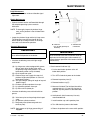
M — Reservoir
N — 2 in. (51 mm) (From Top of
Reservoir)
P — Breather Cap
Q — Fluid Level
IMPORTANT
A low fluid level or the use of hydraulic fluids not
equivalent to the fluid types recommended, will
cause abnormal operation of the leveler and WILL
void warranty.
• Check reservoir fluid level (Q):
1. Put the dock leveler platform at the full
below-dock position.
2. Turn OFF all electrical power to the leveler.
3. Remove inspection plate (C).
4. Remove breather cap (P).
5. Measure fluid level. The fluid level should be
approximately 2 in. (51 mm) (N) from top of
reservoir (M) with platform at the below-dock
position.
6. Add hydraulic fluid if necessary. Use only
recommended fluid.
7. Install breather cap and inspection plate.
8. Turn ON electrical power to the leveler.
9. Return the platform to the cross-traffic position.
21
ADJUSTMENT AND TESTING
PowerHold Operating Range
NOTE: Test operating range of PowerHold without
truck/trailer backed into dock.
When service under the dock leveler is required,
always lock all electrical disconnects in the OFF
position after raising the platform and engaging the
maintenance prop. Failure to do this may result in
serious personal injury or death.
Always post safety warnings and barricade the
work area at dock level and ground level to prevent
unauthorized use of the dock leveler before
maintenance is complete. Failure to do this may
result in serious personal injury or death.
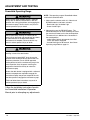
1. Make sure the selector switch is in Normal and
BYPASS mode has not been activated.
- Red Inside Light, No Amber Light
- Green Outside Light
2. Momentarily press the ENGAGE button. The
PowerHold restraint will raise to 90 deg. NO trailer
the restraint will lower back to the stored position.
The motor will run additional 6 to 10 seconds in
the stored position.
- Inside Amber Light for 30 seconds, then Red
*Alarm will sound if equipped
- Outside Red Light for 30 seconds, then Green
Operating range Refer to page 10.
Always stand clear of the dock leveler lip when
working in front of the dock leveler.
The maintenance prop MUST be in the service
position when working under the dock leveler. For
maximum protection, use an OSHA approved
locking device to lock the maintenance prop in the
service position. Only the person servicing the
equipment should have the key to unlock the
maintenance prop.
Unless the dock leveler is equipped with a tethered
remote, two people are required to engage the
maintenance prop: one person to operate the unit,
the other person to engage the maintenance prop.
Failure to follow these instructions may result in
serious personal injury or death.
Follow the installation instructions found in
the PowerHold Installation & Operation
Manual prior to attempting any adjustments.
22
4111-0016 — Sept 2010
ADJUSTMENTS
PowerHold Adjustments
Install prox flush then back out
(CCW) just past flush.
Prox Switch PRS 2
INPUT #4
1/16 min
1/8 max
Prox Switch PRS 1
INPUT #3
The Operating range is not adjustable on a
PowerHold restraint.
IMPORTANT: Make sure that the wire from the prox
switches are clear of all moving parts.
Proximity switch Adjustment and replacement.
A.
Locate and remove four screws and cover on
front of PowerHold assembly.
B.
Adjust PRS 1. With the “Z’” bar rotated
directly over the prox switch. The prox switch
distance should between 1/16” and 1/8”.
C.
Adjust PRS 2. The #2 prox switch must be
threaded in until flush with the latch block.
Turn prox switch out (CCW) until switch is no
longer flush with the latch block.
4111-0016 — Sept 2010
23
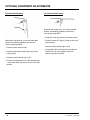
OPTIONAL EQUIPMENT ADJUSTMENTS
Adjust Dock Leveler and Truck Restraint Interlock
Dock Leveler and Truck restraint Interlock
When service under the dock leveler is required,
always lock all electrical disconnects in the OFF
position after raising the platform and engaging the
maintenance prop. Failure to do this may result in
serious personal injury or death.
Always post safety warnings and barricade the
work area at dock level and ground level to prevent
unauthorized use of the dock leveler before
maintenance is complete. Failure to do this may
result in serious personal injury or death.
Always stand clear of the dock leveler lip when
working in front of the dock leveler.
The maintenance prop MUST be in the service
position when working under the dock leveler. For
maximum protection, use an OSHA approved
locking device to lock the maintenance prop in the
service position. Only the person servicing the
equipment should have the key to unlock the
maintenance prop.
The dock leveler can be interlocked with the truck
restraint so that the leveler cannot be operated until
the restraint has engaged the truck/trailer RIG (Rear
Impact Guard) when the OPERATION switch is in
NORMAL and has NOT been switched to BYPASS.
The truck restraint is interlocked with the dock leveler
so that the restraint cannot be operated until the
leveler is stored in the cross traffic position (lip fully
folded, inside the keepers, and the platform level with
the dock floor).
Leveler and restraint interlocking are overridden when
the OPERATION switch is in BYPASS. The allows
the independent operation of the leveler (the restraint
cannot be operated in BYPASS).
Pressing the restraint ENGAGE button when in
BYPASS mode will return the leveler to NORMAL
operating mode.
This option is not available on units equipped with the
Auto Return to Dock option.
Unless the dock leveler is equipped with a tethered
remote, two people are required to engage the
maintenance prop: one person to operate the unit,
the other person to engage the maintenance prop.
Failure to follow these instructions may result in
serious personal injury or death.
24
4111-0016 — Sept 2010
OPTIONAL EQUIPMENT ADJUSTMENTS
Adjust & Test Dock Leveler and Truck Restraint Interlock
1. The dock leveler should be in the cross traffic
position before beginning tests.
2. Back a truck/trailer with RIG bar into dock. A test
fixture may be used to simulate the RIG bar. Use
care to avoid damage to the equipment or harm to
the operator.
3. Press the RAISE push button. The dock leveler
should NOT raise. If the leveler did not raise,
proceed with step 4. If the leveler did raise,
decrease dimension “A” or “B”, so that the target
is in the sensing range of the switch. Typical
factory settings for “A” and “B” are approximately
3/4” and 1/8” respectively. Make adjustments at
switch (dimension B) and/or target (dimension A)
until leveler does not raise when the truck restraint
is not engaged at truck trailer RIG bar.
4. Momentarily press the ENGAGE button. The truck
restraint automatic engage cycle will be activated
and the restraint will engage the truck/trailer RIG
bar.
6. Press the RELEASE button. The truck restraint
should NOT disengage from the truck/trailer RIG
bar or test fixture. If the restraint did NOT engage,
proceed with step 7. If the restraint DID
disengage, move the switch farther from the target
or bend the target so that the target is not in the
sensing range of the switch as shown in Figure
37. Make adjustments at switch and/or target until
restraint does not disengage truck/trailer.
IMPORTANT: If adjustments are required in this
step, make sure that the interlocking described in
step 3 is still in effect after step 6 adjustments are
complete.
7. Press the RAISE push button. The dock leveler
will raise. The leveler lip will fold as the platform
raises. When the lip is fully folded, release the
RAISE push button. The leveler will descend to
the cross traffic position.
8. Momentarily press the RELEASE button. The
truck restraint will return to the stored position.
5. Raise the dock by pressing the RAISE button until
the lip is fully extended. Release the RAISE
button. The leveler will drop to the floor of the
truck/trailer. If a RIG test fixture is used it should
allow the leveler to drop to the full below dock
position without the contact between the lip and
test fixture.
4111-0016 — Sept 2010
25
OPTIONAL EQUIPMENT ADJUSTMENTS
Adjust Auto Return To Dock (ARTD)
Adjust the ARTD as Follows:
B
C
D
E
F
When service under the dock leveler is required,
always lock all electrical disconnects in the OFF
position after raising the platform and engaging the
maintenance prop. Failure to do this may result in
serious personal injury or death.
A
H
A— Cable
B— Proximity Switch
C— Bracket
D— Lock Nuts
G
E— Target
F— Lip Hinge Tube
G—Platform Lip
H— Indicator Light
Standard PR levelers are equipped with the Auto
Return To Dock (ARTD) unless leveler is interlocked
with a truck restraint.
The ARTD allows the platform to automatically return
to the cross-traffic (stored) position after the truck
departs. The ARTD uses a proximity switch (B)
located under the platform and a piece of angled
steel called the target (E) that is attached to the lip
hinge tube (F).
The proximity switch provides a six-second delay
after the platform has lowered to the full below-dock
position, after which, the platform will return to the
cross-traffic position. The switch also contains an
indicator light (H) that can be used for diagnosing
and adjusting the switch.
NOTE: Some proximity switches have an indicator
light at the back of the housing and some
have the light at the side of the housing.
Always post safety warnings and barricade the
work area at dock level and ground level to prevent
unauthorized use of the dock leveler before
maintenance is complete. Failure to do this may
result in serious personal injury or death.
Always stand clear of the dock leveler lip when
working in front of the dock leveler.
The maintenance prop MUST be in the service
position when working under the dock leveler. For
maximum protection, use an OSHA approved
locking device to lock the maintenance prop in the
service position. Only the person servicing the
equipment should have the key to unlock the
maintenance prop.
Unless the dock leveler is equipped with a tethered
remote, two people are required to engage the
maintenance prop: one person to operate the unit,
the other person to engage the maintenance prop.
Failure to follow these instructions may result in
serious personal injury or death.
1. Raise platform fully and engage the maintenance
prop in the service position. Allow platform to rest
on the prop so the lip will fully fold until it contacts
the lip stops.
2. Turn OFF all electrical power to the dock leveler.
Attach safety lockout and tag-out devices.
26
4111-0016 — Sept 2010
OPTIONAL EQUIPMENT ADJUSTMENTS
IMPORTANT
6. Turn ON electrical power to the dock leveler.
Anytime proximity switch and target are adjusted,
always check for interference between target and
switch before operating the leveler. Damage to
switch will occur if the target contacts the switch.
7. Disengage the maintenance prop.
The maximum torque for proximity switch lock nuts
is 27 N•m (29 lb-ft). Damage to switch will occur if
maximum torque is exceeded.
9. Raise the platform until the lip is fully extended,
then allow the platform to drift to the below-dock
position.
B
C
A— 1/4 in. (6.4 mm)
Approximate
B— Target
D
Use the following illustrations to assist in fine
tuning and/or diagnosing the ARTD operation.
Cross-Traffic Position
C— 1 in. (25.4 mm)
Approximate
D— Lock Nuts
E— Proximity Switch
NOTE: Distances (A and C) are typical factory
settings. Use these dimensions only as a
starting point when adjusting the proximity
switch and target, especially if switch and/or
target have been replaced.
When dimensions (A and C) are obtained, the
proximity switch and target may need finer
adjustments to get the ARTD to operate
satisfactorily.
3. Loosen lock nuts (D). Adjust proximity switch (E) to
obtain distance (A). Tighten lock nuts.
4. Bend target (B) as needed to obtain distance (C).
Recheck distance (A) and readjust if necessary.
NOTE: At least two people may be required to
manually move the lip.
5. After adjusting proximity switch and target, slowly
move the lip up by hand while observing the target
and proximity switch. The target MUST NOT
contact the switch, otherwise, damage to switch
will occur. Readjust switch and/or target if
necessary, then recheck for interference.
4111-0016 — Sept 2010
After approximately 6 seconds, the platform must
return to the cross-traffic position.
10. Adjust the proximity switch and target as
necessary. Make small adjustments, then
operate the dock leveler to check results. Do this
until satisfied with the ARTD operation.
A
E
8. Turn the ARTD switch (on control panel) to the
ON position.
Lip Keeper
NOTE: The platform lip is fully folded when the
platform is at the cross-traffic (stored)
position (lip engaged with keepers) or when
platform is resting on the maintenance prop.
Whenever the platform lip is at the cross-traffic
position, the following conditions will exist for a
normally operating ARTD:
• Target not in the sensing area of proximity switch.
• Proximity switch OFF (open) (no signal sent to
control panel).
• Proximity switch indicator light is OFF.
• Platform stays at this position unless the operator
activates the leveler.
27
OPTIONAL EQUIPMENT ADJUSTMENTS
Full Below-Dock Position
Lip Fully Extended Position
Lip Keeper
Whenever the platform lip is at the fully extended
position, the following conditions will exist for a
normally operating ARTD:
• Target not in the sensing area of proximity switch.
Whenever the platform lip is at the full below-dock
position, the following conditions will exist for a
normally operating ARTD:
• Proximity switch OFF (open) (no signal sent to the
control panel).
• Proximity switch indicator light is OFF.
• Proximity switch senses target.
• Proximity switch ON (closed) (signal sent to the
control panel).
• If the platform lip is resting on the truck bed, the
platform will stay at this position unless the
operator activates the leveler.
• Proximity switch indicator light is ON.
• Platform will automatically rise after approximately
a six-second delay, then returns to the cross-traffic
position.
28
4111-0016 — Sept 2010
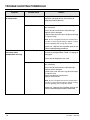
TROUBLESHOOTING POWERHOLD
When service under the dock leveler is required,
always lock all electrical disconnects in the OFF
position after raising the platform and engaging the
maintenance prop. Failure to do this may result in
serious personal injury or death.
Always post safety warnings and barricade the
work area at dock level and ground level to prevent
unauthorized use of the dock leveler before
maintenance is complete. Failure to do this may
result in serious personal injury or death.
Always stand clear of the dock leveler lip when
working in front of the dock leveler.
The maintenance prop MUST be in the service
position when working under the dock leveler. For
maximum protection, use an OSHA approved
locking device to lock the maintenance prop in the
service position. Only the person servicing the
equipment should have the key to unlock the
maintenance prop.
Unless the dock leveler is equipped with a tethered
remote, two people are required to engage the
maintenance prop: one person to operate the unit,
the other person to engage the maintenance prop.
Failure to follow these instructions may result in
serious personal injury or death.
Before performing the detailed troubleshooting procedures, check the following items first:
• Check all fuses inside the control panel(s). Replace
any blown fuse(s) with a fuse of equal specification.
Symptom
Possible Cause
• Make sure the correct voltages are present at the
proper locations inside the control panel(s).
Solution
Inside and outside
Bad Flasher.
signal lights do not
operate. Controller
(PLC) RUN indicator is
on solid (not flashing).
Unit operates as normal.
Replace flasher with wire. If lights operate (lights
will not flash), replace flasher.
Restraint does not
Motor overload device
operate. Motor does not tripped.
energize.
Reset overload relay (3 phase) or replace fuse (1
phase) or reset breaker (1 phase-new models).
Determine cause of device tripping.
NOTE: If replacing fuse, use fuse with equal
specification .
Motor starter (3 phase) or
motor relay (1 phase) not
energizing. Combination
Leveler and P-Hold Only.
4111-0016 — Sept 2010
Check controller output that sends a signal to starter
or relay. Output may have failed OPEN. Use meter
to check for contact closure when output ON.
29
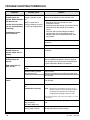
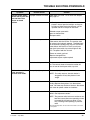
TROUBLE SHOOTING POWERHOLD
Symptom
Possible Cause
Three-phase units only: 3 Phase units only - no
Restraint does not
voltage is present on one
operate. Motor energizes line.
but does not run.
NOTE: A motor that is
If motor hums, but does missing voltage on one line
not run, overload device is said to be single-phased.
should trip.
Combination Leveler
and P-Hold Only.
Solution
Check for blown fuses at branch circuit disconnect.
Replace fuse. Determine cause of blown fuse.
Check motor starter as follows:
1. Disconnect wires at load side of starter.
2. Energize the starter.
3. Measure line-to-line voltage at line side of starter.
4. Measure line-to-line voltage at load side of
starter.
5. Line-side and load-side voltages should be
approximately the same. Replace starter if
voltage values are considerably different from
one another.
Check all wiring to motor for high resistance or no
connection.
Replace motor.
Three-phase units only:
Restraint does not
operate. Motor runs in
reverse
Phase reversed.
Reverse any two legs at the branch circuit
disconnect.
Single-phase units only:
Restraint does not
operate.
Line voltage too low.
Check wiring to motor for high resistance. Check for
loose or corroded connections. Check if gauge of
wires to motor are of correct size and specification
for load requirement. Replace if necessary.
Defective motor centrifugal
switch.
Replace motor.
Defective motor capacitor.
Replace motor.
Low hydraulic fluid.
Add fluid, see Maintenance section for proper fluid
level and type.
Low hydraulic fluid.
Add fluid, see Maintenance section for proper fluid
level and type.
Motor energizes, but
does not run.
Restraint operates
slowly.
Pressure relief valve set too See pressure relief adjustments on page 48.
low.
NOTE: The pressure relief valve must not be set at a
(combination unit only)
level that causes the motor operating current to
exceed the full load amp value* at any time,
including when operating in pressure relief.
* The full load amp value can be found on the inside cover of the
control panel.
Power Hold raises Slow or
Slow to release
(SC Power Hold Only)
-Pressure Relief cartridge adjusted per max amp
draw.
Damage or blocked hydraulic Replace damaged hose(s). Check and remove
hose(s) and/or valve(s).
blockage from hose(s) and/or valve(s).
30
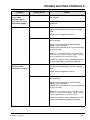
4111-0016 — Sept 2010
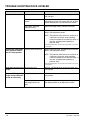
TROUBLE SHOOTING POWERHOLD
Symptom
Restraint does not fully
raise or motor
overcurrent device
and/or overload device
continuously tripping.
Possible Cause
Solution
Low hydraulic fluid.
Add fluid, see Maintenance section for proper fluid
level and type.
Debris in Tank
Drain and clean tank. I debris cannot be cleaned out
replace tank.
Restraint does not raise. Solenoid Not energized.
Locate solenoid (See Page 40 & 41).
Coil must be energized when P-Hold is in engage
mode.
-Check valve for Magnetism at the coil
Bad Spool Valve
Remove coil from cartridge valve and cartridge valve
from valve block.
-Check valve for contaminant's and/or damage.
-Replace valve if damaged.
-Carefully wipe valve with clean rag (do not damage
“O” rings on valve).
NOTE: Do not over tighten valve into block. Max Torque:
10-15 lb/ft. or snug to prevent leakage. Tighten coil snug,
avoid over tightening and causing valve to bind.
Operate unit. Replace valve if problem persists and
all other troubleshooting procedures performed.
Restraint does not raise
but leveler raises.
(combination unit only)
Solenoid Not energized.
Locate solenoid (See Page 39).
Coil Must be energized when P-Hold is in engage
mode.
-Check valve for Magnetism at the coil.
Bad Spool Valve
Remove coil from cartridge valve and cartridge valve
from valve block.
-Check valve for contaminant's and/or damage.
-Replace valve if damaged.
-Carefully wipe valve with clean rag (do not damage
“O” rings on valve).
NOTE: Do not over tighten valve into block. Max Torque:
10-15 lb/ft. or snug to prevent leakage. Tighten coil snug,
avoid over tightening and causing valve to bind.
Operate unit. Replace valve if problem persists and
all other troubleshooting procedures performed.
4111-0016 — Sept 2010
31
TROUBLE SHOOTING POWERHOLD
Symptom
Restraint will not lower
to release truck.
Possible Cause
Solution
Solenoid staying energized.
Relay or PLC contact is stuck contacts. Test coil for
Magnetism (see page 40,41). Coil must be deenergized to release the truck.
Bad Spool Valve.
Remove coil from cartridge valve and cartridge valve
from valve block.
-Check valve for contaminant's and/or damage.
-Replace valve if damaged.
-Carefully wipe valve with clean rag (do not damage
“O” rings on valve).
NOTE: Do not over tighten valve into block. Max Torque:
10-15 lb/ft. or snug to prevent leakage. Tighten coil snug,
avoid over tightening and causing valve to bind.
Operate unit. Replace valve if problem persists and
all other troubleshooting procedures.
Restraint will not lower
but leveler raises.
(combination unit only)
Solenoid not Energized.
Locate solenoid (See Page 48).
Coil must be energized when P-Hold is in engage or
disengaged.
-Check valve for Magnetism at the coil
Bad Spool Valve
Remove coil from cartridge valve and cartridge valve
from valve block.
-Check valve for contaminant's and/or damage.
-Replace valve if damaged.
Carefully wipe valve with clean rag (do not damage
“O” rings on valve.
-Check valve block for contaminant's.
-Replace valve and coil.
NOTE: Do not over tighten valve into block. Max Torque:
10-15 lb/ft. or snug to prevent leakage. Tighten coil snug,
avoid over tightening and causing valve to bind.
Operate unit. Replace valve if problem persists and
all other troubleshooting procedures performed.
32
4111-0016 — Sept 2010
TROUBLE SHOOTING POWERHOLD
Symptom
Possible Cause
Solution
Restraint raises makes
contact with ICC bar but
does not lock. Then
returns to stored
position.
Improper location of P-Hold
Power Hold must have a 4” set back from bumper
SEE page 10.
Prox switch
1. Check prox switch #1 and #2. When metal is
placed in front of prox the led light on the prox
will light up. When the led on the prox is lit the
inputs#3 and #4 on the plc will also be lit.
-Shorted or open prox switch
-open or shorted wires
-Bad prox switch.
Activation of #1 prox switch
Input 4 must come on first. The restraint shoe must
make contact with the ICC bar. The restraint shoe
will rotate as the hydraulic extends. The Slide block
on the hydraulic cylinder push The rod. The rod will
make contact with the Z bar. The Z bar will pass
over the #1 prox switch. Input #3 will light on the
PLC. The power hold then shut off.
-Frozen or rusted push rod
-Bend or damaged Z bar
-adjustment to prox maybe required
Activation of #2 prox switch
Platform does not rise.
Pump operates in
pressure relief mode.
The restraint shoe must make contact with the ICC
bar. The restraint shoe will rotate the ratchet will
pass in front of the #2 prox switch, input #4
Heavy object(s) on platform. Remove object(s) from platform.
NOTE: For safety reasons, the dock leveler is
designed to lift only the platform’s own
weight.
Dock leveler binds.
Check for visible obstructions that could cause
binding. Remove obstructions. If no obstructions
found, call Poweramp Technical Services. See inside
back cover for phone number and address.
Pressure relief set too low.
Increase pressure relief. See Adjust Main Pressure
Relief in the Adjustment section.
NOTE: The pressure relief valve must not be set at a
level that causes the motor operating current
to exceed the full load amp value* at any
time, including when operating in pressure
relief.
* The full load amp value can be found on the inside cover of the
control panel.
4111-0016 — Sept 2010
33
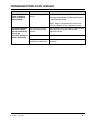
TROUBLE SHOOTING DOCK LEVELER
Symptom
Platform rises slowly.
Possible Cause
Solution
Low hydraulic fluid.
Add fluid, see Maintenance section for proper fluid
level and type.
Contaminated hydraulic
system.
Clean and inspect valves. Flush contaminated oil
from hydraulic system. Fill system with new oil. See
Periodic Maintenance in the Maintenance section.
Damaged or restricted
hydraulic hose(s).
Replace damaged hose(s). Remove restriction.
Pressure relief set too low.
Increase pressure relief. See Adjust Main Pressure
Relief in the Adjustment section.
NOTE: The pressure relief valve must not be set at
a level that causes the motor operating
current to exceed the full load amp value* at
any time, including when operating in
pressure relief.
* The full load amp value can be found on the inside cover of the
control panel.
Pump motor loads down Pressure relief set too high.
when platform reaches
the full raised position.
Decrease pressure relief. See Adjust Main Pressure
Relief in the Adjustment section.
NOTE: The pressure relief valve must not be set at
a level that causes the motor operating
current to exceed the full load amp value* at
any time, including when operating in
pressure relief.
* The full load amp value can be found on the inside cover of the
control panel.
Shoe does not rise to full Low hydraulic fluid.
height.
Add fluid, see Maintenance section for proper fluid
level and type.
Platform DOES rise to full Low hydraulic fluid.
height, but lip DOES NOT
extend or extend fully.
Add fluid, see Maintenance section for proper fluid
level and type.
Logic block (valve) lever
cable weight too low on
cable.
34
Adjust cable weight. See Adjust Cable Weight and
Down Speed Control in the Adjustment section.
4111-0016 — Sept 2010
TROUBLESHOOTING DOCK LEVELER
Symptom
Platform locks into
“safety” as platform
lowers. Lip drops to
vertical position.
Possible Cause
Platform lowering speed is
too fast.
Solution
Adjust platform down speed control.
See Adjust Cable Weight and Down Speed Control
in the Adjustment section.
NOTE: Extreme cold weather OR incorrect fluid
may cause platform to lock. Adjustment is same.
Dock leveler equipped
with ARTD: Platform
does not automatically
return to the
cross-traffic position or
operates abnormally.
4111-0016 — Sept 2010
The auto return proximity
switch not sensing target
correctly.
Adjust proximity switch and target as necessary. See
Adjust Auto Return To Dock (ARTD) in the
Adjustment section.
Defective proximity switch.
Replace switch.
Broken wire. Loose or
corroded wire connections.
Repair or replace wires and connections as
necessary.
35
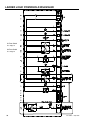
LADDER LOGIC POWERHOLD W/LEVELER
#1 Prox Switch
See Page 23
#2 Prox Switch
See Page 23
36
4111-0016 — Sept 2010
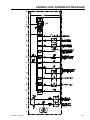
LADDER LOGIC POWERHOLD W/LEVELER
4111-0016 — Sept 2010
37
PROGRAMMING
ISSUES FOR PROGRAMMING.
- Error light is flashing, PLC is either missing or
damaged.
- Update to newer program
- Installation of new un programmed PLC
MATERIAL REQUIRED.
You will receive two (2) E-proms
- Blank run E-Prom.
- Program Specific E-Prom.
INSTALLATION
1. Turn power off power. (remove existing E-Prom if
present).
2. Insert new “Blank Run” E-Prom.
3. Turn power on for 30 seconds.
4. Turn power off for 10 seconds repeat cycle 3
times.
Prom Location
Twido PLC
- Insert program chip (program specific)
Repeat steps 1,3 and 4. Allow light sequence to
complete flashing. Run light should be on STEADY not
flashing. Error light should NOT be on. Check for proper
input and out put lights on the PLC.
If not, repeat steps 3 and 4 until PLC responds properly.
If the PLC does not accept the program or if questions
contact the “Tech Service Department” at 800-643-9424.
Note: The PLC will maintain the program even if the
power is turned off.
E-Prom
38
4111-0016 — Sept 2010
MANUAL RELEASE
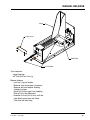
Shoe
Front Cover
Slide Block
3/4” Dia Rod
Tools required:
Large Hammer
3/4” Dia Rod Two Foot Lg.
Manual release.
- Lock out / tag out leveler.
- Remove front cover plate (4 screws)
- Remove bolt and washer holding
cylinder in place.
- Install 3/4’ rod through front opening.
Rod will fit in the slide block.
- Hammer 3/4 rod (4 to 5 hits) until the
slide block travels past the shoe.
-The shoe will then drop.
4111-0016 — Sept 2010
39
This page intentionally left blank
This page intentionally left blank
40
4111-0016 — Sept 2010
PARTS
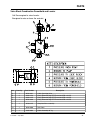
Valve Block Combination PowerHold and Leveler
Coil De-energized to raise Leveler.
Energized to raise or lower the restraint.
G
H
A
B 5
1
C 3
C
2
B 6
E 4
2
6
5
4
1
3
Item
Quantity
Part Number
A
B
C
E
1
2
1
1
8581-0011
9301-0113
9301-0115
8581-0016
4 Way Cartridge Valve
Fitting Elbow 90 Deg STR Thread #6 ORB x #6 JIC
Fitting Elbow 90 Deg STR Thread #6 ORB x #8 JIC
Fitting Elbow 90 Deg STR Thread #8 ORB x #8 JIC
F
1
8583-0115
Complete Valve assembly
G
1
8581-0004
Coil, Delta
H
1
4301-0001
Cable Assembly 48” Lg
4111-0016 — Sept 2010
Description
41
PARTS
PowerHold Valve Block SC
G
H
E
F
4
1
C
D
3
2
A
B
Item
Quantity
A
B
C
D
E
F
G
H
1
2
2
2
1
1
1
1
Part Number
9571-0007
9301-0109
8581-0113
8581-0115
8581-0011
8581-0004
4305-0319
Hydraulic Valve Body
Fitting Pipe Plug 1/8 NPT
Fitting Conn STR Thread
Fitting Elbow 90 Deg #6 ORB x #6 JIC
Valve Cartridge Relief
Valve Cartridge 4-Way
Coil, Delta
Cable Assembly 22” Lg
Description
I
1
8583-0017
Complete Valve Assembly
*Provide dock leveler and/or PowerHold serial number when calling or faxing orders.
42
4111-0016 — Sept 2010
PARTS
PowerHold Valve Block
E
F
Coil must be energized to raise restraint.
De-energized to lower the restraint.
D
A
4
1
B
C
3
2
Item
Quantity
Part Number
Description
A
B
C
D
E
F
1
2
2
1
1
1
9301-0109
9301-0113
8581-0011
8581-0004
4305-0319
Valve Manifold
Fitting Connection STR #6 ORB TO 36 JIC
Fitting Elbow 90 Deg STR Thread #6 ORB x #6 JIC
Valve Cartridge 4-Way
Coil, Delta
Cable Assembly 22” Lg
G
1
8583-0016
Complete Valve assembly
*Provide dock leveler and/or PowerHold serial number when calling or faxing orders.
4111-0016 — Sept 2010
43
PARTS
A
X
E
X
B
P Q
C
N
D
K
I
L
M
O
J
V
F
U
S T Q
G
H
R Q
W
*Provide dock leveler and/or PowerHold serial number when calling or faxing orders.
44
4111-0016 — Sept 2010
PARTS
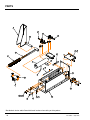
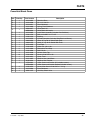
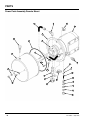
PowerHold Break Down
Item
Quantity
Part Number
A
B
C
D
1
1
1
1
E
1
F
G
H
I
J
K
L
M
N
O
P
Q
R
S
T
U
1
1
1
1
1
1
1
1
2
4
1
14
1
1
1
1
V
W
X
4
1
1
9414-0064
9412-0030
9414-0021
9411-0005
8583-0017
8583-0016
9414-0065
2101-0118
2101-0119
9414-0073
9904-0059
9904-0155
9412-0095
2101-0045
9412-0063
2101-0009
9411-0046
2101-0099
9411-0012
9411-0007
0192-0016
2753-0001
2753-0002
2101-0074
9414-0063
8581-0137
4111-0016 — Sept 2010
Description
Restraint Shoe
Pin 1-1/2 X 8 LG
Rack Weldment
Spring, Rack Weldment
Valve Block SC
Valve Block with leveler
Latch Block Assembly (Includes Prox Switches)
Bolt 3/4-10 UNC X 1-1/2 LG
Bushing
Cylinder Complete (Includes Slide Block and Hoses)
Hose, 35” Lg. #6 Jic Swivel Both Ends
Hose, 21” Lg. #6 Jic Swivel Both Ends
Push Rod
Cotter Pin, 1/8 x 1.00
Removable Track Stop
Bolt 5/16-18
Access Cover, Top
Screw 1/4-20 UNC x 3/8
Cover, Front
Weather Seal, Hold Down
Weather Seal, Ratchet
J-Box, Cover and Gasket SC (includes screws)
J-Box, Cover and Gasket Remote (includes screws)
Screw, Allen Head 1/2-20 UNC x 1-1/2 Lg.
Base Weldment
One Way Check Valve
45
PARTS
PowerHold SC Power Pac
D
A
C
G
F
B
Item
Quantity
Part Number
A
B
C
D
F
1
1
1
2
7
9301-0199
9411-0047
9301-0085
9904-0051
2101-0009
Breather Cap
Cover, Power Pac
Filter 3/8 NPT
Hose, 16.00” LG 3/8 NPTM / #6 Jic Swivel Female
Bolt 5/16-18 UNC 3/4 Lg.
G
1
9395-0022
Power Pac Complete, SC
46
Description
4111-0016 — Sept 2010
PARTS
PowerHold SC
Prox Switch #2
INPUT #4
A
D E
Prox Switch #1
INPUT #3
B
C
Item
Quantity
Part Number
A
B
C
D
E
F
F
2
1
1
1
1
1
1
0963-0073
0941-0008
0941-0009
2101-0012
2101-0202
2101-0203
9414-0065
4111-0016 — Sept 2010
Description
Prox Switch
Spring
Spring
Bolt 5/16-18 UNC
Nut, Hex 5/16-18 UNC
Latch Weldment
Latch Assembly (Complete With Prox Switches)
47
PARTS
Power Pack Assembly Remote Mount
J
L
K
M
H
D
C
G
E
F
AC
AB
B
Q
AA
R
Z
Y
A
N
P
W
X
S
T
U
T
V
48
4111-0016 — Sept 2010
PARTS
Power Pack Assembly Remote Mount
Item
Quantity
Part Number
A
B
C
D
E
F
2
2
1
1
1
2
1
4
1
1
1
1
1
1
1
1
1
1
1
1
2
1
1
1
1
1
1
2
2
2
1
2101-0039
9301-0029
9302-0014
9301-0199
9301-0027
9302-0012
9301-____ 1
2101-0016
9301-0028
9303-0002
9302-0017
9904-0001
0521-0017
0521-0007
3411-____ 2
0521-0015
0521-0014
9301-0024
9302-0009
9303-0003
9301-0014
9301-0015
9301-0016
0521-0016
9301-0009
9301-0082
9301-0008
9301-0003
9301-0004
2101-0063
9395-____ 1
G
H
J
K
L
M
N
P
Q
R
S
T
U
V
W
X
Y
Z
AA
AB
AC
1
2
Description
Nylon Lock Nut, 5/16-18 UNC
Seal, Thread
Reservoir
Breather Cap, 3/8 NPT Male
O-Ring (Reservoir)
Tie Rod (Reservoir)
Pump Only
Cap Screw, 5/16-18 UNC x 3-1/2 in., Grade 5
Gasket, Pump
Coupling Assembly
Plate, Drive
Hose
90° Elbow, 3/8 NPT Male x #8-JIC Male
90° Elbow, 1/4 NPT Male x 1/4 Tube
Motor Only
Straight Fitting, 3/8 NPT Male x #8-JIC Male
Ball, Check
Guide, Check Ball
Spring, Relief Valve
Screw, Adjusting
Washer, Nylon, 11/16 in. OD x 1/2 in. ID
Nut, Jam, 1/2-20 UNF
Nut, Acorn, 1/2-20 UNF
45° Elbow, 3/8 NPT Male x #8-JIC Male
Strainer, Suction
Magnet
Pipe Nipple, 3/8 NPT x 3 in.
Washer, Aluminum, 9/16 in. OD x 3/8 in. ID x 1/16 in.
Screw, Socket Head, 3/8-16 UNC x 1-3/4 in.
Nut, Jam 5/16-18 UNC
Power Pack Complete (Includes All Items Except L, N, and W)
Provide dock leveler serial number and type of installation when calling or faxing orders.
Provide dock leveler serial number, voltage, and phase when calling or faxing orders.
4111-0016 — Sept 2010
49
PARTS
Outside Signs
A
Item
Quantity
Part Number
A
1
1751-0033
B
1
1751-0034
50
B
Description
SIGN,PULL IN/OUT ON GREEN ONLY
RIGHT READING,16-7/8x8x3/32
SIGN,PULL IN/OUT ON GREEN ONLY
MIRROR IMAGE,16-7/8x8x3/32
4111-0016 — Sept 2010
PARTS
OSLA (Outside Light Assembly)
Item
Quantity
Part Number
1
3055-0008
Complete Light Housing, Yellow Plastic, LED Lights
1
1
3055-0002
3055-0009
Complete Light Housing, Yellow Plastic, Incandescent Lights
Complete Light Housing, Clear Charcoal, LED Lights, Strobe
1
3055-0007
Complete Light Housing, Clear Charcoal, Incandescent Lights, Strobe
1
3051-0063
Light Housing Only, Yellow Plastic
1
3051-0100
Light Housing Only, Clear Charcoal
2
1
3051-0102
Lens/Housing/Circuit Assembly Red-LED
3
1
3051-0103
Lens/Housing/Circuit Assembly Green-LED
*
2
3051-0085
Lamp, 25W,120V,Incandescent, BAY (Rated 1000 Hours)
*
2
3051-0066
Socket Harness for Incandescent Lamp
2
1
3051-0064
Lens, Red
3
1
3051-0065
Lens, Green
4
1
3051-0068
Mounting Gasket
5
4
3051-0105
Clips, Lens Holding
6
4
3051-0104
Screw, Lens Holding Clip
7
1
x
Conduit Fastener, 3/4” x 3/8” (Included in Light Package)
1
4111-0016 — Sept 2010
Description
51
52
4111-0016 — Sept 2010
MISCELLANEOUS
Customer Information
A
PR052
NOTE: Refer to illustration for left/right orientation of
dock leveler.
The model/serial number decal (A) is located
on the right platform joist near the front (lip)
of dock leveler.
When you receive your PR dock leveler, write down
the dock leveler model and serial number in the form
provided. This will help ensure safe keeping of the
numbers in the event the model/serial number decal
(A) becomes lost or damaged.
Also, write down Systems, Inc.’s job number, the
company that installed the dock leveler, and the
original owner’s name. This will all help to identify the
specific dock leveler if more information is required.
When ordering, use part numbers and description to
help identify the item ordered. Do not use “item”
numbers. These are only for locating the position of
the parts. Always give dock leveler MODEL NUMBER
and/or SERIAL NUMBER.
For service, call or contact:
Dock Leveler Information
Model ___________________________________
Serial No. ________________________________
Systems, Inc., Job No. ______________________
Original Owner Information
Name ___________________________________
Address _________________________________
________________________________
Installer Information
Name ___________________________________
Address _________________________________
_________________________________
Date of Installation ________________________
Systems, Inc.
P.O. Box 309
Germantown, WI 53022
Phone: (800) 643-5424
Fax: (262) 255-5917
4111-0016 — Sept 2010
53
STANDARD PRODUCT WARRANTY
SYSTEMS, INC. warrants that its products will be free from defects in design, materials and
workmanship for a period of one (1) year from the date of shipment. All claims for breach of this warranty
must be made within 30 days after the defect is or can with reasonable care, be detected. In no event
shall any claim be made more than 30 days after this warranty has expired. In order to be entitled to the
benefits of this warranty, the product must have been properly installed, maintained and operated in
accordance with all manufacturer’s recommendations and/or specified design parameters and not
otherwise have been subject to abuse, misuse, misapplication, acts of nature, overloading, unauthorized
repair or modification, application in a corrosive environment or lack of maintenance. Periodic
lubrication, adjustment and inspection in accordance with all manufacturers’ recommendations are the
sole responsibility of the Owner/User.
In the event of a defect, as determined by SYSTEMS INC., covered by this warranty, SYSTEMS INC.
shall remedy such defect by repairing or replacing any defective equipment or parts, bearing the cost for
the parts, labor and transportation. This shall be exclusive remedy for all claims whether based on
contract, negligence or strict liability.
WARRANTY LIMITATIONS
THE ABOVE WARRANTIES ARE IN LIEU OF ANY OTHER WARRANTIES, WHETHER EXPRESSED
OR IMPLIED, INCLUDING BUT NOT LIMITED TO ANY IMPLIED WARRANTY OF MERCHANTABILITY
OR FITNESS FOR A PARTICULAR PURPOSE. SYSTEMS INC. AND ITS SUBSIDIARIES SHALL NOT
IN ANY EVENT BE LIABLE TO ANYONE, INCLUDING THIRD PARTIES, FOR INCIDENTAL,
CONSEQUENTIAL OR SPECIAL DAMAGES OF ANY KIND INCLUDING BUT NOT LIMITED TO,
BREACH OF WARRANTY, LOSS OF USE, LOSS OF PROFIT, INTERRUPTION OF BUSINESS OR
LOSS OF GOODWILL.
PRODUCT SPECIFIC WARRANTY
“PowerHold®” SERIES VEHICLE RESTRAINT
In addition to the “Standard Product Warranty” provided with all Poweramp® Products, Systems Inc.,
guarantees materials, components and workmanship to be free of defects for the following extended
periods:
• Structural Warranty – For a period of five (5) years from the date of shipment, this warranty
specifically applies to; restraint shoe, pivot pin and frame weldment only.
• Hydraulic Warranty – For a period of two (2) years from date of shipment, this warranty
specifically applies to; the hydraulic pump and motor, all hydraulic cylinders, hydraulic pressure
lines, fittings and valves only.
• Electrical Warranty – For a period of two (2) years from date of shipment, this warranty
specifically applies to; the control box components, proximity switches, coils and proximity
sensor when interlocked with a Poweramp® leveler only.