1
ENGLISH
REMOTE CONTROL OPERATION
(Remote control unit: RC8100PM)
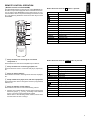
The RC8100PM remote control unit can control MARANTZ audio/video components equipped with an infrared remote sensor as well as other MARANTZ components which are connected with the above components through the remote control
bus. The following illustration shows the button layout of the
RC8100PM.
Button functions when the CD button is pressed:
Button
Function
PLAY
Fast forward
Fast backward
Stop
OPEN/
CLOSE
SOURCE
POWER
AMS/SCAN
SCROLL
DISPLAY
TEXT
1
2
3
4
5
6
7
8
c
9
RAND0M
x
v
OPEN/CLOSE
Pause
Open/Close
AMS/SCAN
TEXT
Music scan
Display the CD text
Skip forward to next track
Skip backward to previous track
REPEAT
0
PRESET
TUNE
TUNE
VOL
+
VOL.
MODE/
AUDIO
TAPE
SCROLL
REPEAT
Scroll the text on the display
Repeat play
b
RANDOM
DISPLAY
Random play
Switch the text/time information on the display
MODE/AUDIO
Not used
VOL
VOL.
AUX/DVD
x
MUTE
TUNER
CD
MD
PHONO
CD-R
z
REMOTE CONTROLLER
RC8100PM
z Group of buttons for selecting the connected
components *1
These buttons are used as the amplifier’s input selector.
x Group of buttons for controlling playback, etc.
Button functions when the TUNER button is pressed:
Button
These buttons are used to control the CD player, tape deck,
etc.
Frequency up
Frequency down
c Group of numeric buttons
These buttons are used to enter figures for the tuner, CD player,
etc.
v Group of buttons for player, tuner, and other equipments
These buttons are used to change the modes or programmed
stations, etc.
b Group of amplifier control buttons
These buttons are used to control the listening volume.
*1 Pressing one of these buttons change the functions of the
buttons in groups x, c and v according to the selected
source component except PHONO and AMP.
Please refer to the following tables entitled, which show
how the button functions change.
Function
Not used
Not used
Not used
OPEN/CLOSE
AMS/SCAN
Not used
Scan the programmed stations
TEXT
Not used
Program type up
SCROLL
Program type down
Not used
REPEAT
RANDOM
Not used
Not used
DISPLAY
MODE/AUDIO
Switch the text/time information
Change the MONO/STEREO
5