1
ENGLISH
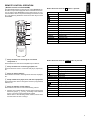
Button functions when the AUX/DVD button is pressed:
Button
Function
Button functions when the CD-R button is pressed:
Button
FRANCÇAIS
PLAY
Fast forward playback
Fast reverse playback
Stop
Fast reverse playback
Stop
OPEN/CLOSE
Pause
Open/Close
OPEN/CLOSE
Pause
Open/Close
AMS/SCAN
TEXT
Intro-scan play
Not used
AMS/SCAN
TEXT
Intro-scan play
Not used
Chapter/Track skip forward
Chapter/Track skip backward
Chapter/Track skip forward
Chapter/Track skip backward
SCROLL
REPEAT
Not used
Repeat play
SCROLL
REPEAT
Scroll the text on the display
Repeat play
RANDOM
DISPLAY
Random play
Switch the time information on the display
RANDOM
DISPLAY
Random play
Switch the time information on the display
MODE/AUDIO
Select the audio mode
MODE/AUDIO
Not used
Button functions when the MD button is pressed:
Button
6
Function
PLAY
Fast forward playback
Function
Button functions when the TAPE button is pressed:
Button
Function
PLAY
PLAY
Fast forward
Fast backward
Fast forward
Fast backward
Stop
Pause
Stop
Pause
OPEN/CLOSE
AMS/SCAN
Open/Close
Not used
OPEN/CLOSE
AMS/SCAN
Open/Close
Automatic music scan
TEXT
Change the charactors when TEXT is input
Skip forward to next track
TEXT
Not used
Skip forward to next track
Skip backward to previous track
Not used
Select Deck A
Select Deck B
Switch the time information
Blank skip
SCROLL
Skip backward to previous track
Not used
SCROLL
REPEAT
RANDOM
Repeat play
Random play
REPEAT
RANDOM
DISPLAY
MODE/AUDIO
Switch the text/time information on the display
Change the MONO/STEREO for recording
DISPLAY
MODE/AUDIO