1
SPECIFICATIONS
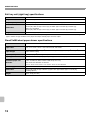
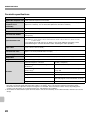
Network scanner / Internet Fax*1 specifications
Type
Built-in
100 x 100, 200 x 200, 300 x 300, 400 x 400, 600 x 600
Scanning resolution (dpi) Internet Fax: 200 x 100, 200 x 200, 200 x 400, 400 x 400, 600 x 600 (200 x 100, 200 x 200 when file
type is TIFF-S) Halftone can be selected for resolutions other than 200 x 100 dpi.
Scanning speed
MX-M363N/MX-M453N/MX-M503N:
Colour (A4 / 8-1/2" x 11") One-sided: 70 pages/min. (200 x 200 dpi),
Two-sided: 70 pages/min. (200 x 200 dpi)
Black and white (A4 / 8-1/2" x 11") One-sided: 70 pages/min. (200 x 200 dpi),
Two-sided: 70 pages/min. (200 x 200 dpi)
MX-M283N:
Colour (A4 / 8-1/2" x 11") One-sided: 50 pages/min. (200 x 200 dpi),
Two-sided: 20 pages/min. (200 x 200 dpi)
Black and white (A4 / 8-1/2" x 11") One-sided: 50 pages/min. (200 x 200 dpi),
Two-sided: 20 pages/min. (200 x 200 dpi)
Interface port
LAN connectivity: 10Base-T / 100Base-TX / 1000Base-T
Supported protocols
TCP/IP (IPv4)
File formats
Remarks
Colour
(including greyscale)
File types: TIFF, JPEG, PDF, Encrypted PDF, XPS, Compact
PDF*2
Compression ratio: High / Medium / Low
Black and white
File types: TIFF, PDF, Encrypted PDF, XPS
Compression modes: None / Medium (G3) / High (G4)
Internet Fax
(black and white only)
File types: TIFF-FX (TIFF-F, TIFF-S)
Compression modes: Medium (G3) / High (G4)
Number of one-touch keys for
storing destinations*3
Maximum number of keys: 1000
Number of destinations that can be Maximum number of destinations in one group (1 key): 500
stored in a group (1 key)*3
Scan destinations
Scan to E-mail / Scan to FTP / Scan to Desktop / Scan to
Network Folder
*1 Internet fax expansion kit is required.
*2 Enhanced compression kit is required.
*3 Total number of all destinations (Scan to E-mail, Scan to FTP, Scan to Desktop, Scan to Network folder, Internet Fax, Fax, and
Group)
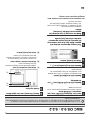
Pull scan function (TWAIN) specifications
Supported protocol
TCP/IP (IPv4)
Supported client PC
operating systems
Windows 98 / Me / 2000 / XP / Server 2003 / Vista / Server 2008
Colour modes
Full Colour, Greyscale, Mono Diffusion, Mono 2 gradation
Resolution settings
75 dpi, 100 dpi, 150 dpi, 200 dpi, 300 dpi, 400 dpi, 600 dpi
(The resolution can be specified by entering a numerical value from 50 to 9600 dpi. However, when
a high resolution is specified, it is necessary to reduce the scanning area.)
Scanning area
Maximum: A3 (11" x 17")
19