1
3.2
Vocal POST Messages
This motherboard includes the Winbond speech controller to support a
special feature called the ASUS POST Reporter™. This feature gives you
vocal POST messages and alerts to inform you of system events and boot
status. In case of a boot failure, you will hear the specific cause of the
problem.
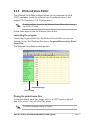
These POST messages are customizable using the Winbond Voice Editor
software that came with your package. You can record your own
messages to replace the default messages.
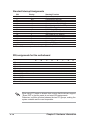
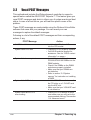
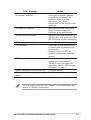
Following is a list of the default POST messages and their corresponding
actions, if any.
POST Message
3-2
Action
No CPU installed
• Install an Intel Pentium 4 Processor
into the CPU socket.
System failed CPU test
• Check the CPU if properly installed.
• Call ASUS technical support for
assistance. See the “ASUS contact
information” on page x.
System failed memory test
• Install 184-pin unbuffered
PC3200/2700/2100 DIMMs into the
DIMM sockets.
• Check if the DIMMs on the DIMM
sockets are properly installed.
• Make sure that your DIMMs are
not defective.
• Refer to section “2.5 System
memory” for instruction on installing
a DIMM.
System failed VGA test
• Install a PCI VGA card into one of
the PCI slots, or a 1.5V AGP card
into the AGP slot.
• Make sure that your VGA/AGP card
is not defective.
System failed due to CPU
over-clocking
• Check your CPU settings in BIOS
and make sure you only set to the
recommended settings. See section
“4.4 Advanced menu.”
Chapter 3: Powering up