1
Table of Contents
1
HomePlug Powerline ................................................................................................................................... 4
1.1
1.2
1.3
Introduction ..................................................................................................................................................... 4
System Diagram ............................................................................................................................................. 4
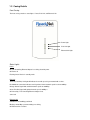
Casing Details ................................................................................................................................................ 5
Front Casing ....................................................................................................................................................................................... 5
Status Lights ....................................................................................................................................................................................... 5
Bottom Casing .................................................................................................................................................................................... 6
Buttons ............................................................................................................................................................................................... 6
1.4
Initial Setup ..................................................................................................................................................... 6
Connect the HomePlug AV Ethernet Adapter to a Computer or Modem/Router ................................................................................... 6
2
Individual HomePlug AV Network Setup (Optional) ................................................................................. 7
2.1
2.2
2.3
Creating a new individual HomePlug AV network (Network AB).................................................................... 7
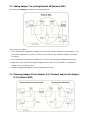
Adding Adapter C to existing Network AB (Network ABC) ............................................................................. 8
Removing Adapter B from Adapter A & C Network and join with Adapter D & E (Network BDE) .................. 8
3
Troubleshooting ........................................................................................................................................... 9
4
Specification ............................................................................................................................................... 10