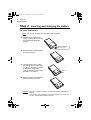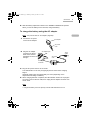
1
Start-up Guide 00 Cover.book Page 2 Saturday, January 19, 2002 11:33 AM In the U.S.A. Declaration of Conformity Personal Mobile Tool: SL-5500 This device complies with Part 15 of the FCC Rules. Operation is subject to the following two conditions: (1) This device may not cause harmful interference, and (2) this device must accept any interference received, including interference that may cause undesired operation. Responsible Party: SHARP ELECTRONICS CORPORATION Sharp Plaza, Mahwah, New Jersey 07430 TEL: 1-800-BE-SHARP Tested To Comply With FCC Standards FOR HOME OR OFFICE USE WARNING - FCC Regulations state that any unauthorized changes or modifications to this equipment not expressly approved by the manufacturer could void the user's authority to operate this equipment. Note: This equipment has been tested and found to comply with the limits for a Class B digital device, pursuant to Part 15 of the FCC Rules. These limits are designed to provide reasonable protection against harmful interference in a residential installation. This equipment generates, uses, and can radiate radio frequency energy and, if not installed and used in accordance with the instructions, may cause harmful interference to radio communications. However, there is no guarantee that interference will not occur in a particular installation. If this equipment does cause harmful interference to radio or television reception, which can be determined by turning the equipment off and on, the user is encouraged to try to correct the interference by one or more of the following measures: — Reorient or relocate the receiving antenna. — Increase the separation between the equipment and receiver. — Connect the equipment into an outlet on a circuit different from that to which the receiver is connected. — Consult the dealer or an experienced radio/TV technician for help. Note:A shielded interface cable is required to ensure compliance with FCC regulations for Class B certification. FOR YOUR RECORDS... For your assistance in reporting this product in case of loss or theft, please record the model number and serial number (located on the bottom of the unit) below. Please retain this information. Model Number Serial Number Date of Purchase Place of Purchase 01 Intro.fm Page 1 Tuesday, January 22, 2002 5:10 PM Introduction Introduction Congratulations on purchasing the SL-5500 Personal Mobile Tool. Read this SL-5500 Start-up Guide first. Then, refer to the SL-5500 Operation Manual for more details. NOTICE: • SHARP strongly recommends that you keep separate permanent written records of all important data. Data may be lost or altered in virtually any electronic memory product under certain circumstances. Therefore, SHARP assumes no responsibility for data lost or otherwise rendered unusable, whether as a result of improper use, repairs, defects, battery replacement, use after the specified battery life has expired or any other cause. • SHARP assumes no responsibility, directly or indirectly, for financial losses or claims from third parties resulting from the use of this product and any of its functions, such as stolen credit card numbers, the loss or alteration of stored data, etc. • Some of the accessories described in this manual may not be available at the time you purchase this product. • The information and screens provided in this manual is subject to change without notice. • All company and/or product names are trademarks and/or registered trademarks of their respective holders. 1 01 Intro.fm Page 2 Tuesday, January 22, 2002 5:10 PM 2 Introduction • CompactFlash is a trademark of SanDisk Corporation. • SD logo is a trademark. • Java and PersonalJava are trademarks of Sun Microsystems, Inc. • LINEO and Embedix are trademarks of Lineo, Inc. • Linux is a registered trademark owned by Linus Torvalds. • Trolltech™, Qt™, Qtopia™ and the Trolltech logo are registered trademarks of Trolltech. • Opera™ is a trademark of Opera Software ASA. • Jeode™ is a trademark of Insignia Solutions, Inc. • Hancom™ is a trademark of Hancom. • Microsoft, PowerPoint, Outlook, and Windows are either registered trademarks or trademarks of Microsoft Corporation in the United States and/or other countries. • This product includes software developed by the University of California, Berkeley and its contributors. 00 Cover.book Page 3 Saturday, January 19, 2002 11:33 AM 3 Contents Introduction ................................................................. 1 Quick Start ................................................................... 4 Step 1: Step 2: Step 3: Step 4: Step 5: Check the contents ............................................. 4 Inserting and charging the battery ....................... 6 Pulling out the stylus ........................................... 8 Display protection cover ...................................... 9 Initial settings .................................................... 10 About your SL-5500 .................................................. 15 Useful functions and services of the SL-5500 ................ 15 Part names and functions ............................................... 19 Opening or closing the keyboard .................................... 23 Connecting the SL-5500 to your PC ............................... 23 Charging using the Docking Station ............................... 24 Basic Operations ...................................................... 27 Turning on and off .......................................................... 27 Operating methods ......................................................... 28 Home screen .................................................................. 29 Entering characters ........................................................ 32 Creating and modifying an entry ..................................... 43 Assigning a new category (categories) to an entry ......... 44 Using the Index screen ................................................... 47 Using the Menu bar ........................................................ 48 Using the Details screen ................................................. 55 Using the Documents folder ........................................... 58 Adjusting the volume ...................................................... 61 Checking the battery level .............................................. 62 Using expansion memory cards ..................................... 63 Using Help ...................................................................... 66 Appendix .................................................................... 69 What to do if a problem occurs ....................................... 69 Replacing the battery ...................................................... 70 Conditions of use ...................................................... 71 Troubleshooting ........................................................ 74 Specifications ............................................................ 76 Product Support ........................................................ 79 00 Cover.book Page 4 Saturday, January 19, 2002 11:33 AM 4 Quick Start Quick Start Step 1: Check the contents SL-5500 Personal Mobile Tool with Display protection cover Rechargeable Lithium-Ion Battery (EA-BL06) Stylus (attached in the SL-5500) AC Adapter (EA-70) and AC Power Cord CF Slot Protection Card (attached in the SL-5500) Docking Station (CE-ST7) 00 Cover.book Page 5 Saturday, January 19, 2002 11:33 AM Quick Start Operation Manual Start-up Guide (this book) CD-ROM (PC link software and its Operation Manual, USB drivers, etc.) Support sticker for card ejection (2 sheets) Note: The AC power cord plug may differ in some countries. 5 00 Cover.book Page 6 Saturday, January 19, 2002 11:33 AM 6 Quick Start Step 2: Inserting and charging the battery To insert the battery Note: Only use the “EA-BL06” rechargeable battery (supplied). 1. Slide the battery replacement switch on the rear side of the unit to the “REPLACE BATTERY” position. NORMAL OPERATION REPLACE BATTERY 2. Open the battery compartment lid and gently pull it off. 3. Insert the battery on the ribbon tab, making sure that the triangle (), plus (+), and minus (-) marks on the battery are aligned correctly with those printed inside the battery compartment. Ribbon tab 4. Replace the battery compartment lid with the ribbon tab inside. Caution: Be sure to replace the battery compartment lid after inserting the battery. If the cover is not on securely, the battery may become loose and you may lose the data stored in the unit. 00 Cover.book Page 7 Saturday, January 19, 2002 11:33 AM Quick Start 5. Slide the battery replacement switch to the “NORMAL OPERATION” position. When you use the battery for the first time, charge the battery. To charge the battery using the AC adapter Note: Only use the “EA-70” AC adapter (supplied). 1. Connect the AC power AC adapter cord to the AC adapter. AC power cord 2. Plug the AC adapter connector into the SL5500 which contains the battery as shown on the right. AC adapter jack To AC outlet AC power cord AC adapter connector AC adapter 3. Plug the AC power cord into an AC outlet. The LED indicator on the unit (charge light) will turn amber when charging begins. Standard charging time is approximately 2.5 hours (depending on the temperature and usage conditions). 4. When charging has been completed, the LED indicator will turn off. Unplug the AC power cord from the AC outlet, then unplug the AC adapter connector from the SL-5500. Note: • Charge the battery to its full capacity until the LED indicator turns off. 7 00 Cover.book Page 8 Saturday, January 19, 2002 11:33 AM 8 Quick Start • If a charging error occurs, the LED indicator will flash. Make sure that the AC power cord and the AC adapter are connected correctly, remove and reinsert the battery, then perform steps 1 to 3 above again. If the error persists, there is something wrong with the battery, SL-5500, etc. Contact your local SHARP dealer for repair. • The AC power cord plug may differ in some countries. The SL-5500 has a specified built-in rechargeable back-up battery that prevents the memory contents from being erased when you replace the battery. The rechargeable back-up battery will be charged to its full capacity in 30 hours using the AC adapter or a fully charged “EA-BL06” operating battery. If you want to replace the operating battery before the rechargeable back-up battery is fully charged, be sure to connect the AC adapter. (Refer to page 70.) Step 3: Pulling out the stylus This unit comes equipped with a stylus to select items and enter various kinds of information, etc. Pull out the stylus as shown. To replace it, insert it so that the protruding part of the stylus locks into place. Touch the button displayed on the screen one time to open, select an item, etc. 00 Cover.book Page 9 Saturday, January 19, 2002 11:33 AM Quick Start Step 4: Display protection cover To open the Display protection cover When carrying the SL-5500, be sure to close the cover to protect the LCD display. If not closed, the display may be damaged or broken. Open or close the Display protection cover by picking up or holding down the hook of the cover gently. Remove To remove the Display protection cover, open it more than 135°. The Display protection cover opens about 135°. Replace To replace the Display protection cover, catch it on the side hooks. 9 00 Cover.book Page 10 Saturday, January 19, 2002 11:33 AM 10 Quick Start Step 5: Initial settings Carry out the initial setup of the SL-5500 after completing the battery charge. Performing a FULL RESET You have to initialize the hardware prior to using the SL-5500. Caution: When you push the FULL RESET button, the hardware will be reset. All data created and all add-on applications installed in the SL-5500 will be deleted. 1. Slide the battery replacement switch on the rear side of the unit to the “REPLACE BATTERY” position. NORMAL OPERATION REPLACE BATTERY 2. Open the battery compartment lid. 3. Push the “FULL RESET” button on the lower right side of the battery compartment with the stylus. Note: Do not use an object with a breakable or sharp tip. FULL RESET button 00 Cover.book Page 11 Saturday, January 19, 2002 11:33 AM Quick Start 4. Replace the battery compartment lid. Note: Be sure to replace the battery compartment lid before you use the SL5500. 5. Slide the battery replacement switch to the “NORMAL OPERATION” position. Turning the unit on 1. Press (On/Off) to turn the power on. The Welcome screen appears. Then, follow the next procedures to complete the initial settings. Note: • If the Welcome screen does not appear, try FULL RESET again. Also make sure that the battery replacement switch is set to “NORMAL OPERATION” and the battery is inserted correctly. • If the battery level is low, the power will not turn on even if you attach the AC adapter. Charge the battery to its full capacity. Adjusting the touch panel 1. On the Welcome screen, tap anywhere on the display. The Calibration screen appears. 2. Tap the cross hairs firmly one by one. When you have completed adjustment of the touch panel, the Set System Time screen appears. Then, follow the next procedure. 11 00 Cover.book Page 12 Saturday, January 19, 2002 11:33 AM 12 Quick Start Setting the date and time For the time-critical functions to work properly, the built-in clock must be set to the current date and time. Note: For detailed information on how to enter characters, see page 32, “Entering characters.” Time Zone drop-down list button City Time button Hour and Minute spinboxes Date button Time format drop-down list button Weeks start on drop-down list button Date format drop-down list button 1. Tap the Time Zone drop-down list button. The default city names of six candidates will be displayed. 2. Select your time zone. Note: If your time zone is not listed, go to step 3. You can change the time zone later using the Date/Time application. (For details, see the separate Operation Manual.) 3. Tap the Time format drop-down list button and tap either of the choices: 12 hour or 24 hour. 4. Tap the up and down arrows on the Hour and Minute spinboxes to set the correct time. 5. If you select the 12-hour format in step 3, select AM or PM by tapping the dropdown list. 6. Tap the Date button and then tap your current date on the Calendar screen that appears. • Tap the up and down arrows of the year spinbox to set the current year. • Tap the month drop-down list button and select the current month. • Tap or to change the setting month by month. 00 Cover.book Page 13 Saturday, January 19, 2002 11:33 AM Quick Start • Tap or one go. to select the first month (January) or last month (December) in 7. Tap the Weeks start on drop-down list button and then tap the starting day of the week of the calendar: Sunday or Monday. 8. Tap the Date format drop-down list button and then tap the desired format. The selected format applies to the Date column displayed on the Index screen of the application, etc. M/D/Y (example, 12/26/02) D.M.Y (example, 26.12.02) Y-M-D (example, 02-12-26) D/M/Y (example, 26/12/02) Note: These Date formats will not apply to the long date format, for example, December 26, 2002. 9. Tap “Next” or to save the setting. The display turns to the Edit My Personal Details screen. Follow the next procedure. Registering your personal information To skip entering it now, tap “Next” or . You can enter it later using the Address Book application. (See the separate Operation Manual.) 1. Enter your information on the Edit My Personal Details screen and then tap “Next” or to save it. Tapping “Back” returns to the previous Set System Time screen. 13 00 Cover.book Page 14 Saturday, January 19, 2002 11:33 AM 14 Quick Start Note: On this screen you cannot select or enter the category name. Follow the next procedure. Setting your passcode By setting your own passcode in the SL-5500, you can protect your unit from unauthorized use. Once you set the passcode and enable the setting, enter it every time you turn the unit on. To skip setting the passcode now, tap “Finish” or . You can enter it later using the Security application. (See the separate Operation Manual.) Caution: Use this function with care. If you forget your passcode, you need to carry out the hardware reset. It will lose all data created and saved and add-on programs added to the unit. . 1. Tap the “Set passcode” button. 2. Enter your passcode and then tap “OK”. 3. Enter the same passcode again and then tap “OK”. To make the unit ask for the passcode at start-up every time you turn it on, tap the “Require pass code at power-on” checkbox to turn it on. 4. Tap “Finish” or to complete the initial settings. The initial settings are complete and then the Home screen will be displayed. • If you turned on the “Require pass code at power-on” option in step 3, the passcode entry screen appears asking for your passcode. Entering the correct passcode will display the Home screen. 00 Cover.book Page 15 Saturday, January 19, 2002 11:33 AM About your SL-5500 About your SL-5500 Useful functions and services of the SL-5500 Your SL-5500 has the following features: • A large colorful LCD screen • A full QWERTY keyboard and software keyboards (capable of handwriting recognition) • The ability to create and read Internet e-mail message (POP3/SMTP/IMAP4) The e-mail message can include the attachment file • An HTML browser that can access a variety of information screens • Powerful PIM functions (Address Book, Calendar, Todo List, Text Editor) • Playback of MPEG1 movie files and MP3 music files • Viewing and simple editing of the files of the Microsoft Word or Excel, and viewing of the files of the Microsoft PowerPoint • Saving or transporting data in CF or SD card expansion slots • Data exchange with a PC using PC link software • The capacity to add applications by importing them from a PC or transferring them from a CF or SD/MMC memory card • The ability to slideshow image files • Voice Recorder to capture your messages and memos (commercially available headset with a microphone required) The functions such as calendar in this product can handle dates from January 1, 1970 to December 31, 2037. 15 00 Cover.book Page 16 Saturday, January 19, 2002 11:33 AM 16 About your SL-5500 Applications Address Book Allows you to check the list of existing names and contact details. Calendar Allows you to store events and set alarms. Todo List Allows you to show a list of Todo items and reminds you of what and when to be done. Text Editor Allows you to open with a list of text files, create a new text file and edit it. Media Player Allows you to play movies and music stored in your SL5500 or expansion memory cards. Image Viewer Allows you to display and slideshow the image files. Opera Browser This Web browser connects to the Internet and shows pages in HTML format. EMail Allows you to create and transmit e-mail messages. Clock Allows you to show the current time and date and can be used as a stopwatch. City Time Allows you to show the time in up to six different cities of your choice. Calculator Features a conversion function and 12-digit calculation. Help Browser Allows you to show the help information that works in a similar way to a Web browser. System Info Allows you to present a set of pages each presenting an aspect of the system’s status. Voice Recorder Allows you to record your messages and memos. Requires a headset with a microphone Hancom Presenter Allows you to open the Microsoft PowerPoint data. 00 Cover.book Page 17 Saturday, January 19, 2002 11:33 AM About your SL-5500 HancomSheet Allows you to open and edit the Microsoft Excel data. HancomWord Allows you to open and edit the Microsoft Word data. Note: For details on how to use the Hancom Presenter, HancomSheet, and HancomWord, see the online documentation on the CD-ROM supplied. Settings Add/Remove Software Allows you to install or uninstall applications to/from the SL-5500. Appearance Allows you to customize the desktop and window properties. Application Key Allows you to assign the four keys (Calendar key, Address Book key, Menu Popup key, EMail key) on the slide cover to any of the applications installed in the unit. Backup Restore Allows you to make a backup file of the unit or restores data of the unit on a CF or SD/MMC memory card. Beam Receive Allows you to transfer data of the Address Book, Calendar, Todo List, and Documents files by an infrared beam. Date/Time Allows you to set the current date and time and your city. Internet Wizard Allows you to configure the LAN and dial-up settings in turn to perform network functions. Light & Power Allows you to change the time that elapses before the unit turns off automatically and the front light goes off automatically. Network & Sync Allows you to set up dial-up and LAN preferences for both the EMail and Opera Browser. Proxim Configuration Allows you to configure the OpenAir Wireless LAN card manufactured by Proxim. Wireless LAN Setting Allows you to configure the wireless LAN card. 17 00 Cover.book Page 18 Saturday, January 19, 2002 11:33 AM 18 About your SL-5500 Recalibrate Allows you to calibrate the touch-panel screen. Security Allows you to set your own pass code to protect your unit from unauthorized use. Shutdown Allows you to restart Linux system, Qtopia system, etc. Games Asteroids Destroy asteroids while avoiding collision. Go Conquer more of the board than your opponent while avoiding capture. Mindbreaker Guess the sequence of the colored pegs. Mine Hunt Quickly mark all the squares that contain mines. Patience Sort the cards in their suits from Ace to King. Snake Make the snake grow longer by eating the mice. Word Game Use letters to form words and score points. 00 Cover.book Page 19 Saturday, January 19, 2002 11:33 AM About your SL-5500 Part names and functions Front 1.Display 2.Address Book key 3.HOME key 11.LED indicator 10.Calendar key 9.Cancel key (On/Off key) 8.SELECT key 4.Menu Popup key (Front light key) 5.EMail key 6.OK key 7.Cursor key 16.Keyboard 12.Display protection cover 15.Slide cover 14.SHARP I/O PORT 13.AC adapter jack 19 03 About SL5500.fm Page 20 Tuesday, January 22, 2002 5:11 PM 20 About your SL-5500 Back 17.Eyelets for the handstrap 18.Battery compartment lid 20.FULL RESET button 19.Battery replacement switch Rear Reserve nut for a future and undecided optional attachment. It is not a missing screw. 21.Stylus 22.CF card slot 23.CF Slot Protection card 24.Stereo headphone jack 26.SD card slot 25.IR port 00 Cover.book Page 21 Saturday, January 19, 2002 11:33 AM About your SL-5500 1. Display: Displays applications, menus, and data stored in the SL-5500. 2. Opens the Address Book application. Address Book key: 3. HOME key 4. ( Menu Popup key: Front light key): Opens the Home screen. Opens and then closes the pop-up menu. Turns the front light on and off when pressed and held for several seconds. Opens the EMail application. 5. EMail key: 6. OK key: Executes the current operation, closes a window, etc. Cursor key: ) Moves the cursor in the direction of the respective cursor keys you press. 7. ( 8. SELECT key: Executes the current operation, etc. 9. Cancels the current operation, closes a window without saving settings, etc. Turns the SL-5500 on when it is powered off. Turns the SL-5500 off when pressed and held for several seconds. Opens the Calendar application. Cancel key (On/Off key): 10. Calendar key: 11. LED indicator Charge light (amber): Mail light (green): Turns on when charging begins. Turns off when it is completed. Light indicating e-mail operation. Flashes for incoming e-mail messages. 12. Display protection cover: Close the cover when not in use to protect the display from damage. 13. AC adapter jack: Enables connection of the AC adapter. 14. SHARP I/O PORT: Enables connection to the Docking Station, etc. 15. Slide cover: Has the frequently used keys, such as the Cursor key and the HOME key. Open this cover to use the keyboard. 16. Keyboard: For entering characters and commands. 17. Eyelet for the handstrap: Attach the handstrap here. 18. Battery compartment lid: Open when inserting/removing the battery. 19. Battery replacement switch: Switch when inserting/removing the battery. 21 00 Cover.book Page 22 Saturday, January 19, 2002 11:33 AM 22 About your SL-5500 20. FULL RESET button: Performs the hardware reset. All data created and all add-on applications installed in the SL5500 will be erased. 21. Stylus: Used to tap the buttons etc. on the screen. 22. CF card slot (for the CompactFlash card Type I/Type II): Insert an optional CompactFlash memory card and modem card here. 23. CF Slot Protection card: Insert this card when the CF card slot is not being used. 24. Stereo headphone jack: For connecting an optional stereo headphone or headset with a microphone. 25. IR port: When you transmit data by an infrared beam, turn this to face the IR port of the other unit. 26. SD card slot (for the SD memory card and Multi Media Card): Insert an optional SD memory card or Multi Media Card here. Docking Station 27.Connection Terminal (inside) 30.AC Adapter jack 28.SYNC button 29.SHARP I/O PORT 31.USB Cable 27. Connection Terminal: Enables connection with the SHARP I/O PORT of the SL-5500. 28. SYNC button: Starts synchronization between the SL-5500 and a PC. 29. SHARP I/O PORT: Enables connection to a PC, etc. with the specified connection cable, etc. 30. AC Adapter jack: Enables connection of the AC adapter for the Docking Station. 31. USB Cable: Enable connection to the USB port. 00 Cover.book Page 23 Saturday, January 19, 2002 11:33 AM About your SL-5500 Opening or closing the keyboard To open the keyboard, hold the slide cover firmly and pull it down until it is locked. To close the keyboard, push it upwards until it is locked. Note: • Please close the slide cover when you carry your SL-5500. Carrying the SL5500 with the slide cover open may cause damage. • Be sure to press the keys on the slide cover by opening or closing the cover until it locks into position. These keys may not work unless the cover stays open or if the cover is closed halfway. Connecting the SL-5500 to your PC To synchronize data with a PC, connect the SL-5500 to your PC using the Docking Station. Refer to the PC operation manual for more information regarding connection. PC Docking Station USB port USB connector 1. Connect the USB connector of the Docking Station to the USB port of the PC. Note: • The USB cable of the Docking Station is used to connect the SL-5500 to a PC (PC link, etc.). It is not used for charging. • For details on synchronization with a PC, etc., see the on-line operation manuals (on the CD-ROM) for the PC link software. 23 00 Cover.book Page 24 Saturday, January 19, 2002 11:33 AM 24 About your SL-5500 Charging using the Docking Station 1. Connect the AC power cord to the AC adapter. Docking Station AC adapter jack To AC outlet AC adapter (EA-70) 2. Plug the AC adapter connector into the Docking Station. 3. Plug the AC power cord into an AC outlet. USB cable To AC outlet AC power cord Docking Station 4. Open the SHARP I/O PORT cover of the SL-5500 and then place the SL-5500 in the Docking Station by sliding it in. The LED indicator on the unit (charge light) will turn amber when charging begins. 00 Cover.book Page 25 Saturday, January 19, 2002 11:33 AM About your SL-5500 5. When the charging has been completed, the LED indicator will turn off. Then lift the SL-5500 from the Docking Station and close the SHARP I/O PORT cover by pressing on the right side of the cover. T OR OP P I/ AR SH 6. Unplug the AC power cord from the AC outlet and unplug the AC adapter connector from the Docking Station. Note: • The USB cable of the Docking Station is used to connect the SL-5500 to a PC (PC link, etc.). It is not used for charging. • Do not tilt the SL-5500 forward while it is placed in the Docking Station. Do not pick up the unit by itself. If this is done, the unit connection terminal of the Docking Station may be damaged. 25 00 Cover.book Page 26 Saturday, January 19, 2002 11:33 AM 00 Cover.book Page 27 Saturday, January 19, 2002 11:33 AM Basic Operations Basic Operations Turning on and off Turning the unit on Press (On/Off) to turn the power on. Note: When the battery level is low, the power will not turn on even when you attach the AC adapter. Turning the unit off Press and hold (On/Off) for several seconds to turn the power off. Turning the front light on and off When it is dark and difficult to see the LCD display, turn the front light on for easier viewing. Every time you press and hold the Front light key ( ) for several seconds, the front light turns on and off in turn. Auto front light off To save the battery, the front light will automatically turn off if you do not operate the SL-5500 for a certain period of time. The Light & Power application in the Settings folder of the Home screen allows you to change the time that elapses before the front light turns off automatically. Auto power off To save the battery, the SL-5500 will automatically turn off if you do not operate the unit for a certain period of time. The Light & Power application in the Settings folder of the Home screen allows you to change the time that elapses before the unit turns off automatically. Note: The Auto power off function does not work when the AC adapter is attached to the unit. 27 00 Cover.book Page 28 Saturday, January 19, 2002 11:33 AM 28 Basic Operations Operating methods The SL-5500 can be operated by either pressing keys on the keyboard or tapping an item (buttons, etc.) on the screen using the stylus. This operation manual mainly describes the stylus operation. Button or key operations are included, if they make it easier to carry out the relative function. Using the stylus To tap Touch an item (application icon, button, etc.) on the screen once to execute it. To tap and hold Tap and hold the stylus on an item (application icon, document icon) to open the “Details” screen of an item. (See page 55.) Pressing keys and buttons In the Home screen Press to move the focus. Then press the SELECT key or to open or launch a selected application. In an application Press to move the focus. On the Setting or Edit screen, press to save settings and then close the window, or press to close it without saving settings. 00 Cover.book Page 29 Saturday, January 19, 2002 11:33 AM Basic Operations Home screen Press (HOME key) to display the Home screen. The Home screen consists of the following five folders. Press or tap one of the Navigation tabs to switch folders, and then tap the desired icon to start it. Applications tab: Games tab: Jeode tab: Settings tab: consisting of built-in applications. consisting of built-in games. consisting of built-in sample Java applications. consisting of programs to control basic operations for the SL-5500. Documents tab: consisting of the documents you have created or copied, and files stored on the expansion memory cards inserted into the SL-5500. Part names Navigation tabs Scroll bar Taskbar Num lock symbol Qt Menu icon Input Methods icon Input Methods menu icon Running Application icons Caps lock symbol Time indicator Battery icon SD card icon CF card icon Sound volume icon Connection Status icon 29 00 Cover.book Page 30 Saturday, January 19, 2002 11:33 AM 30 Basic Operations Navigation tabs Tap Applications, what’s available. Games, Jeode, Settings or Documents, to show Using the Taskbar Left of the Taskbar QT Menu icon: This is an another way of accessing applications in the list view. Input Methods icon: It displays the input method modes when you tap on the icon. (See page 34.) Input Methods menu icon: Tap to pop up a list of input methods. Middle of the Taskbar Running Application icons: The icon(s) of the applications that have not been closed appear. Tap the desired icon to switch the running application. Right of the Taskbar Connection Status icon: The icon appears when dial-up settings are completed in the Network & Sync or Internet Wizard application and a modem card is inserted. Sound volume icon: Tap to reach the volume adjustment slide. (See page 61.) CF card icon/SD card icon: The icon appears when the unit recognizes that the CF or SD/MMC memory card is inserted in the CF card slot/SD card slot. It is required to remove the CF or SD/ MMC memory card by tapping the CF card icon/SD card icon on the taskbar and then selecting “Eject card” or “Eject SD-card”. (See page 64.) Battery icon: Tap to get the battery’s status. (See page 62.) Time indicator: Tap to adjust the date and time. For the time-critical functions to work properly, the built-in clock must be set to the current date and time. (See page 12, and the separate Operation Manual.) Num lock symbol: Displayed when Num Lock mode is entered using the keyboard. Caps lock symbol: Displayed when Caps Lock mode is entered using the keyboard. 00 Cover.book Page 31 Saturday, January 19, 2002 11:33 AM Basic Operations Using Applications Tap Applications, Games, Jeode, Settings or Documents to show what’s available. Then tap the application or document icon you want to use. The icons of each folder are displayed in alphabetical order of the icon names. Use the scroll bar in the right edge of the screen to move through a list of icons, so that you can see additional parts of icons. To get more information about an application or a document file, tap and hold the stylus on each icon. The “Details” screen will be displayed according to the icon. Tap in each of some applications to access on-line help. (See page 66, “Using Help”.) Tap Tap or press or press to close a window. to close a window without saving 31 00 Cover.book Page 32 Saturday, January 19, 2002 11:33 AM 32 Basic Operations Entering characters The SL-5500 provides two ways of entering characters: using the hardware keyboard and software keyboard. Using these tools, you can type in letters, numbers and special characters. The hardware keyboard 1. Keys: Enters lowercase letters on respective keys. 2. 3. 4. 5. 6. 7. : When pressed, shifts the mode to enter uppercase letters, or lowercase letters when Caps lock is active. : Enables entry of numbers and symbols printed on the keyboard in yellow. (Caps): Changes the entering mode to enter uppercase (capital) letters (Caps lock). To cancel the function, press again. : Inserts a space. : Acts as a tab key. On the Edit screen, the cursor moves to the next field. Back space: Deletes the character to the left of the cursor. (Delete): Deletes the character to the right of the cursor. 8. 9. 10. 11. (Symbol): Opens the symbol window for entry of special characters. (Num): Changes the entering mode to enter numbers (Num lock) and symbols. To cancel the function, press again. (Carriage return): Starts a new line. (Cut): Cuts the selected text. (Copy): Copies the selected text. (Paste): Pastes the cut/copied text. 00 Cover.book Page 33 Saturday, January 19, 2002 11:33 AM Basic Operations Typing in text Typing text is simple and straightforward. Press a key to enter the corresponding letter. For example (when Caps lock is not active): To enter a lowercase letter “h”, press . To enter an uppercase letter “H”, press while holding down . functions in reverse. Note: While Caps lock is active, To enter a symbol “@”, press , then press . Entering numbers Press , and then press the number key, or put in Num lock mode. To enter numbers continuously, press the number key while holding down Deleting text If you make a mistake while entering text, you can delete the text as follows. 1. Move the cursor to the right of the character to be deleted. 2. Press to delete a character to the left of the cursor. . 33 00 Cover.book Page 34 Saturday, January 19, 2002 11:33 AM 34 Basic Operations Software keyboard By default, “ ” appears at the bottom left of the screen. Input Methods icons Input Methods menu icon Tap the Input Methods menu icon ( ) to pop up a list of input methods: Handwriting, Keyboard, Pickboard and Unicode. Tap the input method you prefer. The icon will change to reflect your choice. • Handwriting ( ): Enters characters using your handwriting. • Keyboard ( ): Enters characters by tapping a QWERTY keyboard on the screen. • Pickboard( ): Enters characters by tapping a keyboard similar to a phone keyboard. • Unicode ( ): Enters characters by tapping a list arranged according to their Unicode. Tapping the Input Methods icon alternately pops up the input area and hides the input area. 00 Cover.book Page 35 Saturday, January 19, 2002 11:33 AM Basic Operations Handwriting Pop up the input area in handwriting mode. Write a letter with the stylus. There are three input areas: Uppercase letter input area, Lowercase letter input area, Symbol input area. As you write letters, a list of words appears on the Candidates area (top of the input area). Tap it to enter it. Uppercase letter input area Symbol input area Back space button Candidates area Return button Help button Lowercase letter input area Setup button Handwriting Gestures To insert commands other than characters, make handwriting gestures. “Return”, “BackSpace”, “Uppercase”, “CapsLock”. These are indicated with brackets ([ ]) in the Character list on the Trainer folder of the Handwriting Help screen (p.36), and you can learn how they are drawn. 35 00 Cover.book Page 36 Saturday, January 19, 2002 11:33 AM 36 Basic Operations Handwriting Recognition Tap the Help button of the Handwriting input method to view the tips or to use the trainer. The Tips folder screen shows you hints of how to use handwriting effectively. Character type drop-down list button Character list Left and right arrow buttons Sample area Input area Switching character types Tap the character type drop-down list button of the Trainer folder to switch types. There are three types: Uppercase latin1, Lowercase latin1, Numeric and Symbols. Tap any character in the Character list. As you tap, the character selected in the list will be demonstrated on the Sample area automatically. If you tap the right arrow button, another way of writing, if available, will be demonstrated. When you select “Uppercase latin 1” and then tap the right arrow button, the corresponding lowercase letter will be demonstrated, if available. 00 Cover.book Page 37 Saturday, January 19, 2002 11:33 AM Basic Operations Practicing your handwriting While the selected character is demonstrated in the Sample area, practice your handwriting on the right Input area. You can confirm your result in the area above the input area showing the matched rate (%) of the character you wrote and the matched rate of similar characters to the character you wrote. Setting up your preferences Tap the Setup button ( ) on the input area to set your preferences and to customize handwriting input. You can customize the handwriting input area. Timeout adjustment Input areas displayed Timeout adjustment (Multi-stroke character timeout) Set the timeout (millisecond) of how to recognize one character within the specified time you set. If you start beyond the specified time, the recognizer will recognize it as the second character. 37 00 Cover.book Page 38 Saturday, January 19, 2002 11:33 AM 38 Basic Operations Input areas displayed You can customize the input area shown in handwriting mode. (See below.) If you want to have both uppercase input area and lowercase input area, select “Upper and lower case areas” by tapping the radio button. If you want to have only lowercase input area, select “Lower case (toggle Upper case)” by tapping the radio button. In this case, when you write in uppercase, first perform an “Uppercase” gesture (p.35, “Handwriting Gestures”) for writing the uppercase character and then write the desired character (in lowercase). Upper and lowercase Lowercase Customizing your handwriting This setting allows you to customize the handwriting to your own style of writing. Character type drop-down list button Character list Input area “Add” button Left and right arrow buttons “Clear” button The following four parts: character type drop-down list button, character list, input area and left and right arrow buttons, work in the same way described on page 36 (Trainer folder of the Handwriting Help screen). Recognizing your handwriting The input area shows the corresponding character selected in the character list. This demonstrates the way the unit recognizes the character. You can clear it and write it in your own way in the input area. This will be the way the unit recognizes your character. 1. Tap your choice from the character list. 2. Tap the “Clear” button when the character is displayed. 3. Write the character in your own style. 00 Cover.book Page 39 Saturday, January 19, 2002 11:33 AM Basic Operations 4. Tap the “Add” button to add your writing. 5. Tap to save your writing. If you want to delete the way of writing recognized by the unit, tap “Remove” button. To revert to the default setting, tap the “Default” button. Registering new characters This setting allows you to add new characters to the character list. Not only characters but input command words such as Return and Backspace, and handwriting gestures can be selected instead of entering characters. 1. Tap a “Clear” button to clear the character displayed on the input area. 2. Write the desired character in the input area. 3. Tap the “New…” button. The Enter new character screen will be displayed. “Character” combobox button 4. Type a character you want to register using the hardware keyboard. If you want to add command words, tap the “Character” combobox button. 5. Tap “OK” on the Enter new character screen to add it. 6. Tap on the Setup Handwriting Input screen to save your writing. “Character” combobox The choices are as follows: [Esc], [Tab], [BackSpace], [Return], [Uppercase], [Caps Lock], [Shortcut], [Punctuation], [Symbol], and [Extended]. 39 00 Cover.book Page 40 Saturday, January 19, 2002 11:33 AM 40 Basic Operations Keyboard Pop up the input area in keyboard mode. The keyboard works just like a full-size keyboard, except that you tap the keys instead of typing them. Candidates area Keyboard layout switch button Entering characters As you tap, the character you tapped and candidates including it appear above the keyboard. Tap the desired one to insert. If you tap Shift, it will remain down until you tap it again or tap a letter. Switching the keyboard layout Tap the keyboard layout switch button (right arrow key) to switch the keyboard layout. Insert, Home, PageUp, Delete, End, PageDown and arrow keys will be displayed and hidden every time you tap it. Pickboard The Pickboard provides reasonably fast text input using a minimum of screen space. Pop up the input area in pickboard mode. The pickboard comprises groups of letters, plus a few symbols and command words. 00 Cover.book Page 41 Saturday, January 19, 2002 11:33 AM Basic Operations Pickboard Top Row This row has the 123 letter group for entering digits, the symbols letter group and some command words. Tap Space to enter a space, tap Back to backspace delete, and tap Enter to move to a new line. CAPS LOCK is controlled by tapping Shift. The KEY group leads to a set of keyboard navigation keys, e.g. PgUp, PgDn, etc. To return to the normal Pickboard, tap the pop-up menu button and then tap “Reset”. To display numeric characters, tap a numeral in the “123” group. To display symbols, tap a letter in the “@*!?” group. Pop-up menu button To display special characters or commands, tap a letter “KEY”. Tap ESC to return to the normal Pickboard. Pickboard Bottom Row Tapping letter groups enters words. The Pickboard presents a list of letters and words at the top of the input area. If the word you intend to type appears, tap it to insert it. For example, to enter the word “intellect”, tap the GHI group (for “i”), then the MNO group (for “n”), then the STU group (for “t”), then the DEF group (for “e”), then the JKL group (for “l”). At this point the word “intellect” appears; tap the word to enter it. Pickboard Menu At the right of the pickboard is a pop-up menu button which offers an Add word option and a Reset option. Use this menu if no candidates you want is found. To add a word, tap each letter of the word in the letter groups in turn, then tap the pop-up menu button and tap “Add...”. To cancel selecting the letter group(s), tap the pop-up menu button and then tap “Reset”. 41 00 Cover.book Page 42 Saturday, January 19, 2002 11:33 AM 42 Basic Operations This will pop up the Add dialog which presents lists of letters. Letter buttons Refer to an example of how to enter Lineo (“JLK” (L)) → “GHI” (i) → “MNO” (n) → “DEF” (e) → “MNO” (o). To switch between upper and lower case letter, tap a letter button again. The keytop indication switches between upper and lower case. Tap the letter buttons to compose your word, then tap the “OK” button to add your word to the dictionary. Unicode Use Unicode mode to insert special characters and symbols. Unicode group drop-down list button Character chart Entering characters Unicode characters are collected in groups. To change group, tap the Unicode group drop-down list button, then select the group you want. To insert a character, tap it in the grid. 00 Cover.book Page 43 Saturday, January 19, 2002 11:33 AM Basic Operations Creating and modifying an entry (For Address Book, Calendar, and Todo List applications) This section shows the screen examples of the Todo List application. Creating a new entry 1. Tap the New icon ( ). The new entry screen for the selected application will be displayed. Priority drop-down list button Edit Categories button Category drop-down list button 2. Enter the necessary information by tapping the drop-down list buttons to select an item or using the hardware or software keyboard. Note: Pressing the Tab key on the hardware keyboard moves the cursor to the next entry field. To assign a category to the new entry Tap the Category drop-down list button to select the desired category. If you do not select the category, the “Unfiled” setting will be automatically assigned. • In addition to the default categories (“Business” and “Personal”), you can create new categories and assign multiple categories to a single entry. (See page 44.) 3. Tap or press to save the setting. Note: For another way of creating a new entry using the menu(s) on the Menu bar, see page 48, “Using the Menu bar.” 43 00 Cover.book Page 44 Saturday, January 19, 2002 5:30 PM 44 Basic Operations Modifying an entry 1. On the Index screen, select an entry you want to modify. 2. Tap the Edit icon ( ). The Edit screen will be displayed. 3. Modify, as you want. 4. When you have finished modification, tap or press to save the modification. Assigning a new category (categories) to an entry You can classify the entries of the Address Book, Calendar, and Todo List applications by assigning more than one category (“Business”, “Personal”, or new categories created). 1. Tap the New icon ( Or tap the Edit icon ( ). ) of the entry you want to assign a category to. 2. On the new/edit entry screen that appears, tap the Edit Categories button ( The Edit Categories screen will be displayed. Category checkbox Add button Rename button Trash button Global checkbox ). 00 Cover.book Page 45 Saturday, January 19, 2002 5:30 PM Basic Operations 3. Tap the “Add” button. The Add screen appears for entering a new category name. 4. Enter the new category name and then tap “OK”. The new category name created will be displayed in the Categories column. • If you want to use the category name not only for the application that created the entry but for all category settings in the SL-5500, tap the “Global” checkbox. The indication of the Application button turns to “All”. • Repeat this step to create multiple category names, if necessary. • If you want to change the category name you created, tap the desired category name and then tap the “Rename” button. • If you want to delete a category you created, tap the desired category name and then tap the “Trash” button ( ). (The entry assigned to only the category you delete will be automatically reassigned to “Unfiled”.) 45 00 Cover.book Page 46 Saturday, January 19, 2002 5:30 PM 46 Basic Operations Note: • Regardless of whether there is a global category name or not, you cannot create the same category name with that of the category you have already created in the SL-5500. • The default category names (Business, Personal) cannot be renamed and deleted. 5. Tap the checkbox of the category you want to assign to the entry. If you want to assign multiple category names to an entry, tap the checkbox sequentially. 6. Tap or press to save the setting. The Edit Categories screen turns to the new/edit entry screen. If you have assigned multiple categories, the Category drop-down list button will add “(Multi)” next to those category names. Note: Tapping the Category drop-down list button on the new/edit entry screen again and selecting a new category will overwrite the current category setting. 7. Enter the necessary information and then tap or press to save the entry. Note: For information on how to narrow the entries by using the categories assigned, see page 52, “To view only the entries of a specified category.” 00 Cover.book Page 47 Saturday, January 19, 2002 11:33 AM Basic Operations Using the Index screen . Application name Title bar Category name Label buttons of each column Adjusting the column width You can change the column width on the Index screen of each application. 1. On the Index screen, drag the column boundary between each label button. Changing the entry order in the list You can change the listing order on the Index screen of each application. 1. On the Index screen, tap the desired label button. The button you tap will sort the entries by alphabetic order, by date, by size, by status, etc. 47 00 Cover.book Page 48 Saturday, January 19, 2002 11:33 AM 48 Basic Operations Using the Menu bar The Index and/or Edit screen of some applications has menus and/or shortcut icons of applications. Some menu commands are also displayed on the Menu bar in the icon format, which helps you access them by using a stylus. This section shows the screen examples of the Address Book application. Menu bar Selecting a menu command or shortcut icon The SL-5500 offers the following common menu operations. The menu commands and shortcut icons differ according to the application. Some menu commands will be dimmed according to the screen you open. Tap the desired menu command and shortcut icon to select. The Menu Popup key ( ) and Cursor key also allow you to select them. 1. Press on the Address Book Index screen. The menu in the left-hand corner on the Menu bar pops up. 00 Cover.book Page 49 Saturday, January 19, 2002 11:33 AM Basic Operations 2. Press the left or right cursor key ( or ) to move the focus on the next menu name, if available. The menu command(s) available pop up immediately. Press the up or down cursor key ( command. or ) to move the focus on the menu 3. Repeat pressing the left or right cursor key ( or ) to select a shortcut icon. 4. Press the SELECT key to execute the focused command. 49 00 Cover.book Page 50 Saturday, January 19, 2002 11:33 AM 50 Basic Operations Menus and shortcut icons The following menus and menu commands are common to the Index and Edit screens of some PIM applications installed in the SL-5500. Some of them are indicated in the shortcut icon format on the Menu bar. Menus Data menu Address Book Calendar Todo List Category menu Address Book Todo List Options menu Address Book Calendar Todo List Edit menu Address Book Calendar Todo List Text Editor Shortcut icons New*** (Creates a new entry) Edit*** (Edits the entry) Delete... (Deletes the entry) Delete all… (Deletes all entries) Duplicate (Duplicates the entry) Send by beam… (Transfers data by an infrared beam) All (Displays all entries created) Business (default fixed category) Personal (default fixed category) Unfiled (Displays only unfiled categories) Find… (Finds entries) Font (Changes the display font size) Help… (Displays the online Help) Undo (Undoes the last operation) Cut (Cuts selected text to the clipboard) Copy (Copies selected text to the clipboard) Paste (Pastes text within clipboard to cursor position) - Note: • For other menu and menu commands specific to each application, see the separate Operation Manual. • In the Category menu, the default two category names (Business, Personal) , “Unfiled”, and more entries you create, if any, will be displayed. 00 Cover.book Page 51 Saturday, January 19, 2002 11:33 AM Basic Operations Opening a screen to create a new entry 1. On the Index screen, tap the “Data” menu and then tap “New***”. Or tap the New icon ( ) on the Menu bar. The new entry screen for the selected application will be displayed. Note: Pressing + new screen. on the hardware keyboard allows you to create a Opening the Edit screen to modify an entry 1. Move the focus to the desired entry on the Index screen using . 2. Tap the “Data” menu and then tap “Edit***”. Or tap the Edit icon ( ) on the Menu bar. The Edit screen will be displayed. Deleting an entry 1. Move the focus on the desired entry on the Index screen using . 2. Tap the “Data” menu and then tap “Delete…”. Or tap the Delete icon ( ) on the Menu bar The confirmation message will be displayed. Note: Pressing + allows you to carry out deletion. 3. Tap “Yes” to delete it. The selected entry will be deleted. Tap “No” to cancel deletion. Deleting all entries 1. Tap the “Data” menu and then tap “Delete all...” in the desired application. The confirmation message will be displayed. 2. Tap “Yes” to delete them. All entries displayed in the list will be deleted. Tap “No” to cancel deletion. 51 00 Cover.book Page 52 Saturday, January 19, 2002 11:33 AM 52 Basic Operations Duplicating an entry 1. Move the focus on the desired entry on the Index screen using . 2. Tap the “Data” menu and then tap “Duplicate”. The selected entry will be duplicated. Transferring data by an infrared beam You can transfer entries created in the Address Book, Calendar, and Todo List applications using the IR port (IrDA) on the left side of the unit. For detailed information, see the separate Operation Manual, “Beam Receive”. To view only the entries of a specified category (For the Address Book and Todo List applications) 1. On the Index screen, tap the “Category” menu. The category names appear in alphabetical order and the current category is checked. If you have more than 13 category names (including “Business” and “Personal”), the Category menu on the Index screen lists “All”, “Unfiled”, or “More…”. If “More…” is displayed, follow the procedure below, “When “More…” is displayed in the Category menu”. 2. Tap the category you want to display. The entries belonging to the category you select will be displayed on the Index screen. The title bar in the upper left corner of the Index screen displays the current category name. Choose the “All” category to show entries in any category. When “More…” is displayed in the Category menu 1. Tap “More…”. The Select category screen appears. 00 Cover.book Page 53 Saturday, January 19, 2002 11:33 AM Basic Operations Drop-down list button 2. Tap the drop-down list button. All category names appear in alphabetical order. 3. Tap the category you want to display and then tap "Select." The Select category screen closes and then the entries belonging to the selected category will be displayed on the Index screen. Note: For details on how to create a new category, see page 44 . Searching for an entry (For the Address Book, Calendar, and Todo List applications) The Find menu command helps you search for a specific entry stored in the application. If only the entries of the specified category are displayed in the Index screen, the Find function will be carried out for them. To carry out the Find function for all categories, select "All" from the Category menu to display all entries in the SL5500. 1. On the Index or Details screen, tap the “Options” menu and then tap “Find...”. The Find screen appears. 53 00 Cover.book Page 54 Saturday, January 19, 2002 11:33 AM 54 Basic Operations • By tap-and-dragging on the title bar of the Find screen, you can move it and see the hidden part of the list, etc. on the screen. 2. Enter the keyword. Note: Enter the keyword by entry items, such as “First Name” or “Last Name”. Multiple keywords (First Name and Last Name, etc.) cannot be searched. 3. Tap “Find Next” to start forward search, or “Find Prev” to start backward search. The search result appears. If multiple entries are found, tap the “Find Next >” or “< Find Prev” key to switch entries to be displayed. 4. Tap to close the Find screen. Changes the display font size (For the Address Book, Todo List, and the Detail screen of the Calendar applications) You can change the display font size in the application for easier viewing. 1. Tap the “Options” menu and then tap “Font”. The current display font size is checked. 2. Tap the desired font size (Large, Medium, Small). Note: The selected font size applies only in the current application. Opening Help 1. Tap the “Options” menu and then tap “Help...”. The on-line Help for each application will be displayed. 00 Cover.book Page 55 Saturday, January 19, 2002 11:33 AM Basic Operations Using the Details screen The “Details” screen of the application or Documents file shows the information of the application or Documents file. From the Details screen of the Documents file, you can delete, duplicate, and beam it. Using the Application Details screen 1. In the Applications folder of the Home screen, tap and hold for a few moments on an application icon. The Application Details screen appears. Fast load checkbox Name field Displays a file name. (You cannot change it.) Type indication Displays a file type. Comment indication Displays an application description. Turns fast load mode on/off. Fast load checkbox (except for the Image Viewer and Media Player applications) 55 00 Cover.book Page 56 Saturday, January 19, 2002 11:33 AM 56 Basic Operations Using the Document Details screen 1. In the Documents folder of the Home screen, tap and hold for a few moments on a Document file icon. The Document Details screen appears. Location drop-down list button Category checkbox Add button (for category) Rename button (for category) Trash button (for category) Delete File button Copy button Global checkbox (for category) Beam button Name Displays a file name. (You can change it.) Location drop down list button Displays the location of the current Documents file. If you change the location and then tap , the file will be moved to the specified location. Type Displays a file type. Categories (Displays the categories. These categories allow you to classify files in the Documents folder of the Home screen. For details, see page 59, “To show Documents files by category”. Note: The default category names (Business, Personal), and “Unfiled” cannot be renamed or deleted.) Categories list Displays a file type. Category checkbox When checked, the category name(s) will be assigned to the current file. Multiple category names can be assigned. Add button Tap to display the Add screen to enter a category name for a new category. Rename button Renames the category. Trash button Deletes the category selected in the category list. Global checkbox When checked, the category name will be available for all category settings in the SL-5500. Delete File button Deletes the file stored in the internal memory of the SL-5500, CF or SD/MMC memory card. Copy button Copies the file to the direction you select with the Location drop-down list button. The file will be named as “Copy of (original file name)”. Beam button Transfers the current file by an infrared beam. For details, see the separate Operation Manual, “Beam Receive”. 00 Cover.book Page 57 Saturday, January 19, 2002 5:30 PM Basic Operations Assigning a new category (categories) to a Document file Like the entries of the Address Book and Todo List applications, you can classify the Document files in the Documents folder by assigning more than one category to it for easier viewing. 1. In the Documents folder of the Home screen, tap and hold for a few moments on a Document file icon to which you want to assign a category. The Document Details screen appears. 2. Tap the “Add” button. The Add screen appears for entering a new category name. 3. Enter the new category name and then tap “OK”. • If you want to use the category name not only for the application that created the entry but for all category settings in the SL-5500, tap the “Global” checkbox. The indication of the Application button turns to “All”. • Repeat this step to create multiple category names, if necessary. • If you want to change the category name, tap the desired category name and then tap the “Rename” button. • If you want to delete a category, tap the desired category name and then tap the “Trash” button ( ). Note: • Regardless of whether there is a global category name or not, you cannot create the same category name with that of the category you have already created in the SL-5500. • The default category names (Business, Personal) cannot be renamed and deleted. 57 00 Cover.book Page 58 Saturday, January 19, 2002 11:33 AM 58 Basic Operations 4. Tap the checkbox of the category you want to assign to the Document file. • If you want to assign multiple category names to a entry, tap the checkbox sequentially. 5. Tap or press to save the setting. The screen turns to the Documents folder. Note: • For details on how to display the Documents files by using the category assigned, see page 59, “To show Documents files by category.” • Category names other than “Unfiled” assigned to files stored on expansion memory cards are also stored on the cards. Category information errors are likely to occur if memory cards are swapped between units or a hardware reset is executed. Using the Documents folder The Documents folder of the Home screen displays the document icon of the following: • Text Editor and Voice Recorder entries • Files stored on the expansion memory card (CF or SD/MMC memory card that the SL-5500 applications can handle) • Files copied from a PC and e-mail attachment files that can be handled by the SL-5500 Opening Documents file 1. In the Documents folder, tap a document icon. Or move the focus to the desired document icon by using SELECT key or . and then press the The Documents file will be opened. Sorting Documents file The Documents folder provides buttons at the bottom to make finding document file easier. To show Documents file by type 1. Tap the File type button. 00 Cover.book Page 59 Saturday, January 19, 2002 11:33 AM Basic Operations The file type name will be displayed according to the file type of the file in the Documents folder. . File type button Category button 2. Tap the desired file type. To show text documents, tap “text”, for example. The files of other types will be hidden. Tap the “All” type to show documents of any type. To show Documents files by category 1. Tap the Category button. The followings pop up: default fixed category names (“Business” and “Personal”), category names registered on the Documents Details screen, and global category names created in the applications. . 59 00 Cover.book Page 60 Saturday, January 19, 2002 11:33 AM 60 Basic Operations 2. Tap the desired category. Only the documents belonging to the category chosen will be displayed and the rest will be hidden. Tap the “All” category to show documents in any category. If you want to change or add a file’s category classification, change the settings in the Details screen of the document file. (See page 57, “Assigning a new category (categories) to a Document file”.) 00 Cover.book Page 61 Saturday, January 19, 2002 11:33 AM Basic Operations Adjusting the volume Volume setting allows you to adjust the volume of the stereo headphone to listen to the Media Player and Voice Recorder files or the alarm, keyclicks, and screentaps. The Sound volume icon always appears in the bottom right-hand corner of the taskbar. . 1. Tap the Sound volume icon on the taskbar to display the volume adjustment slide. Volume adjustment slider Mute checkbox Alarms checkbox Keyclicks checkbox Screentaps checkbox Sound volume icon 2. Tap and hold the slider and move up or down to adjust the volume. 3. Tap each checkbox to turn off the sound for the alarm, keyclicks, or screentaps, if necessary. If you want to mute all sounds, tap the “Mute” checkbox. 4. Tap anywhere outside the volume adjustment slide to save the setting and close the slide. 61 00 Cover.book Page 62 Saturday, January 19, 2002 11:33 AM 62 Basic Operations Checking the battery level 1. Tap the Battery icon in the bottom right-hand corner to check the battery level. The Battery Status screen will appear. Battery indicator Battery icon The battery indicator displays the remaining battery power in green for AC adapter connection or in blue for AC adapter disconnection. Below the battery indicator, you can see the Battery status and connection or disconnection status of the AC adapter: • Depending on the battery level, the Battery status reads: Good, Low, Very Low or Charging • When the AC adapter is connected, “Power on-line” is displayed, and when the AC adapter is disconnected, “External power disconnected” is displayed. 2. Tap “Close” to close the screen. 00 Cover.book Page 63 Saturday, January 19, 2002 11:33 AM Basic Operations Using expansion memory cards You can use a CompactFlash card, an SD memory card, and a Multi Media Card. The unit automatically recognizes the CompactFlash card and the SD memory card (Multi Media Card) when the card is inserted in the unit. The unit displays files in the Documents folder of the Home screen, which are stored on the memory cards and can be handled by the unit. Note: The copyright protection function of the SD memory card is not applicable to the SL-5500. Inserting 1. Be sure to turn the unit on before inserting the card. If the power is turned off, first turn the SL-5500 on. After switching the power on, check that the start-up routine has been completed (the keyboard and other function keys will be fully operational). 2. Insert the desired card into the specific card slot until it slides into position securely. Be sure to insert the card in the correct direction. The CF (or SD) card icon will appear on the taskbar in the bottom right-hand corner of the screen. The unit displays files in the Documents folder of the Home screen, which are stored on the memory cards and can be handled by the SL-5500. Caution: • Insert the card if the start-up routine has been completed (the keyboard and other function keys will be fully operational) after the power is switched on. If the card is inserted before the start-up routine is completed, the SL-5500 will not recognize the card properly, and this may result in incorrect operation. • Do not subject the card to strong shocks. • Insert the SD memory card and the Multi Media Card into the slot until they are inserted completely. 63 00 Cover.book Page 64 Saturday, January 19, 2002 5:30 PM 64 Basic Operations Removing 1. Be sure all applications are closed before removing the card. If any applications are open, tap to close them. 2. While the card is inserted, tap the CF (or SD) card icon on the taskbar in the bottom right-hand corner of the screen. The pop-up menu will appear. SD card icon CF card icon 3. Tap “Eject card” (or “Eject SD-card”). The CF (or SD) card icon will disappear including icons of the files which are stored on the memory cards and displayed in the Documents folder of the Home screen. Now you are ready to remove the card from the CF (or SD) card slot. 4. After the CF (or SD) card icon disappears, remove the CF card straight out. Or push the SD memory card or Multi Media Card inwards slowly and then remove it. Caution: • The Eject Operation is not available if any files on the memory cards are open, or if a modem card, etc. is in use. • If you do not carry out the Eject Operation, the SL-5500 will not recognize cards properly, and this may result in incorrect operation. • Use your fingers to prevent the card from popping out from the SD card slot. 00 Cover.book Page 65 Saturday, January 19, 2002 11:33 AM Basic Operations Note: Some CompactFlash cards are designed not to have a protruding part on the bottom of the rear side, with which you can pick up the card easily. If this is the case, paste the supplied sticker (support sticker for card ejection) on the front side of the CompactFlash card as shown below before inserting it in the CF card slot. To remove the card, pull the sticker. Support sticker CF card (Front side) After inserting a CF card with an attached support sticker into the slot, be sure to tuck the end of the sticker into the slit found between the rear of the card and the unit as shown above. Note: Use only the SD memory card and Multi Media Card for the SL-5500 recommended by Sharp. Otherwise, the SD card icon will not appear on the taskbar. 65 00 Cover.book Page 66 Saturday, January 19, 2002 11:33 AM 66 Basic Operations Using Help The Help Browser is a hypertext help system that works in a similar way to a Web browser. 1. In the Applications folder of the Home screen, tap the “Help Browser” icon. The top screen will be displayed. 2. Tap blue word to jump to the page concerning the word. Note: With the following methods, you can open the context-sensitive help screen of the Help Browser. • Tap for application help screen. (not available for all applications) • Tap the “Options” menu and then tap “Help…” on the Index screen of applications. (not available for all applications) Home Forward Backward Bookmarks menu Bookmarks menu Add Bookmark Adds the page to the bookmarks. Remove from Bookmarks Removes registered bookmarks. Registering bookmarks By registering frequently-used pages, you can jump to the page easily. You can register up to 12 bookmarks in the Help Browser application. 1. Display the Help Browser page you want to register to the bookmarks. 2. Tap the “Bookmarks” menu and then tap “Add Bookmark”. The title of the page will be registered. Once you have registered it, the title of the bookmarked page will be displayed in the Bookmarks menu. 00 Cover.book Page 67 Saturday, January 19, 2002 11:33 AM Basic Operations Removing bookmarks 1. Tap the “Bookmarks” menu and select the bookmarked page that you want to remove from the menu. The bookmarked page will be displayed. 2. Tap the “Bookmarks” menu and then tap “Remove from Bookmarks”. The bookmark of the page you are on will be removed from the bookmarks. 67 00 Cover.book Page 68 Saturday, January 19, 2002 11:33 AM 00 Cover.book Page 69 Saturday, January 19, 2002 11:33 AM Appendix Appendix What to do if a problem occurs Software reset A strong impact, exposure to an electrical field, or other unusual conditions may render the SL-5500 inoperative. Pressing the keys may not have an effect. If this occurs, follow the instructions below. 1. With the SL-5500 turned on, set the battery replacement switch to the “REPLACE BATTERY” position and then back to “NORMAL OPERATION”. NORMAL OPERATION REPLACE BATTERY 2. Press (On/Off) to restart the SL-5500. The Home screen will be displayed. Full reset If the SL-5500 still fails to function after the software reset is done as instructed above, you will have to do a hardware reset. Caution Performing the hardware reset will erase all data created and all add-on applications installed in the SL-5500. To perform the Full reset, refer to page 10, “Initial settings”. 69 00 Cover.book Page 70 Saturday, January 19, 2002 11:33 AM 70 Appendix Replacing the battery Caution: Be sure to carry out the following procedure when you replace the battery. Otherwise all data and settings may be lost. • Turn off the SL-5500 and set the battery replacement switch to “REPLACE BATTERY” before replacing the battery. • Connect the AC adapter when replacing the battery. If you change the battery without connecting the AC adapter, replace the battery within 5 minutes when the back-up battery is fully charged. • Only use the “EA-BL06” rechargeable battery. 1. Slide the battery replacement switch on the rear side of the unit to the “REPLACE BATTERY” position. 2. Open the battery compartment lid. 3. Remove the battery by gently pulling up the ribbon tab. 4. Insert a new battery. 5. Replace the battery compartment lid using the ribbon tab inside. Caution: Be sure to replace the battery compartment lid. 6. Slide the battery replacement switch to the “NORMAL OPERATION” position. 7. Charge the battery. About the back-up battery The SL-5500 has a specified built-in rechargeable back-up battery which prevents the memory contents from being erased when you replace the battery. • The rechargeable back-up battery will be charged to its full capacity in 30 hours under normal use in the following instances: – When the AC adapter is connected; – When the fully charged operating battery (EA-BL06) is inserted. • The rechargeable back-up battery will be exhausted if you leave an already exhausted operating battery in the SL-5500 for more than a day, or when you replace the operating battery. • The rechargeable back-up battery (when fully charged) keeps data stored in the SL-5500 for approximately 5 minutes when the operating battery is not inserted. 00 Cover.book Page 71 Saturday, January 19, 2002 11:33 AM Conditions of use Conditions of use Your SL-5500 conforms to international regulations insofar as it is used under normal conditions and in accordance with the following instructions. Caring for your SL-5500 • Do not open or attempt to repair your SL-5500 yourself. The product may only be repaired by authorized service personnel. • Do not drop your SL-5500 or subject it to severe impacts. Bending the body can damage the circuitry. Do not use extreme force when pressing the display or keys. • Close the Display protection cover to protect the LCD from being scratched, broken, or damaged when you carry it with other objects. • Do not insert business cards, pens, etc. between the Display protection cover and LCD. The LCD may be broken or damaged if the Display protection cover is pressed with force. • Do not use sharp, pointed objects or your fingernails to touch the display screen. Before using your SL-5500, remove dirt and stain from the screen so as not to damage the screen. • Do not use solvents to clean your SL-5500. Use only a soft, dry cloth. • Do not carry your SL-5500 in your back pocket as it could break when you sit down. The display is made of glass and is particularly fragile. Battery • The SL-5500 consumes battery power even when turned off. Charge the battery once every week even when it is not in use. • If the battery charging alert is displayed on the screen, charge the battery as soon as possible. If you continue using your SL-5500 ignoring the alert, the power will not be turned on and all data and settings will be lost. • Before removing the battery from the SL-5500, make sure the SL-5500 is turned off. • Change the battery as soon as it becomes old and weak. Using a weak battery may result in lost data or damage from battery leaks. • Make sure that your battery is inserted in the SL-5500 at all times, otherwise all data and settings may be lost. • Power supply may be blocked if there is dust on the battery terminals or the terminals of the main unit. Use a soft dry cloth to wipe the terminals. Batteries can cause damage, injury or burns if a conductive material touches the exposed terminals. 71 00 Cover.book Page 72 Saturday, January 19, 2002 11:33 AM 72 Conditions of use • When the battery is removed from the SL-5500, use a cover made of a nonconductive polythene bag for keeping and carrying the battery safely. In the U.S.A., Canada only “BATTERY DISPOSAL” CONTAINS LITHIUM-ION BATTERY. MUST BE DISPOSED OF PROPERLY. CONTACT LOCAL AGENCIES FOR INFORMATION ON RECYCLING AND DISPOSAL PLANS IN YOUR AREA. Other • Use your SL-5500 only with “EA-BL06” batteries, the “EA-70” AC adapter and accessories recommended by SHARP. SHARP disclaims any liability for damage caused by the use of other batteries, AC adapters, or accessories. • As with any electronic storage unit, data may be lost or corrupted under various circumstances. Back up important data regularly. We strongly recommend that you also keep separate written copies of all important data. • Do not leave your SL-5500 without the battery inserted in the battery compartment or with a low battery level. If you do this, all data and settings may be lost. In the U.S.A. This product utilizes tin--lead solder, and fluorescent lamp containing a small amount of mercury. Disposal of these materials may be regulated due to environmental considerations. For disposal or recycling information, please contact your local authorities or the Electronics Industries Alliance: www.eiae.org Environment • The display quality may deteriorate if used beyond our recommended temperature range 0°C to 40°C (32°F to 104°F). However, this is only temporary and does not indicate a malfunction. • Keep your SL-5500 and accessories away from extreme heat. Do not leave it on the dashboard of a car or near a heater. Do not leave it in any place that is extremely damp or dusty. • As this product is not waterproof, do not use it or store it where fluids such as water can splash onto it. Raindrops, water spray, juice, coffee, steam, perspiration, etc. will also cause a malfunction. • Keep batteries or accessories that might be swallowed away from children. • The unit gets warm when used for a long period of time. Therefore, by holding the unit in the same position during operation, you may suffer low-temperature burns. 00 Cover.book Page 73 Saturday, January 19, 2002 11:33 AM Conditions of use Precautions AC adapter and AC power cord If the following precautions are not observed, fire or electric shock may occur. • Only use the “EA-70” AC adapter and the recommended AC power cord. • Do not use the AC adapter for other equipment. The equipment may be destroyed. • Do not use voltages beyond the indicated power supply voltage range. • When not in use, disconnect the AC power cord and the AC adapter from the wall outlet and from the unit for safety. • Do not perform modifications, disassembly, or repair. • Do not connect or disconnect the AC adapter with wet hands. • Do not use the AC power cord and the AC adapter under the following conditions below. When one of the following abnormalities occurs, immediately disconnect the AC power cord and the AC adapter from the wall outlet and the unit and turn off the power. — In case of damage. — When there is smoke or a strange smell. — When an abnormal sound is heard. • The AC plug must be appropriate for the AC outlet configuration. • This AC adapter should be used at ambient temperatures from 32°F to 104°F (0°C to 40°C). • Only use the AC adapter and AC power cord indoors. • Do not keep the AC adapter and AC power cord in places that are very dusty. • Do not place heavy objects on the AC adapter or AC power cord and do not put them in places where they can fall from a high level. Rechargeable battery • Only use the “EA-BL06” rechargeable battery. • When charging, be sure to use the SL-5500 only with the “EA-70” AC adapter. • Do not dispose of the battery in a fire. • Also keep the battery away from open flames. • Never attempt to disassemble the battery pack. • Do not short-circuit the terminals as they will become very hot and will damage the battery. • Do not drop or subject the battery to shock. • After storing the battery for a long period of time, be sure to charge the battery completely. • Charge the battery properly, according to the details described in this guide. 73 00 Cover.book Page 74 Saturday, January 19, 2002 11:33 AM 74 Troubleshooting Troubleshooting If you have a problem with your SL-5500, check the following points. If the problem remains, contact our Support. The SL-5500 does not turn on. • Make sure the battery is installed properly and is fully charged. • Make sure the Battery replacement switch is set to “NORMAL OPERATION”. • Power supply may be blocked if there is dust on the battery terminals or the terminals of the main unit. Use a soft dry cloth to wipe the terminals. The keys do not function, or nothing appears on the display. Perform the software reset with the SL-5500 turned on by setting the Battery replacement switch to the position “REPLACE BATTERY” and then back to “NORMAL OPERATION”. (Refer to page 69.) The SL-5500 turns itself off. • You have not operated the SL-5500 for a certain period and Auto power off function is activated. • Check the battery indicator status on the screen. If it is low, charge the battery immediately. The LED indicator (charge light) on the unit flashes and the battery will not charge. A charging error has occurred. Make sure that the battery is inserted properly. If the error persists, the battery or the unit may be out of order. Contact your local SHARP dealer for repair. The power of the SL-5500 does not turn on even when the AC adapter is attached. The battery is almost exhausted. Charge the battery to its full capacity and then turn the SL-5500 on. 00 Cover.book Page 75 Saturday, January 19, 2002 11:33 AM Troubleshooting The alert message is displayed indicating that the back-up battery is exhausted. The built-in rechargeable back-up battery is almost exhausted. Connect the AC adapter to the SL-5500 for more than 30 hours or insert a fully charged battery (EA-BL06) into the SL-5500 for more than 30 hours. The back-up battery will be charged to its full capacity. If the alert message still appears, contact your local SHARP dealer for repair. Software reset can not be completed by switching the Battery replacement switch to the “REPLACE BATTERY” position and then back to the “NORMAL OPERATION” position. Perform software reset with the SL-5500 turned on. If you switch the Battery replacement switch to the “REPLACE BATTERY” position with the unit turned on, the display screen disappears gradually with display fluctuation. This is not a malfunction. This unit is designed to protect the unit’s data. The CF (or SD) card icon will not disappear from the taskbar by tapping the icon and then tapping “Eject card” (or “Eject SD-card”). The operation (“Eject card” or “Eject SD-card”) is not valid if any files on a memory card are open, or if a modem card, etc. is in use. Pressing the Home key to display the Home screen while adjusting settings in the Date/Time, Light & Power applications, etc. invalidates the settings. Save the setting and close the application first by tapping or pressing then display the Home screen. Pressing the Home key does not save it. Not sure what kind of device is to be used for the SL-5500. For information regarding the devices, etc., visit our Web site. (See page 79, “Product Support”) , 75 00 Cover.book Page 76 Saturday, January 19, 2002 11:33 AM 76 Specifications Specifications Hardware Strong ARM (SA-1110, 206 MHz) Platform OS: Linux 2.4 (Embedix) • Linux based embedded operating system (Embedix™) Memory ROM: 16MB FLASH for OS, Applications, Driver, etc. RAM: 64MB SDRAM Display Reflective TFT LCD with front light 3.5" with 240 x 320 pixels, 65,536 colors Input device Touch panel and typewriter keyboard I/O device Serial/USB (via Docking Station) port, IR (IrDA, 115.2 kbps), stereo headphone jack (monaural audio input) CompactFlash card slot, SD card slot (no copyright protection feature) Power AC adapter: "EA-70" 5.0V (DC) Battery: "EA-BL06" 3.7V (DC) lithium-Ion battery Memory back-up battery: 3.0V (DC) (Built-in) Power consumption 2.5W (with battery) 6.2W (with AC adapter) 00 Cover.book Page 77 Saturday, January 19, 2002 5:30 PM Specifications Battery life When you display the Day view mode screen of the Calendar application continuously with the frontlight turned off. • approx. 10 hours When you play the mpeg1 file continuously with the frontlight at its brightest level turned on. • approx. 1 hour Note: When the power of the SL-5500 is turned on at a temperature of under 25°C (75°F), with no peripheral device (including the expansion memory card) connected, after the rechargeable battery (EA-BL06) is fully charged. Data storage time (at a temperature of under 25°C (75°F)) When the power of the SL-5500 is turned off at a temperature of under 25°C (75°F) after the brand-new battery is fully charged. • approx. 10 days When the operating battery is exhausted and the power can not be turned on. • approx. 1 day When the operating battery is not inserted after the rechargeable back-up battery is fully charged. • approx. 5 minutes Number of charging and discharging of the operating battery life Approx. 500 times Note: The Battery life and storage time may vary depending on the usage. Temperature range For operation: For battery charging: 0°C to 40°C (32°F to 104°F) 5°C to 35°C (37°F to 99°F) 77 00 Cover.book Page 78 Saturday, January 19, 2002 11:33 AM 78 Specifications Dimensions (when the slide cover is closed) Excluding the display protection cover Approx. 74 (W) x 138 (D) x 18 (H)mm Approx. 2.9 (W) x 5.4 (D) x 0.7 (H) inches Including the display protection cover (excluding protruding parts) Approx. 74 (W) x 138 (D) x 21 (H)mm Approx. 2.9 (W) x 5.4 (D) x 0.8 (H) inches Weight Excluding the display protection cover: Approx. 194g (6.8 oz) Including the display protection cover: Approx. 212g (7.5 oz) Docking Station Connector used: USB, SHARP I/O PORT Dimensions: Approx. 86 (W) x 65 (H) x 107 (D) mm Approx. 3.4 (W) x 2.6 (H) x 4.2 (D) inches Cable length: Approx. 2±0.15 m (6.56±0.49 ft.) 09 Product Support.fm Page 79 Tuesday, January 22, 2002 5:12 PM Product Support Product Support Please register on our Web site, so that we can keep you up-to-date, as new products and services become available. If you have read the operation manual and require further product support you can contact us using the information below. Prior to contacting us, please have the following information available. • The serial number of your SL-5500 (indicated on the back of the unit). Product Registration and Support USA URL: www.sharp-usa.com E-Mail: [email protected] Other countries URL: www.sharp-world.com In the USA To Obtain Hardware Service Phone: 1-877-794-8675 Zaurus Community Web site URL: www.myzaurus.com Online Shopping (Purchase additional peripherals, etc.) URL: www.sharpplace.com 79 10 Back Cover.fm Page 80 Saturday, January 19, 2002 12:48 PM In Europe: This equipment complies with the requirements of Directives 89/336/EEC and 73/23/EEC as amended by 93/68/EEC. Dieses Gerät entspricht den Anforderungen der EG-Richtlinien 89/336/EWG und 73/23/ EWG mit Änderung 93/68/EWG. Ce matériel répond aux exigences contenues dans les directives 89/336/CEE et 73/23/CEE modifiées par la directive 93/68/CEE. Dit apparaat voldoet aan de eisen van de richtlijnen 89/336/EEG en 73/23/EEG, gewijzigd door 93/68/EEG. Dette udstyr overholder kravene i direktiv nr. 89/336/EEC og 73/23/EEC med tillæg nr. 93/ 68/EEC. Quest' apparecchio è conforme ai requisiti delle direttive 89/336/EEC e 73/23/EEC, come emendata dalla direttiva 93/68/EEC. Este equipamento obedece às exigências das directivas 89/336/CEE e 73/23/CEE, na sua versão corrigida pela directiva 93/68/CEE. Este aparato satisface las exigencias de las Directivas 89/336/CEE y 73/23/CEE, modificadas por medio de la 93/68/CEE. Denna utrustning uppfyller kraven enligt riktlinjerna 89/336/EEC och 73/23/EEC så som kompletteras av 93/68/EEC. Dette produktet oppfyller betingelsene i derektivene 89/336/EEC og 73/23/EEC i endringen 93/68/EEC. Tämä laite täyttää direktiivien 89/336/EEC ja 73/23/EEC vaatimukset, joita on muutettu direktiivillä 93/68/EEC. 10 Back Cover.fm Page 81 Tuesday, January 22, 2002 5:54 PM In the U.S.A. CONSUMER LIMITED WARRANTY SHARP ELECTRONICS CORPORATION warrants to the first consumer purchaser that this Sharp brand product (the “Product”), when shipped in its original container, will be free from defective workmanship and materials, and agrees that it will, at its option, either repair the defect or replace the defective Product or part thereof with a new or remanufactured equivalent at no charge to the purchaser for parts or labor for the period(s) set forth below. This warranty does not apply to any appearance items of the Product nor to the additional excluded item(s) set forth below nor to any Product the exterior of which has been damaged or defaced, which has been subjected to improper voltage or other misuse, abnormal service or handling, or which has been altered or modified in design or construction. In order to enforce the rights under this limited warranty, the purchaser should follow the steps set forth below and provide proof of purchase to the servicer. The limited warranty described herein is in addition to whatever implied warranties may be granted to purchasers by law. ALL IMPLIED WARRANTIES INCLUDING THE WARRANTIES OF MERCHANTABILITY AND FITNESS FOR USE ARE LIMITED TO THE PERIOD(S) FROM THE DATE OF PURCHASE SET FORTH BELOW. Some states do not allow limitations on how long an implied warranty lasts, so the above limitation may not apply to you. Neither the sales personnel of the seller nor any other person is authorized to make any warranties other than those described herein, or to extend the duration of any warranties beyond the time period described herein on behalf of Sharp. The warranties described herein shall be the sole and exclusive warranties granted by Sharp and shall be the sole and exclusive remedy available to the purchaser. Correction of defects, in the manner and for the period of time described herein, shall constitute complete fulfillment of all liabilities and responsibilities of Sharp to the purchaser with respect to the Product, and shall constitute full satisfaction of all claims, whether based on contract, negligence, strict liability or otherwise. In no event shall Sharp be liable, or in any way responsible, for any damages or defects in the Product which were caused by repairs or attempted repairs performed by anyone other than an authorized servicer. Nor shall Sharp be liable or in any way responsible for any incidental or consequential economic or property damage. Some states do not allow the exclusion of incidental or consequential damages, so the above exclusion may not apply to you. THIS WARRANTY GIVES YOU SPECIFIC LEGAL RIGHTS. YOU MAY ALSO HAVE OTHER RIGHTS WHICH VARY FROM STATE TO STATE. Model Specific Section Your Product : Sharp Zaurus SL-5500 Personal Mobile Tool (Be sure to have this information available if you need service for your Product.) Warranty Period for this Product : For the Main Unit, Docking Station and AC Adapter: One (1) year parts and labor from date of purchase during the “Warranty Period for this Product”. For the Rechargeable Battery: Ninety (90) days from date of purchase. Additional Items Excluded from : Rechargeable battery supplied with this Product is warranted for replacement only and limited to ninety (90) days from date of purchase. Warranty Coverage : The warranty shall not cover any conflict, fault or damage affecting the SL-5500 and other devices caused by the installation and use of add-on software or by the connection and use of peripheral devices not guaranteed or recommended by SHARP. Any disk media, consumable items (such as paper or ink) and any external hardware, software, firmware, or peripherals other than those included with the Product are excluded from warranty coverage. What to do to Obtain Service : Ship your product prepaid to a Sharp Authorized Servicer. To find address, call Sharp Electronics Corporation toll free at 1-877-794-8675. Proof of Purchase will be required. If you ship or mail the product, be sure it is packaged carefully. TO OBTAIN SUPPLY, ACCESSORY OR PRODUCT INFORMATION, CALL 1-877-794-8675 00 Cover.book Page 82 Saturday, January 19, 2002 11:33 AM SHARP CORPORATION 02BTO(TINSE1273YCZZ) Printed in Japan Imprimé au Japon