1
22
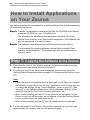
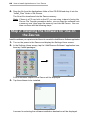
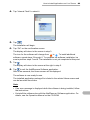
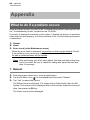
About Your Zaurus
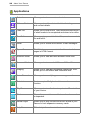
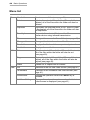
Applications
Calendar
Allows you to store events and set alarms.
Address Book
Allows you to add and view the list of existing names
and contact details.
Todo List
Allows you to view a list of Todo items and reminds you
of what needs to be completed and when to be done.
Text Editor
Allows you to open a list of text files, create a new text
file and edit it.
EMail
Allows you to create and transmit e-mail messages.
Opera Browser
This Web browser connects to the Internet and shows
pages in HTML format.
Hancom Sheet
Allows you to view and edit Microsoft Excel files.
Hancom Word
Allows you to view and edit Microsoft Word files.
Imaging
Allows you to view and slideshow image files. Also,
allows you to edit Memo and illustration files.
Voice Recorder
Allows you to record/play your messages and memos.
Calculator
Features up to 12-digit calculations and a conversion
function.
City Time
Allows you to view the time in up to six different cities
of your choice.
Clock
Shows the current time and date and can be used as
a stopwatch.
Media Player
Allows you to play movies and music stored in your
Zaurus or from expansion memory cards.
Help Browser
Offers help information similar to a web browser.