1
System connections (continued)
Remote control
■
■
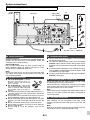
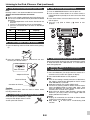
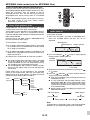
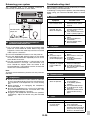
Subwoofer pre-out connection
You can connect a subwoofer with an amplifier to the
SUBWOOFER PRE OUT socket.
Audio cable
(commercially
available)
Commercially available subwoofer
(amplifier built in)
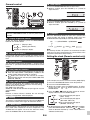
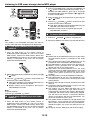
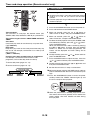
Battery installation
1 Open the battery cover.
2 Insert the supplied battery according to the terminal
indicated in the battery compartment.
When inserting or removing the battery, push it towards the
(–) battery terminals.
3 Close the cover.
Audio signal
To audio input
socket
To SUBWOOFER PRE
OUT socket
Main
unit
Notes:
● No sound is heard from the subwoofer without a built-in
amplifier.
● Subwoofer Pre-out (audio signal): 200mV / 10k ohms at
70 Hz.
■
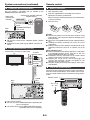
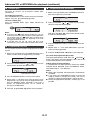
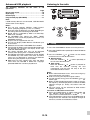
Line input connection (TV, etc.)
Connect to the TV using an audio cable.
TV
To audio
output sockets
Audio cable
(commercially
available)
Caution:
● Remove the battery if the unit will not be used for a long
period of time. This will prevent potential damage due to
battery leakage.
● Do not use rechargeable battery (nickel-cadmium battery,
etc.).
● Installing the battery incorrectly may cause the unit to
malfunction.
● Batteries (battery pack or batteries installed) shall not be
exposed to excessive heat such as sunshine, fire or the
like.
Notes concerning use:
● Replace the battery if the operating distance is reduced or
if the operation becomes erratic. Purchase an “AA” size
battery (UM/SUM-3, R6, HP-7 or similar).
● Periodically clean the transmitter on the remote control
and the sensor on the unit with a soft cloth.
● Exposing the sensor on the unit to strong light may
interfere with operation. Change the lighting or the
direction of the unit if this occurs.
● Keep the remote control away from moisture, heat, shock,
and vibrations.
Audio signal
■
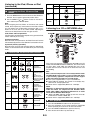
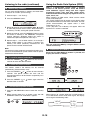
Test of the remote control
Check the remote control after checking all the connections.
Point the remote control directly at the remote sensor on the
unit. The remote control can be used within the range shown
below:
Remote sensor
Main
unit
To LINE
input
sockets
0.2 m - 6 m
(8" - 20' )
CD/USB
To select Line In function:
● On main unit: Press FUNCTION button repeatedly until
Line In is displayed.
● On remote control: Press AUDIO/LINE (INPUT) button
repeatedly until Line In is displayed.
RDS
E-5