1
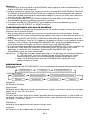
SAFETY PRECAUTIONS
To achieve the utmost in enjoyment and performance, please read this manual carefully before attempting to operate the unit
in order to became familiar with its features, and assure you years of faithful, trouble free performance and listening pleasure.
Important Safety instruction
Keep instructions the safety and operating instructions should be retained for future reference.
Avoid installing the unit in locations described below:
Places exposed to direct sunlight or close to heat radiating
appliances such as electric heaters. On top of other stereo equipment that radiate too much heat. Places lacking ventilation
or dusty places.
Places subject to constant vibration. Humid or moist places.
Make sure not to obstruct the ventilation openings.
Before turning on the power for the first time, make sure the power cord is properly installed.
Mains plug is used as the disconnect device and it shall remain readily operable completely.
The product shall not be exposed to dripping or splashing and that no objects filled with liquids, such as vases, shall be
placed on the product.
Clean only with dry cloth.
To be completely disconnect the power input, the mains plug of apparatus shall be disconnected from the mains.
When the stand-by LED gives no color, the apparatus is completely disconnected from mains.
Minimum distances10cm around the apparatus for sufficient ventilations.
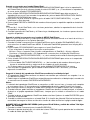
Attention should be drawn to the environmental aspects of battery disposal.
The use of apparatus in moderate climates.
The mains plug should not be obstructed or should be easily accessed during intended use.
The ventilation should not be impeded by covering the ventilation openings with items such as newspaper, table-clothes,
curtains etc.
No naked flame sources such as lighted candles should be placed on the apparatus.
Battery shall not be exposed to excessive heat such as sunshine, fire or the like.
Do not defeat the safety purpose of the polarized or grounding-type plug. A polarized plug has two blades with one wider
than the other.
A grounding type plug has two blades and a third grounding prong. The wide blade or the third prong are provided for
your safety. If the
provided plug does not fit into your outlet. Consult an electrician for replacement of the obsolete outlet.
For safety reasons, do not remove any covers or attempt to gain access to the inside of the product. Refer any servicing
to qualified personnel. Do not attempt to remove any screws, or open the casing of the unit; there are no user
serviceable parts inside, refer all servicing to qualified service personnel.
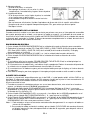
CAUTION : TO REDUCE THE RISK OF ELECTRIC SHOCK DO NOT REMOVE COVER (OR BACK) , NO USER
SERVICEMAN LE PARTS INSIDE, REFER SERVICING TO QUALIFIED SERVICE PERSONNEL.
DANGEROUS VOLTAGE
Conductor dangerous voltage, that may be of sufficient magnitude to constitute a risk of electric shock to
persons is present within this products enclosure.
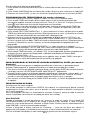
ATTENTION
The owners manual contains important operating and maintenance instructions, for your safety, it is necessary
to refer to the manual.
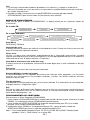
WARNING : TO PREVENT FIRE OR SHOCK HAZARD, DO NOT EXPOSE THIS APPLIANCE TO DRIPPING OR
SPLASHING.
Note:
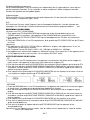
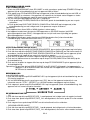
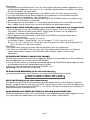
This unit will become warm when used for a long period of time. This is normal and does not indicate a problem
with the unit.
The CD player includes micro-processors which may malfunction as a result of external electrical interference or noise.
If the CD player is not working properly, disconnect the power source and then reconnect it.
Excessive sound pressure from earphones and headphones can cause hearing loss.
If an unusual conditions occurs in the display window or key button, switch the unit off, then turn on the unit again.
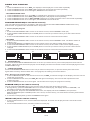
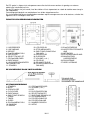
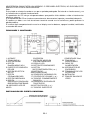
FEATURES AND CONTROLS
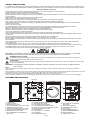
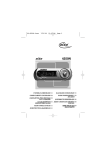
12 13 14
11
10
9
8
7
6
5
4
3
2
1
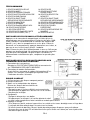
1. SPEAKER
2. LINE IN JACK
3. REPEAT BUTTON
4. iPod/ID3/MEM/C-ADJ. BUTTON
5. USB DEVICE IN PORT
6. SELECT/FM MO./ST. BUTTON
7. CD/iPod/USB/CARD BUTTON
8. DAB/FM/AUX BUTTON
9. PLAY/PAUSE/SCAN/ENTER
BUTTON
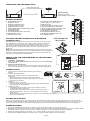
15
16
17
18
19
20
25
27
VI DE O OU T
26
24
ON
OF F
21
22
10.STANDBY LED INDICATOR
11. STANDBY BUTTON
12. LCD DISPLAY WINDOW
13.STOP/MENU/INFO BUTTON
14.SKIP/TUNE (UP or DOWN) BUTTON
15.OPEN/CLOSE BUTTON
16. IR SENSOR
17. VOLUME (+ or -) KNOB
18. CD DOOR
19. SD CARD IN SLOT
UK-1
23
AC
20.FOLDER(UP or DOWN)
BUTTON
21. iPod DOCK DOOR
22.HEADPHONES JACK
23.AC CORD
24.AC POWER SWITCH
25.SPEAKER TERMINALS
26.FM ANTENNA
27.VIDEO OUT JACK