1
Agilent Technologies
U3042AE12
User’s Guide
Use this manual with the following documents:
PNA Series Network Analyzer On-line Help System and
Application Note 1408-12
Manufacturing Part Number: U3042-90001
Printed in USA: March 2009
Supersede April 2008
© Copyright 2007- 2009 Agilent Technologies, Inc. All rights reserved.
Warranty Statement
THE MATERIAL CONTAINED IN THIS DOCUMENT IS PROVIDED “AS IS,” AND IS SUBJECT
TO BEING CHANGED, WITHOUT NOTICE, IN FUTURE EDITIONS. FURTHER, TO THE
MAXIMUM EXTENT PERMITTED BY APPLICABLE LAW, AGILENT DISCLAIMS ALL
WARRANTIES, EITHER EXPRESS OR IMPLIED WITH REGARD TO THIS MANUAL AND
ANY INFORMATION CONTAINED HEREIN, INCLUDING BUT NOT LIMITED TO THE
IMPLIED WARRANTIES OF MERCHANTABILITY AND FITNESS FOR A PARTICULAR
PURPOSE. AGILENT SHALL NOT BE LIABLE FOR ERRORS OR FOR INCIDENTAL
OR CONSEQUENTIAL DAMAGES IN CONNECTION WITH THE FURNISHING, USE, OR
PERFORMANCE OF THIS DOCUMENT OR ANY INFORMATION CONTAINED HEREIN.
SHOULD AGILENT AND THE USER HAVE A SEPARATE WRITTEN AGREEMENT WITH
WARRANTY TERMS COVERING THE MATERIAL IN THIS DOCUMENT THAT CONFLICT
WITH THESE TERMS, THE WARRANTY TERMS IN THE SEPARATE AGREEMENT WILL
CONTROL.
DFARS/Restricted Rights Notice
If software is for use in the performance of a U.S. Government prime contract or
subcontract, Software is delivered and licensed as “Commercial computer software” as
defined in DFAR 252.227-7014 (June 1995), or as a “commercial item” as defined in FAR
2.101(a) or as “Restricted computer software” as defined in FAR 52.227-19 (June 1987) or
any equivalent agency regulation or contract clause. Use, duplication or disclosure of
Software is subject to Agilent Technologies’ standard commercial license terms, and
non-DOD Departments and Agencies of the U.S. Government will receive no greater than
Restricted Rights as defined in FAR 52.227-19(c)(1-2) (June 1987). U.S. Government users
will receive no greater than Limited Rights as defined in FAR 52.227-14 (June 1987) or
DFAR 252.227-7015 (b)(2) (November 1995), as applicable in any technical data.
ii
User’s Guide
Safety Notes
The following safety notes are used throughout this document. Familiarize yourself with
each of these notes and its meaning before performing any of the procedures in this
document.
WARNING
Warning denotes a hazard. It calls attention to a procedure which, if
not correctly performed or adhered to, could result in injury or loss
of life. Do not proceed beyond a warning note until the indicated
conditions are fully understood and met.
CAUTION
Caution denotes a hazard. It calls attention to a procedure that, if not
correctly performed or adhered to, could result in damage to or destruction of
the instrument. Do not proceed beyond a caution sign until the indicated
conditions are fully understood and met.
Statement of Compliance
This product has been designed and tested in accordance with the standards listed on the
Manufacturer’s Declaration of Conformity, and has been supplied in a safe condition. The
documentation contains information and warnings that must be followed by the user to
ensure safe operation and to maintain the product in a safe condition.
Definitions
• Specifications describe the performance of parameters covered by the product warranty
(temperature –0 to 55 °C, unless otherwise noted.)
• Typical describes additional product performance information that is not covered by the
product warranty. It is performance beyond specification that 80% of the units exhibit
with a 95% confidence level over the temperature range 20 to 30 °C. Typical
performance does not include measurement uncertainty.
• Nominal values indicate expected performance or describe product performance that is
useful in the application of the product, but is not covered by the product warranty.
• Characteristic Performance describes performance parameter that the product is
expected to meet before it leaves the factory, but is not verified in the field and is not
covered by the product warranty. A characteristic includes the same guard bands as a
specification.
User’s Guide
iii
iv
User’s Guide
Contents
U3042AE12
Introduction . . . . . . . . . . . . . . . . . . . . . . . . . . . . . . . . . . . . . . . . . . . . . . . . . . . . . . . . . . . . . . . . . 2
Description . . . . . . . . . . . . . . . . . . . . . . . . . . . . . . . . . . . . . . . . . . . . . . . . . . . . . . . . . . . . . . . . . . 3
Network Analyzer Requirement. . . . . . . . . . . . . . . . . . . . . . . . . . . . . . . . . . . . . . . . . . . . . . . . 3
Available Options . . . . . . . . . . . . . . . . . . . . . . . . . . . . . . . . . . . . . . . . . . . . . . . . . . . . . . . . . . . . . 4
Test Set Options . . . . . . . . . . . . . . . . . . . . . . . . . . . . . . . . . . . . . . . . . . . . . . . . . . . . . . . . . . . . 4
Accessory Options . . . . . . . . . . . . . . . . . . . . . . . . . . . . . . . . . . . . . . . . . . . . . . . . . . . . . . . . . . . 4
Cable Options . . . . . . . . . . . . . . . . . . . . . . . . . . . . . . . . . . . . . . . . . . . . . . . . . . . . . . . . . . . . . . 4
Verifying the Shipment . . . . . . . . . . . . . . . . . . . . . . . . . . . . . . . . . . . . . . . . . . . . . . . . . . . . . . . . 5
General Specifications . . . . . . . . . . . . . . . . . . . . . . . . . . . . . . . . . . . . . . . . . . . . . . . . . . . . . . . . . 6
Power Requirements . . . . . . . . . . . . . . . . . . . . . . . . . . . . . . . . . . . . . . . . . . . . . . . . . . . . . . . . 6
Environmental Requirements . . . . . . . . . . . . . . . . . . . . . . . . . . . . . . . . . . . . . . . . . . . . . . . . . 7
Environmental Tests . . . . . . . . . . . . . . . . . . . . . . . . . . . . . . . . . . . . . . . . . . . . . . . . . . . . . . . 7
Equipment Heating and Cooling . . . . . . . . . . . . . . . . . . . . . . . . . . . . . . . . . . . . . . . . . . . . . 7
Required Conditions for Accuracy Enhanced Measurement . . . . . . . . . . . . . . . . . . . . . . . 7
Dimensions and Space Requirements . . . . . . . . . . . . . . . . . . . . . . . . . . . . . . . . . . . . . . . . . 8
Frequency Range and Maximum Power Levels . . . . . . . . . . . . . . . . . . . . . . . . . . . . . . . . . . . 9
Typical Reflection Tracking . . . . . . . . . . . . . . . . . . . . . . . . . . . . . . . . . . . . . . . . . . . . . . . . . . . 10
Front and Rear Panel Features . . . . . . . . . . . . . . . . . . . . . . . . . . . . . . . . . . . . . . . . . . . . . . . . . 11
Active LED . . . . . . . . . . . . . . . . . . . . . . . . . . . . . . . . . . . . . . . . . . . . . . . . . . . . . . . . . . . . . . . 11
Test Port LEDs . . . . . . . . . . . . . . . . . . . . . . . . . . . . . . . . . . . . . . . . . . . . . . . . . . . . . . . . . . . . 11
Test Ports – 3.5 mm Bulkhead (male) . . . . . . . . . . . . . . . . . . . . . . . . . . . . . . . . . . . . . . . . . . 11
Access Ports – 3.5 mm (female) . . . . . . . . . . . . . . . . . . . . . . . . . . . . . . . . . . . . . . . . . . . . . . . 11
Line Switch . . . . . . . . . . . . . . . . . . . . . . . . . . . . . . . . . . . . . . . . . . . . . . . . . . . . . . . . . . . . . . . 12
Control Lines and Voltage Adjust . . . . . . . . . . . . . . . . . . . . . . . . . . . . . . . . . . . . . . . . . . . . . 12
Test Set Interface . . . . . . . . . . . . . . . . . . . . . . . . . . . . . . . . . . . . . . . . . . . . . . . . . . . . . . . . . . 12
Pass Through Interface. . . . . . . . . . . . . . . . . . . . . . . . . . . . . . . . . . . . . . . . . . . . . . . . . . . . . . 12
Line Module. . . . . . . . . . . . . . . . . . . . . . . . . . . . . . . . . . . . . . . . . . . . . . . . . . . . . . . . . . . . . . . 12
Available Fuses . . . . . . . . . . . . . . . . . . . . . . . . . . . . . . . . . . . . . . . . . . . . . . . . . . . . . . . . . . . . 13
System Setup with N5230A/C . . . . . . . . . . . . . . . . . . . . . . . . . . . . . . . . . . . . . . . . . . . . . . . . . 14
Preparing the N5230A/C Network Analyzer . . . . . . . . . . . . . . . . . . . . . . . . . . . . . . . . . . . . . 14
N5230A/C RF Interface Cable Connections . . . . . . . . . . . . . . . . . . . . . . . . . . . . . . . . . . . . . 16
Controlling the Test Set with N5230A . . . . . . . . . . . . . . . . . . . . . . . . . . . . . . . . . . . . . . . . . . . 17
Installing New Firmware . . . . . . . . . . . . . . . . . . . . . . . . . . . . . . . . . . . . . . . . . . . . . . . . . . . . 18
N5230A Multiport Mode for Option 551 . . . . . . . . . . . . . . . . . . . . . . . . . . . . . . . . . . . . . . . . 20
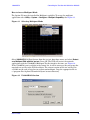
How to Access Multiport Mode . . . . . . . . . . . . . . . . . . . . . . . . . . . . . . . . . . . . . . . . . . . . . . 21
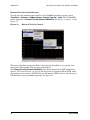
External Test Set Control Feature . . . . . . . . . . . . . . . . . . . . . . . . . . . . . . . . . . . . . . . . . . . 22
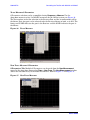
Trace Measure S-Parameter . . . . . . . . . . . . . . . . . . . . . . . . . . . . . . . . . . . . . . . . . . . . . . . . 23
New Trace Measure S-Parameter. . . . . . . . . . . . . . . . . . . . . . . . . . . . . . . . . . . . . . . . . . . . 23
N-Port Calibration with N5230A . . . . . . . . . . . . . . . . . . . . . . . . . . . . . . . . . . . . . . . . . . . . . 26
N5230A Interface Control. . . . . . . . . . . . . . . . . . . . . . . . . . . . . . . . . . . . . . . . . . . . . . . . . . . . 28
Overview of the Interface Control . . . . . . . . . . . . . . . . . . . . . . . . . . . . . . . . . . . . . . . . . . . 28
How to Access Interface Control Settings with N5230A . . . . . . . . . . . . . . . . . . . . . . . . . . 29
Test Set I/O Address and Data using Control Interface with N5230A. . . . . . . . . . . . . . . 30
N5230A GPIB Control . . . . . . . . . . . . . . . . . . . . . . . . . . . . . . . . . . . . . . . . . . . . . . . . . . . . . . 32
Overview of the GPIB Control . . . . . . . . . . . . . . . . . . . . . . . . . . . . . . . . . . . . . . . . . . . . . . 32
How to Access GPIB Command Processor with N5230A . . . . . . . . . . . . . . . . . . . . . . . . . 33
GPIB Command Processor Console . . . . . . . . . . . . . . . . . . . . . . . . . . . . . . . . . . . . . . . . . . 34
Contents-1
Contents
System Setup with N5242A . . . . . . . . . . . . . . . . . . . . . . . . . . . . . . . . . . . . . . . . . . . . . . . . . . . .35
Preparing the N5242A Network Analyzer . . . . . . . . . . . . . . . . . . . . . . . . . . . . . . . . . . . . . . .35
N5242A RF Interface Cable Connections . . . . . . . . . . . . . . . . . . . . . . . . . . . . . . . . . . . . . . .38
Controlling the Test Set with N5242A or N5230C . . . . . . . . . . . . . . . . . . . . . . . . . . . . . . . . . .40
PNA Multiport Mode for Option 551 . . . . . . . . . . . . . . . . . . . . . . . . . . . . . . . . . . . . . . . . . . .40
How to Access Multiport Mode . . . . . . . . . . . . . . . . . . . . . . . . . . . . . . . . . . . . . . . . . . . . . .41
External Test Set Control Feature. . . . . . . . . . . . . . . . . . . . . . . . . . . . . . . . . . . . . . . . . . . .42
Trace Measure S-Parameter . . . . . . . . . . . . . . . . . . . . . . . . . . . . . . . . . . . . . . . . . . . . . . . .44
New Trace Measure S-Parameter . . . . . . . . . . . . . . . . . . . . . . . . . . . . . . . . . . . . . . . . . . . .44
N-Port Calibration with N5242A or N5230C . . . . . . . . . . . . . . . . . . . . . . . . . . . . . . . . . . . . .47
N5242A or N5230C Interface Control . . . . . . . . . . . . . . . . . . . . . . . . . . . . . . . . . . . . . . . . . . .49
Overview of the Interface Control . . . . . . . . . . . . . . . . . . . . . . . . . . . . . . . . . . . . . . . . . . . .49
How to Access Interface Control Settings . . . . . . . . . . . . . . . . . . . . . . . . . . . . . . . . . . . . . .50
Test Set I/O Address and Data using Control Interface with N5242A or N5230C . . . . . .51
N5242A or N5230C GPIB Control. . . . . . . . . . . . . . . . . . . . . . . . . . . . . . . . . . . . . . . . . . . . . .53
Overview of the GPIB Control . . . . . . . . . . . . . . . . . . . . . . . . . . . . . . . . . . . . . . . . . . . . . . .53
How to Access GPIB Command Processor . . . . . . . . . . . . . . . . . . . . . . . . . . . . . . . . . . . . .54
GPIB Command Processor Console . . . . . . . . . . . . . . . . . . . . . . . . . . . . . . . . . . . . . . . . . . .55
DUT Control Lines . . . . . . . . . . . . . . . . . . . . . . . . . . . . . . . . . . . . . . . . . . . . . . . . . . . . . . . . . . .56
Setting the DUT Control Interface . . . . . . . . . . . . . . . . . . . . . . . . . . . . . . . . . . . . . . . . . . . . .56
Setting the Variable Source Voltage . . . . . . . . . . . . . . . . . . . . . . . . . . . . . . . . . . . . . . . . . . . .58
Connecting to the DUT Control Lines. . . . . . . . . . . . . . . . . . . . . . . . . . . . . . . . . . . . . . . . . . .58
Using an External Power Supply . . . . . . . . . . . . . . . . . . . . . . . . . . . . . . . . . . . . . . . . . . . . . .59
Test Set I/O Interface Commands. . . . . . . . . . . . . . . . . . . . . . . . . . . . . . . . . . . . . . . . . . . . . . . .61
Switch Address and Data. . . . . . . . . . . . . . . . . . . . . . . . . . . . . . . . . . . . . . . . . . . . . . . . . . . . .61
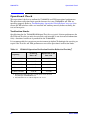
Operational Check . . . . . . . . . . . . . . . . . . . . . . . . . . . . . . . . . . . . . . . . . . . . . . . . . . . . . . . . . . . .66
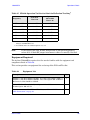
Verification Limits . . . . . . . . . . . . . . . . . . . . . . . . . . . . . . . . . . . . . . . . . . . . . . . . . . . . . . . . . .66
Equipment Required . . . . . . . . . . . . . . . . . . . . . . . . . . . . . . . . . . . . . . . . . . . . . . . . . . . . . . . .67
Operational Check Procedure . . . . . . . . . . . . . . . . . . . . . . . . . . . . . . . . . . . . . . . . . . . . . . . . .68
Preparing the N5230A . . . . . . . . . . . . . . . . . . . . . . . . . . . . . . . . . . . . . . . . . . . . . . . . . . . . .68
N5230A 1-Port Calibration and Verification Procedure . . . . . . . . . . . . . . . . . . . . . . . . . . .70
Preparing the N5242A or N5230C. . . . . . . . . . . . . . . . . . . . . . . . . . . . . . . . . . . . . . . . . . . .74
N5242A or N5230C 1-Port Calibration and Verification Procedure . . . . . . . . . . . . . . . . .75
Troubleshooting Operational Check Failures . . . . . . . . . . . . . . . . . . . . . . . . . . . . . . . . . . . . . .80
Interconnect Cable Verification . . . . . . . . . . . . . . . . . . . . . . . . . . . . . . . . . . . . . . . . . . . . . . . .80
Service Information . . . . . . . . . . . . . . . . . . . . . . . . . . . . . . . . . . . . . . . . . . . . . . . . . . . . . . . . . .81
Replaceable Parts . . . . . . . . . . . . . . . . . . . . . . . . . . . . . . . . . . . . . . . . . . . . . . . . . . . . . . . . . . .81
Theory of Operation . . . . . . . . . . . . . . . . . . . . . . . . . . . . . . . . . . . . . . . . . . . . . . . . . . . . . . . . . .83
RF Switch Components . . . . . . . . . . . . . . . . . . . . . . . . . . . . . . . . . . . . . . . . . . . . . . . . . . . . . .83
S100 - Source to Ports (1, 5, 9 and 13). . . . . . . . . . . . . . . . . . . . . . . . . . . . . . . . . . . . . . . . . . .83
S200 - Source to Ports (2, 6, 10 and 14). . . . . . . . . . . . . . . . . . . . . . . . . . . . . . . . . . . . . . . . . .83
S300 - Source to Ports (3, 7, 11 and 15). . . . . . . . . . . . . . . . . . . . . . . . . . . . . . . . . . . . . . . . . .83
S400 - Source to Ports (4, 8, 12 and 16). . . . . . . . . . . . . . . . . . . . . . . . . . . . . . . . . . . . . . . . . .83
S101 - Receiver to Ports (1, 5, 9 and 13) . . . . . . . . . . . . . . . . . . . . . . . . . . . . . . . . . . . . . . . . .83
S201 - Receiver to Ports (2, 6, 10 and 14) . . . . . . . . . . . . . . . . . . . . . . . . . . . . . . . . . . . . . . . .83
S301 - Receiver to Ports (3, 7, 11 and 15) . . . . . . . . . . . . . . . . . . . . . . . . . . . . . . . . . . . . . . . .84
S401 - Receiver to Ports (4, 8, 12 and 16) . . . . . . . . . . . . . . . . . . . . . . . . . . . . . . . . . . . . . . . .84
RF Coupler Components . . . . . . . . . . . . . . . . . . . . . . . . . . . . . . . . . . . . . . . . . . . . . . . . . . . . .84
System Block Diagram . . . . . . . . . . . . . . . . . . . . . . . . . . . . . . . . . . . . . . . . . . . . . . . . . . . . . .85
Contents-2
Contents
Safety and Regulatory Information. . . . . . . . . . . . . . . . . . . . . . . . . . . . . . . . . . . . . . . . . . . . . .
Introduction. . . . . . . . . . . . . . . . . . . . . . . . . . . . . . . . . . . . . . . . . . . . . . . . . . . . . . . . . . . . . . .
Before Applying Power . . . . . . . . . . . . . . . . . . . . . . . . . . . . . . . . . . . . . . . . . . . . . . . . . . . . . .
Connector Care and Cleaning . . . . . . . . . . . . . . . . . . . . . . . . . . . . . . . . . . . . . . . . . . . . . . . .
Declaration of Conformity . . . . . . . . . . . . . . . . . . . . . . . . . . . . . . . . . . . . . . . . . . . . . . . . . . .
Shipping Instructions . . . . . . . . . . . . . . . . . . . . . . . . . . . . . . . . . . . . . . . . . . . . . . . . . . . . . . .
Compliance with German Noise Requirements . . . . . . . . . . . . . . . . . . . . . . . . . . . . . . . . . .
EMC Information . . . . . . . . . . . . . . . . . . . . . . . . . . . . . . . . . . . . . . . . . . . . . . . . . . . . . . . . . .
Safety Information . . . . . . . . . . . . . . . . . . . . . . . . . . . . . . . . . . . . . . . . . . . . . . . . . . . . . . . . .
Warnings . . . . . . . . . . . . . . . . . . . . . . . . . . . . . . . . . . . . . . . . . . . . . . . . . . . . . . . . . . . . . . . . .
Cautions. . . . . . . . . . . . . . . . . . . . . . . . . . . . . . . . . . . . . . . . . . . . . . . . . . . . . . . . . . . . . . . . . .
Instrument Markings . . . . . . . . . . . . . . . . . . . . . . . . . . . . . . . . . . . . . . . . . . . . . . . . . . . . . . .
Electrostatic Discharge Protection . . . . . . . . . . . . . . . . . . . . . . . . . . . . . . . . . . . . . . . . . . . . . .
Contacting Agilent . . . . . . . . . . . . . . . . . . . . . . . . . . . . . . . . . . . . . . . . . . . . . . . . . . . . . . . . . .
88
88
88
88
88
88
89
89
89
90
91
92
93
94
Contents-3
Contents
Contents-4
U3042AE12
User’s Guide
1
U3042AE12
Introduction
Introduction
This document describes how to use the U3042AE12 Multiport Test Set with the Agilent
N5230A/C 4-Port PNA-L Network Analyzer and the N5242A PNA-X for a 16-Port network
analyzer solution.
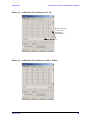
Figure 1
N5230A/C 4-Port PNA-L with U3042AE12
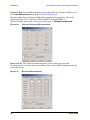
Figure 2
N5242A 4-Port PNA-X with U3042AE12
2
User’s Guide
U3042AE12
Description
Description
The Agilent U3042AE12 Multiport Test Set is a 12-Port solid-state extension test set.
When combined with a 4-Port N5230A/C PNA-L or N5242A PNA-X Network Analyzer, the
U3042AE12 provides a complete solution for 16-Port full crossbar measurements.
The test set is directly controlled by the network analyzer, no external personal computer
or software is required.
The N5230A/C PNA-L and N5242A PNA-X Network Analyzer’s will be referred to
throughout this document as the PNA-L and the PNA-X. PNA refers to both PNA-L or
PNA-X.
Network Analyzer Requirement
• The Network Analyzer requires Option 551 (N-Port error correction and measurement
capability).
• The N5230A/C PNA-L requires Option 245, 145, 246 or 146 to provide the test set
interface connections and requires test set file u3042ae12_p4.tsx
• The N5242A PNA-X requires Option 400 to provide the test set interface connections
and requires test set file u3042ae12_pnax_p4.tsx.
More PNA information is available on the following websites:
• Documentation - http://www.agilent.com/find/pna
• Network Analyzer Firmware - http://na.tm.agilent.com/pna/firmware/firmware.htm
Refer to “Installing New Firmware” on page 18.
• U3042AE12 Test Set Files - http://na.tm.agilent.com/multiport. (see test set files link)
User’s Guide
3
U3042AE12
Available Options
Available Options
Test Set Options
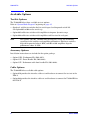
The U3042AE12 has three available test set options:
Refer to “System Block Diagram” beginning on page 85.
• Standard - solid state switches for fast switch speed and improved switch life.
(No Option 001 or 002 on the serial tag).
• Option 001 solid state switches with amplifiers to improve dynamic range.
• Option 002 solid state switches with amplifiers and bias-tees for each port.
NOTE
The Options 700, 001, and 002 limit the frequency range due to blocking
capacitors in the switches and amplifier performance. Solid state switches
degrade frequencies below 2 MHz, and 001 or 002 amplifiers degrade
performance above 18 GHz.
Accessory Options
Installation instructions are included in the option package.
• Option 1CM - Rackmount Kit (5063-9215).
• Option 1CN - Front Handle Kit (5063-9228).
• Option 1CP - Rackmount with front handle Kit (5063-9222).
Cable Options
The U3042AE12 has available cable options:
• Option 016 provides the interface cable set and hardware to connect the test set to the
PNA-L.
• Option 042 provides the interface cable set and hardware to connect the U3042AE12 to
the PNA-X.
4
User’s Guide
U3042AE12
Verifying the Shipment
Verifying the Shipment
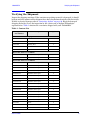
Inspect the shipping container. If the container or packing material is damaged, it should
be kept until the contents of the shipment have been checked mechanically and electrically.
If there is physical damage refer to “Contacting Agilent” on page 94. Keep the damaged
shipping materials (if any) for inspection by the carrier and an Agilent Technologies
representative. Table 1 contains the accessories shipped with your U3042AE12.
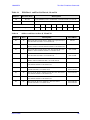
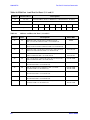
Table 1 Content List
Agilent
Part Number
Description
Qty
Common to the following Options
9320-6636
Functional Test Certificate
1
9320-0333
Envelope-Cal Certificate
1
5023-0132
Locking Feet
1
8120-6818
Test Set I/O Cable
1
U3042-90001
User’s Guide
1
Option 016 (Cable-set for PNA-L)
Z5623-20418
RF Cable Semi-rigid
8
Z5623-20419
RF Cable Semi-rigid
8
Option 042 (Cable-set for PNA-X)
U3042-20031
RF Cable Semi-rigid
1
U3042-20032
RF Cable Semi-rigid
1
U3042-20029
RF Cable Semi-rigid
1
U3042-20030
RF Cable Semi-rigid
1
U3042-20035
RF Cable Semi-rigid
1
U3042-20033
RF Cable Semi-rigid
1
U3042-20034
RF Cable Semi-rigid
1
U3042-20036
RF Cable Semi-rigid
1
U3042-20037
RF Cable Semi-rigid
1
U3042-20038
RF Cable Semi-rigid
1
U3042-20039
RF Cable Semi-rigid
1
U3042-20040
RF Cable Semi-rigid
1
U3042-20041
RF Cable Semi-rigid
1
U3042-20043
RF Cable Semi-rigid
1
U3042-20044
RF Cable Semi-rigid
1
0515-2317
Screw
2
N5242-20138
Rear Lock Feet (right)
1
N5242-20139
Rear Lock Feet (left)
1
User’s Guide
5
U3042AE12
General Specifications
General Specifications
Specifications for the U3042AE12 Multiport Test Set are characteristic for the System
performance of the PNA and Test Set. Actual performance of the system is based on the
customers PNA and options that are used with the test set. A functional certificate is only
offered for the U3042AE12.
When connected to a PNA, this test set will degrade the performance at the
test ports. The internal switch paths reduce test port power and power to the
receivers. This affects the test port power of the PNA and also reduces
dynamic range. The reflection tracking values measured in the “Operational
Check” on page 66 can be subtracted from the analyzers dynamic range to
determine the approximate performance of the system.
NOTE
Power Requirements
Verify that the required ac power is available before installing the Test Set to the PNA.
• Air conditioning equipment (or other motor–operated equipment) should not be placed
on the same ac line that powers the Test Set and PNA.
• Table 2 contains the maximum wattage for all instruments. This table can be use to
determine the electrical and cooling requirements.
Values are based on 120 Vac supplied to each instrument at 60 Hz.
NOTE
Table 2
Power Requirements
Standard Equipment
Instrument
Maximum
Wattage
N5242A
270
N5230A/C
350
U3042AE12
350
WARNING
6
This is a Safety Class I product (provided with a protective earthing
ground incorporated in the power cord). The mains plug shall be
inserted only into a socket outlet provided with a protective earth
contact. Any interruption of the protective conductor, inside or
outside the instrument, is likely to make the instrument dangerous.
Intentional interruption is prohibited.
User’s Guide
U3042AE12
General Specifications
Environmental Requirements
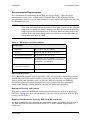
The environmental requirements of the PNA are listed in Table 3. Note that these
requirements are the same as those of the N5230A/C PNA-L. The N5230A/C PNA-L
provides front panel access to the source outputs, receiver inputs and couplers for use with
the Multiport test sets.
Ventilation Requirements: When installing the instrument in a cabinet, the
convection into and out of the instrument must not be restricted. The ambient
temperature (outside the cabinet) must be less than the maximum operating
temperature of the instrument by 4 °C for every 100 watts dissipated in the
cabinet. If the total power dissipated in the cabinet is greater than 800 watts,
forced convection must be used.
CAUTION
Table 3
PNA Operating Environment
Temperature
Operation
0 °C to 40 °C (32 °F to 104 °F)
Storage
–40 °C to +70 °C (–40 °F to +158 °F)
Measurement Calibration
20 °C to 26 °C (68 °F to 79 °F)
Performance Verification
Temperature must be within 1 °C (1.8 °F) of
the temperature at which the measurement
calibration was performed.
Pressure Altitude
(Operation or Storage)
0 to 4600 meters (~ 15,000 feet)
Enclosure Protection
IP 2 0
Environmental Tests
The U3042AE12 complies with all applicable safety and regulatory requirements for the
intended location of use and have been evaluated to assure that they are consistent with
Agilent quality and reliability goals. On the basis of that evaluation, the following
environmental tests have been deemed unnecessary and have not been performed:
temperature, humidity, shock, vibration, altitude and power line conditions.
Equipment Heating and Cooling
If necessary, install air conditioning and heating to maintain the ambient temperature
within the appropriate range. Air conditioning capacity must be consistent with the BTU
ratings given in Table 2.
Required Conditions for Accuracy Enhanced Measurement
Accuracy–enhanced (error–corrected) measurements require the ambient temperature of
the PNA and Test Set to be maintained within ± 1 °C of the ambient temperature at
calibration.
User’s Guide
7
U3042AE12
General Specifications
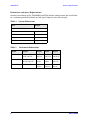
Dimensions and Space Requirements
Standard installation of the U3042AE12 and PNA includes configuration and installation
on a customer provided lab bench or table top of adequate size and strength.
Table 4
System Dimensions
Item
Weight
Required Bench Top Dimension:
Clearance above the bench
43 cm (17 in)
Width
127 cm (50 in)
Depth
102 cm (40 in)
Weight
55 kg (110 lb)
Table 5
Instrument Dimensions
Model
Weight
Height
Width
Depth
N5242A
37 kg
(82 lb, ±0.5 lb)
26.67 cm
(10.5 in)
42.5 cm
(16.57 in)
55.8 cm
(21.97 in)
N5230A/C
29.7 kg
(65.5 lb, ±0.5 lb)
27.9 cm
(11 in)
48.3 cm
(19 in)
50 cm
(19.7 in)
U3042AE12
11.4 kg (25 lb)
19.1 cm
(7.5 in)
42.5 cm
(16.7 in)
43.2 cm
(17 in)
8
User’s Guide
U3042AE12
General Specifications
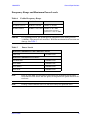
Frequency Range and Maximum Power Levels
Table 6
Usable Frequency Range
Model
Standard
001 or 002
N5230A/C (PNA-L)
10 MHz to 20 GHz
10 MHz to 20 GHz
N5242A (PNA-X)
10 MHz to 26.5 GHz
10 MHz to 26.5 GHz
(significantly degraded
performance above 20 GHz)
CAUTION
It is recommend that you do not operate components near damage levels
(+30 dBm). The power levels must be 3 dB below maximum level to ensure no
damage. See Table 7.
Table 7
Power Levels
Maximum U3042AE12 Test Port RF Power Levels:
PORT 5-16
+27 dBm 0 Vdc
Maximum U3042AE12 Access Ports:
SOURCE OUT
+20 dBm 0 Vdc
CPLR ARM
+20 dbm 0 Vdc
CPLR THRU
+20 dBm 0 Vdc
RCVR OUT
+20 dBm 0 Vdc
NOTE
Refer to your PNA specifications to determine the maximum input power
levels for the PNA access and test ports, or to optimize the power levels in the
receivers.
NOTE
Damage and maximum levels are not necessarily the optimum level.
User’s Guide
9
U3042AE12
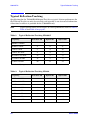
Typical Reflection Tracking
Typical Reflection Tracking
Specifications for the U3042AE12 Multiport Test Set are typical. System performance for
the PNA and Test Set are only characteristic and intended as non warranted information.
A functional certificate is provided for the U3042AE12 only.
Typical specifications are based on 1 to 2 units performance. Refer to Table 8,
Table 24 and Table 25 on page 67.
NOTE
Table 8
Typical Reflection Tracking N5230A/C
Frequency
Standard 700
Option 001
Option 002
300 kHz to 10 MHz1
−80
−100
−100
10 MHz to 4 GHz
−2
+2
+1
4 GHz to 6 GHz
−7
+1
+0
6 GHz to 10.5 GHz
−8
−2
−3
10.5 GHz to 13.5 GHz
−13
−3
−4
13.5 GHz to 15 GHz
−15
−3
−4
15 GHz to 20 GHz
−20
−13
−15
1. Generally improves at 3 MHz to −6 dBm.
Table 9
Typical Reflection Tracking N5242A
Frequency
Standard 700
Option 001
Option 002
10 MHz to 50 MHz
−2
+5
+4
50 MHz to 500 MHz
−3
+5
+4
500 MHz to 3.2 GHz
−8
+2
+1
3.2 GHz to 10 GHz
−12
−2
−3
10 GHz to 16 GHz
−15
−4
−5
16 GHz to 20 GHz
−20
−13
−15
20 GHz to 24 GHz
−24
−21
−23
24 GHz to 26.5 GHz
−25
−35
−37
10
User’s Guide
U3042AE12
Front and Rear Panel Features
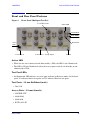
Front and Rear Panel Features
Figure 3
Front Panel (Multiport Test Set)
1 of 12 Test Ports
CPLR ARM
SOURCE IN
CPLR THRU
Active
LED
Power Switch
RCVR OUT
Control Lines
Voltage Adjust
Ground
Active LED
• When the test set is connected and addressed by a PNA, the LED is On (illuminated).
• The LED is Off (not illuminated) when the test set power switch is in Standby, or not
addressed by a PNA.
Test Port LEDs
• An illuminated LED indicates an active port in Source or Receiver mode. On the front
panel “S” indicates Source test ports and “R” indicates Receiver test ports.
Test Ports – 3.5 mm Bulkhead (male)
• Port 5–16
Access Ports – 3.5 mm (female)
• SOURCE OUT
• CPLR THRU
• CPLR ARM
• RCVR (A-D) IN
User’s Guide
11
U3042AE12
Front and Rear Panel Features
Line Switch
– Standby
|
– ON (Active LED On)
Control Lines and Voltage Adjust
For further information pertaining to control lines and voltage adjustments see “DUT
Control Lines” on page 56.
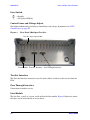
Figure 4
Rear Panel (Multiport Test Set)
Bias Tee Input (Option 002)
Line Module Test Set Interface Pass Through Interface
Test Set Interface
The Test Set Interface connector is used to send address and data to the test set from the
PNA.
Pass Through Interface
Connection to another test set.
Line Module
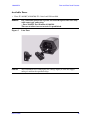
The line fuse, as well as a spare, reside within the line module. Figure 5 illustrates where
the fuses are located and how to access them.
12
User’s Guide
U3042AE12
Front and Rear Panel Features
Available Fuses
•
Fuse (F 5 A/250V, 2110-0709) U.L. listed and CSA certified
WARNING
For continued protection against fire hazard replace line fuse only
with same type and rating:
• Fuse 5A/250V, Part Number 2110-0709
The use of other fuses or material is prohibited.
Figure 5
Line Fuse
CAUTION
This instrument has autoranging line voltage input; be sure the supply
voltage is within the specified range.
User’s Guide
13
U3042AE12
System Setup with N5230A/C
System Setup with N5230A/C
WARNING
The opening of covers or removal of parts is likely to expose
dangerous voltages. Disconnect the instrument from all voltage
sources while it is being opened.
Preparing the N5230A/C Network Analyzer
1. Remove the feet from the bottom of the network analyzer. Refer to Figure 6.
2. Remove the 2 lower standoffs and screws (0515-1619) from the rear panel on the
network analyzer.
Figure 6
Rear Bottom Feet
Standoffs (x2)
Feet (x4)
3. Install the two rear locking feet (5023-0132) onto the PNA-L, using the included screws
(0515-1619), where the standoffs were removed. Refer to Figure 7.
Figure 7
Install Locking Feet
Screws (0515-1619)
Included in package
14
Locking Feet
(5023-0132)
User’s Guide
U3042AE12
System Setup with N5230A/C
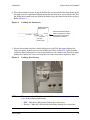
4. Place the network analyzer on top of the Test Set and ensure that the front frame of the
network analyzer is positioned slightly forward of the locks that are attached to the Test
Set. Slide the network analyzer back so the locks engage the front frame of the analyzer.
Refer to Figure 8.
Figure 8
Locking the Analyzer’s
Network Analyzer
Front Frame
screw
Lock Link
Slide the network Analyzer
back to engage the lock link
in the back of the network
analyzer's front frame
Test Set
Front Frame
5. Secure the network analyzer’s lower locking feet to the Test Set upper locking feet,
using the spring–loaded screws on the locking feet. Refer to Figure 9. If the network
analyzer's lower locking feet are not aligned with the screw holes in the Test Set's upper
locking feet, loosen the screws securing the feet to the instrument slightly to align.
Figure 9
Locking Feet Screws
NOTE
There are two Lock-Feet kits available. Refer to “Contacting Agilent” on
page 94 for ordering information.
• PNA − 5023-0132 (Kit includes locking feet and screws)
• Test Set − 5063-9253 (Kit includes lock links, locking feet and screws)
User’s Guide
15
U3042AE12
System Setup with N5230A/C
N5230A/C RF Interface Cable Connections
Figure 10 on page 16 illustrates the setup configuration of the U3042AE12 Multiport Test
Set and how it should be configured to the PNA-L.
1. Connect the RF interconnect cables, supplied with this option, from the PNA-L to the
Test Set. Torque each cable to 8 in-lb. Refer to Table 10 and Figure 10 on page 16. The
Z5623-20418 are the short cables and the Z5623-20419 are the long cables.
CAUTION
Each end of the interconnect RF cables have a different length from the bend.
When connecting the RF Interconnect cables be sure that the longer end from
the bend is connected to the PNA.
CAUTION
Over torque will cause damage to the test set and may cause connectors to
spin or become loose.
Table 10
N5230A/C Interface Cable Connection (Option 016)
RF Cables
From PNA-L
To Test Set
Z5623-20418
SOURCE OUT
SOURCE OUT
Z5623-20418
CPLR ARM
CPLR ARM
Z5623-20419
CPLR THRU
CPLR THRU
Z5623-20419
RCVR IN
RCVR OUT
Figure 10
N5230A/C RF Interface Connections
2. Connect the PNA Test Set I/O cable (8120-6818) to the U3042AE12 Test Set Interface
on the rear panel. Refer to Figure 30 on page 39.
16
User’s Guide
U3042AE12
Controlling the Test Set with N5230A
Controlling the Test Set with N5230A
This section will describe how to setup and operate the U3042AE12 Multiport Test Set
with the N5230A 4-Port PNA-L Network Analyzer.
The U3042AE12 Multiport Test Set is considered a “slave” instrument. A PNA–L must be
used to control the Test Set. There are three methods to control the Test Set. Multiport
mode is recommended due to calibration and ease of use.
• PNA Multiport Mode firmware revision ≥ A.07.50.26 for the N5230A Option 551. From
the PNA drop-down menu and select Help > About Network Analyzer.
The following test set file must be installed into network analyzer file directory:
c:\Program Files\Agilent\Network Analyzer\testsets
4-Port PNA-L requires test set: u3042ae12_p4.tsx
• PNA Interface Control
• PNA GPIB Command Processor
Visit our website for firmware revision and downloads.
http://na.tm.agilent.com/pna/firmware/firmware.htm
User’s Guide
17
U3042AE12
Controlling the Test Set with N5230A
Installing New Firmware
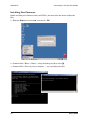
Before installing new firmware into your PNA-L, you must store the mixer calibration
files.
1. From the Start menu select run and enter 1 > OK.
2. Command line “Enter a Choice:”, using the front panel keys enter [6].
3. Command line “Press any key to continue....”, use any front panel key.
18
User’s Guide
U3042AE12
Controlling the Test Set with N5230A
4. Copy the following three mxcalfiles from D:\CALFILES to c:\Program
Files\Agilent\Network Analyzer.
From
User’s Guide
To
19
U3042AE12
Controlling the Test Set with N5230A
N5230A Multiport Mode for Option 551
The PNA Multiport Mode selects the test set file that will enable the PNA to control the
Test Set. The PNA Multiport Mode allows you to complete a N-Port calibration using the
Cal Wizard application in the PNA. Refer to the PNA Help system for more information.
Figure 11
20
N5230A Options
User’s Guide
U3042AE12
Controlling the Test Set with N5230A
How to Access Multiport Mode
The Option 551 must be installed for Multiport capability. To access the multiport
application select System > Configure > Multiport Capability. See Figure 12.
Figure 12
System Configuration
Select U3042AE12 (16-Port System) from the test set drop-down menu and select Restart
as a Multiport PNA with this test set. Press OK. The PNA will restart the network
analyzer application with the U3042AE12 Multiport Test Set interface features. See
Figure 13.
If the U3042E12 is not available in the testset list, it will be necessary for you to copy the
required test set file to the PNA hard drive. The current version of the test set files are
available on the web at http://na.tm.agilent.com/multiport. Copy the appropriate file to
c:\Program Files\Agilent\Network Analyzer\testsets.
Figure 13
User’s Guide
U3042AE12 Selection
21
U3042AE12
Controlling the Test Set with N5230A
External Test Set Control Feature
To verify that the network application has the U3042AE12 interface features, select
Channel > External Test Set > Other. The U3042AE12 will be displayed as External Test
Set Control-U3042AE12. See Figure 14.
This menu will allow the physical Ports 1 thru 16 to be identified as any port for your
convenience. For example; Port 5 can be named Port 2.
The External Test Set Control-U3042AE12 also allows control of the DUT control lines,
refer to “DUT Control Lines” on page 56. To change the state from LOW to HIGH, select
the graphical user interface (GUI) for the specific control (LINE 1 thru 8) and then press
OK. Each line can be controlled separately, see Figure 14.
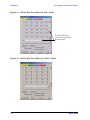
Figure 14
External Test Set U3042AE12 (Port 1 - 8)
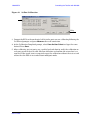
Select the Port Control down arrow for Ports 9 thru 16, see Figure 15.
Figure 15
22
External Test Set U3042AE12 (Port 9 - 16)
User’s Guide
U3042AE12
Controlling the Test Set with N5230A
Trace Measure S-Parameter
S-Parameter selection can be accomplished using Trace Measure menu. Select TRACE >
Measure. Use the drop-down menus to select 1 of 256 S-Parameters for the 16-Port system,
see Figure 16. The first number in the Sxx selection is the Receiver Port and the second
number will be the Source Port. Any port can be selected to be the Receiver, Source or both,
as in S11. The front panel R LED indicates the port is the Receiver and the S LED
indicates the port is the Source.
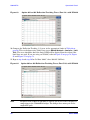
Figure 16
N5230A Trace Measure
New Trace Measure S-Parameter
S-Parameter Tab:
Multiple S-Parameters can be made from the New Measurement menu. In the drop-down
menu select Trace > New Trace. The New Measurement window allows the selection of any
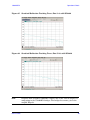
of the 256 S-Parameter's. See Figure 17 and Figure 18.
Figure 17
User’s Guide
16-Port New Trace Measure (S11 - S55)
23
U3042AE12
Figure 18
Controlling the Test Set with N5230A
16-Port New Trace Measure (S88 - S1212)
Use the scroll bar to
select.other s-parameter
measurements
Figure 19
24
16-Port New Trace Measure (S1212 - S1616)
User’s Guide
U3042AE12
Controlling the Test Set with N5230A
Balanced Tab: Balanced Measurements can be configured by selecting the Balance tab
in the New Measurement menu. Refer to Figure 20.
For more information on balanced (differential) component measurement, refer to the
Application Note 1373-1 and 1373-2 (5988-5634EN and 5988-5635EN) at
http://www.home.agilent.com. In the search menu type in “Multiport and Balanced.”
Figure 20
Balance
Receiver Tab: The S-Parameter measurements can be ratioed with selectable
Denominators for each port and receiver. Refer to the standard N5230A PNA-L
documentation for more information.
Figure 21
User’s Guide
Receiver Ports
25
U3042AE12
Controlling the Test Set with N5230A
N-Port Calibration with N5230A
It is recommended that you perform an ECal characterization to minimize the connections
required for multiple port calibration. The N4691B Option M0F is recommended with
cable (85131F) if you are calibrating at the PNA and test set ports. Characterize the ECal
module with adapters that will not be used in the measurement of the DUT.
Calibrate at the end of the test port RF cables and any adapters that are used to connect
the DUT. This removes the effect on the measurement of the DUT. Failure to do this will
create ripple and other measurement errors. If measurement errors occur, ensure the
newest version of firmware is installed on the PNA.
Consult with Agilent Service or the firmware web page for the latest PNA, PNA-L or
PNA-X Option 551 firmware revisions and history.
htt:\\na.tm.agilent.compna\firmware\firmware.htm
Figure 22
ECal Characterization
1. On the network analyzer select Calibration > Calibration Wizard.
a. If using a mechanical cal kit, select SmartCal.
b. If using an ECal module, select ECal.
2. Continue following the Cal Wizard prompts. On the “Select Calibration Ports and ECal
Module” window, press Select All or select the ports you are calibrating and press Next.
26
User’s Guide
U3042AE12
Figure 23
Controlling the Test Set with N5230A
16-Port Calibration
Help
3. Connect the ECal or the mechanical cal kit to the ports you are calibrating following the
Cal Wizard prompts and press Measure after each connection.
4. At the Calibration Completed prompt, select Save As User Calset and type the name
desired. Press Save.
5. After calibrating test set ports, use a quality load and short to verify the calibration on
each port or end of the test cable. Measure reflection and confirm the return loss is as
expected. If the result is not as expected, repeat the calibration without the test set and
ensure that the PNA is in standard (non-multiport) mode.
User’s Guide
27
U3042AE12
Controlling the Test Set with N5230A
N5230A Interface Control
The interface control will not function properly when using the mutliport
mode. The multiport mode will reset the switch path commands of the
interface control. It is recommended that the PNA be restarted in stand-alone
mode if the interface control is being used.
NOTE
This section includes only the features required in the Interface Control for the
U3042AE12 Multiport Test Set. Applications and feature information can be found in the
PNA’s Help System Menu, “Interface Control.”
• Overview
• How to Access Interface Control Settings
• Interface Control Dialog Box
Other connectivity topics can be found in the PNA Series Network Analyzer’s Help System
Menu.
Overview of the Interface Control
The Interface Control feature allows you to send data and remote commands to control
external equipment using the GPIB, Material Handler I/O, Test Set I/O, and Auxiliary I/O
without needing to create a remote program. Refer to PNA Series Network Analyzer’s Help
System Menu, “Rear Panel Tour.”
• A unique set of control data can be sent for each channel. In addition, a unique set of
control data can be sent before the channel sweep starts and after the sweep ends.
• Interface Control settings can be saved and recalled from the Interface Control Dialog
Box or with Instrument State Save and Recall.
• Interface Control settings can be copied to other channels using Copy Channels.
• Control data can only be WRITTEN to the interfaces, NOT READ from the interfaces.
• Control data is sent in the following order and this order cannot be changed:
1. GPIB Interface
2. Material Handler Interface (not covered in this manual)
3. Test Set Interface (not covered in this manual)
4. Dwell Time (not covered in this manual)
28
User’s Guide
U3042AE12
Controlling the Test Set with N5230A
How to Access Interface Control Settings with N5230A
This section will describe how to setup and operate the U3042AE12 Multiport Test Set
with the N5230A/C 4-Port Series Network Analyzer. To access the InterfaceControl
application select Channel > InterfaceControl in the drop-down menu.
NOTE
The Agilent N5230A/C 4-Port PNA–L Series Network Analyzer comes with
the Interface Control application. Please review this application before
connecting the U3042AE12 Test Set to the PNA. Information regarding this
application can be found in the PNA’s Help System Menu, InterfaceControl.
The application is shown below.
NOTE
While using Interface Control, the PNA must be in GPIB System Controller
mode. Once this is complete you must restart the PNA application to go back
to Talker/Listener.
User’s Guide
29
U3042AE12
Controlling the Test Set with N5230A
Test Set I/O Address and Data using Control Interface with N5230A
An Instrument Preset will reset all of the fields to their default settings.
NOTE
If an error is encountered when sending Interface Control data, an error
message is displayed on the PNA screen and the Channel Trigger State is set
to Hold. You must fix the condition that caused the error, then change the
Channel TriggeState to its original setting.
Enable Interface Control:
Enables and disables ALL Interface Control communication. When cleared (default
setting) Interface Control is disabled and NO data is sent. To send data, the individual
interfaces must also be enabled.
Channel:
Specifies the channel number for dialog settings. Each channel is configured individually.
The list box illustrates the channels that currently have measurements. There must be at
least one measurement present in order to make the settings.
Channel Label:
Specifies the label to be displayed on the PNA screen during the channel sweep.
Before Sweep Start– After Sweep End Tabs:
Commands /data for all four interfaces can be sent Before Sweep Start and After Sweep
End. However, they are configured and enabled on separate tabs of the Interface Control
Dialog Box. For example; to send GPIB commands Before and After a PNA sweep, the
Enable Control check box must be selected and commands entered on both the Before
Sweep Start and After Sweep End tabs.
Before Sweep Start:
The data is sent before the first trace on the channel begins sweeping.
After Sweep End:
The data is sent after the last trace on the channel completes sweeping.
Address:
Positive integer is used to specify switch path to be controlled. The address also specifies
outputs on specific ports. Refer to “Test Set I/O Interface Commands” on page 61.
• 112 = DUT Control
• 0 = Ports 5, 9 and 13
• 16 = Ports 6, 10 and 14
• 32 = Ports 7, 11 and 15
• 64 = Ports 8, 12 and 16
30
User’s Guide
U3042AE12
Controlling the Test Set with N5230A
Data:
Positive integer is used to select switch position or state of DUT control interface line.
Refer to Table 16 on page 62 through Table 23 on page 65.
Address and data are separated by a period. Entries should be separated by a new line, or
carriage return.
For example:
0.0
16.1
32.2
The front-panel Enter key inserts a new line into the field. The number of Test Set I/O
entries that can be entered is limited only by the available memory of the PNA. See “Test
Set I/O Interface Commands” on page 61.
Dwell After Command:
Specifies a wait time, in milliseconds, after all commands to all interfaces are sent. Any
positive integer is allowed. This is used to allow all external devices to settle before
beginning a measurement. An erratic trace could indicate that more settling time is
necessary.
Reset All:
Sets all fields on all channels to their default values.
Save and Recall:
Saves and recalls the contents of the dialog box. If the Interface Control dialog box is
populated with settings during an Instrument State Save, the settings are automatically
recalled with the instrument state settings. Interface control uses an *.xml file type. An
example file is stored on the PNA hard drive. You can recall it into the dialog, or you can
open and edit it with a word processor, such as Word Pad.
User’s Guide
31
U3042AE12
Controlling the Test Set with N5230A
OK:
Applies the settings and closes the dialog box.
Cancel:
Does not apply changes that were made and closes the dialog box.
NOTE
U3042AE12 Test Set I/O Commands can be found in Table 16 on page 62
through Table 23 on page 65. The Address and Data commands can be
entered into the Test Set I/O control.
N5230A GPIB Control
The GPIB Command Processor feature allows you to send remote commands and data to
the PNA rear-panel GPIB connector and test set I/O connector. More information
regarding the GPIB Command Processor can be found in the PNA Series Network
Analyzer Help System Menu.
• Overview
• How to Access GPIB Command Processor
• GPIB Command Processor Console
Overview of the GPIB Control
The GPIB Command Processor allows you to send address and data to control an external
test set, without needing to create a remote program. The user is required to manually
input address and data using the GPIB Command Processor Console in the PNA Series
Network Analyzer Help System Menu.
• GPIB Command Processor settings can not be saved or recalled.
• Address and data can be written to the GPIB Command Processor and read from the
GPIB Command Processor.
32
User’s Guide
U3042AE12
Controlling the Test Set with N5230A
How to Access GPIB Command Processor with N5230A
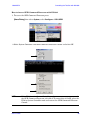
1. To access the GPIB Command Processor press:
[Menu/Dialog] then tab to System, select Configure > SICL/GPIB
2.Select System Controller and GPIB Command Processor Console and select OK.
NOTE
User’s Guide
If the PNA is not in System Controller mode, an error message appears and
the GPIB Command Processor is disabled. To correct this situation, place the
PNA in System Controller mode and restart the GPIB Command Processor
Console.
33
U3042AE12
Controlling the Test Set with N5230A
GPIB Command Processor Console
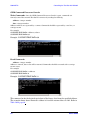
Write Commands Once the GPIB Command Processor Console is open, commands can
remotely control the external Test Set I/O connector by sending the following:
address: a integer number
data: a integer number
Address and data are separated by a comma. Commands should be separated by a new line, or
carriage return.
For example:
CONT:EXT:TEST:DATA <address>,<data>
CONT:EXT:TEST:DATA 0,0
Example: CONT:EXT:TEST:DATA 0,0
Read Commands
address: a integer number
Address is entered, data value will be returned. Commands should be executed with a carriage
return (enter).
For example:
CONT:EXT:TEST:DATA? <address>
CONT:EXT:TEST:DATA? 0
Example: CONT:EXT:TEST:DATA? 0
This command reads the decimal equivalent of the binary data from the specified address.
The example shown above illustrates address is 0 and the returned data is 8191. Refer to
Table 16 on page 62.
34
User’s Guide
U3042AE12
System Setup with N5242A
System Setup with N5242A
The opening of covers or removal of parts is likely to expose
dangerous voltages. Disconnect the instrument from all voltage
sources while it is being opened.
WARNING
Preparing the N5242A Network Analyzer
1. Remove the feet from the bottom of the network analyzer. Refer to Figure 24.
2. Remove the 2 lower standoffs and screws (0515-1619) from the rear panel on the
network analyzer.
Figure 24
Rear Bottom Feet
Standoffs (x2)
Feet (x4)
3. Install the two rear locking feet (5023-0132) onto the PNA-X, using the included screws
(0515-1619), where the standoffs were removed. Refer to Figure 25.
Figure 25
Install Locking Feet on N5242A
Screws (0515-1619)
Included in package
User’s Guide
Locking Feet
(5023-0132)
35
U3042AE12
System Setup with N5242A
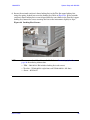
4. Install the two rear locking feet onto the U3042AE12. Looking at the front panel, the
N5242-20138 is the right foot and the N5242-20139 is the left foot. Two screws
(0515-2317) are included with this option. Refer to Figure 26.
Figure 26
Install Locking Feet on U3042AE12
5. Place the network analyzer on top of the Test Set and ensure that the front frame of the
network analyzer is positioned slightly forward of the locks that are attached to the Test
Set. Slide the network analyzer back so the locks engage the front frame of the analyzer.
Refer to Figure 27.
Figure 27
Locking the Analyzer’s
Network Analyzer
Front Frame
Lock Link
screw
Slide the network Analyzer
back to engage the lock link
in the back of the network
analyzer's front frame
Test Set
Front Frame
36
User’s Guide
U3042AE12
System Setup with N5242A
6. Secure the network analyzer’s lower locking feet to the Test Set upper locking feet,
using the spring–loaded screws on the locking feet. Refer to Figure 28. If the network
analyzer's lower locking feet are not aligned with the screw holes in the Test Set's upper
locking feet, loosen the screws securing the feet to the instrument slightly to align.
Figure 28 Locking Feet Screws
NOTE
There are two Lock-Feet kits available. Refer to “Contacting Agilent” on
page 94 for ordering information.
• PNA − 5023-0132 (Kit includes locking feet and screws)
• Test Set − N5242-20138 (right foot) and N5242-20139 (left foot).
• Screw − 0515-2317
User’s Guide
37
U3042AE12
System Setup with N5242A
N5242A RF Interface Cable Connections
Figure 29 on page 39 illustrates the setup configuration of the U3042AE12 Multiport Test
Set and how it should be configured to the PNA-X. The cables have been supplied with
Option 042.
1. Connect the RF interconnect cables from the PNA-X to the Test Set in the order listed.
As you are connecting each cable, torque to 8 in-lb. The longer, straight end of each
cable is connected to the test set. Refer to Table 11 and Figure 29 on page 39.
CAUTION
Over torque will cause damage to the test set and may cause connectors to
spin or become loose.
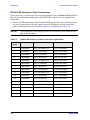
Table 11
N5242A RF Interface Cable Connection (Option 042)
Numeric
Order
38
RF Cables
From PNA-X
To Test Set
1
U3042-20031
Port 1 SOURCE OUT
Port 5 SOURCE IN
2
U3042-20032
Port 1 CPLR THRU
Port 5 CPLR THRU
3
U3042-20029
Port 1 CPLR ARM
Port 5 CPLR ARM
4
U3042-20030
Port 1 RCVR A IN
Port 5 RCVR OUT
5
U3042-20035
Port 3 SOURCE OUT
Port 6 SOURCE IN
6
U3042-20033
Port 3 CPLR ARM
Port 6 CPLR ARM
7
U3042-20034
Port 3 RCVR C IN
Port 6 RCVR OUT
8
U3042-20036
Port 3 CPLR THRU
Port 6 CPLR THRU
9
U3042-20039
Port 4 SOURCE OUT
Port 7 SOURCE IN
10
U3042-20037
Port 4 CPLR ARM
Port 7 CPLR ARM
11
U3042-20038
Port 4 RCVR D IN
Port 7 RCVR OUT
12
U3042-20040
Port 4 CPLR THRU
Port 7 CPLR THRU
13
U3042-20041
Port 2 CPLR ARM
Port 8 CPLR ARM
14
U3042-20044
Port 2 CPLR THRU
Port 8 CPLR THRU
15
U3042-20043
Port 2 SOURCE OUT
Port 8 SOURCE IN
16
U3042-20042
Port 2 RCVR B IN
Port 8 RCVR OUT
User’s Guide
U3042AE12
System Setup with N5242A
Figure 29 indicates the final two digits of the part number for each cable.
Figure 29
N5242A RF Interface Cable Connections
29 31
33 35
37 39
41 43
30
44
32
34 36
38 40
42
2. Connect the PNA-X Test Set I/O cable (8120-6818) to the U3042AE12 Test Set Interface
on the rear panel.
Figure 30
User’s Guide
N5242A Test Set I/O Cable Connection
39
U3042AE12
Controlling the Test Set with N5242A or N5230C
Controlling the Test Set with N5242A or N5230C
This section will describe how to setup and operate the U3042AE12 Multiport Test Set
with the N5242A or N5230C. Both will be referred to as the PNA-X in this section.
The U3042AE12 Multiport Test Set is considered a “slave” instrument. A PNA-X must be
used to control the Test Set. There are three methods to control the Test Set. Multiport
mode is recommended due to calibration and ease of use.
• PNA Multiport Mode firmware revision:
N5242A Option 551≥ A.08.04.07
N5230C Option 551 ≥ A.08.04.10
The following test set file must be installed into network analyzer file directory:
c:\Program Files\Agilent\Network Analyzer\testsets
4-Port PNA-L requires test set: u3042ae12_p4.tsx
4-Port PNA-X requires test set: u3042ae12_pna_p4.tsx
• PNA Interface Control
• PNA GPIB Command Processor
Visit our website for firmware revision and
downloads.http://na.tm.agilent.com/pna/firmware/firmware.htm
You may also refer to “Installing New Firmware” on page 18 in this manual.
PNA Multiport Mode for Option 551
The PNA multiport mode selects the test set file that will enable the PNA to control the
Test Set. The PNA-X multiport mode allows you to complete a N-Port calibration using the
Cal Wizard application in the PNA. Refer to the PNA Help system for more information.
40
User’s Guide
U3042AE12
Controlling the Test Set with N5242A or N5230C
How to Access Multiport Mode
The Option 551 must be installed for Multiport capability. To access the multiport
application select Utility > System > Configure > Multiport Capability. See Figure 31.
Figure 31
Selecting Multiport Mode
Select U3042AE12 (16-Port System) from the test set drop-down menu and select Restart
as a Multiport PNA with this test set. Press OK. The PNA will restart the network
application with the U3042AE12 Multiport Test Set interface features, see Figure 32.
If the U3042E12 is not available in the testset list, it will be necessary for you to copy the
required test set file to the PNA hard drive. The current version of the test set files are
available on the web at http://na.tm.agilent.com/multiport. Copy the appropriate file to
c:\program files\Agilent\Network Analyzer\testsets directory.
Figure 32
User’s Guide
U3042AE12 Selection
41
U3042AE12
Controlling the Test Set with N5242A or N5230C
External Test Set Control Feature
To verify that the network application has the U3042AE12 interface features, select
Trace/Chan > Channel > Hardware Setup > External Test Set > Other. The U3042AE12
will be displayed as External Test Set Control-U3042AE12. See Figure 33, Figure 34 and
Figure 35.
Figure 33
External Test Set Control
This menu will allow the physical Ports 1 thru 16 to be identified as any port for your
convenience. For example; Port 5 can be named Port 2.
The External Test Set Control-U3042AE12 also allows control of the DUT control lines,
refer to “DUT Control Lines” on page 56. To change the state from LOW to HIGH, select
the graphical user interface (GUI) for the specific control (LINE 1 thru 8) and then press
OK. Each line can be controlled separately, see Figure 34.
42
User’s Guide
U3042AE12
Figure 34
Controlling the Test Set with N5242A or N5230C
External Test Set U3042AE12 (Port 1 - 8)
Select the Port Control down arrow for Ports 9 thru 16, see Figure 35.
Figure 35
User’s Guide
External Test Set U3042AE12 (Port 9 - 16)
43
U3042AE12
Controlling the Test Set with N5242A or N5230C
Trace Measure S-Parameter
S-Parameter selection can be accomplished using Response > Measure. Use the
drop-down menus to select 1 of 256 S-Parameters for the 16-Port system, see Figure 36.
The first number in the Sxx selection is the Receiver Port and the second number will be
the Source Port. Any port can be selected to be the Receiver, Source or both, as in S11. The
front panel R LED indicates the port is the Receiver and the S LED indicates the port is
the Source.
Figure 36
Trace Measure
New Trace Measure S-Parameter
S-Parameter Tab: Multiple S-Parameters can be made from the New Measurement
menu. In the drop-down menu select Trace > New Trace. The New Measurement window
allows the selection of any of the 256 S-Parameter's. Refer to Figure 37 and Figure 38.
Figure 37
44
New Trace Measure
User’s Guide
U3042AE12
Figure 38
Controlling the Test Set with N5242A or N5230C
16-Port New Trace Measure (S1 - S5)
Use the scroll bar
to select other
s-parameter
measurements
Figure 39
User’s Guide
16-Port New Trace Measure (S1212 - S1616)
45
U3042AE12
Controlling the Test Set with N5242A or N5230C
Balanced Tab: Balanced Measurements can be configured by selecting the Balance tab
in the New Measurement menu. Refer to Figure 20 on page 25.
For more information on balanced (differential) component measurement, refer to the
Application Note 1373-1 and 1373-2 (5988-5634EN and 5988-5635EN) at
http://www.home.agilent.com. In the search menu type in “Multiport and Balanced.”
Figure 40
Selecting Balanced Measurements
Receiver Tab: The S-Parameter measurements can be ratioed with selectable
Denominators for each port and receiver. Refer to the standard PNA-X documentation for
more information.
Figure 41
46
Receiver Measurements
User’s Guide
U3042AE12
Controlling the Test Set with N5242A or N5230C
N-Port Calibration with N5242A or N5230C
It is recommended that you perform an ECal characterization to minimize the connections
required for multiple port calibration. The N4691B Option M0F is recommended with
cable (85131F) if you are calibrating at the PNA and test set ports.
Characterize the ECal module with adapters that will not be used in the measurement of
the DUT.
Calibrate at the end of the test port RF cables and any adapters that are used to connect
the DUT. This removes the effect on the measurement of the DUT. Failure to do this will
create ripple and other measurement errors.
NOTE
If measurement errors occur, ensure the newest version of firmware is
installed on the PNA. Measurement errors can be a result of firmware
algorithms. Consult with Agilent Service or firmware web page for the latest
PNA, PNA-L or PNA-X Option 551 firmware revisions and history.
http:\\na.tm.agilent.compna\firmware\firmware.htm.
1. On the network analyzer select Response > Calibration Wizard.
a. If using a mechanical cal kit, select SmartCal.
b. If using an ECal module, select ECal.
Figure 42
User’s Guide
ECal Characterization
47
U3042AE12
Controlling the Test Set with N5242A or N5230C
2. Continue following the Cal Wizard prompts. On the “Select Calibration Ports and ECal
Module” window, press Select All or select the ports you are calibrating and press Next.
Figure 43
16-Port Calibration
Help
3. Connect the ECal or the mechanical cal kit to the ports you are calibrating following the
Cal Wizard prompts and press Measure after each connection.
4. At the Calibration Completed prompt, select Save As User Calset and type the name
desired. Press Save.
5. After calibrating test set ports, use a quality load and short to verify the calibration on
each port or end of the test cable. Measure reflection and confirm the return loss is as
expected. If the result is not as expected, repeat the calibration without the test set and
ensure that the PNA is in standard (non-multiport) mode.
48
User’s Guide
U3042AE12
Controlling the Test Set with N5242A or N5230C
N5242A or N5230C Interface Control
The interface control will not function properly when using the mutliport
mode. The multiport mode will reset the switch path commands of the
interface control. It is recommended that the PNA be restarted in stand-alone
mode if the interface control is being used.
NOTE
This section includes only the features required in the Interface Control for the
U3042AE12 Multiport Test Set. Applications and feature information can be found in the
PNA’s Help System Menu, “Interface Control.”
• Overview
• How to Access Interface Control Settings
• Interface Control Dialog Box
Other connectivity topics can be found in the PNA Series Network Analyzer’s Help System
Menu.
Overview of the Interface Control
The Interface Control feature allows you to send data and remote commands to control
external equipment using the GPIB, Material Handler I/O, Test Set I/O, and Auxiliary I/O
without needing to create a remote program. Refer to PNA Series Network Analyzer’s Help
System Menu, “Rear Panel Tour.”
• A unique set of control data can be sent for each channel. In addition, a unique set of
control data can be sent before the channel sweep starts and after the sweep ends.
• Interface Control settings can be saved and recalled from the Interface Control Dialog
Box or with Instrument State Save and Recall.
• Interface Control settings can be copied to other channels using Copy Channels.
• Control data can only be WRITTEN to the interfaces, NOT READ from the interfaces.
• Control data is sent in the following order and this order cannot be changed:
1. GPIB Interface
2. Material Handler Interface (not covered in this manual)
3. Test Set Interface (not covered in this manual)
4. Dwell Time (not covered in this manual)
User’s Guide
49
U3042AE12
Controlling the Test Set with N5242A or N5230C
How to Access Interface Control Settings
This section will describe how to setup and operate the U3042AE12 Multiport Test Set
with the PNA-X. To access the Interface Control application select Trace/Chan > Channel >
Hardware Setup > Interface Control in the drop-down menu.
NOTE
The PNA-X Series Network Analyzer comes with the Interface Control
application. Please review this application before connecting the U3042AE12
Test Set to the PNA. Information regarding this application can be found in
the PNA’s Help System Menu, InterfaceControl. The application is shown
below.
NOTE
While using Interface Control, the PNA-X must be in GPIB System Controller
mode. Once this is complete you must restart the PNA application to go back
to Talker/Listener.
50
User’s Guide
U3042AE12
Controlling the Test Set with N5242A or N5230C
Test Set I/O Address and Data using Control Interface with N5242A or N5230C
An Instrument Preset will reset all of the fields to their default settings.
NOTE
If an error is encountered when sending Interface Control data, an error
message is displayed on the PNA screen and the Channel Trigger State is set
to Hold. You must fix the condition that caused the error, then change the
Channel TriggeState to its original setting.
Enable Interface Control:
Enables and disables ALL Interface Control communication. When cleared (default
setting) Interface Control is disabled and NO data is sent. To send data, the individual
interfaces must also be enabled.
Channel:
Specifies the channel number for dialog settings. Each channel is configured individually.
The list box illustrates the channels that currently have measurements. There must be at
least one measurement present in order to make the settings.
Channel Label:
Specifies the label to be displayed on the PNA screen during the channel sweep.
Before Sweep Start– After Sweep End Tabs:
Commands /data for all four interfaces can be sent Before Sweep Start and After Sweep
End. However, they are configured and enabled on separate tabs of the Interface Control
Dialog Box. For example; to send GPIB commands Before and After a PNA sweep, the
Enable Control check box must be selected and commands entered on both the Before
Sweep Start and After Sweep End tabs.
Before Sweep Start:
The data is sent before the first trace on the channel begins sweeping.
After Sweep End:
The data is sent after the last trace on the channel completes sweeping.
Address:
Positive integer is used to specify switch path to be controlled. Address also specifies
output on specific ports. Refer to “Test Set I/O Interface Commands” on page 61.
• 112 = DUT Control
• 0 = Ports 5, 9 and 13
• 16 = Ports 6, 10 and 14
• 32 = Ports 7, 11 and 15
• 64 = Ports 8, 12 and 16
User’s Guide
51
U3042AE12
Controlling the Test Set with N5242A or N5230C
Data:
Positive integer is used to select switch position or state of DUT control interface line.
Refer to Table 16 on page 62 through Table 23 on page 65.
Address and data are separated by a period. Entries should be separated by a new line, or
carriage return.
For example:
0.0
16.1
32.2
The front-panel Enter key inserts a new line into the field. The number of Test Set I/O
entries that can be entered is limited only by the available memory of the PNA. See “Test
Set I/O Interface Commands” on page 61.
Dwell After Command:
Specifies a wait time, in milliseconds, after all commands to all interfaces are sent. Any
positive integer is allowed. This is used to allow all external devices to settle before
beginning a measurement. An erratic trace could indicate that more settling time is
necessary.
Reset All:
Sets all fields on all channels to their default values.
Save and Recall:
Saves and recalls the contents of the dialog box. If the Interface Control dialog box is
populated with settings during an Instrument State Save, the settings are automatically
recalled with the instrument state settings. Interface control uses an *.xml file type. An
example file is stored on the PNA hard drive. You can recall it into the dialog, or you can
open and edit it with a word processor, such as Word Pad.
52
User’s Guide
U3042AE12
Controlling the Test Set with N5242A or N5230C
OK:
Applies the settings and closes the dialog box.
Cancel:
Does not apply changes that were made and closes the dialog box.
NOTE
U3042AE12 Test Set I/O Commands can be found in “Test Set I/O Interface
Commands” on page 61. The Address and Data commands can be entered into
the Test Set I/O control.
N5242A or N5230C GPIB Control
The GPIB Command Processor feature allows you to send remote commands and data to
the PNA rear-panel GPIB connector and test set I/O connector. More information
regarding the GPIB Command Processor can be found in the PNA Series Network
Analyzer Help System Menu.
• Overview
• How to Access GPIB Command Processor
• GPIB Command Processor Console
Overview of the GPIB Control
The GPIB Command Processor allows you to send address and data to control an external
test set, without needing to create a remote program. The user is required to manually
input address and data using the GPIB Command Processor Console in the PNA Series
Network Analyzer Help System Menu.
• GPIB Command Processor settings can not be saved or recalled.
• Address and data can be written to the GPIB Command Processor and read from the
GPIB Command Processor.
User’s Guide
53
U3042AE12
Controlling the Test Set with N5242A or N5230C
How to Access GPIB Command Processor
1. To access the GPIB Command Processor press: Utility > System > Configure >
SICL/GPIB/SCPI.
Figure 44
Utility Configure
2. Check System Controller and GPIB Command Processor Console and select OK.
Figure 45
54
GPIB Command Processor
User’s Guide
U3042AE12
Controlling the Test Set with N5242A or N5230C
GPIB Command Processor Console
Write Commands Once the GPIB Command Processor Console is open, commands can
remotely control the external Test Set I/O connector by sending the following:
address: a integer number
data: a integer number
Address and data are separated by a comma. Commands should be separated by a new line, or
carriage return.
For example:
CONT:EXT:TEST:DATA <address>,<data>
CONT:EXT:TEST:DATA 0,0
Example: CONT:EXT:TEST:DATA 0,0
Read Commands
address: a integer number
Address is entered, data value will be returned. Commands should be executed with a carriage
return (enter).
For example:
CONT:EXT:TEST:DATA? <address>
CONT:EXT:TEST:DATA? 0
Example: CONT:EXT:TEST:DATA? 0
This command reads the decimal equivalent of the binary data from the specified address.
The example shown above illustrates address is 0 and the returned data is 8191. Refer to
“Test Set I/O Interface Commands” on page 61.
User’s Guide
55
U3042AE12
DUT Control Lines
DUT Control Lines
The 15 pin female D-Sub connector on the front panel provides 8 latched data connections
that can be used to control your DUT. An adjustable voltage source (+2 to +5 Vdc) is
provided on the front panel. A positive or negative external source can be used. Refer to
Table 14 and Figure 49 on page 60.
Setting the DUT Control Interface
This section describes how to control the DUT control lines. Refer to “Controlling the Test
Set with N5242A or N5230C” on page 40 or “Controlling the Test Set with N5230A” on
page 17. For more information regarding the control lines, see Table 12 and Table 13.
Table 12 Test Set DUT Control Address and Data
Address
Data
Data
AD12–AD0
112
0
0000000000000
ALL DUT Control Lines set to 0 or + voltage
112
255
0000001111111
ALL DUT Control Lines set to 0 or – voltage
112
1
00000xxxxxxxB
DUT Control Line 1
0,1
112
2
00000xxxxxxBx
DUT Control Line 2
0,1
112
4
00000xxxxxBxx
DUT Control Line 3
0,1
112
8
00000xxxxBxxx
DUT Control Line 4
0,1
112
16
00000xxxBxxxx
DUT Control Line 5
0,1
112
32
00000xxBxxxxx
DUT Control Line 6
0,1
112
64
00000xBxxxxxx
DUT Control Line 7
0,1
112
128
00000Bxxxxxxx
DUT Control Line 8
0,1
Control Lines
Description
Bit Data
0= +Voltage
1= –Voltage
Line 8
Line 7
Line 6
Line 5
Line 4
Line 3
Line 2
Line 1
Test Set I/O Bits
AD7
AD6
AD5
AD4
AD3
AD2
AD1
AD0
Bit Decimal Equivalent
128
64
32
16
8
4
2
1
Example 1 Data = 0
0
0
0
0
0
0
0
0
Example 2 Data = 21
0
0
0
1
0
1
0
1
X indicates unknown user bit state
B indicates bit of interest
To select a test set DUT control line configuration, all 8 DUT control lines must be set. To do this you
must add AD7 to AD0 binary number and convert this to a decimal equivalent.
56
User’s Guide
U3042AE12
DUT Control Lines
NOTE
All DUT control lines must be set with each command sent. Logic 0 = high
Figure 46
DUT Control Line Pin Assignment
Table 13
DUT Control Line Pin Assignment
Pin
Number
Signal Name
Description
1
Line 1
Output port of line 1
2
Line 2
Output port of line 2
3
Line 3
Output port of line 3
4
Line 4
Output port of line 4
5
Line 5
Output port of line 5
6
Line 6
Output port of line 6
7
Line 7
Output port of line 7
8
Line 8
Output port of line 8
9
Not used
10
Not used
11
Not used
12
+2 V to +5 V
The voltage input to pin 13. (The voltage can be varied by
rotating the voltage adjustment trimmer on the front panel).
13
Positive Input
Input a signal that is outputted when each line is high from
pin 12 or external dc power supply.
14
Negative Input
Input a signal that is outputted when each line is low from
the external dc power supply. Able to output 0 V as low from
the each line by connecting to pin 15.
15
Gnd
User’s Guide
ground terminal
57
U3042AE12
DUT Control Lines
Setting the Variable Source Voltage
The output voltage of pin 12 can be varied from +2 to +5 V. Perform the following procedure
to set the voltage:
1. Turn On U3042AE12.
2. Measure the voltage between pin 12 and 15 using a multimeter.
3. Rotate the voltage adjustment trimmer on the front panel until the multimeter
indicates the appropriate voltage.
Connecting to the DUT Control Lines
Figure 47 illustrates an example of the connection between the DUT and the U3042AE12
without an external dc power supply. Connect pin 12 to pin 13 for +5 V, and pin 14 to pin 15
to provide the ground path. Connect each DUT control line to the external device under
test.
CAUTION
You may only connect pin 12–13, and pin 14–15. Damage may result if any
other path is short–circuited.
Figure 47
Control Line Connector
58
User’s Guide
U3042AE12
DUT Control Lines
Using an External Power Supply
Figure 48 illustrates an example of the connection between the DUT and the U3042AE12
with an external dc power supply. Input the High and Low signals from the external power
supply to the Positive Input and Negative Input respectively, and connect each line to the
control terminal of the DUT.
Turning On the U3042AE12 using an External Power Supply.
1. Turning On the U3042AE12.
2. Connect the DUT.
3. Turn On the external power supply.
Turning Off the U3042AE12 using an External Power Supply.
1. Turning Off the Power Supply.
2. Turning Off the U3042AE12.
3. Disconnect the DUT.
Figure 48
User’s Guide
U3042AE12 to the DUT and External DC Power Supply
59
U3042AE12
Table 14
DUT Control Lines
DUT Control Specifications
Item
Specifications
Connector Shape
15–pin female D–Sub
Voltage Range:
Figure 49
60
Positive Input
0 to +5 V
Negative Input
–5 to 0 V
Maximum Current
100 mA (in total of each line)
Impedance
< 10 Ω
Range of Variable Voltage
+2 to +5 V
Block Diagram of DUT Control
User’s Guide
U3042AE12
Test Set I/O Interface Commands
Test Set I/O Interface Commands
Switch Address and Data
Table 16 through Table 23 contain the information to set the internal switch paths of the
U3042AE12 Test Set. Additional information regarding the operation and descriptions for
the internal switches can be found in “Theory of Operation” on page 83.
The address is the first value in the Test Set I/O control or GPIB data command. The
second value controls the source and receiver paths of the ports. To select a test set port
configuration both switches must be set to complete the source and receiver paths. To do
this you must add the decimal values together to determine the data command value,
which is the second number in the test set I/O or GPIB command. Refer Table 15.
Table 16 and Table 17 on page 62 illustrates Port 1, 5, 9 or 13 as the configured source and
receiver paths. Refer to Table 15 to calculate other path combinations.
Example:
If Port 5 is to be the source and Port 6 is to be the receiver.
then;
Source Port 5 = address 0, decimal 2 and Receiver Port 6 = address 16, decimal 32. See
Table 15. Refer to “How to Access Interface Control Settings with N5230A” on page 29 and
in “How to Access GPIB Command Processor with N5230A” on page 33.
Table 15
Port Value Select
Source Path1
Address
Receiver Path2
Bit
0
1
2
3
4
5
6
7
Decimal
1
2
4
8
16
32
64
128
0
Ports
1
5
9
13
1
5
9
13
16
Ports
2
6
10
14
2
6
10
14
32
Ports
3
7
11
15
3
7
11
15
64
Ports
4
8
12
16
4
8
12
16
1. All Source switches are 100, 200, 300, and 400.
2. All Receiver switches are 101, 201, 301, and 401.
User’s Guide
61
U3042AE12
Test Set I/O Interface Commands
Table 16 PNA Port 1 and Test Set Ports 1, 5, 9, 13
Address
Decimal Data
Description
0
D0 - D3
Controls SW100; Source to PNA Port 1 or Test Set Port 1, 5, 9 and 13.
0
D4 - D7
Controls SW101; Receiver to PNA Port 1 or Test Set Port 1, 5, 9 and 13.
Test Set I/O Data Bit
Data Bit Decimal Equivalent
Table 17
D0
D1
D2
D3
D4
D5
D6
D7
1
2
4
8
16
32
64
128
Address and Data for Port 1, 5, 9 and 13
Address
Data
Description
Port LED’s
0
17
Selects the Port 1 as the Source and Receiver port. Port 5, 9
and 13 terminated with a 50 Ω switch load.
All Off
0
18
Selects the PNA Port 1 as the Receiver and Port 5 as the
Source. Ports 9 and 13 terminated with a 50 Ω switch load.
Port 5 S ON
0
35
Selects the Port 1 as the Source Port. Port 5 as the Receiver.
Ports 9 and 13 terminated with a 50 Ω switch load.
Port 5 R ON
0
34
Selects the Port 5 as the Source and Receiver port. Port 1, 9
and 13 terminated with a 50 Ω switch load.
Port 5 R ON
Port 5 S ON
0
65
Port 1 as the Source and Port 9 as the Receiver Port. Port 5
and 13 terminated with a 50 Ω switch load.
Port 9 R ON
0
20
Port 1 as the Receiver and Port 9 as the Source. Port 5 and
13 terminated with a 50 Ω switch load.
Port 9 S ON
0
68
Port 9 as the Receiver and Source. Port 1, 5 and 13
terminated with a 50 Ω switch load.
Port 9 R ON
Port 9 S ON
0
24
Port 13 as the Source and Port 1 as the Receiver. Port 5 and
9 terminated with a 50 Ω switch load.
Port 13 S ON
0
129
Port 1 as the Source and Port 13 as the Receiver. Port 5 and
9 terminated with a 50 Ω switch load.
Port 13 R ON
0
68
Port 13 as the Receiver and Source. Port 1, 5 and 9
terminated with a 50 Ω switch load.
Port 13 R ON
Port 13 S ON
62
User’s Guide
U3042AE12
Table 18
Address
Test Set I/O Interface Commands
PNA Port 1 and Test Set Ports 6, 10 and 14
Decimal Data
Description
16
D0 - D3
Controls SW200; Source to PNA Port 2 or Test Set Port 6, 10 and 14.
16
D4 - D7
Controls SW201; Receiver to PNA Port 2 or Test Set Port 6, 10 and 14.
Test Set I/O Data Bit
Data Bit Decimal Equivalent
Table 19
D0
D1
D2
D3
D4
D5
D6
D7
1
2
4
8
16
32
64
128
Address and Data for Port 6, 10 and 14
Address
Data
Description
Port LED’s
16
17
Selects the Port 2 as the Source and Receiver port. Port 6, 10
and 14 terminated with a 50 Ω switch load.
All Off
16
18
Selects the PNA Port 2 as the Receiver and Port 6 as the
Source. Ports 10 and 14 terminated with a 50 Ω switch load.
Port 6 S ON
16
35
Selects the Port 2 as the Source Port. Port 6 as the Receiver.
Ports 10 and 14 terminated with a 50 Ω switch load.
Port 6 R ON
16
34
Selects the Port 6 as the Source and Receiver port. Port 2, 10
and 14 terminated with a 50 Ω switch load.
Port 6 R ON
Port 6 S ON
16
65
Port 2 as the Source and Port 10 as the Receiver Port. Port
Ports 6 and 14 terminated with a 50 Ω switch load.
Port 10 R ON
16
20
Port 2 as the Receiver and Port 10 as the Source. Port 6 and
14 terminated with a 50 Ω switch load.
Port 10 S ON
16
68
Port 10 as the Receiver and Source. Port 2, 6 and 14
terminated with a 50 Ω switch load.
Port 10 R ON
Port 10 S ON
16
24
Port 10 as the Source and Port 2 as the Receiver. Port 6 and
10 terminated with a 50 Ω switch load.
Port 14 S ON
16
129
Port 2 as the Source and Port 14 as the Receiver. Port 6 and
10 terminated with a 50 Ω switch load.
Port 14 R ON
16
68
Port 14 as the Receiver and Source. Port 2, 6 and 10
terminated with a 50 Ω switch load.
Port 14 R ON
Port 14 S ON
User’s Guide
63
U3042AE12
Test Set I/O Interface Commands
Table 20 PNA Port 1 and Test Set Ports 7, 11 and 15
Address
Decimal Data
Description
32
D0 - D3
Controls SW300; Source to PNA Port 3 or Test Set Port 7, 11 and 15.
32
D4 - D7
Controls SW301; Receiver to PNA Port 3 or Test Set Port 7, 11 and 15.
Test Set I/O Data Bits
Data Bit Decimal Equivalent
Table 21
D0
D1
D2
D3
D4
D5
D6
D7
1
2
4
8
16
32
64
128
Address and Data for Port 7, 11 and 15
Address
Data
32
17
Selects the Port 3 as the Source and Receiver port.
Port 7, 11 and 15 terminated with a 50 Ω switch load.
32
18
Selects the PNA Port 3 as the Receiver and Port 7 as the
Source. Ports 11 and 15 terminated with a 50 Ω switch load.
Port 7 S ON
32
35
Selects the Port 3 as the Source Port. Port 7 as the Receiver.
Ports 11 and 15 terminated with a 50 Ω switch load.
Port 7 R ON
32
34
Selects the Port 7 as the Source and Receiver port. Port 3, 11
and 15 terminated with a 50 Ω switch load.
Port 7 R ON
Port 7 S ON
32
65
Port 3 as the Source and Port 11 as the Receiver Port. Port 7
and 15 terminated with a 50 Ω switch load.
Port 11 R ON
32
20
Port 3 as the Receiver and Port 11 as the Source. Port 7 and
15 terminated with a 50 Ω switch load.
Port 11 S ON
32
68
Port 11 as the Receiver and Source. Port 3, 7 and 15
terminated with a 50 Ω switch load.
Port 11 R ON
Port 11 S ON
32
24
Port 15 as the Source and Port 3 as the Receiver. Port 7 and
11 terminated with a 50 Ω switch load.
Port 15 S ON
32
129
Port 3 as the Source and Port 15 as the Receiver. Port 7 and
11 terminated with a 50 Ω switch load.
Port 15 R ON
32
68
Port 15 as the Receiver and Source. Port 3, 7 and 11
terminated with a 50 Ω switch load.
Port 15 R ON
Port 15 S ON
64
Description
Port LED’s
All Off
User’s Guide
U3042AE12
Test Set I/O Interface Commands
Table 22 PNA Port 1 and Test Set Ports 8, 12 and 16
Address
Decimal Data
Description
64
D0 - D3
Controls SW400; Source to PNA Port 4 or Test Set Port 8 12 and 16.
64
D4 - D7
Controls SW401; Receiver to PNA Port 4 or Test Set Port 8 12 and 16.
Test Set I/O Data Bits
Data Bit Decimal Equivalent
Table 23
D0
D1
D2
D3
D4
D5
D6
D7
1
2
4
8
16
32
64
128
Address and Data for Port 8, 12 and 16
Address
Data
64
17
Selects the Port 4 as the Source and Receiver port. Port 8,
12 and 16 terminated with a 50 Ω switch load.
64
18
Selects the PNA Port 4 as the Receiver and Port 8 as the
Source. Ports 12 and 16 terminated with a 50 Ω switch load.
Port 8 S ON
64
35
Selects the Port 4 as the Source Port. Port 5 as the Receiver.
Ports 12 and 16 terminated with a 50 Ω switch load.
Port 8 R ON
64
34
Selects the Port 8 as the Source and Receiver port. Port 4,
12 and 16 terminated with a 50 Ω switch load.
Port 8 R ON
Port 8 S ON
64
65
Port 4 as the Source and Port 12 as the Receiver Port. Port 8
and 16 terminated with a 50 Ω switch load.
Port 12 R ON
64
20
Port 4 as the Receiver and Port 12 as the Source. Port 8 and
16 terminated with a 50 Ω switch load.
Port 12 S ON
64
68
Port 12 as the Receiver and Source. Port 4, 8 and 16
terminated with a 50 Ω switch load.
Port 12 R ON
Port 12 S ON
64
24
Port 16 as the Source and Port 4 as the Receiver. Port 8 and
12 terminated with a 50 Ω switch load.
Port 16 S ON
64
129
Port 4 as the Source and Port 16 as the Receiver. Port 8 and
12 terminated with a 50 Ω switch load.
Port 16 R ON
64
68
Port 16 as the Receiver and Source. Port 4, 8 and 12
terminated with a 50 Ω switch load.
Port 16 R ON
Port 16 S ON
User’s Guide
Description
Port LED’s
All Off
65
U3042AE12
Operational Check
Operational Check
This operational check is to confirm the U3042AE12 and PNA operational performance.
The operation verification limits provided ensure that your U3042AE12 and PNA are
operating properly. Refer to “Troubleshooting Operational Check Failures” on page 80 to
ensure the RF interface cables are installed and working correctly before returning the
test set for repairs.
Verification Limits
Specifications for the U3042AE12 Multiport Test Set are typical. System performance for
the PNA and Test Set are only characteristic and intended as non warranted information.
Only a functional certificate is provided for the U3042AE12.
It is recommended that you return your instrument to Agilent Technologies for servicing or
repair if the Test Set and PNA performance exceed the operational verification limits.
Table 24
N5230A/C Operation Verification Limit for Reflection Tracking1
Standard
Port 1-162
Option 001 or 002
Port 1-16
10 MHz to 4 GHz
−10.0 dB
0 dB
4 GHz to 6 GHz
−13.0 dB
−2.5 dB
6 GHz to 10 GHz
−16.0 dB
−5.0 dB
10 GHz to 15 GHz
−17.0 dB
−7.5 dB
15 GHz to 20 GHz
−25.0 dB
−15.0 dB
Frequency
1. Reflection Tracking takes into account Source Loss, Receiver
Loss, Margin, and PNA Mixer Cal.
2. A standard unit is one without Options 001 or 002.
66
User’s Guide
U3042AE12
Operational Check
Table 25 N5242A Operation Verification Limit for Reflection Tracking1
Standard2
Port 1-16
Options
001 or 002
Port 1-16
10 MHz to 4 GHz
−10.0 dB
0 dB
4 GHz to 6 GHz
−13.0 dB
−2.5 dB
6 GHz to 10 GHz
−16.0 dB
−5.0 dB
10 GHz to 15 GHz
−17.0 dB
−7.5 dB
15 GHz to 20 GHz
−25.0 dB
−15.0 dB
20 GHz to 26.5 GHz
−30.0 dB
−40 dB
Frequency
1. Reflection Tracking takes into account Source Loss, Receiver Loss,
Margin, and PNA Mixer Cal.
2. A standard unit is one without Options 001, 002.
NOTE
If you suspect that your 16-Port configuration is not operating properly,
ensure that all front RF jumper interconnect cables are correctly attached.
Equipment Required
The Agilent U3042AE12 requires that the user be familiar with the equipment and
components listed in Table 26.
This section provides an equipment list and setup of the PNA and Test Set.
Table 26
Equipment List
Description
Qty
N4691A 3.5 mm ECal Module 10 MHz - 26.5 GHz (Option 00F or M0F) or
N4691B 3.5 mm ECal Module 300 kHz - 26.5 GHz (Option 00F or M0F) or
Mechanical cal kit 85052B or 85052D
1
N5230A/C 4-Port Network Analyzer (Option 245 and 551) or
N5242A Option 400 and 551
1
Set of interconnect cables (PNA and Test Set), see “N5230A/C RF Interface
Cable Connections” on page 16.
1
User’s Guide
67
U3042AE12
Operational Check
Operational Check Procedure
The sequence of this procedure is very important and must be followed or the performance
accuracy and results may vary from the reference plots provided. Ensure that the test set
is not connected to the PNA if you are performing a PNA Operator’s Check. The PNA will
indicate false failures if the test set is connected.
Preparing the N5230A
1. Connect the Test Set to the N5230A 4-Port PNA using the interconnect cables as shown
in Figure 50 on page 69 and Table 10 on page 16.
2. Turn On the Test Set.
3. On the PNA, press Calibration > Cal Sets. Delete or Rename any Cal Sets titled “999.1”
thru “999.16” (16-Port), although it is unlikely that you will find Cal Sets with these
names.
4. Verify that the PNA is in 16-Port mode. Refer to the bottom of Figure 55 on page 72, or
select Trace > New Trace.
a. If only four S-Parameters are listed, press System > Configure > Multiport
Capability. On the Multiport Restart dialog, select Restart as multiport PNA with
this test set. Select U3042AE12 (16-Port).
5. Press System > Preset.
6. Verify that the [Stop Frequency] is set to the maximum of the PNA and test set.
7. Verify that the [Start Frequency] is set to [10 MHz]. If not, press Channel > Start/Stop
and enter [10 MHz].
8. Verify that the [Power] is to set to [−8 dBm]. If not, press [Power] > Power Level and
enter [−8 dBm].
9. Select Sweep > IF Bandwidth > 100 Hz.
10.Select Sweep > Number of Points > 401.
11.Connect the ECal module to the PNA-L USB port on the front or rear panel, refer to
Figure 50 on page 69. This procedure assumes you are using a ECal. If you are not, see
“N5230A 1-Port Calibration and Verification Procedure”, step 2.
68
User’s Guide
U3042AE12
Figure 50
Operational Check
Test Set to N5230A Connections
12.Allow the ECal module, Test Set and PNA to warm up for a minimum of 30 minutes.
User’s Guide
69
U3042AE12
Operational Check
N5230A 1-Port Calibration and Verification Procedure
1. Connect the ECal or the mechanical cal kit to Port 1 or the port you are testing.
Torque to 8 in-lb. For more information press the Help button, see Figure 51.
Figure 51
ECal at N5230A Port 1
2. Perform a 1-Port Calibration on Port 1. On the PNA, press Calibration > Calibration
Wizard.
a. If using a mechanical cal kit, select SmartCal.
b. If using an ECal module, select ECal.
3. Continue following the Cal Wizard prompts. In the “Select Calibration Ports and ECal
Module” window, press Clear All and select Port 1, then press Next. See Figure 52.
Figure 52
1-Port Calibration
Help
4. Continue to follow the prompts until the “Calibration Completed” window appears.
70
User’s Guide
U3042AE12
Operational Check
5. At the Calibration Completed prompt, select Save As User Calset and type the name
999.1. Overwrite the Calset if it already exists. Press Save.
NOTE
Figure 53
If you do not have a key board, select Save As User Calset > Edit Name and
save as 999.x. X is the port number you are calibrating. See Figure 53. Use
the numeric keypad on the PNA front panel to enter "999.1."
Calibration Complete
6. Repeat step 1 thru step 5 (1-Port Calibration Procedure) for Ports 2 thru 16. When
finished, there should be sixteen Cal Sets saved with the titles “999.1” thru “999.16”
(16-Port).
If you are using an ECal module you can verify the individual port calibration by
selecting Calibration > ECal Confidence Check. For further information refer to the
system Help menu.
7. Press Trace > Delete Trace. There should be no traces on the PNA screen.
User’s Guide
71
U3042AE12
Operational Check
8. Select Calibration > Cal Set Viewer to launch the Cal Set Viewer toolbar. See Figure 54.
Figure 54
Calibration, Cal Set Viewer
9. From the Cal Sets drop-down menu, select 999.1 and check Enable. Select the
Reflection Tracking(1,1) term in the center drop-down menu and ensure that the
Enable and Error Terms are selected as shown in Figure 55.
You may also create a table on the PNA and enter the limit line stimulus and
response values. Select Limit Test ON and Limit Line ON, and press Show
Table. See Figure 55 on page 72.
NOTE
Figure 55
Option 001 or 002 Reflection Tracking Trace (Port 1-16) with
N5230A/C
Error Term
Enable
999.1
16-Port
72
User’s Guide
U3042AE12
Operational Check
10.Compare the Reflection Tracking (1,1) trace to the appropriate limits in Table 24 on
page 66. This can be done using Limit Lines (press Trace > Limit Test) or Marker. The
trace should be above the limit. PASS will be displayed on the screen if the limit lines
are used.
11.Repeat step 9 and step 10 for Cal Sets “999.1” thru “999.16” (16-Port).
Figure 56
Option 001 or 002 Reflection Tracking Trace (Port 1-16) with
N5230A/C
Figure 57
Standard Reflection Tracking Trace (Port 1-16) with N5230A/C
User’s Guide
73
U3042AE12
Operational Check
Preparing the N5242A or N5230C
1. Connect the Test Set to the N5242A 4-Port PNA-X using the interconnect cables as
shown in Figure 29 on page 39 and Table 11 on page 38. If you are using a N5230C,
refer to Figure 50 on page 69 and Table 10 on page 16.
2. Turn On the Test Set.
3. On the PNA, press Response > CAL > Manage CALS > CAL Set. Delete or Rename any
Cal Sets titled “999.1” thru “999.16” (16-Port), although it is unlikely that you will find
Cal Sets with these names.
4. Verify that the PNA is in 16-Port. See the bottom of the measurement window.
a. If only four S-Parameters are listed, press Utility > System > Configure > Multiport
Capability. On the Multiport Restart dialog, select Restart as multiport PNA with
this test set. Select U3042AE12 (16-Port).
5. Press Preset.
6. Verify that the [Stop Frequency] is set to [26.5 GHz], or [20 GHz] for the N5230C.
7. Verify that the [Start Frequency] is set to [10 MHz].
8. Verify that the [Power] is to set to [−5 dBm].
9. Select Response > Avg > IF Bandwidth > 100 Hz. See Figure 58.
10.Select Stimulus > Sweep > Number of Points > 401.
11.Connect the ECal module to the PNA USB port on the front or rear panel, refer to
Figure 50 on page 69. This procedure assumes you are using a ECal. If you are not, see
“N5242A or N5230C 1-Port Calibration and Verification Procedure” step 2.
12.Allow the ECal module, Test Set and PNA to warm up for a minimum of 30 minutes.
Figure 58
74
Setting the IF Bandwidth
User’s Guide
U3042AE12
Operational Check
N5242A or N5230C 1-Port Calibration and Verification Procedure
1. Connect the ECal or the mechanical cal kit to Port 1 or the port you are testing. Refer to
Figure 2 on page 2. Torque to 8 in-lb. For more information press the Help button, see
Figure 59.
2. Perform a 1-Port Calibration on Port 1. On the PNA, press Response > CAL > Start Cal
> Calibration Wizard.
a. If using a mechanical cal kit, select SmartCal.
b. If using an ECal module, select ECal.
3. Continue following the Cal Wizard prompts. In the “Select Calibration Ports and ECal
Module” window, press Clear All and select Port 1, then press Next.
Figure 59
1-Port Calibration
Help
4. Continue to follow the prompts until the “Calibration Completed” window appears.
5. At the Calibration Completed prompt, select Save As User Calset and type the name
999.1. Overwrite the Calset if it already exists. Press Save.
NOTE
User’s Guide
If you do not have a key board, select Save As User Calset > Edit Name and
save as 999.x. X is the port number you are calibrating. Refer to Figure 53 on
page 71. Use the numeric keypad on the PNA front panel to enter "999.1."
75
U3042AE12
Figure 60
Operational Check
Calibration Complete
6. Repeat step 1 thru step 5 (1-Port Calibration Procedure) for Ports 2 thru 16. When
finished, there should be sixteen Cal Sets saved with the titles “999.1” thru “999.16”
(16-Port).
If you are using an ECal module you can verify the individual port calibration by
selecting Response > CAL > More > ECAL > ECAL Confidence Check. For further
information refer to the system Help menu.
7. Press Trace/Chan > Trace > Delete Trace. There should be no traces on the PNA screen.
76
User’s Guide
U3042AE12
Operational Check
8. To launch the Cal Set Viewer toolbar. Select Response > CAL > Manage CALS >
CAL Set Viewer.
Figure 61 Calibration, Cal Set Viewer
9. From the Cal Sets drop-down menu, select 999.1 and check Enable. Select the
Reflection Tracking(1,1) term in the center drop-down menu and ensure that the
Enable and Error Terms are selected.
NOTE
Figure 62
User’s Guide
You may also create a table on the PNA and enter the limit line stimulus and
response values. Select Limit Test ON and Limit Line ON, and press Show
Table. See Figure 62.
PNA-X Setting the Test Limits
77
U3042AE12
Operational Check
Figure 63
Option 001 or 002 Reflection Tracking Trace (Port 1-4) with N5242A
10.Compare the Reflection Tracking (1,1) trace to the appropriate limits in Table 24 on
page 66. This can be done using Limit Lines (press Marker/Analysis > Analysis > Limit
Test). The trace should be above the limit. PASS will be displayed on the screen if the
limit lines are used. If you are using an N5230C, refer to Figure 55 on page 72, Figure
56 and Figure 57 on page 73.
11.Repeat step 9 and step 10 for Cal Sets “999.1” thru “999.16” (16-Port).
Figure 64
NOTE
78
Option 001 or 002 Reflection Tracking Trace (Port 5-16) with N5242A
Response from 10 MHz to 500 MHz is normal due to the PNA-X Couplers in
comparison to the U3042AE12 bridges. The bridges have more gain in the
coupled RF path.
User’s Guide
U3042AE12
Operational Check
Figure 65
Standard Reflection Tracking Trace (Port 1-4) with N5242A
Figure 66
Standard Reflection Tracking Trace (Port 5-16) with N5242A
NOTE
Response from 10 MHz to 500 MHz is normal due to the PNA-X couplers in
comparison to the U3042AE12 bridges. The bridges have more gain in the
coupled RF path.
User’s Guide
79
U3042AE12
Troubleshooting Operational Check Failures
Troubleshooting Operational Check Failures
If your test results fail the Operational Check limits, verify following:
1. Insure that the test set is turned on and connected properly to the PNA.
2. Check all appropriate network analyzer and test set connectors for damage, cleanliness,
and proper torque.
3. Repeat the relevant 1-Port calibrations.
4. Verify that the stand-alone network analyzer is operating properly and meeting its
published specifications.
Interconnect Cable Verification
1. Connect the Test Set to the PNA and select Multiport mode.
2. Verify the Source Interconnect RF cables (Source Out and CPLR THRU).
a. Remove the Receiver and CPLR ARM interconnect cables and install the standard
PNA jumpers.
b. Connect two RF cables on the PNA, Port-1 to Port-2 and Port-3 to Port-4.
c. Set the PNA to measure Trace S12, S21, S34 and S43, and verify that there are no
power holes. If S12, or S34 has a power hole check the Port-2, or Port-4 Source
interconnect cables and test set connectors for damage. If S21, or S43 has a power
hole check the Port-1, or Port-3 Source interconnect cables and test set connectors for
damage.
3. Verify the Receiver Interconnect RF cables (Receiver A IN or B IN and CPLR ARM).
a. Re-install the Receiver and CPLR ARM interconnect cables.
b. Remove the Source Out and CPLR THRU interconnect cables and install the
standard PNA jumpers.
c. Set the PNA to measure Trace S12, S21, S34 and S43. Verify that there are no power
holes. If S12 or S34 has a power hole check Port-1, or Port-3 Receiver Interconnect
cables and test set connectors for damage. If S21, or S43 has a power hole check
Port-2, or Port-4 Receiver Interconnect cables and test set connectors for damage.
4. If the problem still exists, connect the standard jumpers to the PNA (Source and
Receiver) and verify the Source Out to CPLR THRU and A/B IN to CPLR ARM switch
paths.
a. Connect two RF cable, one to Port-1 and one to Port-2.
b. Set the PNA to measure trace S12 (all standard jumpers connected).
c. Connect the Port-1 cable to Source Out and Port-2 cable to CPLR THRU connectors
on the test set. If a power hole still exists refer to “Contacting Agilent” on page 94.
d. Connect Port-1 to Receiver A IN or B IN and Port-2 to CPLR ARM connectors on the
test set. If a power hole still exists refer to “Contacting Agilent”.
80
User’s Guide
U3042AE12
Service Information
Service Information
Refer to “Contacting Agilent” on page 94.
WARNING
No operator serviceable parts inside. Refer servicing to qualified
personnel. To prevent electrical shock do not remove covers.
WARNING
These servicing instructions are for use by qualified personnel only.
To avoid electrical shock, do not perform any servicing unless you
are qualified to do so.
Replaceable Parts
Special options are built to order, so long lead times may be encountered when ordering
replacement parts..
Description
Test set I/’O Cable
Agilent
Part Number
8120-6818
RF Cable, Semi-rigid
Z5623-20418
RF Cable, Semi-rigid
Z5623-20419
Port 1 SOURCE OUT
U3042-20031
Port 1 CPLR THRU
U3042-20032
Port 1 CPLR ARM
U3042-20029
Port 1 RCVR A IN
U3042-20030
Port 3 SOURCE OUT
U3042-20035
Port 3 CPLR ARM
U3042-20033
Port 3 RCVR C IN
U3042-20034
Port 3 CPLR THRU
U3042-20036
Port 4 CPLR ARM
U3042-20037
Port 4 RCVR D IN
U3042-20038
Port 4 SOURCE OUT
U3042-20039
Port 4 CPLR THRU
U3042-20040
Port 2 CPLR ARM
U3042-20041
Port 2 SOURCE OUT
U3042-20043
Port 2 RCVR B IN
U3042-20042
Port 2 CPLR THRU
U3042-20044
Screw
0515-2317
PNA-X Test Set Rear Lock Feet (right)
N5242-20138
PNA-X Test Set Rear Lock Feet (left)
N5242-20139
User’s Guide
81
U3042AE12
Description
Service Information
Agilent
Part Number
PNA-L or PNA-X Locking Feet
5023-0132
PNA-L Test Set Locking Feet
5063-9253
User’s Guide (Option E12)
82
U3042-90001
User’s Guide
U3042AE12
Theory of Operation
Theory of Operation
The following is a description of the operation of the U3042AE12. Reference the
U3042AE12 block diagrams shown in Figure 67 on page 85. This section assumes the user
has a general understanding of couplers, switches, and network analyzers.
RF Switch Components
There are eight quad switches. The switches select the RF paths from the PNA source and
receiver through interconnect cables to test set port paths 5 thru 16.
S100 - Source to Ports (1, 5, 9 and 13)
Switch 100 provides control of the Source path to PNA Port 1 and ports 5, 9 and 13 to the
Test Set. In the state shown in the block diagram, switch 100 routes the RF Source back to
the PNA Port 1 and the Test Set Source paths to ports 5, 9 and 13 are terminated.
S200 - Source to Ports (2, 6, 10 and 14)
Switch 200 provides control of the Source path to PNA Port 6 and ports 10 and 14 to the
Test Set. In the state shown in the block diagram, switch 200 routes the RF Source back to
the PNA Port 2 and all unused Test Set ports (6, 10 and 14) Source paths are terminated.
S300 - Source to Ports (3, 7, 11 and 15)
Switch 300 provides control of the Source path to PNA Port 7 and ports 11 and 15 to the
Test Set. In the state shown in the block diagram, switch 300 routes the RF Source back to
the PNA Port 3 and all unused test set ports (7, 11 and 15) source paths are terminated.
S400 - Source to Ports (4, 8, 12 and 16)
Switch 400 provides control of the Source path to PNA Port 4 and ports 8, 12 and 16 to the
Test Set. In the state shown in the block diagram, switch 400 routes the RF Source back to
the PNA Port 4 and all unused test set ports (8, 12 and 16) Source paths are terminated.
S101 - Receiver to Ports (1, 5, 9 and 13)
Switch 101 provides control of the A Receiver path to PNA Port 1 and ports 5, 9 and 13 to
the Test Set. In the state shown in the block diagram, switch 101 routes the Coupler Arm
from the PNA Port 1 to the A Receiver and all unused test set ports (5, 9 and 13) Coupler
Arm paths are terminated.
S201 - Receiver to Ports (2, 6, 10 and 14)
Switch 201 provides control of the A Receiver path to PNA Port 2 and ports 6, 10 and 14 to
the Test Set. In the state shown in the block diagram, switch 201 routes the Coupler Arm
from the PNA Port 2 to the A Receiver and all unused Test Set ports (6, 10 and 14) Coupler
Arm paths are terminated.
User’s Guide
83
U3042AE12
Theory of Operation
S301 - Receiver to Ports (3, 7, 11 and 15)
Switch 301 provides control of the A Receiver path to PNA Port 3 and ports 7, 11 and 15 to
the Test Set. In the state shown in the block diagram, switch 301 routes the Coupler Arm
from the PNA Port 3 to the A Receiver and all unused Test Set ports (7, 11 and 15) Coupler
Arm paths are terminated.
S401 - Receiver to Ports (4, 8, 12 and 16)
Switch 401 provides control of the B Receiver path to PNA Port 4 and ports 8, 12 and 16 to
the Test Set. In the state shown in the block diagram, switch 401 routes the Coupler Arm
from the PNA Port 4 to the B Receiver and all unused Test Set ports Coupler Arm paths
are terminated.
RF Coupler Components
Test set ports (5 - 16) provide the signal separation of the source and receiver paths. The
test set ports can either stimulate or receive a signal to the DUT.
84
User’s Guide
User’s Guide
Port 9
Port 5
SW 100
1
2
3
4
3
SW 101
2
4
C
1
Port 14
Port 10
Port 6
SW 200
SW 201
Module 2
Port 11
Port 7
SW 301
RCVR D OUT
SOURCE
SOURCE
RCVR C OUT
SOURCE
RCVR A OUT
PNA P3
JUMPERS
Port 16
Port 12
Port 8
SW 400
SW 401
Module 4
PNA P4
JUMPERS
SOURCE
PNA P2
JUMPERS
Port 15
SW 300
Module 3
RCVR B OUT
PNA P1
JUMPERS
C
Module 1
Figure 67
Port 13
U3042AE12 Standard
U3042AE12
Theory of Operation
System Block Diagram
U3042AE12 Standard Configuration
CPLR THRU
CPLR ARM
CPLR THRU
CPLR ARM
CPLR THRU
CPLR ARM
CPLR THUR
CPLR ARM
85
86
Port 13
Port 9
Port 5
1
2
3
4
3
SW 101
2
4
C
1
Port 14
Port 10
Port 6
SW 200
SW 201
Module 2
Port 11
Port 7
SW 301
RCVR D OUT
SOURCE
RCVR C OUT
SOURCE
RCVR A OUT
SOURCE
PNA P3
JUMPERS
Port 16
Port 12
Port 8
SW 400
SW 401
Module 4
PNA P4
JUMPERS
SOURCE
PNA P2
JUMPERS
Port 15
SW 300
Module 3
RCVR B OUT
PNA P1
JUMPERS
C
Module 1
Figure 68
SW 100
U3042AE12 Option 001
Note: All amplifiers have attenuators on
outputs, not shown in block diagram.
U3042AE12
Theory of Operation
U3042AE12 Option 001 Configuration
CPLR THRU
CPLR ARM
CPLR THRU
CPLR ARM
CPLR THRU
CPLR ARM
CPLR THUR
CPLR ARM
User’s Guide
User’s Guide
Port 13
Port 9
Port 5
1
2
3
4
3
C
4
C
1
Port 14
Port 10
Port 6
SW 200
SW 201
Module 2
Port 11
Port 7
SW 301
SOURCE
RCVR C OUT
SOURCE
RCVR A OUT
PNA P3
JUMPERS
RCVR D OUT
PNA P2
JUMPERS
Port 15
SW 300
Module 3
Port 16
Port 12
Port 8
SW 400
PNA P4
JUMPERS
SW 401
Module 4
RCVR B OUT
PNA P1
JUMPERS
SW 101
2
Module 1
Figure 69
SW 100
U3042AE12 option 002
Note: All amplifiers have attenuators on
outputs, not shown in block diagram.
U3042AE12
Theory of Operation
U3042AE12 Option 002 Configuration
CPLR THRU
SOURCE
CPLR ARM
CPLR THRU
CPLR ARM
CPLR THRU
CPLR ARM
CPLR THUR
SOURCE
CPLR ARM
87
U3042AE12
Safety and Regulatory Information
Safety and Regulatory Information
Introduction
Review this product and related documentation to familiarize yourself with safety
markings and instructions before you operate the instrument. The documentation contains
information and warnings that must be followed by the user to ensure safe operation and
to maintain the product in a safe condition.
Before Applying Power
Verify that the premises electrical supply is within the range of the instrument. The
instrument has an autoranging power supply.
Connector Care and Cleaning
If alcohol is used to clean the connectors, the power cord to the instrument must be
removed. All cleaning should take place in a well ventilated area. Allow adequate time for
the fumes to disperse and moist alcohol to evaporate prior to energizing the instrument.
WARNING
To prevent electrical shock, disconnect the Agilent Technologies
model product from mains before cleaning. Use a dry cloth or one
slightly dampened with water to clean the external case parts. Do
not attempt to clean internally.
Declaration of Conformity
A declaration of conformity is on file for the PNA models, and a copy is available upon
request, or a copy is available on the Agilent Technologies web site at
http://regulations.corporate.agilent.com/DoC/search.htm
Shipping Instructions
You must always call the Agilent Technologies Instrument Support Center to initiate
service before retuning your instrument to a service office. See “Contacting Agilent” on
page 94. Always transport or ship the instrument using the original packaging if possible.
If not, comparable packaging must be used. Attach a complete description of the failure
symptoms.
88
User’s Guide
U3042AE12
Safety and Regulatory Information
Compliance with German Noise Requirements
This is to declare that this instrument is in conformance with the German Regulation on
Noise Declaration for Machines (Laermangabe nach der Maschinenlaermrerordnung-3.
GSGV Deutschland).
Acoustic Noise Emission/Geraeuschemission
LpA<70 dB
Lpa<70 dB
Operator Position
am Arbeitsplatz
Normal Operation
normaler Betrieb
per ISO 7779
nach DIN 45635 t. 19
EMC Information
Complies with European EMC Directive 89/336/EEC, amended by 93/68/EEC
• IEC/EN 61326
This product complies with the radiated electromagnetic field immunity requirement in
IEC/EN 61326 using performance criterion B. Degradation of some product specifications
can occur in the presence of ambient electromagnetic fields. The product self-recovers and
operates as specified when the ambient field is removed.
• CISPR Pub 11 Group 1, class A
• AS/NZS CISPR 11:2002
• This ISM device complies with Canadian ICES-001.
Cet appareil ISM est conforme a la norme NMB du Canada.
Safety Information
Complies with European Low Voltage Directive 2006/95/EC
• IEC/EN 61010-1:2001
• Canada: CSA C22.2 No. 61010-4
• USA: UL Std No. 61010-1 (2nd Edition)
User’s Guide
89
U3042AE12
Safety and Regulatory Information
Warnings
WARNING
The WARNING notice denotes a hazard. It calls attention to a
procedure, practice, or the like, which if not correctly performed or
adhered to, could result in personal injury. Do not proceed beyond a
WARNING notice until the indicated conditions are fully understood
and met.
Warnings applicable to this instrument are:
WARNING
To prevent electrical shock, disconnect the Agilent Technologies
U3042AE12 from the mains power supply before cleaning. Use a dry
cloth or one slightly dampened with water to clean the external case
parts. Do not attempt to clean internally.
WARNING
For continued protection against fire hazard replace line fuse only
with same type and rating: 5A/250V, Part Number 2110-0709
The use of other fuses or material is prohibited.
WARNING
This is a Safety Class I product (provided with a protective earthing
ground incorporated in the power cord). The mains plug shall be
inserted only into a socket outlet provided with a protective earth
contact. Any interruption of the protective conductor, inside or
outside the instrument, is likely to make the instrument dangerous.
Intentional interruption is prohibited.
WARNING
No operator serviceable parts inside. Refer servicing to qualified personnel.
To prevent electrical shock do not remove covers.
WARNING
The opening of covers or removal of parts is likely to expose the user
to dangerous voltages. Disconnect the instrument from all voltage
sources while it is being opened.
WARNING
If this product is not used as specified, the protection provided by
the equipment could be impaired. This product must be used in a
normal condition (in which all means for protection are intact) only.
WARNING
The detachable power cord is the instrument disconnecting device.
It disconnects the mains circuits from the mains supply before other
parts of the instrument. The front panel switch is only a standby
switch and is not a LINE switch (disconnecting device).
90
User’s Guide
U3042AE12
Safety and Regulatory Information
Cautions
CAUTION
The CAUTION notice denotes a hazard. It calls attention to an operating
procedure, practice, or the like, which if not correctly performed or adhered to,
could result in damage to the product or loss of important data. Do not
proceed beyond a CAUTION notice until the indicated conditions are fully
understood and met.
Cautions applicable to this instrument are:
CAUTION
Always use the three-prong ac power cord supplied with this instrument.
Failure to ensure adequate earth grounding (by not using this cord) can cause
instrument damage and the risk of electrical shock.
CAUTION
This instrument has autoranging line voltage input; be sure the supply
voltage is within the specified range.
CAUTION
Ventilation Requirements: When installing the instrument in a cabinet, the
convection into and out of the instrument must not be restricted. The ambient
temperature (outside the cabinet) must be less than the maximum operating
temperature of the instrument by 4 °C for every 100 watts dissipated in the
cabinet. If the total power dissipated in the cabinet is greater than 800 watts,
forced convection must be used.
CAUTION
This product is designed for use in Installation Category II and Pollution
Degree 2 per IEC 61010-1:2000, and 664 respectively.
User’s Guide
91
U3042AE12
Safety and Regulatory Information
Instrument Markings
The instruction documentation symbol. The product is marked with this symbol
when it is necessary for the user to refer to the instructions in the documentation.
This symbol indicates that the instrument requires alternating current (ac) input.
This symbol indicates separate collection for electrical and electronic equipment,
mandated under EU law as of August 13, 2005. All electric and electronic equipment
are required to be separated from normal waste for disposal (Reference WEEE
Directive, 2002/96/EC).
This symbol indicates that the power line switch is ON.
This symbol indicates that the power line switch is in the STANDBY position.
This symbol indicates that the power line switch is in the OFF position.
This symbol is used to identify a terminal which is internally connected to the
product frame or chassis.
The CE mark is a registered trademark of the European Community. (If accompanied
by a year, it is when the design was proven.)
The CSA mark is a registered trademark of the Canadian Standards Association.
This instrument complies with Canada: CSA 22.2 No. 61010-4
This is a symbol of an Industrial Scientific and Medical Group 1 Class A product.
ICES/NMB-001
This is a marking to indicate product compliance with the Canadian
Interference-Causing Equipment Standard (ICES-001).
Direct Current.
This is a required mark signifying compliance with an EMC requirement. The C-Tick
mark is a registered trademark of the Australian Spectrum Management Agency.
China RoHS regulations include requirements related to packaging, and require
compliance to China standard GB18455-2001.
This symbol indicates compliance with the China RoHS regulations for
paper/fiberboard packaging.
92
User’s Guide
U3042AE12
Electrostatic Discharge Protection
Electrostatic Discharge Protection
Protection against electrostatic discharge (ESD) is essential while removing assemblies
from or connecting cables to the network analyzer. Static electricity can build up on your
body and can easily damage sensitive internal circuit elements when discharged. Static
discharges too small to be felt can cause permanent damage. To prevent damage to the
instrument:
• always have a grounded, conductive table mat (9300-0797) in front of your test
equipment.
• always wear a grounded wrist strap (9300-1367) with grounding cord (9300-0980),
connected to a grounded conductive table mat, having a 1 MΩ resistor in series with it,
when handling components and assemblies or when making connections.
• always wear a heel strap (9300-1126) when working in an area with a conductive floor.
If you are uncertain about the conductivity of your floor, wear a heel strap.
• always ground yourself before you clean, inspect, or make a connection to a
static-sensitive device or test port. You can, for example, grasp the grounded outer shell
of the test port or cable connector briefly.
• always ground the center conductor of a test cable before making a connection to the
analyzer test port or other static-sensitive device. This can be done as follows:
1. Connect a short (from your calibration kit) to one end of the cable to short the center
conductor to the outer conductor.
2. While wearing a grounded wrist strap, grasp the outer shell of the cable connector.
3. Connect the other end of the cable to the test port and remove the short from the
cable.
Figure 27
User’s Guide
ESD Protection Setup
93
U3042AE12
Contacting Agilent
Contacting Agilent
Assistance with test and measurement needs, and information on finding a local Agilent
office are available on the Internet at:
http://www.agilent.com/find/assist
You can also purchase accessories or documentation items on the Internet at:
http://www.agilent.com/find
If you do not have access to the Internet, contact your field engineer.
NOTE
94
In any correspondence or telephone conversation, refer to the product by its
model number and full serial number. With this information, the Agilent
representative can determine the warranty status of your unit.
User’s Guide