1
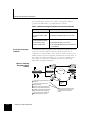
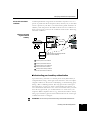
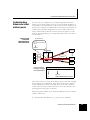
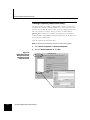
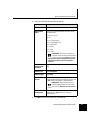
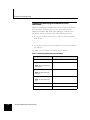
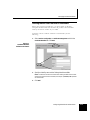
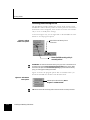
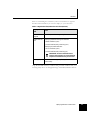
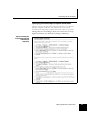
Identifying authentication requirements If not already done, decide if you will use self-signed certificates generated by Sidewinder or a public/private CA server. Table 2-1. Sidewinder self-signed certificates versus CA-based certificates Scenario Profile No CA needed Requires one VPN association for each client Using self-signed certificates (for a small number of VPN clients) Uses a private or public CA Single VPN association for all clients Can make VPN deployment and management Using CA-based certificates (for a medium to large number of VPN clients) more efficient A closer look at self-signed certificates A VPN implemented using Sidewinder self-signed certificates does not require an external certificate authority and is relatively easy to configure for a small number of (less than 10) clients. However, one VPN association must be configured on Sidewinder for each client. As the number of configured clients grows, so does the administrative time. Figure 2-2 shows the certificates involved in a VPN using Sidewinder self-signed certificates. Figure 2-2. Sidewinder self-signed certificate summary 1 Firewall Cert. 4 Firewall Cert. *.pem Protected Network Sidewinder Client Cert. 2 *.pem 1 Admin creates firewall private key and certificate creates client private key/ 2 Admin certificate pair(s) *.pk1 Soft-PK Internet 5 Client Cert. 3 PK12 object for importing to Soft-PK 3 Admin converts client private key & exports certificate files to PK12 object 4 Firewall certificate imported to Soft-PK, (private key remains on Sidewinder) 5 Client private key and certificate file (PKCS12) imported into Soft-PK 2-4 Planning Your VPN Configuration Note: A self-signed certificate created on Sidewinder remains valid for one year beginning from the date it is created.