1
ENGLISH
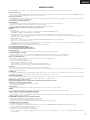
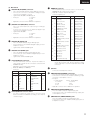
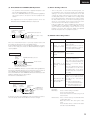
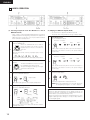
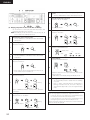
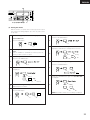
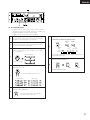
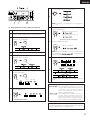
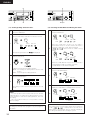
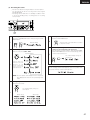
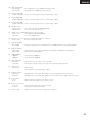
Select the A-B erase mode.
Turn the select knob and select “A-B Erase?”.
(
(
8
NOTE: Cue Erase? is not displayed if no cue signals are
set.
Erase the set section.
Press the ERASE button.
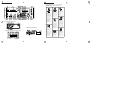
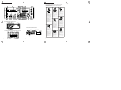
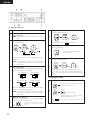
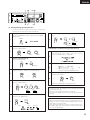
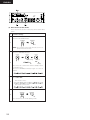
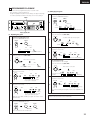
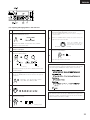
(5) Erasing Specific Sections ‹A-B erase function›
1
Load the cartridge.
2
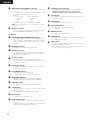
Set the section to be erased.
Use the SCAN or SEARCH dial to find the starting point.
ERASE
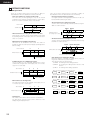
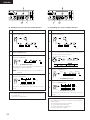
Displayed if only the B point is set.
Set the starting point.
Press the “A” (or “B”) button.
(Set the B or A point, as necessary.)
9-1
3
Press the ERASE button again.
ERASE
Lit
4
Displayed if only the A point is set.
A-B erase is rehearsed.
NOTE: If both the A and B points are set, the A-B section
is rehearsed and
is displayed the
first time the ERASE button is pressed.
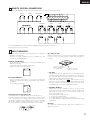
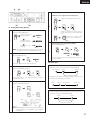
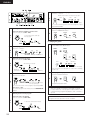
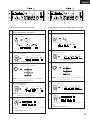
Use the SCAN or SEARCH dial to find the end point.
Set the end point.
Press the “B” (or “A”) button.
Press the ERASE button again.
5
Lit
Lit
* The ERASE button turns off.
9-2
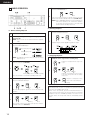
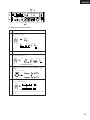
Set the edit mode.
Press the EDIT button.
EDIT
EDIT
6
The A-B section is erased and the mode returns to the edit
mode.
Lit
TRACK NO.
SINGLE
m
REMAIN
s
NEXT NO.
f
EDIT
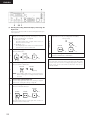
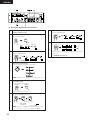
Display during the A-B erase operation
Lit
Set the erase mode.
Press the ERASE button.
ERASE
TRACK NO.
SINGLE
m
7
REMAIN
s
NEXT NO.
f
EDIT
* The ERASE button lights.
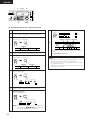
This is displayed if no B point is set. If you
continue without setting the B point, the end
of the track is set as the B point, and the
section from the A point to the end of the
track is rehearsed and erased.
This is displayed if no A point is set. If you
continue without setting the A point, the
beginning of the track is set as the A point,
and the section from the beginning of the
track to the B point is rehearsed and erased.
NOTE:
The A-B erase operation cannot be performed if the A or B point
is set on a track for which cue signals are set.
31