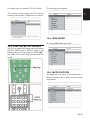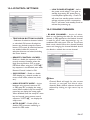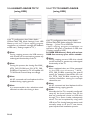
1
5
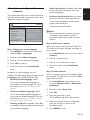
Use more of your TV
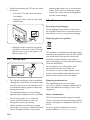
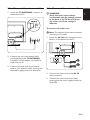
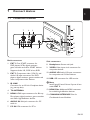
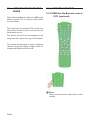
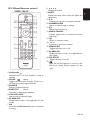
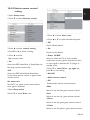
5.1 Remote control overview
1
2
19
18
17
16
AV
ALARM
ALARM
Û
Û
ON
OFF
SLEEP
15
3
4
5
6
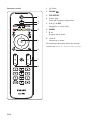
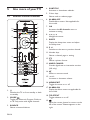
5. Colour keys
Selects tasks or teletext pages.
6. ALARM OFF
Disable Alarm status- Not applicable for
this model.
7. OK
Accesses the All channels menu or
activates a setting.
8. Í, Æ, Î, ï
Navigate the menu.
7
8
9. SLEEP
Display the sleep timer menu and adjust
the sleep timer.
9
10. P +/Switches to the next or previous channel.
10
14
11
13
4. SUBTITLE
Activates or deactivates subtitles.
12
11. Number keys
Selects a channel, page or setting.
12. ∏
Selects a picture format.
13. MHEG CANCEL
Cancels digital text or interactive services
(UK only).
14. [
Mutes or restores sound.
15. ” +/Increases or decreases volume.
16. MENU/EXIT
Toggles the menu on or off.
1. .
Switches the TV on from standby or back
to standby.
2. GUIDE
Toggles the Electronic Program Guide on
or off Only active with digital channels.
3. SOURCE
Selects connected devices.
EN-14
17. ALARM ON
Display the Alarm menu-not applicable for
this model.
18. TELETEXT
Toggles teletext on or off.
19.
Splits the current channel or source on the
left of the screen. Teletext appears on the
right.