1
Connecting to an Xbox 360 . . . . . . . . . . . . . . . . . . . . . 28
TV headphone jack for the audio connection . . . . . . . . . . 28
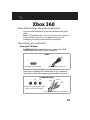
Identifying jacks and cables . . . . . . . . . . . . . . . . . . . . . . . . . . . . . . . . . .28
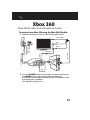
HDMI cable with a TV headphone jack . . . . . . . . . . . . . . . . . . . . . . . .30
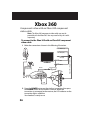
Component video cable with a TV headphone jack . . . . . . . . . . . .31
Xbox 360 AV cable with a TV headphone jack . . . . . . . . . . . . . . . . .32
Xbox 360 cable for the audio connection . . . . . . . . . . . . . . 33
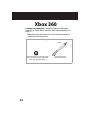
Identifying jacks and cables . . . . . . . . . . . . . . . . . . . . . . . . . . . . . . . . . .33
HDMI cable with the Xbox 360 AV cable . . . . . . . . . . . . . . . . . . . . . . .35
Component video with an Xbox 360 component video cable . .36
Xbox 360 AV cable for both audio and video . . . . . . . . . . . . . . . . . .37
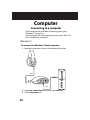
Connecting to a computer . . . . . . . . . . . . . . . . . . . . . . 38
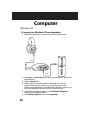
Windows 7 . . . . . . . . . . . . . . . . . . . . . . . . . . . . . . . . . . . . . . . . . . . 38
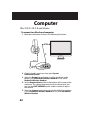
Windows XP . . . . . . . . . . . . . . . . . . . . . . . . . . . . . . . . . . . . . . . . . 40
Mac OS X v10.2.8 and above . . . . . . . . . . . . . . . . . . . . . . . . . . 42
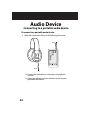
Connecting to a portable audio device . . . . . . . . . . 44
Troubleshooting . . . . . . . . . . . . . . . . . . . . . . . . . . . . . . . . 45
Xbox 360 HDMI audio adapter . . . . . . . . . . . . . . . . . . . . . . . . 45
General . . . . . . . . . . . . . . . . . . . . . . . . . . . . . . . . . . . . . . . . . . . . . . 45
Chat Questions . . . . . . . . . . . . . . . . . . . . . . . . . . . . . . . . . . . . . . . 46
Why isn't Chat working? . . . . . . . . . . . . . . . . . . . . . . . . . . . . . . . . . . . . . .46
Wireless Questions . . . . . . . . . . . . . . . . . . . . . . . . . . . . . . . . . . . 47
There is some interference. What do I do? . . . . . . . . . . . . . . . . . . . . .47
Why is there no communication between the headphones and the
wireless transmitter? . . . . . . . . . . . . . . . . . . . . . . . . . . . . . . . . . . . . . . . . .47
How do I reset the wireless receiver? . . . . . . . . . . . . . . . . . . . . . . . . . .48
LED Indicator Questions . . . . . . . . . . . . . . . . . . . . . . . . . . . . . . 48
What does the LED indicator on the wireless transmitter mean? 48
What do the LED indicators on the wireless receiver mean? . . . .48
Audio Questions . . . . . . . . . . . . . . . . . . . . . . . . . . . . . . . . . . . . . 49
Why do I have low or no sound coming from my headsets? . . . .49
Why isn't my microphone working? . . . . . . . . . . . . . . . . . . . . . . . . . . .50
Operating System Questions . . . . . . . . . . . . . . . . . . . . . . . . . 52
What Windows versions are supported? . . . . . . . . . . . . . . . . . . . . . .52
3