1
Xbox 360
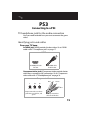
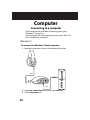
HDMI cable with the Xbox 360 AV cable
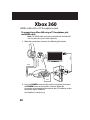
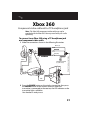
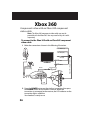
To connect to the Xbox 360 using the Xbox 360 AV cable
and an HDMI cable:
Note: The HDMI cable may not be provided with the Xbox 360.
You may have to buy this cable separately.
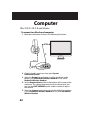
1 Make the connections shown in the following illustration.
Note: If you can’t access the red and white audio jacks on the
Xbox 360, you need an additional adapter cable. See “Xbox 360
HDMI audio adapter” on page 45.
HDMI
White
SOURCE
Yellow (not used)
Piggyback
Green
POWER
USB
Xbox 360 AV
Black
Xbox cable
(press firmly)
Red
LINE IN
MUTE
USB
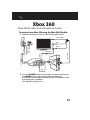
2 Press the POWER button on the wireless transmitter, then press
the POWER button on the wireless receiver. When the
transmitter is connected to the receiver, the LED indicator on the
transmitter lights solid blue.
Your headset is ready to use.
35