1
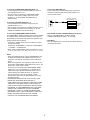
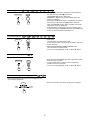
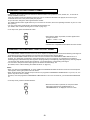
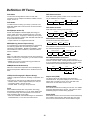
7. Connecting DIGI-LINK jack
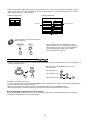
• Connect this jack to the DIGI LINK jack of the external
Sherwood component that uses the DIGI LINK II or III
remote control system.
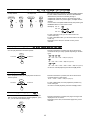
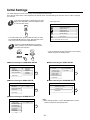
4. Connecting COMPOSITE VIDEO OUTPUTs 1, 2
• Connect this jack to the (composite)VIDEO input jack of
your amplifier/receiver or TV.
• The same signal is output from COMPOSITE VIDEO
OUTPUT 1 and 2 jacks, enabling connection to two
devices(e, g., an A/V amplifier and additional TV)
simultaneously.
Sherwood component
with DIGI LINK II or III
Amplifier/receiver
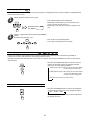
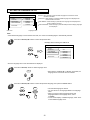
5. Connecting S-VIDEO OUTPUTs 1, 2
• Connect this jack to the S-VIDEO input jack of your
amplifier/receiver or TV
• The same signal is output from S-VIDEO OUTPUT 1 and 2
jacks, enabling connection to two devices(e, g., an A/V
amplifier and additional TV) simultaneously.
Tape deck
System
control
cord
CD player
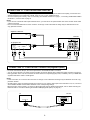
8. A/V SCART OUTPUT CONNECTOR(Regional Option)
• Refer to “CONNECTING TO TV WITH SCART
CONNECTOR (Regional Option)” on next page.
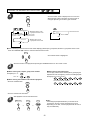
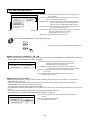
6. Connecting COMPONENT VIDEO OUTPUTs
The COMPONENT VIDEO OUTPUTs of this unit are capable
of outputting either conventional interlacing video signal or
progressively scanned video signal(that can reproduce highdensity pictures with less flicker).
9. AC INPUT
• Plug the supplied power cord into this AC INPUT and then
into the wall AC outlet.
• According to VIDEO OUTPUTs, the excellence in picture
quality is as follows:
Progressive “COMPONENT” > Interlaced “COMPONENT”
> “S-VIDEO” > “COMPOSITE”
• When making COMPONENT VIDEO connections, connect
“Y” to “Y”, “Pb” to “Pb”(, “Cb”, “B-Y”), “Pr” to “Pr” (, “Cr”, “R-Y”).
Notes:
• When the VIDEO OUTPUT is set to PROGRESSIVE, the
S-VIDEO and COMPOSITE VIDEO OUTPUTs can not
output the video signals, meaning the picture will not be
shown.
• When the progressive video signals are input into the nonprogressive COMPONENT VIDEO INPUTs of your TV, the
picture may not be shown normally.
Therefore, when the progressive COMPONENT VIDEO
INPUTs of TV are not connected to, you should set the
VIDEO OUTPUT to INTERLACED.(For details, refer to
“When selecting the VIDEO OUTPUT” on page 34.)
• Do not connect the unit to the TV through a VCR.
Otherwise the picture may be disturbed due to the copy
protection function.
• CONSUMERS SHOULD NOTE THAT NOT ALL HIGH
DEFINITION TELEVISION SETS ARE FULLY
COMPATIBLE WITH THIS PRODUCT AND MAY CAUSE
ARTIFACTS TO BE DISPLAYED IN THE PICTURE. IN
CASE OF 525 OR 625 PROGRESSIVE SCAN PICTURE
PROBLEMS, IT IS RECOMMENDED THAT THE USER
SWITCH THE CONNECTION TO THE “STANDARD
DEFINITION” OUTPUT. IF THERE ARE QUESTIONS
REGARDING OUR TV SET COMPATIBILITY WITH THIS
MODEL 525p AND 625p DVD PLAYER, PLEASE
CONTACT OUR CUSTOMER SERVICE CENTER.
8