1
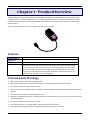
The MultiMobile USB V.92 Portable USB modem MT9234MU-CDC-XR provides V.92/56K data rates, fax and file transfer
capabilities and a hot-swappable USB interface. This modem, weighing only 2 ounces, is ideal for mobile users who want
email and Internet access on the road. The MT9234MU-CDC-XR modem can also serve as the mobile user’s home office
desktop modem.
This user’s guide explains how to install, configure, test and use your modem.
Features
Command Buffer
Diagnostics
LED Indicators
Intelligent Features
40 characters
Power-on self test, local analog and local digital loop, remote digital loop.
LEDs for Data, Carrier Detect, Off Hook, Terminal Ready
Fully AT command compatible; autodial, redial, repeat dial; pulse or tone dial; dial pauses;
auto answer; caller ID; EIA extended automode; adaptive line probing; automatic symbol
and carrier frequency during start-up, retrain, and rate renegotiation; call status display,
auto-parity and data rate selections; keyboard-controlled modem options; non-volatile
memory; on-screen displays for modem option parameters; command lines of up to 40
characters each; help menus; remote configuration.
Telecom Safety Warnings
●
Never install telephone wiring during a lightning storm.
●
Never install a telephone jack in wet locations unless the jack is specifically designed for wet locations.
●
Use this product with UL and cUL listed computers.
●
Never touch uninsulated telephone wires or terminals unless the telephone line has been disconnected at the network
interface.
●
Use caution when installing or modifying telephone lines.
●
Avoid using a telephone (other than a cordless type) during an electrical storm. There may be a remote risk of electrical
shock from lightning.
●
Do not use a telephone in the vicinity of a gas leak.
●
To reduce the risk of fire, use only 26 AWG or larger telecommunication line cord.
●
This product must be disconnected from the telephone network interface when servicing.
4
MT9234MU-CDC-XR User Guide