1
22
Windows Driver
Properties
Tools
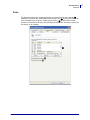
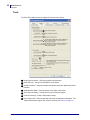
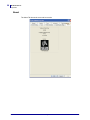
The Tools Tab enables access to diagnostic functions and controls.
Clear Kiosk Presenter – Ejects any media in the presenter.
Send PRN File – Sends a saved PRN file to the printer.
Update Firmware – Calls the firmware downloader utility and updates the printer
firmware.
Set Black Mark Mode – Sets the printer to use black mark media.
Set Continuous Mode – Set the printer to print continuous pages.
Feed One Receipt – Feeds a single blank receipt.
Print Config Label – Prints a page with the printer configuration information. The
“Enable bidirectional support” box must be checked (see "Ports" on page 17).
P1028248-001 Rev. A
KR203 Software Integrator Guide
8/6/2010