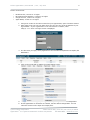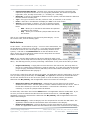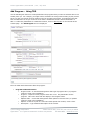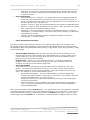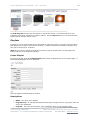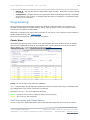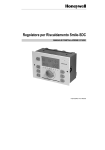
1
HyperCaster® User Manual TelVue HyperCaster® User Manual / v4.3 / July 2014 1 The TelVue HyperCaster® is an IP broadcast server with advanced features to adapt to the different needs of individual broadcast operations. This manual covers basic set-up configurations, as well as content management, scheduling, and workflow features, typical use cases, and some popular options such as Traffic & Billing system integration. HyperCaster settings can be managed through a userfriendly browser interface, which is illustrated throughout the manual. This manual applies to all three Generation II HyperCaster models: • B1000: up to 20 HD/SD channels • B100: up to 4 HD/SD channels • Virtual HyperCaster This manual is also available on the TelVue website: http://www.telvue.com/support/productdocumentation/telvue-hypercaster-user-manual/ You can access a series of online Training videos here: http://www.telvue.com/support/training/ Table of Contents Safety Requirements ..............................................................................................3 Network and Security .............................................................................................3 Preparing Content for the HyperCaster ...................................................................6 Organize and Add Content ......................................................................................7 Transmux to TS and Import DVD .............................................................................. 12 The Dashboard .....................................................................................................13 Server Health ......................................................................................................... 14 Field Descriptions .................................................................................................... 15 Content Management ............................................................................................18 Import Content ....................................................................................................... 19 Show Content Page ................................................................................................. 21 Content File Actions ................................................................................................ 23 Searching and Browsing ........................................................................................... 27 Thumbnails and Table Views ..................................................................................... 28 Bulk Actions ........................................................................................................... 30 Add Program – Using TBD ........................................................................................ 31 Playlists ................................................................................................................. 33 Playlist Actions ..................................................................................................... 34 Export ................................................................................................................... 36 Content RSS Feed ................................................................................................... 36 Record ..................................................................................................................36 Tasks ....................................................................................................................37 Programming ........................................................................................................38 Classic View ........................................................................................................... 38 Field Descriptions and Display Options ..................................................................... 38 Search Filters and Event Functions .......................................................................... 39 © 2014 TelVue Corporation 16000 Horizon Way, Suite 500, Mt. Laurel, NJ 08054 HyperCaster® is a registered trademark of TelVue Corporation 800-885-8886 / www.telvue.com TelVue HyperCaster® User Manual / v4.3 / July 2014 2 Programming Functions: Add Switch Event .............................................................. 40 Programming Functions: Add Playout Event ............................................................. 42 Programming Functions: Add Overlay ...................................................................... 44 Programming Functions: Add Capture Event ............................................................. 45 Programming Functions: Add Stream Event ............................................................. 47 Scheduling Conflicts and Ripple .............................................................................. 48 Programming Functions: Unschedule an Event .......................................................... 49 Programming Functions: Block Copy ....................................................................... 50 Programming Functions: Import and Export events ................................................... 51 Native CSV Formatting ............................................................................................ 52 Event Actions ......................................................................................................... 53 Calendar View ........................................................................................................ 55 Programming Guide Page .....................................................................................58 Reports Tab ..........................................................................................................59 Config Tab ............................................................................................................61 Channel Setup ........................................................................................................ 62 Continuity ........................................................................................................... 64 Content Management .............................................................................................. 65 External Devices ..................................................................................................... 69 Feed Setup ............................................................................................................ 70 Overlay “Tickers” and “Bugs” .................................................................................... 72 Emergency Notification Console .............................................................................. 75 ProVue Integration .................................................................................................. 76 Remote Server Configuration .................................................................................... 77 Schedule Configuration ............................................................................................ 79 Security Configuration ............................................................................................. 80 Server Management ................................................................................................ 81 SNMP Support ...................................................................................................... 86 Switch Configuration ............................................................................................... 87 User Management ................................................................................................... 90 Version and Configuration ........................................................................................ 92 Backups ................................................................................................................94 Typical Use Cases .................................................................................................94 Controlling What Appears in the Program Guide .......................................................... 94 Extending an IP Capture without Re-Entering Metadata ................................................ 94 Live Streams .......................................................................................................... 95 Publishing Your Schedule to Other Media .................................................................... 95 Scheduling a Live Switch Event whose Actual Duration Varies ....................................... 96 Using Third-Party Editing Software ............................................................................ 97 Appendix: Guide to CCMS Plus ..............................................................................98 Technical Support ............................................................................................... 102 © 2014 TelVue Corporation 16000 Horizon Way, Suite 500, Mt. Laurel, NJ 08054 HyperCaster® is a registered trademark of TelVue Corporation 800-885-8886 / www.telvue.com TelVue HyperCaster® User Manual / v4.3 / July 2014 3 Safety Requirements The following safety instructions apply to TelVue’s server products. 1. 2. 3. 4. 5. 6. 7. 8. 9. Read and follow all warning notices and instructions marked on the product or included in this manual. Opening or removing covers and/or components may expose you to dangerous high voltage points or other risks. Qualified personnel should perform all servicing. The maximum ambient temperature for the server is 90 degrees Fahrenheit. Care should be given to allow sufficient air circulation or space between units when the server is installed in a closed or multiunit rack assembly. Installation of the server in a rack without sufficient airflow can be unsafe. If the server is installed in a rack, the rack should safely support the combined weight of all equipment it supports. The server’s internal AC power supply input is intended for use with the three-wire grounding type plug (a plug that has a grounding pin). This is a safety feature. Do not defeat the purpose of grounding type plugs by modifying the plug or using an adapter. Do not allow anything to rest on the power cord. Do not locate the product where persons can walk on or come in contact with the power cord. Determine that the cumulative power requirements of the server plus other equipment in the rack do not overload the supply circuits and/or wiring. If using a power strip or similar supply, make sure the power requirement of the chassis, plus the cumulative power draw of any other equipment in the rack, do not overload the supply circuit. There is danger of explosion if the motherboard battery is incorrectly replaced. A lithium battery on the server motherboard provides backup power for its internal clock. The battery has an estimated life expectancy of ten years. Network and Security The HyperCaster is a networked digital-video appliance with Ethernet connections and a number of integrated IP-based services. Prior to powering on your server please read the Getting Started document that contains information such as power requirements and instructions on how to set your IP address. TelVue HyperCaster Getting Started [PDF] Core Networking Requirements • • • • • IP Address – A static or Dynamic (DHCP) IP will work, but a Static IP is highly recommended. Subnet Mask Gateway Address – The IP address of your router. DNS Address – At least one Domain Name Server (DNS) address. NTP Address – Public or private Network Time Protocol (NTP) server address. Optional Networking Configurations • Port Forwarding If your HyperCaster will only be available on your Local-Area Network (LAN), then no ports need to be opened on your hardware firewall (router). If your HyperCaster will be accessible from outside your firewall, then certain ports will need to opened on your router. Exactly how to do that is different for every router and is beyond the scope of this document, but looking up “Port Forwarding” online, for your router brand and model, will help. © 2014 TelVue Corporation 16000 Horizon Way, Suite 500, Mt. Laurel, NJ 08054 HyperCaster® is a registered trademark of TelVue Corporation 800-885-8886 / www.telvue.com TelVue HyperCaster® User Manual / v4.3 / July 2014 4 Ports marked “optional” mean the function is optional. If you want to use that function, you must forward port access. TelVue highly recommends that customers: • • Place the HyperCaster behind a firewall device to avoid Denial of Service (DoS)-type attacks or brute force login attempts on the various services. Never enable Samba for external access. Consider locking down remote access to service ports to known IP addresses. For example, if you would like to access your HyperCaster from home and your flat in Paris, you could limit remote access via your router firewall to IP sources coming only from those two locations. Consult your IT department for standard networking security practices including establishing a firewall and remote access. Map the Samba Network Drive If your server will not be used on a network, skip to Configure the User Interface. Configure the User Interface Start the User Interface © 2014 TelVue Corporation 16000 Horizon Way, Suite 500, Mt. Laurel, NJ 08054 HyperCaster® is a registered trademark of TelVue Corporation 800-885-8886 / www.telvue.com TelVue HyperCaster® User Manual / v4.3 / July 2014 5 TelVue recommends: • • • • Mozilla Firefox, version 14 or higher Microsoft Internet Explorer, versions 8 or higher Google Chrome, version 16 or higher Apple Safari, version 4.0 or higher 1. 2. Using a PC or Mac on the same network as your HyperCaster, open a browser window. Enter http://nnn.nnn.nnn.nnn:3000 where nnn.nnn.nnn.nnn is the IP address of your HyperCaster. If your HyperCaster is not connected to a network, enter http://1.1.1.1:3000. The login screen is displayed. 3. The first time you login, enter psgadmin for the username and password to display the Dashboard. 4. Click on the Config tab to display the Configuration screen. 5. 6. Configure the channel(s) for your HyperCaster by editing the channel configuration. If this HyperCaster is connected to a switch, edit the switch configuration. You can name the devices on the input and output ports. © 2014 TelVue Corporation 16000 Horizon Way, Suite 500, Mt. Laurel, NJ 08054 HyperCaster® is a registered trademark of TelVue Corporation 800-885-8886 / www.telvue.com TelVue HyperCaster® User Manual / v4.3 / July 2014 7. 8. 6 If your HyperCaster is connected to an encoder or stream source, edit the feed setup. If your HyperCaster is connected to a remote server, edit the remote server configuration The HyperCaster is now connected to your broadcast network and ready to receive content. Preparing Content for the HyperCaster The TelVue HyperCaster® transmits compressed video content over UDP packets. Content must be already multiplexed into an MPEG-2 Transport Stream, and that transport stream often must have a constant multiplex rate (note however that does not mean the video elementary stream must have a constant bit rate). The 4.0 version of the TelVue HyperCaster software supports variable mux rate Transport Streams, however other equipment in your setup may not, so you may need to investigate whether your full playout chain can support variable mux rate content. The equipment receiving these streams can and often will have more stringent requirements. TelVue® servers can aid with these downstream requirements by changing Program ID values as the MPEG-2 TS is transmitted. However, other requirements, such as bit rate, frame rate, profile and level, GOP structure, and more, must be set at the time of file creation or by transcoding or multiplexing. CableLabs and ATSC Two common standards that broadcast video equipment will adhere to are the CableLabs set of specifications for VOD, and the ATSC broadcast specifications. If your downstream equipment requires your files to adhere to either specification, you should select a program that the provider has verified is compliant to these specifications. If your downstream equipment does not require these particular specifications, you may be able to use any of the programs discussed in this section that are listed as HyperCaster compatible. H.264 The TelVue HyperCaster is optionally capable of sending Transport Streams that use the H.264 video codec. However, no specific sub-standard similar to the CableLabs or ATSC standards has yet emerged for H.264 settings. Most systems using H.264 will have specific requirements for things such as profile, level and bit-rate. All of the transcoding and multiplexing programs mentioned below are capable of working with Transport Streams that include H.264, though this sometimes requires an upgraded version of the utility. If you are working with H.264 video, you should start from the Transport Stream presets provided in the transcode programs below and then tailor it to your system’s specific requirements. If you have any questions on H.264 presets for your HyperCaster, please contact TelVue Support. Programs for Creating Files for the TelVue HyperCaster The simplest way to ensure that all files in your media library are compatible with the TelVue HyperCaster is to use TelVue® Connect™ for ingest and transcoding. TelVue customizes your TelVue Connect transcoding profile to your station’s requirements, and files can be distributed directly from the TelVue Connect service to your HyperCaster. There are other options. The following program can create files that are compatible with the TelVue HyperCaster: • Telestream Episode (Microsoft Windows or Apple Macintosh) Many others will be capable of creating constant mux rate MPEG-2 TS. TelVue has not extensively tested the following programs but they are known to create constant mux rate Transport Stream, or in some cases CableLabs or ATSC compliant streams: © 2014 TelVue Corporation 16000 Horizon Way, Suite 500, Mt. Laurel, NJ 08054 HyperCaster® is a registered trademark of TelVue Corporation 800-885-8886 / www.telvue.com TelVue HyperCaster® User Manual / v4.3 / July 2014 • • 7 PixelTools HDProQT (Microsoft Windows or Apple Macintosh) – HDProQT also supports preserving Closed Captioning data captured using a Black Magic Designs input card and Apple Final Cut Pro. Womble MPEG Video Wizard DVD 5.0 (Microsoft Windows) You should always test some sample files with your broadcast server and downstream equipment prior to committing to a workflow. The following programs can not only create compatible content, but can also create or help create CableLabs-compliant files (in all cases) or ATSC-compliant files (in some cases, see below). • • Harmonic ProMedia Carbon (formerly Rhozet Carbon Coder – Microsoft Windows) Manzanita Systems multiplexers (Microsoft Windows) Many of the above systems, unless otherwise noted, include presets for ATSC or CableLabs compliant streams, and you can just use those presets. Organize and Add Content The simplest way to add content to your HyperCaster is with a TelVue® Connect™ account. With TelVue Connect you can upload content to your Media Library by dragging and dropping the video files over any Internet connection, and then distribute these videos to your HyperCaster channels with a single click. If you do not have a TelVue® Connect™ account, the following instructions apply: Organizing Content on the Server The HyperCaster supports a folder (directory) structure with sub-folders for content management and playout. The HyperCaster is configured with a primary media folder labeled vol1 (for Volume 1). If your HyperCaster has been configured for multiple volumes, it might have vol2, vol3, etc. Many servers have a shortcut to vol1 called upload, so \nnn.nnn.nnn.nnn\upload will take you to \nnn.nnn.nnn.nnn\vol1. TelVue recommends that you keep all media files in the primary media folder. Use the Web Application content management tools to categorize the files and search them based on their metadata. However, some installations opt to organize media files into sub-folders. If you do this, adjust the instructions to import content into the correct subfolder. Storing Files without Including Them on the Content Page To store content on your TelVue server without tracking it via the UI, create a subfolder named “hidden” in your media folder and move the content to that hidden folder. Anything stored in /vol1/hidden, /vol2/hidden, etc. will not be displayed on the Content page but will still be on your server. Adding Content to the Server There are several methods for adding content to the server. • • • • Drop MPEG2 Files into the Media Hot Folder Use Samba to Add Content via Drag and Drop Use FTP to Add Content A PBCore hot folder is also available. Please contact TelVue Technical Support to enable this feature. © 2014 TelVue Corporation 16000 Horizon Way, Suite 500, Mt. Laurel, NJ 08054 HyperCaster® is a registered trademark of TelVue Corporation 800-885-8886 / www.telvue.com TelVue HyperCaster® User Manual / v4.3 / July 2014 8 Drop MPEG2 Files into the Media Hot Folder The Web Application includes a hot folder at \nnn.nnn.nnn.nnn\vol1\import\media. 1. 2. 3. From a PC or Mac on your network, map the media hot folder as a network drive. Open a local window with your content and a second window with the media hot folder. Drag and drop content files into the media hot folder. They will be added to the Content page without the need to import them. Since the content is already available on the Content page, you can immediately program it. Use Samba to Add Content via Drag and Drop Your server must be on a network in order to use Samba. You should already have mapped a Samba network drive on a PC or Mac on the same network as your HyperCaster. 1. 2. 3. Open a window on the PC or Mac and browse to the folder with the content you want to transfer to your server. Connect to the network drive you mapped for your server. You now have a second open window showing the highest-level folder on your server, such as vol1. Drag MPEG files from your local folder and drop them into your server’s import folder. Once the content is in your import folder you will use the Import function to make the content available for programming. Use FTP to Add Content FTP must be set to active mode for file sharing to work. The default FTP setting in most browsers is passive mode. Passive mode opens too many ports so it is not as secure. Setting FTP Mode to Active in FileZilla 1. Click on Edit → Settings to open the Settings window. © 2014 TelVue Corporation 16000 Horizon Way, Suite 500, Mt. Laurel, NJ 08054 HyperCaster® is a registered trademark of TelVue Corporation 800-885-8886 / www.telvue.com TelVue HyperCaster® User Manual / v4.3 / July 2014 9 2. Expand the Connections portion of the tree so you can see Transfer Mode on the right. 3. 4. 5. 6. Click on FTP and click the Active radio button to set FTP mode to Active. Make sure the Allow Fall back to other transfer mode on failure box is checked. In the FTP Keep-Alive section, make sure the Send FTP keep-alive commands box is checked. In the Settings tree, click on the Passive mode page. 7. 8. Make sure the Fall back to active mode box is checked. Click OK to save the settings and exit. Setting FTP Mode to Active in Internet Explorer 1. Click on Tools → Internet Options to open the Internet Options window. © 2014 TelVue Corporation 16000 Horizon Way, Suite 500, Mt. Laurel, NJ 08054 HyperCaster® is a registered trademark of TelVue Corporation 800-885-8886 / www.telvue.com TelVue HyperCaster® User Manual / v4.3 / July 2014 10 2. Click on the Advanced tab. 3. In the Browsing section, scroll down to Use Passive FTP (for firewall and DSL modem compatibility) and click in the box to uncheck it. Click OK to save the settings and exit. 4. Running FTP with FileZilla Before using FTP to transfer files, make sure it is set to Active Mode. 1. 2. 3. 4. Open FileZilla. In the Host box, enter the IP address of your server. Enter the username and password. (The defaults are both psguser.) Click the Quickconnect button. Your import folder (directory), which is usually vol1, is displayed in the Remote site pane on the right. If your server has multiple volumes you will be taken to the highest-level folder. © 2014 TelVue Corporation 16000 Horizon Way, Suite 500, Mt. Laurel, NJ 08054 HyperCaster® is a registered trademark of TelVue Corporation 800-885-8886 / www.telvue.com TelVue HyperCaster® User Manual / v4.3 / July 2014 5. 6. 11 In the Local pane on the left, browse for the file you want to transfer to your server. Drag the file into your import folder. Once the content is in your import folder you will use the Import function to make the content available for programming. Running FTP with Internet Explorer Before using FTP to transfer files, make sure it is set to Active Mode. 1. 2. 3. Open an Internet Explorer window and type ftp://nnn.nnn.nnn.nnn in the address window, where nnn.nnn.nnn.nnn is the IP address of your TelVue HyperCaster. In the upper right of the window, click on Page, then choose Open FTP Site in Windows Explorer. In the Login As dialog box, enter your username and password. (The default username and password are both psguser.) Click Log On to open the FTP folder, which is usually vol1. If your server has multiple volumes you will be taken to the highest-level folder. © 2014 TelVue Corporation 16000 Horizon Way, Suite 500, Mt. Laurel, NJ 08054 HyperCaster® is a registered trademark of TelVue Corporation 800-885-8886 / www.telvue.com TelVue HyperCaster® User Manual / v4.3 / July 2014 4. 5. 12 Open a new Windows Explorer window and browse to the folder with your content files. Drag files from that folder and drop them into the folder FTP opened on your server. Once the content is in your vol1 folder you will use the Import function to make the content available for programming. Transmux to TS and Import DVD HyperCaster 4.0 and above includes a Transmux feature, which will look for any MPEG-2 Program Stream or MP4 mux containing H.264 (including most .mov formats) video, and transmux those to the MPEG-2 Transport Stream format required to play out on the HyperCaster. The Transmux feature also makes it possible to import a DVD. Drag the VIDEO_TS content directly from the DVD into the DVD Import hot folder in vol1. On import, the HyperCaster will re-multiplex supported MPEG-2 Program and MP4 files on import to Transport Stream. This produces a variable mux rate output. Video is preserved as-is from the original file including video bit rate. Audio is preserved as-is from the original file including audio bit rate for AC-3, MPEG-1 Layer II, and AAC audio. Other audio formats are converted to MPEG-1 Layer 2 for MPEG-2 video, and AAC for H.264 video. (NOTE: If utilizing the transmux feature of the HyperCaster, first please confirm that the audio formats above are supported by the end decoding devices; IE: Set Top Boxes, TV Tuners, Other Broadcast Decode Solutions. If these audio formats are not supported, you will need to use an external file prep solution such as TeleStream Episode Pro or TelVue Connect.) To enable the Transmux feature, go to Config –> Content –> Content Item. Check off the box “Transmux to Transport Stream”. If you do not have the Transmux feature enabled, the HyperCaster will still import MPEG-2 Program and MP4, but will show the files as unplayable. The tool tip help with display the reason why, and note that you need to enable the Transmux feature so that the file can be transmuxed to Transport Stream for compatibility. © 2014 TelVue Corporation 16000 Horizon Way, Suite 500, Mt. Laurel, NJ 08054 HyperCaster® is a registered trademark of TelVue Corporation 800-885-8886 / www.telvue.com TelVue HyperCaster® User Manual / v4.3 / July 2014 13 A tooltip alerts you that this file is in the process of being transmuxed and is not yet playable. If you do have the Transmux feature enabled, MPEG-2 Program and MP4 files will still show as unplayable when they are first imported, but the tool tip help will show that it is waiting to be transmuxed. The transmux operation itself is fast, and does not require re-encoding the video stream, and also typically does not require re-encoding the audio stream. The original quality of your source video is preserved, the file is just reformatted to Transport Stream. You can see the progress of the transmux operation in the Tasks tab. The Dashboard The Dashboard shows what is happening on the HyperCaster, including what is currently playing. It provides information about the HyperCaster’s status, file system, channel, and feed and switch status. Many elements on the Dashboard have links to other pages that let you see more information or take actions regarding that element. The current state is refreshed each time the Dashboard page is refreshed in the browser. HyperCasters with the IP Capture feature will see an additional “Feed” field on the right side of the Dashboard, which shows at a glance what feeds are currently being captured, or scheduled for capture. © 2014 TelVue Corporation 16000 Horizon Way, Suite 500, Mt. Laurel, NJ 08054 HyperCaster® is a registered trademark of TelVue Corporation 800-885-8886 / www.telvue.com TelVue HyperCaster® User Manual / v4.3 / July 2014 14 Server Health On the top bar of every UI screen is the Health Indicator. The server’s health can be: • • • OK– All components are running normally, as shown in the illustration. Warning– A component is running but there is a problem such as a disk nearing capacity or the lack of a spare disk drive that should be investigated and resolved. If any component has a warning status, the Health Indicator will display Warning. Critical – One or more components is not running correctly. If any component is critical, the Health Indicator will display Critical. Click on the health indicator for more details. The Health Status screen is displayed. • • • • • Hide – Admin-level users can click the Hide button to remove this component from the health check. For example, if an almost-full media disk is normal at certain times for your installation, you might hide it so the media-disk warning does not mask other health issues. If you want to include a component again, select it from the drop-down list at the top of the column and click the Show Health Item button. If you do not have admin privileges, the Hide column is not displayed. Health Criteria – the name of the component. Status – how the component is doing. As with the overall health, it can be OK if it is running normally, Warning if the component needs attention, or Critical if there is a problem that could adversely impact server performance. Message – details on the component. More Information – link to the Config section where Admin-level users can view details and sometimes change settings for this component, if applicable. © 2014 TelVue Corporation 16000 Horizon Way, Suite 500, Mt. Laurel, NJ 08054 HyperCaster® is a registered trademark of TelVue Corporation 800-885-8886 / www.telvue.com TelVue HyperCaster® User Manual / v4.3 / July 2014 • • • 15 Last Check – time the component was most recently checked, in HH:MM:SS format. Next Check – time the component will be checked again, in HH:MM:SS format. Refresh – Click the Refresh button to update the component health now. Components that use considerable resources cannot be refreshed. Field Descriptions Field Descriptions – Server Section • • • • • Server – shows the name and/or model number of the server. Server Serial No. – displays this server’s serial number. Status– shows the state of the real-time media server. Possible states include: o Online – the media server is running normally. o Resetting – the media server was manually or automatically reset and is still coming online. o Offline – the media server is not currently running. Uptime– how long the media server has been running. Free Space – how much of the media partition’s total capacity is currently available for more files. Also expressed as the available percentage of the partition’s total capacity. Field Descriptions – Channel Section • Channel – information about each playout channel. If this installation supports more than one channel, each channel is listed in its own section. Channel information includes: • Channel Name – quick link to the Edit Channel page, which is described in the Config section. • Next Programming Gap – the amount of time remaining until the next unprogrammed slot in the schedule, up to 24 hours from now. If the server is currently in a programming gap, the application displays this. If you have enabled continuity, it plays during programming gaps. • Schedule – quick link to the Programming page for the channel, which is described at the beginning. • External Schedule – quick link to the searchable, per-day schedule for this channel. The external schedule can be linked or frame-viewed on your webpage. • RSS Schedule – quick link to the programming schedule for this channel for the coming week in an RSS-like format. The listing depends on your browser, but typically includes the program name and description from the content metadata. For example, this browser displays: • Program names or filenames. • Date and time the content is scheduled for broadcast. • A brief description of the content, if one is available in the content metadata. © 2014 TelVue Corporation 16000 Horizon Way, Suite 500, Mt. Laurel, NJ 08054 HyperCaster® is a registered trademark of TelVue Corporation 800-885-8886 / www.telvue.com TelVue HyperCaster® User Manual / v4.3 / July 2014 16 In some browsers you can sort and filter the programming by: • • • • Date – the date the content is scheduled for broadcast. If you click on Date again, the order is reversed. Title – sorts the list alphabetically. If you click on Title again, the order is reversed. This is one way to see if a certain title has been scheduled. Filter by Category – displays only the titles in a particular category. For example, if you are supposed to air five community events today, click on the Community category to see if at least five are displayed. All – To see everything on the schedule again, click on All at the top of the box. Click your browser’s Back button to return to the Dashboard. Your organization can optionally use the RSS feed as an API to customize the integration programming information on your website or in other applications. • Now Playing – the name and thumbnail of the program currently being played on the server. The time the program was scheduled to start and end are displayed below the thumbnail. Both the start time and runtime are shown in hours, minutes, and seconds (HH:MM:SS). • Stop – to stop playing the current program immediately, click the Stop button. A confirmation dialog will pop up. If the current program is a zero-duration switch event, there will be no Stop button. • RSS Now – quick link to a basic RSS 2.0-like feed that describes what is currently playing on the channel. The listing depends on your browser, but typically includes the program name, date and time of broadcast, and a description from the content metadata as in this example. Click your browser’s Back button to return to the Dashboard. • Next Up – the name, thumbnail, start time, and end time of the next program scheduled to run in the next 24 hours. • RSS Next – quick link to a basic RSS 2.0-like feed that describes what is next playing on the channel. The listing depends on your browser, but typically includes the © 2014 TelVue Corporation 16000 Horizon Way, Suite 500, Mt. Laurel, NJ 08054 HyperCaster® is a registered trademark of TelVue Corporation 800-885-8886 / www.telvue.com TelVue HyperCaster® User Manual / v4.3 / July 2014 17 program name, date and time of scheduled broadcast, and a description from the content metadata as in this example. Click your browser’s Back button to return to the Dashboard. Field Descriptions – Feed Section • • • • Feed – information about incoming feeds. If this installation supports more than one feed, each feed is listed in its own section. Feed information includes the name of the IP stream as used on your system. Now Capturing – the name and thumbnail of the content currently being captured. The time the capture was scheduled to start and its runtime are displayed below the thumbnail. Both the start time and runtime are shown in hours, minutes, and seconds (HH:MM:SS). Stop – to stop the current capture immediately, click the Stop button. A confirmation dialog will pop up. Next Up – the name, thumbnail, start time, and runtime of the next program scheduled to run in the next 24 hours. Field Descriptions – Switch Section Switch information is displayed only in systems configured with the TelVue video switch control module. A switch connected to a TelVue server controls the path of data from a feed, through the server, to an output. The table of switch audio/video inputs and outputs is displayed at the bottom of the Dashboard. If the switch has more than 8 inputs and outputs, a table shows the input route for each output. • • Switch –The switch output ports are listed down the left side. Their default names are OUT1, OUT2, etc. You can rename them via Switch Configuration. Port Locked – The Port Locked column shows whether a switch port is locked or unlocked. If you lock a switch port it will hold that switch route until you unlock it manually. Although the switch ignores switch events while it is locked, it keeps track of any scheduled switch events. When you unlock the switch, it restores the switch route it would be using if you had not locked the switch. Input Columns – The switch input columns are headed with IN1, IN2, etc. You can rename them via Switch Configuration. If breakaway is enabled, the letter A is shown in the audio input columns and the letter V is shown in the (video) input columns. If breakaway is disabled, there is one column per input with the letters AV showing the input-output route. • Switch Operation - The switch input/output configuration you set in Switch Configuration is known as the home path. The input for each switch output is called the home port. During everyday operation, programming comes from an input feed, passes through the switch, and goes to an output channel. If you have switched off the home port and want to keep that path, go to the Switch section of the Dashboard and click on Lock for the output port you want to lock. • Switch Continuity - Some installations use the switch for continuity programming. For example when nothing is scheduled for a channel they might switch to IN8, which is that user’s bulletin board feed. This changes the pattern on the display of switch inputs and outputs. © 2014 TelVue Corporation 16000 Horizon Way, Suite 500, Mt. Laurel, NJ 08054 HyperCaster® is a registered trademark of TelVue Corporation 800-885-8886 / www.telvue.com TelVue HyperCaster® User Manual / v4.3 / July 2014 18 Content Management The Content page shows available content and manages content on the HyperCaster. Use this page to see what content is currently available, to search for specific content, to import new content files, to create continuity playlists of JPG and video files, to create placeholders for content you don’t have yet, and to perform bulk actions on selected content such as normalizing, deleting or categorizing. Two views are available; the default thumbnail view and the table view. The top of the page shows how many titles appear on this page. To see more titles, use the dropdown list to select a larger display size. You may display up to 100 titles per page. The other dropdown box lets you switch between Thumbnail View and Table View. The Select All checkbox on the right (Select All on Page if the content does not fit on one page) lets you check all titles displayed on the page for bulk action. The Deselect All option (Deselect All on All Pages if the content does not fit on one page) lets you uncheck all titles on all pages. You can use the Select All checkbox and check or uncheck individual boxes across multiple pages. Note: To select all content on the system, first choose Show 100 per page from the dropdown box. Clear all advanced searches so all titles are displayed. Click the Select All checkbox. Advance to the next page and click the Select All checkbox again. Repeat for each page. © 2014 TelVue Corporation 16000 Horizon Way, Suite 500, Mt. Laurel, NJ 08054 HyperCaster® is a registered trademark of TelVue Corporation 800-885-8886 / www.telvue.com TelVue HyperCaster® User Manual / v4.3 / July 2014 19 The HyperCaster comes preloaded with sample MPEG-2 clips. To make other files available for playout scheduling, use the Import Content function to import them. Import Content Content that is on the server but has not yet been added to the database is considered readable, writable, and deletable, i.e. the content file can be edited and resaved (written) using other software on your network and can be deleted via standard file management tools. Once the content file has been added to the Digital Broadcaster database, it is labeled as read-only. It cannot be edited or resaved (written), and can be deleted only via the Web Application content management tools. This fail-safe prevents accidental deletion of a file that is scheduled for playout. Note: Any files in the hidden folder cannot be imported. Import One File To import one content file at a time, choose the file from the drop-down list and click the Import button. The Import Log is displayed, stating whether or not the import was successful. The application also displays the thumbnail or full row for the imported file. To import more files, select another filename from the drop-down list and click Import again. Import with Metadata To import a content file and input its metadata at the same time: 1. 2. 3. Click on Import with Metadata on the left side of the Content page. Select a filename from the drop-down list. Fill in the metadata. © 2014 TelVue Corporation 16000 Horizon Way, Suite 500, Mt. Laurel, NJ 08054 HyperCaster® is a registered trademark of TelVue Corporation 800-885-8886 / www.telvue.com TelVue HyperCaster® User Manual / v4.3 / July 2014 20 Program Guide Information • • • • • Program Code – a code that distinguishes what type of program this is, if program codes are used in this installation. Program –the name of the program as it would be displayed in the Program Guide. Episode Code – a code that distinguishes what episode of a series this is, if episode codes are used in this installation. Episode – If the file is part of a series and each episode has a name, it is displayed here as it would be in the Program Guide. Description – Type a detailed description of the content. Expiration If you want to remove the content from the application at a specific date and time, enter them in the boxes. Otherwise the content will remain on the server until you schedule a deletion. For example, when importing winter-themed content you might schedule its deletion for the first day of spring. Categories Select one or more event categories from the list. Custom Attributes If you created any custom attributes for your content metadata, fill them in. Click on Import Content at the bottom of the window. The application displays the Import Log and tells whether the content imported successfully. To import more content with metadata, click on Back. To return to the Content screen, click on Content at the top of the Content Import With Metadata screen or click on the Content tab. To edit file information or schedule the file, click the [Edit] or [Play] links. To locate recently imported content that might need updates to its metadata, use the Advanced Search feature and filter for recently added content. © 2014 TelVue Corporation 16000 Horizon Way, Suite 500, Mt. Laurel, NJ 08054 HyperCaster® is a registered trademark of TelVue Corporation 800-885-8886 / www.telvue.com TelVue HyperCaster® User Manual / v4.3 / July 2014 21 Show Content Page When you click on a filename or thumbnail on the Content page, the Show Content page is displayed. This page shows the content’s properties, and upcoming and recent playout history. The fields displayed for the file are described briefly below. • • • • • • General – information about the file similar to what is displayed on the Content page, such as filename, type, runtime, status, owner, size, creation date, play count, and delete date. To change this information, click the Edit button at the right. Categories – any programming categories in which this file appears, as selected by the operator. To put this file in a category, click the Edit button at the right. To set up categories, use the Content Management section of the Config page. File Properties – the encoded video and audio properties of the file, including format, bitrate, and type. The file properties cannot be edited. Recurring Events – recurring times at which the file is scheduled for playout, such as every Thursday at 9:00 AM. To schedule recurring events, click the Schedule button at the right. Upcoming Events – the next few times the file is scheduled for playout, including both recurring and single playouts. To schedule more events, click the Schedule button at the right. Recent Events – the last five times the file was scheduled for content. To see more history, click on View More Past Events at the bottom of the page. The Recent Events section includes status information for the content, such as whether it was completed, started late, or ended early. © 2014 TelVue Corporation 16000 Horizon Way, Suite 500, Mt. Laurel, NJ 08054 HyperCaster® is a registered trademark of TelVue Corporation 800-885-8886 / www.telvue.com TelVue HyperCaster® User Manual / v4.3 / July 2014 22 File actions for this content file are shown in the upper right of the page, below the thumbnail frame. Not all actions are available for all content. • • • • • Play Now – to begin playing the file immediately, select a channel from the drop-down list and click on Play Now. If nothing is playing on the HyperCaster, this is one way to play a file immediately. To play this content on another channel on your system, choose it from the drop-down list. Schedule – takes you to the Schedule Playout page to schedule one or more times to play the file. The Schedule Playout page is described in Content File Actions. Edit – to change the file information for the content, click the Edit button. This takes you to the Edit Content page as described in Content File Actions. Note: Use caution when deleting content, since this permanently removes the file from the file system. Delete – to delete the content from the HyperCaster’s file system, click the Delete button. This action is described more fully in Content File Actions. Purge – to remove the content from the Web Application’s list, but preserve it on the HyperCaster’s file system, click the Purge button. This action is described more fully in Content File Actions. To return to the Content page from the Show Content page, click on the Content tab at the top of the screen. Show Content Page for Unattached Content When you click on the filename or thumbnail for unattached content, which is programming that has been scheduled but is not yet on the server, the information on the Show Content page is different because the content is not yet on the server. The page shows the placeholder’s expected properties and scheduled playouts, if allowed on this server. The fields displayed for the placeholder are described briefly below. © 2014 TelVue Corporation 16000 Horizon Way, Suite 500, Mt. Laurel, NJ 08054 HyperCaster® is a registered trademark of TelVue Corporation 800-885-8886 / www.telvue.com TelVue HyperCaster® User Manual / v4.3 / July 2014 • • • • • • 23 General – information about the placeholder similar to what is displayed on the Content page, such as expected filename, expected runtime, ingest date, and day of week. If your installation has custom metadata fields, they are displayed here as well. To change this information, click the Edit button at the right. Program Series – If this placeholder is part of a series, this section will display its sequence (order) in the series and whether the placeholder is out of order. Categories – any programming categories in which this file appears, as selected when the program was added. To put this placeholder in a category, click the Edit button at the right. To set up categories, use the Content Management section of the Config page. Recurring Events – If this placeholder has been scheduled for recurring playout, this section displays them, such as every Thursday at 9:00 AM. To schedule recurring events, click the Schedule button at the right. Upcoming Events – If this placeholder has been scheduled for playout, this section displays the next few times, including both recurring and single playouts. To schedule more events, click the Schedule button at the right. Recent Events – Generally there will be no recent events for placeholders unless the time for a scheduled event has passed and the actual file was never imported. File actions for this content file are shown in the upper right of the page, below the thumbnail frame. Not all actions are available for all content. • • • • Schedule – takes you to the Schedule Playout page to schedule one or more times to play the placeholder. The Schedule Playout page is described in the next section of this manual, on Content File Actions. To schedule placeholders, this installation must allow scheduling of unattached content. To change the configuration, go to the Configuration →Schedule Configuration section of this manual. Edit – To change the file information for the placeholder, click the Edit button. This takes you to the Edit Content page as described in the next section of this manual, on Content File Actions. Purge and Bump – If this placeholder is part of a series, you can remove it from the Web Application but preserve the series information. For example, a series on quilting might have 8 episodes. The producer decides to cancel the 3rd episode. You could purge and bump Quilting_3. There will now be only 7 episodes in the series. The new Quilting_3 will inherit the filename, ingest date, and other metadata from the old Quilting_4. Quilting_4 will inherit the metadata from the old Quilting_5, etc. Purge – If you want to remove this placeholder from the Web Application and not preserve any of its metadata, click the Purge button. This is a good choice if the event associated with this placeholder is cancelled. To continue the example, if the entire quilting series were cancelled, you would purge each placeholder. Content File Actions The following actions may be performed on content. Edit To change the file information for a content file or placeholder, click on its Edit action. The Edit Content page is displayed. © 2014 TelVue Corporation 16000 Horizon Way, Suite 500, Mt. Laurel, NJ 08054 HyperCaster® is a registered trademark of TelVue Corporation 800-885-8886 / www.telvue.com TelVue HyperCaster® User Manual / v4.3 / July 2014 24 The Edit Content page displays information about the content including its media type and format, and encoding information. The following information can be edited. • • • • • • • Program Code – If program codes are used in your workflow, enter a code that distinguishes what program this is. You can search on program codes in combination with a keyword search. Program – If this installation does not use program codes, enter the name of the program as it should appear in the Program Guide. Episode Code – If episode codes are used at your installation, enter a code that distinguishes what episode of a program series this is. You can search on episode codes in combination with a keyword search. Episode – If this installation does not use episode codes, enter the name of the episode as it should appear in the Program Guide, if applicable. Description – (optional) Enter a detailed description of the content as well as any keywords to be used to search for this content. Categories – Select one or more categories used on your HyperCaster, such as PSA (public service announcements). Filename – the name of the content file, such as council_meeting_0425.mpg. If the content is currently scheduled, you cannot change the filename. Offset – Runtime or Start Trim – End Trim Depending on the schedule settings you chose in Config → Schedule Configuration your TelVue server displays either Offset and Runtime (Duration) or Start Trim and End Trim to determine where file playout should start and stop and how long the playout should be. If this content was imported with trims or an offset and runtime already in the metadata, it is advisable to use them. If needed, you can set a different trim or offset and runtime manually when you schedule the content. Information on calculating the offset and runtime or start trim and end trim is provided below. • Offset – how far from the beginning of the file you want to start playing, in hours, minutes, and seconds. For example, if the file begins with 3 minutes of announcements prior to a soccer game, enter 00:03:00 to skip the announcements and begin the file when the game begins. To play the file from its beginning, leave this field blank. © 2014 TelVue Corporation 16000 Horizon Way, Suite 500, Mt. Laurel, NJ 08054 HyperCaster® is a registered trademark of TelVue Corporation 800-885-8886 / www.telvue.com TelVue HyperCaster® User Manual / v4.3 / July 2014 • • • • • 25 Runtime – the length of time you want the playout to run, in hours, minutes, and seconds. For example, suppose you captured a soccer game for 2 hours (2:00:00). The game ends 1 hour and 55 minutes into the file and you want to skip the 3 minutes of announcements at the beginning. To end each playout when the game ends, enter 1:52:00 for the runtime. To end the playout when the file ends, enter 1:57:00 or click on Calculate Max Duration as described below. Calculate Max Duration – This utility subtracts the offset from the untrimmed length of the file to get the runtime without any end trim. Click on the words Calculate Max Duration to use it. If you want the runtime to be less than the max duration, change the entry in the Runtime field after calculating the Max Duration. Start Trim – how far from the beginning of the file you want to start playing, in hours, minutes, and seconds. For example, if the file begins with 3 minutes of announcements prior to a soccer game, enter 00:03:00 to skip the announcements and begin the file when the game begins. To play the file from its beginning, leave this field blank. End Trim – how far from the beginning of the file you want to stop playing, in hours, minutes, and seconds. For example, suppose you captured a soccer game for 2 hours (2:00:00). The game ends 1 hour and 55 minutes into the file. To end each playout when the game ends, enter 1:55:00 for the end trim. To end the playout when the file ends, enter 2:00:00. Virtual Trim – When you use the Start Trim and End Trim fields together the application calculates the trimmed length of the file as: Runtime = <original file length> – <start trim> – [<original file length > - <end trim >]. For example, if you want to trim the soccer game file from both ends, enter 00:03:00 for the start trim and 1:55:00 for the end trim. Runtime = 2:00:00 – 00:03:00 – [2:00:00 – 1:55:00] = 2:00:00 – 00:03:00 – 00:05:00 = 1:52:00 • • • • • Delete At – To set a date and time for the content file to be automatically deleted from the server, type a date in the form MM-DD-YYYY or use a Calendar icon to choose a date. If no time is specified, then the content is deleted at midnight the next day. To keep the content on the server indefinitely, leave the date and time blank. Private – To keep this content on your private list so it is visible only to users with Admin privileges and yourself, check this box. Ingest Date – For a content placeholder pending the content’s arrival, enter the date and time the content file is expected to be brought onto the serve in the form MM-DD-YYYY or use a Calendar icon to choose a date up to one year from now. Enter the time in the form HH:MM:SS using 24-hour time. Location – (optional) The location where the content was created. Contributor – (optional) the name of the person, company, or other entity that supplied this content. © 2014 TelVue Corporation 16000 Horizon Way, Suite 500, Mt. Laurel, NJ 08054 HyperCaster® is a registered trademark of TelVue Corporation 800-885-8886 / www.telvue.com TelVue HyperCaster® User Manual / v4.3 / July 2014 26 When you have finished editing the content file information, click the Save button. The application saves the changes and returns you to the Content page. To return to the Content page without changing anything about the content, click the Cancel button. Note: This information becomes part of the content’s metadata and will always be associated with this content unless and until you change it. Play If you clicked on the content filename to see the information about the content before playing it, click the Schedule button to go to the Schedule Playout page. On the Content page in thumbnail view or in the Action column of Table View, click on the Play action. 1. To schedule a playout for a content file, click on that file’s Play action. The Schedule Playout page is displayed. 2. Fill in the fields on the screen as described below: Channel – Select a channel from the drop-down list if this is a multi-channel installation or leave the default channel selected. File – the file defaults to the playout you selected to play, but you can also select any file from the drop-down list. Metadata, or information about the file, is automatically displayed. Offset – Duration or Start Trim – End Trim Depending on the schedule settings you chose in Config à Schedule Configuration your TelVue server uses either Offset and Duration or Start Trim and End Trim to determine where file playout should start and stop and how long the playout should be. • • • Offset –The application fills in the content file’s offset from the metadata. To change the offset for this playout only, enter a new offset in the form HH:MM:SS. The offset in the playout’s metadata remains the same. Duration – The application fills in the content file’s duration from the metadata. To change the duration for this playout only, enter a new duration in the form HH:MM:SS. Calculate Max Duration – This utility subtracts the offset from the untrimmed length of the file to get the duration without any end trim. Click on the words Calculate Max Duration to © 2014 TelVue Corporation 16000 Horizon Way, Suite 500, Mt. Laurel, NJ 08054 HyperCaster® is a registered trademark of TelVue Corporation 800-885-8886 / www.telvue.com TelVue HyperCaster® User Manual / v4.3 / July 2014 • • • • • • • • 27 use it. If you want the runtime to be less than the max duration, change the entry in the Duration field after calculating the Max Duration. Start Trim –The application fills in the content file’s start trim from the metadata. To change the start trim for this playout only, enter a new trim in the form HH:MM:SS. To play the file from its beginning, leave this field blank. End Trim –The application fills in the content file’s end trim from the metadata. To change the end trim for this playout only, enter a new trim in the form HH:MM:SS. To end the playout when the file ends, leave this field blank. Actual Duration – The original, untrimmed duration of the file. Offset + Runtime = Actual Duration. Start – Use a Calendar icon to select a start date or enter a date in the form MM-DD-YYYYup to one year from today. Time – Enter the start time in HH:MM:SS format using 24-hour time. For example, 1:00 PM is 13:00:00. Play Immediately – To start playout as soon as the Save button is clicked, check this box. Day of Week – Check one or more boxes to the right of the day of the week to have the file recur on that day. To play the file every day, click Daily, which will check all the boxes. To uncheck all the boxes, click None. There is a one-year limit on recurring playouts. Until Date – Use a Calendar icon to select the last day for the recurring playout up to one year from today. If you are playing the file on several days of the week, it will play on the last day up to and including the date you select. Optional Program Guide Data Include in Program Guide – normally checked by default for video file types. If you do not want the program guide report to display this playout, such as for a test file, uncheck this box. How you configure categories in the Content Management section of the Config page determines whether this box will be checked by default every time you schedule a playout. For example, if you do not normally want PSAs to appear in your Program Guide, edit the PSA category and set the Include in Guide Default field to “No.” Then you will not have to uncheck this box every time you schedule a PSA. Track Content Metadata – checked by default. If you want any changes you make to the file’s metadata, such as a program description, to be automatically tracked in the playout metadata, check this box. Uncheck the box to override the metadata for the selected file and use the metadata you tag for this specific event. • • • • • Program Code – A code that distinguishes what program this is, if program codes are used in your workflow. Episode Code – A code that distinguishes what episode of a series this is, if episode codes are used in your workflow. Program – If this installation does not use program codes, the name of the program as it would be displayed in the Program Guide. Episode – If this installation does not use episode codes, the title of the episode is displayed or entered here as it would be in the Program Guide. Description – The detailed description of the content. Click the Save button to add the playout to the programming schedule or click the Cancel button to return to the Content page without adding the playout. The server checks for errors. If none are detected, the Content page of the newly scheduled playout is displayed. Searching and Browsing Quick Search © 2014 TelVue Corporation 16000 Horizon Way, Suite 500, Mt. Laurel, NJ 08054 HyperCaster® is a registered trademark of TelVue Corporation 800-885-8886 / www.telvue.com TelVue HyperCaster® User Manual / v4.3 / July 2014 28 To search for content on the main Content page by keyword, type a keyword or phrase in the Quick Search box and press Search. The server will display all available content that matches the search. The keyword may appear as typed in the file name, program, episode name, program or episode code, description, or other content metadata. Advanced Search To search for content using specific criteria, such as category or a media type, press the Advanced Search tab. Fill in one or more of the boxes. • • • • • • • • • • Media Type – The type of media you want, such as audio file, a video, an overlay, or an image, or any media type. Source – Select from uploaded, captured, or manually entered content. Category – Select one of the categories used on your HyperCaster, such as PSA (public service announcements). Program – Enter the exact program title. If you are not certain of the program title, use the Keywords field. Added – Select the time period that bests describes when this content was added to your server. Time periods range from 5 minutes ago to 7 days ago. If the content was added more than 7 days ago, select Anytime. Last Played – Select the time period that best describes when the Web Application last played this content. Time periods range from 5 minutes ago to 7 days ago. If the content was played more than 7 days ago, select Anytime. Play Count – Select the number or range that best describes when the Web Application last played this content. Play counts range from Never Played to Played > 10 times. If you are uncertain how often the content has been played, select Any Play Count. Min Duration – Enter the minimum duration of the content in hours, minutes, and seconds as it would appear in the content metadata. Max Duration – Enter the maximum duration of the content in hours, minutes, and seconds as it would appear in the content metadata. Keywords – Type any keywords that might help identify this content. Keywords can match most metadata including the filename and file path. Press Search. The Web Application displays the content that matches your search terms. If all results of the search are not displayed, select a larger display number (up to 100) from the drop-down list at the top of the page. If you don’t see the content you wanted, adjust the selections in one or more categories or press Clear to start again. To see all titles again, press Clear, then press Search. Browse To see all content of a specific category, press the Browse tab and click on one of the categories from the list. Categories may be customized under the Config tab in the Content section. To stop browsing and display all content again, click on Quick Search, clear the search field, and press the Search button. To add a single content file to a category, display the content in Thumbnail view, press the Browse tab, and drag the content thumbnail over the category. The category bar blinks several times. Browse to see all content of a specific category, press the Browse tab and click on one of the categories from the list. Categories may be customized under the Config tab à Content section. To stop browsing and display all content again, click on Quick Search, clear the search field, and press the Search button. Thumbnails and Table Views © 2014 TelVue Corporation 16000 Horizon Way, Suite 500, Mt. Laurel, NJ 08054 HyperCaster® is a registered trademark of TelVue Corporation 800-885-8886 / www.telvue.com TelVue HyperCaster® User Manual / v4.3 / July 2014 29 Thumbnail View Each thumbnail displays a scene from the content with the following information. • • • • • • • Checkbox – allows you to select the content for a bulk action, such as a purge, or deletion. Filename – the name of the content as it is stored in the application, typically the filename without the extension. If the name is long, mouse over it to display the full name. Clicking on the name takes you to the Show Content page. File Type and Running Time – whether this file is a video, overlay, etc., followed by the playing time of this file, after any virtual trimming, in hours, minutes, and seconds (HH:MM:SS). Program or Program Code – the program name or program code of this file. If the name is too long, mouse over the ellipsis (. . .) to see the full name. Episode or Episode Code – the episode name or episode code of this file, if applicable. If the name is too long, mouse over the ellipsis (. . .) to see the full name. Edit – Link to the edit page so you can edit the file information and optional metadata for this content. Play – Link to the Schedule Playout page so you can schedule a playout date and time for this content. Table View Table View displays the content as a list without any thumbnail images. As in Thumbnail View, you may show 10, 20, 50, or 100 titles per page. To go to one of the other pages, click on the page number links or the <Previous or > Next links in the lower-right corner. • • • • • • • Select Checkbox– allows you to mark the content shown on the page for bulk actions by checking the box. Filename– the filename of the content. The last portion of the filename usually indicates the file type, such as MPG or JPG. Program or Program Code – The name of the program or its program code. Episode or Episode Code – The episode name or episode code of this file, if applicable. Size – the size of the file, typically in megabytes (MB) or gigabytes (GB). Duration– the runtime of this file in hours, minutes, and seconds (HH:MM:SS) including any virtual trimming. Play Count – the number of times this file has been played since it was brought onto the server. If you purge the file and re-import it, the play count is preserved. © 2014 TelVue Corporation 16000 Horizon Way, Suite 500, Mt. Laurel, NJ 08054 HyperCaster® is a registered trademark of TelVue Corporation 800-885-8886 / www.telvue.com TelVue HyperCaster® User Manual / v4.3 / July 2014 • • • • • 30 Create/Ingest Date & Time – the date, time, and day of the week the content file was captured or imported onto the server. For a program placeholder, this shows the expected ingest date, time, and day of the week. (T = Tuesday, Th = Thursday) Delete At – if this file is scheduled for deletion from the system, this field shows the date and time the deletion will take place. Type – the type of content in this file, such as a video, an audio file, or an overlay. Level – if the file is normalized it will display the dBFS in the level column. Actions– the functions, or actions, you may do with this content. These actions are described more fully under Content File Actions, below. • Edit – allows you to edit the file information and optional metadata for this content. • Play – allows you to schedule a playout date and time for this content. Click on any underlined heading to sort the list by that category. To see the reverse order, click the heading again. Bulk Actions To take action – such as delete or purge – on one or more content files, use the checkboxes to select one or more files – or use the Select All checkbox to select all content on the current page (not necessarily all titles on the system) – and click on the Bulk Actions tab on the left side bar of the page. Choose one of the following actions from the drop-down list. Not all actions are available on all systems. Note: If you used the Search features and want to take bulk action on all search results, use the drop-down list at the top of the page to display all the results (up to 100 titles). This will help prevent you from performing a bulk action on only some of the titles you want. • Purge from Library – Purging files removes them from the content list, but keeps them on the server. Content that is scheduled, is used as continuity, or is part of any playlist cannot be purged. Purging unattached content (TBD files) has the same effect as deleting it, so you can reuse a TBD filename after purging it. To purge files, select them and click the Purge button. The application asks for confirmation. If you are sure you want to purge these titles, click Yes (OK). The application removes the selected files from the list and unlocks the file on the server file system so it can be edited, written, and deleted. Otherwise click No (Cancel), and the application leaves the content list unchanged. • Delete from Library and Filesystem – Deleting files removes them from the content database and the server. Use this option to remove outdated content from the server. Once a file has been deleted you can reuse the filename. Content that is scheduled, is used as continuity, or is part of a playlist cannot be deleted. To delete files, select them and click the Delete button. The application asks for confirmation. If you are sure you want to delete these titles from the content list and server, click Yes (OK). The application removes the selected files. Otherwise click No (Cancel), and the application leaves the content list unchanged. • • Add to Category – Select a category from the drop-down list and click the Add button. The application confirms that the selected titles have been added to the category. Remove from Category – Select a category from the drop-down list and click the Remove button. The application confirms that the selected titles have been removed from the category. © 2014 TelVue Corporation 16000 Horizon Way, Suite 500, Mt. Laurel, NJ 08054 HyperCaster® is a registered trademark of TelVue Corporation 800-885-8886 / www.telvue.com TelVue HyperCaster® User Manual / v4.3 / July 2014 31 Add Program – Using TBD Use the Add Program feature to make placeholders for programs that you want to schedule but do not actually have yet. For example, you might want to schedule the zoning board meeting to play several times over the next month, but the meeting won’t be recorded until tonight. Programming that has been scheduled but is not yet on the server is called “unattached content” and its thumbnail is a TBD. To make this placeholder for unattached content, click on Add Program on the left side of the Content page. The Add Program screen is displayed. Fill in the fields with information about the program. • Program Guide Information • Program Code – A code that distinguishes what type of program this is, if program codes are used in this installation. • Program – Required unless program codes are in use. The placeholder for the program. This is the name that will display in the Program Guide. • Episode Code – A code that distinguishes what episode of a series this is, if episode codes are used in this installation. • Episode –If the file is part of a series and each episode has a name, enter it here. • Description – Type a detailed description of the content. © 2014 TelVue Corporation 16000 Horizon Way, Suite 500, Mt. Laurel, NJ 08054 HyperCaster® is a registered trademark of TelVue Corporation 800-885-8886 / www.telvue.com TelVue HyperCaster® User Manual / v4.3 / July 2014 32 Expiration – To remove the content from the application at a specific date and time, enter them in the boxes. Otherwise the content will remain on the server until you schedule a deletion. Source Information • Ingest Date and Time – Required. For content that has been scheduled pending its arrival, enter the date and time the content file is to be brought onto the server. To set an auto ingest date, type a date in the form MM-DD-YYYY or use a Calendar icon to choose a date up to one year from now. • Duration – Required. Enter the expected duration of the content in HH:MM:SS format. • Filename – Required. Enter the filename of the content. When the content is ingested later, its filename must match this filename exactly. • Contributor – Required if Require Contributor for Unattached Content is checked in Configuration –> Content Settings. The name of the person, company, or other entity that supplied this content. • Location – Required if Require Location for Unattached Content is checked in Configuration –> Content Settings. • • • Series Generation Information This section creates a placeholder for each time you schedule this program. For example, if you scheduled a program named parade to playout on Monday and Wednesday for the next four weeks, the application will make 8 placeholders called parade_1.mpg, parade_2.mpg, through parade _8.mpg on the Content page. • • • Series End Date and Time –Enter the date and time when the last content file is to be brought onto the server. Enter the date in the form MM-DD-YYYY or use a Calendar icon to choose a date up to one year from now. Enter the time in the form HH:MM:SS or leave it blank to have the series end at midnight. Program Days – Check one or more boxes for the day(s) you want to schedule the program. The UI fills in the time for the program to air. You can change the time if necessary, as long as it is later than the ingest time. Series Information If you have previously generated a series and want to add one episode to it, fill in this section. You cannot enter information here if you are creating a series using the Series Generation Information section. Sequence Number – Enter this content file’s order in the series. For example, if it is the fourth episode, enter 4. • Re-sequence if Necessary – If you want the software to insert this episode and renumber the episodes after it, check this box. Otherwise, if you entered a sequence number that already exists, you will get an error. • Categories– Select one or more event categories from the list, such as PSA (public service announcements). • Custom Attributes – If your installation uses custom attributes they are displayed here. To set custom attributes go to Configuration tab à Content Management à Custom Metadata fields. When you have finished, click the Submit button. The Add Program screen is redisplayed, either with a message saying the program or series was added successfully or an error message. If you need to add more placeholders, enter the information and click the Submit button again. To return to the Content page, click the Content tab. A thumbnail for each placeholder is displayed with the others. © 2014 TelVue Corporation 16000 Horizon Way, Suite 500, Mt. Laurel, NJ 08054 HyperCaster® is a registered trademark of TelVue Corporation 800-885-8886 / www.telvue.com TelVue HyperCaster® User Manual / v4.3 / July 2014 33 The Add Program function does not capture or import the content. Use the Record tab or your installation’s encoding equipment to capture content. Use the Import feature on the Content tab to import content onto the TelVue server. Playlists A playlist is a list of content that can be scheduled as continuity to play in a looping sequence rather than playing just a single content file as continuity. Playlists cannot be scheduled as programming; they can be used only for continuity. Note: If you want to replicate a schedule of content to play at certain times, use the Export and Import features on the Programming page. Create Playlist To create a playlist, click the Create Playlist button under the Playlists tab on the Content page. A blank Playlist Metadata screen is displayed. Fill in the playlist metadata fields as needed. Descriptions • • • Name – the name of the playlist. Program Code – A code that distinguishes what type of program this is, if program codes are used in this installation. Program – The name of the playlist, if this installation does not use program codes. © 2014 TelVue Corporation 16000 Horizon Way, Suite 500, Mt. Laurel, NJ 08054 HyperCaster® is a registered trademark of TelVue Corporation 800-885-8886 / www.telvue.com TelVue HyperCaster® User Manual / v4.3 / July 2014 • • • 34 Episode Code – A code that distinguishes what episode of a series this is, if episode codes are used in this installation. Episode – If this installation does not use episode codes but an episode name applies to this playlist, enter it. Description – A brief description of the playlist, such as the type of files it contains. Visibility Private? – If you want this playlist’s contents to be invisible to other users, check this box. Private playlists will not even be displayed in the content window for users who do not own them; they will be invisible. However, users with Admin privileges can see all private playlists, even those they do not own. Categories Select one or more content categories from the list. When you have finished entering the playlist metadata, click the Save button. You now see the Manage Playlist Items screen. See My Playlists: Manage Items to continue building the playlist. Playlist Actions The next two sections under Playlists let you manage playlists and their content. The difference between “My Playlists” and “All Playlists” is that you can edit, manage, append content to, and delete your playlists in the “My Playlists” list that are owned by you, but you can only view and copy playlists in the “All Playlists” list that are owned by other users. Administrators can view and manage all playlists, but other users cannot view private playlists other than their own and can manage only their own playlists. My Playlists: Edit Metadata To edit the metadata in a playlist, select the playlist from the drop-down list and click the Edit Metadata button. Change the playlist metadata and click the Save button. Once you have saved the metadata changes, you can also add or delete items from the playlist by clicking Manage Playlist Items next to the Save button. My Playlists: Manage Items To add, delete, or re-order items from a playlist, select the playlist from the drop-down list and click the Manage Items button. The Manage Playlist Items screen is displayed. Use the Search features to find images. Drag and drop image icons from the Search Results column on the left of the screen to the playlist area. To change the order of items in the playlist, drag the item’s icon to the place where you want it or change its number in the box to the right of the icon. To delete an item from the playlist, click its trash icon. When you have finished, click the Save Changes button. Click on Content to return to the © 2014 TelVue Corporation 16000 Horizon Way, Suite 500, Mt. Laurel, NJ 08054 HyperCaster® is a registered trademark of TelVue Corporation 800-885-8886 / www.telvue.com TelVue HyperCaster® User Manual / v4.3 / July 2014 35 Content page, Playlist Metadata to edit the metadata for the playlist, or Enter Item Edit Mode to edit individual item details such as the image duration. Important: Your playlist changes will only be saved if you click the Save Changes button after making changes. My Playlists: Manage Items: Enter Item Edit Mode Item Edit Mode allows you to see the duration, offset, and content detail for all items in the playlist. To see and edit items, click on Enter Item Edit Mode at the top of the Manage Playlist Items window. The list of items in the playlist is displayed. The top of the table shows how many items are in the playlist and the duration of the entire playlist. To edit the information for a playlist item, click on its Edit icon in the Action column. The Edit Playlist Item screen is displayed. You can change the duration of this image in this playlist by entering a new duration in hours, minutes, and seconds. When you have finished, click on Save, or click Cancel to return to Item Edit Mode without making any changes. When you have finished editing items in the playlist, click Exit Edit Item Mode in the upper right corner to return to the Manage Playlist Items screen. My Playlists: Append Content To add content to the end of a playlist from the main Content page, check one or more thumbnails to select them. Select the playlist from the drop-down list and click the Append Content button. The system asks you confirm; click OK to append the content. The new items are added to the end of the playlist and a confirmation message is displayed at the top of the page. My Playlists: Delete Playlist To delete a playlist, select it from the My Playlists drop-down list and click the Delete Playlist button. The system asks you confirm; click OK to delete the playlist. All Playlists: View Metadata © 2014 TelVue Corporation 16000 Horizon Way, Suite 500, Mt. Laurel, NJ 08054 HyperCaster® is a registered trademark of TelVue Corporation 800-885-8886 / www.telvue.com TelVue HyperCaster® User Manual / v4.3 / July 2014 36 To see a playlist’s metadata, including non-private playlists owned by another user, select the playlist from the drop-down list and click the View Metadata button. The metadata screen for the playlist is displayed. You can view the metadata but you cannot edit it. To return to the Content screen, click the word Content or the Content tab at the top of the page. All Playlists: View Items To see the content in a playlist, including non-private playlists owned by another user, select the playlist from the drop-down list and click the View Items button. The list of items in the playlist is displayed. You can view the items in the playlist but you cannot edit them. To return to the Content screen, click the word Content or the Content tab at the top of the page. All Playlists: Copy Playlist If you want to create a playlist that is similar to one that already exists, start by copying the existing playlist. To copy a playlist, including one owned by another user, select it from the All Playlists dropdown list and click the Copy Playlist button. The metadata page for the playlist is displayed, with a new playlist name in the format Copy(n) of Playlist Name. Change the name and any other metadata as you would when creating a playlist. When you have finished, click the Save button. To view or change the playlist items, click on Manage Playlist Items. To return to the Content page, click the Content tab or on Content at the top of the page. Export To export the content list as a file named content.csv, click the Export icon on the left side of the Content page. If your file system permits, you may rename the file. This file includes the filename and duration of all the content on your server. Some installations find it helpful to have a list of what is on their server. Others sort the content.csv file by duration so they can quickly find content that can fill programming gaps Content RSS Feed The RSS feed button on the left side of the Content page is a quick link to information on the imported content on your server in an RSS-like format. The actual display depends on the browser you are using, and may include: Content filename, typically with a link to the Show Content page. When the content most recently played. Date and time the content record was last updated. Content categories. To return to the User Interface, click on your browser’s Back button. Record If your HyperCaster includes the IP Capture feature, the Record page allows you to capture files to your media library or for future playout. It also shows you the real-time status of the active capture. This page essentially acts like a simple VCR control for the capture feature. © 2014 TelVue Corporation 16000 Horizon Way, Suite 500, Mt. Laurel, NJ 08054 HyperCaster® is a registered trademark of TelVue Corporation 800-885-8886 / www.telvue.com TelVue HyperCaster® User Manual / v4.3 / July 2014 37 Field Descriptions • • • • Capture Status– shows the state of the encoder. Possible states include: o STOPPED –not currently recording. o STARTED –currently recording. o ERROR – the Web Application has detected a problem. Look at the top of the screen for a description of the error. Elapsed Time – the amount of time it has been recording, in hours, minutes, and seconds. File Information: 1. Filename – If you are not using a placeholder name, enter a name for the file to be recorded. Filenames must be unique on the server. 2. Unattached Program – If you have created a placeholder on the Content page for the program you want to record, select it from the drop-down list. 3. File Duration – the duration of the capture in hours, minutes, and seconds (HH:MM:SS). If left blank or set to 00:00:00, it default to 20:00:00. You may stop the capture and save the file at that point at any time by clicking on the Stop Capture button. Feed Information– choose an incoming IP stream from the dropdown menu. Tasks The Tasks page displays the tasks the HyperCaster is performing in the background. Most background tasks are normalization of content files. Field Descriptions • • • • • Filename – the name of the content file. Click on the filename to go to its Show Content page. Task – what is being done to the file. The most common task is normalization. Status – whether the task is queued, multiplexing, or finished. For more information click on the underlined status. Size – the size of the content file. Larger files typically require more time to normalize. Queued at – the date and time the HyperCaster scheduled the background task. © 2014 TelVue Corporation 16000 Horizon Way, Suite 500, Mt. Laurel, NJ 08054 HyperCaster® is a registered trademark of TelVue Corporation 800-885-8886 / www.telvue.com TelVue HyperCaster® User Manual / v4.3 / July 2014 • • 38 Started at – the date and time the HyperCaster began the task. Most tasks are begun almost immediately. Completed at – the date and time the HyperCaster finished the background task. Most tasks are finished in a few seconds. If a background task does not complete in a reasonable length of time, you can cancel it. Programming The Programming page shows both historical and pending events and allows you to manage the schedule. Use this page to schedule playout, switch, capture, stream, device, and graphic overlay events up to one year from today’s date. Remember to schedule only content that is playable on your server. Your content must be encoded to the specifications listed in the content section. There are two programming views: Calendar and Classic. Classic View The default programming view is Classic View, which displays all events in table format. By default, 100 events are displayed per page in chronological order. Use the drop-down list at the top of the page to display 10 – 1,500 programming events on the page. Colors– the events list is color-coded for readability. Gray – historical data. Events that have already been played are part of the history, and appear with gray backgrounds. They can be viewed but not changed. Scheduled (no color) – the event has been scheduled. Green – the active event, such as a playout that is currently playing. Yellow – the event you just scheduled Field Descriptions and Display Options To sort on any of the hyperlinked fields, click on the underlined hyperlink at the top of the column. © 2014 TelVue Corporation 16000 Horizon Way, Suite 500, Mt. Laurel, NJ 08054 HyperCaster® is a registered trademark of TelVue Corporation 800-885-8886 / www.telvue.com TelVue HyperCaster® User Manual / v4.3 / July 2014 • 39 (Checkbox) – allows you to choose one or more events for an action by checking the box. To deselect an event, click in the checked box to “uncheck” it. To select all events on the page (not necessarily all titles on the system), click the check box in the top header; all events on the page will be automatically selected. Note: To select all content in your system (up to 1,500 titles), first choose Show 1500 per page from the drop-down box next to the words Classic View. Then click in the checkbox in the top header. • • • • • • • • • • • • • • • • • • • • • Type – shows whether this is a switch, capture, overlay, playout, stream, or device event. Out – the switch output port for a switch event. In – the A/V input port for a switch event. If breakaway is enabled, the “Audio In” and “Video In” columns are displayed. Chan – the server output channel on which this event will occur. Feed – the server input feed for this event, such as a capture. Day – the day of the week for which this event is scheduled. Start Date – the date on which this event is scheduled to begin in the form MM/DD/YYYY. Start – the time of day this event is scheduled to begin, in 24-hour format. End – the time of day this event is scheduled to end, in 24-hour format. If an event runs past midnight on its start date, its end time will appear to be earlier than its start time. Source – the name of the file for playouts and overlays. For captures and stream events the source is the feed. For device events the source is the event name. For switch events the source is the video input. Duration – the duration of this event in hours, minutes, and seconds. Program or Program Code – the program name or code from the event’s metadata. Episode or Episode Code – the episode name or code from the event’s metadata. Recur – if the event is a recurring event this field will display “Yes”, otherwise it will display “No”. Action – lists the actions available for the event: View – allows you to see an event that has passed. Modify –allows you to change the parameters of an event that has not played. + (“Plus”) – allows you to schedule an event of the same type immediately after this one. The + link exists for an event as long as there is a time gap between that event and the next playout or stream event. p (“Playout”) – allows you to schedule a playout event after this event. The p link is displayed as long as there is room in the schedule for a playout between this event and the next event that will play through the server. s (“Stream”) – allows you to schedule a stream event after this event. The s link is displayed as long as there is room in the schedule for a stream event between this event and the next event that will play through the server. x (“Cross”) – allows you to add another type of event immediately after this one by crossing from playout to switch, or switch to playout. Display Options The Classic View of the Programming page offers display options to control how many events appear on the page at once. • • Calendar View – To see the Programming page in Calendar View, click on the words Calendar View at the top left of the page. Calendar View lets you schedule playout events by dragging and dropping icons onto a calendar. Show – To select how many events to display on the page, choose 10, 20, 50, 100, 500, 1000, or 1500 from the drop-down list. Search Filters and Event Functions Search Filters © 2014 TelVue Corporation 16000 Horizon Way, Suite 500, Mt. Laurel, NJ 08054 HyperCaster® is a registered trademark of TelVue Corporation 800-885-8886 / www.telvue.com TelVue HyperCaster® User Manual / v4.3 / July 2014 40 The programming list may be filtered in several ways, using the drop-down lists and checkboxes in the Search Filters section. To display a set of events, use the filters to set your search criteria, then press the Search button at the end of the second row of search filters. To suppress the search filters so you cannot see them on the page, click on Hide Search Filters in the upper right corner of the page. • • • • • • • • • • • • • • Output – allows you to select the switch A/V output on which to filter. Select one output or all output ports. Channel – allows you to select the server channel on which to filter. Select one channel or all channels. Feed – allows you to select the feed on which to filter. This filter is available only in systems with the IP Capture feature or capture capability such as DVB-ASI. Select one feed or all feeds. Start Date – to see a different start date up to one year from now for the programming list, click on a Calendar icon or type in a date in the form MM/DD/YYYY. End Date – to see a different end date up to one year from now for the programming list, click on a Calendar icon or type in a date in the form MM/DD/YYYY. From – the earliest time of the day you want to see. To see events starting after midnight (00:00:00) type the time in the boxes using 24-hour format. To – the latest time of the day you want to see. To see events ending before 11:59 PM (23:59:59), type the time in the boxes using 24-hour format. Day of the Week – to display events beginning on some days of the week but not others, check or uncheck the boxes as needed. For example, to display weekend events, check the Su and Sa boxes and uncheck the others. Hide History – to suppress the display of events that have already occurred, beginning with the start date and time, check this box. To see events that have already occurred, uncheck the box. Switch – To hide switch events, uncheck the Switch box. This box appears only in systems with a video switch. Playout – To hide playout events, uncheck the Playout box. Capture – To hide capture events, uncheck the Capture box. This box appears only in systems with the IP Capture feature or capture capability such as DVB-ASI. Keywords – to filter for programming that contains certain words in the filename or metadata, type the word or words in the box. Reset – to return to the defaults for all search filters, click the Reset button. Event Functions Below the Search Filters is a row of buttons that let you add events. You can add switch, stream, or device events, playouts, overlays, or captures, depending on your server model. Programming Functions: Add Switch Event If this HyperCaster has been configured to control a video switch, you can schedule switch events. You might schedule a switch event to broadcast from a live feed or to play a bulletin board. Note: Manually switching by pressing the buttons on the switch panel or clicking on lock for that switch output on the Dashboard overrides programmed switch events. The TelVue software polls the switch 1 second before a scheduled switch event. If the switch has been manually switched away, the scheduled switch event will be postponed until you unlock the switch by pressing the buttons on the switch panel or going to the Dashboard and clicking on unlock for that switch output. To schedule a switch event from the Programming page, use the Add Switch Event button and enter information about the date and time. 1. 2. On the Dashboard, make sure the output port you plan to use is unlocked. On the Programming page, click the Add Switch Event button. The Schedule Switch Event page is displayed. © 2014 TelVue Corporation 16000 Horizon Way, Suite 500, Mt. Laurel, NJ 08054 HyperCaster® is a registered trademark of TelVue Corporation 800-885-8886 / www.telvue.com TelVue HyperCaster® User Manual / v4.3 / July 2014 41 3. Fill in the fields on the screen as described below. Port Settings • • • A/V Output Port – Select a switch output port from the drop-down list. A/V Input Port – Select a switch input port from the drop-down list. If your switch supports disabling an output select none to turn off the output. If breakaway is enabled, separate drop-down lists for video input port and audio input port are displayed as shown in the illustration. Duration – optional. However, a duration is recommended so the switch will return home when the event ends. Enter the time you want the switch event to last in HH:MM:SS format. Entering a duration also enables conflict checking on the specified output port for the duration of the event. If you enter 00:00:00 the output will remain switched away until you change it. If you previously ran a switch event with 0 duration that switched away from the home port, you can schedule a 0 duration switch event to the home port to resume normal operation. Date & Time • • • Start – Use a Calendar icon to select a date up to one year from now for the switch event. Time – Enter a start time in HH:MM format using 24-hour time. For example, 1:00 PM is 13:00:00. Switch Immediately – To start the switch event as soon as the Save button is clicked, check this box. Optional Recurrence If you want to schedule this switch event for the same time on certain days of the week, complete this section. • • Days of the Week – Check one or more boxes to the right of the day of the week to make the switch on that day. To switch every day, click Daily, which will check all the boxes. To uncheck all the boxes, click on None. There is a one-year limit on scheduling recurring events. Until Date – Use a Calendar icon to select the last day for the switch event to recur, up to one year from today. The last switch will occur on the last day of the week up to and including the date you select. Optional Program Guide Data Enter metadata for switch events that correspond to on-air programs to be included in the Program Guide. • Include in Program Guide – checked by default. If you do not want the automatically generated program guide to display this event, uncheck this box. © 2014 TelVue Corporation 16000 Horizon Way, Suite 500, Mt. Laurel, NJ 08054 HyperCaster® is a registered trademark of TelVue Corporation 800-885-8886 / www.telvue.com TelVue HyperCaster® User Manual / v4.3 / July 2014 • • • • • 42 Program Code – the code for this program, if used. A switch event need not have a Program Code. Episode Code – the code for this episode, if applicable. Program – The name of the program as it would be displayed in the Program Guide. If you need to change it (for example, to correct a misspelling), click in the box and type the changes. Episode – If the file is part of a program series and each episode has a name, it is displayed here. If you need to change it (for example, to correct a misspelling), click in the box and type the changes. Description – A synopsis of the event as it would be displayed in a detailed program guide or for a search. If you need to change it (for example, to correct a misspelling), click in the box and type the changes. 4. Click the Save button to add the switch event to the schedule. 5. The server checks for errors. If none are detected, the Programming page is displayed with the new switch event on the list. For information on scheduling live switch events whose actual duration can vary, please see the Typical Use Cases section of this manual. Programming Functions: Add Playout Event To schedule a single or recurring playout from the Programming page, use the Add Playout Event button and enter the playout’s information. 1. On the Programming page, click the Add Playout Event button. The Schedule Playout page is displayed. 2. Fill in the fields on the screen as described below. Channel & Content • • Channel – If this is a multi-channel installation select a channel from the drop-down list. If this is a single-channel installation the channel will already be selected. File –Select any file from the drop-down list. Metadata, or information about the file, is automatically displayed. Offset – Duration or Start Trim – End Trim © 2014 TelVue Corporation 16000 Horizon Way, Suite 500, Mt. Laurel, NJ 08054 HyperCaster® is a registered trademark of TelVue Corporation 800-885-8886 / www.telvue.com TelVue HyperCaster® User Manual / v4.3 / July 2014 43 Depending on the schedule settings you chose in Config ◊ Schedule Configuration, your TelVue® server uses either Offset and Duration or Start Trim and End Trim to determine where file playout should start and stop and how long the playout should be. • • • Offset –The application fills in the content file’s duration from the metadata. To change the offset for this playout only, enter a new offset in the form HH:MM:SS. The offset in the playout’s metadata remains the same. Duration – The application fills in the content file’s duration from the metadata. To change the duration for this playout only, enter a new duration in the form HH:MM:SS. Calculate Max Duration – This utility subtracts the offset from the untrimmed length of the file to get the duration without any end trim. Click on the words Calculate Max Duration to use it. If you want the runtime to be less than the max duration, change the entry in the Duration field after calculating the Max Duration. Note: To store an offset and duration to be used every time this file is scheduled, edit and save the file’s properties. • • • Start Trim –The application fills in the content file’s start trim from the metadata. To change the start trim for this playout only, enter a new trim in the form HH:MM:SS. To play the file from its beginning, leave this field blank. End Trim –The application fills in the content file’s end trim from the metadata. To change the end trim for this playout only, enter a new trim in the form HH:MM:SS. To end the playout when the file ends, leave this field blank. Actual Duration – The original, untrimmed duration of the file. Offset + Duration = Actual Duration. Note: To store a start trim and end trim to be used every time this file is scheduled, edit and save the file’s properties. • Program Number – If the video is out of a series, the episode number would be entered here. Date & Time • • • • Start – Use a Calendar icon to select a start date or enter a date in the form MM-DD-YYYY up to one year from today. Time – Enter the start time in HH:MM:SS format using 24-hour time. For example, 1:00 PM is 13:00:00. Play Immediately – To start playout as soon as the Save button is clicked, check this box. Cancel Conflicting Events – Check this box if you want the current event to take precedence over any previously-scheduled events. Optional Recurrence • • Day of Week – Check one or more boxes to the right of the day of the week to have the file play on that day at the specified time. To play the file every day, click Daily, which will check all the boxes. To uncheck all the boxes, click None. There is a one-year limit on recurring playouts. Until Date – Use a Calendar icon to select the last day for the recurring playout. If you are playing the file on several days of the week, it will play on the last day up to and including the date you select. There is a one-year limit on recurring playouts. © 2014 TelVue Corporation 16000 Horizon Way, Suite 500, Mt. Laurel, NJ 08054 HyperCaster® is a registered trademark of TelVue Corporation 800-885-8886 / www.telvue.com TelVue HyperCaster® User Manual / v4.3 / July 2014 44 Optional Program Guide Data • • • • • • • Include in Program Guide – checked by default. If you do not want the program guide report to display this playout, such as for a test file, uncheck this box. Track Content Metadata – checked by default. If the box is checked, the schedule will use the metadata stored for this content file. Uncheck the box to override the metadata for the selected file. Program Code –A code that distinguishes what type of program this is, if program codes are used in this installation. Episode Code –A code that distinguishes what episode of a series this is, if episode names are used in this installation. Program – If this installation does not use program codes, the name of the program. Episode – (when episode codes are not used) If the file is part of a series and each episode has a name, it is displayed here. Description – Type a detailed description of the content. 3. Click the Save button to add the playout to the schedule. 4. The server checks for errors. If none are detected, the Programming page is displayed with the new entry. Programming Functions: Add Overlay To schedule a single or recurring Graphic Overlay (either Bug or Ticker) from the Programming page, click the Add Overlay Event button and enter the Overlay’s scheduling information. © 2014 TelVue Corporation 16000 Horizon Way, Suite 500, Mt. Laurel, NJ 08054 HyperCaster® is a registered trademark of TelVue Corporation 800-885-8886 / www.telvue.com TelVue HyperCaster® User Manual / v4.3 / July 2014 1. 45 Fill in the fields on the screen as described below. Channel & Overlay • • • Channel – Select a channel from the drop-down list. Overlay – Select either a Bug or a Ticker from the drop-down list. Duration – Fill in the time you want to display the graphic Overlay on the channel in hours, minutes, and seconds (HH:MM:SS). Date & Time • • • Start – Use a Calendar icon to select a date for the Overlay event to begin. Time – Enter a start time for the stream event in HH:MM:SS format using 24-hour time. For example, 1:00 PM is 13:00:00. Play Immediately – To display the graphic Overlay as soon as the Save button is clicked, check this box. Optional Recurrence • • Day of Week – Check one or more boxes to the left of the day of the week to repeat the Overlay on that day. To repeat this Overlay every day, click Daily, which will check all the boxes. To uncheck all the boxes, click None. There is a one-year limit on scheduling Overlay events. Until Date –Use a Calendar icon to select the last day for the Overlay to recur up to one year from today. If you scheduled the Overlay to play several days per week, it will occur up to and including the date you select. 2. Click the Save button to add the playout to the schedule. 3. The server checks for errors. If none are detected, the Programming page is displayed with the new entry. (Note: this feature was introduced in HyperCaster v4.3) Programming Functions: Add Capture Event The Add Capture Event feature is available only at installations with the IP Capture feature. Use this action to set up the captures. 1. On the Programming page, click the Add Capture Event button. The Schedule Capture page is displayed. © 2014 TelVue Corporation 16000 Horizon Way, Suite 500, Mt. Laurel, NJ 08054 HyperCaster® is a registered trademark of TelVue Corporation 800-885-8886 / www.telvue.com TelVue HyperCaster® User Manual / v4.3 / July 2014 46 2. Fill in the fields on the screen as described below. Feed & Capture The Feed & Capture section is displayed only in systems with the IP Capture feature. • • • • Feed – Select a feed from the drop-down list. You can configure your feeds on Configuration –> Feeds –> Live Streams Filename – Enter a name for the captured file. Autoname – To name the captured file automatically with the feed name and date and time of capture, check this box. Unattached Content – If you have already scheduled a TBD placeholder for this content, select the date and title from the drop-down list. The default is the TBD event closest to the current date and time. Date & Time • • • • • • Start – Use a Calendar icon to select a date for the capture to begin up to one year from now. Time – Enter a start time for the capture in HH:MM:SS format using 24-hour time. For example, 1:00 PM is 13:00:00. Duration – Set the total time for the capture in hours, minutes, and seconds (HH:MM:SS). The maximum capture time is 6 hours (06:00:00). If your installation anticipates a longer capture, contact TelVue® Support. Preroll – Enter the number of seconds before the beginning of the capture time to start capture, if desired. For example, a one-hour capture beginning at 3:00 AM with a 5-second preroll will actually capture from 2:59:55 – 4:00:00. Postroll – Enter the number of seconds after the end of the capture time to end capture, if desired. For example, a one-hour capture beginning at 3:00 AM with a 5-second postroll will actually capture from 3:00:00 – 4:00:05. Capture Immediately – To start the capture as soon as the Save button is clicked, check this box. Auto Delete • • Auto Delete Date – Use a Calendar icon to select a date for the captured file to be deleted from the server. Time – Enter a deletion time for the captured file in HH:MM:SS format using 24-hour time. For example, 1:00 PM is 13:00:00. The default is midnight. © 2014 TelVue Corporation 16000 Horizon Way, Suite 500, Mt. Laurel, NJ 08054 HyperCaster® is a registered trademark of TelVue Corporation 800-885-8886 / www.telvue.com TelVue HyperCaster® User Manual / v4.3 / July 2014 47 Optional Recurrence • • Day of Week – Check one or more boxes to the left of the day of the week to repeat the capture on that day. To capture video every day, click Daily, which will check all the boxes. To uncheck all the boxes, click None. There is a one-year limit on scheduling captures. Until Date – Use a Calendar icon to select the last day for the capture to recur up to one year from today. If you plan to capture video on several days of the week, the capture will occur up to and including the date you select. Optional Program Guide Data This program guide data will become the metadata for the capture. • • • • • Program Code – Enter a code that distinguishes what program this is, if program codes are used in this installation. Episode Code – Enter a code that distinguishes what episode of a series this is, if episode codes are used in this installation. Program – If this installation does not use program codes, enter the name of the program. Episode – Enter the name of the episode, if applicable. Description – Enter a detailed description of the capture. 3. Click the Save button to add the capture to the schedule. 4. The server checks for errors. If none are detected, the Programming page is displayed with the new capture. Programming Functions: Add Stream Event The Add Live Stream Event feature is available only at installations that are configured for streaming. From the Programming page, click the Add Stream Event button and enter information about the date and time. 1. On the Programming page, click the Add Stream Event button. The Schedule Live Stream Event page is displayed. 2. Fill in the fields on the screen as described below. © 2014 TelVue Corporation 16000 Horizon Way, Suite 500, Mt. Laurel, NJ 08054 HyperCaster® is a registered trademark of TelVue Corporation 800-885-8886 / www.telvue.com TelVue HyperCaster® User Manual / v4.3 / July 2014 48 Channel & Content • • • Channel – Select a channel from the drop-down list. Feed – Select a feed from the drop-down list. Duration – Fill in the time you want to stream from the channel in hours, minutes, and seconds (HH:MM:SS). Date & Time • • • • Start – Use a Calendar icon to select a date for the stream event to begin up to one year from now. Time – Enter a start time for the stream event in HH:MM:SS format using 24-hour time. For example, 1:00 PM is 13:00:00. Stream Immediately – To start streaming as soon as the Save button is clicked, check this box. Cancel Conflicting Events – Check this box if you want the current stream to take precedence over any previously-scheduled events. Optional Recurrence • • Day of Week – Check one or more boxes to the left of the day of the week to repeat the stream on that day. To repeat this stream every day, click Daily, which will check all the boxes. To uncheck all the boxes, click None. There is a one-year limit on scheduling stream events. Until Date –Use a Calendar icon to select the last day for the stream to recurup to one year from today. If you plan to stream from this channel several days per week, it will occur up to and including the date you select. Optional Program Guide Data This program guide data will become the metadata for the stream. • • • • • Program Code – Enter a code that distinguishes what program this is, if program codes are used in this installation. Episode Code – Enter a code that distinguishes what episode of a series this is, if episode codes are used in this installation. Program – If this installation does not use program codes, enter the name of the program. Episode – Enter the name of the episode, if applicable and if this installation does not use episode codes. Description – Enter a detailed description of the stream event. 3. Click the Save button to add the stream event to the schedule. 4. The server checks for errors. If none are detected, the Programming page is displayed with the new stream. Scheduling Conflicts and Ripple You can schedule several types of events at once, as long as they do not conflict with one another. For example, you can schedule a playout and an overlay to run at the same time. Likewise © 2014 TelVue Corporation 16000 Horizon Way, Suite 500, Mt. Laurel, NJ 08054 HyperCaster® is a registered trademark of TelVue Corporation 800-885-8886 / www.telvue.com TelVue HyperCaster® User Manual / v4.3 / July 2014 49 you can run a playout on one channel and a live stream on another channel. Scheduling a playout and a live stream for the same channel at the same time, however, can cause a conflict. If you schedule a conflict, the application will offer you options. Not all options are possible for all conflicts. Ripple – fit the event into the schedule and push everything else forward. This is a useful option if the playout overlaps the next event by just a few seconds. Ripple stops at midnight. If an earlier event is rippled, then any event scheduled over the midnight hour will end at midnight, even if there is a schedule gap at 00:00:00. If you ripple an event at 19:00:00 so the next event starts at 20:00:05, then all subsequent playouts will start 5 seconds late until midnight or until the web application finds a gap of 5 or more seconds, whichever comes first. Ripple pushes playout events forward, but not overlay events. • • • Start this Event Late – Let the event begin later than you tried to schedule it. If this is a playout, viewers will not see the beginning of the file. Similarly, they will not see the intended beginning of stream or switch events. End this Event Early – Let the event end earlier than you tried to schedule it so the next event can begin on time. If this is a playout, viewers will not see the end of the file. Similarly, they will not see the intended ending of stream or switch events. Cancel this Event – Remove the event you just tried to schedule. It might be best to begin again, especially if you did not expect a conflict. For example, you might have scheduled a playout for the wrong channel. If you want to ripple any switch events or device events forward as well, check the boxes. However, rippling switch and device events forward means they will start later than originally scheduled. For example, suppose you scheduled a switch event to a live feed from town hall so you could broadcast the mayor’s speech at 10:00 AM. Then suppose you schedule a playout at 8:00 AM that creates a 5minute conflict. If you ripple the schedule forward and include the switch event, you will switch to town hall at 10:05 AM. If you do not include the switch event in the ripple, the event just before the 10:00 AM switch event will end 5 minutes early. Programming Functions: Unschedule an Event Single or multiple events can be removed from the programming schedule. To unschedule an event: 1. Use the checkbox to select one or more events on the Programming page. 2. Click the Unschedule button. The application asks you to confirm the cancellation. If this is a recurring event and you click Yes/OK, the application presents three choices. Unschedule just the selected event – Cancels just this instance of the playout or other event. If the event is a playout in progress, this will cancel the playout immediately. • Unschedule all recurrences linked to the scheduled event – Cancels all instances of the playout or other event. All listings of the event are removed from the Programming page. If the event is in progress, it is canceled immediately. • Do not unschedule any events – Allows you to halt the cancellation. Click on the appropriate cancellation choice. The Programming page is displayed without the event. • 3. © 2014 TelVue Corporation 16000 Horizon Way, Suite 500, Mt. Laurel, NJ 08054 HyperCaster® is a registered trademark of TelVue Corporation 800-885-8886 / www.telvue.com TelVue HyperCaster® User Manual / v4.3 / July 2014 50 Programming Functions: Block Copy The HyperCaster v4.3 and above supports Block Scheduling, a time-saving feature which allows the programmer to copy groups of events for insertion into different parts of the programming schedule. The “Block Copy” feature is accessible from both the Classic and Calendar Programming views. • • • • • • • To create a new block of programming, flrst check off the events that you want to include in that block Click on the “Block Copy” button to open the following pop-up window: If you previously created and named a block of programs, you can choose one from the pulldown menu on the right. If you do not choose a previously Saved Block, the currently selected events will be used. Continue to the “Paste” section, where you will enter the Start Date/Time and Channel information, and decide whether or not to cancel conflicting events. To paste to more than one programming slot, just click on the Add(+) link. Another time slot option will appear. Under the “Manage” section, you can save your block of programming by name, or by adding to an existing block. You can also delete blocks of programming that you no longer need. With the Block Copy feature, you can easily do things like copy an entire day’s worth of programming on Channel 1, and paste it to another day on that same Channel or other Channels. Or you can copy © 2014 TelVue Corporation 16000 Horizon Way, Suite 500, Mt. Laurel, NJ 08054 HyperCaster® is a registered trademark of TelVue Corporation 800-885-8886 / www.telvue.com TelVue HyperCaster® User Manual / v4.3 / July 2014 51 and paste a block of programming for a specific day part range, or save commonly used blocks of programming. (Note: this feature was introduced in HyperCaster v4.3) Programming Functions: Import and Export events The HyperCaster can import event lists exported from other programs including other traffic and scheduling systems such as Protrack and Facil for batch scheduling. Event list files are typically in CSV or XML format. To import an event list: 1. On the Programming tab in Classic View, click the Choose File button and select the event list file from your local computer file system. 2. Select the import format from the drop-down list. Possible formats include: • • • • Native – TelVue’s format that covers all event types on single-channel and multi-channel systems and can be used for internal manipulations. Native can carry metadata associated with the content, and you can edit the CSV file to change the metadata before importing. Native format is recommended for batch copying, batch imports, and backups. Facil – a third-party format used by many access centers to manage assets, schedules, and facilities. Facil supports only playout and switch events. It uses a Facil-specific CSV format. Annenberg – specific format requested by Annenberg Media. It supports only Channel 1 and uses the format filename, start time. Annenberg files cannot have a header row. Protrack – a third-party format used for integrating with third-party broadcast traffic systems. This format supports the Protrack raw log document format for scheduling playouts and switch events. For imports, the log header must contain the TelVue channel name. For switch events, the Protrack Source must match the TelVue Input Name, and the Switch Input/Output settings for this channel must be correct. This format cannot be used for exports. 3. Select a start date and time, if desired. If a start date and time is not provided, the dates and times specified in the import list are used to schedule the events. If a start date and time is provided, the schedule times in the event list file are moved relatively in a group to start at the new time. For example, a four-hour schedule block from 8:00 AM-12:00 PM could be imported to start at 6:00 PM and that same block would now be scheduled from 6:00 PM-10:00 PM. Note: Either both the Start Date and Time fields must be filled in, or both fields must be left blank. 4. Click the Import button. When the import action is complete, the application generates a report showing whether each entry scheduled successfully, and – if not – the reason. To export an event list: 1. On the Programming tab in Classic View, filter the display for the events you want to export, as needed. 2. Use the check boxes to select the events you want to export. 3. Select an export format from the drop-down list. Possible export formats include: • • Native – TelVue’s format that covers all event types on single-channel and multi-channel systems and can be used for internal manipulations. Native can carry metadata associated with the content, and you can edit the CSV file to change the metadata before importing. Native format is recommended for batch copying, batch exports, and backups. Annenberg – specific format requested by Annenberg Media. It supports only Channel 1 and uses the format filename, start time. It does not use a header row. 4. Click the Export button. The application exports the events to your file system in the selected format. For example, if you exported files using the Native format, the export file might be named export_native.csv. © 2014 TelVue Corporation 16000 Horizon Way, Suite 500, Mt. Laurel, NJ 08054 HyperCaster® is a registered trademark of TelVue Corporation 800-885-8886 / www.telvue.com TelVue HyperCaster® User Manual / v4.3 / July 2014 52 Combining exporting with importing also provides a simple way to copy large scheduling blocks. Native CSV Formatting The Native CSV format can be used to import a schedule via the programming tab or by way of the import/native hot folder on the server. It may also be exported from the server via the programming tab, modified, and re-imported. Required: • • • • • • • • Output – The server channel on which the video will be played. Date – Date of event in MM/DD/YYYY format. Time – Time of scheduled event in HH:MM:SS format. Type – Options include PLAYOUT, OVERLAY, STREAM, SWITCH, DEVICE. Source ID – The unique ID of the content that resides on the server. Null this field if you wish to use the Source Name instead. Source Name – The name of the content item on the server. Offset – How far from the beginning of the file you want to start playing in seconds. 0 will start from the beginning of the file. Duration– The length of time you want the playout to run in seconds. Not Required: These columns are not necessary for simple file plays. If any other action such as overlays or switch events are used each column should be present in the below order. • • • • • • • • • • Output Name – The channel name Program Code – If program codes are used in your workflow, enter a code that distinguishes what program this is. You can search on program codes in combination with a keyword search. Episode Code – If episode codes are used at your installation, enter a code that distinguishes what episode of a program series this is.You can search on episode codes in combination with a keyword search. Program – If this installation does not use program codes, enter the name of the program as it should appear in the Program Guide. Title– Used for overlays. Episode – If this installation does not use episode codes, enter the name of the episode as it should appear in the Program Guide, if applicable. Description – Enter a detailed description of the content as well as any keywords to be used to search for this content. OSD – On-Screen Display & Emergency Notifications OSD Path – Path to the OSD OSD File – File name of the OSD © 2014 TelVue Corporation 16000 Horizon Way, Suite 500, Mt. Laurel, NJ 08054 HyperCaster® is a registered trademark of TelVue Corporation 800-885-8886 / www.telvue.com TelVue HyperCaster® User Manual / v4.3 / July 2014 • • • • 53 Include In Guide – If you want the program guide report to display this playout. Track Content Attributes – If true the schedule will use the metadata stored for this content file. Program Number – Use if program is many in a series. Found in the metadata of the file. Switch Command – Example of a switch from source 2 to output 1 is ” B002->001″ Tips on using Excel to help in scheduling Excel will recognize the date column (B) and time column (C) as date and time values. But when doing any calculations on them, you want them to behave as a combined date-time (so that, for example, you properly roll over any midnight boundaries). So in each cell you want to do a calculation (for example, the next cell’s date and time cells), you will first combine the two values – just adding them will turn them into a combined date-time object. The duration column (H) is shown in seconds, so to do math with it, use the TIME function, passing in the H column as the third value (seconds). Thus, to calculate a start date and time exactly after the previous program ends, the formula would look like this (example here assumes current values are in row 2): =B2+C2+TIME(0,0,H2) This will at first give you a full date-time (5/24/2011 14:22), but use Excel’s Extract functions to extract just the date (5/24/2011) or just the time with seconds (14:22:30) to match the column types as expected. For the date, use the INT function, and for the time, use the MOD function. If we follow the example above, they would be: For the date, =INT(B2+C2+TIME(0,0,H2)) For the time, =MOD(B2+C2+TIME(0,0,H2),1) You will repeat the exact same formula in both the B and C column, and may have to use Excle’s formatting options to display only the date or only the time. This way, you could create a sheet where each start date and time is calculated from the row before, and you could enter whatever you want for the duration in each row. Remember to empty the Source ID column if it does have values, as you want the import to match on filename, which it will do if Source ID is blank. Event Actions The available actions for any event are listed in the Actions column on the right side of the Programming screen in Classic View. You may view any event, and edit or add events associated with an event that has not yet happened. For example, you can modify playout until it begins playing. Shortly after the event has started the Modify option changes to View. When an action for a specific event is selected, the Web Application opens the appropriate screen and automatically fills in the available data, reducing typing and errors. Event Actions: View © 2014 TelVue Corporation 16000 Horizon Way, Suite 500, Mt. Laurel, NJ 08054 HyperCaster® is a registered trademark of TelVue Corporation 800-885-8886 / www.telvue.com TelVue HyperCaster® User Manual / v4.3 / July 2014 54 Past events can be viewed. Display the list of events on the Programming page, making sure the Hide History box is unchecked. Click on the View action for the event. The example below shows the data for a playout. . The information supplied when the playout was added is displayed in the Playout Detail screen. In addition, the screen displays status information. • • • • Completed – The event ran normally. Ended Early/Late – The event stopped early or late. Missed – The event did not play. Terminated – The operator stopped the event. To return to the Programming page, click the Close button at the bottom right of the screen. Event Actions: Modify To change some information about an event, click its Modify action. The information displayed is identical to the information completed when the event was added but includes the event’s status. • • Pending or Scheduled – The event is scheduled but has not yet happened. It can still be modified. Started – The event is currently playing or happening. It cannot be modified. If you need to stop the event, go to the Dashboard and click the Stop button under the event. When modifying an event you can change: • • • Program Guide — Add the event to the Program Guide listing, or remove it if it is already included. Metadata — Track or override the content metadata. Optional Recurrence — You can modify all recurrences or just this event. If you change anything and want it to apply to all recurrences of the event, check the Update all recurrences in this series? box. When you have finished modifying the event, click the Save button to return to the Programming page, or click the Cancel button to return to the programming page without changing anything. Event Actions: Adding Subsequent Events Use the action symbols to schedule others events immediately after this one. • • • • + “Plus” – Follow this event with another of the same type. p “Playout” – Schedule a playout event after this event. s “Stream” – Schedule a stream event after this event. x “Cross” – Schedule a switch event after this playout, or a playout after this switch event. © 2014 TelVue Corporation 16000 Horizon Way, Suite 500, Mt. Laurel, NJ 08054 HyperCaster® is a registered trademark of TelVue Corporation 800-885-8886 / www.telvue.com TelVue HyperCaster® User Manual / v4.3 / July 2014 55 You can use these actions to construct a continuous schedule of events without re-entering dates and calculating start times. The links are displayed for an event as long as there is a time gap between that event and the next event. The Web Application fills in the correct data and start time information so the new event will occur immediately after the preceding event finishes. In the example below, the operator clicked on the Plus action of a playout event that was scheduled to end at 3:10 PM. The date and time of the next playout are already filled in. Fill in the displayed information as needed, just as though you were adding an event. Click on the Save button when complete. Calendar View The other viewing mode available under the Programming tab is Calendar View, with today’s date at the top of the page and a grid displaying the day’s programming. Each empty row in the grid represents the time until the next 30-minute slot. To switch to Calendar View from Classic View, click on Calendar View in the upper-left section of the page. To see the programming for an earlier date, click the double arrows << to the left of the date. To see the programming for a later date, click the double arrows >> to the right of the date. You can also © 2014 TelVue Corporation 16000 Horizon Way, Suite 500, Mt. Laurel, NJ 08054 HyperCaster® is a registered trademark of TelVue Corporation 800-885-8886 / www.telvue.com TelVue HyperCaster® User Manual / v4.3 / July 2014 56 jump from date to date by clicking on a date on the calendar under the Calendar tab on the left side of the page. The field names across the top of the Calendar View are: • • • • • • • • • Time – the time of day when the event in this slot begins. When no programming is scheduled the empty sections are divided into 30-minute time slots. Program – the program name of the playout, capture, or other event scheduled for that time slot as taken from its metadata. If scheduled programming does not fill the 30-minute slot, the display shows how much open time remains before the next 30-minute time slot. Episode – the name of an episode in a series, if available in the metadata. Source – the source of the playout or event, such as a filename or feed. Start – the exact time the playout or event will start, in HH:MM:SS format. Stop – the exact time the playout or event will end, in HH:MM:SS format. Duration – the length of time this event will run in hours, minutes, and seconds. If the event is starting late or ending early, the duration shown will be shorter than the event’s actual duration. Options – the available options or actions for this event, such as modifying it. Checkbox – for the bulk actions available in the left column of the Calendar View page. To perform a bulk action on one or more events, check the box. The available bulk actions are described below. The menus on the left-hand side of the page offer more programming options. Output • • Channels – to see programming for a particular output channel, select that channel from the drop-down list. Switch Outputs – to see programming that is playing through a particular switch, select that switch output from the drop-down list. Calendar Click on the Calendar bar to display the Calendar selection tool. To display the schedule for a different month, click on the left-arrows (<<) or right-arrows (>>). To select a date, click on that date. Bulk Actions Bulk actions affect the playouts, but not the actual content. • Unschedule – to remove an event from the schedule, select it and click the Unschedule button. The application asks you to confirm the removal. Click on Yes (OK) to unschedule the program. Otherwise click on No (Cancel), and the application leaves the programming schedule unchanged. Content Search The Search window lets you narrow the list of content thumbnails displayed. Enter a keyword and press Search. Any content that matches the criteria is displayed under Search Results. To search on specific criteria such as category, duration, or how many times an event has played, click on Edit Advanced Search to open the advanced search window. Fill in one or more criteria. • • • • Media Type – Choose from videos, still images (analog servers), or both. Category – Choose one content category or use all of them. The more disciplined your installation is about categorizing content when adding it to the database, the more useful the Category search criterion will be. Source – Choose from uploaded content, captured content, manually entered content, or any source. Added – Select a time period when the content was added, 7 days ago to 5 minutes ago. © 2014 TelVue Corporation 16000 Horizon Way, Suite 500, Mt. Laurel, NJ 08054 HyperCaster® is a registered trademark of TelVue Corporation 800-885-8886 / www.telvue.com TelVue HyperCaster® User Manual / v4.3 / July 2014 • • • • 57 Last Played – Select a time period when the content was last played on the server, from 7 days ago to 5 minutes ago, or anytime. This can help you avoid content that has been played recently, or find content you want to run frequently. Play Count – Select a range corresponding to how many times the content has been played on the server. This can help you schedule content that a sponsor expects your installation to play a certain number of times, or avoid content that you have played often. Min Duration – Enter the minimum duration of the content you want to schedule using the format HH:MM:SS. This can help you tailor your choices to the size of the scheduling gap you want to fill. Max Duration – Enter the maximum duration of the content you want to schedule using the format HH:MM:SS. This helps limit the content displayed to files that are small enough to fit your scheduling gap. Click the Search button at the bottom of the window. The search results are displayed in the Media tab. For example, suppose you have a schedule with a 15-minute gap to fill. Click Edit Advanced Search to see the selection criteria. Suppose you have a category called Fillers to fill these small gaps in the schedule. Select Fillers from the Category drop-down list. Set the Min Duration to 5 minutes and the Max Duration to 15 minutes. Click Search. The results are displayed in the Search Results section. Search Results Search Results displays thumbnails of content that was found during the search. To schedule the content, drag the thumbnail to an open slot in the schedule. Continuing the example above, you could drag School Board Video onto the schedule and reduce the 15-minute gap to 10 minutes. External Sources To schedule an event through an external source, such as a switch event, drag the source from the External Sources list to an open slot in the schedule. If the event does not have a prescheduled duration, click on Modify to set the duration. Clicking on Modify opens the applicable scheduling screen. In this example, the Schedule Switch screen opens. Change the Duration and click the Save button. Scheduling Events Using the Actions on the Grid Several event actions are available on the schedule grid in Calendar View. These actions let you schedule events in a way similar to the method used in Classic View. Only the options available on your TelVue® server are displayed on the schedule grid. © 2014 TelVue Corporation 16000 Horizon Way, Suite 500, Mt. Laurel, NJ 08054 HyperCaster® is a registered trademark of TelVue Corporation 800-885-8886 / www.telvue.com TelVue HyperCaster® User Manual / v4.3 / July 2014 58 1. To schedule a playout, click on Content. This opens the Schedule Playout screen and fills in the start time. 2. To schedule a stream event, click on Live Stream Source. This opens the Schedule Live Stream Event screen and fills in the start time. 3. To schedule a switch event, click on External Source. This opens the Schedule Switch screen and fills in the start time. Import/Export functions such as copying blocks of a schedule also must be done in Classic View. You are free to use Classic View or Calendar View – or both – to schedule programming for your server. Use whichever method is convenient. Programming Guide Page The Program Guide page allows you to create a program guide for an output channel. You can view it in the browser and export it to your website or a program guide service in a number of formats. To view the program guide, select the settings under the PROGRAM GUIDE heading. • • • Channel or Switch Output – Select a server channel or switch output. The default is your first channel or output port. Start and End Dates – Type the first and last dates you want to see in these boxes, or use a Calendar icon to select dates. The greater the date range you select, the smaller the type in your program guide will appear. The limit is eleven days. Format – Select a format from the drop-down list. o Publish– displays program names and their durations for the hours when programming is scheduled. Each event displays the Program Name and Episode Name from the metadata – if they were filled in – and the event duration. o Internal– displays the program names, filenames, feed names if applicable, and their durations in HH:MM:SS format for the full 24-hour day. Each event displays the Program Name and Episode Name from the metadata – if they were filled in – and the event duration. o X-List – uses CSV format so your installation can send schedules to TV Guide. o XMLTV – outputs in an XML-based format used in several countries to create customized TV schedules. o Minerva – A full Minerva export consists of two data files: one that details each program and one that details when those programs are scheduled to play. “Minerva (Program Data)” is always present in the dropdown and allows the user to export the © 2014 TelVue Corporation 16000 Horizon Way, Suite 500, Mt. Laurel, NJ 08054 HyperCaster® is a registered trademark of TelVue Corporation 800-885-8886 / www.telvue.com TelVue HyperCaster® User Manual / v4.3 / July 2014 59 program data file. As soon as Minerva export is enabled, users see the “Minerva (Schedule Data)” option that allows them to download the schedule data file. When you have finished specifying how you want your program guide to look, click the Display button to see it. To download the guide in HTML format, click the Download button. Customize Gaps in the X-List Schedule If you are using the X-List program guide format, you can provide a title and category for programming gaps that you are filling with continuity. For example, you could title a gap Bulletin Board so that part of the program guide is not blank. 1. On the Program Guide page, click on Customize the gaps in your X-List schedule. 2. Next to Fill schedule gaps?, select the Yes button. 3. Type a program name that accurately applies to all continuity, such as Community News or Bulletin Board. 4. Type a brief description if desired. 5. Select one of the X-List categories from the drop-down list. 6. Click the Save button. Now, all gaps in your X-List schedule will use this program name, optional description, and category. Reports Tab The Reports page offers on-screen reports for the server system. As Run Report The default view is the As Run Report, which shows all events that have run on the application, beginning with the oldest. © 2014 TelVue Corporation 16000 Horizon Way, Suite 500, Mt. Laurel, NJ 08054 HyperCaster® is a registered trademark of TelVue Corporation 800-885-8886 / www.telvue.com TelVue HyperCaster® User Manual / v4.3 / July 2014 60 To view the As Run Report information differently, change the settings under the Reports>As Run Report heading. • • • • • • • • • • • • • • Switch Output – Select a switch output from the drop-down list. This is available only in systems with a switch. Channel– Select a channel from the drop-down list. Feed – Select a feed from the drop-down list. This is available only in systems with the IP Capture feature. First Run Only – To display only events that are running for the first time, check this box. This lets you show how much unique programming you have run. Repeats Only – To display only events that are rebroadcasts in this report period, check this box. Show – Select the number of events to display on each page from the drop-down list. Event Types: The default is to display all event types. o Switch – To hide switch events, uncheck the Switch box. This box appears only in systems with a switch. o Playout – To hide playout events, uncheck the Playout box. o Capture – To hide capture events, uncheck the Capture box. This box appears only in systems with the IP Capture feature. Keywords – to see programming that contains certain words in the filename or metadata, type the word or words in this box. Categories – select an event category from the drop-down list or choose All Categories. Start Date – to see a different start date for the programming list, use a Calendar icon or type in a date in the form MM/DD/YYYY. (Start) Time – to see events since a specific start time, type the time in the boxes using 24hour format. End Date – to see a different end date for the programming list, use a Calendar icon or type in a date in the form MM/DD/YYYY. (End) Time – to see events up to a specific end time, type the time in the boxes using 24hour format. Clear – to clear all selections and return to the defaults, click the Clear button. When you have finished selecting report criteria, click the Search button. The report with the selected criteria is displayed. As Run Report Field Headings To sort the report entries, click on any underlined heading. To reverse the sort order, click on the underlined heading again. For example, clicking on Type displays capture events first. Clicking on Type again displays switch events first. • • • • • • • • • • • • Day – sorts the report alphabetically by day of the week. Date – sorts the report by date, from oldest to most recent. Type – the type of content in this file, such as a playout, capture, or switch event. Program or Program Code – the name of the program or its program code, depending on how the schedule settings were configured. Episode or Episode Code – the episode name or episode code of this file, if applicable, depending on how the schedule settings were configured. Some content might have a Program name or code, but no Episode. Source– typically the title of the content file or the name of the live feed. Click on the link to the program source to go to the Show Content page. Sched. Start – the scheduled start time for the event. Actual Start – the actual time the event started. Sched. End – the scheduled end time for the event. Actual End – the actual time the event ended. Scheduled Duration – the total time this event should require, in hours, minutes, and seconds (HH:MM:SS). Actual Duration – the total time this event actually lasted, in hours, minutes, and seconds (HH:MM:SS). © 2014 TelVue Corporation 16000 Horizon Way, Suite 500, Mt. Laurel, NJ 08054 HyperCaster® is a registered trademark of TelVue Corporation 800-885-8886 / www.telvue.com TelVue HyperCaster® User Manual / v4.3 / July 2014 • 61 Summary – the status of this event: o Completed – the event finished as scheduled. o Missed – the event was skipped. o Partial – part of the event was completed as scheduled. o Started – the event has started but is not scheduled to end yet. o Stopped – the event stopped before it was completed. For more details, click on the underlined status to go to the Event As Run Detail for this event. Notes – brief comments on what happened, if the event did not run normally. Missing File Report The Missing File Report lists any files that are scheduled to play but have not yet been uploaded to the server database. Config Tab The Config tab allows administrators (“admins,” users with Admin-level privileges) to set parameters that act as defaults for the server, such as channel names, user permissions, and network configuration. To change any of these settings for the server, click on the applicable link. To return to the Config page from any of the screens, click on the Config tab. Users with User-level privileges are limited to some User Management functions and viewing the UI version information. Note: The configuration options will vary, depending on your system and your level of permissions. For instance, users of a HyperCaster-SDI will see a ProVue configuration box. Administrators will see more options than users. Here is a typical Config screen for someone with user privileges. © 2014 TelVue Corporation 16000 Horizon Way, Suite 500, Mt. Laurel, NJ 08054 HyperCaster® is a registered trademark of TelVue Corporation 800-885-8886 / www.telvue.com TelVue HyperCaster® User Manual / v4.3 / July 2014 62 Channel Setup Channel Setup requires admin-level privileges. Use the options in this section to name and edit output channels, configure streaming, transitions, or continuity over a network channel, set the video format, or set the multicast TTL format. To name output channels or configure streaming, transitions, or continuity over a network channel, click on the channels option. The application displays the Channel Setup page with a list of all channels on this system. Attributes Click on the channel name or edit icon to edit. The application displays the Edit Channel screen. The following fields are editable. To cancel any unsaved changes and return to the Config page, click the Cancel button at the bottom of the screen. © 2014 TelVue Corporation 16000 Horizon Way, Suite 500, Mt. Laurel, NJ 08054 HyperCaster® is a registered trademark of TelVue Corporation 800-885-8886 / www.telvue.com TelVue HyperCaster® User Manual / v4.3 / July 2014 • • • • • • • • • 63 Name – Enter a short, descriptive name for the channel. Description – Enter a longer description about the channel that will distinguish it from the others at your installation. TV Guide Station ID – If your installation submits schedules to TV Guide in X-List format, enter your station ID. Switch Output – (For systems with a switch) Select a switch output for this channel from the drop-down list. Switch Input – (For systems with a switch) Select a switch input for this channel from the drop-down list, if applicable. Output Format – (HD-SDI) Select an output format from the drop-down list. Destination IP Address – (IPTV) This is initially blank or set to a local IP address. Enter the IP address of the device where you want the stream to play. Destination IP Port – (IPTV) Enter a port number not used by any other streaming applications that may send networked data to the video server. Bit Rate – (ASI and IPTV) You can select a bitrate standard, or enter your own choice for the bit rate. The bitrate you select or enter is displayed in the box. Files that exceed this rate as their total mux rate cannot be played on the channel. The options you can pick from for a predefined bit rate standard include: CableLabs SD: 3.75 Mbps CableLabs HD: 19 Mbps ATSC: 19.396285 Mbps • Program Map Table – (IPTV) This feature is for advanced users. Depending on your program map table the files and transport stream sources that play from your server will be © 2014 TelVue Corporation 16000 Horizon Way, Suite 500, Mt. Laurel, NJ 08054 HyperCaster® is a registered trademark of TelVue Corporation 800-885-8886 / www.telvue.com TelVue HyperCaster® User Manual / v4.3 / July 2014 64 remapped to new PIDs and filtered so that certain elements are passed through. Select from several predefined PMT options or make your own in the config tab. When you have finished entering attributes for this channel, click the Save button at the bottom of the section. Set Multicast TTL If the system is configured to use the Linux Multicast TTL, this option will be displayed in the Channel Setup section. To change the setting, click on the Multicast TTL option. The IP Multicast TTL Configuration screen is displayed. Enter the number of router hops the system should attempt when forwarding a multicast packet and click the Save button. Entering 0 has the same effect as pressing the Cancel button. The change will take effect next time the server is rebooted. Continuity Continuity is a file or feed that plays when no other programming is scheduled for a channel. For example, some installations play a bulletin board when no other programming is scheduled. If you enable continuity, choose one of the sources: file, switch, feed, or playlist. Only one source may be selected; selecting another will automatically cancel a previously selected source. On a multi-channel system, you can have different continuity on different channels. • • Enable Continuity? – To enable continuity for this channel, check this box. Continuity Resume – Continuity resume controls where in a file or stream the continuity begins to play again after scheduled programming finishes. Checking continuity resume will prevent viewers from seeing the same piece of the continuity clip over and over again. To restart the continuity at the beginning after the scheduled programming finishes, leave the box unchecked. Note: If continuity is a playlist, then unchecking the Continuity Resume box means the playlist will resume at the start of the next item on the list. A playlist does not resume at the very beginning. © 2014 TelVue Corporation 16000 Horizon Way, Suite 500, Mt. Laurel, NJ 08054 HyperCaster® is a registered trademark of TelVue Corporation 800-885-8886 / www.telvue.com TelVue HyperCaster® User Manual / v4.3 / July 2014 65 To resume the continuity at the point where it left off, check the box. Note: If the continuity file or playlist does not support random access (playing a file at any point), then checking the Continuity Resume box means the continuity will resume at the beginning of the file or the current item on the playlist. Each channel’s continuity may come from one source: a file, a switch, a feed, a playlist, or a WEBUS channel. When you choose one source, the others will be blanked out. Only continuity options that are available for your system will be displayed. • • • • • Continuity File – If your continuity comes from a file, select it from the drop-down list. This file will play when nothing else is playing on this channel. Continuity Switch – If your continuity resides on a DVD player, satellite, or other device, use this drop-down list to select the switch through which the continuity file will play. If breakaway is enabled, select both the video and audio inputs. Continuity Feed – If your continuity comes through a feed, such as a live source, select the feed from the drop-down list. Only one channel on your system can receive continuity from a feed. Continuity Playlist – If your continuity is a playlist of files, select it from the drop-down list. If breakaway is enabled, you can select the audio feed – such as a radio station – separately. To enable breakaway, go to the Switch Configuration section. Continuity WEBUS– If your continuity is a WEBUS channel, select it from the drop-down list. When you have finished entering the continuity information for this channel, click the Save button at the bottom of the section. To return to the Configuration menu page without making changes beyond what you have already saved, click the Cancel button or the Config tab. Content Management Content Management requires admin-level privileges. To update content and import settings, add, remove, and manage content categories and customize the content metadata fields, use these options. Content Categories To manage the content categories, click on the categories option. The application displays the Category Setup screen with the current category names, a brief description if one was entered, and whether content in that category is listed in the Program Guide. If there are no categories yet, the box will be empty. The Include in Guide Default column tells whether content in that category will be listed in the Program Guide and external schedule. If the default is set to Yes, content in that category will be included in them. If the default is set to No or No Default, content in that category will not be included. Content may be put in multiple categories, but if any category is set not to be included in the Program Guide and external schedule, that piece of content will not appear in them unless you edit the playout and check the Include in Program Guide option. For example, suppose you put a recycling reminder in both the Community and PSA categories. Content in the Community category normally appears in the Program Guide and external schedule, but PSAs do not. The PSA category supersedes the Community category and the recycling announcement will not appear in the Program Guide or external schedule. © 2014 TelVue Corporation 16000 Horizon Way, Suite 500, Mt. Laurel, NJ 08054 HyperCaster® is a registered trademark of TelVue Corporation 800-885-8886 / www.telvue.com TelVue HyperCaster® User Manual / v4.3 / July 2014 66 • Edit – To edit a category, click on the category name or on its Edit icon. Change the name, description, or program guide default of the category as desired. If you change the Include in Guide default from Yes to No, or No to Yes, you can apply that change to all future events in the category that are already scheduled. Click on the Save button at the bottom of the screen to save the changes. To return to the Category Setup screen without making changes, click the Cancel button. • Delete – To delete a content category, click its Delete icon. The application asks you to confirm the deletion. If you are sure you want to delete this category, click on Yes (OK). Otherwise click on No (Cancel), and the application leaves the category unchanged. • Add – To add a new content category, click the New Category button at the bottom of the screen. The application displays the Add Category screen. • Name – Enter a short, descriptive name for the category, preferably one word. This is what will be displayed on the Programming and Content pages. • Description – Enter a longer description about the category that will distinguish it from any others on the database. • Include in Guide– To include this category’s content in the Program Guide and external schedule, choose Yes from the drop-down list. To omit this category’s content from the Program Guide and external schedule, such as PSAs, choose No. If you change the default © 2014 TelVue Corporation 16000 Horizon Way, Suite 500, Mt. Laurel, NJ 08054 HyperCaster® is a registered trademark of TelVue Corporation 800-885-8886 / www.telvue.com TelVue HyperCaster® User Manual / v4.3 / July 2014 67 from Yes to No, or No to Yes, you can apply that change to all future events in the category that are already scheduled. Click on the Add button at the bottom of the screen to add the category to the list. To return to the Category Setup screen without adding a category, click the Cancel button. You can add content to a category when adding the content file to the database, editing the content metadata, or while displaying one or more content files on the Content page. Content HyperCaster 4.0 and above includes a Transmux feature, which will look for any MPEG-2 Program Stream or MP4 mux containing H.264 (including most .mov formats) video, and transmux those to the MPEG-2 Transport Stream format required to play out on the HyperCaster. To enable the Transmux feature, check off the box “Transmux to Transport Stream”. Re-multiplex supported MPEG-2 Program (with MPEG-2 video codec) and MP4/MOV/AVI (with H.264/AVC video codec) files on import to Transport Stream. Produces a variable mux rate output. Video preserved as-is from the original file including video bit rate. Audio preserved as-is from the original file including audio bit rate for AC-3, MPEG-1 Layer II, and AAC audio. Other audio formats converted to MPEG-1 Layer II for MPEG-2 video, and AAC for H.264 video. For more detailed information on the Transmux feature, refer to the “Organize and Add Content” section of this manual. Customize Metadata Fields The media server lets you add your own metadata fields so you can tailor your content metadata to your installation’s needs. For example your installation might track sponsors or certain producers. To customize the metadata fields, click on the custom content metadata fields option. The application displays the Metadata Setup screen. If there are no custom metadata fields, the box will be empty. • Edit – To edit a metadata field, click on the field name or on its Edit icon. Edit the name, description, or default value of the field as desired. Click on the Save button at the bottom of the screen to save the changes. To return to the Metadata Setup screen without making changes, click the Cancel button. © 2014 TelVue Corporation 16000 Horizon Way, Suite 500, Mt. Laurel, NJ 08054 HyperCaster® is a registered trademark of TelVue Corporation 800-885-8886 / www.telvue.com TelVue HyperCaster® User Manual / v4.3 / July 2014 68 • Delete – To delete a metadata field, click its Delete icon. The application asks you to confirm the deletion. If you are sure you want to delete this field, click on Yes (OK). Otherwise click on No (Cancel), and the application leaves the field unchanged. • Add – To add a new metadata field, click the New Attribute button at the bottom of the screen. The application displays the Add Attribute screen. • Name – Enter a short, descriptive name for the attribute (metadata field), preferably one or two words. This is what will be displayed on the Programming and Content pages. • Description – Enter a longer description about the attribute (metadata field) that will distinguish it from any others on the database. • Default Value – Enter a default value for the attribute (metadata field) if desired. Click on the Add button at the bottom of the screen to add the attribute to the list. To return to the Metadata Setup screen without adding an attribute, click the Cancel button. Import Settings To change the settings for imported content, click on the import option. The application displays the Import Settings screen. • Thumbnail Offset – The server displays a thumbnail for all imported content by capturing a frame from the file. The thumbnail offset is the point in the file where the server captures the frame. Enter a thumbnail offset in seconds or use the default of 20 seconds. • Create TBDs when importing CSVs – TBD is a placeholder that allows you to schedule an event before you even have the content. For TBD to work, you have to already know when you expect to ingest the content, how long it should be, and the precise filename. To enable this feature, check “Create TBDs when importing CSVs”. If you are used to scheduling via CSV, this will automatically create TBDs for any item that does not yet have associated content. Note: your Source name has to match the filename of the TBD content exactly. © 2014 TelVue Corporation 16000 Horizon Way, Suite 500, Mt. Laurel, NJ 08054 HyperCaster® is a registered trademark of TelVue Corporation 800-885-8886 / www.telvue.com TelVue HyperCaster® User Manual / v4.3 / July 2014 69 Click on the Save button at the bottom of the screen to save the import settings. To return to the Configuration menu without making changes, click the Cancel button. External Devices External Devices Configuration requires admin-level privileges. Use this option to create a tunnel to a QAM modulator that is on the same network as your IPTV server. To edit, click new external device on the config tab. The application displays a table of device controllers and information about them. • • • • • Name – The name of the device. Type – DekTec QAM Description – A few words describing the device, such as “QAM Modulator” IP Address – The IP address of the device. IP Port – The IP port where the device is connected to the server system. © 2014 TelVue Corporation 16000 Horizon Way, Suite 500, Mt. Laurel, NJ 08054 HyperCaster® is a registered trademark of TelVue Corporation 800-885-8886 / www.telvue.com TelVue HyperCaster® User Manual / v4.3 / July 2014 • • 70 User Name – Required to access the device. Password – Required to access the device. Opening External Device To open the newly added device, click on the underlined device name, such as Illudium Q-36 Modulator. This will open a new window that shows the interface of your QAM device. If needed instead select the edit button to change the name, description, or IP address of the device as needed. Click the Save button to save changes and return to the External Devices Configuration screen, or click the Cancel button to return without making any changes. Feed Setup The Feed Setup section is available only in installations with the IP Capture feature. Feed Setup requires admin-level privileges. Use it to identify the directory (folder) for your captures, and settings for any live stream sources your installation uses. Capture Configuration To set the default configuration for captures, click on the capture configuration option. The application displays the Capture Configuration screen. To set defaults for captures, fill in the fields. • • • Capture Destination Directory – Type the path to the folder where you normally want your captures to be saved. Leave it blank to default to the directory where content is saved, typically /media/psg/vol1. Capture Default Auto Delete Days – Type the number of days after a capture you normally want it deleted from the server. To leave captures on the server until you delete them manually, leave the box blank. Use Program Values as Defaults – To use the program values, check this box. © 2014 TelVue Corporation 16000 Horizon Way, Suite 500, Mt. Laurel, NJ 08054 HyperCaster® is a registered trademark of TelVue Corporation 800-885-8886 / www.telvue.com TelVue HyperCaster® User Manual / v4.3 / July 2014 • • • 71 FTP Master File On Capture – After the capture is done you can automatically ftp it to another location. Check this box and select an FTP server from the drop-down list. The servers on this list are added as described in the “Remote Server Configuration” section of this manual. Delete Master File After Transfer – If you create a master file for captures and want it deleted after successfully transferring the file to the server, check this box. Program Feed Server Host – Type the name or IP address of the server for the program feed. If you want to get unattached programs from another server, enter that server’s name as identified on your network. When you have finished, click Save to save the configuration information or Cancel to stop. Manage Live Stream Sources with IP StreamThruTM To manage live stream sources, click on the stream sources option. The application displays the Stream Source Setup screen. If there are no stream sources, the box will be empty. To add a stream source, click the Add Stream Source button and fill in the fields. • • • • • • • Type – Select a stream type such as Unicast from the drop-down list. Name – Type a name for the stream source to identify it when scheduling. Description – Type a description of the stream source, if desired. IP Address – Type the IP address of where the stream source originates. IP Port – Type the 5-digit port number between 50000 and 65535 to receive the UDP packets for this stream source. Many installations select a random 5-digit number in this range. Make sure it is not the same as an existing stream source IP port number. Protocol – Select a protocol such as UDP from the drop-down list. Max Bit Rate – Enter as accurate an estimation of the total multiplex rate of the incoming video as possible. If your channel output requires a specific multiplex rate, it is up to you to ensure that your incoming feeds match. © 2014 TelVue Corporation 16000 Horizon Way, Suite 500, Mt. Laurel, NJ 08054 HyperCaster® is a registered trademark of TelVue Corporation 800-885-8886 / www.telvue.com TelVue HyperCaster® User Manual / v4.3 / July 2014 72 When you have finished, click Add to add the stream source or Cancel to stop. The new stream source will be displayed on the list. To change the information for a stream source, click the Edit icon. To delete a stream source, click the Trash icon. Overlay “Tickers” and “Bugs” Starting with the HyperCaster version 4.1, there is an optional integrated graphics add-on – which requires TelVue ProVue IP Decoder integration – and allows you to manage station identification “bugs” and scrolling “tickers” across the screen. This works with both external TelVue ProVue decoders and integrated decoders in a HyperCaster SDI or HyperCaster Analog model. A “Ticker” is a text crawl overlay that can be used to run a message across the television screen during a broadcast. A “Bug” is a graphic, usually the station logo, which can be placed anywhere on the screen, but is usually placed discreetly in one corner. To manage graphics, go to the “Overlays” section under the Config tab of the HyperCaster interface. To create a new ticker: select the “add” button on the right hand side of the interface to be brought to the New Ticker Overlay page. To edit an existing ticker: click on the ticker name to get to the editing interface. © 2014 TelVue Corporation 16000 Horizon Way, Suite 500, Mt. Laurel, NJ 08054 HyperCaster® is a registered trademark of TelVue Corporation 800-885-8886 / www.telvue.com TelVue HyperCaster® User Manual / v4.3 / July 2014 73 This is where you will set the properties of the ticker, and enter the text of your message. There are Information icons throughout the interface with more detailed explanations of each feature. Also, any change you make in the settings will immediately be reflected in the live display on the right side of the edit page. 1. 2. Type the text of the message in the Content Properties box. Position the crawl a. You can either select one of the presets (Top or Bottom) from the General Properties options, or b. Set the position manually, using the Background Properties section. The X and Y axes have been calibrated for each screen resolution to help you visualize the position on the screen. © 2014 TelVue Corporation 16000 Horizon Way, Suite 500, Mt. Laurel, NJ 08054 HyperCaster® is a registered trademark of TelVue Corporation 800-885-8886 / www.telvue.com TelVue HyperCaster® User Manual / v4.3 / July 2014 3. 4. 5. 6. 74 Adjust the speed of the crawl in the General Properties section by entering in this field the number of seconds it takes for a character to cross the screen. You get three color choices: Font, Background, and Border. You can set the transparency of the background ribbon using the slider widget in the color picker. Save your settings. Turn the ticker for the desired channel “On”, and your ticker will be live. “Bugs”: Inserting a logo or station ID 1. If your station logo is not already in PNG format, convert it. The size and transparency of the Bug should be incorporated directly into the png image before upload. 2. Once uploaded, you can position the bug in two ways: • • Choose a preset type from the pulldown in General Properties Set a pixel value in the Horizontal and Vertical Position fields 3. Save your settings. 4. Turn the bug for the desired channel “On”, and your bug will be live. Simulcast Overlays © 2014 TelVue Corporation 16000 Horizon Way, Suite 500, Mt. Laurel, NJ 08054 HyperCaster® is a registered trademark of TelVue Corporation 800-885-8886 / www.telvue.com TelVue HyperCaster® User Manual / v4.3 / July 2014 75 The edit pages for both Tickers and Bugs have tabs for different resolutions, if you are simulcasting in different resolutions / formats, such as HD and SD. While saving an overlay, the HyperCaster will automatically populate every version, and automatically scale to the size and resolution of the different output displays. Starting with HyperCaster v. 4.2, you can choose a default resolution tab by going to Config–> Overlays –> Config, and then choosing your preferred resolution. This feature is particularly useful for stations that are not using multicast. If you want to customize for each channel, you can fill out each resolution tab manually. But manually specifying any value on a resolution tab will prevent that resolution from being automatically scaled and populated. So if you update one tab, those changes do not automatically carry over to the other versions. If you do update your graphics, you will have to manually re-start the overlay on each channel for the changes to take effect. Emergency Notification Console The Emergency Notification Console allows a TV station administrator to grant key personnel (e.g. the police department, the mayor’s office) the authority to compose a text ticker message that “crawls” across the screen, overlaying any ongoing video programming, with no interference or access to the rest of the broadcast server’s management interface. With this feature your town’s emergency management team can reach your viewers quickly and directly. The emergency text message is typed into an easy-to-use web interface. 1. First, an Admin has to Create an Emergency User: • • • Go to Config –> Users to Create a new user Check the “Emergency” box under the user profile Save 2. Then the Admin has to Designate a ticker as your emergency line: • • See instructions on how to “create a ticker” Check the Emergency checkbox for the ticker style that you want to be used for emergencies 3. An Emergency User is now able to initiate an Emergency Ticker from the Emergency Console: • • • • • Login as Emergency User Type the emergency message in the field Select whether the emergency ticker will run until manually stopped, or will stop at a specific date and time Select one or more channels to display the emergency ticker Save © 2014 TelVue Corporation 16000 Horizon Way, Suite 500, Mt. Laurel, NJ 08054 HyperCaster® is a registered trademark of TelVue Corporation 800-885-8886 / www.telvue.com TelVue HyperCaster® User Manual / v4.3 / July 2014 76 All other overlays will be suppressed while an Emergency Ticker is active to be sure that no other overlays interfere with the important emergency message. When the Emergency Ticker is completed or stopped, suppressed overlays will re-appear on air. While an Emergency Ticker is active, the page header for all application users will display Emergency Ticker: ON AIR. To stop an Emergency Ticker manually, simply return to the Emergency Console and click the Stop Emergency Ticker button. Emergency users can edit their user profile, for example to change their password, by clicking their username in the upper right of the page header. An Admin can also access and use the Emergency Console via the Config tab under Overlays –> Emergency Console. *Note: This feature is only available in HyperCaster/ProVue configurations with the Graphic Overlay add-on feature. ProVue Integration HyperCaster 4.0 and above allows internal or external integration with the TelVue ProVue IP decoder. The B1000 supports up to 4 internal ProVue decoders. The B100 supports one internal decoder. But you can control any number of external ProVue decoders and assign any one of your channels to those decoders. Configure the ProVue, whether external or internal, through the HyperCaster UI: 1. Navigate to the “ProVue Decoders” section under the Config tab, and you will see a list of all ProVues, external or internal, that are integrated with your HyperCaster. 2. To add a decoder, click on New ProVue Decoder and fill out this template © 2014 TelVue Corporation 16000 Horizon Way, Suite 500, Mt. Laurel, NJ 08054 HyperCaster® is a registered trademark of TelVue Corporation 800-885-8886 / www.telvue.com TelVue HyperCaster® User Manual / v4.3 / July 2014 77 3. To edit the decoder configuration, click on the Action icon and fill out these fields. (Note: if this is an internal ProVue, some of these fields – like IP address, port, unicast/multicast – cannot be edited.) For internal ProVue decoders, selecting a Channel will automatically set that decoder to play that HyperCaster channel. You can have more than one ProVue decoder set to the same channel, for example for Simulcast applications where one decoder is set to HD, and one to SD. For external ProVue decoders, selecting a Channel will cause the application to validate that channel’s output settings match the input settings in the ProVue. If they don’t match, an alert will be displayed and it is up to the user to address the incompatibility. The HyperCaster will monitor any internal and external ProVue decoders managed in the application as part of the System Health check. If communication is lost with the decoder, or the decoder reports that it is not decoding when associated with a Channel that should be playing, a System Health alert will be raised. Remote Server Configuration Remote Server Configuration requires admin-level privileges. To view or edit information on remote servers, such as an archive server, click on Configure remote servers. The application displays the Remote Server Setup screen. © 2014 TelVue Corporation 16000 Horizon Way, Suite 500, Mt. Laurel, NJ 08054 HyperCaster® is a registered trademark of TelVue Corporation 800-885-8886 / www.telvue.com TelVue HyperCaster® User Manual / v4.3 / July 2014 78 The application displays the remote server name, description, type, protocol, path and icons for available actions. To return to the Config tab without taking any actions, click on Configuration at the top of the screen. To add, edit, delete, or accept a remote server, click on the corresponding icon. Add Remote Server To add a remote FTP server for auto-transfer options, click the New Remote Server button. The Add Remote Server screen is displayed. • • • • • • • • • • • Server Type – choose a server type, e.g. Archive. Server Protocol – choose between SMB and FTP protocols. Name – Type a short, descriptive name for the remote server. Description – Enter a longer description about the remote server that will distinguish it from the others at your installation. Type – Select the type of server this is, typically FTP or SFTP. Host – Enter the host for the remote server, typically localhost. Do not fetch content past – enter the number of days beyond which you do not require the server to import content. Credentials – choose between Anonymous and Normal. Username – The name you will use to connect to the remote server. This must be a valid username from your User Management list. Password – The password you will use to connect to the remote server. Password Confirm – Type the password again to make sure you have not made a mistake. When you have finished, click Add to add the server to the list or Cancel to exit without adding the server. You are returned to the Remote Server Setup screen. Edit Remote Server © 2014 TelVue Corporation 16000 Horizon Way, Suite 500, Mt. Laurel, NJ 08054 HyperCaster® is a registered trademark of TelVue Corporation 800-885-8886 / www.telvue.com TelVue HyperCaster® User Manual / v4.3 / July 2014 79 To edit the settings for a remote server, click on the Edit icon in the Action column. The Edit Remote Server screen is displayed. Edit the fields as you would when adding a remote server. Destination Directory can be edited here. When you have finished, click Save to save any changes or Cancel to exit the screen without making any changes. You are returned to the Remote Server Setup screen. Test Remote Server To test a remote server, click the Test icon. The system uses the username and password for this remote server to attempt to access it, and responds with a message saying whether it was successful. Delete Remote Server To delete a remote server, click the Delete icon. The application asks you to confirm that you want to delete the remote server. Click Yes/OK to delete it or No/Cancel to return to the Remote Server Setup screen without deleting the server. Schedule Configuration Schedule Configuration requires admin-level privileges. The schedule settings allow you to set defaults for the content you use in your programming. To configure schedule settings, click on the schedule option. The application displays the Edit Schedule Settings screen. Change the defaults by editing one or more of the following fields. To return to the Configpage without making any changes, click the Cancel button. • • • • • Allow Scheduling of Unattached Content? – If you want to be able to schedule content that is not yet on the server, check this box. This option is useful at installations where content is aired shortly after capture. Use Start Trim/End Trim? – The Web Application offers two ways to determine where file playout should start and stop and how long the playout should be. You will see one or the other when you edit content or schedule playouts. To use Offset and Duration, leave this box unchecked. To use Start Trim and End Trim check this box. If you use a nonlinear editor such as Ulead to find trim points, use Start Trim and End Trim. Default JPG Duration – (On servers that support images) Enter thedefault length of time you want each jpg image file in a playlist to play. You can override this default for any image when you create a playlist. Also, if the runtime has been set in an image file, the runtime will override this default for that image file. Changing the default here will not affect any playlists you have already created. Default Overlay Duration – (Analog servers) Controls the default duration of overlays in playlists. This feature is not available in this release. Use Program Episode Codes – If your installation uses program and episode codes, check this box to use the “Program Code” and “Episode Code” fields when searching content and to display the program and episode codes on content thumbnails and tables, on programming screens, and in the As Run report. All unattached content you add to your server will be identified by its Program Code and Episode Code combination. © 2014 TelVue Corporation 16000 Horizon Way, Suite 500, Mt. Laurel, NJ 08054 HyperCaster® is a registered trademark of TelVue Corporation 800-885-8886 / www.telvue.com TelVue HyperCaster® User Manual / v4.3 / July 2014 • 80 Cancel Overlapping Events on Import – Check this box to prevent an event from being imported if it overlaps another scheduled event. This will also prevent hot folder and native imports if they conflict with a scheduled event. When you have finished editing the schedule settings, click the Save button at the bottom of the screen. A message verifying that the changes were updated appears at the top of the screen. Click the Config tab to return to the Configuration menu or click any tab to do other work. Security Configuration Security configuration requires admin-level privileges. Use this option to manage your firewall rules. To start, click on firewall. The current firewall rules are displayed. To add a firewall rule, enter the information in the Add Rule section at the top of the page. • • • • Address – Enter the IP address of the machine or range. Leave this field blank to make the rule apply anywhere, that is, to any machine that tries to access your server. Netmask – Enter the source mask for your IP address or range, such as 255.255.0.0 or 255.0.0.0. Port – Choose FTP, Samba, or 3000 from the drop-down list. Block/Allow – To block this machine or range, click the Block radio button. To allow this machine or range to access your server, click Allow. Click the Submit button on the right to add the rule. To delete a firewall rule, click the Delete button to the right of that rule. © 2014 TelVue Corporation 16000 Horizon Way, Suite 500, Mt. Laurel, NJ 08054 HyperCaster® is a registered trademark of TelVue Corporation 800-885-8886 / www.telvue.com TelVue HyperCaster® User Manual / v4.3 / July 2014 81 Firewall Status When the firewall is running, its status is STARTED. In rare cases you might want to stop the firewall briefly. For example, too many trusted machines are suddenly blocked and you need to give someone access to diagnose the problem. To stop the firewall, click the Stop button. Be sure to start the firewall again when the work is complete. Guidelines for Firewall Rules Adding a stream automatically adds a rule to the list. If you have remote users, add a firewall rule so they can continue using remote access. You must be on-site to add a rule; you cannot add one remotely. It is good practice to record your rules, such by printing the firewall screen to paper or a file and keeping it in a secure location off your network. Do not delete the netbios rules. They are for Samba access. In some cases you might want to return the firewall rules to the original configuration that came with your server. For example, too many individual rules seem to conflict with one another. Keep in mind that this will delete the firewall rules for active streams, remote users, etc. Record your firewall rules, then click the Restore Initial Configuration button. To return to the configuration page, click the Config tab. Server Management Server Management requires admin-level privileges. The Server Management section lets you manage email settings, look at server information, change the hostname, configure your network settings, and reboot or turn off the server. Email Enabling email notifications on your server will ensure that even when you are away from your server you will be alerted to any significant events. To manage your email configurations, click on the email option. The application displays the Email Configuration screen. The left portion is an example using a gmail address as the account that will send the alert emails. Once you enter the credentials you can send a test email to another account to ensure that your setup is working. Once you save on this screen you have just one more step. Navigate to config -> users and select a user that you would like the alert emails to be sent too. Make sure that user has a valid email address. Select the Email notification check box and save. Repeat this for any other users as needed. Each enabled user will now receive emails in the event of a server state change such as the firewall being disabled or if you have an event scheduled within 4 hours that has no media uploaded. The missing files alert window is configurable in the config -> schedule window. Manage Network Configurations © 2014 TelVue Corporation 16000 Horizon Way, Suite 500, Mt. Laurel, NJ 08054 HyperCaster® is a registered trademark of TelVue Corporation 800-885-8886 / www.telvue.com TelVue HyperCaster® User Manual / v4.3 / July 2014 82 To manage your network configurations, click on the network option. The application displays the Network Configuration Management screen. • • • • • • • Interface – the name of the host interface, such as eth0 or eth1. Type – the type of network connection, such as Ethernet. HW Address – Ethernet card identity Link Detected – if the link is being detected. IP Address – The IP address of the network. If the IP address is dynamic, this entry will display DHCP. If DHCP is used, the assignment should match the MAC address of the Digital Broadcaster. Speed – the connection speed. Route All Multicast On This Interface – if multicast is being streamed through that ethernet port. To enable multicasting for this network connection, click on Route All Multicast below the appropriate ethernet port. Multicast IP addresses must use the range 224.0.0.0 – 239.235.235.235. Warning: Before enabling multicasting, talk to your system administrator. • • • • Interface is Active – if the ethernet port is being used. Using DHCP – if it is a DHCP or static IP Address. Netmask– The Netmask value of the network. The default value is 255.255.255.0. Activate at boot? – If this network connection should be activated when the server is booted this entry will display yes. © 2014 TelVue Corporation 16000 Horizon Way, Suite 500, Mt. Laurel, NJ 08054 HyperCaster® is a registered trademark of TelVue Corporation 800-885-8886 / www.telvue.com TelVue HyperCaster® User Manual / v4.3 / July 2014 • 83 Enable multicast? – If multicasting has been enabled for this network connection, this entry will display yes. To edit a network configuration, click on the Edit icon in the Action column. The Edit Network Configuration screen is displayed. The following fields are editable. • • • • Name – the name of the host interface, such as eth0 or eth1. IP Address – Select either DHCP or Static. If Static, enter the assigned the IP address. TelVue® generally recommends a Static IP address so any possible port forwarding does not become stale due to IP address changes. If DHCP is used, the assignment should match the MAC address of the Digital Broadcaster. The default is Static IP address 1.1.1.1. Netmask– Enter the Netmask value for your network. The default value is 255.255.255.0. Default Gateway– Enter the Default Gateway IP address. The Default Gateway is generally the device on your network that routes Internet traffic to the Digital Broadcaster, for example a cable or DSL router. When you have edited the network configuration, click the Save button at the bottom of the screen. A message verifying that the changes were updated appears at the top of the screen. Click the Config tab to return to the Configuration menu or click any tab to do other work. Note: Some changes to the network configuration, such as IP addresses and destination ports, will make it necessary to reboot the media server. The media server will warn you and give you the option of canceling the changes. Changing the Hostname The hostname of the server is displayed at the top of every screen. The default is the product model. You can change the hostname of your server to help distinguish it from other servers of the same model. Click on Change Hostname. Enter the new hostname and click the Save button. When you reboot the server, the new hostname will be displayed at the top of the screen. Running netstat During troubleshooting you might be asked to run the netstat utility. Click the button at the bottom of the Network Configuration Management screen. The results of the status check will be displayed on the UI screen. Set Samba Workgroup Your server ships with an integrated Samba file sharing server for easy networked access to your digital video files. Samba is a standard way to transfer files among the server and other computers on © 2014 TelVue Corporation 16000 Horizon Way, Suite 500, Mt. Laurel, NJ 08054 HyperCaster® is a registered trademark of TelVue Corporation 800-885-8886 / www.telvue.com TelVue HyperCaster® User Manual / v4.3 / July 2014 84 the network. For example, you can use Samba to export a project from a Non-Linear Editor (NLE) to the server. To change the Samba workgroup, click on samba in the Server Management section. Type the name of the new workgroup and click the Save and Apply button. Turn Off or Reboot the Server To turn off or reboot the server, click the Shutdown/Reboot option. The application displays the Manage the Server or Services screen. Read the warnings on the screen before shutting down or rebooting the server or restarting the server application. Shutdown, reboot, and restart actions will interrupt work in progress, including any programming you may currently be streaming to viewers. The interruption could be as brief as a few seconds but could take several hours if the system performs a filesystem check upon startup. For assistance or if you often need to reboot or restart your server, contact TelVue Support. Shutdown To shut down the server without restarting it, click Shutdown. Reboot To reboot the server, which will restart the server and the User Interface, click Reboot. Note: The HyperCaster has a watchdog timer that automatically reboots the server after 2 minutes if it should lock up or suffer a software crash. Restart Application © 2014 TelVue Corporation 16000 Horizon Way, Suite 500, Mt. Laurel, NJ 08054 HyperCaster® is a registered trademark of TelVue Corporation 800-885-8886 / www.telvue.com TelVue HyperCaster® User Manual / v4.3 / July 2014 85 To restart the server application, which will restart the User Interface and media server but not restart the server hardware, click Restart Application. To exit this page without doing anything, click Cancel. Manage Time Settings Set the time zone and select at least one NTP time server source so your HyperCaster can maintain accurate time sync. The HyperCaster must be able to send and receive traffic on UDP Port 123 on your network for NTP support. To set the time zone or time servers, click on “Time” in the Server Management section. • • System Time Zone – Select your time zone from the pull-down menu and click the Save button. This will cause services including web servers and database servers to reset, so you many lose connection to the application momentarily. Trusted Time Servers – Enter the IP address of the time server you want your Digital Broadcaster to use to set its clock. You might want to use a local time server on your network as the primary source and a public server on the Internet as a backup. If using a public NTP server, pick one that is close to your location and in your time zone. Click Save and Apply to apply the time server settings. Your Digital Broadcaster’s clock will reset if necessary, then run within a few milliseconds of accuracy. Note: At this time, one place to find IP addresses of time servers around the world is http://ntp.isc.org/bin/view/Servers/StratumTwoTimeServers. Look for a timeserver with an open access policy. If you are in an area that uses Daylight Saving Time, make sure the time server is in an area with DST also. Note: Some installations block access to DNS or NTP for security purposes. Your server, not just your workstation, must have access to a time server. You might need to enter the IP address of your internal time server, rather than its hostname. If you have difficulty accessing a time server, contact your IT staff. View RAID Status To view information on RAID disks and file systems on servers with RAID disk arrays, click on RAID in the Server Management section. © 2014 TelVue Corporation 16000 Horizon Way, Suite 500, Mt. Laurel, NJ 08054 HyperCaster® is a registered trademark of TelVue Corporation 800-885-8886 / www.telvue.com TelVue HyperCaster® User Manual / v4.3 / July 2014 86 To see the event log of hardware RAID processes, click the Show Event Log button below the Disk Info section. If this installation has software RAID, click the Show Details button to see more information. To exit the page, click on the Configuration tab. SNMP Support All health status categories are available via the SNMP protocol. To use SNMP to monitor the HyperCaster’s System Health, set the SNMP Community String as desired. You can download the TelVue MIBs from the Download link to import into your SNMP client or NMS system. The HyperCaster supports reporting uptime, network interface statistics, and System Health criteria via SNMP. Be sure that the SNMP ports are enabled as desired in the HyperCaster Firewall configuration. The default settings open the SNMP ports for common local network IP addresses: © 2014 TelVue Corporation 16000 Horizon Way, Suite 500, Mt. Laurel, NJ 08054 HyperCaster® is a registered trademark of TelVue Corporation 800-885-8886 / www.telvue.com TelVue HyperCaster® User Manual / v4.3 / July 2014 87 Switch Configuration The switch configuration option is available only in systems with a video switch. Switch configuration requires admin-level privileges. Contact TelVue Technical Support to see which switch models are supported. Configure Switch Ports To configure switch input and output ports, click on the switch ports option in the Switch Configuration section. The application displays the Configure Switch screen. The following fields are editable. • Name – Enter a short, descriptive name for the switch. © 2014 TelVue Corporation 16000 Horizon Way, Suite 500, Mt. Laurel, NJ 08054 HyperCaster® is a registered trademark of TelVue Corporation 800-885-8886 / www.telvue.com TelVue HyperCaster® User Manual / v4.3 / July 2014 • • • • • 88 Description – Enter a longer description about the switch that will distinguish it from the others at your installation. Enable Breakaway? – To enable breakaway, check this box. Enabling breakaway allows separate audio and video input ports to be routed to the same switch output port. Switch Outputs – The names and brief descriptions of the available switch output ports are listed. To change any of them, type the new name and brief description in the fields for that output port. Video Switch Inputs – The names and brief descriptions of the available video switch input ports are listed. To change any of them, type the new name and brief description in the fields for that input port. Audio Switch Inputs – The names and brief descriptions of the available audio switch input ports are listed. To change any of them, type the new name and brief description in the fields for that input port. When you have finished entering the configuration information for this switch, click the Save button at the bottom of the screen. To return to the Config page without making any changes, click the Cancel button. Configure RS232 Settings To change the RS232 settings for the switch, click on the RS232 option. The application displays the Edit Switch RS232 Settings screen. The following fields are editable. • • COM Port – Enter the COM port number this switch will use. Baud Rate – Select the baud rate for this switch from the drop-down list. When you have finished entering the configuration information for the RS232 switch, click the Save button at the bottom of the screen. To return to the Config page without making any changes, click the Cancel button. Change Switch Configuration The switch configuration option lets you control whether the HyperCaster will acknowledge or ignore a manual switch (a switch using the buttons on the switch faceplate). To change the switch configuration click on the configuration option. To enable the HyperCaster to acknowledge a manual (faceplate) switch, select On from the drop-down list. When the server detects a manual switch, it will ignore programmed switch events until the operator returns the switch to its home path manually. To prevent the HyperCaster from acknowledging a manual (faceplate) switch, select Off from the drop-down list. The server will then ignore manual (faceplate) switches. © 2014 TelVue Corporation 16000 Horizon Way, Suite 500, Mt. Laurel, NJ 08054 HyperCaster® is a registered trademark of TelVue Corporation 800-885-8886 / www.telvue.com TelVue HyperCaster® User Manual / v4.3 / July 2014 89 Click the Save button at the bottom of the screen. To return to the Config page without making any changes, click on the Config tab. Lock the Switch When manual detection of switch action is on and the operator wants the switch to hold the same path regardless of what events have been scheduled, the operator locks the switch. There are two ways to lock the switch. With the switch away from the home port, go to the Switch section of the Dashboard and click on Lock for the output port you want to lock. Manually change the switch path by pressing the buttons on the switch panel. Consult your switch operations manual for guidance. © 2014 TelVue Corporation 16000 Horizon Way, Suite 500, Mt. Laurel, NJ 08054 HyperCaster® is a registered trademark of TelVue Corporation 800-885-8886 / www.telvue.com TelVue HyperCaster® User Manual / v4.3 / July 2014 90 This table illustrates how the switch behaves, depending on whether it is locked into a path or unlocked. User Management User Management is available to both users and admins. To add, remove, or manage system users or their permissions click on the users option. A user can also be given API access while creating or © 2014 TelVue Corporation 16000 Horizon Way, Suite 500, Mt. Laurel, NJ 08054 HyperCaster® is a registered trademark of TelVue Corporation 800-885-8886 / www.telvue.com TelVue HyperCaster® User Manual / v4.3 / July 2014 91 editing an account, and they are given an API Key which can be used whenever they need to access API. The application displays the User Management screen. Edit User Those with user-level privileges may edit only their own information. To edit a user’s information, click on the user name or on the Edit icon. Edit the full username, password, name, contact information, or privileges as desired. Click on the Save button at the bottom of the screen to save the changes. To return to the User Management screen without making changes, click the Cancel button. Delete User Only admins may delete a user. To delete a user from the list, such as when an employee leaves the company or installation, click the Delete icon. The application asks you to confirm the deletion. If you are sure you want to delete this username, click on Yes (OK). Otherwise click on No (Cancel), and the application leaves the user on the list. Note: Neither psgadmin nor psguser can be deleted. Add User Only admins may add a user. To add a new user to the application, click the New User button at the bottom of the screen. The application displays the Add User screen. At a minimum, enter the new user’s username, password (twice), first name, and last name. © 2014 TelVue Corporation 16000 Horizon Way, Suite 500, Mt. Laurel, NJ 08054 HyperCaster® is a registered trademark of TelVue Corporation 800-885-8886 / www.telvue.com TelVue HyperCaster® User Manual / v4.3 / July 2014 • • • • • • • • • • 92 Username – (Required) Enter the user’s ID. This is the name the user will enter to log in. It may be up to 30 alphanumeric characters in length. Password – (Required) Enter the user’s password. It must be a minimum of 3 and a maximum of 100 alphanumeric characters in length. Password Again – (Required) Retype the user’s password. Retyping protects against accidental misspellings. First Name – (Required) Enter the user’s first name. Last Name – (Required) Enter the user’s last name. Organization – Enter the name of the station, institution, or other organization. Some installations use this field for downloaded reports. Address 1, Address 2, City, State, Zip Code, Email, Phone – Enter this optional contact information for the user if you wish. Admin? – If this user will have administrative privileges, check this box. Admin privileges include: o System configuration – Admins can configure the server, any switches, feeds, channels, remote servers, and schedules. Users cannot view most of these options on the Configuration page. o Content Editing – Admins can edit any content on the server. Users can edit only the content they created or imported. User Preferences – Check the optional Show tooltips and Email notification here. API Access – Check the box to provide the user with a unique API Key, which gives the user authorization to use API, view information about the server, and make changes to the server or content. Click on the Add button at the bottom of the screen to add the user to the application. To return to the User Management screen without adding a new user, click the Cancel button. Version and Configuration Version and Configuration is available to users and admins. It allows you to see what software and tool versions your server is running, provides a tool to install TelVue upgrade packages, and lets you see log files. Version Information To view information on the current HyperCaster user interface, click on About under Systems. The application displays the Version and Configuration Information screen. © 2014 TelVue Corporation 16000 Horizon Way, Suite 500, Mt. Laurel, NJ 08054 HyperCaster® is a registered trademark of TelVue Corporation 800-885-8886 / www.telvue.com TelVue HyperCaster® User Manual / v4.3 / July 2014 93 The Versions box shows the user interface’s date stamp in the form YYYYMMDDHHMM, release number, UI revision number, schema version, MPEG tools version, and Media Server version. The Network Settings box shows: 1. 2. External IP Address – the server address as it appears to the outside world. Internal IP address – the server address as it appears on your network. The Configuration box shows if configurations, such as CCMS, Content Sources, H264 Support, and IP Capture, are enabled or disabled. To return to the Config tab, click the Config tab. Installing a Software Upgrade Warning: Upgrades are only installed by a support representative of TelVue. Do not attempt to install third-party software on your server. Download Log Files To create a log file in downloadable format for troubleshooting, click on Log Files in the Systems section. Click on Create Log File at the bottom of the screen. The log file will be saved in your /vol1 directory (folder). © 2014 TelVue Corporation 16000 Horizon Way, Suite 500, Mt. Laurel, NJ 08054 HyperCaster® is a registered trademark of TelVue Corporation 800-885-8886 / www.telvue.com TelVue HyperCaster® User Manual / v4.3 / July 2014 94 Backups The server automatically makes a full, binary backup every day in a folder under vol1. The backup also stores one week’s worth of select columns from the As Run report and the Program Guide in CSV format. You do not need to configure the backup. Additionally, the RAID disks in the server rack are redundant and hot-swappable. The system partition uses RAID1, while the media partition uses RAID6. Should you lose data, please contact TelVue® Technical Support for assistance. Typical Use Cases These examples describe some of the most popular uses of the HyperCaster. Additional information and use cases may be found on TelVue’s self-service web portal at http://www.telvue.com/support. Controlling What Appears in the Program Guide To prevent fillers such as PSAs, switch events, etc. from displaying in the Program Guide and external schedule, you can individually de-select the “Include In Program Guide” metadata for each event. With some planning, however, you can avoid this. In the Category Setup section of the Config page, add a category such as “Fillers” and set “Include In Guide Default” to No. Put your PSAs, fillers, and other non-Program Guide events in these categories. Now when you schedule them, they will automatically be excluded from the Program Guide and external schedule. For example: 1. Go to Config → Manage Content → Categories. 2. Add a new category called Filler and set “Include In Guide Default” to No. 3. On the Content page in Calendar View, use Advanced Search in the sidebar to locate your fillers. 4. Use Bulk Actions to add multiple filler files to the Filler category. 5. Now when you drag and drop these filler programs in Calendar View or schedule them from Classic View, they will not be displayed in the Program Guide or external schedule. Extending an IP Capture without Re-Entering Metadata If your installation has external IP Capture, you can automate some of the process of getting files onto your broadcast server. To extend an IP Capture device on a broadcast or archive server without reentering the metadata for the file you plan to encode, set the feed name and FTP server to match, then set the Master FTP File Server to FTP back to the feed. 1. 2. 3. 4. Go to the Content page on the archive or broadcast server where you want to import the content. Use the Add Program function to enter the placeholder. In the Source Information section, make sure the Location field matches the Feed Name of the IP Capture device. On the other server’s Config page in the Feed Setup section, select capture configuration. Set the Program Feed Server Host to the name or IP address of the TelVue server where the metadata was entered for the placeholder in Step 1. On the same capture configuration page, check the FTP Master File on Capture box so the pull down of Master File FTP Servers displays. Select the archive or broadcast server’s upload folder (directory). Go to the Record page of the server with the external IP Capture device. Add the capture or manual encode for the external IP Capture device. The Unattached Program pull down will include the archive or B-series server so you can select the placeholder. When the encoded file is completed, the encoder will FTP to the media import folder. Because the filename will match the placeholder, the encoded file will auto-import to the root media folder, such as vol1. You cannot specify a subfolder when auto-importing. © 2014 TelVue Corporation 16000 Horizon Way, Suite 500, Mt. Laurel, NJ 08054 HyperCaster® is a registered trademark of TelVue Corporation 800-885-8886 / www.telvue.com TelVue HyperCaster® User Manual / v4.3 / July 2014 95 Live Streams The HyperCaster is capable of rebroadcasting incoming streaming video. You can configure live stream sources in the config tab. Note: Pro and HD models that play 1920x1080i HD content do not support this feature. Transcoding a live stream is very CPU-intensive at this bitrate. Warning: Network streaming can send large amounts of data across your network. This can cause network congestion if not coordinated with your IT department. Please confirm with your IT department before enabling. Live Stream Setup The network stream for a channel will show video playouts only. External sources from a video switch or device will not be streamed. JPEG images and overlays will not be streamed. To configure a channel for network streaming, login as an admin and: 1. 2. 3. 4. Click the Config tab. In the Feeds section, click the link for Live Streams to display the Stream Source Setup page. Click Add Stream Source. Complete the add live stream source form. • • • • • • Type is Unicast or Multicast Enter a unique name. Description is optional. IP address for unicast is the source of the stream. If it is multicast the address must be in the range of 224.0.0.0 to 239.255.255.255. IP Port must be between 3000 and 65535. Bit Rate. For HyperCaster the bit rate should match the rate of the incoming stream. The stream will be playable on channels that have a bit rate that is at least as high as the stream. 5. Click Add to save. The live stream is now able to be scheduled as an event. If your server has IP capture enabled you may also record any live stream source. This can be done through the record tab or programming tab. Publishing Your Schedule to Other Media The HyperCaster includes an integrated, searchable, web-based Program Guide to which you can link from your site without having to re-enter program information. You can link the Program Guide to your website or export it to a spreadsheet or text file. Making the Program Guide Available on your Website © 2014 TelVue Corporation 16000 Horizon Way, Suite 500, Mt. Laurel, NJ 08054 HyperCaster® is a registered trademark of TelVue Corporation 800-885-8886 / www.telvue.com TelVue HyperCaster® User Manual / v4.3 / July 2014 96 1. Open the HyperCaster Web Application port (typically port 50000) on your router or firewall. Consult your IT department for how to do this properly at your installation. 2. Link to the web site program guide module. The format for the link is http://nnn.nnn.nnn.nnn:50000/external_schedule/simple_day_schedule?id=# where nnn.nnn.nnn.nnn is the public IP address that routes port 50000 to the HyperCaster and # is the channel id, such as “1” for output channel 1, “2” for output channel 2, etc… on a multi-channel server. 3. Regularly set the metadata for your content and events so the Program Guide will show useful information. Users can select the day they want to view your schedule using the Calendar Picker. The results show the program start times, the program names, and the next air date for each program. Users can also search the Program Guide by keyword to find specific air times of their favorite shows. 4. To link to the external Program Guide from your own website HTML code, insert code using the following format: <a href=“http://nnn.nnn.nnn.nnn:50000/external_schedule?id=#”>Schedule For Channel 10</a> where nnn.nnn.nnn.nnn is the server IP address and # is the channel number. Copying the Program Guide to a Text File 1. Go to the program guide page at http://nnn.nnn.nnn.nnn:50000/external_schedule/simple_day_schedule for a single-channel system or http://nnn.nnn.nnn.nnn:50000/external_schedule/simple_day_schedule?id=# for a multi-channel system where nnn.nnn.nnn.nnn is the public IP address that routes port 50000 to the Digital Broadcaster and # is the channel id, such as “1” for output channel 1, “2” for output channel 2, etc… on a multi-channel server. 2. Highlight and copy the text you want. 3. Open a simple text editor such as NotePad, WordPad, or TextEdit and paste the text into a blank file. 4. If you need the schedule for more dates, use the calendar picker at the left to display another date and repeat Steps 2 – 3. 5. Rename and save the file to a local drive or device. Scheduling a Live Switch Event whose Actual Duration Varies Live events can be shorter or longer than the time you originally scheduled. For example your station might schedule a weekly, two-hour switch to the camera at the high school basketball game. If the game runs long you will want to continue to broadcast it. If the game ends early you will want to show your viewers a related program. One way to control what you broadcast when you have switched to a live event is to schedule the event for less time than you expect it to run, then lock the switch manually until the event finishes. © 2014 TelVue Corporation 16000 Horizon Way, Suite 500, Mt. Laurel, NJ 08054 HyperCaster® is a registered trademark of TelVue Corporation 800-885-8886 / www.telvue.com TelVue HyperCaster® User Manual / v4.3 / July 2014 97 The server will still play the event after the switch event, but viewers will continue to see the live event. 1. 2. 3. 4. 5. On the Config page, go to Switch Configuration and make sure manual detection of switch actions is on. On the Programming page, schedule the switch event. Schedule an event to follow the switch event. After the switch event begins, go to the Dashboard and click the Lock option next to the switch output you want to lock. When the live event ends, release the switch lock by clicking the Unlock option on the Dashboard. The event you scheduled to play at that moment is immediately visible to viewers from its current point according to the schedule. Continuing the basketball game example, suppose you expect the game to last two hours. You could schedule the switch event to the game camera for only 90 minutes and follow it with a switch event to your news studio feed for 90 minutes. After the basketball game begins, lock the switch. As long as the game ends after 90 minutes but before three hours you can notify your news studio to begin postgame coverage, then release the switch lock. Another possibility would be to schedule the switch to the basketball game camera for 90 minutes, followed by a 60-minute continuity playlist. After the basketball game begins, lock the switch. Unlock the switch when the game ends. If the game ends after 90 minutes, viewers will see the entire 60minute playlist. If the game ends after two hours, they will see the playlist from the middle to the end. If the game ends after two hours and 25 minutes, they will see just the last five minutes of the playlist. Using Third-Party Editing Software Refer to the Preparing Content Section of the TelVue website (www.telvue.com/content) for guidelines on using several of the popular video editing software packages with your TelVue server. The USB key that came with your server has an addendum to this manual with guidelines for: Trimming DVD-compliant, MPEG-2 files. Re-encoding files so they are DVD-compliant. Note: TelVue’s recommendations regarding the use of third-party software packages are subject to change without notice. © 2014 TelVue Corporation 16000 Horizon Way, Suite 500, Mt. Laurel, NJ 08054 HyperCaster® is a registered trademark of TelVue Corporation 800-885-8886 / www.telvue.com TelVue HyperCaster® User Manual / v4.3 / July 2014 98 Appendix: Guide to CCMS Plus The TelVue CCMS Plus feature pack is an optional upgrade module for the TelVue HyperCaster, enabling it to interoperate with any CCMS-compatible Traffic and Billing (T&B) System. The following are methods, operations and procedures for the TelVue HyperCaster when using the CCMS Plus feature set. It is based on the Generic Digital Protocol (GDP) specification (originally developed by Novar, now owned by Harris Corporation). CCMS Plus will work with any standard GDP Traffic & Billing (T&B) system. All HyperCasters and CCMS Plus remote servers must be active and visible on your LAN. If you are using hostnames or domain names, all servers must be able to resolve DNS for the domain or hostname. HTTP traffic must not be blocked to the servers so you can access the browser-based interface. Inter-server communication occurs over the very common SMB (Samba) or FTP protocols, active by default in all versions of Windows, Mac and Linux. The HyperCaster is typically configured with two NIC ports, one for streams in and out, and the other on a management network where the HyperCaster can receive schedules and content, and transmit verification reports. Assuming this type of network configuration, the management port would also be the point of connectivity for the various remote schedule and content servers. CCMS Plus Setup 1. Channel Setup Each HyperCaster must be configured with two parameters, Network and Headend ID. From the browser interface: • • • Click Channels in the Config tab. Click a Channel’s title or its Edit button. Fill in appropriate values for Network and Headend ID. Save those changes. Each channel being scheduled with CCMS Plus must have a unique Network / Headend-ID pair. Each schedule file has a Network and Headend ID in its filename. (Network ID is character positions 4 & 5. Headend ID is positions 6, 7, and 8.) The HyperCaster retrieves .SCH files with a filename containing the Headend and Network ID of any of its channels for scheduling. For example, if you configure a channel to have a Network ID of 01 and a Headend ID of 001, the server will retrieve from the schedule remote server, all .SCH files with a filename of ***01001.SCH. 2. Remote Server Setup A CCMS Plus setup includes one or more HyperCasters connected to a single remote server for schedule files, and any number of content remote servers for media. The schedule and content remote servers can be any available FTP or SMB share on the network. The HyperCaster will automatically retrieve scheduled media files not already present from any of the remote content servers, and schedules from the single schedule remote server. To set up a remote server: • • • • Click “Remote Servers” on the Config tab and select the “New Remote Server” button. Select a type of “CCMS” for schedule remote servers, or “Content” for remote servers Select the protocol type (either FTP or SMB). Fill out the remaining protocol dependent fields (name, user, etc.) and select “Save” © 2014 TelVue Corporation 16000 Horizon Way, Suite 500, Mt. Laurel, NJ 08054 HyperCaster® is a registered trademark of TelVue Corporation 800-885-8886 / www.telvue.com TelVue HyperCaster® User Manual / v4.3 / July 2014 99 3. Warm Spare Designation Any HyperCaster that is using CCMS Plus can be designated as a “warm spare” in the “Server” section of the config tab. Warm spare servers are meant to serve as a backup to a primary server, and should be configured with the same Network and Headend ID’s. See the explanation of the verification directory below for more details on the differences between primary and warm spare servers. Schedule and Media Imports Playout Event Imports An attempt to import schedule and content files is made every 5 minutes. When the schedule import process runs, for each Spot ID in the SCH file that does not have a matching media file on the server, the system creates a “TBD” content record. In the “Content” tab, these items have placeholder thumbnails marked “TBD”. These are simply empty content records that have no associated media file yet. The HyperCaster will periodically look on the content remote servers for a media file that matches each of its TBD’s. If found, it is transferred, and the placeholder thumbnail is replaced with a genuine thumbnail. It will also import any content file that has a more recent modified date/time (which can be used to replace or update already transferred content files). The “Schedule” section of the HyperCaster’s config tab also enables the operator to configure the missing media alarm to generate an e-mail alert for any TBD that is scheduled to playout within a specified time. Stream Event Imports CCMS Plus allows you to schedule streaming events via the SCH import: 1. 2. Click the Stream item in the Config tab on a Child server. Create a stream with a Spot ID that matches that of stream events in your SCH file. • Activating “Include in Guide” will cause the Stream, when scheduled, to show up on the Programming Guide. • Activating “Include in Inventory” will cause the Stream’s playouts to log to Verification (VER) files. © 2014 TelVue Corporation 16000 Horizon Way, Suite 500, Mt. Laurel, NJ 08054 HyperCaster® is a registered trademark of TelVue Corporation 800-885-8886 / www.telvue.com TelVue HyperCaster® User Manual / v4.3 / July 2014 100 3. From the Parent server, distribute the SCH in the usual manner. Any stream or feed configured on a HyperCaster can have a “Spot ID” specified. During import of an SCH file, if any row contains a spot ID that matches an available feed’s spot ID, a stream event will be created instead of a regular playout event. E-Mail Notifications of Missing Content In the event content is scheduled but is missing from the server or has not yet been saved to the server, it is possible to set up an email notification. Email notification or missing file alerts can be sent to email enabled users based upon on a specified time threshold. To do so, select the following: • • Configuration>Email Configuration Check “Deliver Email Notifications” Set up your SMTP address, port, domain along with username and password. If you do not know how, consult your IT person regarding the proper values of these email settings. Additionally, email notifications must be enabled on a user by user basis. That can be set in the Users section of the Config tab. When a missing file is scheduled to play within the threshold, the Missing Files system health item will become “critical” and an email will be sent to all users who have selected to receive notifications. The missing files information is available as a report under the Reports tab, as well as being part of the HyperCaster API. (Missing Files API) Directory Folder Structures Schedule Remote Server File Structure Any HyperCaster will create the following directory structure on a schedule (type CCMS) remote server. In this example, “vol1” is either the SMB share name or FTP directory on the remote server. //vol1/import/GDP/csv Raw copies of the imported .SCH files. Once each schedule file has finished importing, the most recent copy of the SCH is saved here for future reference. //vol1/import/GDP/summary A summary report is created for each individual schedule file import, and will be located in this subdirectory. The date/time of the import is incorporated into the filename. For example, the schedule file A0901001.SCH imported on 6/7/2012 at 14:27:19 will be called A0901001_import_log_cmp_06072012_142719.csv. There will be a line for each individual playout event in this report, showing a successful import or displaying any individual error messages. //vol1/import/GDP/failed A failed report is created if any schedule entries are not imported successfully. The failed report consists of the raw schedule file rows that could not be imported and is named in using the same timestamp scheme as the summary files. //vol1/import/GDP/verification The verification files for EACH HyperCaster client are located here in their client specific subdirectories, regardless of warm spare designation. Client specific sub directories are named after each HyperCaster’s serial number available on the dashboard screen. © 2014 TelVue Corporation 16000 Horizon Way, Suite 500, Mt. Laurel, NJ 08054 HyperCaster® is a registered trademark of TelVue Corporation 800-885-8886 / www.telvue.com TelVue HyperCaster® User Manual / v4.3 / July 2014 101 These are not the “primary” verification files meant for final processing, but are meant to serve as an additional copy of what each individual HyperCaster did in case any data is ever lost or needs to be double checked. One directory level above the client specific directories are the verification files created by each nonwarm-spare HyperCaster. Any server that is meant to serve as a backup to a primary server should be designated a “warm spare” on the Config > System tab. Warm spare servers will continue to write their verification data to its own serial number specific directory, but will not write to the primary verification file. In the event of a primary server failure, the secondary server’s warm spare designation should be removed manually before use as a primary server. HyperCaster File Structure Each HyperCaster contains the same directory structure and files that are written to the schedule remote server under the //vol1/import directory. These are meant to serve as a backup in case network connectivity or some other problem prevents transfer of information to the remote server. In addition to the above directories each HyperCaster also contains the following directory: //vol1/import/GDP This is the location of the HyperCaster’s import hot folder. Any schedule files dropped into this directory will be imported roughly every 5 minutes. In an emergency, or in the event of a temporary communication failure with the CMP parent, any .SCH files can be manually copied here to import to individual HyperCasters. Verification File Export Verification files are also part of the CCMS GDP standard. They contain a log of playouts with a corresponding status code (completed, missed, partial, etc). They are named identically to their original SCH file, but with a .VER extension. The VER file format is outlined in Appendix I. It’s important to note that not only will VER files be located in two places on the schedule remote server, but each child server also creates and saves its own copy of its VER file. This is useful to know when we’re experiencing connectivity problems. Note also warm spares DO NOT write to the top level VER file (but still to their serial number specific directory). A quick refresher of the verification file locations: • • • • Each unit writes a VER file locally, always, in vol1/import/GDP/verification. Each unit sends that VER file to the schedule remote server, in vol1/distribute/GDP/verification/[serial number]. Every serial number is unique for every HyperCaster. If the unit is NOT marked as a Warm Spare on its Config->System page, it also writes its VER to vol1/distribute/GDP/verifications on the parent, this is an effort to give you a single target to draw VER files for all the primary servers. The units do not have any way to know if they are suppose to be a warm spare or not (they do not heartbeat each other, for instance), so in the event of failover, you should change the checkbox under Config->Server yourself. You can access all three locations via FTP or SMB. The serial number of each unit can be seen on its dashboard, when you log into the web user interface. Tasks Tab The tasks tab on the HyperCaster contains information about all the background jobs that support CCMS Plus. For each SCH file import, there will be a corresponding “CMP Event Import” job with a date, time, and filename © 2014 TelVue Corporation 16000 Horizon Way, Suite 500, Mt. Laurel, NJ 08054 HyperCaster® is a registered trademark of TelVue Corporation 800-885-8886 / www.telvue.com TelVue HyperCaster® User Manual / v4.3 / July 2014 102 For each content file import, there will be two corresponding tasks. A “Content File Transfer” task which transfers the physical media to the HyperCaster, followed by a “Replacement File Task” which imports the content file to the system, and attaches it to its corresponding TBD if needed. Task information is also available as a part of the Hypercaster API (Tasks API). Technical Support TelVue® offers technical support by telephone, fax, and email. Toll-free: 800-885-8886 Fax: 856-866-7411 Email: [email protected] APIs: http://www.telvue.com/api Support documentation: http://www.telvue.com/support/product-documentation/ Training Videos: http://www.telvue.com/training © 2014 TelVue Corporation 16000 Horizon Way, Suite 500, Mt. Laurel, NJ 08054 HyperCaster® is a registered trademark of TelVue Corporation 800-885-8886 / www.telvue.com