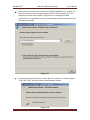
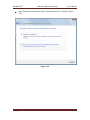
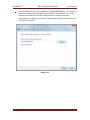
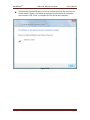
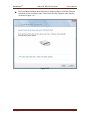
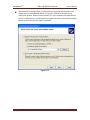
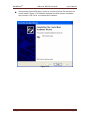
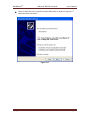
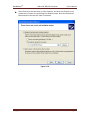
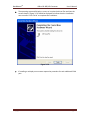
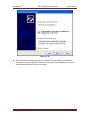
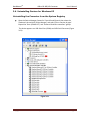
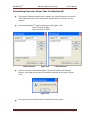
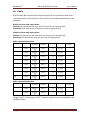
1
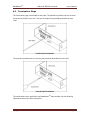
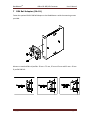
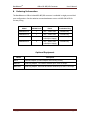
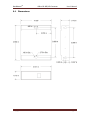
BaudMaster TM Isolated USB to RS-485/RS-422 Converters 1-Port: BMUSB-ID1 2-Port: BMUSB-ID2 User’s Manual Rev. 1.0 11/26/10 Innovative I/O Since 1977 6979 Wales Road Northwood, Ohio 43619 Phone: 800-248-1632 or 419-666-4700 Fax: 419-666-4702 website: www.baudmaster.com email: [email protected] email: [email protected] BaudMasterTM USB to RS-485/422 Converter Copyright © 2010 Electronic Solutions, Inc 1-800-248-1632 User’s Manual Page 2 BaudMasterTM USB to RS-485/422 Converter BaudMaster User’s Manual TM Isolated USB to RS-485/RS-422 Converter User’s Manual 5 Year Warranty Interface converter products, sold by Dutec, Inc., are warranted against defects in materials and workmanship for five years from the date of purchase. There are no other express or implied warranties and no warranty of merchantability or fitness for a particular purpose. During the warranty period, Dutec will repair or, at its option, replace components that prove to be defective, provided the unit is shipped prepaid to the manufacturer directly or via and authorized distributor. Not covered by this warranty are defects caused by modification, misuse or accidents and any further damage caused by inadequate packing for service return. Dutec’s obligation is restricted to the repair or replacement of defective parts and under no circumstances will Dutec be liable for any other damage, either direct or consequential. Trademarks TM TM The Dutec logo, BaudMaster , ADFC , Omni-isolation TM and I/O PLEXER are trademarks of Dutec, Inc. Notice to the User The information contained in this manual is believed to be correct. However, Dutec, Inc. assumes no responsibility for any inaccuracies. Information in this document is subject to change without notice. No part of this document may be reproduced or transmitted in any form or by any means, electronic or mechanical, for any purpose, without the express written permission of Dutec, Inc. Copyright © 2004 Dutec, Inc. All rights reserved. Copyright © 2010 Electronic Solutions, Inc 1-800-248-1632 Page 3 BaudMasterTM USB to RS-485/422 Converter User’s Manual Table of Contents 1 Introduction ............................................ 5 2 Features .................................................. 6 3 Driver Installation .................................. 7 3.1 Windows 7 Install.................................. 8 3.2 Windows 7 Uninstall ........................... 17 3.3 Windows Vista Install.......................... 22 3.4 Windows Vista Uninstall ..................... 32 3.5 Windows XP Install ............................. 37 3.6 Windows XP Uninstall ........................ 48 4 Description ........................................... 51 4.1 USB Performance............................... 52 4.2 LED Indicators .................................... 53 5 Configuration ....................................... 54 5.1 Half Duplex RS-485 ............................ 55 5.2 Full Duplex RS-485 ............................ 56 5.3 Two-Wire RS-422 ............................... 57 5.4 Four-Wire RS-422 .............................. 58 5.5 Network Termination .......................... 59 5.6 Network Bias ...................................... 60 5.7 Bus/Self Power Jumpers ................... 61 6 Wiring .................................................... 64 6.1 Half Duplex ......................................... 64 6.2 Full Duplex ......................................... 64 6.3 Termination Plugs............................... 65 7 DIN Rail Adapter ................................. 66 8 Ordering Information .......................... 67 9 Specifications ...................................... 68 9.1 Dimensions ......................................... 69 10 Cable .................................................... 70 Copyright © 2010 Electronic Solutions, Inc 1-800-248-1632 Page 4 BaudMasterTM 1 USB to RS-485/422 Converter User’s Manual Introduction The BaudMasterTM USB converters are designed to allow the connection of RS-485 and RS-422 devices to any USB equipped PC. The converters function as a USB-to-UART bridge with an isolated RS-485/422 interface. For RS-485 networks the converters automatically control the direction of serial data eliminating the need for software flow control. The isolated interface provides protection from voltage spikes and ground loops that may hamper communications or harm computer ports. There are two software interfaces available for the converter. One interface provides a Virtual COM Port (VCP) which appears to the system as a legacy COM port. The second interface, D2XX, is provided via a proprietary DLL. The D2XX interface provides special functions that are not available in standard operating system COM port APIs. See the Driver Installation section for more information. BMUSB-ID1 1-Port Converter BMUSB-ID2 2-Port Converter Copyright © 2010 Electronic Solutions, Inc 1-800-248-1632 Page 5 BaudMasterTM 2 USB to RS-485/422 Converter User’s Manual Features USB Port Powered (-ID1) No external power supply is required (USB low power device). USB Port Powered or Self Powered (-ID2) USB high power device (> 100mA) that can be powered directly from the USB host or self-powered hub. For operation with a bus-powered hub the converter can be powered from an external 5V supply. The 5V power input is protected from over-voltage and reverse polarity connections. Electrical Isolation Optical and transformer isolation technology provide 2000 volts of signal and ground isolation between the computer and the serial interface. Eliminates ground loops that destroy computer ports and reduce serial communications reliability. Transient Voltage Protection 15KV ESD protection on all signal lines. USB 2.0 Compatible USB Specification 2.0 compliant; backward compatible with USB 1.0 and 1.1 WHQL Certified Drivers Certified drivers are supplied for Microsoft Windows 7 (32-bit and 64-bit), Microsoft Windows Vista (32-bit and 64-bit), Windows XP and Windows 2000. Drivers for Windows ME, Windows 98SE, MAC OSX and Linux are also available. Contact Dutec for more information. Virtual COM Port Windows will install the converter as an additional COM port that is compatible with existing COM Port PC applications. Direct USB Device Support Drivers are available that provide an alternative interface solution that does not implement a COM port. A simple, high-level application program interface (API) is used to provide simpler USB-UART connectivity and functionality. High Speed RS-485/422 Communications Support for data rates up to 921.6 kbps. Switch Selectable Communication Modes RS-422, RS-485, 4-wire master/slave operation and echo modes can be configured with DIP switches available from the outside of the converter case. The switches are identified on the label for easy setup. Switch Selectable Termination and Bias Resistors Network termination and bias can be configured with DIP switches available from the outside of the converter case. The switches are identified on the label for easy setup. Data Echo With the echo feature enabled, data is echoed back to the PC’s communication port. This may desirable or required with some protocols. Copyright © 2010 Electronic Solutions, Inc 1-800-248-1632 Page 6 BaudMasterTM USB to RS-485/422 Converter User’s Manual Status LEDs Status LEDs are provided for transmit and receive data. Pluggable Terminal Blocks Industrial rated pluggable terminal blocks for ease of installation or removal. Accepts up to 16 AWG wire. High Retention USB Connector A high retention force USB connector ensures a reliable connection. Stainless Steel Enclosure A rugged stainless steel enclosure provides protection from harsh environments. DIN Rail Mounting DIN Rail mounting accessories available for easy wiring. USB Cable A 2 meter A-B cable is included with the converter. 3 Driver Installation There are two software interfaces available for the converters. One interface provides a Virtual COM Port (VCP) which appears to the system as a legacy COM port. The second interface, D2XX, is provided via a proprietary DLL. The D2XX interface provides a simple, high-level application program interface (API) that is used to provide USB-UART connectivity and functionality. For Windows, the D2XX driver and VCP driver are distributed in the same driver package, called the Combined Driver Model (CDM) package and both drivers are installed during the installation process. Applications may use either the D2XX or VCP interface but may not use both interfaces at the same time. The CDM driver provides support for Microsoft Windows 7 (32-bit and 64-bit), Microsoft Windows Vista (32-bit and 64-bit), Windows XP and Windows 2000. Drivers for Windows ME, Windows 98SE, MAC OSX and Linux are also available. Contact Dutec for more information. Copyright © 2010 Electronic Solutions, Inc 1-800-248-1632 Page 7 BaudMasterTM USB to RS-485/422 Converter User’s Manual 3.1 Driver Installation for Windows 7 If a Dutec converter has already been installed on the PC the new converter will automatically be installed using the existing drivers. To force the use of the new driver files the existing drivers need to be removed. Refer to the Uninstalling Devices and Drivers for Windows 7 section for more information. Insert the BaudMasterTM CD into the PC’s CD-ROM drive. If a CD-ROM drive is unavailable the driver files can be downloaded as a self-extracting zip file from the Dutec website. Run the self-extracting zip file to unzip them to a directory on your PC (default location is C:\Dutec\BMUSB Driver). Plug the converter into an available USB port. The operating system (OS) will detect the new hardware and will attempt to connect to the Windows Update website to locate a suitable driver. If the automatic installation occurs the OS will display a message ‘Device driver software was successfully installed’. Clicking on the message opens a window that is similar to Figure 3.1.1 Figure 3.1.1 NOTE – Multiple devices will be listed if you are attempting to install a multiple port converter. Refer to the end of this section for information on completing and verifying the installation. Copyright © 2010 Electronic Solutions, Inc 1-800-248-1632 Page 8 BaudMasterTM USB to RS-485/422 Converter User’s Manual Installation without Windows Update (no internet connection) Click on the Windows ‘start’ button to open the start menu and select ‘Control Panel’. From the Control Panel window select ‘Hardware and Sound’ (Figure 3.1.2) Figure 3.1.2 Select ‘Device Manager’ from ‘Devices and Printers’ (Figure 3.1.3) Figure 3.1.3 In the Device Manager window the BaudMasterTM converter will appear under ‘Other devices’ with a yellow warning symbol to indicate that no driver is installed. (Figure 3.1.4) Copyright © 2010 Electronic Solutions, Inc 1-800-248-1632 Page 9 BaudMasterTM USB to RS-485/422 Converter User’s Manual Figure 3.1.4 Right click on the BMUSB Converter to open a menu (Figure 3.1.5) and select ‘Update Driver Software’. Figure 3.1.5 Copyright © 2010 Electronic Solutions, Inc 1-800-248-1632 Page 10 BaudMasterTM USB to RS-485/422 Converter User’s Manual At the next window select ‘Browse my computer for driver software’ (Figure 3.1.6) Figure 3.1.6 Copyright © 2010 Electronic Solutions, Inc 1-800-248-1632 Page 11 BaudMasterTM USB to RS-485/422 Converter User’s Manual Enter the driver file path in the combo-box (‘D:\Dutec\BMUSB Driver’ in Figure 3.1.7 below) or browse to it by clicking the browse button. The drive letter (‘D:’ in this example) may differ due to the PC’s configuration or if selecting the folder containing the un-zipped driver files. Once the file path has been entered in the box, click ‘Next’ to proceed. Figure 3.1.7 The operating system will display a screen when the installation is finished (Figure 3.1.8). Click ‘Close’ and return to the Device Manager window. Figure 3.1.8 Copyright © 2010 Electronic Solutions, Inc 1-800-248-1632 Page 12 BaudMasterTM USB to RS-485/422 Converter User’s Manual ‘USB Serial Port’ now appears under ‘Other devices’ with a yellow warning symbol to indicate that no Virtual Com Port driver is installed. Figure 3.1.9 Right click on the USB Serial Port to open a menu (Figure 3.1.10) and select ‘Update Driver Software’. Figure 3.1.10 Copyright © 2010 Electronic Solutions, Inc 1-800-248-1632 Page 13 BaudMasterTM USB to RS-485/422 Converter User’s Manual At the next window select ‘Browse my computer for driver software’ (Figure 3.1.11) Figure 3.1.11 Copyright © 2010 Electronic Solutions, Inc 1-800-248-1632 Page 14 BaudMasterTM USB to RS-485/422 Converter User’s Manual Enter the driver file path in the combo-box or browse to it by clicking the browse button (Figure 3.1.12). Once the file path has been entered in the box, click ‘Next’ to proceed. Figure 3.1.12 The operating system will display a screen when the installation is finished (Figure 3.1.13). The COM port number may vary depending on the assignment of other existing ports. Click ‘Close’. Figure 3.1.13 Copyright © 2010 Electronic Solutions, Inc 1-800-248-1632 Page 15 BaudMasterTM USB to RS-485/422 Converter User’s Manual If installing a multiple port converter repeat the procedure for each additional COM port. After successfully completing the driver installation the converter will be assigned a communications port (Com Port) number. To find this assignment and other device information run the program PortFinder which is located on the installation CD. Click the ‘Request Com Port Info’ button to get information on all installed Dutec converters. Figure 3.1.14 Copyright © 2010 Electronic Solutions, Inc 1-800-248-1632 Page 16 BaudMasterTM USB to RS-485/422 Converter User’s Manual 3.2 Uninstalling Devices and Drivers for Windows 7 Microsoft Windows 7 will only allow the operating system itself to delete driver files and modify registry values. Devices can be removed using the Device Manager by right-clicking on the entry and selecting "Uninstall". This will delete the associated registry entries for that device only. Windows 7 provides an automatic method to delete driver files via a check box to "Delete the driver software for this device" on the uninstall dialog box. Uninstalling the Driver Files with Converter Connected Click on the Windows “start” button to open the start menu and select “Control Panel”. From the Control Panel window select “Hardware and Sound”. Select “Device Manager” from “Devices and Printers”. This opens the Device Manager window. Expand the “Ports (COM & LPT)” entry. Right click on the USB Serial Port (COMx) and select “Uninstall” (Figure 3.2.1). Figure 3.2.1 Copyright © 2010 Electronic Solutions, Inc 1-800-248-1632 Page 17 BaudMasterTM USB to RS-485/422 Converter User’s Manual A window opens that informs you that the device will be uninstalled (Figure 3.2.2). Check the “Delete the driver software for this device” box and click “OK”. Figure 3.2.2 Right click the USB Serial Converter under “Universal Serial Bus controllers” and select “Uninstall”. A window opens that informs you that the device will be uninstalled (Figure 3.2.3). Check the “Delete the driver software for this device” box and click “OK”. Figure 3.2.3 The registry entries and driver files for the converter are removed from the system. If uninstalling a multiple port converter repeat this procedure for any additional devices. Copyright © 2010 Electronic Solutions, Inc 1-800-248-1632 Page 18 BaudMasterTM USB to RS-485/422 Converter User’s Manual Uninstalling Driver Files WITHOUT Converter Connected Devices that are not connected are not usually displayed in the Device Manger. To uninstall a disconnected device it must first be made visible in the Device Manger by performing the following procedure: Open "Control Panel > System & Security > System > Advanced System Settings" and click "Environment Variables…" (Fig 3.2.4). Figure 3.2.4 In the System Variables section (NOT THE USER VARIABLES SECTION), click "New...". Copyright © 2010 Electronic Solutions, Inc 1-800-248-1632 Page 19 BaudMasterTM USB to RS-485/422 Converter User’s Manual Create a new System Variable called "DevMgr_Show_NonPresent_Devices" and set the value to 1, then click “OK” (Figure 3.2.5). Figure 3.2.5 The new variable will appear in the System Variable list box. Click “OK” (Figure 3.2.6). Figure 3.2.6 Copyright © 2010 Electronic Solutions, Inc 1-800-248-1632 Page 20 BaudMasterTM USB to RS-485/422 Converter User’s Manual Open the Device Manager and select "View > Show Hidden Devices ". Device Manager will then show all hidden and nonpresent devices (Figure 3.2.7). Figure 3.2.7 The converter can now be uninstalled as if it was a connected device (see “Uninstalling the Converter Driver Files with Converter Connected”). Copyright © 2010 Electronic Solutions, Inc 1-800-248-1632 Page 21 BaudMasterTM USB to RS-485/422 Converter User’s Manual 3.3 Driver Installation for Windows Vista If a Dutec converter has already been installed on the PC the new converter will automatically be installed using the existing drivers. To force the use of the new driver files the existing drivers need to be removed. Refer to the Uninstalling Devices and Drivers for Windows Vista section for more information. Insert the BaudMasterTM CD into the PC’s CD-ROM drive. If a CD-ROM drive is unavailable the driver files can be downloaded as a self-extracting zip file from the Dutec website. Run the self-extracting zip file to unzip them to a directory on your PC (default location is C:\Dutec\BMUSB Driver). Plug the converter into an available USB port. The operating system (OS) will indicate that it has found new hardware and will search for drivers. You will need to direct the OS to search for the drivers on the CD or in the folder that was created in the previous step. Select “Locate and install driver software (recommended)” as shown in Fig 3.3.1. Figure 3.3.1 Copyright © 2010 Electronic Solutions, Inc 1-800-248-1632 Page 22 BaudMasterTM USB to RS-485/422 Converter User’s Manual If the computer is connected to the internet the OS will connect to the Windows Update site and automatically download and install the drivers (Figure 3.3.2). Refer to the end of this section for information on completing and verifying the installation. Figure 3.3.2 If internet access isn’t available the window shown in Figure 3.3.3 will appear. Select "I don’t have the disc. Show me other options". Select this option even if the driver disk is installed. Figure 3.3.3 Copyright © 2010 Electronic Solutions, Inc 1-800-248-1632 Page 23 BaudMasterTM USB to RS-485/422 Converter User’s Manual Select "Browse my computer for driver software (advanced)" as shown in Figure 3.3.4. Figure 3.3.4 Copyright © 2010 Electronic Solutions, Inc 1-800-248-1632 Page 24 BaudMasterTM USB to RS-485/422 Converter User’s Manual Enter the driver file path in the combo-box ("E:\Dutec\BMUSB Driver" in Figure 3.3.5 below) or browse to it by clicking the browse button. The drive letter (“E:” in this example) may differ due to the PC’s configuration or if selecting the folder containing the un-zipped driver files. Once the file path has been entered in the box, click “Next” to proceed. Figure 3.3.5 Copyright © 2010 Electronic Solutions, Inc 1-800-248-1632 Page 25 BaudMasterTM USB to RS-485/422 Converter User’s Manual The operating system will display a screen as it copies the driver files and then the screen shown in Figure 3.3.6 should be displayed to indicate that the installation was successful. Click “Close” to complete the first part of the installation. Figure 3.3.6 Copyright © 2010 Electronic Solutions, Inc 1-800-248-1632 Page 26 BaudMasterTM USB to RS-485/422 Converter User’s Manual The Found New Hardware Wizard will launch automatically to install the COM port emulation drivers. As above, select "I don’t have the disc. Show me other options" as shown in Figure 3.3.7. Figure 3.3.7 Copyright © 2010 Electronic Solutions, Inc 1-800-248-1632 Page 27 BaudMasterTM USB to RS-485/422 Converter User’s Manual Select "Browse my computer for driver software (advanced)" as shown in Figure 3.3.8. Figure 3.3.8 Copyright © 2010 Electronic Solutions, Inc 1-800-248-1632 Page 28 BaudMasterTM USB to RS-485/422 Converter User’s Manual Enter the driver file path in the location box as shown in Figure 3.3.9 or browse to it by clicking the browse button. Once the file path has been entered in the box click “Next” to proceed. Figure 3.3.9 Copyright © 2010 Electronic Solutions, Inc 1-800-248-1632 Page 29 BaudMasterTM USB to RS-485/422 Converter User’s Manual The operating system will display a screen as it copies the driver files and then the screen shown in Figure 3.3.10 should be displayed to indicate that the installation was successful. Click “Close” to complete the first part of the installation. Figure 3.3.10 If installing a multiple port converter Windows Vista will automatically install the drivers for the additional serial ports after completing the initial port installation. Copyright © 2010 Electronic Solutions, Inc 1-800-248-1632 Page 30 BaudMasterTM USB to RS-485/422 Converter User’s Manual The operating system will display a message indicating that the converter is ready to use. Click on the message box and a summary is displayed as shown in Figure 3.3.11 (the COM number may vary). Click “Close”. Figure 3.3.11 After successfully completing the driver installation the converter will be assigned a communications port (Com Port) number. To find this assignment and other device information run the program PortFinder which is located on the installation CD. Click the ‘Request Com Port Info’ button to get information on all installed Dutec converters. Figure 3.3.12 Copyright © 2010 Electronic Solutions, Inc 1-800-248-1632 Page 31 BaudMasterTM USB to RS-485/422 Converter User’s Manual 3.4 Uninstalling Devices and Drivers for Windows Vista Uninstalling the Device and Driver Files with Converter Connected Open the Device Manager (located in ‘Control Panel\System’ then select ‘Device Manger’) and select ‘View > Devices by type’. Expand the ‘Ports (COM & LPT)’ and ‘Universal Serial Bus controllers’ groups. The device appears as a ‘USB Serial Port’ under ‘Ports’ and as a ‘USB Serial Converter’ under ‘Universal Serial Bus controllers’ (Figure 3.4.1). Figure 3.4.1 Copyright © 2010 Electronic Solutions, Inc 1-800-248-1632 Page 32 BaudMasterTM USB to RS-485/422 Converter User’s Manual Right click the device under ‘Ports (COM & LPT)’ and select ‘Uninstall’. A window opens that informs you that the device will be uninstalled (Figure 3.4.2). Check the ‘Delete the driver software for this device’ box and click ‘OK’. Figure 3.4.2 Right click the device under ‘Universal Serial Bus controllers’ and select ‘Uninstall’. A window opens that informs you that the device will be uninstalled (Figure 3.4.3). Check the ‘Delete the driver software for this device’ box and click ‘OK’. Figure 3.4.3 The registry entries and driver files for the converter are removed from the system. If uninstalling a multiple port converter perform the above steps for all BaudMasterTM USB devices. Uninstall the USB Serial Port (COM) entries before uninstalling the Universal Serial Bus controller entries. Copyright © 2010 Electronic Solutions, Inc 1-800-248-1632 Page 33 BaudMasterTM USB to RS-485/422 Converter User’s Manual Uninstalling the Device and Driver Files WITHOUT Converter Connected Devices that are not connected are not usually displayed in the Device Manger. To uninstall a disconnected device it must first be made visible in the Device Manger by performing the following procedure: Open ‘Control Panel > System’ then select the ‘Advanced’ tab and click ‘Environment Variables’ (Figure 3.4.4). Figure 3.4.4 Copyright © 2010 Electronic Solutions, Inc 1-800-248-1632 Page 34 BaudMasterTM USB to RS-485/422 Converter User’s Manual In the System Variables section (NOT THE USER VARIABLES SECTION), click ‘New...’ to display the window shown in Figure 3.4.5. Figure 3.4.5 Create a new System Variable called ‘DevMgr_Show_NonPresent_Devices’ and set the value to 1, then click ‘OK’ (Figure 3.4.6). Figure 3.4.6 Copyright © 2010 Electronic Solutions, Inc 1-800-248-1632 Page 35 BaudMasterTM USB to RS-485/422 Converter User’s Manual Open the Device Manager (located in ‘Control Panel\System’ then select ‘Device Manger’) and select ‘View > Show Hidden Devices ‘. Device Manager will then show all hidden and nonpresent devices available on that PC as shaded. The device can now be uninstalled as if it was a connected device (see ‘Uninstalling the Device and Driver Files with Converter Connected’). Copyright © 2010 Electronic Solutions, Inc 1-800-248-1632 Page 36 BaudMasterTM USB to RS-485/422 Converter User’s Manual 3.5 Driver Installation for Windows XP Installing via the Found New Hardware Wizard If a Dutec converter has already been installed on the PC the new converter will automatically be installed using the existing drivers. To force the use of the new driver files the existing drivers need to be removed. Refer to the Uninstalling Converter Driver Files for Windows XP section for more information. Insert the BaudMasterTM CD into the PC’s CD-ROM drive. If a CD-ROM drive is unavailable the driver files can be downloaded as a self-extracting zip file from the Dutec website. Run the self-extracting zip file to unzip them to a directory on your PC (default location is C:\Dutec\BMUSB Driver). Plug the converter into an available USB port. The operating system (OS) will indicate that it has found new hardware and will search for drivers. You will need to direct the OS to search for the drivers on the CD or in the folder that was created in the previous step. Select ‘No, not this time’ and ‘Next’ as shown in Figure 3.5.1. Figure 3.5.1 Copyright © 2010 Electronic Solutions, Inc 1-800-248-1632 Page 37 BaudMasterTM USB to RS-485/422 Converter User’s Manual Select ‘Install from a list or specific location (Advanced)’ as shown in Figure 3.5.2 below and then click ‘Next’. Figure 3.5.2 Copyright © 2010 Electronic Solutions, Inc 1-800-248-1632 Page 38 BaudMasterTM USB to RS-485/422 Converter User’s Manual Select ‘Search for the best driver in these locations’ and enter the file path in the combo-box (‘D:\Dutec\BMUSB Driver’ in Figure 3.5.3 below) or browse to it by clicking the ‘Browse’ button. The drive letter (‘D:’ in this example) may differ due to the PC’s configuration or if selecting the un-zipped driver files. Once the file path has been entered in the box click ‘Next’ to proceed. Figure 3.5.3 Copyright © 2010 Electronic Solutions, Inc 1-800-248-1632 Page 39 BaudMasterTM USB to RS-485/422 Converter User’s Manual The operating system will display a screen as it copies the driver files and then the screen shown in Figure 3.5.5 should be displayed to indicate that the installation was successful. Click ‘Finish’ to complete the installation. Figure 3.5.5 Copyright © 2010 Electronic Solutions, Inc 1-800-248-1632 Page 40 BaudMasterTM USB to RS-485/422 Converter User’s Manual The Found New Hardware Wizard will launch automatically to install the COM port emulation drivers. As above, select ‘No, not this time’ from the options and click ‘Next’ to proceed with the installation (Figure 3.5.6). Figure 3.5.6 Copyright © 2010 Electronic Solutions, Inc 1-800-248-1632 Page 41 BaudMasterTM USB to RS-485/422 Converter User’s Manual Select ‘Install from a list or specific location (Advanced)’ as shown in Figure 3.5.7 below and then click ‘Next’. Figure 3.5.7 Copyright © 2010 Electronic Solutions, Inc 1-800-248-1632 Page 42 BaudMasterTM USB to RS-485/422 Converter User’s Manual Select ‘Search for the best driver in these locations’ and enter the file path in the combo-box or browse to it by clicking the ‘Browse’ button. Once the file path has been entered in the box click ‘Next’ to proceed. Figure 3.5.8 Copyright © 2010 Electronic Solutions, Inc 1-800-248-1632 Page 43 BaudMasterTM USB to RS-485/422 Converter User’s Manual The operating system will display a screen as it copies the driver files and then the screen shown in Figure 3.5.9 should be displayed to indicate that the installation was successful. Click ‘Finish’ to complete the installation. Figure 3.5.9 If installing a multiple port converter repeat the procedure for each additional COM port. Copyright © 2010 Electronic Solutions, Inc 1-800-248-1632 Page 44 BaudMasterTM USB to RS-485/422 Converter User’s Manual After successfully completing the driver installation the converter will be assigned a communications port (Com Port) number. To find this assignment and other device information run the program PortFinder which is located on the installation CD. Click the ‘Request Com Port Info’ button to get information on all installed Dutec converters. Figure 3.5.10 Copyright © 2010 Electronic Solutions, Inc 1-800-248-1632 Page 45 BaudMasterTM USB to RS-485/422 Converter User’s Manual Installing from Windows Update (requires internet access) Installing from Windows Update is similar to installing via the ‘Found New Hardware Wizard’. Click ‘Yes, this time only’ (Fig 3.5.11) and ‘Install the software automatically’ (Fig 3.5.12). The wizard will search the Windows Update site and automatically download and install the matching driver. Figure 3.5.11 Copyright © 2010 Electronic Solutions, Inc 1-800-248-1632 Page 46 BaudMasterTM USB to RS-485/422 Converter User’s Manual Figure 3.5.12 After successfully completing the driver installation run the program PortFinder to determine Com port assignments and other information. See ‘Installing via the Found New Hardware Wizard’ for more information. Copyright © 2010 Electronic Solutions, Inc 1-800-248-1632 Page 47 BaudMasterTM USB to RS-485/422 Converter User’s Manual 3.6 Uninstalling Devices for Windows XP Uninstalling the Converter from the System Registry Open the Device Manager (located in ‘Control Panel\System’ then select the ‘Hardware’ tab and click ‘Device Manger’) and select ‘View > Devices by type’. Expand the ‘Ports (COM & LPT)’ and ‘Universal Serial Bus controllers’ groups. The device appears as a USB Serial Port (COMx) and USB Serial Converter (Figure 3.6.1). Figure 3.6.1 Copyright © 2010 Electronic Solutions, Inc 1-800-248-1632 Page 48 BaudMasterTM USB to RS-485/422 Converter User’s Manual Right click the device under ‘Ports (COM & LPT)’ and select ‘Uninstall’. A window opens that informs you that the device will be uninstalled (Figure 3.6.2). Click ‘OK’. Figure 3.6.2 If uninstalling a multiple port converter perform the above step for all BaudMasterTM COM ports. Right click the device under ‘Universal Serial Bus controllers’ and select ‘Uninstall’. A window opens that informs you that the device will be uninstalled (Figure 3.6.3). Click ‘OK’. Figure 3.6.3 If uninstalling a multiple port converter perform the above steps for all BaudMasterTM USB devices. Uninstall the USB Serial Port (COM) entries before uninstalling the Universal Serial Bus controller entries. The registry entries for the BaudMaster USB Converter have been removed from the system registry and the device is removed from the Device Manger, however, the driver files have NOT been removed from the operating system. Copyright © 2010 Electronic Solutions, Inc 1-800-248-1632 Page 49 BaudMasterTM USB to RS-485/422 Converter User’s Manual Uninstalling Converter Driver Files for Windows XP The program ‘CDMuninstallerGUI.exe’ located in the ‘Dutec\Uninstaller’ directory is used to remove the driver files from the PC. Double-click the .exe file to run the program. Enter the BaudMasterTM product ID and click ‘Add’ (Figure 3.6.4). 1-Port Converter ID: 6001 2-Port Converter ID: 6010 1-Port Converters Figure 3.6.4 2-Port Converters After the converters VID and PID appear in the device window click ‘Remove Devices’. A message box will confirm successful removal from the system (Figure 3.6.5). Figure 3.6.5 The registry entries and driver files are removed from the system. Copyright © 2010 Electronic Solutions, Inc 1-800-248-1632 Page 50 BaudMasterTM 4 USB to RS-485/422 Converter User’s Manual Description The diagram below shows the function blocks, signal paths and isolation of the BaudMasterTM USB-to-RS485/422 converter. The isolated BaudMasterTM converter provides full galvanic isolation from the RS485/422 interface to the USB port. Galvanic isolation breaks the signal, power and ground paths using transformer and optical technology. Data is allowed to flow between systems but not electrical current, eliminating grounding problems. All communication and power lines are transient protected. In RS-485 applications the line driver must only be enabled when the converter is transmitting data. The BaudMasterTM converter automatically controls the driver, eliminating the need for software control. Copyright © 2010 Electronic Solutions, Inc 1-800-248-1632 Page 51 BaudMasterTM 4.1 USB to RS-485/422 Converter User’s Manual USB Performance BaudMasterTM USB converters transfer data using USB Bulk transfers. The most efficient way to conduct USB bulk transfers is in large chunks. The converters are bi-directional and can therefore both send and receive data across a USB connection. If data is written in small amounts or even individual bytes as many applications written for legacy serial ports do, the USB bulk transfer protocol is only be able to transfer 1 byte per USB packet. This method is not efficient when employing USB bulk transfers and performance is greatly diminished. Received data is returned to the host (PC) when the converter has a full buffer of data or when the device’s latency timer has expired. The latency timer will trigger a transfer if there is not enough data to fill the buffer. When optimizing data throughput for USB converters, the following factors should be considered: Send as much data to the device from the host application as possible in a single write. This will maximize the size of the data packets being sent to the device and hence minimize the number of packets required and time to transfer an amount of data. Set the latency timer to a value appropriate for the application. Note that a low latency timer value may result in many short incoming USB packets rather than a single large packet, thus diminishing performance. Copyright © 2010 Electronic Solutions, Inc 1-800-248-1632 Page 52 BaudMasterTM 4.2 USB to RS-485/422 Converter User’s Manual LED Indicators The BaudMasterTM converter has several status LED indicators. These indicators show the status of data communications and are handy for verifying operation and troubleshooting network problems. LED Name LED Function TxD Transmit - Red indicates that the converter is sending data. RxD Receive - Red indicates that the converter is receiving data. I/O Power Power for the RS-485/422 interface circuit Copyright © 2010 Electronic Solutions, Inc 1-800-248-1632 Page 53 BaudMasterTM 5 USB to RS-485/422 Converter User’s Manual Configuration The BaudMasterTM can be configured to accommodate various RS-485/422 networks. The DIP switches allow the device to be configured to operate in these modes: RS-485 without Echo Multidrop mode for communication in half duplex (2-wire) networks or as a master in full duplex (4-wire) networks. The transmitter is enabled and the receiver is disabled when data is sent. In this mode the communications port will not “hear itself talk”. RS-485 with Echo Multidrop mode for communication in half duplex (2-wire) networks. The transmitter is enabled when data is sent and the receiver is always enabled. In this mode the communications port will “hear itself talk”. RS-485 Full Duplex Slave Multidrop mode for communication as a slave in full duplex (4wire) networks. The transmitter is enabled when data is sent and the receive line to the master is always enabled. The communications port will not “hear itself talk” or receive data from other slaves. RS-422 Full duplex communication in 4-wire networks or one-way communication in 2wire networks. The transmitter and receiver are always enabled. The communications port will not “hear itself talk”. The following sections give more detail on the configuration and operation of RS-485 and RS-422 networks. Copyright © 2010 Electronic Solutions, Inc 1-800-248-1632 Page 54 BaudMasterTM 5.1 USB to RS-485/422 Converter User’s Manual Half Duplex RS-485 Network Twisted pair connection between devices (32 devices max). Transmitters do not drive network when idle. Optional termination at both ends of network (see Network Termination). Optional line bias at one end (see Network Bias). Ground connection (GND) required between devices. Transmit data is heard on receiver if echo mode is enabled. Copyright © 2010 Electronic Solutions, Inc 1-800-248-1632 Page 55 BaudMasterTM 5.2 USB to RS-485/422 Converter User’s Manual Full-Duplex RS-485 Network Twisted pair connection between devices (32 devices max). Transmitters do not drive network when idle. One master device transmits to multiple slave devices over one twisted pair. Slave devices share one twisted pair to transmit data to master device. Master transmit line terminated at far end if master is at one end of network or at both ends if master is located between slaves (see Network Termination). Master receive line terminated at both ends of network (see Network Termination). Master transmit and receive lines each biased at one end (see Network Bias). Ground connection (GND) required between devices. Copyright © 2010 Electronic Solutions, Inc 1-800-248-1632 Page 56 BaudMasterTM USB to RS-485/422 Converter User’s Manual 5.3 Two-Wire (Broadcast) RS-422 Network Twisted pair connection between 1 driver and 1-32 receivers (two wires plus ground). Transmitter always enabled. Network terminated at receiver located at end of network (see Network Termination). Line biasing not required. Ground connection (GND) required between devices. Copyright © 2010 Electronic Solutions, Inc 1-800-248-1632 Page 57 BaudMasterTM 5.4 USB to RS-485/422 Converter User’s Manual Four-Wire (Full Duplex) RS-422 Network Twisted pair connection between 1 driver and 1 receiver (four wires plus ground). Transmitters always enabled. Network terminated at receivers only (see Network Termination). Line biasing not required. Ground connection (GND) required between devices. Copyright © 2010 Electronic Solutions, Inc 1-800-248-1632 Page 58 BaudMasterTM 5.5 USB to RS-485/422 Converter User’s Manual Network Termination The BaudMasterTM provides several options for terminating an RS-485 or RS-422 bus. The decision of what kind of termination depends on data rate, cable length and other nodes on the bus. Terminating resistors are used to prevent transmission line reflections. The type of termination is selected with the DIP switches. No Termination Suitable for slow (9600B / 2000ft) or short (230.4kB / 100ft) networks. Low power consumption 120 Ohm Termination Required for high baud rate and long distance networks. High power consumption Copyright © 2010 Electronic Solutions, Inc 1-800-248-1632 Page 59 BaudMasterTM 5.6 USB to RS-485/422 Converter User’s Manual Network Bias Bias resistors are used to maintain the proper idle voltage state (200mV across a receiver). There are two bias configurations that are selected with DIP switches. Light Bias • Configure light bias for devices installed on un-terminated networks. • Configure light bias for devices that are NOT providing bias on 120 ohm terminated networks. Heavy Bias • Provides proper idle line voltage level on 120 ohm terminated networks. • Configure heavy bias at one location on a 120 ohm terminated network, preferably at one end with termination resistor. • Increases power consumption. Copyright © 2010 Electronic Solutions, Inc 1-800-248-1632 Page 60 BaudMasterTM 5.7 USB to RS-485/422 Converter User’s Manual Power Selection – Dual Port Converter The dual-port BMUSB converter is a USB high power device (> 100mA) that can be powered directly from the USB host or self-powered hub. For operation with a bus-powered hub (100mA max load per port) the converter can be configured for self-powered operation and use an external 5V supply. Jumpers W1 and W2 select the mode of operation. To change the configuration, remove the two screws as shown. Remove the stainless steel bottom cover to access the jumpers. Copyright © 2010 Electronic Solutions, Inc 1-800-248-1632 Page 61 BaudMasterTM USB to RS-485/422 Converter User’s Manual Bus Powered (factory default) Install jumpers W1 and W2 as shown. The converter is powered from the USB port and no external power supply is required. This is the preferred configuration for operating the converter with a USB host (PC) or self-powered hub. Self Powered Install jumpers W1 and W2 as shown. The converter draws no more than 100mA from the USB port. The network drivers and receivers are powered from an external 5V supply. This configuration is required when operating the converter with a port-powered hub. Copyright © 2010 Electronic Solutions, Inc 1-800-248-1632 Page 62 BaudMasterTM USB to RS-485/422 Converter User’s Manual Self Powered (cont.) The self-powered configuration requires an external regulated 5VDC power supply that can provide a minimum of 300mA. A supply with a 120VAC 50-60Hz input is available from Dutec. Many power supplies use the same barrel-style DC power plug but have different output voltages. To prevent damage from an accidental connection to the wrong supply the BaudMasterTM converter has over-voltage and reverse polarity protection on the 5V power input. The over-voltage protection will open the connection to the external supply if the voltage exceeds 6.6V. This protection circuit will prevent damage from a connection to a voltage as high as 25V. The reverse polarity protection will short the power input if the polarity is reversed. The short will force the external supply to fold-back and limit the voltage and current. This protection circuit is designed to work with supplies rated for 6W or less. In self-powered mode the I/O Power LED indicates if the external power supply is energized. The LED is ON if the supply is providing 5V and the converter has been enumerated (recognized) by the USB host (PC). The LED will turn OFF if the PC goes into standby mode. Copyright © 2010 Electronic Solutions, Inc 1-800-248-1632 Page 63 BaudMasterTM 6 6.1 USB to RS-485/422 Converter User’s Manual Wiring Half Duplex Wiring To connect to a half duplex network install the twisted pair data wires and ground wire as shown. See the Cable chapter for recommendations on selecting the appropriate twisted pair cable. 6.2 Full Duplex Wiring To connect to a full duplex network install the two twisted pairs of data wires and ground wire as shown. See the Cable chapter for recommendations on selecting the appropriate twisted pair cable Copyright © 2010 Electronic Solutions, Inc 1-800-248-1632 Page 64 BaudMasterTM 6.3 USB to RS-485/422 Converter User’s Manual Termination Plugs The termination plugs are available in two styles. The parallel style allows the wire to enter the terminals parallel to the unit. This style is standard and probably preferable in most cases. Parallel Style Termination The vertical style allows the wire to enter the terminals perpendicular to the unit. Vertical Style Termination The termination style is specified in the BaudMasterTM order number. See the Ordering Information section for more information. Copyright © 2010 Electronic Solutions, Inc 1-800-248-1632 Page 65 BaudMasterTM 7 USB to RS-485/422 Converter User’s Manual DIN Rail Adapter (DA-01) Fasten the optional DA-01 DIN Rail Adapter to the BaudMasterTM with the mounting screws provided. Mounts to standard DIN rail profiles: 35 mm x 7.5 mm, 35 mm x 15 mm and 32 mm x 15 mm G-profile DIN Rail. Copyright © 2010 Electronic Solutions, Inc 1-800-248-1632 Page 66 BaudMasterTM 8 USB to RS-485/422 Converter User’s Manual Ordering Information The BaudMasterTM USB to Isolated RS-485/422 converter is available in single port and dual port configurations. See the website at www.baudmaster.com or call 800-248-1632 for current pricing. Model Isolated 485/422 Ports Power Termination Plug BMUSB-ID1-P 1 Bus – 100mA max. Parallel Entry BMUSB-ID1-V 1 Bus – 100mA max. Vertical Entry BMUSB-ID2-P 2 Bus – 200mA max. or Self (Ext. Supply) Parallel Entry BMUSB-ID2-V 2 Bus – 200mA max. or Self (Ext. Supply) Vertical Entry Optional Equipment Model Description DA-01 DIN Rail Adapter (Includes adapter and mounting screws) BM-PS5 Wall-Plug Adapter, 110-120VAC 50/60Hz Input, 5Vdc 1A Output BM-PS5U Wall-Plug Adapter, Universal 90-264VAC 50/60Hz Input, 5Vdc 1.2A Output Copyright © 2010 Electronic Solutions, Inc 1-800-248-1632 Page 67 BaudMasterTM 9 USB to RS-485/422 Converter User’s Manual Specifications Isolated USB to RS-485/422 Converters USB Standard: 1.1 and 2.0 Compliant Connector: USB Type B Female w/ High Retention USB UART: FTDI Part Number FT232R (www.ftdichip.com) USB Software (WHQL Certified Drivers) Windows 7 32 and 64-bit Windows Vista and Vista 64-bit Windows XP and XP 64-bit Windows 2000 Other drivers (Win98, ME, Mac and Linux) available. Contact Dutec for information. RS-485/422 Baud Rate: 183 to 921.6K bps Drive: Up to 32 unit loads (1 unit load = 12K ohms) Range: 4000 feet (1220 meters) @ 38.4K bps with 24 AWG twisted pair Connector: Pluggable Terminal Blocks (#16 to #24 AWG) Biasing Resistors: Selectable 30K or 400 ohms to GND and +3.3V Terminating Resistors: Selectable NONE or 120 ohms Network Configurations: Half-duplex and full-duplex master or slave Indicators Receive Data LED, Transmit Data LED, I/O Power (2-port converter only) Isolation RS485/422-to-USB and RS485/422-to-Chassis: Hi-Pot: 2000 VRMS for 1 minute Leakage Current: Less than 50uA @ 2000 VAC / 60 Hz Surge Protection ESD Protection to IEC61000-4-2: +/- 8kV Contact Discharge +/-15kV Air-Gap Discharge +/-15kV Human Body Model Compliance Pending (CE, FCC Class A, CUL, UL Safety Class II) Power 1-port converter (-ID1): USB low-power bus powered device (100ma or less) 2-port converter (-ID2): USB high-power device (200ma max.) Operating Temperature -10C to +70C Storage Temperature -45C to +100C Humidity 5% to 95% RH Enclosure 18 gage Stainless Steel Dimensions Height: 4.60 inches (117mm) Depth: 4.16 inches (106mm) Width: 1.18 inches ( 30mm) Weight Approximately 13 oz. (370 grams) Accessories DIN Rail Mounting Kit Wall-Plug Adapter, 110-120VAC Input Wall-Plug Adapter, Universal 90-264VAC Input Copyright © 2010 Electronic Solutions, Inc 1-800-248-1632 Page 68 BaudMasterTM 9.1 USB to RS-485/422 Converter User’s Manual Dimensions Copyright © 2010 Electronic Solutions, Inc 1-800-248-1632 Page 69 BaudMasterTM 10 USB to RS-485/422 Converter User’s Manual Cable RS-422 and RS-485 communications requires twisted pair, low capacitance cable, with a nominal impedance of 100-120 ohms. The decision to use shielded cable depends on the application. RS-422 minimum cable requirements: Shielded: two twisted pair with drain wire (use drain wire for signal ground) Unshielded: three twisted pair (using the extra pair for signal ground) RS-485 minimum cable requirements: Shielded: one twisted pair with drain wire (use drain wire for signal ground) Unshielded: two twisted pair (using the extra pair for signal ground) Belden Shielded RS-422 Cable Part No. Wire D.C. Resistance Outside Diameter 9829 24 AWG (7x32) 24.0 /1000' 78.7 /km .291 in. 7.39 mm 8102 24 AWG (7x32) 24.0 /1000' 78.7 /km 8162 24 AWG (7x32) 1419A Capacitance Propagation Velocity 100 15.5 pF/ft. 59.1 pF/m 66% .270 in. 6.86 mm 100 12.5 pF/ft. 41.0 pF/m 78% 24.0 /1000' 78.7 /km .343 in. 8.71 mm 100 12.5 pF/ft. 41.0 pF/m 78% 24 AWG (7x32) 24.0 /1000' 78.7 /km .248 in. 6.30 mm 100 13 pF/ft. 42.5 pF/m 78% 9729 24 AWG (7x32) 24.0 /1000' 78.7 /km .317 in. 8.05 mm 100 12.5 pF/ft. 41.0 pF/m 78% 9842 24 AWG (7x32) 24.0 /1000' 78.7 /km .340 in. 8.64 mm 120 12.8 pF/ft. 42.0 pF/m 66% 88102 24 AWG (7x32) 24.0 /1000' 78.7 /km .227 in. 5.77 mm 100 12.95 pF/ft. 42.0 pF/m 78% 24 AWG (7x32) 23.3 /1000' 76.4 /km .271 in. 6.88 mm 100 12.5 pF/ft. 41.0 pF/m 78% Capacitance Propagation Velocity 89 729 Impedance Belden Shielded RS-485 Cable Part No. Wire D.C. Resistance Outside Diameter Impedance 8132 28 AWG (7x36) 65 /1000' 213 /km .235 in. 5.97 mm 120 11.0 pF/ft. 36.1 pF/m 78% 9841 24 AWG (7x32) 24.0 /1000' 78.7 /km .340 in. 8.64 mm 120 12.8 pF/ft. 42.0 pF/m 66% Category 3 (CAT-3) and Category 5 (CAT-5) cables are good choices for unshielded RS-485 and RS-422 cable. Copyright © 2010 Electronic Solutions, Inc 1-800-248-1632 Page 70