1
Soft Menu Functions
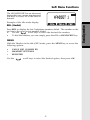
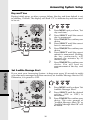
The GIGIAPHONE has an advanced
design that uses a menu structure and
soft keys to access all of the built-in
features.
RDL (Redial)
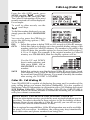
Press RDL to display the last 5 telephone numbers dialed. The number on the
top line is the most recent number dialed.
•
Use the
scroll keys to select the desired the number.
•
To dial the number, you can simply press the ON or HANDSFREE key.
MENU
With the Handset in the idle (OFF) mode, press the MENU key to access the
following options:
•
•
•
CALLS LOG (CALLER ID)
HANDSET SETTINGS
REGISTER
Use the
scroll keys to select the desired option, then press OK.
17
Basic Operation
Example of the idle mode display: