1
87075_2.book Page 57 Thursday, November 22, 2007 8:07 AM
Chapter 4: SPX-5 Tiller system settings
57
.
Options
OFF
Joystick off
1
1 = Proportional power steer
Proportional power steer applies rudder in proportion to joystick movement –
the further the joystick is held over, the greater the applied rudder.
2
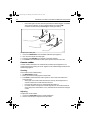
2 = Bang-bang power steer
Bang-bang power steer applies continuous rudder in the direction of the lever
movement – to improve control, the speed of rudder movement changes with
the angle of the lever. For maximum speed, push the lever hardover. If you
return the lever to the center position, the rudder will remain in its current position.
Cruise speed
Set the cruise speed to the boat’s typical cruising speed. If neither the speed through
the water nor speed over ground are unavailable via SeaTalk or NMEA, the SPX-5
Tiller system will use the cruise speed value you set here as a default when
calculating course changes.
Screen Text
Range
CRUISE SP
4 to 60 knots
Latitude
If valid latitude data is available via SeaTalk or NMEA, the SPX-5 Tiller system will use
this data instead of the calibration value.
Screen Text
Range
LATITUDE
0° to 80° in 1° steps
System reset
CAUTION: Losing settings at system reset
Do NOT carry out a System RESET unless advised to do so by a
Raymarine dealer. If you complete a reset you will lose the SPX-5
Tiller system calibration settings. You will then need to repeat the
SPX-5 Tiller system commissioning process.
Carrying out a System reset will reset User calibration, Seatrial calibration and Dealer
calibration settings to their default values.
Note: The Display calibration settings will not change, as these are stored in each individual
controller