1
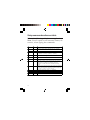
Setup commands reference table
Refer to the following table for more applications:
Note: Use all capital or all lowercase letters, do
not mix, when typing the commands.
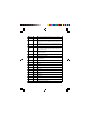
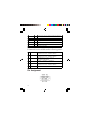
Command
Value
Description
<<<
Set the local adapter change the data mode into command
mode.
<<<
Switch the data mode to the command.
The time interval between each character will be more than the
time: [500ms] "<" [500ms] "<" [500ms] "<" [1500ms]
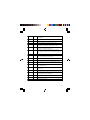
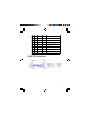
<<<=
?
Inquire the current setting.
(Default)
Y
Turn on the "<<<" command
N
Turn off the "<<<" command
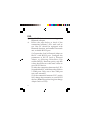
Set the remote adapter change the data mode into command
mode from the local adapter in connecting status. The
command is available after 500 ms when data transferring
finished.
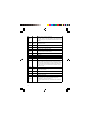
>>>
Switch the remote adapter from the data mode to the command.
The time interval between each character will be more than the
time: [1 sec] ">" [1 sec] ">" [1 sec] ">" [2 sec]
>>>
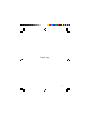
>>>=
?
Inquire the setting status of the ">>>" command.
(Default)
Y
Turn on the ">>>" command
N
Turn off the ">>>" command
12