1
Single System
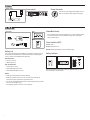
Changing Group and Channel
Automatic Frequency Scan
Change Channel
If you encounter wireless interference, perform a channel scan on the receiver and use the selected channel. You usually do not need to change
the group.
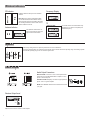
Channel Scan
If you encounter wireless interference, set the receiver and transmitter to
a different channel or group.
ULXP4, ULXS4
ULX1, ULX2
This feature scans for an open channel in the selected group.
1
00:00:02
ULXP4, ULXS4
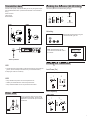
Change Group
ULXP4, ULXS4
2
ULX1, ULX2
ULX1, ULX2
00:00:02
Note: You can reverse the scroll direction by holding SET and
pressing MODE.
Group Scan (ULXP4 only)
The “group scan” feature on the ULXP helps maximize the number of
systems you can install at a single venue. It scans for wireless interference and finds the group with the most open channels.
ULXP4
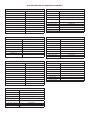
Frequency Master List Mode
Master List mode offers more precise frequency selection for larger,
multiple-system installations.
Enter Master List mode on the receiver or transmitter by holding down the
SET button for 10 seconds. Set GROUP and CHANNEL as you would in
normal mode.
NOTE: The unit must remain in Master List mode to operate at the selected frequency.
Multiple Systems
To maximize performance, set all wireless systems to different channels
from the same group. These channels are selected to work well together.
Follow these steps when using group and channel scan with multiple
systems.
1.Power off all system transmitters. Turn on all other wireless or digital
devices as they would be during the performance or presentation.
2.On the first receiver: Perform a group scan. Note the selected group,
then use channel scan to find the first open channel in that group.
3.Power on the first transmitter and set it to the selected group and
channel.
4.IMPORTANT: Leave the first transmitter powered on while setting up
the next system.
5.For each additional system: Set to the same group as the first.
Perform a channel scan and set the receiver and transmitter to the
selected channel.
6.Leave each transmitter on while setting up additional systems.
Note:
• Keep each transmitter at least two meters (6 feet) apart.
• If using systems from different bands, set up all systems from the same
band together.
Tip: To reduce setup time, you can manually set up the group and channels before arriving at the venue. Visit www.shure.com for a list of groups
and channels that are anticipated to be free of interference in a particular
city or region.
Exit Master List mode by holding the SET button for 10 seconds.
5