1
Features
• Data synchronization: every sales check’s text information applies to video image
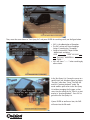
• Video Text Overlay: Transaction text message can be displayed on screen and on the video files. You may also
choose to hide the data from the screen view.
• Exception text:you can predefined 16 set exception event text. For example, all the transactions containing
the keyword “VOID” will be marked.
• Quick search: you can search the data by product name, price and by channel. Besides, you can also use the
combination of words on the search function.
• Remote control: Remote playback and text overlay allow you to know about your business even you are
thousands of miles far from your store.
Devices required for POS Surveillance System
A POS surveillance system is mainly composed of the devices listed as follows:
- Dome/Fixed Camera
- DVR
- POS/Cash Register
- Receipt Printer/Pole Display (optional)
- Data Converter (optional)
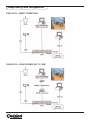
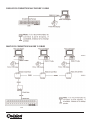
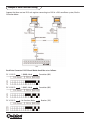
An illustration of POS surveillance system wiring will be shown in the later section: System Connectivity (with
RS232 DB9 Y-cable).
Supported Models
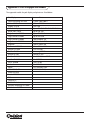
Pole displays/printers that follow the protocols such as EPSON (ESC/POS), PaernerTech, UTC,AEDEX etc. should
work fine. For details of various models support, refer to Appendix C: List of Supported Models.
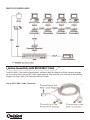
***Data Converter
The Data Converter is for text data collecting and transmitting to a single DVR in a POS surveillance system
with more than one cash register, especially in the system of large scale such as hypermarkets.