1
TV Setup
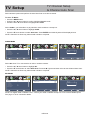
Initial Setup Wizard
Initial Setup Wizard
The Initial Setup Wizard will only appear the first time the TV is turned on.
Step 1: Select a Language
Setup Wizard
Menu Language
English
Air/Cable
Cable
Cable System
AUTO
Auto Scan
Move
Select
Exit
• Press the t u buttons to select a menu language (English > Francais > Español).
• Press the q arrow button to select Go to next step .
• Press the u button to confirm.
Step 2: Select a Cable system
Setup Wizard
Menu Language
English
Air/Cable
Cable
Cable System
AUTO
Auto Scan
Move
Select
Exit
• Press the q arrow button to highlight AIR/CABLE based on your antenna connection.
when Cable is selected, ‘AUTO’ is recommended, Then press the t
select STD > IRC > HRC > Auto .
Step 3: Auto Scan
u arrow button to
Next
Setup Wizard
Setup Wizard
Menu Language
English
Air/Cable
Cable
Cable System
AUTO
RF CH
Found
:
:
1
0
Auto Scan
Move
Select
Exit
Move
• Press the u arrow button to choose Auto Scan.
• Go to next step .
• Press the u arrow button to initiate auto scan.
NOTE: Channel Auto Scan may take several minutes to complete.
32E40-19
Select
Exit