1
Er
ics No
so t fo
nM r
ob Com
ile
me
Co
r
mm cial
un Use
ica
tio
ns
AB
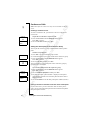
3. Select card position (Card 1 or Card 2).
4. Enter the access number (the phone number) to the calling card
server. The numbers are entered in the same way as in the ordinary
Phone book.
5. Press L E F T or R I G H T .
6. Enter the verification code to your calling card server.
7. To store the calling card number, press Y E S .
Changing the Dialling Order
Since the dialling order (whether you have to dial your verification
code before or after the number you want to dial) may vary between
calling card servers, you can change the order yourself.
• Use the L EF T and R I G H T key, when the Called no. row flashes.
Selecting a Card
If you have stored two card numbers, you must select which card you
wish to use before making a Calling/Credit card call.
To select the card
1. Scroll to Phone book, Y ES , Call card numbers, Y ES .
2. Enter your security code and press Y E S .
3. Scroll to the card you wish to use.
Your settings for the card appear. Press Y E S to confirm each setting.
Note! Once you have selected a card, it remains selected until you
select the other card.
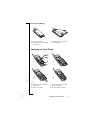
Making a Credit or Calling Card Call
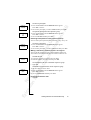
1. Enter the phone number of the person you want to call.
2. Press and hold YE S .
The access number to the calling card server is called and during
the connecting phase, you are prompted to send the called number
(the number of the person you want to call) and the verification
code, in the order chosen by you (see above).
3. To send the called number and the verification code during the
connecting phase, press Y E S when the display shows Send, or wait
a few seconds and your phone will send them automatically.
Tip! You can retrieve the number of the person you want to call from
the phone book. When you have found the number, press and hold
Y E S to make the call.
Calling Card or Credit Card Calls
69