1
2.8
Exit menu
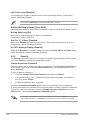
The Exit menu items allow you to load the optimal or failsafe default values for the BIOS
items, and save or discard your changes to the BIOS items.
Main
Advanced
Power
Exit Options
Exit & Save Changes
Exit & Discard Changes
Discard Changes
Load Setup Defaults
BIOS SETUP UTILITY
Boot
Tools
Exit
Exitsystem
systemsetup
setup
Exit
aftersaving
savingthe
the
after
changes.
changes.
F10key
keycan
canbe
beused
used
F10
forthis
thisoperation.
operation.
for
Select Screen
Select
Screen
Pressing <Esc> does not immediately exit this menu. Select one ofSelect
the
options
from this
Item
SelectOption
Item
+Change
menu or <F10> from the legend bar to exit.
Enter Go to Sub-screen
Exit & Save Changes
F1
General Help
F1
General
Help
F10
Save
and Exit
F10 Exit
Save and Exit
ESC
ESC
Exit
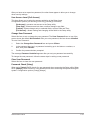
Once you are finished making your selections, choose this option from the Exit menu to
ensure the values you selected are saved to the CMOS RAM. An onboard backup battery
sustains the CMOS RAM so it stays on even when the PC is turned off. When you select this
option, a confirmation window appears. Select OK to save changes and exit.
Exit & Discard Changes
Select this option only if you do not want to save the changes that you made to the Setup
program. If you made changes to fields other than System Date, System Time, and
Password, the BIOS asks for a confirmation before exiting.
Discard Changes
This option allows you to discard the selections you made and restore the previously saved
values. After selecting this option, a confirmation appears. Select OK to discard any changes
and load the previously saved values.
Load Setup Defaults
This option allows you to load the default values for each of the parameters on the Setup
menus. When you select this option or if you press <F5>, a confirmation window appears.
Select OK to load default values. Select Exit & Save Changes or make other changes
before saving the values to the non-volatile RAM.
ASUS P5G41C-M LX
2-21