1
SELECTING PRINTING FUNCTIONS Settings in the [Advanced] tab (continued)
1
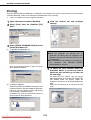
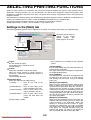
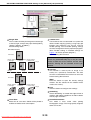
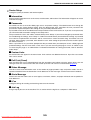
User Settings
Up to 25 sets of custom Tab Print Settings can be
stored, allowing settings to be selected by simply
selecting the name of a set. In addition, five
pre-stored sets of tabbed paper settings are
available for use as needed.
Default setting: No print on Tabs
[Save]
Click this button to save the Tab Print Settings. The
[Tab Paper Print Name] dialog box will open. Up to
20 characters can be entered for the name.
[Save As]
Click this button when you wish to save the Tab
Print Settings under a different name or in a
different location. The [Save As] dialog box will
open.
[Load]
This is used open a file that was saved using [Save
As].
2
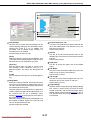
Image Shift
When this setting is selected, the amount of shift of
the print area for printing on tabbed paper can be
set. This sets how far the print image is shifted from
the tabbed side of the paper.
The print image must be created in an application
and the number of pages where tabbed paper is to
be inserted must be set in [Different Paper
Settings] page 2-8 on the [Paper] tab. The shift can
be set from 0 to 20 mm.
When this setting is not selected, tabbed paper can
be inserted at specific pages of the print job and
text can be printed on each tab.
Default setting: Not selected
Downloaded From ManualsPrinter.com Manuals
2-11
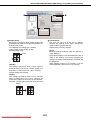
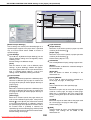
3
Position of the first Tab
Use this to set the distance to the first tab from the
top of the tabbed paper. The distance can be set
from 0 mm to 254 mm.
Default setting: 6 mm
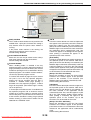
4
Interval
Use this to set the interval between tabs on the
tabbed paper. The interval can be set from 0 mm to
254 mm.
Default setting: 6 mm
5
Paper Size
Use this to specify the paper size of the tabbed
paper.
6
Tab Width
Use this to set the horizontal width of the tabs. The
width can be set from 5 mm to 20 mm.
Default setting: 13 mm
7
Tab Length
Use this to set the vertical length of the tabs. The
length can be set from 10 mm to 149 mm.
Default setting: 52 mm
8
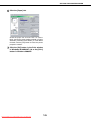
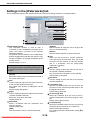
Page Settings
Click this button to open the [Page Settings] dialog
box, which is used to enter the text that will be
printed on the tabs and to select the pages where
tabbed sheets will be inserted (page 2-12). This is
only possible when the [Image Shift] checkbox is
not selected.