1
Using MSN Hotmail
With MSN Hotmail, you can access your hotmail mailbox on your Pocket
PC and send and receive e-mails.
To open MSN Hotmail:
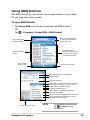
1. Tap Pocket MSN on the Today screen then tap MSN Hotmail.
OR
Tap
> Programs > Pocket MSN > MSN Hotmail.
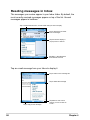
Tap to sort the messages
by order of message type,
sender name, etc.
Tap to display the
message folders
After selecting a
message, choose what
you want to do with the
e-mail from the menu.
Tap a message to
open it
Tap to create
a new e-mail
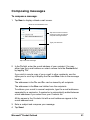
Tap to open the menu
Enter the recipientʼs e-mail address
Enter a subject
Enter the message
Tap to add a recipient from Outlook Contacts
Tap to attach an image, voice note, or file
Tap to choose a preset message
Tap to do a spelling check
Tap to save the message to the Drafts
folder for later editing
Tap to cancel the message without sending it
Tap to set the priority, language encoding,
and more for the message
Tap to send the e-mail
Companion Programs
NOTE
On the MSN Hotmail screen,
tap
> Help for more
information.
63