1
Passport 1000 P2 WiFi Exit Device
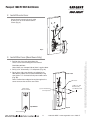
11 Installing the Controller
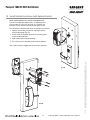
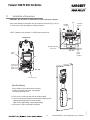
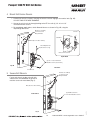
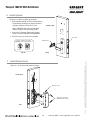
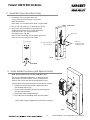
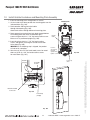
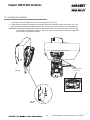
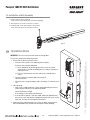
1. Insert bottom tab of controller into slot on mounting plate (Fig. 11A, B).
2. Looking down from top of controller, ensure proper alignment of board-to-board connectors (Fig. 11B) while pivoting controller toward door until two tabs on top snap securely into place on mounting plate.
CAUTION: To avoid possible damage to board-to-board connectors, care should be taken when securing controller to mounting plate. If there is resistance when securing, detach controller to determine cause before re-attaching controller.
Board-to-Board
Connectors
Fig. 11A
Fig. 11B
Fig. 11B Detail
23
1-800-810-WIRE • www.sargentlock.com • A8012F
03/31/14
Fig. 11A
Detail