1
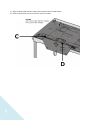
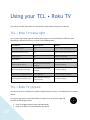
Using your TCL • Roku TV This section provides information on using the day-to-day features of your TCL • Roku TV. TCL • Roku TV status light Your TV has a single status light on the front panel. It goes on and off and blinks in different ways depending on the status of the TV, as shown in the following table: TV condition Status indicator Meaning On (screen is active) Off Screen is communicating that TV is on. Screensaver (screen is active) Off Screen is communicating that TV is on. Off (no power) Off TV does not have power. Off (standby) On TV has power and is ready to use. Starting up from off state Slow pulsing blink until startup completes TV is doing something. On (receiving update from USB) Slow pulsing blink until update completes TV is doing something. Remote control command received Dims on/off once TV has received your command. Powering down to standby mode Slow pulsing blink until the TV reaches standby. TV is doing something. TCL • Roku TV joystick The controls on the TV enable you to perform simple functions, but are not a substitute for the remote control. The joystick-type control on the back of the TCL • Roku TV near the lower right side provides the following functions: 28 Press in to toggle between power ON and Standby. Press up or down to increase/decrease the volume.