1
Copyright © 2012 ROLAND CORPORATION
All rights reserved. No part of this publication may be reproduced in any form without the written permission of ROLAND CORPORATION.
Before using this unit, carefully read the sections entitled: “USING THE UNIT SAFELY” and “IMPORTANT NOTES.”
These sections provide important information concerning the proper operation of the unit. Additionally, in order
to feel assured that you have gained a good grasp of every feature provided by your new unit, Setup Guide and
Owner’s Manuals should be read in its entirety. The setup guide and manuals should be saved and kept on hand
as a convenient reference.
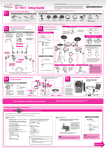
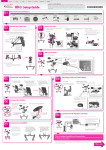
Setup Guide
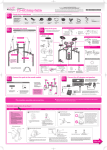
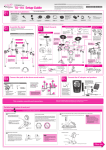
Check the included items
01
* This package does not include a kick pedal, snare
stand, or hi-hat stand. These commercially available
items need to be obtained separately.
❏❏ Drum Sound Module (TD-30)
❏❏ V-Hi-Hat (VH-13)
❏❏ V-Cymbal Crash (CY-14C x 2)
❏❏ V-Cymbal Ride (CY-15R)
❏❏ Manual set
❏❏ TD-30KV Setup Guide (this document)
❏❏ VH-13 Owner’s Manual
❏❏ CY-15R/CY-14C Owner’s Manual
❏❏ KD-140 Owner’s Manual
❏❏ PD-128S/128/108 Owner’s Manual
* The TD-30 owner’s manual and MDS-25
owner’s manual are in the respective
packing cartons.
03
Box 2
Box 1
❏❏ Set of items included with the
V-Cymbals
❏❏ Wing nut x 3
❏❏ Felt washer x 3
❏❏ Stopper x 3
❏❏ Set of items included with the V-Hi-Hat
* These items are in the VH-13
packing carton.
❏❏ Special VH-13 clutch
❏❏ Clamp
❏❏ Holder (3 types)
❏❏ Link cable
❏❏ Drum key
Assemble the hi-hat (VH-13) and kick (KD-140)
For details, refer to the owner’s manual for each component.
❏❏ V-Kick (KD-140)
❏❏ V-Pad for snare (PD-128S)
❏❏ V-Pad for tom (PD-128 x 2)
❏❏ V-Pad for tom (PD-108 x 2)
❏❏ Plastic beater
* The plastic beater is in the KD-140
packing carton.
Assemble the hi-hat (VH-13)
Assembly procedure
Assemble the stand using the procedure described in the VH-13 Owner’s Manual.
MDS-25
* When checking the items included with the
MDS-25, refer to the MDS-25 owner’s manual.
3. Use the included link cable to connect
the top hi-hat and bottom hi-hat.
1. Assemble the top hi-hat using the
dedicated VH-13 clutch (included).
Special
VH-13 clutch
Assemble the stand (MDS-25)
02
* The explanation in this guide assumes that you’re using the MDS-25 as your drum stand.
Assembly procedure
Special
VH-13 clutch
(stopper)
Assemble the stand using the procedure described in the MDS-25 Owner’s Manual.
Link cable
Cymbal mounts
2. Fasten the bottom hi-hat to the hi-hat
stand.
Pad mounts
Holder
Pull down and
tighten
Clamp
Assemble the kick (KD-140)
Pad mounts
Align the knotches
Mounting the kick pedal
Knob that fastens leg
120˚
120˚
* Do not open the stand wider than 120 degrees outward. Be sure
the two pipes at the ends tare no more than 1.6 meters apart.
Doing so can damage the cables inside the stand or cause the
stand to fall over.
Adjust the angle of the leg
1.6 m
Attach the parts
04
Attach the crash cymbal (CY-14C) and
ride cymbal (CY-15R)
For details, refer to the owner’s manual for each component.
Wing nut
(Tighten it to obtain the desired movement)
Align the markings on the hi-hat (VH-13)
Position the
Roland logo on the
opposite side of the
playing area.
Felt washer
CR1 (BOW/EDGE)
RD (BOW/BELL)
RDE (BOW/EDGE)
CY-14C
During performance, the markings ( and ) on
the top hi-hat and bottom hi-hat must always
be aligned as shown in the illustration. If these
marks are not aligned, the system may not
function correctly. Position the “ ” mark so it’s
facing the performer.
TD-30
Stopper
(Be sure to orient
it correctly)
CR2 (BOW/EDGE)
CY-15R
T1
T2
PD-108
PD-108
Tighten the nut
with a drum key
CY-14C
Adjust the head tension of the snare (PD-128S)
and toms (PD-108/128)
T3
VH-13
PD-128
SNR
T4
PD-128
PD-128S
Before playing you must adjust the pad tension first.
You can tune/adjust the head tension as you would with an
acoustic drum, to get the same dynamic “feel.”
4
6
KIK
KD-140
2
1
5
3
1. Adjust each tuning bolt little by little, across the head as
indicated in the illustration.
2. Adjust the tightness of each tuning bolt so that the head
is tensioned evenly.
NOTE
Attach the drum sound module (TD-30)
Adjust the kick (KD-140)
Adjusting the head tension affects only the head response,
and does not change the pitch of the sound as it would on
an acoustic drum. Pitch adjustments are made by editing
the sound in your drum sound module.
For details, refer to the owner’s manual of the drum sound
module you’re using.
Adjusting the head tension
Wide
Adjust the head tension before you perform. A slightly looser tuning will make the
beater response and rebound similar to that of an acoustic bass drum.
Narrow
Sound module
mounting plate
Rod
1. Adjust each tuning bolt little by little, across the head.
2. Adjust the tightness of each tuning bolt so that the head is tensioned
evenly.
* The sound module mounting plate is included with the stand
(MDS-25).
Entire bottom of the kick pedal contacts the floor
Other side
Connect the pads to the drum sound module
05
Adjust the hi-hat (VH-13) offset
06
After the VH-13 is connected to the TD-30 percussion sound module, the “VH Offset” must be adjusted.
This adjustment is required in order to correctly detect open, close, and pedal operations.
Operation procedure
Connection procedure
1. Connect the straight plugs of the cables built into the stand (MDS-25)
to the drum sound module (TD-30).
1. Press the TD-30’s [TRIGGER] button.
5. Press the [F4] (OFFSET) button.
2. Press the [F3] (HI-HAT) button.
6. Press the [F5] (EXECUTE) button.
The TRIGGER HI-HAT screen will appear.
L-shaped Plug
2. Connect the L-shaped plugs of the cables to each pad.
Cable clip
The names on the labels correspond to trigger input jack names as
follows.
Cable
3. Set the Trigger Type to “VH13.”
Label
KIK
SNR
T1
T2
T3
T4
HH
HHC
Jack
KICK
SNARE
TOM 1
TOM 2
TOM 3
TOM 4
HI-HAT
HH CTRL
Label
CR1
CR2
RD
RDE
AX1
AX2
AX3
AX4
Jack
CRASH1
CRASH2
RIDE
EDGE
AUX 1
AUX 2
AUX 3
AUX 4
Use the cable clips as shown above,
to secure the cables.
4. Loosen the clutch screw of the top hi-hat and let it sit on the
bottom hi-hat.
* Do NOT touch the hi-hats or the pedal.
Clutch screw
Before you perform, please read the “TD-30 Owner’s Manual” to ensure that you take full advantage of the
TD-30’s wide range of functionality.
Now you’re ready to perform.
USING THE UNIT SAFELY
C-01-1
C-01-2
C-03-4
• This instrument is designed to minimize the extraneous sounds produced when it’s
played. However, since sound vibrations can be transmitted through floors and walls
to a greater degree than expected, take care not to allow these sounds to become a
nuisance others nearby.
C-03-5
• Purchasers of this product are permitted to utilize said content for the creating,
performing, recording and distributing original musical works.
• When you need to transport the unit, package it in the box (including padding) that it
came in, if possible. Otherwise, you will need to use equivalent packaging materials.
C-03-6
• Purchasers of this product are NOT permitted to extract said content in original or
modified form, for the purpose of distributing recorded medium of said content or
making them available on a computer network.
2a
962a
The symbol alerts the user to things that must be
carried out. The specific thing that must be done is
indicated by the design contained within the circle. In the
case of the symbol at left, it means that the power-cord
plug must be unplugged from the outlet.
• The copyright of content in this product (the sound waveform data, style data,
accompaniment patterns, phrase data, audio loops and image data) is reserved by
Roland Corporation.
• In the interest of product improvement, the specifications and/or appearance of this
unit are subject to change without prior notice.
• MMP (Moore Microprocessor Portfolio) refers to a patent portfolio concerned with
microprocessor architecture, which was developed by Technology Properties Limited
(TPL). Roland has licensed this technology from the TPL Group.
• Do not allow rubber, vinyl, or similar materials to remain on this unit for long periods of
time. Such objects can discolor or otherwise harmfully affect the finish.
360
* Material damage refers to damage or
other adverse effects caused with
respect to the home and all its
furnishings, as well to domestic animals
or pets.
• To avoid disturbing others nearby, try to keep the unit’s volume at reasonable levels.
You may prefer to use headphones, so you do not need to be concerned about those
around you.
• Do not use this product for purposes that could infringe on a copyright held by a third
party. We assume no responsibility whatsoever with regard to any infringements of
third-party copyrights arising through your use of this product.
356
The symbol alerts the user to items that must never be
carried out (are forbidden). The specific thing that must
not be done is indicated by the design contained within
the circle. In the case of the symbol at left, it means that
the unit must never be disassembled.
• When moved from one location to another where the temperature and/or humidity
is very different, water droplets (condensation) may form inside the unit. Damage or
malfunction may result if you attempt to use the unit in this condition. Therefore, before
using the unit, you must allow it to stand for several hours, until the condensation has
completely evaporated.
• When disconnecting all cables, grasp the connector itself—never pull on the cable. This
way you will avoid causing shorts, or damage to the cable’s internal elements.
• It is forbidden by law to make an audio recording, video recording, copy or revision of a
third party’s copyrighted work (musical work, video work, broadcast, live performance,
or other work), whether in whole or in part, and distribute, sell, lease, perform, or
broadcast it without the permission of the copyright owner.
559a
Used for instructions intended to alert the
user to the risk of injury or material
damage should the unit be used
improperly.
Copyrights/Licences/Trademarks
• Use a reasonable amount of care when using the unit’s buttons, sliders, or other
controls; and when using its jacks and connectors. Rough handling can lead to
malfunctions.
558d
Used for instructions intended to alert the
user to the risk of death or severe injury
should the unit be used improperly.
Additional Precautions
• Do not expose the unit to direct sunlight, place it near devices that radiate heat, leave it
inside an enclosed vehicle, or otherwise subject it to temperature extremes. Excessive
heat can deform or discolor the unit.
558a
The symbol alerts the user to important instructions or
warnings.The specific meaning of the symbol is
determined by the design contained within the triangle. In
the case of the symbol at left, it is used for general
cautions, warnings, or alerts to danger.
Placement
556
About the Symbols
553
CAUTION Notices
355b
WARNING and
IMPORTANT NOTES
354a
About
• Depending on the material and temperature of the surface on which you place the unit,
its rubber feet may discolor or mar the surface.
You can place a piece of felt or cloth under the rubber feet to prevent this from
happening. If you do so, please make sure that the unit will not slip or move
accidentally.
ALWAYS OBSERVE THE FOLLOWING
106
• Subject to high levels of vibration and shakiness.
005a
108d
006a
(Do not drop it!)
• Disconnect all cords coming from external
devices.
118d
Protect the unit from strong impact.
• Disconnect the power cord.
3
014
Do not drop or subject to strong impact
• Check to make sure the hand knobs and screws
securing the unit to the stand have not become
loose. Fasten them again securely whenever you
notice any loosening.
2
013
When using the unit in locations where children are
present, be careful so no mishandling of the unit
can take place. An adult should always be on hand
to provide supervision and guidance.
Cautions when moving this unit
1
011
Adults must provide supervision in places where
children are present
Avoid climbing on top of the unit, or placing heavy
objects on it
If you need to move the instrument, take note of
the precautions listed below. At least two persons
are required to safely lift and move the unit. It
should be handled carefully, all the while keeping
it level. Make sure to have a firm grip, to protect
yourself from injury and the instrument from
damage.
Do not place in an unstable location
Do not place containers containing liquid on
this product. Never allow foreign objects (e.g.,
flammable objects, coins, wires) or liquids (e.g.,
water or juice) to enter this product. Doing so
may cause short circuits, faulty operation, or other
malfunctions.
Manage cables for safety
Never climb on top of, nor place heavy objects on
the unit.
Use only stand (MDS series) that is recommended
Don’t allow foreign objects or liquids to enter unit;
never place containers with liquid on unit
For EU Countries
Keep small items out of the reach of children
To prevent accidental ingestion of the parts listed
below, always keep them out of the reach of small
children.
• Included Parts/Removable Parts
nuts, washers, screws
For China
• Roland, SuperNATURAL, V-Drums, V-Hi-Hat, V-Cymbals, V-PRO are either registered
trademarks or trademarks of Roland Corporation in the United States and/or other
countries.
T-01
• Humid; or are
When using the unit with a rack or stand
recommended by Roland, the stand (MDS series)
must be carefully placed so it is level and sure to
remain stable. If not using a stand (MDS series),
you still need to make sure that any location you
choose for placing the unit provides a level surface
that will properly support the unit, and keep it from
wobbling.
Evaluate safety issues before using stands
Try to prevent cords and cables from becoming
entangled. Also, all cords and cables should be
placed so they are out of the reach of children.
• Subject to salt exposure; or are
This unit should be used only with a stand (MDS
series) that is recommended by Roland.
• Never use benzine, thinners, alcohol or solvents of any kind, to avoid the possibility of
discoloration and/or deformation.
Attach only recommended items
• ASIO is a trademark of Steinberg Media Technologies GmbH.
3a
104
• Exposed to steam or smoke; or are
• Dusty or sandy; or are
• For everyday cleaning wipe the unit with a soft, dry cloth or one that has been slightly
dampened with water. To remove stubborn dirt, use a cloth impregnated with a mild,
non-abrasive detergent. Afterwards, be sure to wipe the unit thoroughly with a soft,
dry cloth.
402
004
• Subject to temperature extremes (e.g., direct
sunlight in an enclosed vehicle, near a heating
duct, on top of heat-generating equipment);
or are
• Exposed to rain; or are
This stand for use only with specific Roland musical
instruments. See apparatus instructions. Use with
other models is capable of resulting in instability
causing possible injury.
• MPEG Layer-3 audio compression technology is licensed from Fraunhofer IIS
Corporation and THOMSON Multimedia Corporation.
Make sure to firmly tighten all hand knobs and
screws after you have assembled the drum
stand and attached any components. You should
probably also try to make a habit of checking
and retightening them if necessary before every
performance. You risk injury if you have loose
screws or hand knobs, since a pad or component
can fall unexpectedly.
Do not use or store in the following types of
locations
• Damp (e.g., baths, washrooms, on wet floors);
or are
Use only stand manufactured by Roland
Maintenance
Install only the accessories or parts to the drum
stand that are recommended by Roland.
Remove only the specified screws during the
installation.
101f
Do not attempt to repair the unit, or replace parts
within it (except when this manual provides specific
instructions directing you to do so). Refer all
servicing to your retailer, the nearest Roland Service
Center, or an authorized Roland distributor, as listed
on the “Information” page.
• Do not put anything that contains water on this unit. Also, avoid the use of insecticides,
perfumes, alcohol, nail polish, spray cans, etc., near the unit. Swiftly wipe away any
liquid that spills on the unit using a dry, soft cloth.
401a
003
Do not repair or replace parts by yourself
Add
Do not open or perform any internal modifications
on the unit. (The only exception would be where
this manual provides specific instructions which
should be followed in order to put in place userinstallable options.)
101e
002b
Do not disassemble or modify by yourself
CAUTION
361
WARNING
The “VH Offset” parameter is set automatically (approx. 3 seconds).
The [TRIGGER] button stops flashing and remains lit.
• Company names and product names appearing in this document are registered
trademarks or trademarks of their respective owners.