1
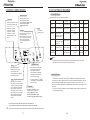
CONTROL PANEL DESIGN
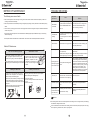
FULLY AUTOMATIC PROGRAM
Fully Automatic Program
Selection of function
Press the button to select +SPIN",
"
WASH"+
"
RINSE""
"
SOAK"+
"
WASH"+
"
RINSE"+
"
SPIN", Press water level button, to select "
WASH",
"
WASH"+
"
RINSE",
the appropriate water level, that
"
RINSE"+
"
SPIN",
"
SPIN".
matched the load size.
Water Level 1 : Light ON
Water Level 2 : Light OFF
Start/
Pause
Water Level 3 : Light ON
After program selection,
press Water Level 4 : Light OFF
the button to start.
Proceed same way to water
Press the button to pause in the level 8.
course of operation,
press the button again the program continues till the program is finished.
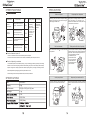
Features of eight fully auto program are as follows:
Water level
/
Heavy
Economy
/ Wool
/
Program
Clothes Type
Wash
Fuzzy
-
Wash 12 minutes
Power
Economy
Less dirty Clothes
Wash 2 minutes
On & off power
Automatic power off
Delicate
Women under
Rinse
Spin (
min.) Total time
2 Times
6
About 43
1 Times + 1 Times
(
Spray rinse)
1
10
Wash 10 minutes
2 Times
2
33
garments, articles
with embroidery
Heavy
Dirty Clothes like
Coats, Jeans, Bed
Sheets, etc.
Wash 15 minutes
2 Times
7
47
Wool
Woolen clothes
Wash 15 minutes
2 Times
Only Drain
34
Anti-wrinkle
-
Wash 8 minutes
2 Times
Only Drain
27
Notices:
CHILD LOCK
The total time included the time of entering water and the drain time.
Total time can change
depending on the pressure of the tap water and the drain speed. L ock
Child Press WATER LEVEL &
.
.UNCTION at same time to
F
.ctivate CHILD LOCK.
a
For more details read “Additional
.
.xplanation” on page 8.
E
Delay
Press the button to preset delay
time. Less than 24 hours each press
the button, the delay-
time is added
an hour . More than 24 hours each press the button, the delay-
time is added 6 hours, after to 48 hours, the
preset indicator is come back origin
status. If always press the button,
the delay time will automatically
change.
TEMPERATURE
Press the button to set the wash mode of water inlet to HOT or COLD. When the lights of HOT and COLD are ON at the same time, the HOT water and COLD water are coming.
By pressing the button again you can select HOT, COLD and WARM
water to be used.
Program
By washing requirement you may
optional select the programs of
light)/
flash),
"
FUZZY "(
"
BULKY "(
(
light)/
flash)
"
ECONOMY"
"
WOOL"(
light)/
flash).
"
DELICATE"(
"
ANTI-
WRINKLE "(
* PLS DO NOT MATCH THE CONTROL PANEL WITH YOUR MACHINE.
THIS IS SCHEMATIC DIAGRAM ONLY AND CAN VARY FROM YOUR MACHINE.
the interval of switching on and off power should be more than 30 seconds.
! In order to protect controller, r
Additional explanation
1. "
CHILD LOCK" function: After starting, press the "
FUNCTION" and "
WATER LEVEL" button at the same time, this "
CHILD LOCK" function can be set, then all buttons will be locked and not to be selected (
including the "
POWER" button), the indication is displayed "
CL" one second every 5 seconds, and press the "
FUNCTION" and "
WATER LEVEL" button at the same time again to unlock the function.
2. In the course SOAK ,
the washer does not stop completely, it will wash interval to let the washing evenly mix with the detergent.